
Web Scraping Walmart with Python: A Tested Workflow

Sep 2, 2026 · Guides · 14 min read
Tested on: Microsoft Windows NT 10.0.26200, PowerShell 7.6.4, Python 3.12.13, Requests 2.34.2, and Beautiful Soup 4.14.3
Web scraping Walmart with Python requires more than a price selector. A dependable workflow must verify the response before parsing it, keep product and offer data separate, preserve the location behind a price, and record failures instead of silently exporting empty rows.
This tutorial builds that workflow with a tested Python project. The local run parses one synthetic product fixture, extracts 25 normalized product fields, writes two variants, four seller offers, and three image rows, processes two review pages, and removes one duplicate from four raw reviews. The project also contains authorization-gated URL fetching, an approved-URL batch manifest, per-URL status logging, and price-change detection.
No live Walmart request was performed for this tutorial. The fixtures are synthetic, so the results prove the parser and workflow—not Walmart’s current private page structure.
Use only authorized data. Walmart’s current Terms of Use restrict automated collection without express prior written consent. Use this project with data you own, a licensed export, a permitted saved response, or URLs you are explicitly authorized to automate. Do not use it to bypass a login, CAPTCHA, rate limit, or access control.
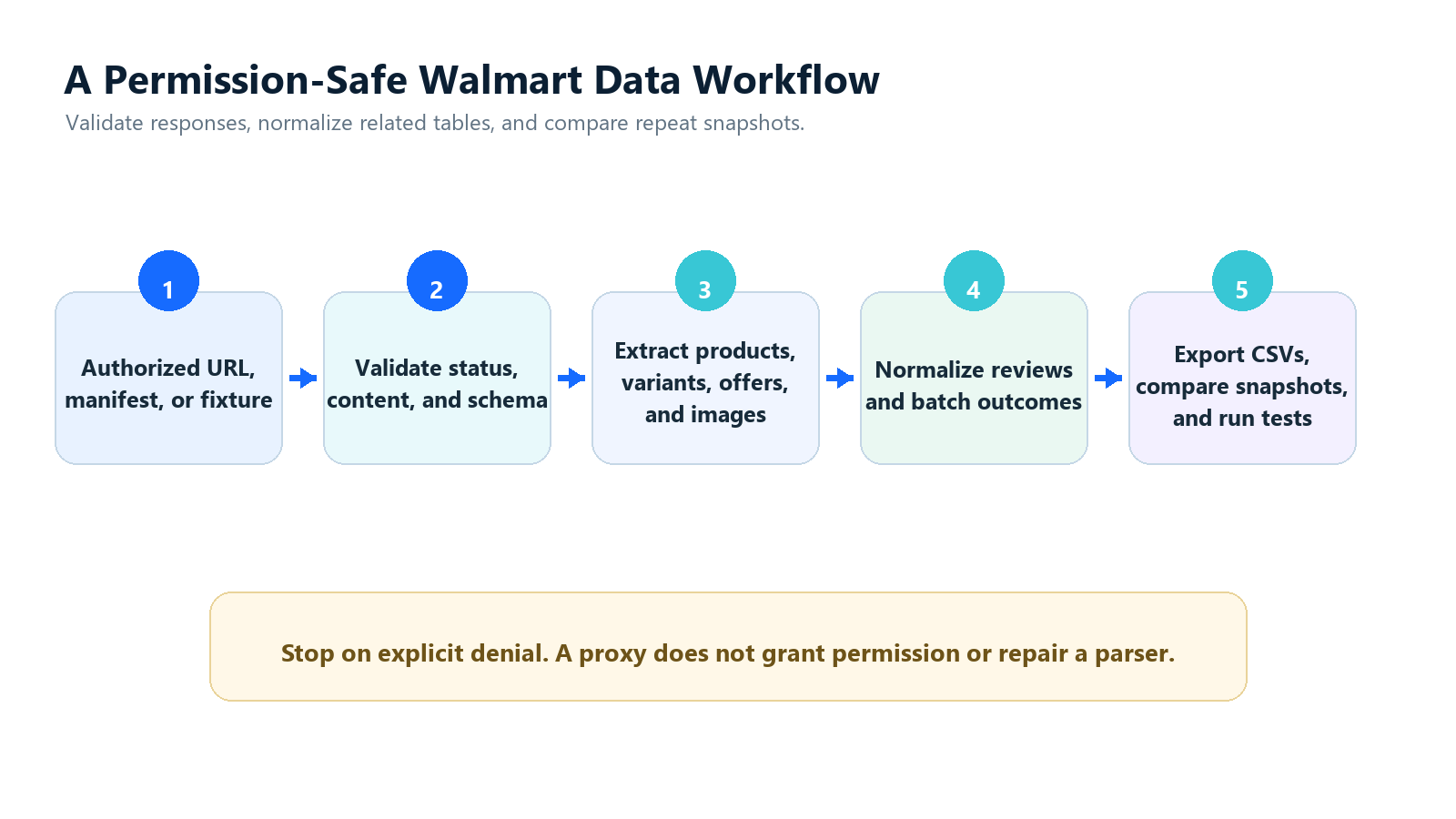
The tested design separates permission, fetching, validation, parsing, normalization, and export.
Preview the Verified Synthetic Output
The fixture run produces a selected product record like this:
{
  "product_id": "WM-DEMO-1001",
  "name": "Authorized Demo Insulated Bottle",
  "selected_offer_price": 19.97,
  "previous_price": 24.97,
  "promotion_label": "Rollback",
  "currency": "USD",
  "availability": "InStock",
  "selected_offer_seller_id": "SELLER-DEMO-01",
  "variant_id": "DEMO-BLUE-16OZ",
  "postal_code": "10001",
  "store_id": "DEMO-STORE-01"
}
The same run exports separate tables for two variants, four seller offers, three product images, and three unique reviews. Every value above is synthetic and exists only to make the parser repeatable; it is not a Walmart price, promotion, product, or inventory claim.
What You Will Build
The project has two independent layers:
Authorized URL or approved URL manifest
                  |
        Requests fetch + validation
                  |
        Permitted HTML response
                  |
                  +----------------------+
                                         |
Synthetic fixture ----------------> Product parser
                                         |
                        Normalize product, selected offer,
                         seller, variant, and location data
                                         |
                   Product + variant + offer + image CSVs
                              + status CSV + changes

Permitted review pages ----------> Review normalizer
                                         |
                              Deduplicated review CSV
This split makes failures diagnosable. A saved response lets you test field extraction without repeatedly contacting a live site. If the fetch succeeds but the parser fails, the source adapter needs work. If validation rejects the response, parsing should never begin.
The following table states exactly what was and was not verified:
| Capability | Local verification | Live Walmart verification |
|---|---|---|
| Product JSON-LD parsing | Passed | Not performed |
| 25-field product CSV | Passed | Source mapping required |
| Variant, seller-offer, and image tables | Passed with 2 variants, 4 offers, and 3 images | Source mapping required |
| Review pagination and deduplication | Passed with two fixtures | Review source mapping required |
| HTTP 403 and HTTP 200 challenge detection | Passed with a saved 403 fixture and simulated challenge body | Not performed |
| Approved URL manifest | Passed with injected test fetcher | Not performed |
| Per-URL success and failure log | Passed with injected test fetcher | Not performed |
| Price and availability comparison | Passed | Requires repeated authorized snapshots |
| Rola IP environment-variable integration | Syntax-checked | No credentials connected |
The exact verification marker printed by the fixture run is:
verification_scope=synthetic_local_fixtures live_walmart_tested_by_tutorial=no
Choose the Walmart Data Scope Before Writing Code
The phrase “Walmart data” can refer to several different records. Mixing them into one scraper creates ambiguous prices, duplicate products, and incomplete review files.
| Source type | Typical output | This project |
|---|---|---|
| Product response | Name, brand, description, identifiers, rating, selected price | Fixture-tested |
| Search or category results | Product cards, rank, filters, pagination | Not implemented |
| Variant data | Color, size, pack, variant identifier | Two synthetic variants exported |
| Seller offers | Seller, price, availability, fulfillment | Four synthetic offers exported |
| Product media | Image URLs and positions | Three synthetic image rows exported |
| Review pages | Review text, rating, date, helpful votes | Fixture pipeline tested |
| Store or ZIP context | Store, postal code, fulfillment method | Fixture-tested fields |
This article deliberately does not add search-page discovery, category crawling, or an undocumented internal endpoint. If the job starts with many known products, provide an approved URL manifest. If the business needs search rank or category coverage, design a separate source adapter and obtain permission for that page type rather than stretching a product-page parser beyond its contract.
Some retail pages expose schema.org JSON-LD; others place data in JavaScript application state, including framework-specific JSON. Treat every path as source-specific and disposable. Do not copy a deep __NEXT_DATA__ path or generated CSS class into production until it has been inspected in a response you are allowed to process and protected by a fixture test.
Set Up the Tested Python Project
Create this layout:
walmart-python-scraper/
├── data/
├── fixtures/
│   ├── authorized_product.html
│   ├── authorized_reviews_page_1.json
│   ├── authorized_reviews_page_2.json
│   ├── minimal_product.html
│   ├── http_403_response.json
│   └── product_missing_id.html
├── walmart_scraper.py
├── test_walmart_scraper.py
└── requirements.txt
The pinned dependencies are intentionally small:
requests==2.34.2
beautifulsoup4==4.14.3
On Windows PowerShell:
py -3.12 -m venv .venv
.\.venv\Scripts\Activate.ps1
python -m pip install -r requirements.txt
On macOS or Linux:
python3.12 -m venv .venv
source .venv/bin/activate
python -m pip install -r requirements.txt
Requests supplies sessions, redirects, timeouts, and status handling; see its official Quickstart. Beautiful Soup parses received HTML and embedded JSON but does not execute JavaScript; its parsing behavior is documented in the Beautiful Soup documentation.
For an approved HTTP source, keep headers transparent and minimal. Rola IP’s guide to Python Requests headers explains common header roles. A copied browser header dump does not grant access and often makes debugging harder.
Step 1: Validate the Response Before Parsing
A common implementation starts with this:
response = requests.get(url)
response.raise_for_status()
soup = BeautifulSoup(response.text, "html.parser")
That is insufficient. An HTTP 200 body may be a challenge page, location prompt, generic error shell, or incomplete application page. Exporting it as a product creates silent data corruption.
The tested validator checks the status, content type, body markers, minimum body length, and presence of a structured Product object:
def validate_http_response(response: requests.Response) -> None:
    if response.status_code in {401, 403, 429}:
        raise AccessDeniedError(
            f"Access was denied or rate-limited (HTTP {response.status_code})."
        )
    response.raise_for_status()

    content_type = response.headers.get("Content-Type", "").lower()
    if "html" not in content_type:
        raise UnexpectedContentTypeError(
            f"Expected HTML but received {content_type or 'no Content-Type'}"
        )

    normalized = response.text.casefold()
    denial_markers = (
        "robot or human",
        "verify you are human",
        "access denied",
        "captcha",
    )
    if any(marker in normalized for marker in denial_markers):
        raise AccessDeniedError("The response body contains an access challenge.")

    if len(response.text) < 200 or not contains_product_jsonld(response.text):
        raise UnexpectedPageError(
            "The response does not contain the expected structured product data."
        )
The marker list is a defensive test, not a universal catalog of Walmart error pages. A source-specific validator should also confirm the expected product ID, final URL, page type, and required source fields. When access is explicitly refused, stop the job; changing the network route does not change the permission decision.
Step 2: Normalize Product, Variant, Seller, and Location Data
Web scraping a Walmart product with Python becomes unreliable when one CSV row treats every value as a permanent product attribute. Price and availability usually belong to an offer; an offer belongs to a seller and selected variant; and the visible result may depend on store, ZIP code, and fulfillment method.
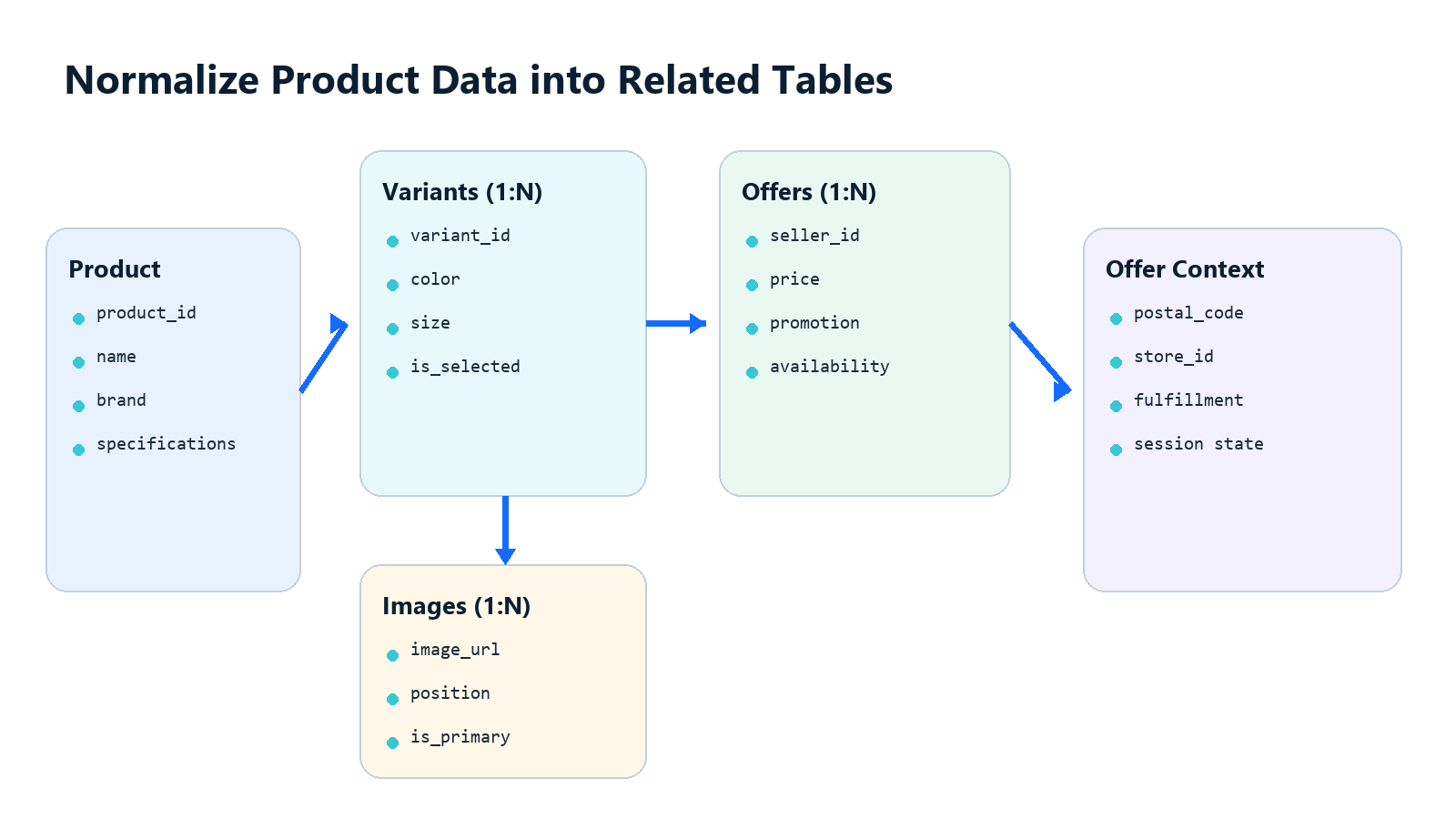
The project keeps product identity, selected variant, selected seller offer, and location context separate.
The product CSV uses these 25 fields:
product_id,name,brand,description,primary_image_url,gtin,category,selected_offer_price,previous_price,unit_price,promotion_label,specifications_json,currency,availability,selected_offer_seller_id,selected_offer_seller_name,canonical_url,rating,review_count,postal_code,store_id,variant_id,fulfillment_type,collected_at,parser_version
Repeated data is normalized into three additional tables:
walmart_variants.csv -> one row per color, size, or pack variant
walmart_offers.csv   -> one row per variant and seller offer
walmart_images.csv   -> one row per variant image and display position
This avoids storing multiple sellers or a list of image URLs inside one ambiguous product cell.
The fixture verifies the following mapping. The final column remains pending until an authorized Walmart response is supplied:
| Normalized field group | Fixture status | Authorized Walmart mapping |
|---|---|---|
| ID, name, brand, category | Passed | Required |
| Description, image URL, GTIN | Passed | Required |
| Current, previous, and unit price | Passed | Required |
| Promotion label and product specifications | Passed | Required |
| Currency and availability | Passed | Required |
| Rating and review count | Passed | Required |
| Seller ID and seller name | Passed | Required |
| Variant, store, ZIP, and fulfillment | Passed | Required |
The source adapter currently finds a schema.org Product object recursively instead of assuming the first JSON-LD block is the right one:
def find_typed_object(value, expected_type):
    if isinstance(value, dict):
        value_type = value.get("@type")
        if value_type == expected_type or (
            isinstance(value_type, list) and expected_type in value_type
        ):
            return value
        for child in value.values():
            found = find_typed_object(child, expected_type)
            if found is not None:
                return found
    elif isinstance(value, list):
        for child in value:
            found = find_typed_object(child, expected_type)
            if found is not None:
                return found
    return None
parse_product_html() applies several rules that prevent ambiguous output:
- Missing optional values become
None, not zero. - Price is numeric and currency is a separate field.
- Availability is read independently instead of inferred from price.
- Product ID, GTIN, and variant ID remain distinct.
- Seller ID and seller name remain distinct.
- The selected offer is not presented as every available Marketplace offer.
- Every row stores
collected_atandparser_version.
The fixture’s hasVariant and offers objects are normalized into dedicated variant and offer tables. An authorized Walmart adapter must map the source’s actual variant and seller structures into the same tables; do not assume Walmart uses the fixture’s schema.org paths. The image table also keeps all verified image URLs and their order instead of retaining only the primary image.
Step 3: Run the Verified Local Fixture
Run the parser from the project directory:
python walmart_scraper.py `
  --fixture fixtures\authorized_product.html `
  --reviews fixtures\authorized_reviews_page_1.json fixtures\authorized_reviews_page_2.json `
  --output-dir data
The verified output is:
product_records=1 product_csv=data\walmart_products.csv
variant_records=2 offer_records=4 image_records=3
review_pages=2 raw_reviews=4 unique_reviews=3 review_csv=data\walmart_reviews.csv
verification_scope=synthetic_local_fixtures live_walmart_tested_by_tutorial=no
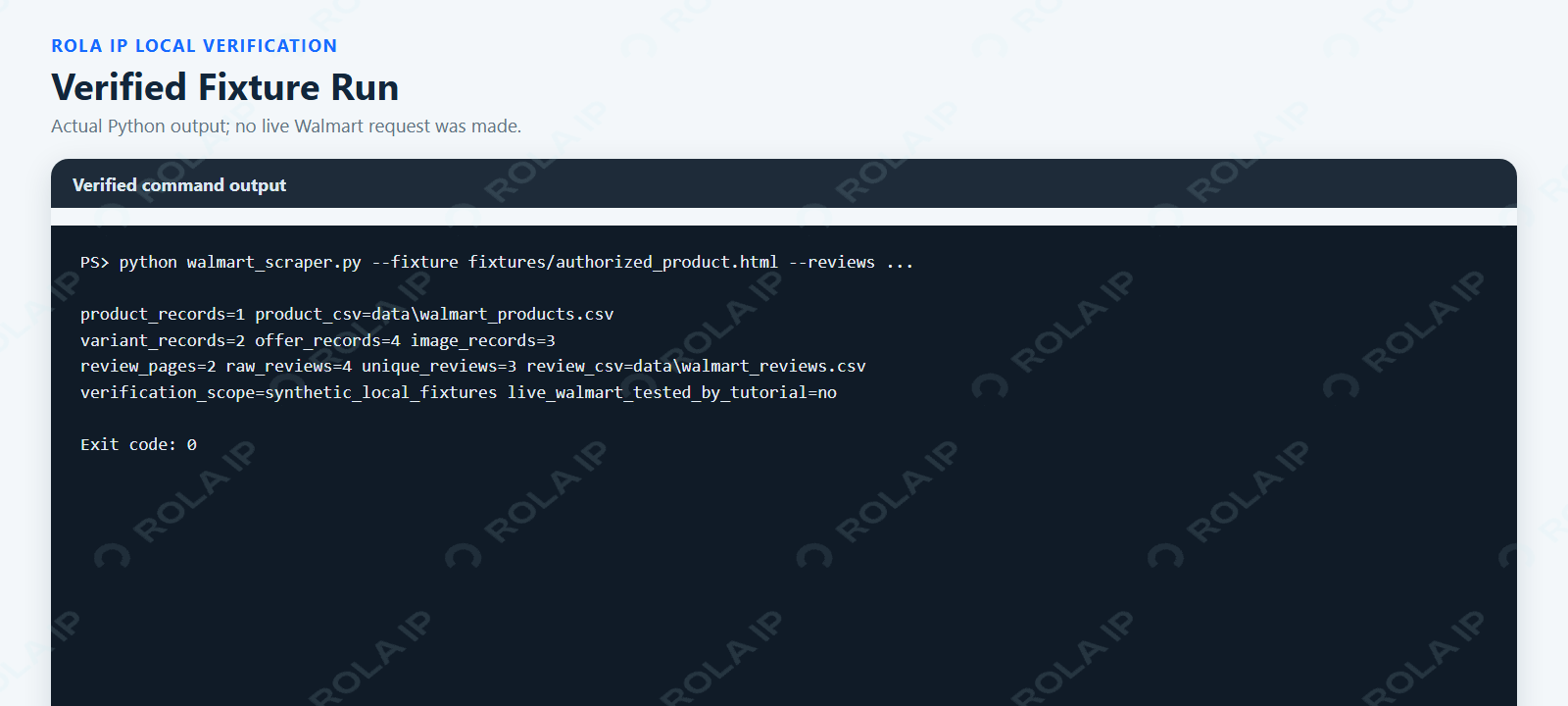
This watermarked local Chrome verification page was generated from the actual fixture-run output. It proves parser execution and CSV export, not live Walmart access.
The synthetic product row includes a 19.97 USD selected offer, InStock availability, description, GTIN, previous price, unit price, Rollback promotion label, specifications, seller, variant, ZIP code, store, and fulfillment context. Related files hold two variants, four offers, and three ordered image rows. These values exist only to verify conversion and column order; they are not current Walmart product claims.
Step 4: Design a Review Parsing Pipeline
The query “web scraping Walmart reviews Python” describes a separate data problem. An aggregate rating is not a review dataset. Individual reviews require their own source adapter, pagination state, stop condition, schema, and duplicate policy.
The project tests two synthetic review pages. Page 2 repeats one stable review ID and adds a record without an ID. The normalizer keeps the first stable ID and creates a fallback hash from the product ID, normalized text, rating, and submission date when no ID exists:
identity = "|".join(
    [
        product_id,
        " ".join(str(raw.get("text") or "").split()).casefold(),
        str(raw.get("rating") or ""),
        str(raw.get("submitted_at") or ""),
    ]
)
review_id = "sha256:" + hashlib.sha256(
    identity.encode("utf-8")
).hexdigest()[:16]
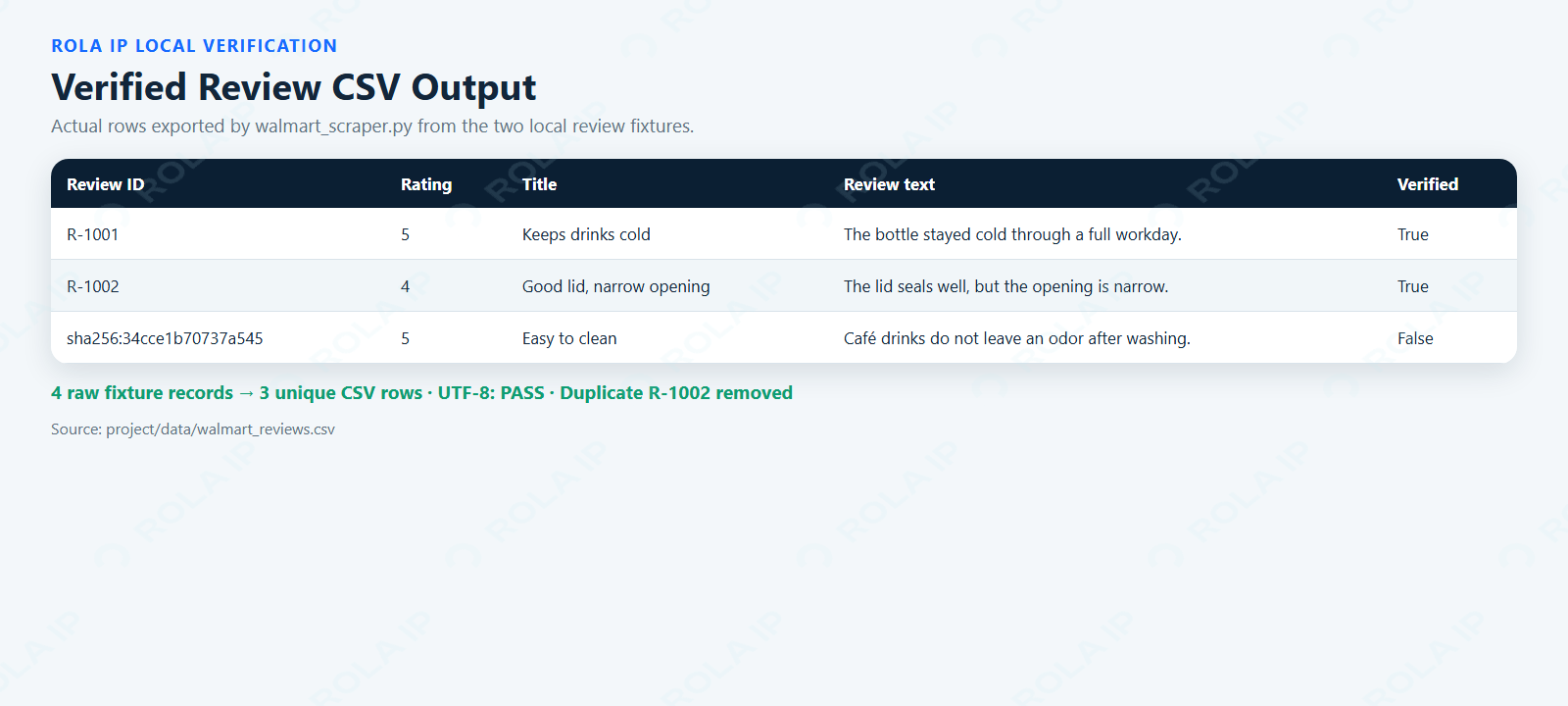
This watermarked local verification page uses the generated CSV: four raw fixture reviews become three unique rows, and “Café” remains intact.
The output schema is:
product_id,review_id,title,text,rating,submitted_at,helpful_votes,verified_purchase,collected_at
This test proves the normalization and deduplication contract. It does not identify or validate a current Walmart review endpoint. For an authorized implementation, map the permitted review response into this schema, retain its real pagination token, cap the page count, and reject a cursor that repeats without progress. A content-based fallback can collide, so document that limitation instead of presenting it as a platform ID.
Collect only fields needed for the analysis. Sentiment analysis generally needs product ID, review text, rating, and date—not account identifiers or profile history.
Step 5: Process an Approved Product URL List
For a permitted batch, start with known URLs instead of adding site-wide discovery. Create approved_urls.csv:
url
https://permitted.example/product-a
https://permitted.example/product-b
Run the manifest mode:
python walmart_scraper.py `
  --authorized-list approved_urls.csv `
  --confirm-authorized `
  --batch-limit 100 `
  --output-dir data
The loader validates each URL, removes duplicates, rejects an empty manifest, and stops when the configured limit is exceeded. Each approved input receives a row in batch_status.csv:
source_url,final_url,status,product_id,error_type,error_message,collected_at
A failed URL does not erase successful products, and an error is not converted into an empty product. The unit test injects one successful response and one simulated AccessDeniedError; it verifies one product row plus success and failed status rows. No live batch request was used in that test.
For larger authorized jobs, add checkpoint files and resume from statuses that are explicitly safe to retry. Do not retry parser failures, 401, 403, or 429 errors as if they were temporary connection failures.
Step 6: Detect Price and Availability Changes
A useful price monitor compares the same commercial context across snapshots. The project uses this composite identity:
product_id
+ variant_id
+ selected_offer_seller_id
+ postal_code
+ store_id
+ fulfillment_type
Copy a verified baseline to data\previous_products.csv. After obtaining the next permitted snapshot, run:
python walmart_scraper.py `
  --fixture fixtures\authorized_product.html `
  --previous-products data\previous_products.csv `
  --output-dir data\current
The generated price_changes.csv stores old and new prices, old and new availability, the comparison time, and one of these outcomes:
new_snapshotprice_changedavailability_changedprice_and_availability_changedunchanged
The test suite changes the previous price from 18.50 to 19.97 while keeping the product, variant, seller, and location context constant. The expected result is price_changed.
This is the minimum dependable model for competitor price monitoring. Comparing rows by product title alone can confuse variants, sellers, or regional offers and produce false price alerts.
Choose Requests, Playwright, or a Licensed Source
Use the simplest permitted method that exposes the fields the project needs.
| Method | Best fit | Main limitation |
|---|---|---|
| Requests | Authorized HTML already contains usable data | Does not execute JavaScript |
| Beautiful Soup | Parsing received HTML or embedded JSON | Cannot render a browser page |
| Playwright | An authorized flow genuinely requires browser execution | Higher resource and maintenance cost |
| Licensed feed or API | Stable commercial delivery is available | Coverage and fields depend on the contract |
If the permitted response requires JavaScript, Playwright for Python can capture it. Pass the resulting HTML or JSON to the same normalization layer instead of building two incompatible schemas.
The practical decision is not “which tool bypasses Walmart.” It is “which permitted source provides the required fields at an acceptable cost per valid record.” A browser cannot fix missing authorization, and a managed API does not eliminate the need to validate fields and context.
Add Rola IP Only Where Routing Is Required
An approved retail data job may need consistent regional routing. In that case, a web scraping proxy belongs in the fetch layer, not in the parser. The parser should produce the same schema regardless of the permitted network route.
Use session behavior according to the task:
| Scenario | Routing and session strategy |
|---|---|
| Independent product snapshots | Rotation between authorized requests may be appropriate |
| Store- or ZIP-specific price | Keep a location-matched sticky session |
| Multi-page review sequence | Preserve one session through the permitted pagination flow |
| Parser or schema error | Do not change the proxy; repair the source adapter |
| Explicit 401, 403, or access challenge | Stop instead of rotating to continue |
| Temporary connect or 5xx failure | Use a bounded retry budget and log the route outcome |
For price projects, Rola IP’s guide to proxies for price monitoring explains why geographic consistency matters. The script reads an optional proxy from ROLA_PROXY_URL and never prints it:
$env:ROLA_PROXY_URL = "http://USERNAME:PASSWORD@HOST:PORT"
python walmart_scraper.py `
  --authorized-url "https://permitted.example/product" `
  --confirm-authorized `
  --output-dir data
Remove-Item Env:ROLA_PROXY_URL
Use credentials and an endpoint from your own account. Keep secrets out of source control, screenshots, and logs. The current Python proxy integration documentation explains the Rola IP parameter format; verify the exact host, port, and session parameters in the current dashboard before publishing them in production configuration.
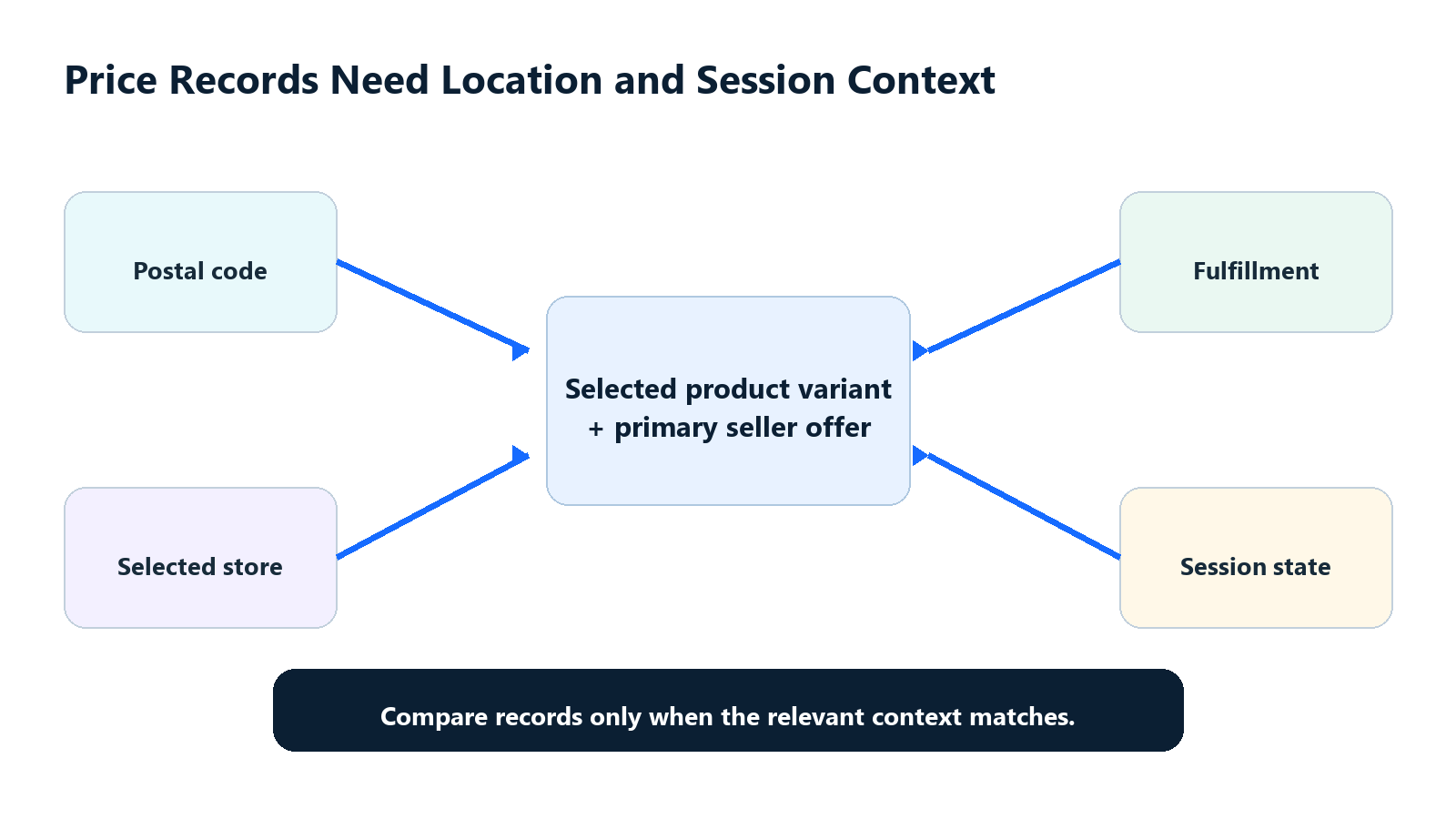
A price snapshot is meaningful only when its variant, seller, store, ZIP, fulfillment, and session context are understood.
The proxy branch was syntax-checked but not connected during the fixture run because no target authorization or credentials were provided. A proxy changes network routing; it does not grant permission, repair an invalid selector, or guarantee a valid response.
Run the Thirteen Parser and Workflow Tests
Execute the suite from the project directory:
python -m unittest -v
The thirteen tests cover:
- All required product fields and numeric conversions.
- Two variant rows, four seller offers, and three ordered image rows.
- Review-page deduplication and fallback IDs.
- Rejection of an HTTP 403 response.
- Rejection of an HTTP 200 challenge body.
- A missing product schema error.
- CSV headers and UTF-8 content across every output table.
- Approved-manifest validation and URL deduplication.
- Per-URL batch success and failure status.
- Price comparison using the complete offer and location context.
- A minimal product fixture with optional fields intentionally absent.
- Rejection of a saved, file-backed HTTP 403 response.
- Rejection of a Product object that has no stable product identifier.
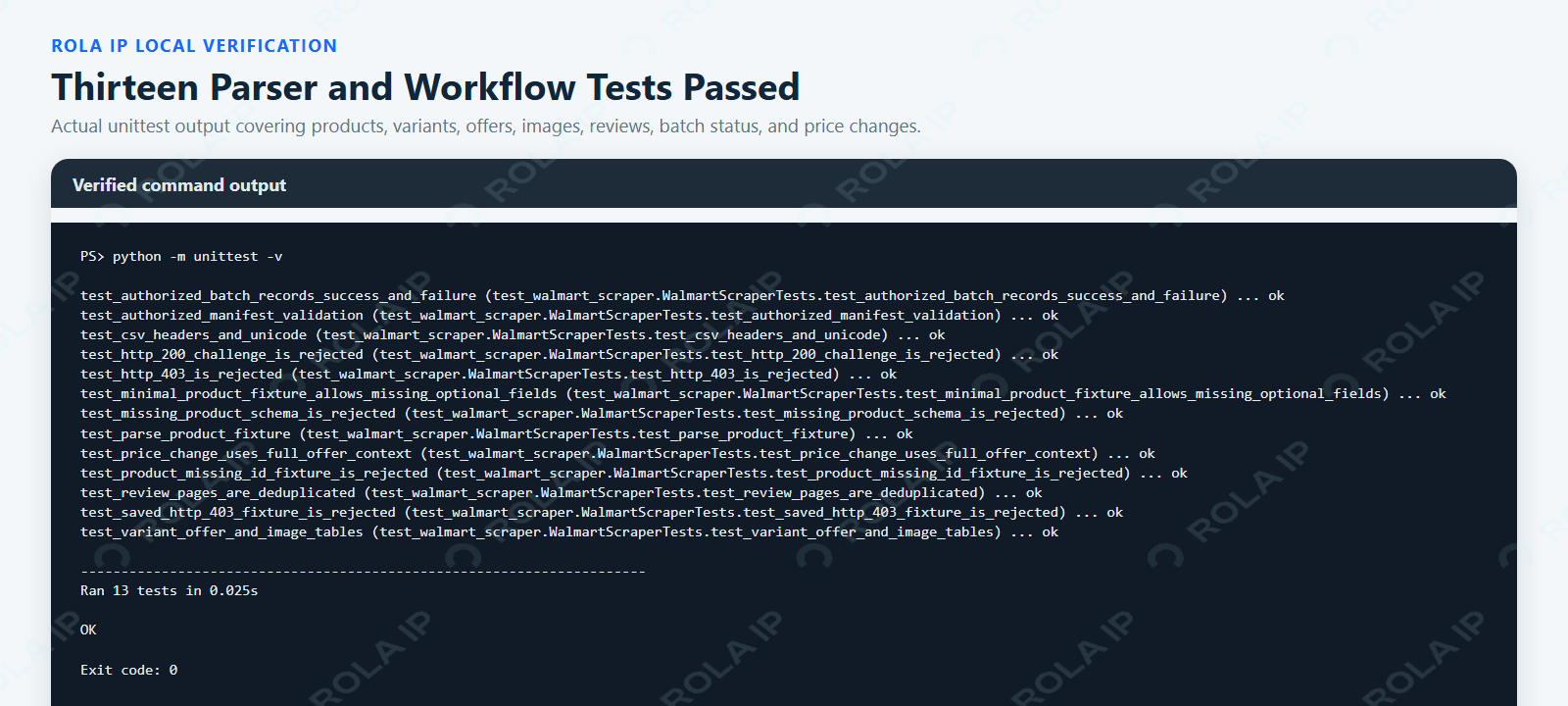
This watermarked local Chrome verification page was generated from the actual unittest output and shows all thirteen tests passing.
Add File-Backed Failure Fixtures
Inline fake responses are useful for small unit tests, but stored fixtures make failure cases reviewable and repeatable. This project now includes three focused files in project/fixtures/:
| Fixture | Scenario represented | Expected result |
|---|---|---|
minimal_product.html |
A valid Product with required identity and offer data but no optional brand, description, GTIN, or specifications | Parse the record and store absent optional values as None or an empty structured object |
http_403_response.json |
A saved synthetic HTTP response with status, headers, and an access-denied body | Raise AccessDeniedError before parsing |
product_missing_id.html |
A Product object exists, but both sku and productID are absent |
Raise SchemaChangedError instead of exporting an unstable row |
The fixtures are synthetic and contain no Walmart page content, cookies, credentials, account identifiers, or proxy endpoints. Keeping status, headers, and body together in the 403 fixture also makes the test closer to a saved response contract than a bare status-code assertion.
Before connecting a source-specific adapter, extend the fixture library with redacted, permitted responses for missing price, out-of-stock products, Marketplace sellers, products without reviews, repeated review cursors, and redirects to unexpected pages. A test suite is valuable only when its fixtures represent the failure modes the production source can actually return.
Troubleshooting Walmart Data Workflows
| Symptom | Likely cause | How to verify | Correct action |
|---|---|---|---|
| HTTP 200 but no product | Challenge, generic shell, or changed schema | Check final URL, title, body markers, and product ID | Reject the response and inspect the permitted source |
| HTTP 403 | Access was refused | Review status, body, and authorization scope | Stop; do not rotate routes to continue |
| HTTP 429 | Approved rate is still too high | Check Retry-After and request logs |
Pause and reduce the rate |
| Wrong content type | Redirect or non-HTML endpoint | Inspect headers and final URL | Correct the source; do not parse blindly |
SchemaChangedError |
Required product mapping is missing | Compare the response with the saved fixture | Update the adapter and its tests |
| Price differs from a browser | Variant, seller, ZIP, store, or fulfillment differs | Compare every context field | Repeat with matching context |
| Empty review CSV | No pages supplied or review adapter is wrong | Check input paths and page count | Verify the authorized review source |
| Duplicate reviews | Cursor repeated or IDs are absent | Compare raw and unique counts | Fix pagination and document fallback identity |
| Batch row is failed | Fetch, validation, or parsing raised an expected error | Read error_type and error_message |
Retry only transient, permitted failures |
| Proxy connection fails | Protocol, credential, endpoint, or allowlist mismatch | Test transport separately from parsing | Correct network configuration |
The most important diagnostic rule is: a proxy cannot repair a broken parser, a changed schema, or an unauthorized request.
Build Around a Verified Response Contract
A reliable Python Walmart data workflow begins with a permitted response and a documented schema. Validate the body before parsing it, keep products separate from variants and seller offers, preserve location context, and record failures instead of turning them into empty rows.
The included project proves 25-field product parsing, variant, offer and image table output, two-page review deduplication, approved-manifest handling, per-URL status records, price and availability comparison, Unicode CSV output, and thirteen automated tests—including three file-backed edge cases. It intentionally does not claim a live Walmart result. Once an authorized Walmart response is available, replace the source adapter, add redacted source-specific fixtures, and rerun the same tests before trusting the data.