
Upwork Web Scraping: API Access, Python and Proxy Setup

Oct 13, 2026 · Guides · 16 min read
Upwork web scraping usually means collecting job titles, descriptions, budgets and skills for a project shortlist or market analysis. Start by choosing an allowed access method: Upwork restricts unauthorized automated page scraping, while its official GraphQL API provides job-search operations for approved applications. This guide shows the documented API request, a Python CSV export, data checks, and optional Rola proxy configuration for tasks that need a particular network exit.
Key takeaways
- An Upwork account, API key and OAuth access token serve different purposes. A job-search request also needs the relevant API scopes.
- The API example exports one small search page and reports its pagination information. It checks GraphQL errors as well as HTTP status.
- A proxy changes the network route. It does not grant API permissions, remove rate limits or extract job fields.
- Use a stable exit for a workflow that requires continuity; use rotation only when the authorized task calls for changing exits.
Can You Scrape Upwork Job Listings?
Upwork’s Terms of Use restrict robots, spiders, scrapers and similar mechanisms without written permission, as well as copying or using information without consent. A page being visible in a browser does not by itself establish permission to automate its collection.
The official Upwork GraphQL documentation describes the endpoint, OAuth authentication, job-search queries and required permissions. The API documentation was retrieved for this revision on October 13, 2026; the legal terms and crawler rules were checked earlier on the same date.
| Access route | When it fits | What you need |
|---|---|---|
| Official API | An approved application needs supported job-search or job-detail operations | API approval, an appropriate OAuth grant and the required scopes |
| Website automation with written permission | The permission explicitly covers the pages and intended collection | A collection plan consistent with that permission; authenticated access where required |
| Records you already have permission to process | You need cleaning, budget comparison or skill analysis | A documented source and permission for the intended use |
This tutorial uses the API route for online acquisition and fictional fixtures for reproducible local checks. It does not include an HTML scraper or a browser automation script for Upwork pages. For the general trade-offs, see web scraping and API access.
Upwork’s robots.txt disallows /nx/ and specified job-search paths, with more specific exceptions. Crawler directives and permission to use data are separate checks.
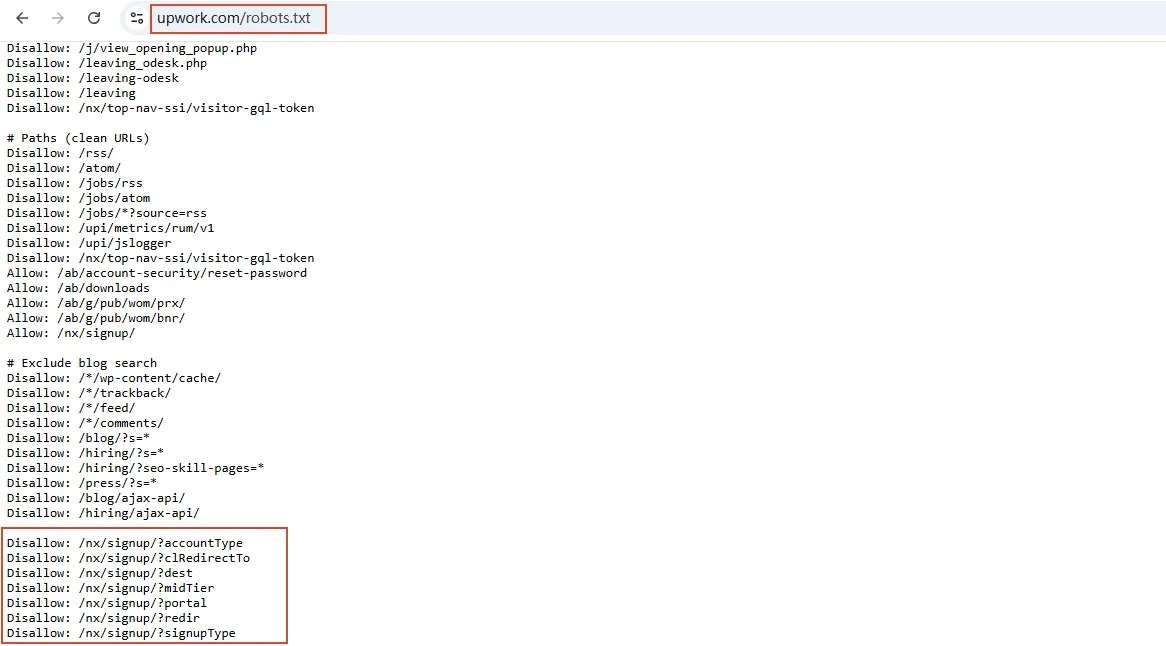
Consult the current linked file for the full crawler rules and exceptions.
Get Upwork API Access Before Writing the Collector
- Follow the developer documentation’s API-key application process and describe your integration. Verify that the approved use includes the records you plan to collect.
- Configure the OAuth flow appropriate to the approved application. Complete authorization and obtain an access token; an API key alone is not the bearer token used below. Follow the documented expiry and refresh procedure.
- Confirm Read marketplace Job Postings for
marketplaceJobPostingsSearch. The documentation also states that Common Entities - Read-Only Access is required. A key that can access another operation may still lack permission for job search. - Start with a small query. The documented search accepts
searchExpression_eqandpagination_eq; its result containsedges,totalCountandpageInfo. - Set your storage policy before saving responses. The API documentation says caching is not allowed for more than 24 hours. Do not treat a CSV export as permission for indefinite retention or redistribution; follow the API terms and your approved use, and remove cached API responses within the permitted window.
If approval is unavailable or the scope is missing, resolve access with Upwork before running the online command. You can still run the fictional fixture to test the export code.
Export One Authorized Search Page with Python
Step 1: Install the Dependency and Prepare the Files
Use Python 3.12 and install Requests:
python -m pip install requests
Copy the complete code blocks in this guide into files with the indicated names and save them as UTF-8 plain text, not .txt files. Keep fetch_jobs.py and rola_connection.py in the same directory; the connection helper is provided in the Rola setup section below and is required even for direct or offline execution.
The exporter uses the documented marketplaceJobPostingsSearch operation. It exports stable IDs, titles, descriptions, publication timestamps, skills and separate budget objects. It retains the API’s ciphertext identifier without inventing a listing URL.
Step 2: Save the Exporter
Save this as fetch_jobs.py:
"""Export one authorized Upwork GraphQL search page, or process an offline fixture."""
import argparse
import csv
import json
import os
from collections import Counter
from datetime import datetime, timezone
from pathlib import Path

import requests
from rola_connection import make_session

QUERY = '''query SearchJobs($filter: MarketplaceJobPostingsSearchFilter) {
  marketplaceJobPostingsSearch(
    marketPlaceJobFilter: $filter
    searchType: USER_JOBS_SEARCH
    sortAttributes: [{field: RECENCY}]
  ) {
    totalCount
    pageInfo { endCursor hasNextPage }
    edges { node {
      id title description ciphertext publishedDateTime
      amount { rawValue displayValue currency }
      hourlyBudgetMin { rawValue displayValue currency }
      hourlyBudgetMax { rawValue displayValue currency }
      skills { name }
    } }
  }
}'''
FIELDS = ['job_id', 'title', 'description', 'ciphertext', 'published_at',
          'amount_json', 'hourly_min_json', 'hourly_max_json', 'skills_json']


def export_page(payload, output):
    if payload.get('errors'):
        raise ValueError('GraphQL returned errors. Review scopes, token and query before retrying.')
    page = payload['data']['marketplaceJobPostingsSearch']
    rows, seen, counts = [], set(), Counter()
    for edge in page['edges']:
        node = edge['node']
        job_id = str(node['id'])
        if job_id in seen:
            continue
        seen.add(job_id)
        skills = [skill['name'] for skill in (node.get('skills') or [])]
        counts.update({skill.strip().casefold() for skill in skills if skill.strip()})
        rows.append(dict(job_id=job_id, title=node.get('title') or '',
                         description=node.get('description') or '',
                         ciphertext=node.get('ciphertext') or '',
                         published_at=node.get('publishedDateTime') or '',
                         amount_json=json.dumps(node.get('amount'), ensure_ascii=False),
                         hourly_min_json=json.dumps(node.get('hourlyBudgetMin'), ensure_ascii=False),
                         hourly_max_json=json.dumps(node.get('hourlyBudgetMax'), ensure_ascii=False),
                         skills_json=json.dumps(skills, ensure_ascii=False)))
    with output.open('w', encoding='utf-8-sig', newline='') as file:
        writer = csv.DictWriter(file, fieldnames=FIELDS)
        writer.writeheader()
        writer.writerows(rows)
    for skill, count in sorted(counts.items(), key=lambda item: (-item[1], item[0])):
        print(f'{skill}: {count}')
    return len(rows), page.get('pageInfo') or {}


def main():
    parser = argparse.ArgumentParser(description=__doc__)
    parser.add_argument('--search', default='python')
    parser.add_argument('--after', default='0')
    parser.add_argument('--first', type=int, default=5)
    parser.add_argument('--output', type=Path, default=Path('api_jobs.csv'))
    parser.add_argument('--fixture', type=Path)
    parser.add_argument('--proxy', action='store_true')
    args = parser.parse_args()
    raw = args.output.with_suffix('.response.json')
    metadata = args.output.with_suffix('.meta.json')
    if args.first < 1 or args.first > 5:
        parser.error('This small-page example accepts --first from 1 to 5.')
    if args.fixture and args.fixture.resolve() in {p.resolve() for p in (args.output, raw, metadata)}:
        parser.error('Choose output paths different from the fixture.')
    if any(path.exists() for path in (args.output, raw, metadata)):
        parser.error('Choose a new output name to preserve earlier batches.')
    variables = {'filter': {'searchExpression_eq': args.search,
                            'pagination_eq': {'after': args.after, 'first': args.first}}}
    if args.fixture:
        payload = json.loads(args.fixture.read_text(encoding='utf-8'))
    else:
        token = os.environ.get('UPWORK_ACCESS_TOKEN')
        if not token:
            parser.error('Set UPWORK_ACCESS_TOKEN to your authorized OAuth access token.')
        with make_session(args.proxy) as session:
            response = session.post('https://api.upwork.com/graphql',
                                    headers={'Authorization': f'Bearer {token}'},
                                    json={'query': QUERY, 'variables': variables}, timeout=(10, 30))
            response.raise_for_status()
            payload = response.json()
    count, page_info = export_page(payload, args.output)
    raw.write_text(json.dumps(payload, ensure_ascii=False, indent=2), encoding='utf-8')
    metadata.write_text(json.dumps({'mode': 'fixture' if args.fixture else 'api',
                                   'processed_at_utc': datetime.now(timezone.utc).isoformat(),
                                   'requested_variables': None if args.fixture else variables,
                                   'page_info': page_info}, indent=2), encoding='utf-8')
    print(f'Exported unique jobs: {count} -> {args.output.name}')
    print('Page info: ' + json.dumps(page_info))


if __name__ == '__main__':
    try:
        main()
    except (requests.RequestException, ValueError, KeyError, TypeError):
        raise SystemExit('Export failed. Check network access, API scopes and response structure; no automatic retry.')
Step 3: Run an Authorized Request
Set UPWORK_ACCESS_TOKEN through your local secret-management method. For a temporary PowerShell session, you can enter it without displaying or saving the token in command history:
$upworkToken = Read-Host 'Upwork OAuth access token' -AsSecureString
$env:UPWORK_ACCESS_TOKEN = [System.Net.NetworkCredential]::new('', $upworkToken).Password
python fetch_jobs.py --search "python" --first 5 --output api_jobs.csv
Remove-Item Env:UPWORK_ACCESS_TOKEN
This sends one POST request to https://api.upwork.com/graphql. The default connection is direct: trust_env=False prevents system proxy settings from silently changing the route. There are no automatic retries. The example caps --first at five for a small initial check; this is an example-code limit, not an Upwork service limit.
Success means an HTTP success response without GraphQL errors, an expected search result structure, and an exported CSV. An empty successful search is possible and is different from an authentication failure. Confirm that the exported titles and IDs correspond to your query before using the data.
The script also writes a raw .response.json and .meta.json with the processing time, requested variables and pagination information. These API files remain subject to the permitted retention window. Store them in a private working directory.
Step 4: Handle Pagination Deliberately
Read hasNextPage and endCursor from the printed page information or metadata. If another page is available, pass the returned cursor unchanged and use a new filename:
python fetch_jobs.py --search "python" --after "CURSOR_FROM_PREVIOUS_RESPONSE" --first 5 --output api_jobs_page2.csv
Do not substitute a guessed numeric offset for an opaque returned cursor. Check your authorized request limits before continuing. The example deduplicates IDs within each page; merge multiple pages by job_id before counting the combined sample. A changing search index can introduce duplicates or missing records between requests, so page totals do not establish a complete historical dataset.
Step 5: Verify the Export Offline
The fictional API response below contains two invented jobs. It is shaped to exercise the documented response fields; it is not a response captured from Upwork. Copy the complete JSON block into demo_api_response.json in the script directory:
{
  "data": {
    "marketplaceJobPostingsSearch": {
      "totalCount": 2,
      "pageInfo": {
        "endCursor": "demo-end",
        "hasNextPage": false
      },
      "edges": [
        {
          "node": {
            "id": "demo-1",
            "title": "Fictional hourly project",
            "description": "Offline demonstration only",
            "ciphertext": "demo-not-a-live-job",
            "publishedDateTime": null,
            "amount": null,
            "hourlyBudgetMin": {
              "displayValue": "15",
              "currency": "USD",
              "rawValue": "15"
            },
            "hourlyBudgetMax": {
              "displayValue": "45",
              "currency": "USD",
              "rawValue": "45"
            },
            "skills": [
              {
                "name": "Python"
              },
              {
                "name": "Data Scraping"
              },
              {
                "name": "Python"
              }
            ]
          }
        },
        {
          "node": {
            "id": "demo-2",
            "title": "Fictional fixed-price project",
            "description": "Offline demonstration only",
            "ciphertext": "demo-not-a-live-job-2",
            "publishedDateTime": null,
            "amount": {
              "displayValue": "500",
              "currency": "USD",
              "rawValue": "500"
            },
            "hourlyBudgetMin": null,
            "hourlyBudgetMax": null,
            "skills": [
              {
                "name": "Python"
              },
              {
                "name": "API Integration"
              }
            ]
          }
        }
      ]
    }
  }
}
After saving both Python scripts, run:
python fetch_jobs.py --fixture demo_api_response.json --output demo_api_jobs.csv
The offline test produced:
python: 2
api integration: 1
data scraping: 1
Exported unique jobs: 2 -> demo_api_jobs.csv
Page info: {"endCursor": "demo-end", "hasNextPage": false}
Fixture mode makes no network request and requires no API token or proxy. Its metadata identifies it as a fixture and leaves requested API variables unset. Successful fixture processing verifies local export logic, not account permissions or live API compatibility.
Configure Rola IP for an Authorized Online Workflow
You do not need a proxy just to use Python or process a CSV. Consider one when your approved task has a concrete network requirement, such as a stable exit address or a specified region. Check that the service and your integration permit that route.
Choose a Stable Exit or Rotation Based on the Task
| Requirement | Rola option | Configuration decision |
|---|---|---|
| A dedicated exit that should remain consistent | Rola IP Static Residential Proxies | Use the assigned fixed endpoint and keep the route consistent throughout the task |
| A residential exit in a required region, with temporary continuity | Rola IP Rotating Residential Proxies using a sticky session | Keep the same session settings while continuity is required; account for session expiry |
| An authorized task specifically needs changing residential exits | Rotating residential service | Use the documented rotation behavior; keep request volume within the target service’s rules |
Rola’s product pages describe dedicated static IPs with per-IP billing, and rotating residential access with traffic billing, rotation and sticky-session options. A sticky session has a bounded lifetime and is different from a dedicated static IP.

Product-page screenshots illustrate the two services; check your account for current endpoints, locations and plans.
For an Upwork integration, start with a consistent route unless the approved requirements call for otherwise. Rotating exits does not increase API permissions or authorize exceeding the service’s request limits. Changing regions also does not establish that you will see higher-budget jobs.
Save the Connection Helper and Verify the Exit IP
The Rola Python proxy integration guide provides HTTP and SOCKS5 examples with account/password and allowlist-based access. This tutorial uses HTTP proxy authentication. Obtain the exact gateway, port and complete proxy username from your Rola account; preserve any country or session parameters in that username. Do not reuse sample endpoints for a different product.
Save the following as rola_connection.py. The exporter imports it even when using a direct connection:
"""Optional Rola HTTP proxy configuration and an independent exit-IP check."""
import ipaddress
import os
from urllib.parse import quote

import requests


def make_session(use_proxy=False):
    session = requests.Session()
    session.trust_env = False
    if use_proxy:
        values = {key: os.environ.get('ROLA_' + key, '')
                  for key in ('HOST', 'PORT', 'USERNAME', 'PASSWORD')}
        if not all(values.values()):
            raise ValueError('Set ROLA_HOST, ROLA_PORT, ROLA_USERNAME and ROLA_PASSWORD.')
        host, port = values['HOST'], values['PORT']
        if not host or any(c not in 'abcdefghijklmnopqrstuvwxyzABCDEFGHIJKLMNOPQRSTUVWXYZ0123456789.-' for c in host):
            raise ValueError('ROLA_HOST must be the assigned gateway hostname or IPv4 address.')
        if not port.isdigit() or not 1 <= int(port) <= 65535:
            raise ValueError('ROLA_PORT must be a valid assigned port.')
        user = quote(values['USERNAME'], safe='')
        password = quote(values['PASSWORD'], safe='')
        proxy = f'http://{user}:{password}@{host}:{port}'
        session.proxies.update(http=proxy, https=proxy)
    return session


if __name__ == '__main__':
    try:
        with make_session(True) as session:
            response = session.get('https://api.ipify.org?format=json', timeout=(10, 30))
            response.raise_for_status()
            address = ipaddress.ip_address(response.json()['ip'])
            print(f'Proxy exit IP: {address}')
    except (requests.RequestException, ValueError, KeyError):
        raise SystemExit('Connection check failed. Review proxy settings and network access.')
Set ROLA_HOST, ROLA_PORT, ROLA_USERNAME and ROLA_PASSWORD using the values assigned to your account. Enter the password securely, then check the connection:
$env:ROLA_HOST = 'YOUR_ASSIGNED_GATEWAY'
$env:ROLA_PORT = 'YOUR_ASSIGNED_HTTP_PORT'
$env:ROLA_USERNAME = 'YOUR_COMPLETE_PROXY_USERNAME'
$rolaPassword = Read-Host 'Rola proxy password' -AsSecureString
$env:ROLA_PASSWORD = [System.Net.NetworkCredential]::new('', $rolaPassword).Password
python rola_connection.py
The helper requests a public IP-check endpoint, https://api.ipify.org?format=json, through the configured proxy and prints a valid IP address if successful. Compare it with a direct IP check made at the same time and with the endpoint assigned to your task. A returned IP alone does not prove its country, reputation or future stability; a sticky exit can change when its session expires.
The http:// proxy URL describes the gateway connection used for HTTPS CONNECT. It does not turn off TLS verification for the HTTPS destination. The helper URL-encodes credentials and keeps them out of source files. If your account uses IP allowlisting instead, follow the documented allowlist method rather than entering fictitious credentials here.
Only after checking that the network route is appropriate for your authorized integration, add --proxy to the API command:
python fetch_jobs.py --search "python" --first 5 --proxy --output api_jobs_proxy.csv
When finished, remove the password from the temporary session:
Remove-Item Env:ROLA_PASSWORD
Test boundary: the helper’s configuration logic was checked locally. No live Rola IP check or Upwork request through Rola was performed, because account credentials were not provided. An IP-check success would verify connectivity to that test endpoint; the API response must still be checked separately.
Clean and Analyze the Exported Job Data
The API exporter counts each skill once per unique job on the exported page. Its CSV keeps skills as a JSON list, avoiding ambiguity when a label contains a comma. It also stores amount, hourlyBudgetMin and hourlyBudgetMax in separate JSON fields, preserving rawValue, currency and display value. For numeric comparisons, parse rawValue as a decimal and group records by currency and pricing unit; avoid parsing formatted display text or inferring a zero from a missing amount.
Use these fields to build a shortlist:
- Filter titles and descriptions for the technology and project scope you can deliver.
- Read hourly bounds separately from fixed amounts. An hourly range of USD 15–45 and a fixed amount of USD 500 represent different pricing units.
- Keep missing budgets and dates missing. Do not convert
nullto zero or use the collection time as the posting time. - Deduplicate merged pages by
job_id, and inspect conflicting records before choosing which version to retain. - Treat skill counts as a description of your sample. They do not establish platform-wide demand or completed transaction prices.
Optional: Normalize a CSV You Already Have Permission to Process
For an existing dataset with source URLs, the two complete scripts below provide a separate workflow. Both use only the Python standard library. Save them as analyze_jobs.py and inspect_results.py in the same directory.
This workflow takes six columns: title, budget, budget_unit, skills, date_posted and url. It is not a direct adapter for api_jobs.csv: the API export deliberately retains IDs and separate budget objects rather than constructing source links or inferring budget units. Use this workflow only when your permitted source already supplies the required fields.
Save the CSV Normalization Script
Copy this code into analyze_jobs.py:
"""Normalize a local CSV. --demo accepts example.com fixture URLs only."""
import argparse
import csv
import re
from decimal import Decimal, InvalidOperation
from pathlib import Path
from urllib.parse import urlsplit

INPUT_FIELDS = {'title', 'budget', 'budget_unit', 'skills', 'date_posted', 'url'}
FIELDS = ['title', 'budget_raw', 'budget_min_usd', 'budget_max_usd',
          'budget_unit', 'budget_status', 'skills', 'date_posted', 'url', 'source_url']


def job_url(value, demo=False):
    try:
        parts = urlsplit(value.strip())
        host = 'example.com' if demo else 'www.upwork.com'
        match = re.fullmatch(r'/jobs/[A-Za-z0-9-]+_(~\d+)/?', parts.path)
        if parts.scheme != 'https' or parts.netloc != host or not match:
            return None
        return match[1], f'https://{host}{parts.path.rstrip("/")}/'
    except ValueError:
        return None


def budget_range(value, unit):
    match = re.fullmatch(r'USD\s+(\d+(?:\.\d+)?)(?:\s*[-–]\s*(\d+(?:\.\d+)?))?', value.strip())
    if unit not in {'HOUR', 'FIXED'} or not match:
        return '', '', 'unparsed'
    try:
        low = Decimal(match[1])
        high = Decimal(match[2] or match[1])
        if not low.is_finite() or not high.is_finite() or low < 0 or high < low:
            return '', '', 'unparsed'
        return str(low), str(high), 'parsed'
    except InvalidOperation:
        return '', '', 'unparsed'


def main():
    parser = argparse.ArgumentParser(description=__doc__)
    parser.add_argument('input', type=Path)
    parser.add_argument('--output', type=Path, default=Path('upwork_jobs_analysis.csv'))
    parser.add_argument('--demo', action='store_true')
    args = parser.parse_args()
    if args.input.resolve() == args.output.resolve():
        parser.error('Use a different output path to preserve the source CSV.')
    with args.input.open(encoding='utf-8-sig', newline='') as file:
        reader = csv.DictReader(file)
        if not INPUT_FIELDS.issubset(reader.fieldnames or []):
            parser.error('Input must include: ' + ', '.join(sorted(INPUT_FIELDS)))
        source = list(reader)
    rows, seen = [], set()
    invalid = duplicate = unparsed = 0
    for item in source:
        item = {key: (item.get(key) or '').strip() for key in INPUT_FIELDS}
        link = job_url(item['url'], args.demo)
        if not link:
            invalid += 1
            continue
        job_id, url = link
        if job_id in seen:
            duplicate += 1
            continue
        seen.add(job_id)
        unit = item['budget_unit'].upper()
        low, high, status = budget_range(item['budget'], unit)
        unparsed += status == 'unparsed'
        rows.append(dict(title=item['title'], budget_raw=item['budget'],
                         budget_min_usd=low, budget_max_usd=high,
                         budget_unit=unit, budget_status=status,
                         skills=item['skills'], date_posted=item['date_posted'],
                         url=url, source_url=item['url']))
    with args.output.open('w', encoding='utf-8-sig', newline='') as file:
        writer = csv.DictWriter(file, fieldnames=FIELDS)
        writer.writeheader()
        writer.writerows(rows)
    print(f'Source rows: {len(source)}')
    print(f'Saved rows: {len(rows)} -> {args.output.name}')
    print(f'Skipped: invalid URL format={invalid}, duplicate job ID={duplicate}')
    print(f'Budgets requiring review: {unparsed}')


if __name__ == '__main__':
    main()
Save the Record-Checking Script
Copy this code into inspect_results.py:
"""Validate normalized records and count each skill once per job."""
import argparse
import csv
from collections import Counter
from decimal import Decimal, InvalidOperation
from pathlib import Path
from analyze_jobs import FIELDS, budget_range, job_url


def main():
    parser = argparse.ArgumentParser(description=__doc__)
    parser.add_argument('input', type=Path)
    parser.add_argument('--skills-out', type=Path, default=Path('skill_frequency.csv'))
    parser.add_argument('--demo', action='store_true')
    args = parser.parse_args()
    if args.input.resolve() == args.skills_out.resolve():
        parser.error('Use a different output path.')
    with args.input.open(encoding='utf-8-sig', newline='') as file:
        reader = csv.DictReader(file)
        if not set(FIELDS).issubset(reader.fieldnames or []):
            parser.error('Missing normalized columns.')
        rows = list(reader)
    seen, counts = set(), Counter()
    pending = 0
    for line, row in enumerate(rows, 2):
        link = job_url(row['url'] or '', args.demo)
        original = job_url(row['source_url'] or '', args.demo)
        if not link or not original or link[0] != original[0] or link[0] in seen:
            parser.error(f'Invalid or duplicate job reference at row {line}.')
        seen.add(link[0])
        expected = budget_range(row['budget_raw'] or '', row['budget_unit'] or '')
        actual = (row['budget_min_usd'], row['budget_max_usd'], row['budget_status'])
        if actual != expected:
            parser.error(f'Budget fields do not match the original value at row {line}.')
        if row['budget_status'] == 'parsed':
            try:
                low, high = Decimal(row['budget_min_usd']), Decimal(row['budget_max_usd'])
                valid = low.is_finite() and high.is_finite() and 0 <= low <= high
            except (InvalidOperation, ValueError):
                valid = False
            if not valid:
                parser.error(f'Invalid numeric bounds at row {line}.')
        else:
            pending += 1
        counts.update({skill.strip().casefold() for skill in (row['skills'] or '').split(',') if skill.strip()})
    with args.skills_out.open('w', encoding='utf-8-sig', newline='') as file:
        writer = csv.writer(file)
        writer.writerow(['skill', 'job_count'])
        writer.writerows(sorted(counts.items(), key=lambda pair: (-pair[1], pair[0])))
    print('Record checks: PASS' if rows else 'Record checks: no records to validate')
    print(f'Unique jobs: {len(rows)} | Distinct skills: {len(counts)}')
    print(f'Budgets requiring review: {pending}')
    for skill, count in sorted(counts.items(), key=lambda pair: (-pair[1], pair[0])):
        print(f'{skill}: {count}')
    print(f'Saved skill counts -> {args.skills_out.name}')


if __name__ == '__main__':
    main()
Prepare the Demo CSV and Run Both Scripts
The CSV below contains five fictional records with example.com links. Copy the complete block, including the header, into demo_jobs.csv. Keep the quotation marks around comma-separated skills so those labels stay in one CSV field:
title,budget,budget_unit,skills,date_posted,url
Demo hourly extraction project,USD 15-45,HOUR,"Python, Data Scraping, Python",,https://example.com/jobs/Demo-extraction_~1001/
Demo API integration project,USD 25-50,HOUR,"Python, API Integration",,https://example.com/jobs/Demo-api_~1002/
Demo fixed-price cleanup project,USD 500,FIXED,"Data Scraping, Data Cleaning",,https://example.com/jobs/Demo-cleanup_~1003/
Demo incomplete reference,USD 20-30,HOUR,Python,,https://example.com/jobs/
Demo duplicate with tracking,USD 15-45,HOUR,"Python, Data Scraping",,https://example.com/jobs/Demo-extraction_~1001/?source=demo
Run both commands from the directory containing these three files:
python analyze_jobs.py demo_jobs.csv --demo --output upwork_jobs_analysis.csv
python inspect_results.py upwork_jobs_analysis.csv --demo --skills-out skill_frequency.csv
The tested normalization output was:
Source rows: 5
Saved rows: 3 -> upwork_jobs_analysis.csv
Skipped: invalid URL format=1, duplicate job ID=1
Budgets requiring review: 0
The tested record checks and skill counts were:
Record checks: PASS
Unique jobs: 3 | Distinct skills: 4
Budgets requiring review: 0
data scraping: 2
python: 2
api integration: 1
data cleaning: 1
Saved skill counts -> skill_frequency.csv
For your own compatible records, omit --demo. The script expects HTTPS links on www.upwork.com shaped like /jobs/title_~123456/; other valid source formats need an explicit adapter. A skipped URL indicates a format mismatch, not proof that a job is invalid. The script supports nonnegative USD amounts and ranges with HOUR or FIXED; unsupported currencies and formats retain their raw text and receive budget_status=unparsed. Posting dates are preserved without inference or validation.
Troubleshoot Upwork Access and Proxy Errors
| Symptom | Likely layer | Next check |
|---|---|---|
| HTTP 401 from the API | Authentication | Token validity, expiry and the documented OAuth flow |
GraphQL errors with HTTP 200 |
Query or authorization | Required scopes, field names and the returned error details; do not use partial data as a complete successful export |
| HTTP 403 or a verification page | Access refused | Whether the endpoint and automation are authorized; stop and review the allowed access method |
| HTTP 429 | Request limit | Respect Retry-After where present and the documented API limits; reduce requests rather than rotate IPs to exceed them |
| Proxy authentication failure, often HTTP 407 | Proxy credentials | Assigned gateway/port, complete username and password, or the appropriate allowlist mode |
| Proxy connection or TLS error | Network path | Gateway reachability, account availability and certificate configuration; keep TLS verification enabled |
| Successful search with no edges | Query/data | Search terms and filters; a successful response can legitimately contain no matching jobs |
| CSV export fails with an unexpected structure | Response/schema | Inspect the permitted raw response securely and compare the operation with the current documentation |
| CSV workflow skips all links | Input format | Match --demo to the input, then inspect host and path patterns |
The exporter deliberately prints a short failure message without credentials or a raw response dump. For deeper diagnosis, inspect the HTTP status and GraphQL error details in a secure development environment, redacting tokens and proxy credentials before sharing logs. For the HTTP-client side of access refusal, see Python GET request 403 errors.
Choose the Access Method, Then the Network Route
Start with API approval and a small authorized request, confirm the response, and keep budget units and source identifiers intact. If the task needs a residential network exit, choose the Rola option in the comparison above, copy the connection settings from your account, and run the separate IP check before adding the proxy to your client. That sequence helps you identify whether a failure belongs to data access, the network connection or the local processing code.