
Python urllib.request Proxy Setup: Authentication, Rotation, and Troubleshooting

Sep 14, 2026 · Guides · 9 min read
Build a ProxyHandler, wrap it in an opener, and either install that opener globally or call it directly. Four lines get a request out through a proxy. The part that costs people an afternoon is different: urllib.request already installs a proxy handler of its own from environment variables and operating system settings, so a script with no proxy code can still be going through one, and a script with proxy code can be fighting a setting it never sees.
The short version
from urllib.request import ProxyHandler, build_opener

proxy = ProxyHandler({
    "http":  "http://USERNAME:PASSWORD@HOST:PORT",
    "https": "http://USERNAME:PASSWORD@HOST:PORT",
})
opener = build_opener(proxy)
print(opener.open("http://ip123.in/ip.json").read().decode())
At the time of review, this example endpoint returned HTTP 200 and JSON containing ip and country. Treat it as a demonstration endpoint; use an endpoint you control or are authorized to query in production.
build_opener returns an opener that uses your handler. Calling opener.open() keeps the proxy scoped to that opener. If you would rather every later urlopen() call in the process use it, add install_opener(opener) once and carry on using urlopen normally.
Note that both the http and https keys hold an http:// URL. That surprises people, but the key names the scheme of the destination, not the scheme of the proxy hop.
Why urllib may already be using a proxy you did not set
This is the behaviour worth knowing before you debug anything else.
The Python documentation states that ProxyHandler’s default “is to read the list of proxies from the environment variables <protocol>_proxy”, and that if no such variables are set, “in a Windows environment proxy settings are obtained from the registry’s Internet Settings section, and in a macOS environment proxy information is retrieved from the System Configuration Framework”.
The urlopen entry is blunter: “if proxy settings are detected (for example, when a *_proxy environment variable like http_proxy is set), ProxyHandler is default installed and makes sure the requests are handled through the proxy” (urllib.request documentation).
So a plain urlopen("https://example.com") on a Windows machine whose Internet Settings name a corporate proxy goes through that proxy. Nothing in your code says so.
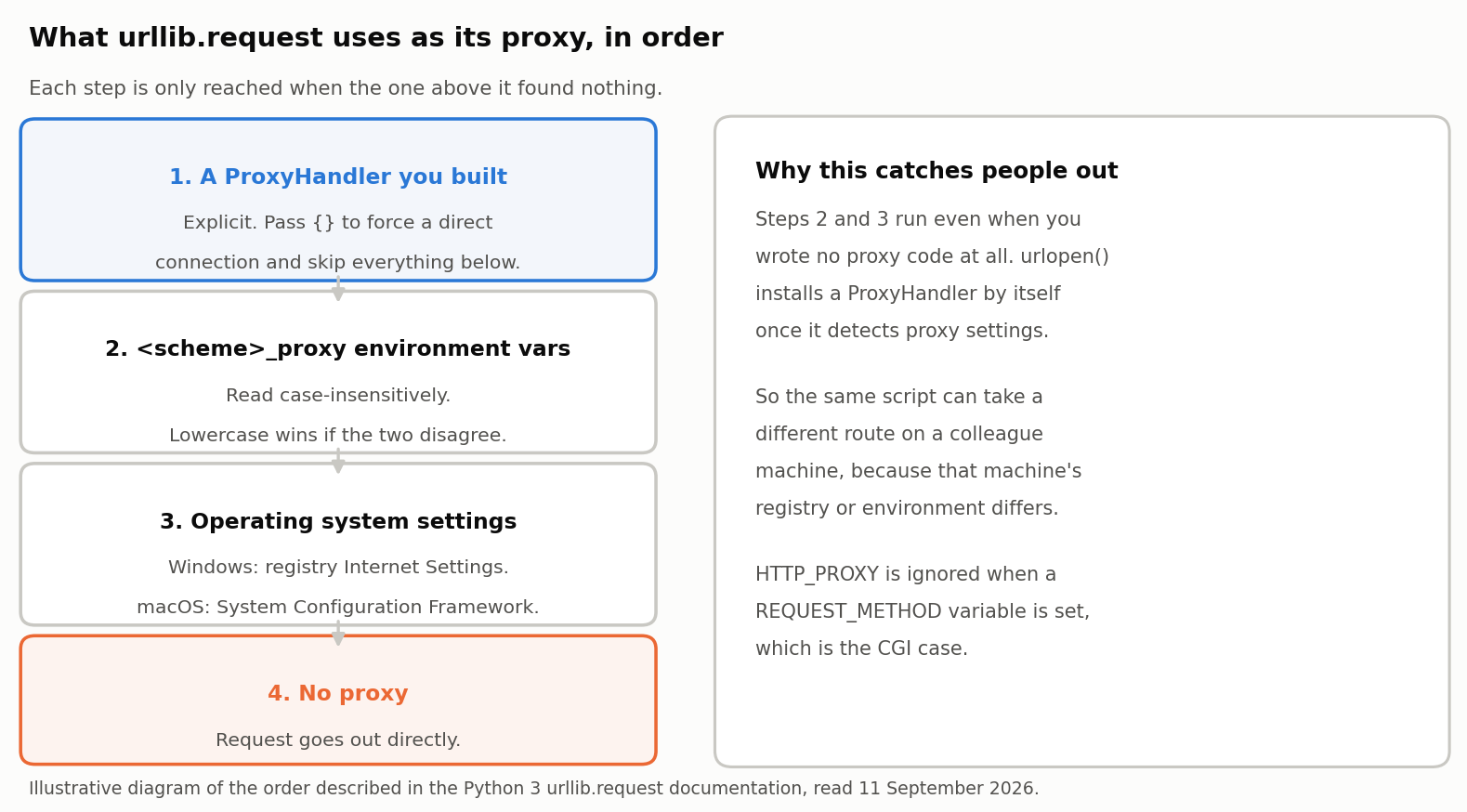
Figure 1. Illustrative diagram of the resolution order described in the Python 3 urllib.request documentation.
Three details from the same documentation decide most confusing cases:
- Lowercase wins.
getproxies()“scans the environment for variables named<scheme>_proxy, in a case insensitive approach”, and “if both lowercase and uppercase environment variables exist (and disagree), lowercase is preferred.” - Empty dictionary means direct. “To disable autodetected proxy pass an empty dictionary.”
ProxyHandler({})is how you guarantee a direct connection. - CGI is special. “
HTTP_PROXYwill be ignored if a variableREQUEST_METHODis set.” This guards against a CGI gateway turning an incomingProxy:header into an environment variable.
When a proxy behaves differently on your machine than on a colleague’s, check urllib.request.getproxies() on both before touching the code.
from urllib.request import getproxies
print(getproxies())   # {} means nothing was auto-detected
What getproxies() actually returns
The three rules above are easier to trust once you watch them run. The session below was run for this guide on Python 3.11.15 under Linux on 11 September 2026, using env -i so each command starts from an empty environment. The addresses are RFC 5737 documentation ranges rather than working proxies.
To reproduce the key cases in a POSIX shell, save the following as probe.py and run each command from a clean environment. The printed dictionaries should match the table below (values may differ if you change the test addresses):
cat > probe.py <<'PY'
from urllib.request import getproxies
print(getproxies())
PY
env -i PATH="$PATH" python3 probe.py
env -i PATH="$PATH" HTTP_PROXY=http://203.0.113.99:3128 python3 probe.py
env -i PATH="$PATH" HTTP_PROXY=http://203.0.113.99:3128 REQUEST_METHOD=GET python3 probe.py
env -i PATH="$PATH" http_proxy=http://198.51.100.10:8080 REQUEST_METHOD=GET python3 probe.py
env -i PATH="$PATH" HTTP_PROXY=http://203.0.113.99:3128 http_proxy=http://198.51.100.10:8080 python3 probe.py
env -i PATH="$PATH" YARN_HTTPS_PROXY=http://203.0.113.99:3128 FOO_PROXY=http://198.51.100.10:8080 python3 probe.py
On Windows, set and clear the variables in a separate PowerShell process for each case, or run the same probe under WSL. Environment and Python-version differences can change the exact dictionary output.
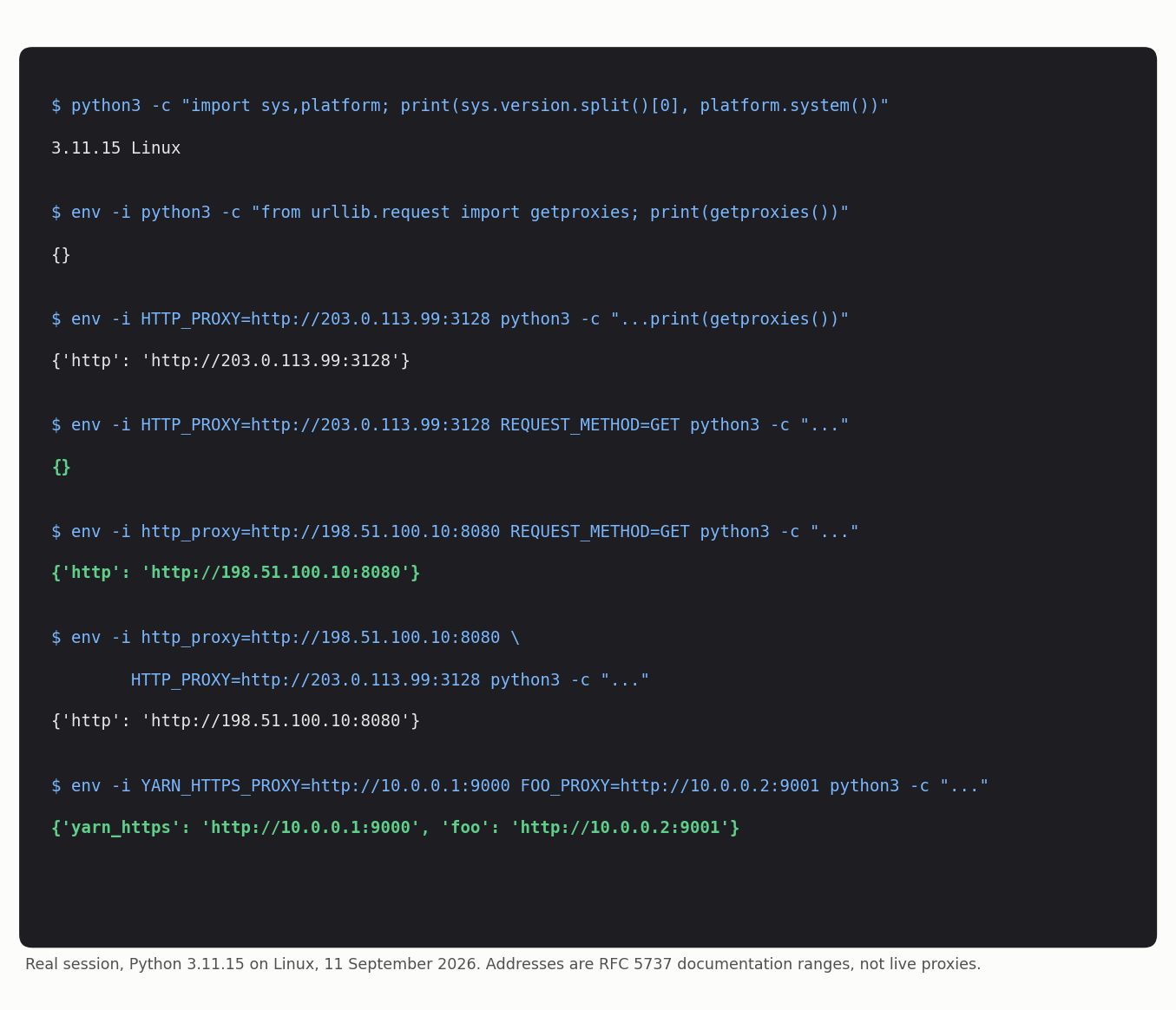
Figure 2. A recorded run of getproxies() on Python 3.11.15, Linux. Reproduce it with the env -i commands shown.
| Environment | getproxies() returned |
What it shows |
|---|---|---|
| Nothing set | {} |
The clean baseline |
HTTP_PROXY only |
{'http': 'http://203.0.113.99:3128'} |
Uppercase alone is honoured |
HTTP_PROXY plus REQUEST_METHOD |
{} |
The CGI rule drops the proxy entirely |
http_proxy plus REQUEST_METHOD |
{'http': 'http://198.51.100.10:8080'} |
Lowercase is not affected by the CGI rule |
| Both cases, disagreeing | {'http': 'http://198.51.100.10:8080'} |
Lowercase wins, as documented |
YARN_HTTPS_PROXY and FOO_PROXY |
{'yarn_https': ..., 'foo': ...} |
Any variable ending in _proxy becomes an entry |
Two results are worth pausing on.
The CGI rule is narrower than it first reads. Setting REQUEST_METHOD removed the uppercase HTTP_PROXY entry completely, while the lowercase http_proxy in the fourth run survived it. If you are debugging a web-gateway deployment, which case the variable uses decides whether it takes effect.
The last run is the one that bites in real projects. getproxies() strips the _proxy suffix and treats whatever remains as a scheme name, so YARN_HTTPS_PROXY became a scheme called yarn_https and FOO_PROXY became one called foo. A build machine carrying npm, yarn, Docker or Electron proxy variables will show all of them in Python’s proxy dictionary. They do not match the http or https keys urllib looks for when it routes a request, so they are noise rather than a redirect, but they make the output hard to read when you are trying to find the one entry that matters.
Proxy authentication in urllib.request
Most paid proxies need a username and password. The credentials-in-the-URL form in the short version above works for basic authentication, and it is the form the standard library accepts. It is also the form that leaks: the URL ends up in tracebacks, logs and process listings.
The explicit route keeps the password out of the URL. ProxyBasicAuthHandler “handles authentication with the proxy” and takes a password manager, per the same documentation:
from urllib.request import (
    ProxyHandler, ProxyBasicAuthHandler,
    HTTPPasswordMgrWithDefaultRealm, build_opener,
)

proxy_url = "http://HOST:PORT"

pwd_mgr = HTTPPasswordMgrWithDefaultRealm()
pwd_mgr.add_password(None, proxy_url, "USERNAME", "PASSWORD")

opener = build_opener(
    ProxyHandler({"http": proxy_url, "https": proxy_url}),
    ProxyBasicAuthHandler(pwd_mgr),
)
print(opener.open("http://ip123.in/ip.json").read().decode())
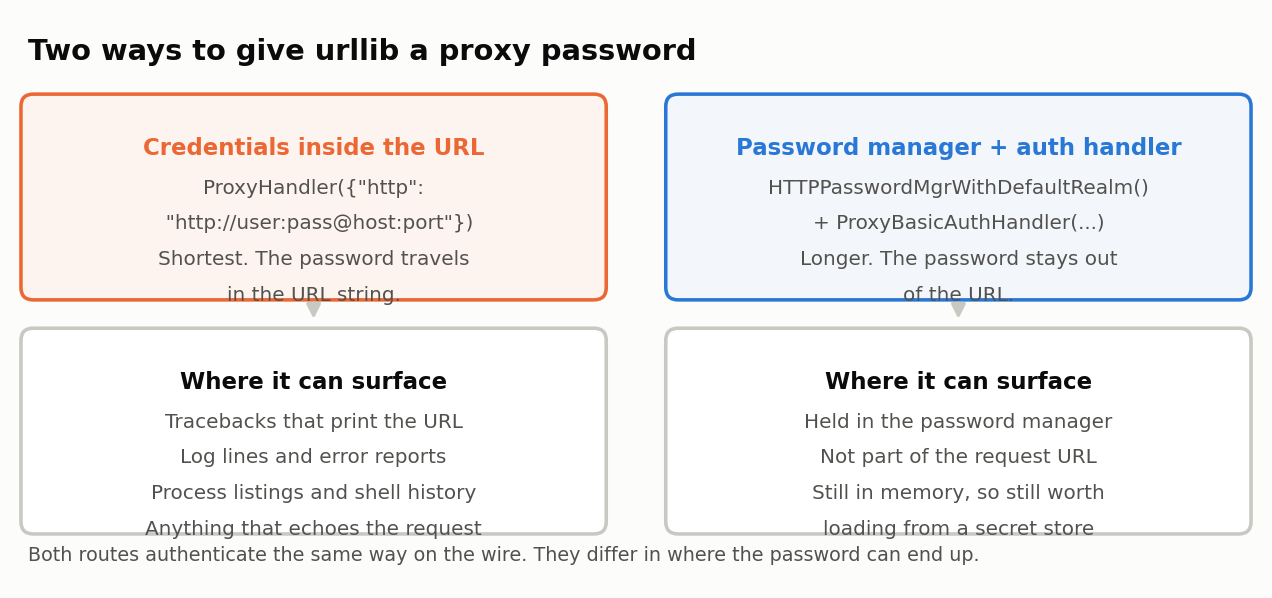
Figure 3. Illustrative comparison of the two routes. Both authenticate identically on the wire; they differ in where the password can end up.
ProxyDigestAuthHandler is the equivalent when the proxy asks for digest rather than basic. Read your provider’s documentation rather than guessing, because sending digest credentials to a basic-auth endpoint fails with the same 407 as a wrong password.
One thing urllib.request does not document a handler for is SOCKS. Its documentation describes proxy handling for the schemes urllib itself speaks and lists no SOCKS handler, so a socks5:// endpoint needs a third-party library or a different client. If your provider offers both, point urllib at the HTTP endpoint.
Rotating the exit IP per request
urllib.request has no session or rotation concept. It opens a connection, makes a request, and forgets. Rotation therefore has to come from the proxy service, and it is configured in the credentials rather than in Python.
Rola IP’s Python proxy integration documentation publishes the account-name pattern USERNAME-country-COUNTRYCODE-sid-SESSION, where the session value is a number you choose. The same page publishes gate.rola.vip:1000 for HTTP and gate.rola.vip:2000 for SOCKS5, and its sample generates a new session value for each rotating request. Whether reusing a session holds one exit, and how quickly a new session changes it, depends on the provider’s current session policy; verify that behavior in your dashboard before relying on it.
Because urllib builds an opener per proxy configuration, a new exit means a new opener:
import time
from urllib.request import ProxyHandler, build_opener

USER, PASSWORD, COUNTRY = "USERNAME", "PASSWORD", "us"
GATEWAY = "gate.rola.vip:1000"

def fetch(url, session_id=None):
    """One request. A new session_id means a new exit IP."""
    sid = session_id or int(time.time() * 1_000_000)
    account = f"{USER}-country-{COUNTRY}-sid-{sid}"
    proxy = f"http://{account}:{PASSWORD}@{GATEWAY}"
    opener = build_opener(ProxyHandler({"http": proxy, "https": proxy}))
    with opener.open(url, timeout=30) as resp:
        return resp.read().decode()

for _ in range(3):
    print(fetch("http://ip123.in/ip.json"))   # three separate exits

sid = 424242
page1 = fetch("http://ip123.in/ip.json", sid)  # reuse a sid to test provider persistence
page2 = fetch("http://ip123.in/ip.json", sid)  # verify the observed exit yourself
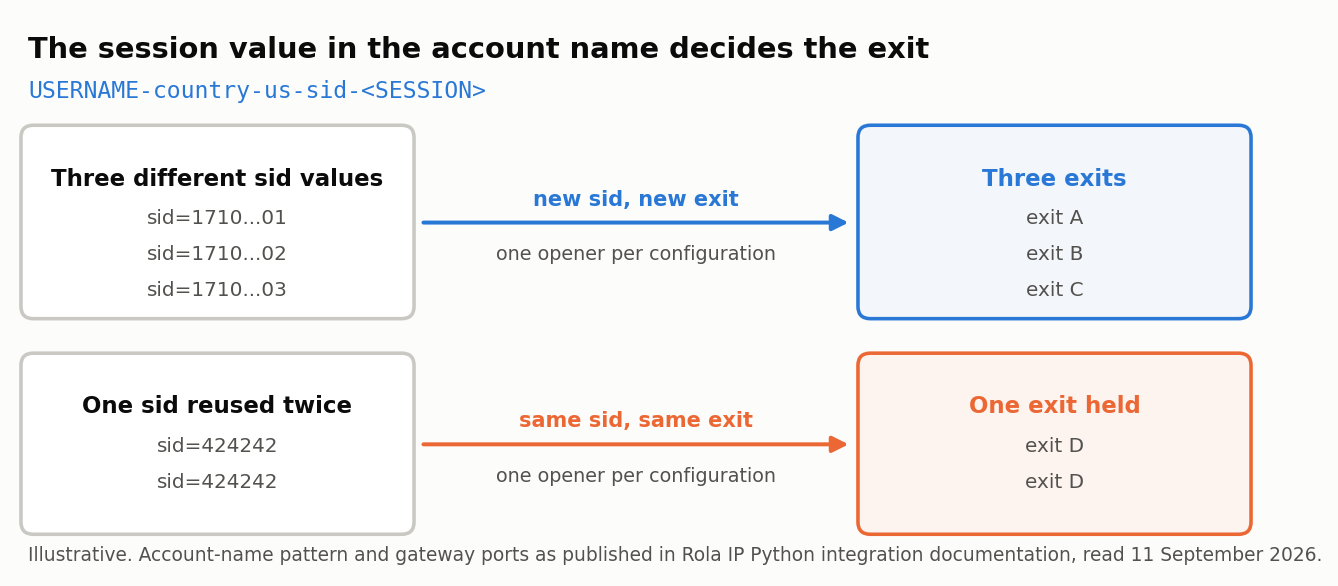
Figure 4. Illustrative diagram of the session-to-exit mapping. The account-name pattern and gateway ports are published in Rola IP’s Python integration documentation; session persistence and rotation timing remain provider-policy dependent.
Confirm the account-name syntax in your own dashboard before deploying. Providers change accepted parameters, and a suffix that no longer parses usually presents as an authentication failure rather than as a syntax error.
The residential proxy product page lists the location and session controls available on the rotating network. Whether you need them depends on the job: a handful of requests against a tolerant endpoint does not, and a job that must look like separate visitors does.
Use proxy rotation only for authorized testing and data collection. Follow the target site’s terms of service, robots and access rules, privacy requirements, and applicable laws. A rotating proxy does not guarantee access, anonymity, or immunity from blocking.
Always set a timeout
urlopen and opener.open accept a timeout argument. Leave it out and a proxy that accepts the connection and then stalls will hang the call for as long as the platform default allows, which on a long-running script is indistinguishable from a hang in your own code.
opener.open(url, timeout=30)
Set it on every call that crosses a proxy.
Verify the exit before you trust it
A request that returns 200 proves the proxy accepted you. It does not prove where the request came out.
- Record your own public address first, with the proxy switched off.
- Run the request through the proxy against an endpoint that echoes the caller’s IP.
- Confirm the address differs from the one you recorded.
- Confirm the country matches what you requested, rather than only that something changed.
- Repeat with the same session value and then a different one, and confirm the exit holds and then changes.
Rola IP’s what is my IP tool shows the address a page sees, which is a useful cross-check when a script and a browser disagree.
import json
from urllib.request import ProxyHandler, build_opener

proxy = "http://USERNAME:PASSWORD@HOST:PORT"
opener = build_opener(ProxyHandler({"http": proxy, "https": proxy}))
data = json.loads(opener.open("http://ip123.in/ip.json", timeout=30).read())
print(data.get("ip"), data.get("country"))
When to stop using urllib
urllib.request is in the standard library, which is its whole advantage. Everything below is something you would otherwise write yourself.
| What you need | urllib.request | Practical alternative |
|---|---|---|
| One request through a proxy, no dependencies | Fine | None needed |
| Connection reuse across many requests | Not provided | requests.Session or httpx |
| Automatic retries with backoff | Not provided | urllib3 retry policy, via requests |
| SOCKS5 endpoint | No handler documented | requests with SOCKS support, or another client |
| Credentials kept out of the URL | Handler plus password manager | One proxies= argument |
| Concurrent requests | Thread it yourself | httpx or aiohttp |
If your script is growing past a single fetch, our guide to the Python requests proxy covers the session, retry and rotation patterns that urllib leaves to you. Staying on urllib is a reasonable choice when the dependency budget is zero and the job is small.
Fixing common urllib proxy errors
Change one thing at a time. Altering the credentials, the scheme and the endpoint together tells you nothing when the next attempt works.
| Symptom | Likely cause | What to check |
|---|---|---|
HTTP Error 407: Proxy Authentication Required |
Credentials missing, wrong, or the wrong auth scheme | Confirm the proxy password is not the dashboard login; try ProxyBasicAuthHandler explicitly |
| Request succeeds but the IP is unchanged | Your handler was never used | You called urlopen rather than opener.open, and never called install_opener |
| Proxy applies when your code sets none | Environment or OS settings were auto-detected | Print getproxies(); pass ProxyHandler({}) to force direct |
| Works for you, not for a colleague | Different environment variables or OS proxy settings | Compare getproxies() output on both machines |
URLError with a connection refused |
Wrong port, or the gateway is not reachable from that network | Retest the same endpoint from a shell before blaming Python |
| Call hangs indefinitely | No timeout set | Add timeout= to every open() call |
| HTTPS requests fail, HTTP works | The https key is missing from the proxy dictionary |
Set both keys, each to the proxy’s own URL |
| Exit country is wrong | The account-name parameter was altered or dropped | Regenerate the account string in the dashboard at country level |
| Environment variable ignored under a web gateway | REQUEST_METHOD is set, so HTTP_PROXY is skipped |
Configure the proxy explicitly rather than through the environment |