
C# HttpClient With Proxy: Auth, Rotation, and Fixes

Sep 14, 2026 · Guides · 10 min read
TL;DR
- Use
HttpClientHandlerplusWebProxyfor the simplest authenticated HTTP proxy setup. - Read the proxy host, port, username, and password from environment variables or a secret store.
- Reuse each client/handler pair; do not create and dispose one for every request.
- Treat proxy identity as handler-level configuration. Use a bounded client pool when multiple routes are required.
- Verify the IP observed by the destination before trusting a new configuration.
- Stop and investigate repeated
407,403,429, CAPTCHA, or access-denied responses.
How Proxy Routing Works in HttpClient
The effective path is:
C# application -> HttpClient -> HttpClientHandler -> proxy endpoint -> destination
HttpClient owns request-level settings such as the base address, default headers, and timeout. HttpClientHandler controls transport behavior, including its Proxy and UseProxy properties. WebProxy stores the proxy URI, bypass rules, and credentials.
For an HTTP destination, the client sends an absolute-form request through the proxy. For an HTTPS destination, it normally asks the proxy to create a tunnel with CONNECT; TLS is then established with the destination through that tunnel. A proxy is therefore a transport route, not permission to access a site or ignore its rules.
| Requirement | Recommended approach | Important boundary |
|---|---|---|
| One HTTP proxy | HttpClientHandler plus WebProxy |
Keeps application routing explicit |
| Long-running service | Reuse HttpClient; measure a suitable connection lifetime |
Connection renewal does not request a new proxy IP |
| Several fixed exits | Use a bounded handler/client pool | Do not create an unbounded client for every input value |
| Authorized stateful flow | Isolate cookies and use a sticky proxy session | Keep the route and identity stable for the whole sequence |
| Exit changes between independent requests | Use a provider-supported rotation parameter or endpoint | Do not rotate to defeat enforcement signals |
| SOCKS5 connection | Confirm the .NET version, handler, URI scheme, and endpoint protocol; test separately | The HTTP example below does not prove SOCKS5 compatibility |
| Machine-wide proxy behavior | HttpClient.DefaultProxy or environment settings |
Use only when process-level defaults are intentional |
Microsoft documents HttpClientHandler.Proxy as the proxy used by the handler, while UseProxy controls whether that configured route is used. See the official HttpClientHandler.Proxy reference.
Prerequisites and Verification Scope
Use a supported .NET SDK, a proxy endpoint you are authorized to use, and a destination that permits your requests. The examples target modern .NET and use only built-in System.Net and System.Net.Http types.
The code in this article was statically reviewed against the .NET 10 API documentation on September 9, 2026. This authoring environment did not contain a .NET SDK or live Rola IP credentials, so no build result or live provider result is claimed. The article must remain in review status until a maintainer runs the commands on the target SDK and records the build status, proxy-observed IP, SDK version, and UTC date in an authorized environment.
Create a console project:
dotnet new console -n ProxyHttpClientDemo --framework net10.0
cd ProxyHttpClientDemo
No NuGet package is required for the basic example.
Step 1: Get the Proxy Connection Details
An authenticated proxy normally gives you four values:
host: proxy.example.net
port: 12345
username: account-or-session-name
password: secret
With Rola IP, select an authorized endpoint in the dashboard and follow the proxy setup guide. A residential proxy can be useful when an approved workflow needs geographic coverage or an ISP-associated exit, but the destination’s terms and your legal basis still apply.
Store secrets outside source control. PowerShell users can set process-scoped variables for a local test:
$env:PROXY_HOST = "proxy.example.net"
$env:PROXY_PORT = "12345"
$env:PROXY_USERNAME = "replace-with-your-username"
$env:PROXY_PASSWORD = "replace-with-your-password"
Do not paste real credentials into screenshots, logs, exception messages, Git history, or a client-side application.
Step 2: Send a Request Through an Authenticated Proxy
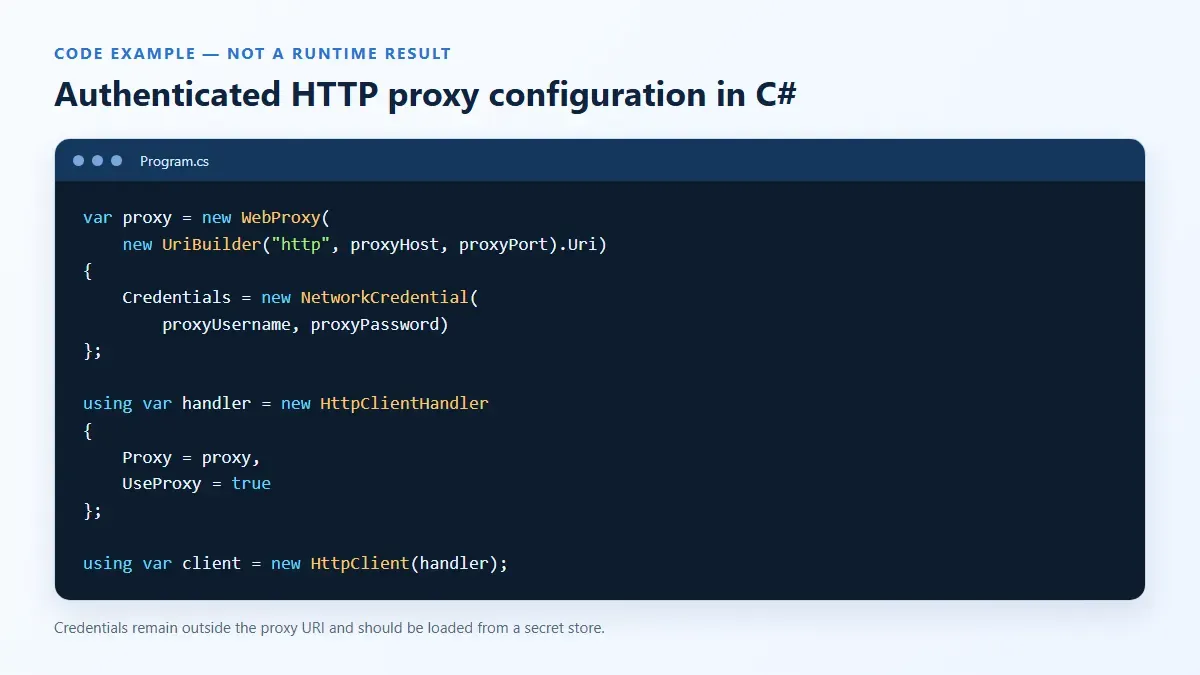
Replace Program.cs with this minimal console example:
using System.Net;
using System.Net.Http.Headers;

static string RequireEnvironmentVariable(string name) =>
    Environment.GetEnvironmentVariable(name)
    ?? throw new InvalidOperationException($"Missing environment variable: {name}");

string proxyHost = RequireEnvironmentVariable("PROXY_HOST");
string proxyPortText = RequireEnvironmentVariable("PROXY_PORT");
string proxyUsername = RequireEnvironmentVariable("PROXY_USERNAME");
string proxyPassword = RequireEnvironmentVariable("PROXY_PASSWORD");

if (!int.TryParse(proxyPortText, out int proxyPort) || proxyPort is < 1 or > 65535)
{
    throw new InvalidOperationException("PROXY_PORT must be an integer from 1 to 65535.");
}

var proxy = new WebProxy(new UriBuilder("http", proxyHost, proxyPort).Uri)
{
    Credentials = new NetworkCredential(proxyUsername, proxyPassword)
};

using var handler = new HttpClientHandler
{
    Proxy = proxy,
    UseProxy = true,
    AutomaticDecompression = DecompressionMethods.All
};

using var client = new HttpClient(handler)
{
    Timeout = TimeSpan.FromSeconds(30)
};

client.DefaultRequestHeaders.UserAgent.Add(
    new ProductInfoHeaderValue("AuthorizedProxyCheck", "1.0"));

using var cancellation = new CancellationTokenSource(TimeSpan.FromSeconds(35));
using HttpResponseMessage response = await client.GetAsync(
    "https://api64.ipify.org?format=json",
    HttpCompletionOption.ResponseHeadersRead,
    cancellation.Token);

string body = await response.Content.ReadAsStringAsync(cancellation.Token);
Console.WriteLine($"HTTP {(int)response.StatusCode} {response.ReasonPhrase}");
Console.WriteLine(body);
response.EnsureSuccessStatusCode();
Run it with:
dotnet run
The proxy URI deliberately contains only a host and port. NetworkCredential supplies proxy credentials without embedding them in the URI. This reduces accidental disclosure when URLs are logged, although the variables themselves still require secret-store controls in production.
Step 3: Verify the Exit IP
A successful status alone does not prove that the destination saw the intended route. Compare the JSON response with the endpoint shown by the provider:
HTTP 200 OK
{"ip":"203.0.113.42"}
203.0.113.42 is documentation-only example data, not a measured Rola IP address. A valid verification record should contain the command, UTC timestamp, redacted endpoint label, HTTP status, and observed IP. Repeat the same request without the proxy only if your test policy allows recording the direct IP. The addresses may differ when the proxy route is active; record and investigate the result rather than treating a difference as proof of anonymity or target acceptance.
api64.ipify.org is a third-party diagnostic service, not a production dependency or a guarantee of target-site success. It may be unavailable, rate-limited, or change its response format. Prefer an organization-owned or explicitly approved IP-echo endpoint for automated checks, validate its response schema, and do not equate its 200 response with acceptance by the actual business destination.
If the address does not change, confirm that UseProxy is true, the request is not covered by a bypass rule, and the running process received the expected variables. Also check whether your organization injects a system proxy or service mesh.
Step 4: Reuse HttpClient Correctly
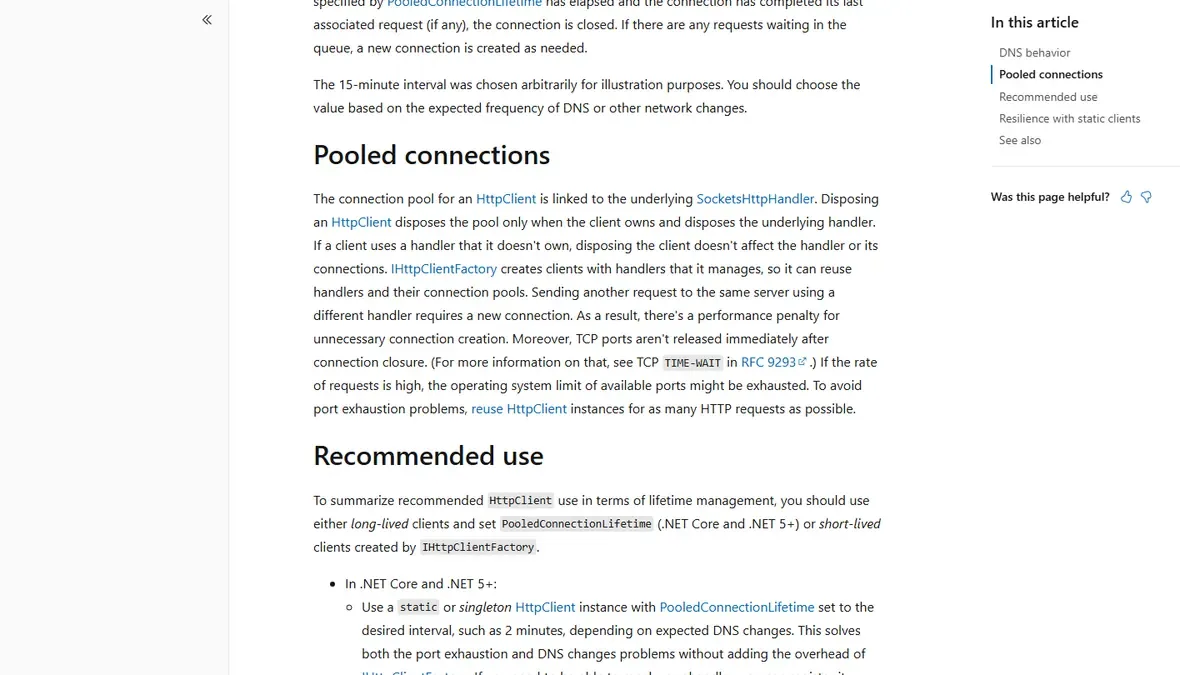
Do not wrap a new HttpClient in using for every application request. Each underlying handler maintains a connection pool, and frequent disposal can force new connections and eventually exhaust ephemeral ports. Microsoft recommends either long-lived clients with PooledConnectionLifetime or short-lived clients created by IHttpClientFactory; it also notes that multiple clients are appropriate when multiple proxies are required. See the official HttpClient lifetime guidelines.
For a long-lived worker, use SocketsHttpHandler directly:
using System.Net;

var proxy = new WebProxy("http://proxy.example.net:12345")
{
    Credentials = new NetworkCredential("username", "password")
};

var handler = new SocketsHttpHandler
{
    Proxy = proxy,
    UseProxy = true,
    ConnectTimeout = TimeSpan.FromSeconds(15),
    PooledConnectionLifetime = TimeSpan.FromMinutes(10),
    PooledConnectionIdleTimeout = TimeSpan.FromMinutes(2),
    MaxConnectionsPerServer = 20
};

var client = new HttpClient(handler, disposeHandler: true)
{
    Timeout = TimeSpan.FromSeconds(30)
};
The ten-minute lifetime is an example, not a universal optimum. PooledConnectionLifetime limits how long a pooled connection remains reusable so that later connections can reflect DNS or network changes. It does not request a new proxy exit IP and is not equivalent to Rola IP rotation or a sticky-session duration. Set it from measured endpoint behavior, throughput, and provider guidance rather than copying a value blindly.
Step 5: Configure a Proxy With IHttpClientFactory
In ASP.NET Core or a generic host, a named client centralizes configuration and lets the factory manage handler reuse:
using System.Net;

var builder = WebApplication.CreateBuilder(args);

builder.Services.AddHttpClient("RolaProxy", client =>
{
    client.Timeout = TimeSpan.FromSeconds(30);
    client.DefaultRequestHeaders.UserAgent.ParseAdd("AuthorizedCollector/1.0");
})
.ConfigurePrimaryHttpMessageHandler(() =>
{
    string host = builder.Configuration["Proxy:Host"]
        ?? throw new InvalidOperationException("Proxy:Host is missing.");
    int port = builder.Configuration.GetValue<int?>("Proxy:Port")
        ?? throw new InvalidOperationException("Proxy:Port is missing.");
    string username = builder.Configuration["Proxy:Username"]
        ?? throw new InvalidOperationException("Proxy:Username is missing.");
    string password = builder.Configuration["Proxy:Password"]
        ?? throw new InvalidOperationException("Proxy:Password is missing.");

    return new SocketsHttpHandler
    {
        Proxy = new WebProxy(new UriBuilder("http", host, port).Uri)
        {
            Credentials = new NetworkCredential(username, password)
        },
        UseProxy = true,
        ConnectTimeout = TimeSpan.FromSeconds(15),
        PooledConnectionLifetime = TimeSpan.FromMinutes(10)
    };
})
.SetHandlerLifetime(TimeSpan.FromMinutes(20));

var app = builder.Build();

app.MapGet("/verify-proxy", async (
    IHttpClientFactory factory,
    CancellationToken cancellationToken) =>
{
    HttpClient client = factory.CreateClient("RolaProxy");
    using HttpResponseMessage response = await client.GetAsync(
        "https://api64.ipify.org?format=json",
        cancellationToken);
    string body = await response.Content.ReadAsStringAsync(cancellationToken);
    return Results.Text(body, "application/json", statusCode: (int)response.StatusCode);
});

app.Run();
The official IHttpClientFactory documentation explains named and typed clients, handler pooling, dependency injection, and an important cookie warning: pooled handlers can share CookieContainer instances, and cookies disappear when a handler expires. Stateful browser-like workflows therefore require deliberate cookie and identity isolation.
PooledConnectionLifetime and SetHandlerLifetime control different layers. The former ages individual pooled connections inside SocketsHttpHandler; the latter determines how long IHttpClientFactory may reuse a primary handler. Neither setting instructs a proxy provider to rotate an exit IP. The endpoint and supported session parameters determine the actual exit behavior.
Step 6: Handle Sticky Sessions and Rotation
Proxy rotation must happen at a defined boundary. Changing handler.Proxy after requests have started is unsafe and may throw; existing pooled connections can also preserve the old route. Instead, create a bounded set of handler/client pairs, one for each route or session identity, and reuse each pair.
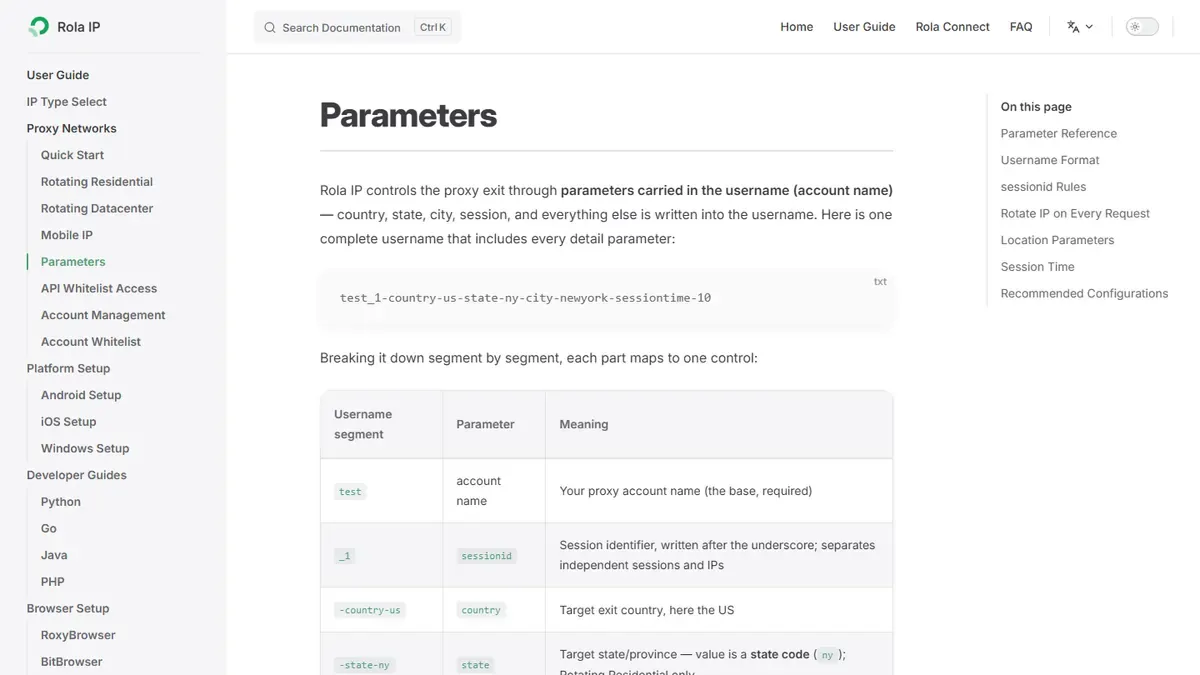
Rola IP documentation describes session and location parameters for supported endpoints; verify the current syntax and account eligibility before deployment. The proxy parameters page was checked on September 11, 2026. It described -country-us for country targeting across the listed networks, an underscore suffix such as _1 for sessionid, -sessiontime-10 with a documented 1–120 minute range, and -f-1 for per-request rotation. It also stated that state and city targeting apply only to Rotating Residential endpoints. These are examples, not permanent guarantees for every product, protocol, region, or account.
Parameter warning: Copy the username generated for the current account. Do not infer support from this example or manually append parameters until the dashboard and current documentation confirm that they apply to the selected endpoint.
Use sticky sessions for a stateful, authorized sequence such as a login followed by permitted account actions. Use per-request rotation only for independent requests that do not share cookies or server-side state. Never rotate identities to defeat blocks, rate limits, or platform enforcement.
static string BuildRolaUsername(
    string baseUsername,
    string countryCode,
    string sessionId,
    int sessionMinutes)
{
    if (!System.Text.RegularExpressions.Regex.IsMatch(countryCode, "^[a-zA-Z]{2}$"))
        throw new ArgumentException("Use a two-letter country code.");
    if (!System.Text.RegularExpressions.Regex.IsMatch(sessionId, "^[a-zA-Z0-9]{1,32}$"))
        throw new ArgumentException("Session ID must be 1-32 letters or digits.");
    if (sessionMinutes is < 1 or > 120)
        throw new ArgumentOutOfRangeException(nameof(sessionMinutes));

    return $"{baseUsername}_{sessionId}-country-{countryCode.ToLowerInvariant()}" +
           $"-sessiontime-{sessionMinutes}";
}
Keep the pool bounded. Do not derive unlimited named-client registrations or cache a new handler for every arbitrary user input; both patterns can consume connections and memory.
Explicit, Default, and Environment Proxies
An explicit handler proxy is usually best for an application that must always use a particular provider. HttpClient.DefaultProxy is a process-wide default, and .NET can initialize it from platform settings or environment variables such as HTTP_PROXY, HTTPS_PROXY, ALL_PROXY, and NO_PROXY. Exact platform behavior is documented in the HttpClient.DefaultProxy reference.
Avoid mixing these mechanisms accidentally. Log only a redacted route label such as us-sticky-01, then record whether the handler uses an explicit proxy. Never log the complete proxy URI if it contains credentials.
Troubleshooting C# HttpClient Proxy Errors
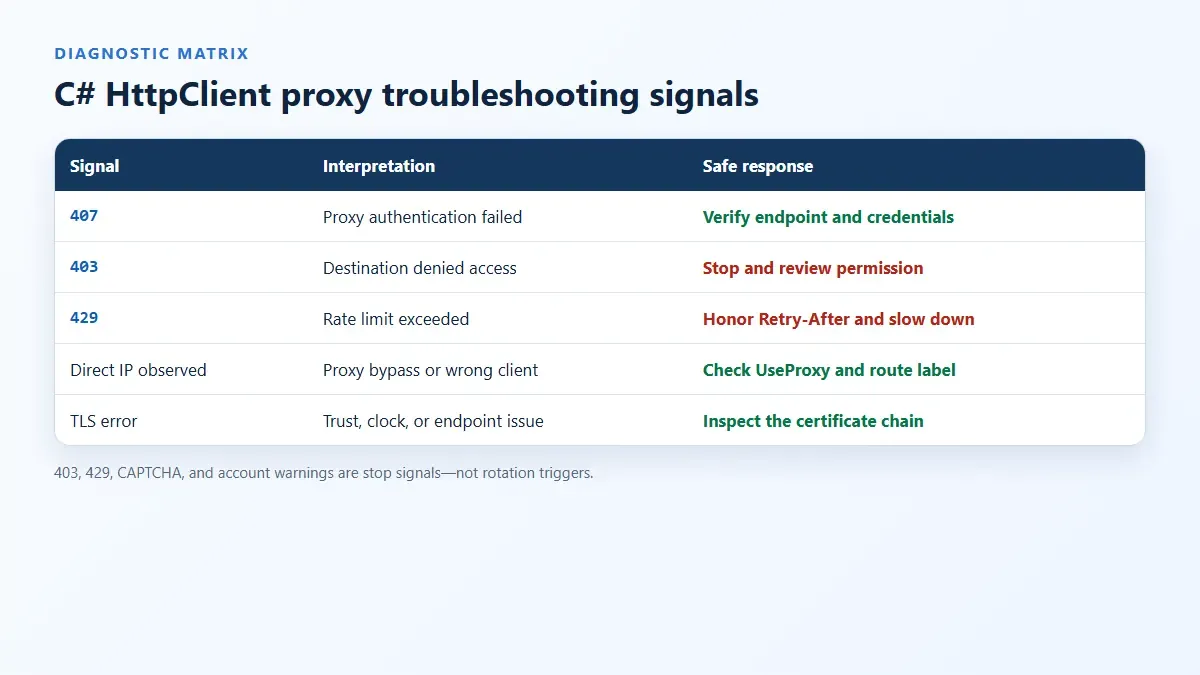
| Symptom | Likely cause | How to verify | Safe fix |
|---|---|---|---|
407 Proxy Authentication Required |
Missing credentials, wrong password, malformed username parameters, or an unsupported auth scheme | Check the provider dashboard and a redacted username; inspect Proxy-Authenticate |
Regenerate credentials and attach them to WebProxy.Credentials |
403 Forbidden |
Destination denied the request or policy does not permit it | Test an authorized diagnostic endpoint; review destination terms | Stop; request access or change the workflow |
429 Too Many Requests |
Request rate exceeds a limit | Read Retry-After and rate-limit headers |
Slow down; honor the documented limit |
HttpRequestException with timeout |
Endpoint, DNS, tunnel, TLS, or destination latency | Separate connect timeout from total timeout; test DNS and TCP reachability | Correct endpoint details and use bounded retries only for transient failures |
| Exit IP equals direct IP | Proxy bypass, wrong client instance, or upstream routing | Print a non-secret client/route label and check UseProxy |
Remove unintended bypass and use the configured client |
| IP changes during a workflow | Rotating mode or expired sticky session | Compare session parameter and timestamps | Use one stable session/client for the sequence |
| Socket exhaustion | A client/handler is created per request | Inspect connection counts and TIME_WAIT |
Reuse clients or adopt IHttpClientFactory |
| TLS certificate error | Interception, wrong system clock, or untrusted issuer | Inspect the certificate chain without disabling validation | Fix trust or endpoint configuration; never accept every certificate |
Do not retry authentication failures indefinitely. A bounded retry may be appropriate for a transient network exception, but repeated 407, 403, 429, CAPTCHA, or access-denied responses are stop signals—not rotation triggers.
What This Tutorial Does Not Prove
- A successful proxy connection does not prove that a business destination will accept the request.
- A changed exit IP does not make a browser, device, or application anonymous.
PooledConnectionLifetimeandSetHandlerLifetimedo not perform provider-side IP rotation.- The HTTP proxy examples do not prove that the same authentication behavior works with a SOCKS5 endpoint.
- Static code review does not replace
dotnet build, integration tests, or an authorized endpoint check. - This article makes no real-time claim about Rola IP speed, success rate, availability, or SLA performance.
Security, Privacy, and Compliance Checklist
- Use only endpoints and destinations you are authorized to access.
- Keep proxy credentials in a managed secret store and rotate exposed secrets immediately.
- Validate the proxy port, country code, session ID, and destination URI before constructing requests.
- Allowlist destinations when the application has a narrow purpose.
- Set connect, request, and cancellation timeouts; cap concurrency and response size.
- Redact credentials, cookies, tokens, query values, and full IP addresses in logs and screenshots.
- Respect robots directives, terms, privacy obligations, copyright, and applicable laws.
- Treat
403,429, CAPTCHA, and account warnings as reasons to stop and investigate. - Monitor status codes, latency, route labels, and error classes without collecting unnecessary personal data.
For an approved collection workflow, a web scraping proxy can provide routing infrastructure, but it does not make prohibited collection permissible. Legal obligations depend on the jurisdiction, the data, the destination, and the exact use.
Production Readiness Checklist
Before deployment, verify all of the following:
dotnet buildsucceeds on the documented SDK version.- A controlled test returns the expected success status through the proxy.
- The observed exit IP matches the intended route or region.
- No credential appears in logs, screenshots, source control, or exception telemetry.
- The client/handler lifetime is explicit and measured under load.
- Sticky sessions remain stable for the required sequence; rotating requests remain independent.
407,403,429, timeout, cancellation, and malformed-configuration paths have tests.- Concurrency and retry limits reflect destination and provider policies.
- Owners, verification date, rollback steps, and secret-rotation procedures are recorded.
Conclusion
Use one deliberately managed handler per proxy route, protect credentials, reuse connections, and verify the route from the destination’s perspective. Add more clients or rotation only at defined, bounded workflow boundaries.
Start with one endpoint and one approved IP-check request. Once that path is verified, add IHttpClientFactory, sticky sessions, rotation, and concurrency only when the workload requires them.