
Error Code 521: What It Means and How to Fix It

Aug 24, 2026 · Troubleshooting · 10 min read
TL;DR
- Visitors: retry once, check whether the site has a status page, and contact the site owner if the error continues.
- Site owners: confirm the web server is running, verify that the correct process listens on the required port, test the origin directly, and inspect firewall rules and origin logs.
- Cloudflare SSL/TLS mode matters: Flexible uses HTTP to the origin. For a standard visitor HTTPS request, Full and Full (Strict) require the origin to accept HTTPS on port 443; Full still follows the visitor-requested scheme.
- Do not start by disabling the firewall or rebooting the whole server. Find the refused connection first, then make the smallest safe correction.
Quick Diagnosis
| Test result | Most likely direction |
|---|---|
| Public URL returns 521 and the direct origin also refuses the connection | Web server process, listener, firewall, or origin address |
| Direct origin works but the Cloudflare URL returns 521 | Cloudflare IP blocking, rate limiting, or the Cloudflare-to-origin protocol |
| Only IPv6 requests or some visitors fail | Stale AAAA record, multiple origins, or an unhealthy load balancer node |
| TCP connects but TLS fails | Certificate, TLS, or SNI issue rather than a basic TCP refusal |
No cf-error-type header appears |
The error may have been forwarded from the origin or generated elsewhere in the request chain; confirm its source before treating it as a Cloudflare-generated 521 |
What Does Error Code 521 Mean?
The important word in a 521 error is refused. The target host actively rejected Cloudflare’s TCP connection, or no service was listening on the expected port. Error 522 instead means the origin connection timed out, while Error 523 means the origin was unreachable.
Error 521 is Cloudflare-specific, not a standard HTTP status code returned by an origin application.
The phrase “Web server is down” can sound as if the whole machine is offline. That is not always true. The server may respond to SSH while Nginx, Apache, Caddy, or another web service is stopped. A firewall can also reject Cloudflare while allowing traffic from your own IP.
What Causes Cloudflare Error 521?
Most 521 incidents fall into four practical groups:
- The web server process is stopped or has crashed. The machine may still be online, but nothing accepts the web connection.
- A firewall or security layer rejects Cloudflare. Hosting firewalls, security groups, Fail2Ban, WAF rules, and rate limits can block Cloudflare IP ranges.
- The origin is not listening on the expected port or protocol. This often appears after a web server, container, certificate, or Cloudflare SSL/TLS change.
- Cloudflare DNS points to the wrong origin. An old
Arecord, staleAAAArecord, or unhealthy load balancer node can send Cloudflare to a host that refuses the connection.
Who Can Fix a 521 Error?
If you are a visitor
You cannot repair the origin server. Save any form data before retrying, wait a few minutes, and look for the site’s official status or support channel. If the error page includes a Cloudflare Ray ID, send it to the site owner along with the URL and approximate time.
Avoid repeated rapid refreshes. They do not fix the origin and can add noise while the owner is checking logs.
If you own or administer the site
You need access to at least one of these surfaces:
- the hosting control panel
- the origin server or container platform
- the Cloudflare zone’s DNS and SSL/TLS settings
- firewall, WAF, Fail2Ban, or security-group rules
- web server and system logs
Before changing anything, record the affected hostname, URL, time, Cloudflare Ray ID, and whether the failure is constant or intermittent. That small evidence bundle makes log searches far easier.
How to Fix Error Code 521
Work through the checks in order. Each step narrows the failure without hiding it behind a broad restart or security change.
1. Confirm the web server process is running
On a Linux server using systemd, check the service that actually serves the site:
sudo systemctl status nginx
sudo systemctl status apache2
Run the command for the server you use; the two lines above are alternatives, not a sequence.
Success should show active (running). If the service is stopped, inspect its recent logs before starting it. A configuration error, exhausted memory, failed dependency, or bad certificate path may cause it to stop again immediately.
If you use containers or a managed host, check the container, deployment, or hosting dashboard instead. A running virtual machine does not prove the web application is accepting requests.
2. Verify that the origin listens on the expected port
For a typical visitor HTTPS request, Flexible sends the Cloudflare-to-origin connection over HTTP, normally to port 80. Full and Full (Strict) preserve HTTPS and therefore require the origin to accept HTTPS, normally on port 443. If the visitor request itself uses HTTP under Full or Full (Strict), Cloudflare connects to the origin over HTTP.
Cloudflare also proxies several nonstandard HTTP and HTTPS ports. If the failing URL explicitly uses a supported alternate port, verify the listener and firewall rule for that port instead of assuming 80 or 443.
On a typical Linux origin, this command shows listeners on those ports:
sudo ss -ltnp | grep -E ':(80|443)\s'
Expected output includes a LISTEN entry for the required port and the correct web server process. No matching listener explains a connection refusal. A listener bound only to 127.0.0.1 also cannot accept Cloudflare traffic arriving on the server’s public or private network interface.
3. Confirm that Cloudflare points to the correct origin IP
Open the zone’s DNS records and check the A or AAAA record for the failing hostname. Compare it with the current origin address shown by your hosting provider.
This catches a common failure after a migration or server replacement: Cloudflare continues connecting to an old address where nothing listens. If an AAAA record exists, confirm that the origin really serves the site over IPv6. A stale IPv6 record can create confusing, partial failures.
Do not expose the origin IP in public screenshots or support posts. Share it only with trusted administrators or the hosting provider.
4. Confirm that Cloudflare generated the 521
Cloudflare-generated error pages now include diagnostic response headers. Capture the failing public response with verbose curl output:
curl -v https://example.com/ -o /dev/null
Look for cf-error-type in the response headers. Cloudflare documents values in the 52x family as origin-connectivity errors, including 521 through 526. The related cf-error-origin header identifies which Cloudflare system generated the error.
If these headers are absent, do not assume that a status line or branded-looking HTML page came from Cloudflare. An origin, upstream proxy, gateway, or cached response may have produced it. You can also inspect the failing request under Network > Headers in browser DevTools.
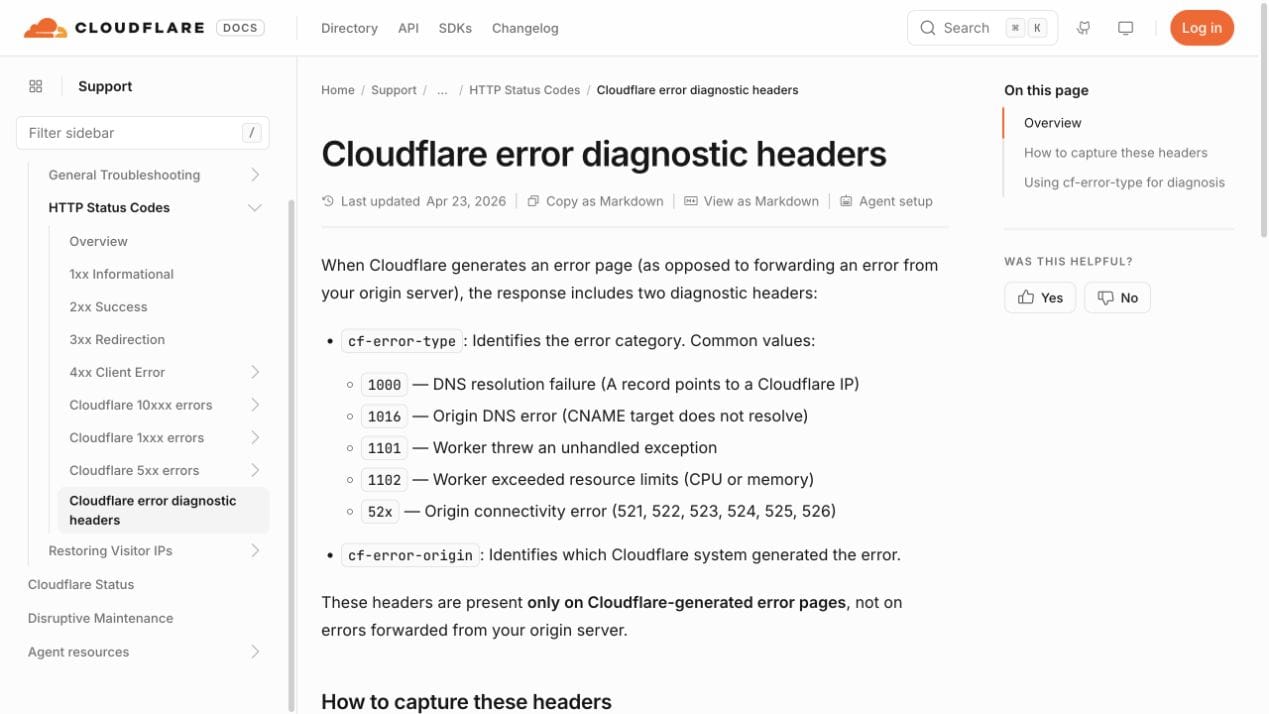
Cloudflare diagnostic headers help distinguish a Cloudflare-generated 52x response from an error produced elsewhere in the request chain.
5. Test the origin directly while preserving the hostname
A plain request to the public domain tests the Cloudflare path:
curl -I https://example.com/
It does not prove that the origin works when contacted directly. Use --resolve to send the request to the origin IP while preserving the hostname for the HTTP Host header and TLS Server Name Indication:
curl -I --connect-timeout 10 \
  --resolve example.com:443:ORIGIN_IP \
  https://example.com/
For a zone using Flexible mode, test HTTP on port 80 instead:
curl -I --connect-timeout 10 \
  --resolve example.com:80:ORIGIN_IP \
  http://example.com/
Replace example.com and ORIGIN_IP with your real values. A 200, expected redirect, or application response proves that something accepted the connection. curl: (7) Failed to connect supports a listener, firewall, routing, or address problem. A certificate validation error proves that TCP and TLS progressed further, so do not classify it as a basic connection refusal.
Two caveats matter here:
- If the origin uses a Cloudflare Origin CA certificate, a local curl client may report a trust error even though Cloudflare can validate that certificate. Origin CA certificates secure the Cloudflare-to-origin connection and are not intended to be trusted directly by ordinary client devices.
- If the origin intentionally accepts traffic only from Cloudflare IP ranges, a direct request from your laptop may be blocked by design. Run the test from an allowed network or interpret that rejection in the context of the firewall policy.
6. Check whether the firewall blocks Cloudflare
If the origin works from another path but Cloudflare still receives a refusal, inspect every enforcement layer between Cloudflare and the service:
- cloud firewall or hosting security group
- operating-system firewall
- hosting provider network controls
- Fail2Ban or similar automated blocking
- web application firewall or security plugin
- connection and rate limits
Allow Cloudflare’s complete, current IPv4 and IPv6 ranges on the required web ports. Use Cloudflare’s official IP Ranges page as the source of truth instead of copying a static list from an article. The ranges can change, and an incomplete list creates intermittent failures that are hard to diagnose.
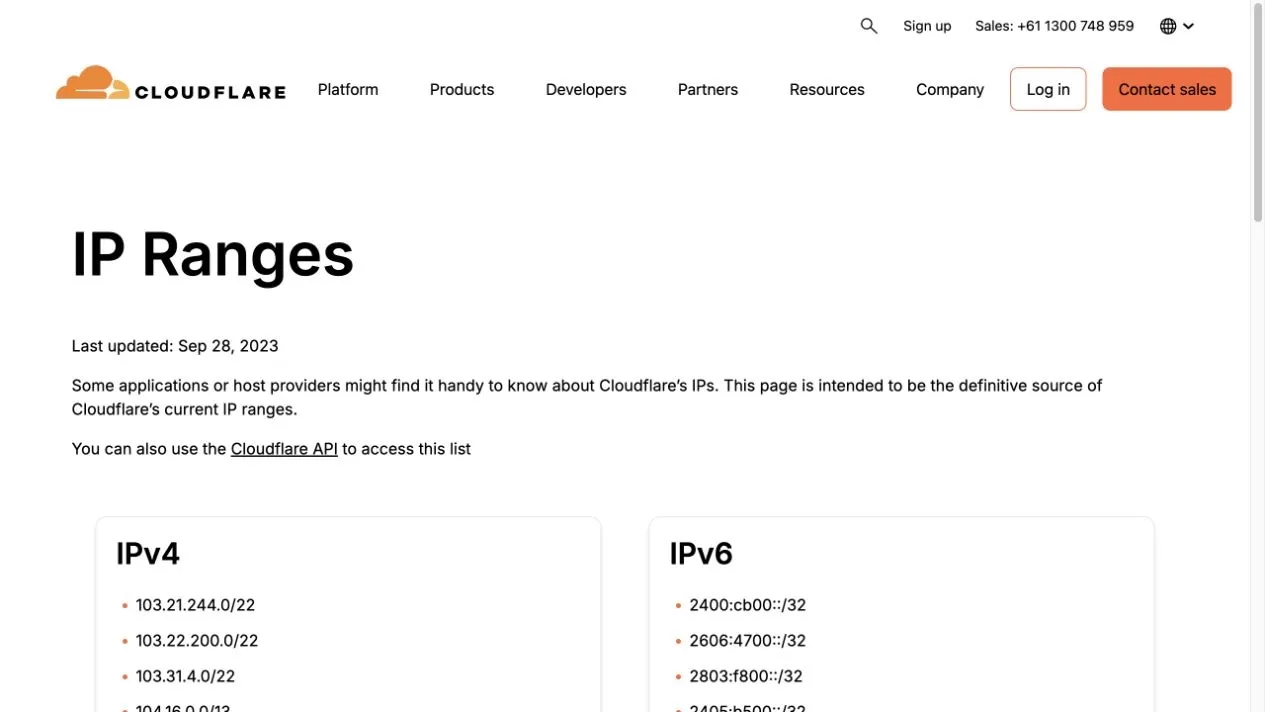
Use Cloudflare’s maintained IP Ranges page when reviewing origin allowlists.
Do not turn off the firewall as the first test on a public server. Review logs and rule counters, add a narrowly scoped allow rule, and keep a rollback path. If a managed host controls the firewall, ask support to confirm that Cloudflare ranges are allowed and not rate limited.
7. Match the refusal time with origin logs
Check the web server, system, firewall, and security logs around the captured timestamp. On a systemd-based Nginx server, a focused starting point is:
sudo journalctl -u nginx --since "15 minutes ago"
Look for service crashes, bind failures, too many open files, out-of-memory events, rejected source addresses, certificate loading errors, or connection-limit messages.
No web server access entry can be useful evidence. It may suggest that the request was refused before the application handled it, especially when firewall or system logs show a matching rejection. First confirm that access logging is enabled, that you are reading the correct log and node, and that an upstream reverse proxy is not recording the request elsewhere.
8. Verify Cloudflare SSL/TLS mode and the origin certificate
Cloudflare manages two separate connections: visitor to Cloudflare, and Cloudflare to the origin. The zone’s encryption mode controls the second connection.
- Flexible uses HTTP from Cloudflare to the origin, even when the visitor connects to Cloudflare over HTTPS.
- Full uses the scheme requested by the visitor. An HTTP request continues to the origin over HTTP, while an HTTPS request continues over HTTPS. For HTTPS, the origin must accept the connection and present a certificate, but Full does not validate that certificate.
- Full (Strict) follows Full’s scheme behavior and also validates the origin certificate. For HTTPS, the certificate must be unexpired, match the hostname, and be issued by a publicly trusted CA or Cloudflare Origin CA.
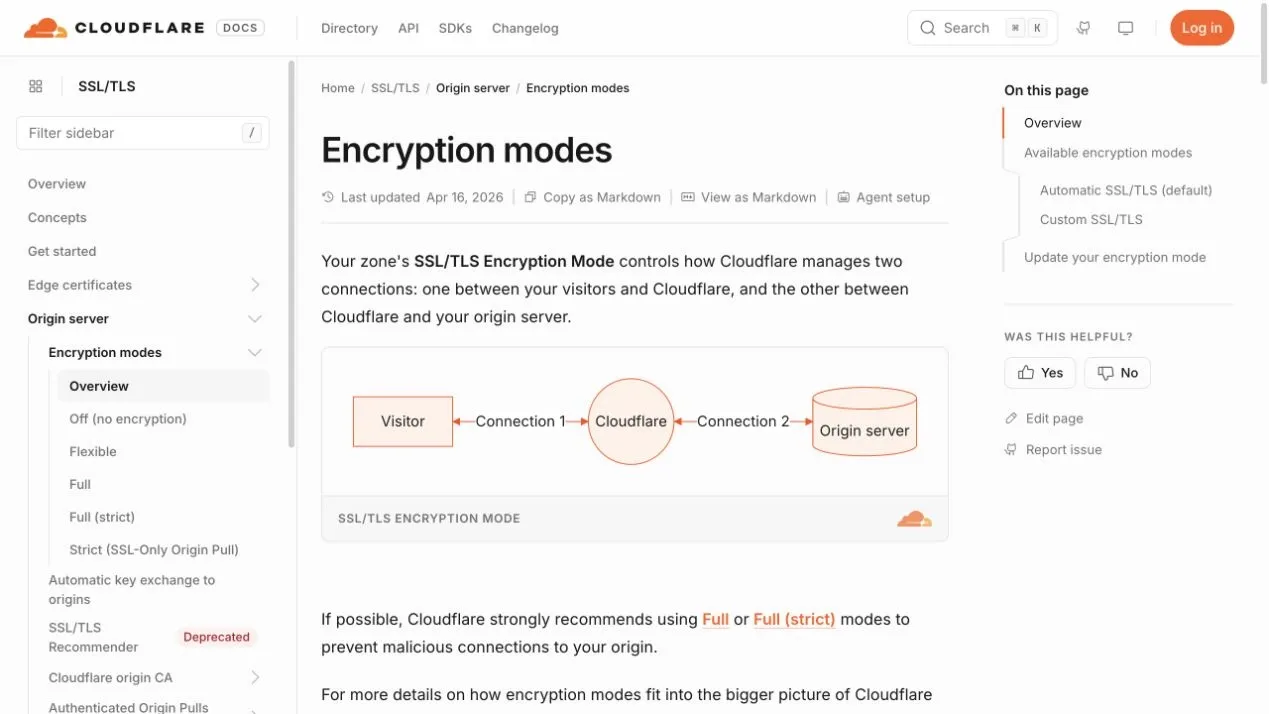
Cloudflare’s SSL/TLS mode controls the separate connection from Cloudflare to the origin.
For a standard HTTPS request in Full or Full (Strict), confirm that the origin accepts HTTPS on port 443. Check the certificate name, expiration, chain, and server configuration. Do not weaken the zone to Flexible as a permanent shortcut. Configure HTTPS correctly on the origin, then use Full (Strict) where possible.
Certificate problems can also surface as Cloudflare Error 525 or 526, depending on the failure. The exact error page and origin logs should decide the next step.
9. Verify the fix from both paths
After one targeted change:
- Repeat the direct-origin
curl --resolvecheck. - Request the public Cloudflare-proxied hostname.
- Confirm that the expected page or status appears consistently.
- Watch origin and firewall logs for new refusals.
- Test more than once if the site has multiple origins or load-balanced nodes.
Do not rely only on a browser refresh. A cached page can hide an unhealthy origin, while a load balancer can send your next request to a different node.
Error 521 vs. Other Cloudflare Errors
| Error | What the signal generally means | First place to investigate |
|---|---|---|
| 520 | Cloudflare received an unexpected or invalid origin response | Origin response, headers, application, and logs |
| 521 | The origin refused Cloudflare’s connection | Web service, listening port, firewall, and correct origin IP |
| 522 | The connection to the origin timed out | Routing, packet loss, firewall drops, load, and origin reachability |
| 523 | Cloudflare could not reach the origin | DNS origin address and network route |
| 525 | The SSL handshake between Cloudflare and the origin failed | TLS versions, ciphers, certificate, and port 443 service |
| 526 | Cloudflare could not validate the origin certificate | Certificate validity, hostname, chain, and Full (Strict) requirements |
The wording on the actual Cloudflare page matters. Treating every 52x error as the same outage leads to random fixes and longer downtime.
Seeing Error 521 While Using a Proxy?
A proxy cannot fix a genuine Cloudflare-to-origin 521 error. If the error appears only when the same URL is requested through a proxy, compare the direct and proxied paths before rotating IPs or changing code. Save the status, response headers, cf-error-type value, and a short sanitized body sample from both paths.
If only the proxy path fails, first validate the endpoint with an independent proxy checker. Then compare the host, port, protocol, and authentication format with the proxy quick start. If the proxy itself cannot connect or repeatedly has no network access, follow the focused proxy API connection failed troubleshooting page.
That comparison answers an important question: are you looking at a genuine Cloudflare-to-origin 521, a response generated somewhere else in the request chain, or a separate proxy connectivity failure? Rotating proxies may change a client-side route, but it is not a general fix for a stopped origin service or a firewall blocking Cloudflare.
How to Prevent Error 521 From Returning
- Monitor both the public URL and the origin service where your architecture permits it.
- Alert on service restarts, failed health checks, connection saturation, and memory pressure.
- Keep Cloudflare IP allowlists synchronized from the official source.
- Review firewall and Fail2Ban changes after security updates.
- Confirm DNS records after migrations, failovers, and origin replacements.
- Renew and deploy origin certificates before expiration.
- Use a health check that exercises the correct hostname and protocol, not only ICMP ping.
- Keep a short incident record with the timestamp, Ray ID, failing node, cause, change, and verification result.
Ping can support a network investigation, but it is weak evidence by itself. ICMP may be blocked while HTTPS works, and a ping response does not prove that the web service listens on port 80 or 443.
How We Verified These Steps
The curl diagnostic flow was validated locally with both a listening service and an unused port. Direct and --resolve requests to the listening service returned 200, while the unused port produced curl: (7) ... Couldn't connect to server.
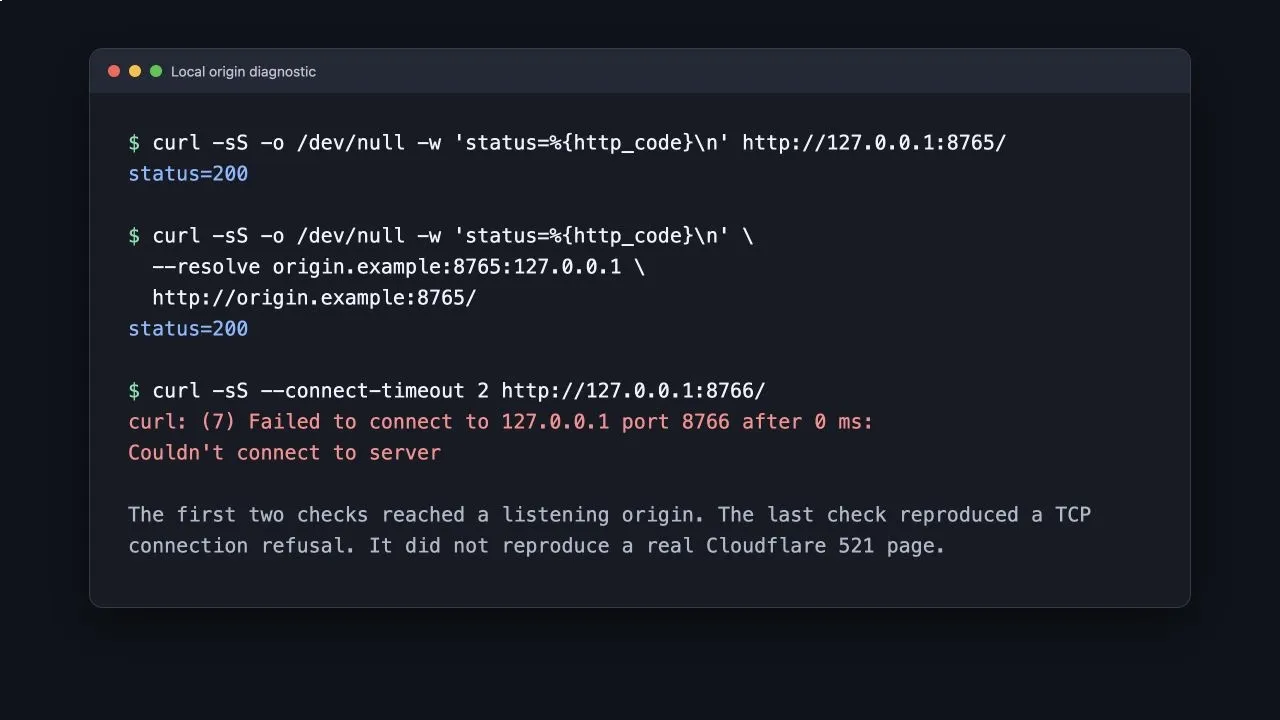
This local reproduction verifies the connection signals. It does not claim to reproduce a real Cloudflare 521 page.
Server-specific commands such as systemctl, ss, and journalctl were checked for their intended Linux use but were not run against a production origin. A real Cloudflare 521 was not deliberately triggered because no authorized Cloudflare-proxied test domain was supplied.
Final Takeaway
Error code 521 is a narrow signal: Cloudflare’s connection to the origin was refused. Start with the web service and required port, then verify the origin address, test the origin with the correct hostname, inspect security rules, and match the failure to logs. Visitors can report the evidence, but the lasting fix belongs on the origin or its network path.