
Best Data Extraction Software: A Practical 2026 Guide

Aug 24, 2026 · Use Cases · 9 min read
TL;DR
- Choose by source type first: documents, databases/APIs, authorized web pages, or damaged storage.
- Evaluate extraction quality with a labeled sample, not a vendor demo alone.
- Free plans are useful for proof-of-concept work; confirm export limits, retention, and commercial rights.
- Keep raw files, extracted values, confidence or validation status, and source identifiers together.
- Hard-drive recovery is a separate discipline from document or web data extraction.
Classify the extraction job before comparing tools
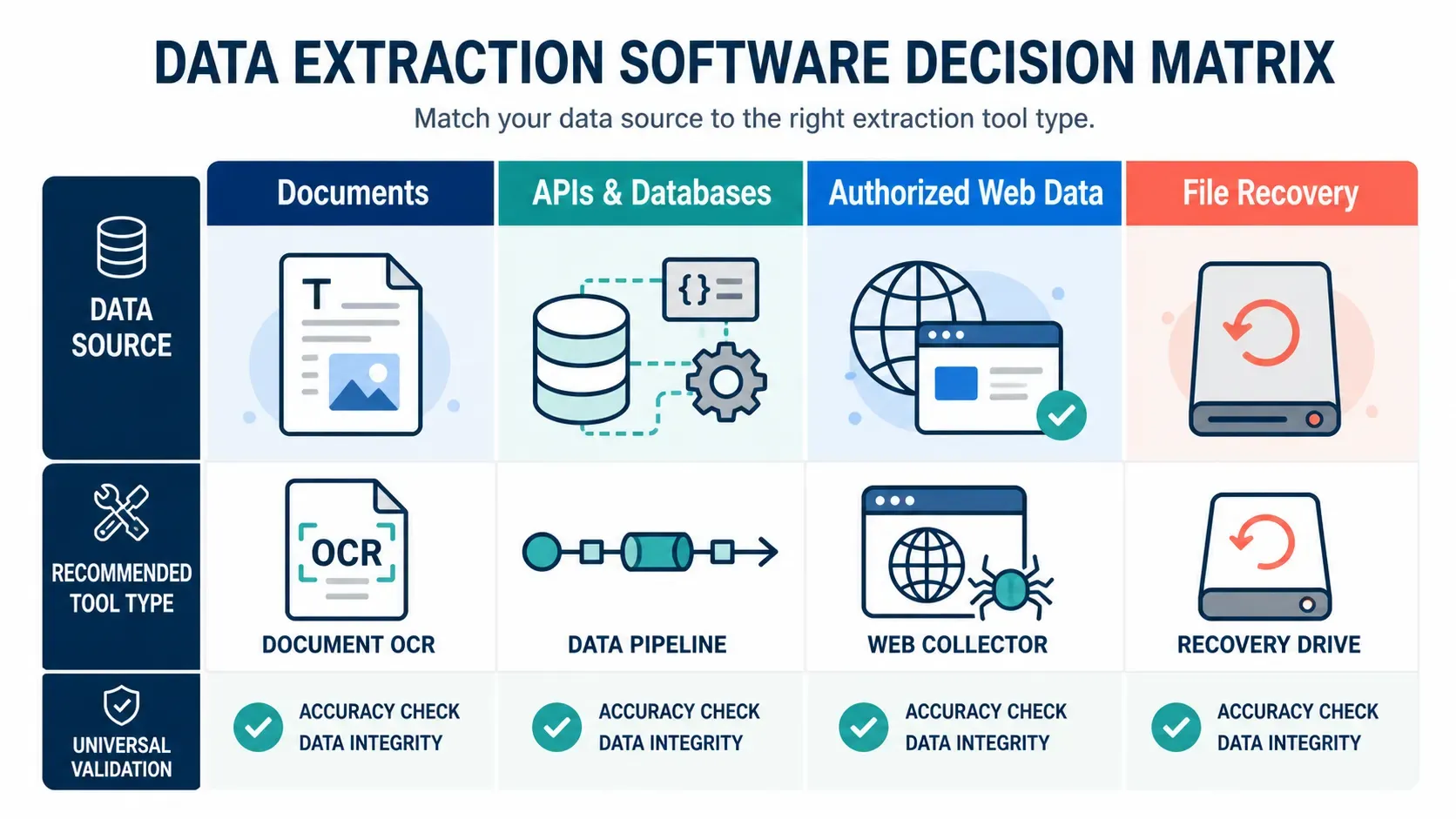
Many lists of data extraction tools mix fundamentally different jobs. That can make a shortlist look complete while hiding the most important constraint: where the data originates and what permission you have to use it.
| Source | Typical input | Best starting category | Primary quality risk |
|---|---|---|---|
| Business documents | PDFs, scans, invoices, forms, emails | OCR or intelligent document processing | Incorrect fields, tables, or handwriting |
| Business systems | SQL databases, SaaS apps, file drops | API connector, ETL, or ELT pipeline | Schema drift and incomplete incremental loads |
| Authorized public web data | HTML, JSON endpoints, permitted exports | Browser-assisted extractor, scraper, or API client | Source-policy changes and selector failure |
| Damaged storage | An unreadable disk, memory card, or file system | Data-recovery or forensic imaging software | Overwriting recoverable data |
The distinction matters. Rossum’s market overview separates structured, semi-structured, and unstructured inputs and frames extraction as the first stage of ETL. That is useful context, but a purchase decision still needs a source-specific test. For document workflows, product categories such as template parsing, OCR, and AI document processing answer different levels of layout variation. For web workloads, use only official APIs, licensed feeds, partner exports, or pages whose automated access is authorized.
Use this scorecard to shortlist the best data extraction software
Build a one-page requirements sheet before arranging demos. Give each requirement a weight from 1 to 5, then score each candidate on evidence from your own sample files or approved test endpoint.
| Criterion | Questions to ask | Evidence to request |
|---|---|---|
| Input coverage | Can it read the exact formats, languages, layouts, and volumes? | A run on your redacted sample set |
| Extraction quality | Does it identify values, tables, line items, and dates correctly? | Field-level precision and recall, not just a headline accuracy rate |
| Validation | Can a person review exceptions and correct values? | Review queue, confidence rules, and audit trail |
| Integration | Can it write to your warehouse, CRM, object storage, or API? | Export schema, webhook/API documentation, retry behavior |
| Security and governance | Where are files stored and who can access them? | Data-processing terms, retention controls, roles, and logs |
| Operations | Can you monitor failures and changing layouts? | Alerting, versioning, support process, and test environment |
| Cost model | Is billing per page, field, task, user, or compute unit? | A written quote for the expected monthly volume |
Do not compare only feature checklists. A tool that is 99% accurate on a clean invoice field may still be expensive if the remaining 1% forces a full manual review. Define an acceptable exception rate and measure it against representative documents, pages, or records.
Compare seven data extraction software candidates
The table below is a shortlist by workflow, not a universal ranking. “Validation” means a documented review feature when one is stated by the vendor; where it says “external QA,” plan to add your own field checks and reconciliation. All free-option, deployment, and output claims were checked against the linked official pages on 2026-08-24. Confirm current terms before purchase or production use.
Tool |
Data source type |
Deployment |
Validation capability |
Output |
Free option |
Best fit and limitation |
|---|---|---|---|---|---|---|
PDFs, Word, CSV/XLS, XML, images |
Cloud-only |
Rule configuration; add external field-level QA for acceptance |
Excel, CSV, JSON, XML, Sheets, integrations |
Recurring business documents with stable or configurable rules; not an on-premises option (official FAQ). |
||
Transactional documents from email, API, or upload |
Cloud service |
Document validation screen and human-in-the-loop exception handling |
API plus downstream integrations |
Enterprise document workflows needing review queues; annual contract and enterprise scope can be excessive for a small pilot. |
||
Authorized web pages, APIs, and custom Actors |
Managed cloud platform |
Application-defined; inspect dataset results and add your own QA |
Dataset/API output and integrations |
Developers and teams building approved collection jobs; Actor capability, terms, and cost vary by Actor and usage. |
||
Authorized web pages |
Desktop app; paid tiers add cloud execution |
Task review/monitoring is tier-dependent; use external data QA |
File exports, databases, and API availability vary by plan |
No-code local web extraction for small approved projects; free plan has task/export caps and no cloud run. |
||
APIs, databases, SaaS sources, and files |
Self-managed open source or managed cloud |
Pipeline monitoring and schema controls; business-value checks remain external |
Configurable destination connectors |
Engineering teams moving permitted system data; it is a data-movement platform, not OCR or a document-review UI. |
||
Lost files on disks, cards, and damaged file systems |
Local, multi-platform utility |
No field validation; verify recovered files manually |
Recovered files written to a separate destination |
File recovery only; it does not extract business fields or web data and may not preserve names or folder structure. |
||
Delimited files and exports you are authorized to process |
Local Python runtime |
Fully custom validation you implement and test |
CSV read/write; integrate with any approved destination |
Included with Python |
Technical teams needing transparent, reproducible CSV handling; code ownership and validation design stay with your team. |
A practical recommendation by use case
Use Docparser for a fast cloud proof of concept on recurring documents, and Rossum when an enterprise document workflow needs an explicit validation queue. Use Airbyte for supported API, database, or SaaS replication; it is usually a better fit than a web collector when a documented connector exists. Use Apify or Octoparse only for authorized web data, choosing Apify for code and platform flexibility and Octoparse for a point-and-click local start. Use PhotoRec only when the task is recovering lost files. Python’s CSV module is the control option when a team can own the code and only needs a small, auditable transformation.
Choose a tool category by workflow
Document extraction and OCR
Choose document extraction software when the source is a PDF, scan, email attachment, image, or form. A template-based parser can be efficient when layouts are stable. OCR identifies text; it does not automatically guarantee that the extracted value is the correct invoice number, total, or line-item quantity. AI-assisted products can handle more variable layouts, but they still need review rules and test data.
The Docparser product overview describes rule-based parsing and structured exports, while Rossum’s official pricing page describes its validation screen and exception handling. Treat these as features to verify in your own pilot, not proof that either product fits your documents. For sensitive documents, test redacted samples first and involve the security owner before uploading production files.
API, database, and file-based extraction
Use an API connector or ETL/ELT pipeline when the publisher offers a supported interface. This is normally the most maintainable route because a documented API can provide stable identifiers, quotas, and an explicit schema. Build incremental extraction around an updated_at cursor or change token where the source supports it, and record the source version and run time.
For a small pilot, a CSV export plus a validation script may be enough. For a production pipeline, add idempotent loads, schema checks, access controls, and monitoring. The Rola IP documentation is a separate implementation reference when an approved workflow needs to configure network access; it does not grant access rights to a data source.
Authorized web extraction
Web extraction is appropriate only when the site owner, contract, API, or license permits it. Prefer the source’s API or downloadable export. When HTML collection is authorized, use a truthful user agent, a limited request rate, fixture tests, and an owner contact. A 401, 403, 429, or challenge page is a stop signal that requires an approved route, not a bypass.
For permitted collection across approved regions, a web scraping proxy may be part of the network design after authorization and rate limits are defined. Use it for a documented workload, with identifiable credentials and logs. Do not use a proxy service to evade a platform’s restrictions or hide the collector’s identity.
A brief note on hard-drive recovery
The query data extractor hard drive recovery is a separate task, not a software-selection category for document, API, or web extraction. Recovery utilities locate lost files; they do not turn accessible documents or web pages into structured business fields. If data is valuable, stop writing to the affected drive and follow the recovery tool’s direction to use a different destination for recovered files. Keep recovery evaluation separate from the main extraction-tool shortlist.
Run a small, reproducible evaluation
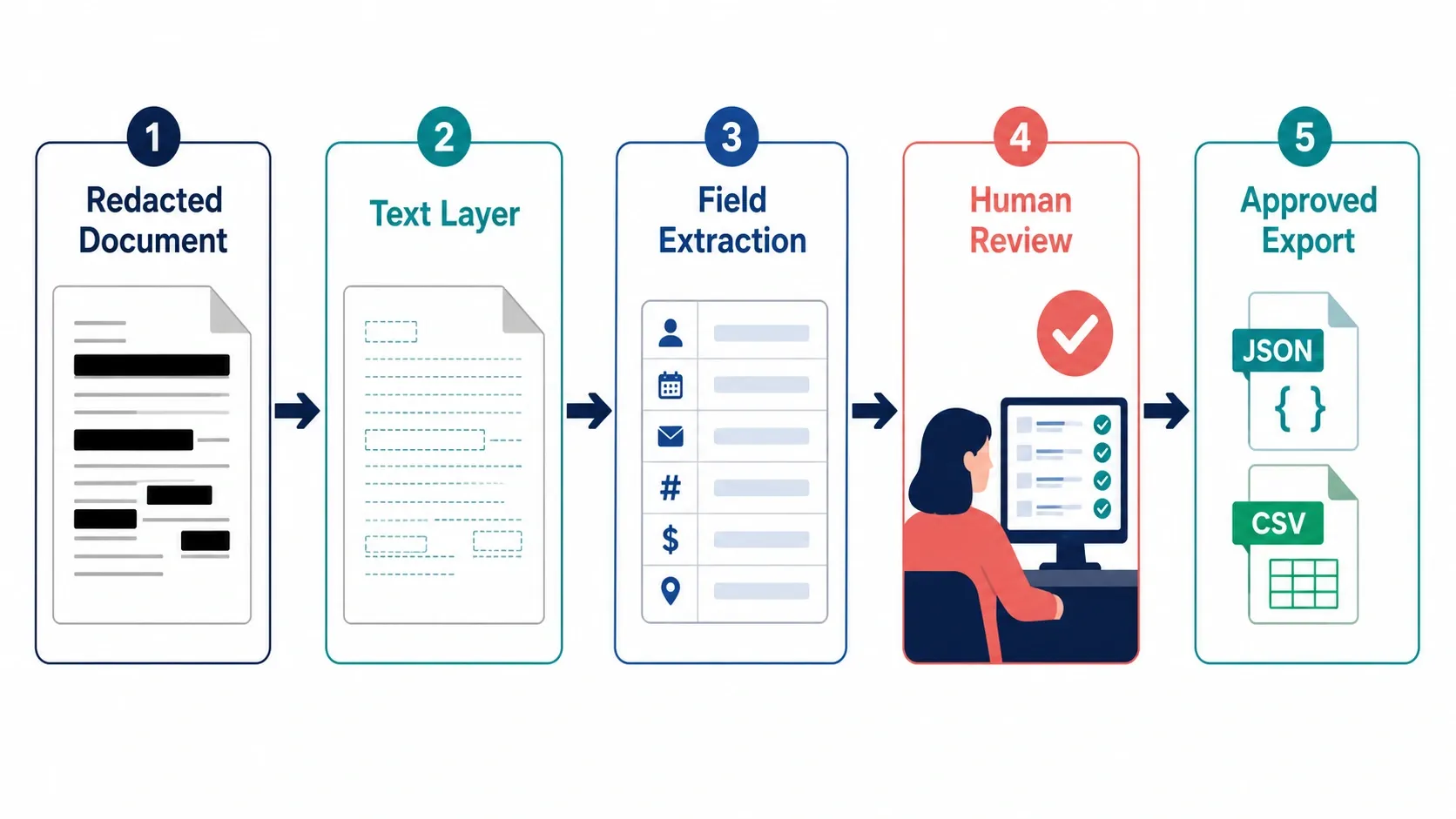
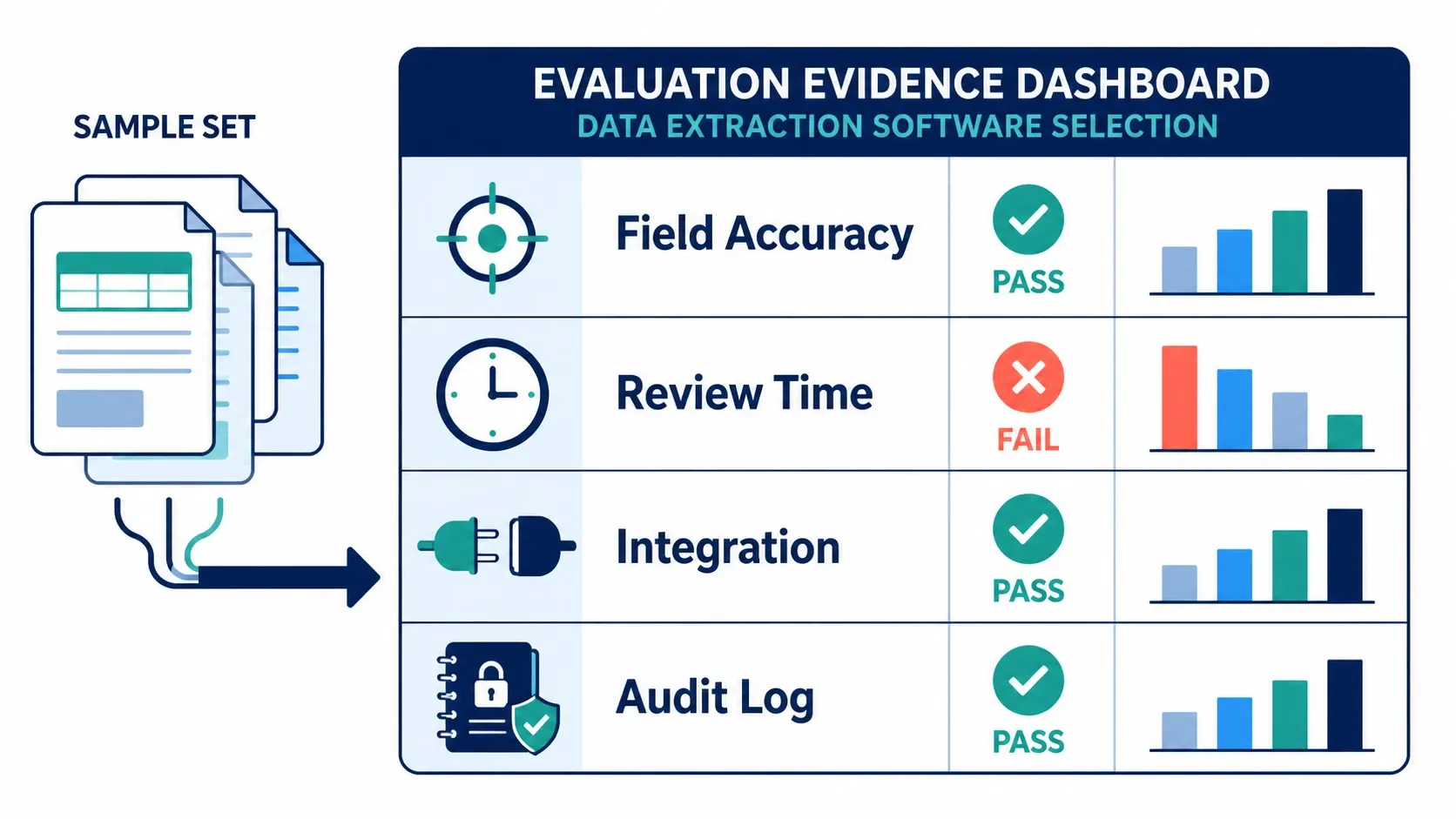
The fastest way to compare candidates is a controlled pilot. Use the same samples, success criteria, and export destination for every tool.
- Select 50-200 representative, authorized samples. Include clean cases, exceptions, and the layouts that cause the most rework.
- Define fields and acceptance rules. For example, an invoice number must match a known reference; a price must have a currency; a URL must match an approved domain.
- Redact personal or confidential information before trial uploads unless the vendor agreement and controls permit production data.
- Run each candidate without manual correction first. Capture field-level correctness, processing time, failure reason, and the number of records needing review.
- Run a second pass with the intended validation workflow. Measure the human minutes required to resolve an exception.
- Export the accepted result to the destination system and reconcile record counts, identifiers, and totals.
Here is a minimal evaluation record that works in a spreadsheet, CSV, or database. For programmatic CSV handling, follow the Python CSV module guidance, including its newline recommendation when opening files.
sample_id,field,expected_value,extracted_value,status,review_minutes,tool_version
inv-001,invoice_total,1250.00,1250.00,pass,0.0,trial-2026-08
inv-002,invoice_number,AC-1048,AC-104B,fail,1.5,trial-2026-08
web-017,product_url,https://partner.example/p/17,https://partner.example/p/17,pass,0.0,trial-2026-08
The second row is more informative than an aggregate score: it tells the team the failure mode, how a reviewer detected it, and the cost of correction. A tool should be selected on that operational evidence.
Free downloads: useful, but check the boundary
Searches for Data Extractor software free download and free data extraction tools often lead to extensions, trial installers, open-source libraries, or recovery utilities. “Free” can mean no-cost software, a capped free tier, a time-limited trial, or a download that still requires a paid key for exports.
Before downloading, confirm all of the following:
- Download from the publisher, a trusted package registry, or an organization-approved software catalog.
- Verify the publisher, license, operating-system support, and checksum or signature when supplied.
- Read what the free tier permits: sample volume, scheduling, exports, API access, commercial use, and data retention.
- Scan installers through the organization-approved endpoint-security process. If your application accepts uploads, apply the OWASP file-upload controls as well.
- Do not upload confidential documents or credentials to a trial service before its privacy and processing terms are approved.
For a developer-led proof of concept, open-source parsers can be appropriate. They shift the cost from license fees to maintenance, security updates, observability, and model or template tuning. A no-cost download is not automatically a no-cost production system.
Design the validation layer before automation scales
Extraction is only useful when downstream users can trust the result. Add validations that reflect the business meaning of each field instead of only checking that text was found.
| Validation | Example | Why it catches real defects |
|---|---|---|
| Format | Date parses as ISO 8601 | Finds OCR substitutions and locale conflicts |
| Reference match | Invoice ID exists in the purchase-order system | Detects plausible but wrong text |
| Range | Quantity is non-negative and within expected bounds | Flags decimal or unit errors |
| Reconciliation | Sum of line items matches total within tolerance | Detects table shifts and missing rows |
| Source provenance | Record retains source ID, file hash, and extraction time | Makes auditing and reprocessing possible |
Version the configuration, prompts, templates, or selectors used by the tool. When a result changes, you need to know whether the source changed, the tool changed, or the validation rule changed. If approved web extraction is part of the workflow, review proxy quick start only after source authorization, scope, and rate policies are settled.
Common selection mistakes and fixes
| Symptom | Likely cause | How to verify | Practical fix |
|---|---|---|---|
| Great demo, poor production output | Trial samples were too clean | Compare layout and exception rates | Add edge cases and real volume to the pilot |
| Exported data cannot be joined | No stable source identifier | Inspect source and destination keys | Preserve source ID and a deterministic record key |
| Review costs erase automation gains | Confidence thresholds are too broad | Measure review minutes by field | Route only risky fields to human review |
| Web job stops with 429 or 403 | Access or rate policy is not satisfied | Check source response and agreement | Pause and use the documented API, feed, or contact path |
| Recovery scan finds little data | Drive was used after loss or is physically failing | Check disk health and write activity | Stop writes; image the drive or use a recovery specialist |
Make the selection evidence-led
The best data extraction software is not a single product category. Identify the source, verify permission, test representative data, measure validation effort, and keep a record of the route from source file or page to final record. That process will produce a shortlist that is cheaper to operate and easier to defend than a choice based on a feature list alone.