
Request Failed with Status Code 422: Causes and Fixes

Aug 24, 2026 · Troubleshooting · 8 min read
TL;DR
Request failed with status code 422 means the server understood the request content type and syntax but could not process its instructions. Inspect the response body first, then check required fields, data types, enum values, nested objects, API versions, and resource state. Reproduce the problem with the smallest valid payload and change one field at a time. If a proxy is involved, compare the same request directly and through the proxy. A matching 422 response usually points to request validation rather than network routing.
If you see this error in Python Requests, Axios, Postman, a browser fetch call, or an API automation script, do not start by retrying or changing IP addresses. A 422 response is usually a precise signal: the server parsed the request, but at least one value, field, header, or business rule failed validation.
This guide explains what HTTP 422 means, how it differs from other 4xx errors, how to read the response body, how to fix common payload mistakes, and how to test whether a proxy path is relevant to the failure.
What HTTP 422 Means
422 Unprocessable Content is a 4xx client error. RFC 9110 defines it as a response for requests whose content type and syntax are understood, but whose instructions cannot be processed. In older articles and frameworks, you may still see the name 422 Unprocessable Entity; the practical troubleshooting meaning is the same for most API debugging work.
It helps to compare 422 with nearby status codes:
| Status Code | What It Usually Means | What to Check First |
|---|---|---|
| 400 Bad Request | The server cannot parse the request syntax | Malformed JSON, invalid form encoding, broken query syntax |
| 401 Unauthorized | Authentication is missing or invalid | Token, API key, session, authorization header |
| 403 Forbidden | The requester is known but not allowed | Permissions, scopes, access policy |
| 404 Not Found | The resource or route is not found | URL, path parameters, API version |
| 422 Unprocessable Content | The request is parseable but semantically invalid | Field values, schema rules, resource state, business constraints |
In plain language, a 422 response is like submitting a form in the correct format but with invalid content. The server can read the form, but it cannot accept one or more values inside it.
Why “Request Failed with Status Code 422” Happens
The fastest way to fix a 422 error is to stop treating it as a generic failure. It usually comes from one of these validation problems.
The JSON Parses but Violates the Schema
Valid JSON is not always valid API input. An endpoint may require an integer but receive a string, expect an array but receive a single object, require an ISO 8601 timestamp but receive a local date, or reject a nested object because one required child field is missing.
For example, this payload is valid JSON, but it is likely to fail validation:
{
  "customer_id": "",
  "amount": "1999",
  "currency": "US",
  "requested_at": "08/22/2026"
}
The JSON syntax is fine. The field values are not.
The Content-Type Does Not Match the Body
When sending JSON, use Content-Type: application/json and make sure your client is actually sending JSON. In Python Requests, that usually means json=payload, not data=payload. In browser code, it means JSON.stringify(payload) plus the correct header.
Required Fields Are Missing
Many APIs return field-level details in keys such as errors, detail, field, path, loc, or message. Read those fields before changing the request. The exception text alone, especially in Axios or Requests, often hides the useful validation details.
Enum Values, Ranges, and Lengths Are Invalid
Fields such as currency, language, status, country code, date, quantity, and category often have strict constraints. A value can be almost right and still rejected. Watch for capitalization, whitespace, minimum and maximum values, and allowed enum strings.
The Resource State Blocks the Action
Some 422 errors are not about field formatting. The request may be structurally correct, but the current resource state does not permit the requested action. For example, an order may already be closed, an invoice may already be paid, an account may lack a required verification state, or a date range may conflict with an existing booking.
The API Contract Changed
Old code examples can continue sending fields that have been removed or renamed. If a previously working request starts returning 422, check the current API documentation, version header, schema, and changelog before assuming the server is unstable.
Diagnose a 422 Error Quickly
Start with the response body. A 422 response often contains the exact field path and rule that failed.
- Save the method, URL, request-header names, redacted request body, status code, response headers, and response body.
- Confirm the method, route, path parameters, and API version.
- Confirm Content-Type, Accept, authentication, and version headers.
- Format the response JSON and inspect
errors,detail,field,path,loc, andmessage. - Compare every failing field with the official API schema.
- Reproduce the issue with the smallest valid request.
- Restore one field at a time until the 422 returns.
- Investigate proxy routing, rate limits, or access policy only when the same valid request behaves differently across clients or network paths.
Never log full tokens, cookies, customer records, proxy credentials, or private request bodies. Redact sensitive values before saving diagnostics.
Walkthrough: Reproduce and Fix a 422 Error
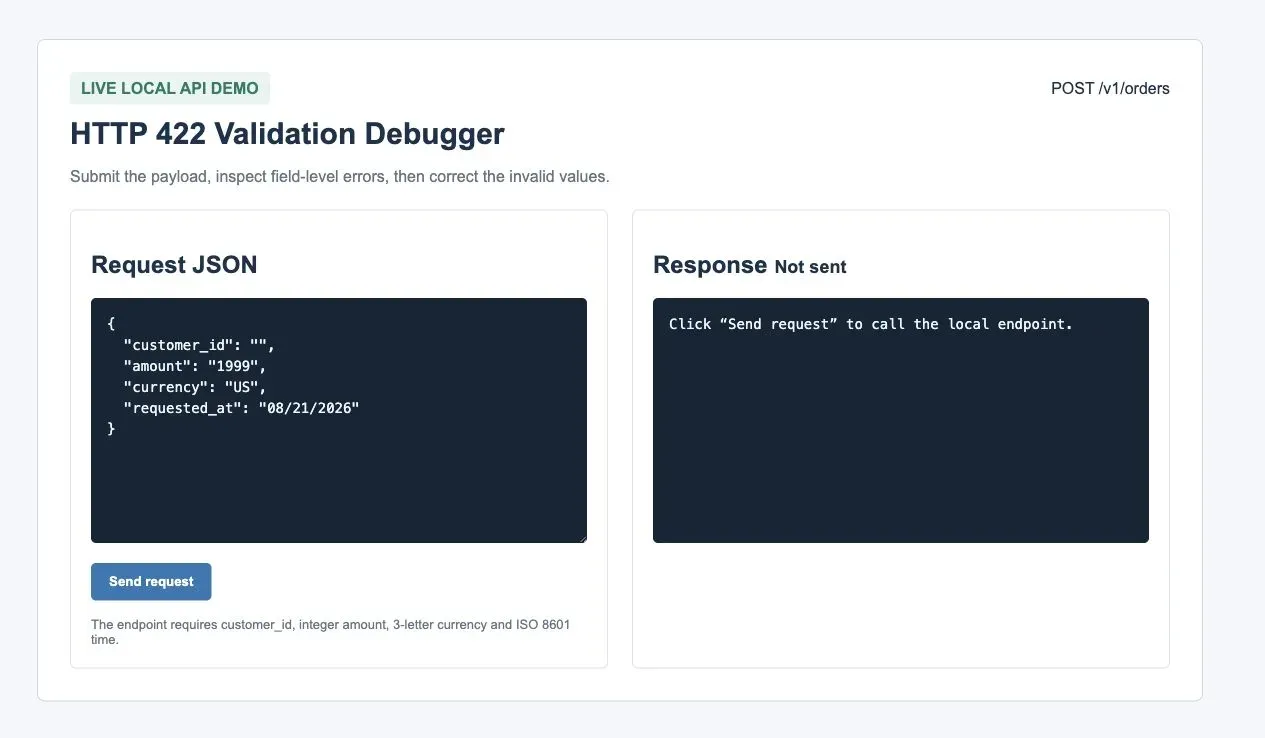
Step 1: Submit an Invalid Payload
The first request contains an empty customer_id, a string value for amount, an invalid currency code, and a date format the API does not accept.
Step 2: Read the Field-Level Response
The API returns 422 Unprocessable Content. Do not immediately retry the same payload. Read each field-level error and map it back to the submitted request.
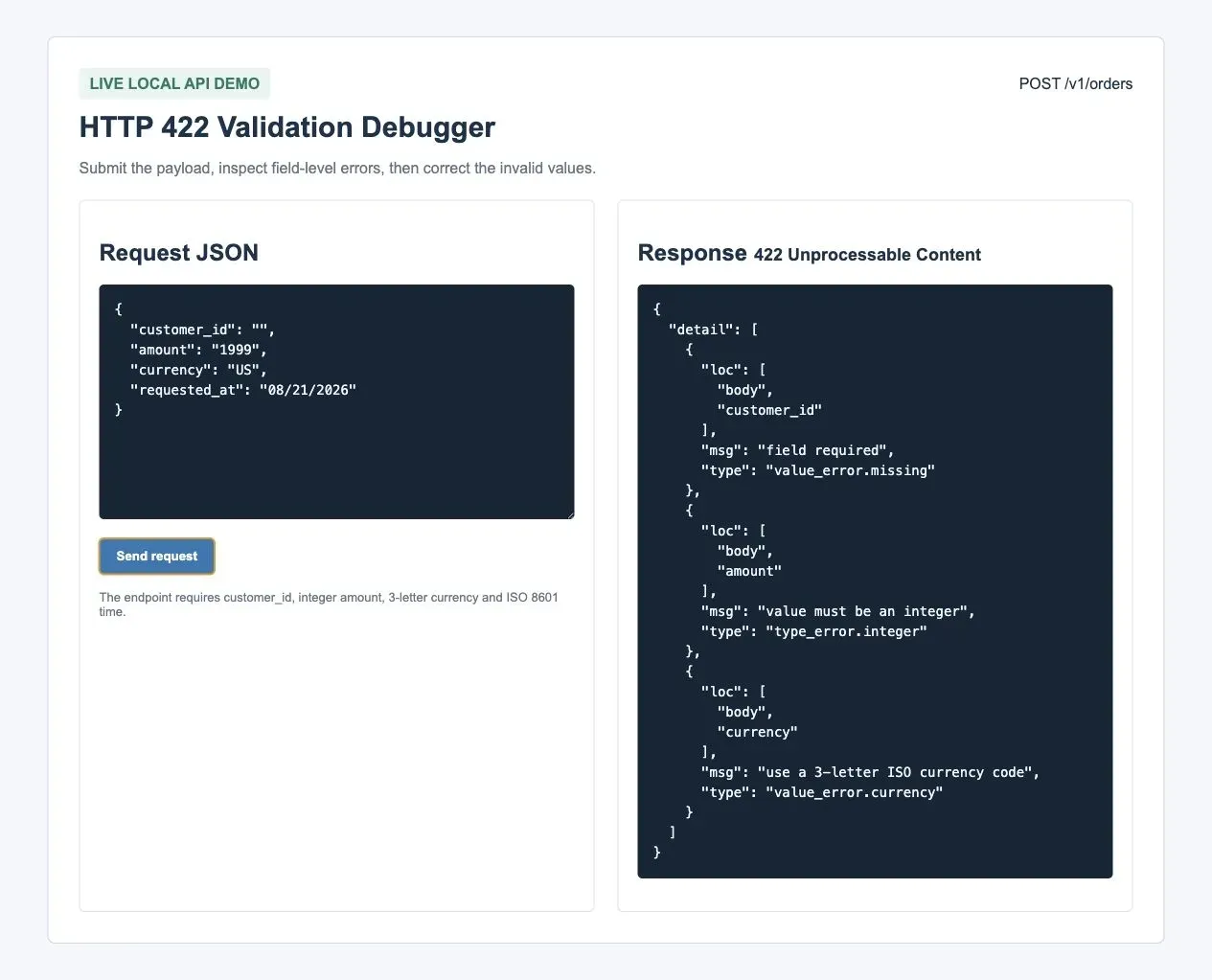
A typical validation response might look like this:
{
  "detail": [
    {
      "loc": ["body", "customer_id"],
      "msg": "customer_id is required"
    },
    {
      "loc": ["body", "amount"],
      "msg": "amount must be an integer"
    },
    {
      "loc": ["body", "currency"],
      "msg": "currency must be a valid ISO 4217 code"
    }
  ]
}
Step 3: Correct One Category of Error
Change only the payload fields. Keep the URL, method, headers, authentication, client, and network path unchanged. This makes the test meaningful.
{
  "customer_id": "cus_123",
  "amount": 1999,
  "currency": "USD",
  "requested_at": "2026-08-22T10:30:00Z"
}
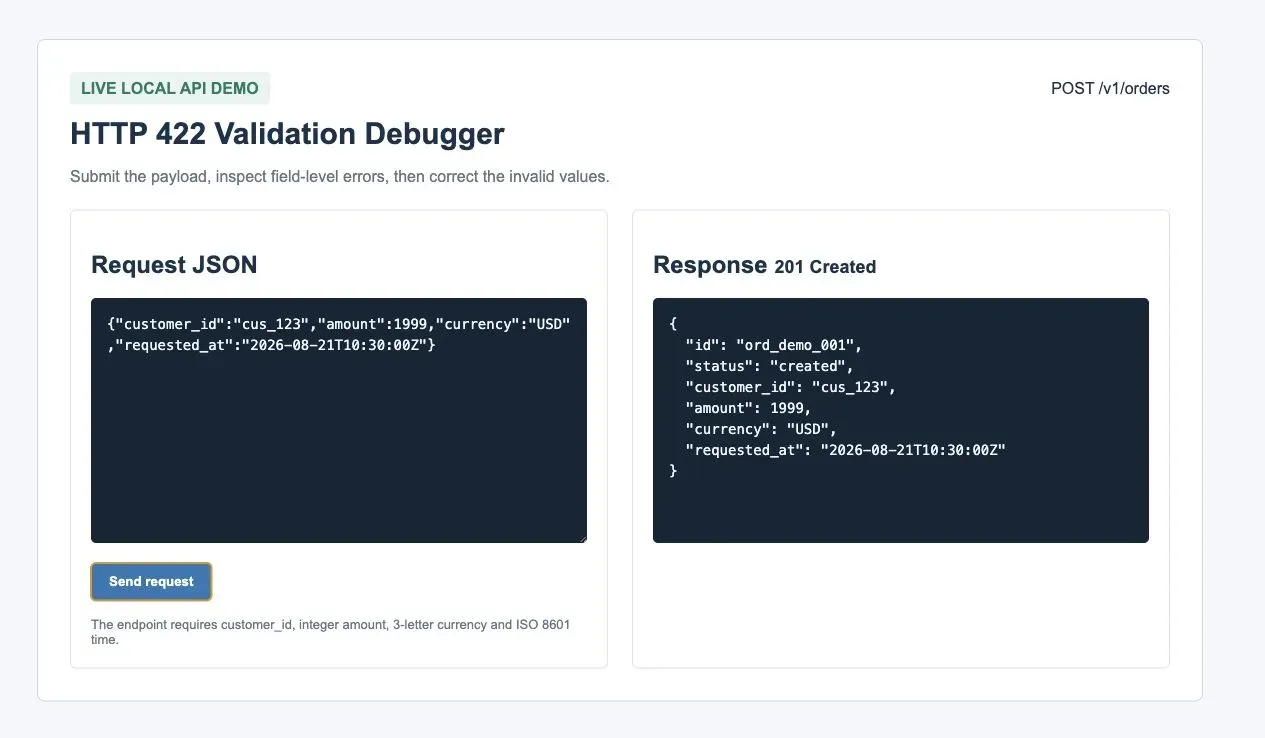
Validation principle: keep everything except the failing data constant. If the response changes from 422 to 201 after only the payload is corrected, the root cause was request validation.
Fix 422 in Python Requests
Install Requests with SOCKS Support
If your test includes a SOCKS proxy, install Requests with the SOCKS extra. Without it, a socks5h:// proxy URL can fail before the request even reaches the target API.
python -m venv .venv
source .venv/bin/activate
python -m pip install "requests[socks]"
Send JSON Explicitly
import os
import requests

API_URL = "https://api.example.com/v1/orders"

payload = {
    "customer_id": "cus_123",
    "amount": 1999,
    "currency": "USD",
    "requested_at": "2026-08-22T10:30:00Z",
}

headers = {
    "Authorization": f"Bearer {os.environ['API_TOKEN']}",
    "Accept": "application/json",
    "Content-Type": "application/json",
}

response = requests.post(
    API_URL,
    json=payload,
    headers=headers,
    timeout=(5, 30),
)

print("status:", response.status_code)

try:
    print(response.json())
except ValueError:
    print(response.text[:1000])

response.raise_for_status()
Using json=payload lets Requests serialize the body and set JSON behavior correctly. Do not send the same payload through both data= and json=.
Print the 422 Details Before Raising
def explain_422(response):
    if response.status_code != 422:
        return

    try:
        body = response.json()
    except ValueError:
        body = {"raw": response.text[:1000]}

    print("422 validation details:", body)


explain_422(response)
If the API returns structured validation details, this output usually tells you what to fix next.
Fix 422 in Axios or Browser Fetch
Many developers first see the phrase request failed with status code 422 in an Axios exception. Axios throws for non-2xx responses, so you need to read error.response.data.
import axios from "axios";

try {
  const response = await axios.post(
    "https://api.example.com/v1/orders",
    {
      customer_id: "cus_123",
      amount: 1999,
      currency: "USD",
      requested_at: "2026-08-22T10:30:00Z",
    },
    {
      headers: {
        Authorization: `Bearer ${process.env.API_TOKEN}`,
        Accept: "application/json",
        "Content-Type": "application/json",
      },
    }
  );

  console.log(response.status, response.data);
} catch (error) {
  if (error.response?.status === 422) {
    console.log("422 validation details:", error.response.data);
  } else {
    throw error;
  }
}
With fetch, remember that the promise does not reject just because the server returns 422. Check response.ok, then read the body.
const response = await fetch("https://api.example.com/v1/orders", {
  method: "POST",
  headers: {
    Authorization: `Bearer ${process.env.API_TOKEN}`,
    Accept: "application/json",
    "Content-Type": "application/json",
  },
  body: JSON.stringify({
    customer_id: "cus_123",
    amount: 1999,
    currency: "USD",
    requested_at: "2026-08-22T10:30:00Z",
  }),
});

const body = await response.json().catch(() => null);

if (response.status === 422) {
  console.log("422 validation details:", body);
}
Can a GET Request Return 422?
A GET request can legitimately return 422 when query parameters, path values, headers, or other request inputs fail validation. Inspect the response body and the endpoint documentation before treating the result as an automation block.
For example, these GET requests can be semantically invalid even without a request body:
- A search endpoint receives an unsupported sort value.
- A report endpoint receives an end date earlier than the start date.
- A route contains a path parameter that is well formed but not valid for that resource.
- A required header is present but contains an unsupported version or locale.
Consider access policy, rate limits, or traffic classification only when a controlled comparison shows that the same valid request behaves differently across clients or network paths.
How Proxies Relate to 422 Errors

Rola IP is not a tool for fixing 422 errors. A 422 response usually means the request content, field values, or business state needs correction. However, when an authorized API test needs to compare approved egress routes, Rola IP can be used as a controlled network variable.
The correct test is simple: send the same request directly, then send the same request through the proxy while changing only the proxy configuration. If both paths return the same 422 details, keep fixing the payload or schema. If the direct request succeeds but the proxied request returns 401, 403, 429, a timeout, or a connection error, then investigate egress policy, authentication, request frequency, proxy credentials, or network routing.
Available locations, targeting levels, session behavior, and supported protocols may change, so confirm each capability against the current Rola IP documentation before publishing or configuring a test. For Python scripts, use the official Python proxy integration. For rotating residential proxy setup, check the rotating residential proxy configuration. If your use case involves regional validation or web data collection, a residential proxy may be relevant, but it should not replace schema-level debugging.
import os
from urllib.parse import quote

proxy_url = (
    f"socks5h://{quote(os.environ['ROLA_PROXY_USERNAME'], safe='')}:"
    f"{quote(os.environ['ROLA_PROXY_PASSWORD'], safe='')}@"
    f"{os.environ['ROLA_PROXY_HOST']}:{os.environ['ROLA_PROXY_PORT']}"
)

proxies = {
    "http": proxy_url,
    "https": proxy_url,
}

# Keep URL, method, JSON, and headers identical to the direct request.
r = requests.post(
    API_URL,
    json=payload,
    headers=headers,
    proxies=proxies,
    timeout=(10, 30),
)

print(r.status_code, r.text[:1000])
Comparison principle: change only proxies. Do not change the payload, account, headers, session, API version, region, and proxy protocol in the same test.
Common Fixes That Do Not Work
| Ineffective Approach | Why It Fails | Better Approach |
|---|---|---|
| Retrying the same request | A semantic validation error usually repeats | Read the response body and fix the invalid fields |
| Changing only the IP | Most 422 errors are not network errors | Compare direct and proxied requests only after validating the payload |
| Looking only at the status code | The useful details are often in the response body | Log redacted errors, detail, path, loc, and message fields |
| Removing every optional field | This can create new required-field errors | Start with the smallest valid request from the official schema |
| Copying an old example | API contracts change | Check current documentation, version headers, and schemas |
| Logging full credentials | It creates a security risk | Redact tokens, cookies, passwords, and customer data |
Conclusion
When you encounter request failed with status code 422, interpret it first as: the request arrived, but its semantics failed validation. Check the JSON body, Content-Type, required fields, field types, enum values, nested structure, API version, and resource state. Read the response details before retrying.
If a proxy is part of your environment, use it only as a controlled comparison variable. Direct and proxied requests that return the same 422 usually point back to schema or business validation. Different results across network paths may justify investigating authentication policy, request frequency, or egress routing.