
How to Train ChatGPT on Your Own Data: 3 Safe Paths

Aug 28, 2026 · Guides · 7 min read
TL;DR
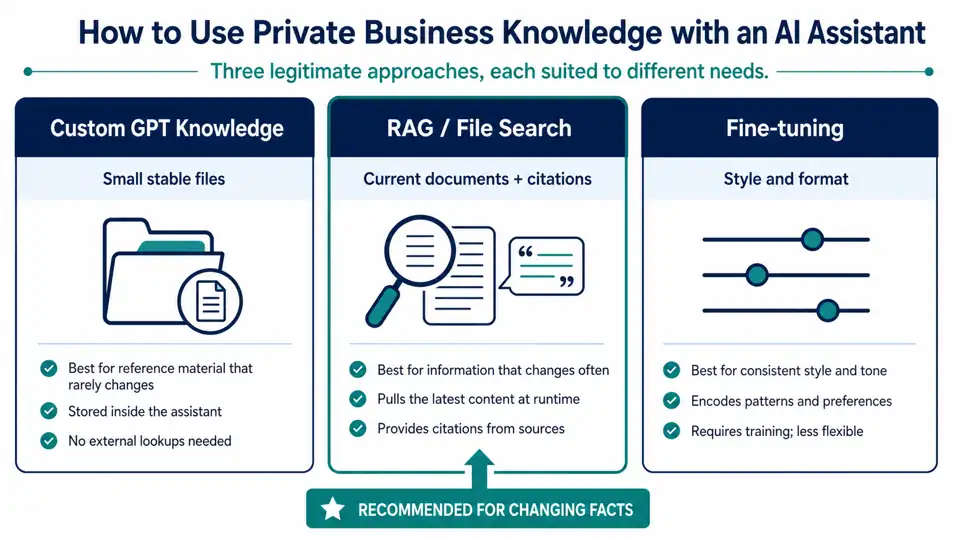
Most teams should retrieve approved data rather than retrain a model. Use Custom GPT knowledge for a small, stable reference set when the current ChatGPT plan or workspace permits it. Use OpenAI API File Search or another RAG architecture when sources change, permissions differ, or answers need traceable evidence. Use fine-tuning for stable behavior patterns, not changing facts. Verify current availability, data controls, retention, and API fields before implementation.
What “Train ChatGPT on Your Data” Usually Means
The phrase combines different jobs. A knowledge file gives an assistant reference material; it does not retrain the foundation model. In the GPT editor, instructions define behavior, while knowledge files provide source content. Fine-tuning is the method intended to learn a repeated input-to-output pattern from a formatted dataset.
Need |
Best first approach |
Update frequency |
Permission isolation |
Citations |
Ongoing work |
|---|---|---|---|---|---|
Personal or team reference set |
Custom GPT knowledge |
Low |
Workspace and sharing controls |
Ask for them in instructions |
Replace files and retest |
Changing product or internal documentation |
RAG / File Search |
Medium to high |
Enforce before retrieval |
Recommended |
Re-index, evaluate, monitor spend |
Stable structured output or classification |
Fine-tuning |
Low |
Application-level |
Add retrieval if facts matter |
Curate examples and run evals |
One-off private-document analysis |
Chat upload or Project |
One-time |
Account/workspace controls |
Optional |
No persistent assistant required |
Fine-tuning can be valuable, but it expects a training file and a supported base model. It is rarely the first choice for facts that change weekly. See OpenAI’s model optimization guide before designing a training dataset.
Path 1: Build a Custom GPT with Knowledge Files
Choose this path for a limited, relatively stable collection of manuals, FAQs, or handbooks. Last reviewed on 2026-08-27; verify current plan availability before publication. GPT creation, editing, sharing, publishing, knowledge limits, and supported file types depend on the current ChatGPT plan and workspace settings. Review the current official GPT documentation and your administrator’s controls immediately before implementation. Do not rely on a fixed file count, file size, or account-eligibility statement unless the cited page still confirms it.
- Collect only approved, current documents.
- Convert scanned PDFs into searchable text and remove obsolete versions.
- In ChatGPT, create or edit an eligible workspace GPT; keep instructions separate from knowledge.
- Upload the reference files as knowledge.
- Add an instruction such as: “Answer from knowledge first. Name the document used. Say when the answer is not in the files.”
- Test in Preview with questions whose correct answer and source are known.
Use headings, direct language, and one policy per section. A spreadsheet full of merged cells or a scan made largely of screenshots can be difficult to retrieve accurately. If documents change often, manual file replacement becomes a stale-answer risk; use RAG instead.
Path 2: Build RAG with OpenAI File Search
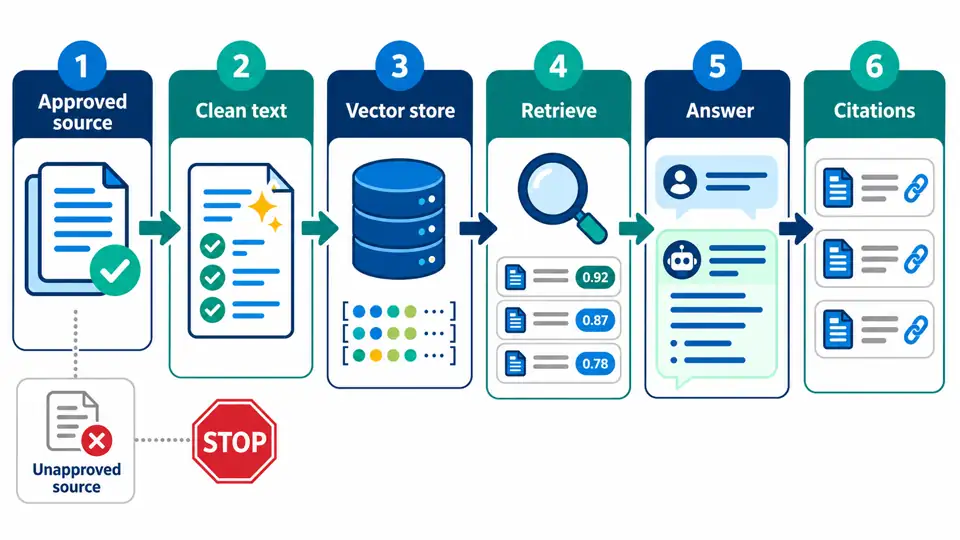
RAG retrieves relevant chunks from approved content at question time, then gives those passages to the model with the question. Replacing or re-indexing a source changes the material available to later answers without retraining a model. It also creates a point at which your application can enforce document-level authorization.
OpenAI API File Search is an API application feature, not a way to modify the ChatGPT product or retrain its foundation model. Vector-store file processing states, attributes, filters, and request fields can change; confirm the current File Search guide and API reference before implementation.
Prepare a Small, Testable Corpus
Start with a small, representative set of authoritative pages rather than every file your company owns. This is a practical pilot recommendation, not an OpenAI product limit. For each source, record an owner, effective date, access group, URL or document ID, and review cadence. Break long material into clear sections with meaningful headings. Deduplicate superseded policies before indexing them.
If an authorized public-source or regional-QA workflow requires a proxy, document the data owner, permitted domains, request limits, and retention rules. A proxy does not grant permission to collect or redistribute protected content, bypass access controls, defeat CAPTCHA challenges, or ignore rate limits. For authorized collection only, see web scraping proxy guidance.
Use File Search as a Managed Retrieval Layer
The following code is an architectural reference, not a verified copy-and-run example. Before publication, test it with the current official OpenAI Python SDK and non-sensitive data. Confirm the upload purpose, vector-store file attributes, processing states, filter syntax, model compatibility, error fields, and cleanup methods against the current API documentation. Application-level authentication and tenant authorization must run before retrieval; metadata filters alone are not an access-control system.
# pip install openai
import os
import time
from pathlib import Path
from openai import OpenAI

client = OpenAI()  # reads OPENAI_API_KEY on the server
model = os.environ["OPENAI_MODEL"]
source_path = Path("approved-refund-policy.md")

# 1. Authorize the source before upload. Keep this check in your own app.
if not source_path.exists() or not source_path.name.startswith("approved-"):
    raise PermissionError("Only approved documents may be indexed.")

# 2. Upload, create a vector store, and attach the file with an access attribute.
with source_path.open("rb") as source_file:
    uploaded = client.files.create(file=source_file, purpose="user_data")

store = client.vector_stores.create(name="approved-policy-demo")
attached = client.vector_stores.files.create(
    vector_store_id=store.id,
    file_id=uploaded.id,
    attributes={"access_group": "support"},
)

# 3. Poll until indexing finishes or a bounded timeout expires.
deadline = time.time() + 300
while attached.status == "in_progress" and time.time() < deadline:
    time.sleep(2)
    attached = client.vector_stores.files.retrieve(
        vector_store_id=store.id, file_id=uploaded.id
    )

if attached.status != "completed":
    raise RuntimeError(f"File indexing did not complete: {attached.status}; {attached.last_error}")

# 4. Illustrate an application-side entitlement check before the model request.
caller_groups = {"support"}  # obtain this from authenticated application logic
if "support" not in caller_groups:
    raise PermissionError("Caller is not allowed to search this source.")

# 5. Search only the allowed group; handle API failures and log request IDs in production.
response = client.responses.create(
    model=model,
    input="What is the approved refund window? Name the supporting policy.",
    tools=[{
        "type": "file_search",
        "vector_store_ids": [store.id],
        "filters": {"type": "eq", "key": "access_group", "value": "support"},
    }],
)

print(response.output_text)
Run the reference flow first against a synthetic or non-sensitive policy. Expected outcomes are an uploaded file, an indexed source that reports ready in the current API, and a response that can be checked against the source. Add explicit handling for upload failure, indexing timeout, permission denial, and model-request failure; also add request-ID logging, tenant-aware authorization, audit records, and a deletion/retention routine before production. Measure indexing cost, retrieval latency, model-call cost, and failure rate in your own project rather than assuming fixed values. File Search filters can narrow an indexed set, but they are not a replacement for application-level identity, entitlement, or tenant isolation.
If an approved public-input workflow is implemented in Python, keep network configuration outside prompts and use Python proxy integration only for authorized connectivity.
Path 3: Fine-Tune for Behavior, Not Changing Facts
Fine-tuning can help when a base model repeatedly misses a required output format, classification taxonomy, tone, or tool-calling convention despite clear prompts and examples. Your dataset should represent the desired input-output behavior and must be evaluated against a held-out set.
Do not use fine-tuning as your first method for a policy manual, product catalog, pricing table, or release notes. Those facts change and need a visible, auditable source of truth. Combine RAG for current facts with fine-tuning only if measured evaluation shows that retrieval and instructions still do not meet a stable behavior requirement.
Test for Grounding Before You Share
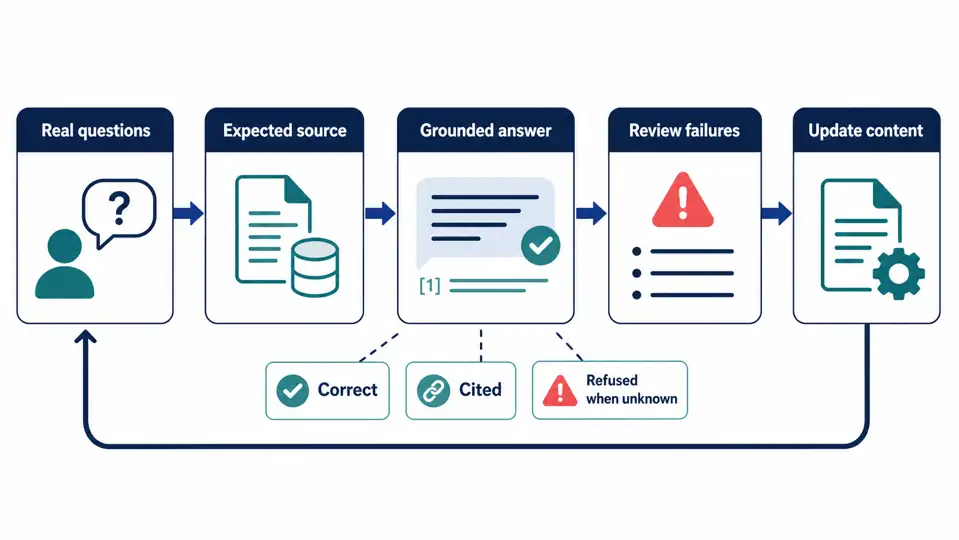
Testing should prove more than “the bot answered.” Create a small evaluation sheet with real questions, expected source IDs, expected answer points, and an “unknown” category. Include an outdated policy, an ambiguous question, and a question that no approved source supports.
| Evaluation case | What to provide | Passing result |
|---|---|---|
| Known answer | A current policy and expected citation | Accurate answer tied to the current passage |
| No answer | A question absent from all approved sources | Clear abstention or request for clarification |
| Outdated policy | A replaced version plus the new version | New policy cited; old content not surfaced |
| Restricted source | A lower-privilege test user | No confidential cross-group content |
| Check | Passing result | Failure signal |
|---|---|---|
| Correctness | Answer matches the approved source | Invented or outdated detail |
| Grounding | Citation points to the relevant passage | Citation is absent or unrelated |
| Permission | User sees only entitled material | Cross-team or confidential leakage |
| Abstention | Assistant says it lacks evidence | Confident guess without a source |
| Freshness | Replaced document changes the answer after re-indexing | Old content persists |
Privacy and Access Boundaries
Before uploading any material, classify it. Remove secrets, personal data, customer exports, private keys, and unapproved contracts unless your organization has approved the specific service, tier, data flow, jurisdiction, and retention arrangement. Personal ChatGPT workspaces and managed offerings can have different data controls. Last reviewed on 2026-08-27; verify the current policy before publication. Check OpenAI’s data-controls guidance, the applicable agreement, workspace configuration, and retention terms before relying on any default data-use setting.
Use least privilege: retrieval should return only documents the current user could already open. For a large authorized public-source workflow, document the purpose, source ownership, schedule, and stop conditions. Do not treat any blog guidance as a substitute for security, privacy, procurement, or legal review.
Common Problems and Fixes
| Symptom | Likely cause | How to verify | Fix |
|---|---|---|---|
| The assistant ignores files | Instructions do not prioritize knowledge | Ask a question with a unique source phrase | Add grounding and citation instructions; retest. |
| Answer cites an old policy | Obsolete file remains indexed | Compare source date and document ID | Remove or replace obsolete content; re-index. |
| Answer is confident but unsupported | Retrieval missed or source lacks detail | Test an intentionally unanswerable question | Require abstention and show retrieved sources. |
| File Search is unavailable | Processing is incomplete or failed | Check vector-store file status | Wait for completed or inspect the recorded error. |
| Sensitive answer appears | Permissions were not enforced at retrieval | Run tests with restricted users | Enforce tenant and access scope before retrieval. |
Conclusion
For most teams, the practical answer to how to train ChatGPT on your own data is to ground it in approved, current sources rather than retrain a foundation model. Start with the smallest method that satisfies your update, permission, and citation needs; then prove it with known-answer, no-answer, outdated-content, and restricted-user tests. Fine-tuning belongs later, when evaluation demonstrates a durable behavior gap that retrieval and clear instructions cannot address.