
Python Geolocation API: Find IP Location with Requests

Sep 7, 2026 · Use Cases · 9 min read
TL;DR
Validate the address with Python’s ipaddress module, reject non-public inputs when the use case requires public IPs, and call a documented provider with an explicit timeout. Normalize optional fields instead of assuming every plan returns the same schema. Cache repeated lookups, stop or wait on HTTP 429, and retain the provider and lookup time with each result.
Use IP geolocation for country-level localization, timezone defaults, regional QA and network diagnostics. Use browser or device geolocation when the application needs permission-based device coordinates, and use geocoding when the input is an address or place name.
What Is a Python Geolocation API?
IP geolocation combines an IP address with databases describing address allocations, routing, network operators and estimated geography. A Python client sends an address to an HTTP endpoint and receives structured data. It does not ask the remote device for GPS coordinates.
Three implementation forms are common:
- A REST API called with Requests.
- A provider-specific Python SDK.
- A local GeoIP database queried without an external request.
REST APIs are easy to integrate and update centrally. SDKs may add typed models, async clients or caching. Local databases reduce request latency and external transmission but require licensed data, updates and local query logic.
IP Geolocation vs GPS and Geocoding
Method |
Input |
Typical output |
Permission |
Precision |
|---|---|---|---|---|
IP geolocation |
IPv4 or IPv6 |
Country, region, approximate coordinates, network |
No browser location prompt |
Network-level estimate |
Browser/device geolocation |
Device signals |
Latitude, longitude, accuracy radius |
Usually explicit user permission |
Often more precise |
Forward geocoding |
Address or place |
Coordinates and matched place |
API credentials |
Address/place dependent |
Reverse geocoding |
Coordinates |
Approximate address or place |
API credentials |
Data-source dependent |
Choose by input and purpose. IP geolocation cannot reliably turn an IP into a street address, and reverse geocoding does not identify which IPs exist at given coordinates.
What Data Can an API Return?
The API Ninjas documentation reviewed for this tutorial defines an address query parameter and documents IPv4 and IPv6 support. Its response can contain validity, country, region and timezone fields. City, postal code, coordinates, ISP, ASN and security-related fields may depend on the current plan. Review the official IP Lookup API documentation before implementation because fields and access conditions can change.
Some providers may also return VPN, Tor, hosting, relay or risk indicators. Treat these as provider-specific signals. They can be stale, unavailable or defined differently, so they should not become the sole reason for blocking a user or making another high-impact decision.
Prerequisites and Test Environment
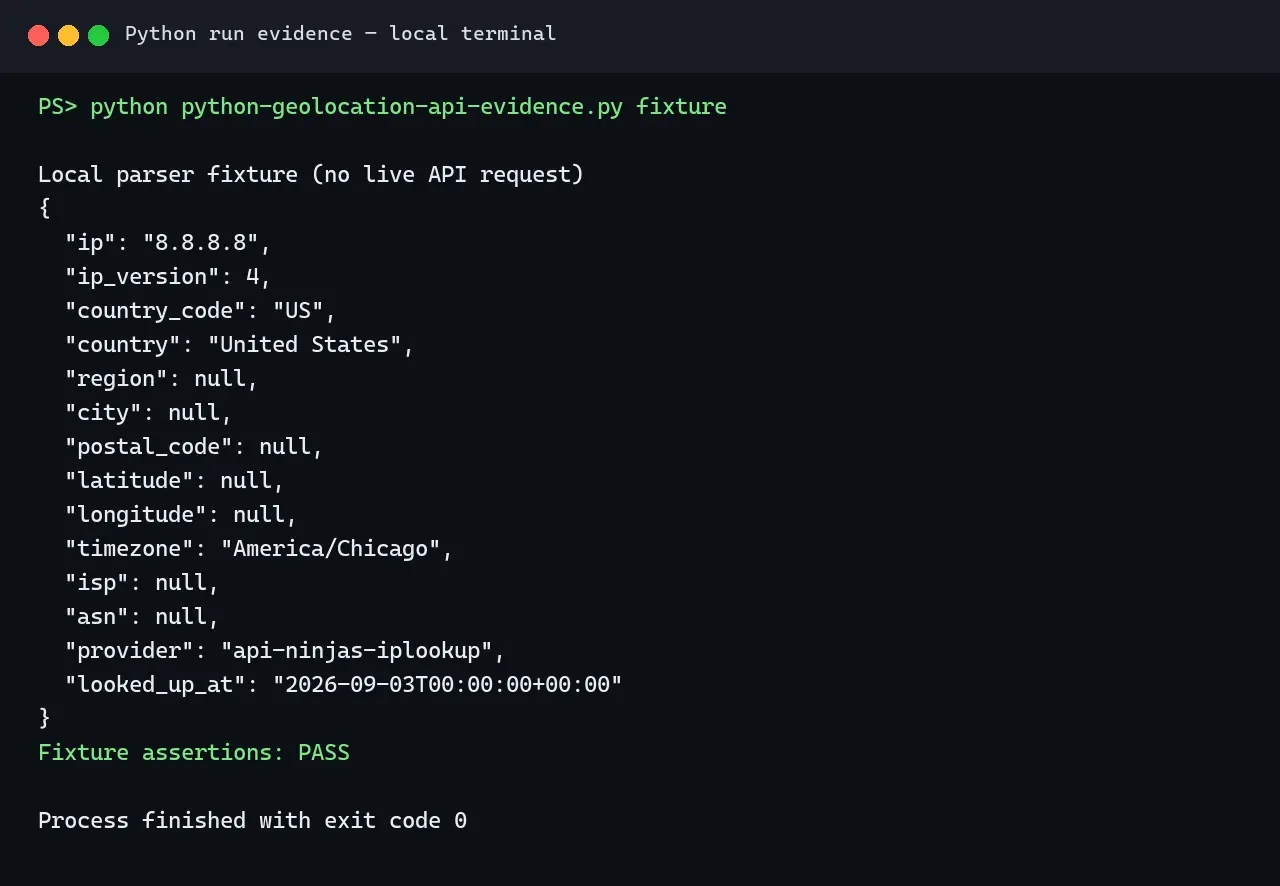
You need Python, Requests and an API key stored outside the source code. The normalization, fixture and schema-error paths in Figures 1–3 were checked locally with Python 3.12.13 on September 3, 2026. The public-IP validation script was rerun with Python 3.12.14 on September 7, 2026, and all four expected paths passed. A live provider request was not executed because no user API key was supplied; the HTTP contract was reviewed against the provider documentation on September 7, 2026. The figures are original local terminal renders and contain no live credentials or third-party interface captures.
python -m venv .venv

# macOS/Linux
source .venv/bin/activate

# Windows PowerShell
.venv\Scripts\Activate.ps1

python -m pip install requests
Set the key only in your local environment:
# macOS/Linux
export API_NINJAS_KEY="replace-with-your-key"

# Windows PowerShell
$env:API_NINJAS_KEY="replace-with-your-key"
How to Get IP Geolocation in Python
Step 1: Validate IPv4 or IPv6 Input
Python’s standard ipaddress module parses both address families and exposes properties for private, loopback, link-local, multicast and reserved addresses.
from ipaddress import ip_address


def validate_public_ip(value: str):
    parsed = ip_address(value.strip())
    if not parsed.is_global:
        raise ValueError("A globally routable public IP is required.")
    return parsed
Whether to reject non-global addresses depends on the application. A private address can be valid inside a company network, but a public geolocation service cannot derive a meaningful public location from it.
Step 2: Send the Request
The documented endpoint is https://api.api-ninjas.com/v1/iplookup. Send the IP through address and the key through X-Api-Key:
import os
import requests

API_URL = "https://api.api-ninjas.com/v1/iplookup"


def request_location(value: str) -> dict:
    api_key = os.environ.get("API_NINJAS_KEY")
    if not api_key:
        raise RuntimeError("API_NINJAS_KEY is not configured.")

    parsed = validate_public_ip(value)
    response = requests.get(
        API_URL,
        params={"address": str(parsed)},
        headers={"X-Api-Key": api_key},
        timeout=(3.05, 10),
    )
    response.raise_for_status()
    return response.json()
An explicit connect/read timeout prevents an unavailable service from holding a worker indefinitely. Requests documents that connection problems, timeouts and unsuccessful HTTP responses require separate handling in production.
Step 3: Normalize and Validate the Response
Provider schemas change and optional fields may be absent. Map the response into an application-owned contract:
from datetime import datetime, timezone


def normalize_location(raw: dict) -> dict:
    if raw.get("is_valid") is False:
        raise ValueError("The provider marked the IP as invalid.")

    lat, lon = raw.get("lat"), raw.get("lon")
    if lat is not None and not -90 <= float(lat) <= 90:
        raise ValueError("Latitude is outside the valid range.")
    if lon is not None and not -180 <= float(lon) <= 180:
        raise ValueError("Longitude is outside the valid range.")

    parsed = ip_address(raw["address"])
    return {
        "ip": str(parsed),
        "ip_version": parsed.version,
        "country_code": raw.get("country_code"),
        "country": raw.get("country"),
        "region": raw.get("region"),
        "city": raw.get("city"),
        "postal_code": raw.get("zip"),
        "latitude": float(lat) if lat is not None else None,
        "longitude": float(lon) if lon is not None else None,
        "timezone": raw.get("timezone"),
        "isp": raw.get("isp"),
        "asn": raw.get("asn"),
        "provider": "api-ninjas-iplookup",
        "looked_up_at": datetime.now(timezone.utc).isoformat(),
    }
Return None for an unavailable optional field. Do not replace missing city or coordinate data with a guessed value.
Complete Python Example with Safe Failures
import json
import requests


class GeolocationError(RuntimeError):
    """A sanitized error that callers can handle without exiting the process."""


def lookup_ip(value: str) -> dict:
    try:
        raw = request_location(value)
        return normalize_location(raw)
    except requests.exceptions.JSONDecodeError as exc:
        raise GeolocationError("The API returned invalid JSON.") from exc
    except ValueError as exc:
        raise GeolocationError(f"Input or schema error: {exc}") from exc
    except requests.Timeout as exc:
        raise GeolocationError("Geolocation request timed out.") from exc
    except requests.ConnectionError as exc:
        raise GeolocationError("Could not connect to the geolocation API.") from exc
    except requests.HTTPError as exc:
        status = exc.response.status_code
        if status == 401:
            raise GeolocationError("Authentication failed; check the API key.") from exc
        if status == 403:
            raise GeolocationError("The key or plan cannot access this operation.") from exc
        if status == 429:
            raise GeolocationError("Rate limit reached; stop and follow provider guidance.") from exc
        raise GeolocationError(f"Geolocation API returned HTTP {status}.") from exc


if __name__ == "__main__":
    try:
        result = lookup_ip("8.8.8.8")
        print(json.dumps(result, indent=2))
    except GeolocationError as exc:
        raise SystemExit(str(exc)) from exc
Example Fixture Output
The following sanitized local fixture demonstrates the normalized schema without a provider key or live API request:
{
  "ip": "8.8.8.8",
  "ip_version": 4,
  "country_code": "US",
  "country": "United States",
  "region": null,
  "city": null,
  "postal_code": null,
  "latitude": null,
  "longitude": null,
  "timezone": "America/Chicago",
  "isp": null,
  "asn": null,
  "provider": "api-ninjas-iplookup",
  "looked_up_at": "2026-09-03T00:00:00+00:00"
}
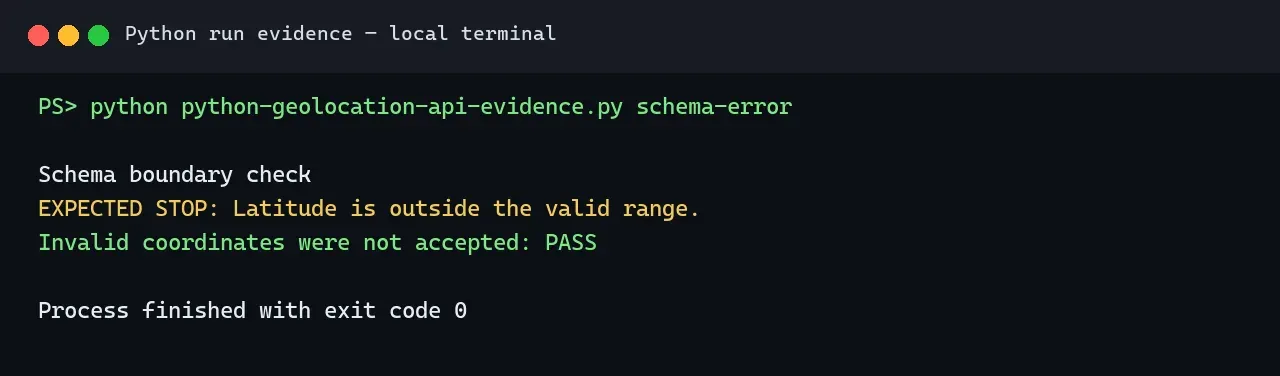
For production evidence, re-run the code with your authorized key and record the dependency versions, response status and test date.
Server-Side Client IP Detection
In a Flask application, request.remote_addr represents the immediate peer. Behind a reverse proxy, that peer may be the proxy rather than the visitor. Werkzeug’s ProxyFix can trust a configured number of forwarded values, but Flask warns that incorrect settings create a security issue. Use it only when you control the proxy and know exactly how many trusted proxies set each header.
from flask import Flask, jsonify, request
from werkzeug.middleware.proxy_fix import ProxyFix

app = Flask(__name__)
app.wsgi_app = ProxyFix(app.wsgi_app, x_for=1, x_proto=1, x_host=1)


@app.get("/location")
def location():
    client_ip = request.remote_addr
    return jsonify(lookup_ip(client_ip))
Do not read the first X-Forwarded-For value blindly on an internet-facing app. A client can submit that header unless your edge proxy removes untrusted values and writes a controlled chain.
Batch Lookups, Caching, and Rate Limits
Validate and deduplicate IPs before consuming API capacity:
from functools import lru_cache


@lru_cache(maxsize=10_000)
def cached_lookup(value: str) -> dict:
    return lookup_ip(str(validate_public_ip(value)))


unique_ips = sorted({str(validate_public_ip(item)) for item in input_ips})
results = [cached_lookup(item) for item in unique_ips]
An in-memory cache suits one process. SQLite or another controlled store is better when results must survive restarts. Store the provider, lookup time and expiration policy. Do not cache authentication failures or malformed responses as successful locations.
On HTTP 429, inspect the provider’s documented response and wait or stop. Retry only eligible transient failures, set a maximum attempt count and total deadline, and add jitter. Never retry malformed input, 401 or 403 as though they were temporary network errors.
How Accurate Is IP Geolocation?
IP geolocation estimates the geography of a network address, not a device’s exact position. Country results are usually more useful than city or coordinate results, but accuracy depends on the provider, region, address type and database age. Mobile carrier gateways, corporate networks, cloud platforms, VPNs and proxies may place the visible IP far from the device.
Coordinates may represent a city or network centroid. Therefore, avoid street-level claims, distance-sensitive safety decisions or emergency-location use. If accuracy matters, compare a sample against known authorized test cases, document the method and date, and avoid publishing percentages without an official source or reproducible benchmark.
Verify a Proxy Exit IP and Location
Where Rola IP Fits Into IP Geolocation Testing
An IP geolocation API reports the approximate location of the IP address visible to the destination. Rola IP can provide an optional, authorized proxy route when you need to test a regional exit, compare network environments or verify how your own application responds to different locations. Review the current Rola IP residential proxy page before testing to confirm the available network scope.
Get the issued host, port, username and password from your Rola IP dashboard. Store the complete authorized proxy URL in a secret manager or the ROLA_PROXY_URL environment variable, and keep it out of source code, logs and screenshots. Confirm the current credential format, protocols, location options and session controls in the official Python proxy integration documentation.
For authorized regional QA, first determine the observed exit IP, then geolocate that address. Do not assume the proxy configuration label equals the provider database result.
proxies = {
    "http": os.environ["ROLA_PROXY_URL"],
    "https": os.environ["ROLA_PROXY_URL"],
}

exit_response = requests.get(
    "https://api64.ipify.org?format=json",
    proxies=proxies,
    timeout=(3.05, 10),
)
exit_response.raise_for_status()
exit_ip = exit_response.json()["ip"]
location = lookup_ip(exit_ip)
The example uses ipify’s documented dual-stack JSON endpoint to report the request’s public IP. Use only an IP-check service approved for your environment. Compare the expected and observed country, region, ASN and timezone, then record the proxy configuration version and lookup time. The Rola IP proxy checker can provide an additional endpoint diagnostic, but no proxy or checker makes an approximate geolocation result exact.
If your project needs authorized regional QA or proxy exit verification, begin with a small test and scale only after confirming the target, data use, request rate and retention requirements. Stop when the target denies access or authorization is unclear.
Common Errors and Troubleshooting
| Symptom | Likely cause | Safe response |
|---|---|---|
| Invalid input | Malformed, private or reserved address | Validate locally before any API call |
| HTTP 400 | Invalid or missing parameter | Log the sanitized address and review the contract |
| HTTP 401 | Missing or invalid key | Check the environment variable without printing it |
| HTTP 403 | Endpoint or field is unavailable | Review the current plan and documentation |
| HTTP 429 | Limit or quota reached | Stop or wait according to provider guidance; use caching |
| HTTP 5xx | Provider failure | Apply a small bounded retry policy or fail safely |
| Timeout/DNS error | Network or service unavailable | Record elapsed time and retry only within a deadline |
| Invalid JSON | Error page or changed response | Record status and content type; do not parse blindly |
| Missing city/coordinates | Optional or unavailable field | Return None; never invent data |
| Unexpected location | Carrier, proxy, VPN or stale mapping | Check ASN and a second authorized source |
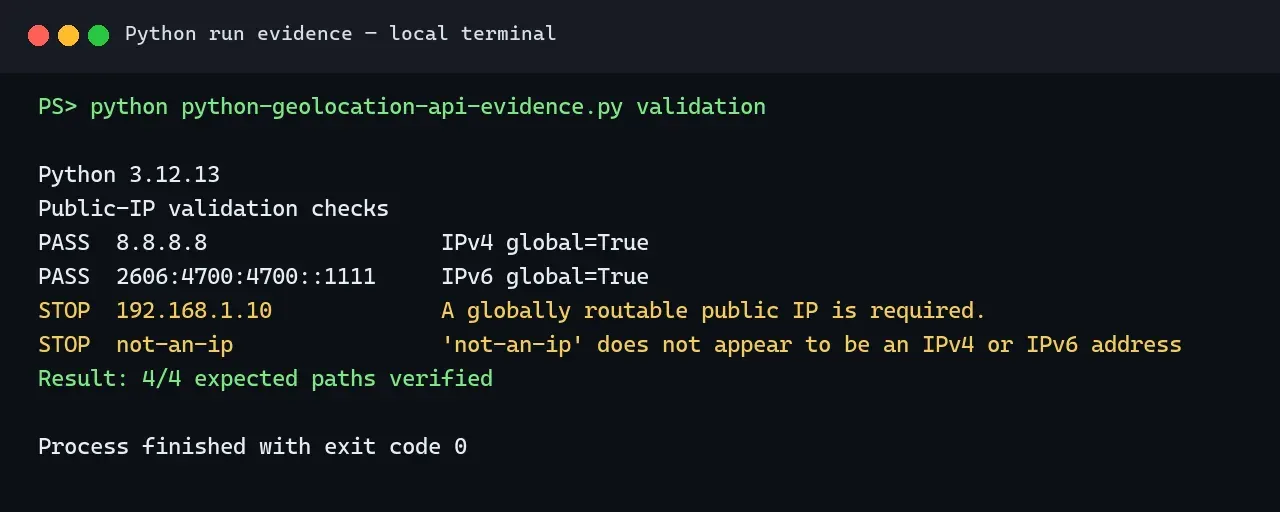
For each failure, record the endpoint, sanitized input, HTTP status, content type, elapsed time, provider request ID when available, cache state, parser version and stop reason. Remove API keys, proxy credentials and unnecessary personal data from logs.
Privacy, Security, and Data Retention
An IP address may be personal data or an online identifier depending on the jurisdiction and context. Collect only fields required for the documented purpose. Consider truncation, aggregation or pseudonymization when a full address is unnecessary. Limit log access and define retention and deletion periods.
Geolocation and network-risk signals should support review rather than become the only evidence in a consequential decision. Legal obligations depend on the jurisdiction and specific use, so sensitive or large-scale processing needs appropriate privacy and legal review.
Production Checklist
- Record tested Python and Requests versions.
- Validate IPv4 and IPv6 input before the request.
- Define how private and reserved addresses are handled.
- Protect API and proxy credentials.
- Set connect, read and overall timeouts.
- Handle 400, 401, 403, 429 and 5xx explicitly.
- Normalize optional and plan-dependent fields.
- Cache repeated lookups with an expiration policy.
- Add fixture and schema-regression tests.
- Log provider, request time, status, latency, cache state and stop reason.
- Remove secrets and unnecessary identifiers from logs.
- Recheck endpoint fields, restrictions, pricing and quotas before release.
Conclusion
A reliable Python geolocation API integration begins with input validation and a documented provider contract. Protect credentials, use timeouts, normalize optional fields, cache repeat lookups and preserve dated evidence. Treat every result as an approximate network-location estimate.
For authorized proxy exit verification, measure the observed exit IP before geolocating it and compare multiple fields rather than trusting a location label. When the requirement is precise device positioning or address conversion, choose device geolocation or geocoding instead.