
Python Requests GET Timeout With a Proxy: 6 Diagnostic Steps

Aug 21, 2026 · Troubleshooting · 9 min read
Quick answer
When a requests.get() call times out through a proxy, do not start by increasing the timeout. Run the same authorized GET request once directly and once through the proxy, with the same URL, headers, and (connect, read) timeout. Then classify the outcome:
- Direct succeeds and proxy raises
ConnectTimeout: check the proxy scheme, host, port, authentication, allowlist, local firewall, and route availability. - Direct succeeds and proxy raises
ReadTimeout: the connection was established, but the target response stopped arriving within the read window. Compare exit location, target behavior, payload size, and endpoint load. - Proxy returns
407,403, or429: you received an HTTP response. Fix authentication, authorization, or request rate instead of treating it as a timeout. - Both routes time out: investigate the target, DNS, local network, or timeout budget before blaming the proxy.
Need the baseline timeout behavior first? The existing Python Requests timeout guide covers scalar and connect/read values, exception classes, Session defaults, POST considerations, and bounded retry syntax. This tutorial begins where that guide ends: diagnosing a requests GET timeout that appears on a proxy route.
Use proxies only for accounts, systems, and public resources you are authorized to access. A different exit IP does not override a website’s terms, rate limits, authentication, or access controls.
What a requests GET timeout tells you in a proxy workflow
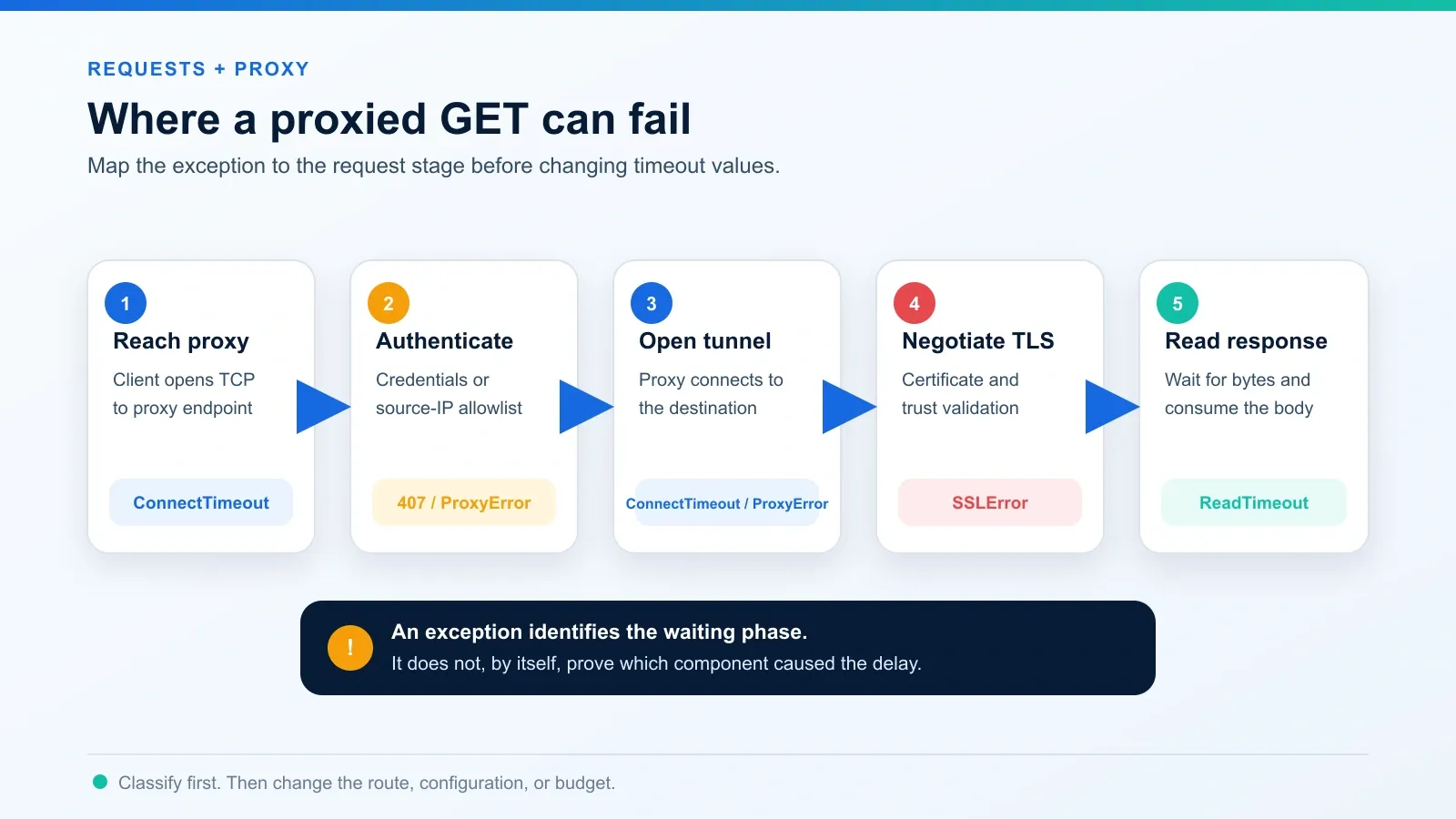
A proxied GET request has more stages than a direct request:
- Resolve and reach the proxy endpoint.
- Authenticate to the proxy when required.
- Ask the proxy to connect to the destination.
- Establish TLS with the destination for HTTPS traffic.
- Wait for response bytes and receive the body.
The word “timeout” identifies a waiting phase, not the responsible component. A ConnectTimeout can involve the path to the proxy or the proxy’s attempt to open the destination connection. A ReadTimeout means a connection existed but response data did not arrive within the configured read interval. A ProxyError, SSLError, or completed HTTP response points to a different class of failure.
That distinction matters because raising every value from 10 seconds to 120 seconds can hide a broken route while tying up workers for longer. Diagnose the stage first; change the budget only when measurements show that a healthy operation legitimately needs more time.
Step 1: Run a controlled direct-versus-proxy test
Use the same process, target, request headers, and timeout tuple for both routes. Do not compare a command-line request on one network with a Python request on another machine; that adds variables before the test begins.
The following diagnostic script reads the proxy URL from an environment variable so credentials are not placed in source code. In production, prefer your organization’s secret manager. Do not print the proxy URL or exception text if it could expose credentials.
import os
from time import perf_counter
from urllib.parse import urlsplit
import requests

url = "https://example.com/"
proxy = os.environ["PROXY_URL"]
routes = {"direct": None, "proxy": {"http": proxy, "https": proxy}}

with requests.Session() as session:
    session.trust_env = False
    for route, proxies in routes.items():
        started = perf_counter()
        try:
            with session.get(url, proxies=proxies, timeout=(5, 20)) as r:
                r.raise_for_status()
                result = f"HTTP {r.status_code}"
        except requests.exceptions.RequestException as exc:
            result = type(exc).__name__
            if exc.response is not None:
                result += f" HTTP {exc.response.status_code}"
                exc.response.close()
        print({
            "route": route,
            "host": urlsplit(url).hostname,
            "result": result,
            "seconds": round(perf_counter() - started, 3),
        })
Replace https://example.com/ with an endpoint you are permitted to test. Run several low-frequency samples instead of drawing a conclusion from one request. perf_counter() is appropriate for elapsed-duration measurements; only the difference between the start and end readings matters.
For this diagnostic, session.trust_env = False prevents system proxy variables from silently routing the supposed direct request through another proxy. It also ignores other environment-derived settings, including certificate bundle variables, so use it only when that behavior is understood. In an enterprise TLS environment, document any required CA bundle explicitly rather than disabling certificate verification.
Reproduce the diagnosis on your own computer
Download the local timeout lab. Unzip it, open its code directory, and run:
python -m venv .venv
source .venv/bin/activate
python -m pip install -r requirements.txt
python requests_lab.py
The script starts an origin and a restricted forwarding proxy on 127.0.0.1. All three requests use timeout=(1.0, 0.2), with environment proxy settings disabled. The middle case deliberately delays the proxy response by 0.8 seconds; the last case removes that delay without increasing the timeout.
| Route | Injected delay | Observed result | Elapsed time |
|---|---|---|---|
| direct | 0 s | HTTP 200 | 5.12 ms |
| delayed_proxy | 0.8 s | ReadTimeout | 201.66 ms |
| repaired_proxy | 0 s | HTTP 200 | 12.03 ms |
Recorded September 7, 2026 with Python 3.12.14 and Requests 2.34.2. Timings will vary on another run. This is an HTTP loopback reproduction of a read-stage failure, not a test of HTTPS CONNECT, a live Rola IP endpoint, or target-site latency. It shows why restoring the route can fix a timeout without increasing the waiting budget.
Step 2: Interpret the comparison before changing code
Record the exception class, HTTP status when available, elapsed time, target host, route label, and proxy region. Never log the proxy password or a complete credential-bearing URL.
| Direct result | Proxy result | Most useful next check |
|---|---|---|
| Success | ConnectTimeout |
Proxy scheme, host, port, credentials, source-IP allowlist, firewall, and endpoint availability |
| Success | ReadTimeout |
Exit-to-target latency, target processing, response size, proxy load, and read budget |
| Success | ProxyError |
Credential format, unsupported protocol, closed endpoint, or failed proxy handshake |
| Success | 407 |
Proxy authentication; do not retry unchanged credentials |
| Success | 403 or 429 |
Target authorization, policy, and rate limits; this is not a timeout |
ConnectTimeout |
ConnectTimeout |
Local network, DNS, destination reachability, or an unrealistically short connect value |
ReadTimeout |
ReadTimeout |
Target performance, response delivery, or an unrealistically short read value |
| Success | Success, but proxy is consistently slower | Exit distance, route quality, target region, and whether the selected proxy type fits the task |
Keep the target request identical during the comparison. Changing the User-Agent, cookies, payload, redirect behavior, and proxy at the same time makes the result impossible to attribute.
Step 3: Fix connection-stage proxy failures
Confirm the proxy URL scheme and port
Requests requires a scheme in each proxy URL. The proxy scheme describes how the client connects to the proxy; it is not automatically the same as the destination scheme. An HTTPS target can still use an HTTP proxy URL when that endpoint supports HTTPS tunneling.
proxies = {
    "http": "http://user:[email protected]:2000",
    "https": "http://user:[email protected]:2000",
}
Copy the provider-generated host, port, username, password, and protocol instead of rebuilding them from memory. Rola IP’s proxy quick start shows where those values are generated and how location or session parameters are represented.
If the username or password contains reserved URL characters such as @, :, /, or #, use the exact provider-supported format or percent-encode the credential component. A malformed credential URL can look like a network failure because the parser sends the connection to the wrong host or supplies the wrong authentication value.
Check authentication and source-IP allowlisting
A credential-based endpoint and an IP-allowlisted endpoint fail differently. With allowlisting, the public source IP of the machine running the script must match the provider record. Office failover, VPN changes, cloud redeployment, and dynamic residential internet can change that source IP without changing your Python code.
An explicit 407 Proxy Authentication Required is not a timeout. Stop retrying and correct the username, password, account state, or allowlist. Repeatedly sending the same invalid credentials only adds noise and may trigger security controls.
Eliminate hidden environment proxy settings
Requests recognizes standard variables such as HTTP_PROXY, HTTPS_PROXY, ALL_PROXY, and NO_PROXY. The official documentation also warns that environment proxy settings can override values placed only in session.proxies.
For a controlled test, either pass proxies= on the individual request or set session.trust_env = False. Do not permanently disable the environment without checking whether the application depends on a corporate proxy or custom certificate bundle.
Choose socks5 or socks5h deliberately
SOCKS support is an optional Requests feature. Install its extra dependencies with the same Python interpreter or virtual environment that runs the application:
python -m pip install "requests[socks]"
Also declare requests[socks] in the project’s dependency file so CI and production install the same extra. Use it only when the proxy provider supplies a SOCKS endpoint and you configure a socks5:// or socks5h:// proxy URL. Do not select SOCKS merely because the destination URL is HTTPS: the destination scheme and the proxy protocol are separate, and an HTTPS destination can still use an http:// proxy endpoint when that endpoint supports HTTPS tunneling.
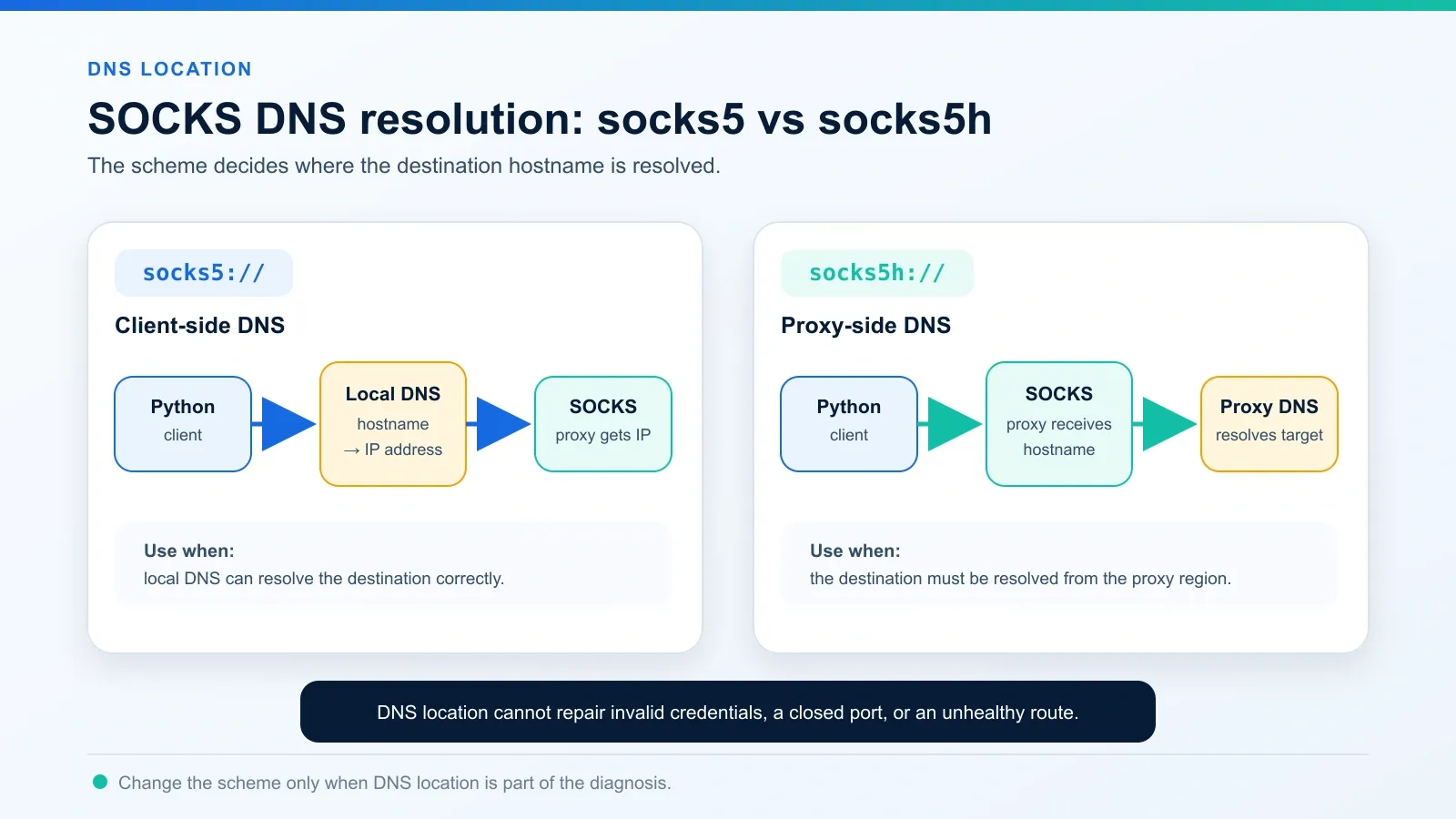
With socks5://, DNS resolution occurs on the client. With socks5h://, the proxy resolves the destination hostname. If local DNS cannot resolve the target, or if the test needs name resolution from the proxy’s region, socks5h may fix that specific failure.
It will not fix invalid credentials, a closed port, an unavailable exit, or a slow target. Do not change an HTTP proxy URL to socks5:// unless the provider documents that host and port as a SOCKS endpoint.
Step 4: Fix read-stage failures
A ReadTimeout means the connection stage completed. Focus on what happens after the request reaches the route.
Compare a nearby exit with a distant exit
Long geographic paths add latency and variability. Test a country-level exit near the destination before narrowing to a city. If the nearby route is stable and the distant route repeatedly times out, choose the region that meets the business requirement with the lowest measured latency rather than globally raising the read value.
When a workflow needs location diversity, rotating residential proxies can provide regional exits. Rotation is not automatically a timeout fix: stateful requests need a sticky session long enough to preserve continuity, while independent public GET requests can rotate more freely.
Separate target delay from proxy delay
Compare at least three low-frequency samples per route and keep the request identical. If both routes slow down at the same time, inspect the target service, payload, and rate limits. If only one proxy endpoint degrades, test another endpoint in the same region before changing the application timeout.
Use a provider health check or a proxy checker to verify that the endpoint is reachable and that the exit matches the intended region. A successful checker result proves basic connectivity; it does not prove that every target will respond at the same speed or grant access.
Close streamed responses
With stream=True, Requests does not release the connection to the Session pool until the body is consumed or the response is closed. Leaving responses open reduces connection reuse and can increase socket and resource use. A pool configured to block may also make callers wait for a free connection; the default adapter does not impose that blocking behavior.
with session.get(
    url,
    proxies=proxies,
    timeout=(5, 30),
    stream=True,
) as response:
    response.raise_for_status()
    for chunk in response.iter_content(chunk_size=64 * 1024):
        if not chunk:
            continue
        process(chunk)
The context manager closes the response even when processing fails. Keep a separate application limit for total bytes or total elapsed time when large downloads must stay within a strict resource budget.
Step 5: Make the result observable
For each attempt, record a route label, destination hostname, exception class or HTTP status, elapsed time, and attempt number. These fields tell you whether a longer timeout merely delays the same failure. Keep proxy passwords, authorization headers, cookies, and secret-bearing query strings out of logs.
Use a Session context for repeated calls and a Response context for streamed data. Track an application deadline separately from Requests’ connect/read tuple, especially when retries or several resolved addresses may extend total duration. If a GET is retried, include every attempt and its backoff in that larger budget.
The downloadable local lab in Step 1 prints a consistent JSON result for a successful direct request, a proxy-path timeout, and a successful repaired route. Use that result shape as a starting point for your own instrumentation.
Step 6: Decide whether to retry, rotate, or quarantine
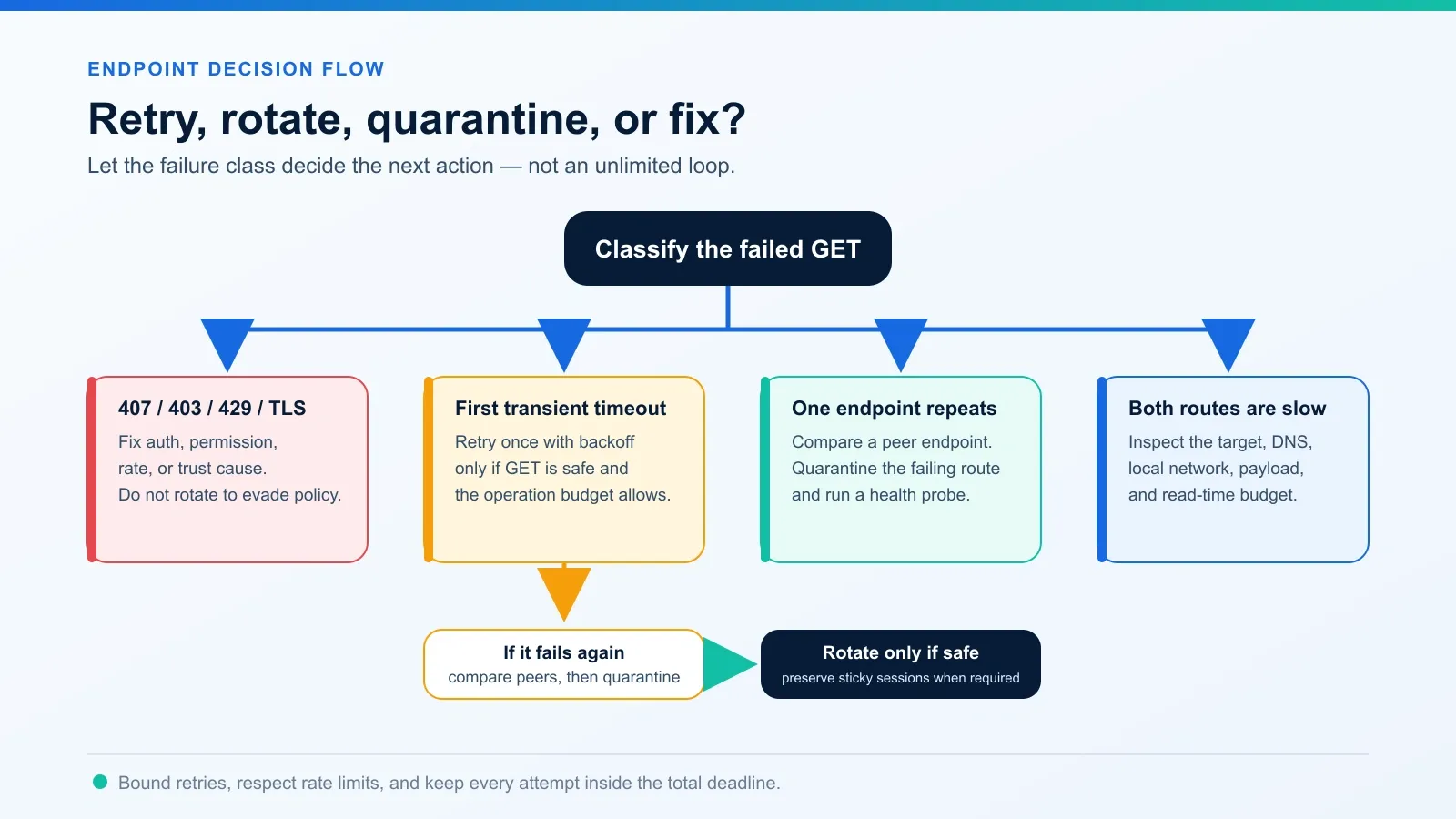
Retry policy should follow the failure class instead of treating every failed request the same way.
| Failure | Default action | Reason |
|---|---|---|
First transient ConnectTimeout on a normally healthy route |
Retry once after a short backoff if the GET is safe and the operation budget allows it | A short network interruption may clear |
Repeated ConnectTimeout on one endpoint |
Quarantine that endpoint and verify its health | More waiting does not repair a dead or unreachable route |
Occasional ReadTimeout |
Compare target and route timing; retry only within a bounded budget | The target or response path may be temporarily slow |
407 |
Fix authentication; do not retry unchanged values | The proxy rejected the credentials or source identity |
429 |
Honor Retry-After when supplied and reduce request rate |
Rotation should not be used to evade a target’s rate limit |
403 |
Check authorization, target policy, and request validity | A different IP does not create permission |
| TLS error | Correct trust configuration or endpoint interception | verify=False hides certificate validation rather than solving the cause |
| One exit repeatedly fails while peers succeed | Remove or quarantine that route and report it to the provider | The evidence points to endpoint-specific health |
urllib3’s Retry supports method restrictions, status-code lists, exponential backoff, jitter, and Retry-After. Keep the allowed methods limited to operations that are safe to repeat, set a small total, and fit all attempts inside the application’s larger deadline. Do not create an unlimited while True loop around requests.get().
Conclusion
The reliable response to a requests GET timeout is classification, not guesswork. Compare direct and proxied calls, preserve all other request variables, and record whether the failure occurs during connection, reading, proxy negotiation, TLS, or after an HTTP response.
Fix configuration and authentication errors directly. Measure healthy regional latency before changing the read budget. Retry safe GET requests only within a bounded operation budget, and quarantine endpoints that repeatedly fail while comparable routes succeed. That workflow makes timeout handling faster to debug and safer to operate without duplicating a general Requests timeout tutorial.