
How to Change MAC Address on Windows 11, macOS, and Linux

Aug 21, 2026 · Guides · 11 min read
TL;DR
To change a MAC address safely, record the active adapter’s current value, generate a locally administered unicast address, use a method supported by that adapter and operating system, reconnect, and verify the effective address. The change normally overrides the factory value; it does not rewrite the network card or change your public IP.
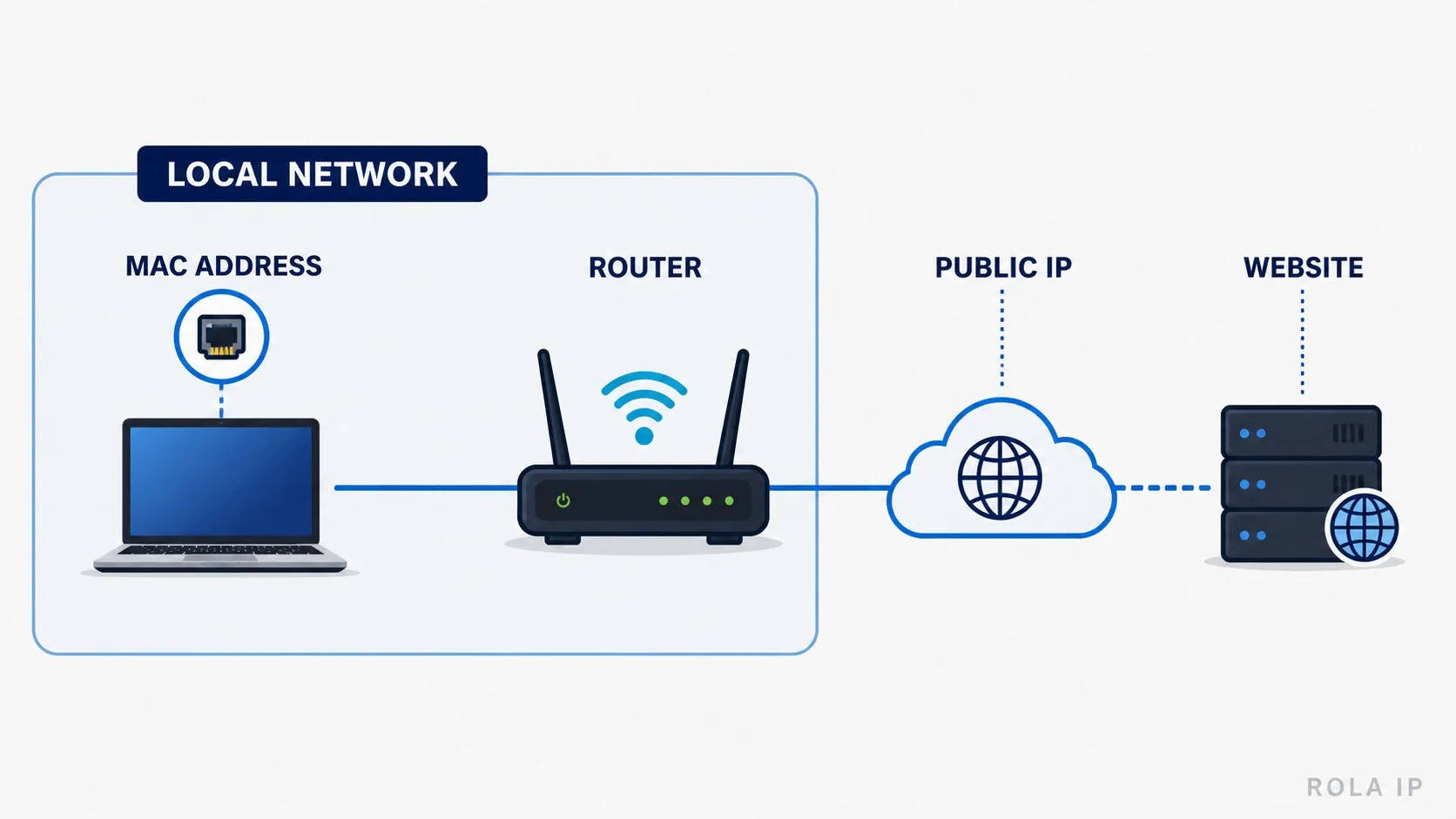
This guide is for people managing their own device or an authorized test network. Do not use MAC spoofing to evade workplace, school, hotel, parental-control, or other access policies.
Quick Decision Table
Platform |
Best supported method |
Custom value? |
Persists? |
Main limitation |
|---|---|---|---|---|
Windows 11 Wi-Fi |
Random hardware addresses in Settings |
No |
Per network or global setting |
Requires compatible Wi-Fi hardware and driver |
Windows 11 Ethernet or supported Wi-Fi adapter |
Device Manager or Set-NetAdapter |
Yes |
Usually until removed or replaced |
Not every adapter supports an override |
Linux |
ip link for a temporary change; NetworkManager for a profile setting |
Yes, random, or stable |
Depends on method |
Interface and connection names vary |
macOS Sequoia 15+ |
Private Wi-Fi Address: Off, Fixed, or Rotating |
No |
Per saved network |
Apple does not expose an arbitrary value in this UI |
Android 10+ |
Per-network randomized MAC |
No |
Normally per SSID |
Menu names vary by manufacturer |
NVIDIA Shield |
View the network MAC in About |
No documented override |
N/A |
NVIDIA documents lookup, not a supported change procedure |
Before You Change Anything: MAC vs IP vs Browser Fingerprint
A 48-bit MAC address is six octets, usually written as 00:11:22:AA:BB:CC. It operates at the data-link layer on the local network. The first octet contains an individual/group bit and a universal/local bit. A software-assigned address should be unicast and locally administered.
| Identifier | Where it matters | Usually assigned by | Does a MAC change affect it? |
|---|---|---|---|
| MAC address | Local Ethernet or Wi-Fi segment | Hardware vendor or operating system | This is the value being changed |
| Private IP | Local network, such as 192.168.1.20 |
Router/DHCP server | It may receive a new lease, but not necessarily |
| Public IP | Internet-facing connection beyond the router | ISP, VPN, or proxy exit | No |
| Browser fingerprint | Website/application layer | Browser and device characteristics | No |
Changing the MAC may help with authorized network testing, a NIC replacement, a lab that expects a specific address, or privacy against nearby Wi-Fi observers. It is not a complete online identity change. Websites do not normally receive the source MAC from a client behind one or more routers; each link uses its own Layer-2 frame.[^2]
How to Find Your Current MAC Address
Always record the original value before changing it. A laptop can have separate addresses for Ethernet, Wi-Fi, Bluetooth, virtual adapters, and VPN interfaces, so identify the adapter that is actually carrying the connection.
Find a MAC Address on Windows 11
On Windows 11, PowerShell is the quickest way to see the adapter name, connection status, and current MAC address together.
Get-NetAdapter -Physical | Format-Table Name, Status, MacAddress
Look for the physical adapter whose status is Up. Microsoft documents Get-NetAdapter for enumerating adapters and getmac for returning their MAC addresses.
You can also use:
getmac /v /fo table
Or, from Command Prompt:
ipconfig /all
Under the active Wireless LAN adapter or Ethernet adapter, the Physical Address is the current MAC. Avoid copying the address of a disconnected Bluetooth, virtual, or VPN adapter.
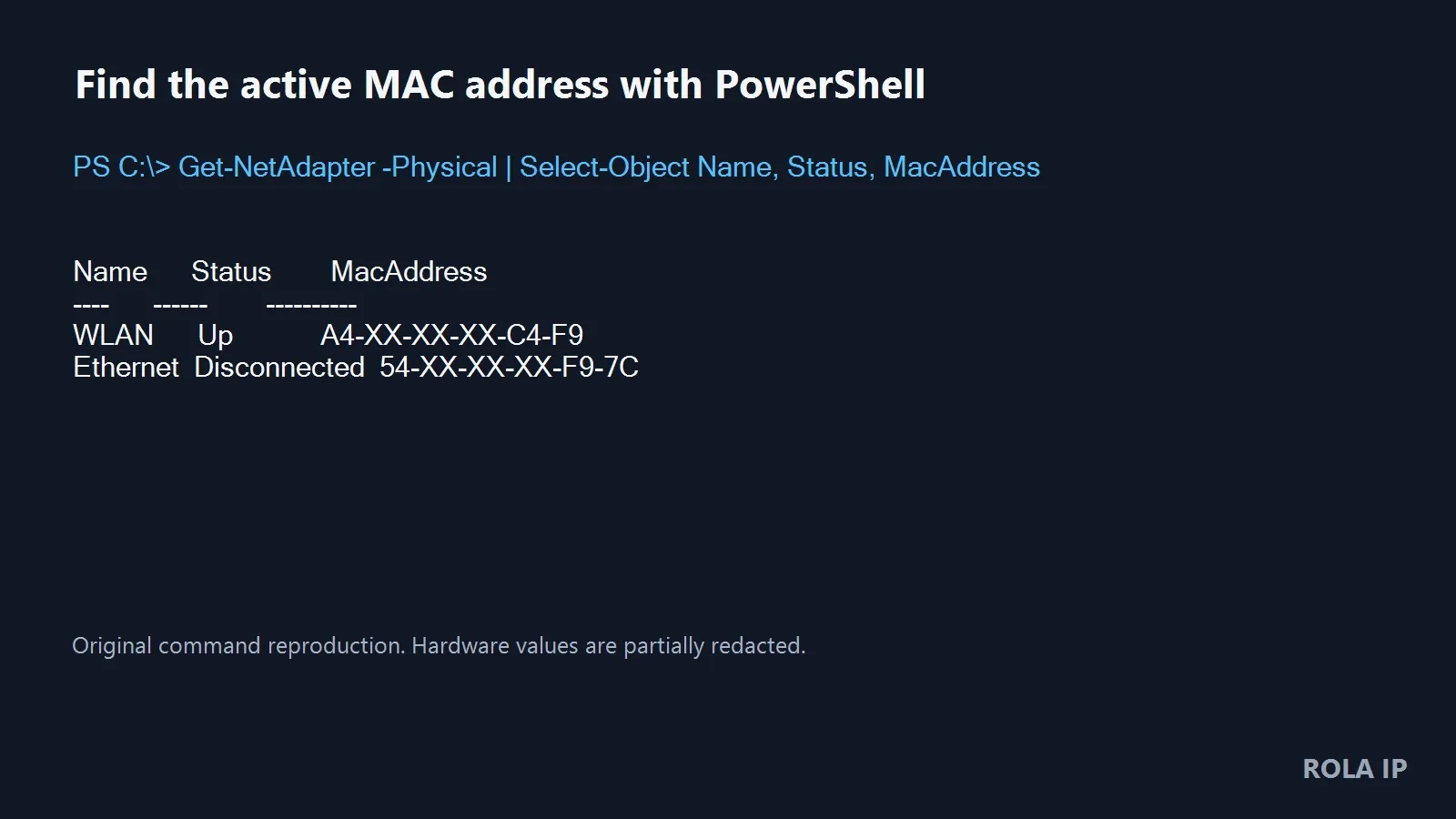
Original ROLA IP command reproduction with hardware values partially redacted. The read-only command was executed on Windows 10 Pro build 19045 with PowerShell 7.6.4; Microsoft documents the command family for Windows 11 and Windows 10.
Find a MAC Address on Linux
Run:
ip -brief link
The address after link/ether is the current Ethernet-style address. Do not assume the interface is called eth0 or wlan0; current systems may use names such as enp3s0 or wlp2s0.
Find a MAC Address on macOS
Open System Settings → Network → Wi-Fi → Details and inspect the network information, or run:
networksetup -listallhardwareports
Match the Hardware Port to its Device, then note the displayed Ethernet Address. The interface name may not be the same on every Mac.
How to Generate MAC Address Values Correctly
If you need to generate a MAC address for an authorized lab or adapter override, do not paste twelve arbitrary hex digits. The address should be locally administered, unicast, and unused on the local network. Setting the first octet to 02 is a simple way to satisfy the first two conditions; for example:
02:7A:34:B1:C8:5E
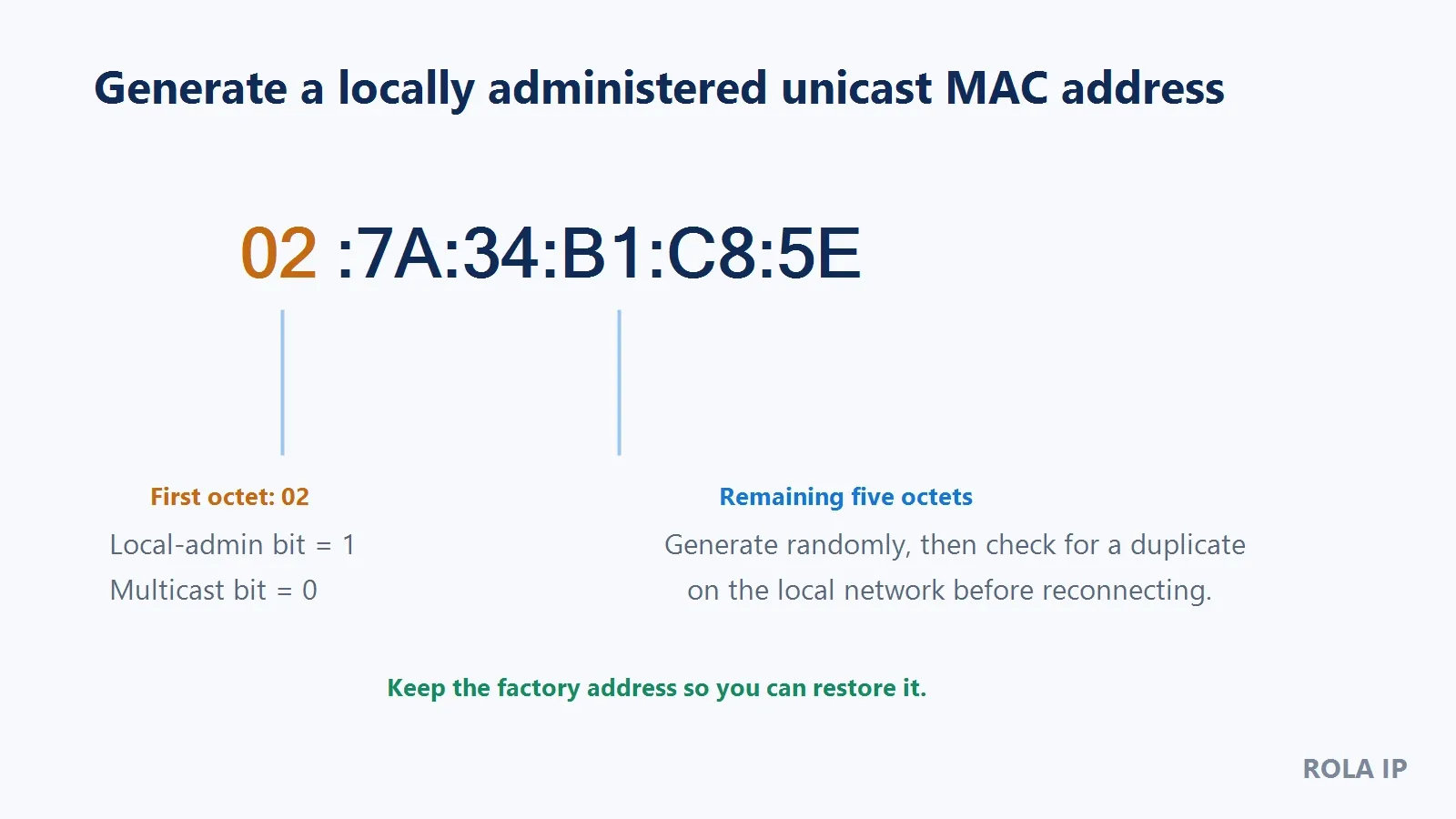
Original ROLA IP educational diagram. 02 sets the locally administered bit and clears the multicast bit; the remaining octets are an example, not an assigned address.
The following PowerShell code generates six random bytes, sets the local bit, clears the multicast bit, and prints a Windows-friendly value:
[byte[]]$bytes = New-Object byte[] 6
$rng = [System.Security.Cryptography.RandomNumberGenerator]::Create()
$rng.GetBytes($bytes)
$rng.Dispose()

$bytes[0] = ($bytes[0] -bor 0x02) -band 0xFE
($bytes | ForEach-Object { $_.ToString("X2") }) -join "-"
Expected result: a value such as CA-E6-8A-73-D7-0F. The first octet does not have to be 02; the code preserves random higher bits while forcing local/unicast status. This generator was executed on PowerShell 7.6.4 and its two control bits were checked.
Before applying the value, review your router’s connected-client list and DHCP reservations. arp -a can reveal addresses your computer recently learned, but an absent entry does not prove an address is unused. Keep the original MAC so you can recover from a collision or allowlist problem.
How to Change MAC Address on Windows 11
Use Windows’ built-in randomization when the goal is Wi-Fi privacy. Use a chosen custom value only when a lab, replacement adapter, or managed network requires it and the driver supports the operation.
Method 1: Turn On Random Hardware Addresses
For all supported Wi-Fi networks:
- Open Settings.
- Select Network & internet → Wi-Fi.
- Turn on Random hardware addresses.
- Disconnect and reconnect to Wi-Fi.
- Run
Get-NetAdapter -Physicalagain and compare the effective value.
For one saved network, open Network & internet → Wi-Fi → Manage known networks, choose the network, and enable the random hardware address setting there. Microsoft states that both controls depend on compatible Wi-Fi hardware.
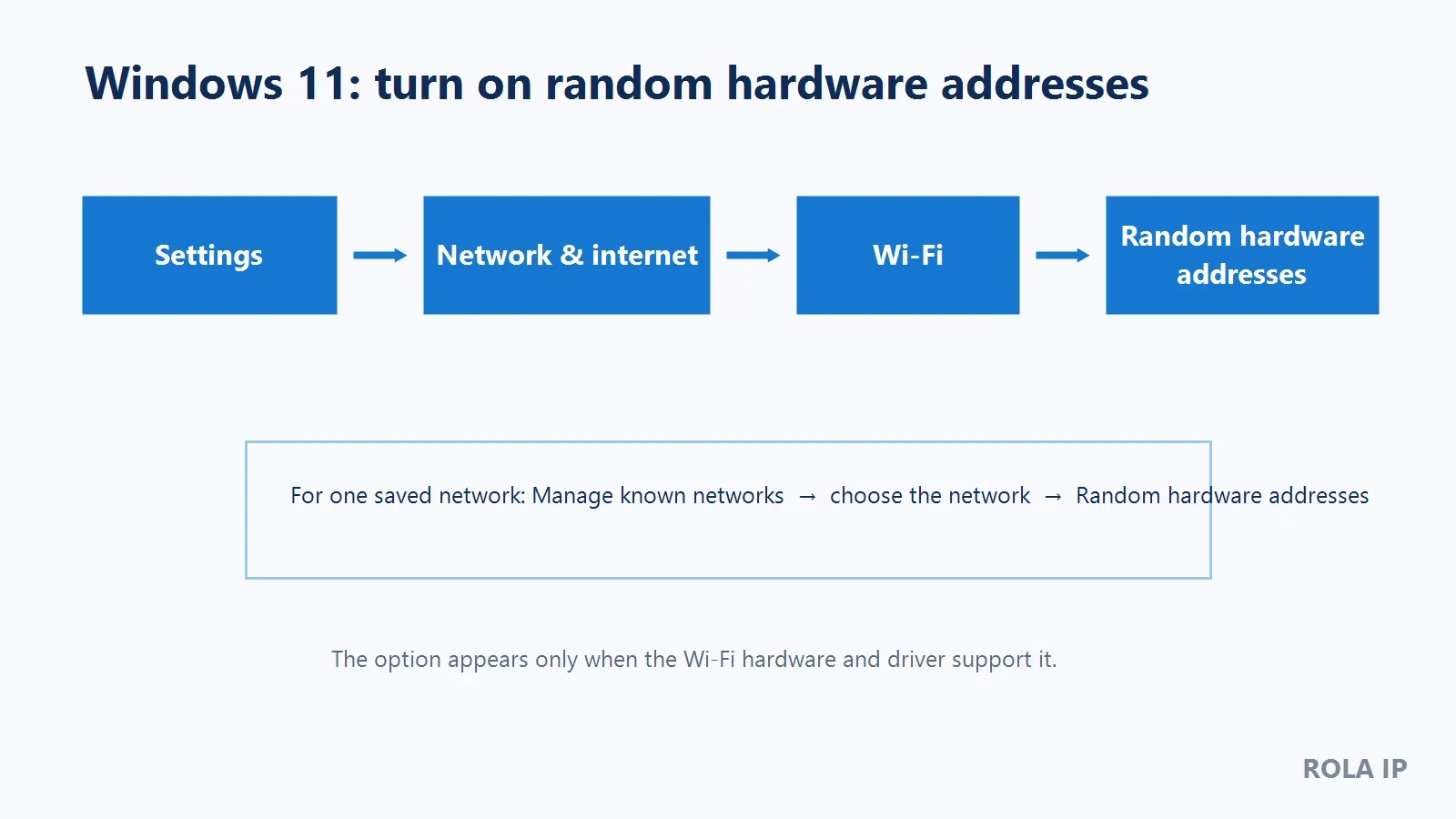
Original ROLA IP navigation diagram based on Microsoft Support. It is not a screenshot and does not replace the current Windows Settings page.
Expected result: Windows uses a private address when it next connects through the supported Wi-Fi adapter. If the option is missing, update the vendor driver and confirm adapter support; do not assume a registry edit can add hardware capability.
Method 2: Set a Custom MAC in Device Manager
- Press
Win + R, enterdevmgmt.msc, and press Enter. - Expand Network adapters.
- Open the active adapter’s Properties → Advanced tab.
- Look for Network Address, Locally Administered Address, or a similarly named driver property.
- Select Value and enter 12 hexadecimal characters without colons or hyphens, such as
027A34B1C85E. - Select OK, then disable and re-enable the adapter or restart Windows.
- Verify with
Get-NetAdapter -Physical.
The property name varies by driver. If it is absent, the adapter may not support an override. A current vendor knowledge-base procedure corroborates the Device Manager workflow, but Microsoft’s driver documentation is the authority for the underlying NetworkAddress mechanism.
Method 3: Set a Custom MAC with PowerShell
Open PowerShell as Administrator and substitute the exact adapter name and authorized address:
Set-NetAdapter -Name "Ethernet" -MacAddress "02-7A-34-B1-C8-5E"
Then verify:
Get-NetAdapter -Name "Ethernet" | Format-List Name, Status, MacAddress
Microsoft documents Set-NetAdapter -MacAddress and explicitly warns that not all adapters support it; the operation can also interrupt networking.The mutating command above was not executed in the production environment used for this article, because doing so would disrupt the active connection. It is documentation-validated, not a claim that every NIC will accept the value.
Restore the Original Windows MAC
If you used random hardware addresses, turn the setting off for that network and reconnect. If you entered a custom value in Device Manager, return to the same property and choose Not Present when that option exists. You can also set the recorded original value again:
Set-NetAdapter -Name "Ethernet" -MacAddress "YOUR-ORIGINAL-MAC"
Restart the adapter and verify the current address. Windows’ NDIS documentation notes that the registry value is not itself validated, which is why directly editing the registry is not the recommended first method.
How to Change MAC Address on Linux
The commands below follow current iproute2 and NetworkManager documentation.They were not live-executed in this Windows-only validation environment, so test them first on a noncritical authorized connection.
Temporary Change with ip link
First discover the real interface name:
ip -brief link
Then replace enp3s0 and the example address:
sudo ip link set dev enp3s0 down
sudo ip link set dev enp3s0 address 02:7a:34:b1:c8:5e
sudo ip link set dev enp3s0 up
ip link show dev enp3s0
Expected result: link/ether shows the new value. A network manager may immediately restore its profile value, and many temporary changes disappear after reboot.
To restore the recorded address, repeat the three ip link set commands with the original value.
Persistent or Profile-Based Change with NetworkManager
List saved connection profiles:
nmcli connection show
For an Ethernet profile:
sudo nmcli connection modify "Wired connection 1" \
  802-3-ethernet.cloned-mac-address 02:7a:34:b1:c8:5e
sudo nmcli connection down "Wired connection 1"
sudo nmcli connection up "Wired connection 1"
For a Wi-Fi profile, replace the saved profile name and interface name in this example:
sudo nmcli connection modify "Home Wi-Fi" \
  802-11-wireless.cloned-mac-address 02:7a:34:b1:c8:5e
sudo nmcli connection down "Home Wi-Fi"
sudo nmcli connection up "Home Wi-Fi"
Verify both the profile setting and the effective address:
nmcli -f 802-11-wireless.cloned-mac-address connection show "Home Wi-Fi"
ip link show dev wlp2s0
The first command should show the cloned value, while ip link shows the address currently presented by the interface. If the change causes a connection problem, restore the hardware address in the profile and reconnect:
sudo nmcli connection modify "Home Wi-Fi" \
  802-11-wireless.cloned-mac-address permanent
sudo nmcli connection down "Home Wi-Fi"
sudo nmcli connection up "Home Wi-Fi"
NetworkManager also accepts random, stable, and preserve in the relevant assigned/cloned-address field.Use permanent to return the profile to the hardware address, reconnect, and confirm with ip link.
How to Change MAC Address on macOS
macOS does not provide a general text box for entering any six-octet address. For Wi-Fi, Apple’s supported control is Private Wi-Fi Address, which gives each saved network its own privacy setting.
On macOS Sequoia 15 or later, open System Settings → Wi-Fi, click Details beside the network, and choose Private Wi-Fi Address. Fixed keeps the same private address for that network. Rotating periodically creates a new one under the operating system’s rules. Choose Off when the network administrator needs the hardware address or a fixed reservation.
After changing the setting, disconnect and reconnect to the network, then check the address shown in the network details or in the router’s client list. If the setting is missing, the network may be managed, the Mac may be running an older release, or the Wi-Fi interface may not support that control. This guide does not recommend an untested ifconfig workaround for arbitrary macOS addresses because current Wi-Fi management can ignore or replace it.
How to Change MAC Address on iPhone and iPad
Open Settings → Wi-Fi, tap the information button beside the network, and choose the Private Wi-Fi Address mode. If a router reservation or managed network expects a known device address, coordinate the change with the administrator before switching modes.
How to Change MAC Address on Android
Android 10 enables MAC randomization by default for supported client-mode Wi-Fi and provides a per-network control in the system UI.On many devices, open Settings → Network & internet → Internet, tap the gear beside the network, and inspect Privacy or MAC address type. Choose the randomized or device MAC according to the authorized network’s requirements. Menu names vary by manufacturer. Google’s Android Help also distinguishes the device Wi-Fi MAC from the randomized address shown for a saved network.
NVIDIA Shield MAC Address: What You Can Verify
To find the MAC address on an NVIDIA Shield, open:
Settings → Device Preferences → About
NVIDIA lists the network MAC address among the information available on that screen.Record the address for the interface currently in use; Ethernet and Wi-Fi can have different identifiers.
NVIDIA’s public Shield guide does not document a supported custom-MAC override. If your Shield’s address appears to change, check whether its current Android TV build exposes a per-network randomized/device-MAC option. If it does not, create the reservation against the stable address shown by the router or contact NVIDIA support. Do not apply a generic phone rooting or ADB tutorial to a Shield device without model- and version-specific evidence.
Do You Need a MAC Address Changer App?
Usually not. Built-in Windows, Linux, Apple, and Android controls are easier to audit and reverse. A utility advertised as a “mac adress changer” may look convenient, but the typo should not lower your standards. Use the same evaluation rules:
- Prefer an operating-system or adapter-vendor method.
- Download only from the maintainer’s official site.
- Check the release date, signature, supported operating systems, and rollback path.
- Do not grant administrator rights to an unknown utility.
- Record the original address before the tool makes any change.
- Verify the effective address independently with an OS command.
A utility cannot make an unsupported driver accept an override, and it does not change the public IP or browser fingerprint.
Troubleshooting: Why the MAC Address Did Not Change
| Symptom | Likely cause | How to verify | Fix |
|---|---|---|---|
Network Address is missing |
Driver does not expose an override | Check adapter documentation and Set-NetAdapter support |
Update the vendor driver or use supported Wi-Fi randomization |
| Command succeeds but value is unchanged | Wrong adapter, profile manager reset, or unsupported NIC | Compare adapter name/status before and after reconnect | Target the active interface; change the NetworkManager profile; stop if unsupported |
| Connection fails immediately | Invalid, multicast, duplicate, or unregistered address | Restore the original and reconnect | Generate a local-unicast value and check router reservations/allowlists |
| Address resets after reboot | Temporary command or OS privacy behavior | Compare live address with profile setting | Use a supported persistent profile or accept temporary behavior |
| Router reservation stops working | Router expects the previous address | Check the router client/reservation list | Update the authorized reservation or use a fixed/device address |
| Website still recognizes the session | MAC is not the relevant website-layer signal | Check public IP, cookies, login, and browser state separately | Do not expect MAC spoofing to replace IP or browser controls |
When a Proxy Is Relevant and When It Is Not
A proxy does not change the client adapter’s MAC and cannot fix a missing Windows driver property or bypass a local MAC allowlist. If your actual task is to confirm the internet-facing address, use ROLA IP’s What Is My IP page before and after the authorized network change. If a legitimate regional web test requires a different public exit, rotating residential proxies may be considered, subject to the target site’s rules and resource availability. The proxy checker can then help confirm the chosen proxy route. None of these steps guarantees access, anonymity, or account safety.
Conclusion
The safest way to change a MAC address is to use a built-in, driver-supported method and prove the effective result. Record the original, generate a local-unicast value when a custom address is necessary, reconnect, verify, and keep a rollback ready. For online identity or regional web testing, solve the separate public-IP and browser-layer problem instead of expecting MAC spoofing to do everything.