
Twitter Scraper Python: Playwright Tutorial and X API Guide

Sep 2, 2026 · Proxy Basics · 8 min read
TL;DR
For authorized Twitter/X workflows, use the official X API when it exposes the fields and history you need. Use Playwright for an owned or explicitly permitted browser-visible page, and use Requests only for static fixtures, API calls, or diagnostics.This tutorial runs against a local Twitter-style fixture and does not contact X. It demonstrates the parser, scrolling,deduplication, validation, and export workflow; live X compatibility depends on current authorization, page state, API access, and platform rules.
The fixture proves the parser workflow, not live-platform compatibility or a real-time X benchmark. A free tool or GitHub repository does not establish permission, maintenance, completeness, or data reuse rights.
What Is a Twitter Scraper in Python?
A Twitter scraper in Python turns an approved X data source or browser-visible page into structured records. It may use browser automation, an official API client, a managed extraction service, or a parser for saved HTML or JSON. These routes are not interchangeable: technical capability does not establish authorization, contractual fit, or reuse rights.
What Can You Scrape from Twitter/X?
| Target | Common fields | Boundary |
|---|---|---|
| Public profile posts | ID, text, author, timestamp, canonical URL | Visibility varies by login state, region, page version, and authorization |
| Keyword or hashtag results | Query, ID, author, text, language, time | Prefer official search when it supports the requirement |
| Individual post pages | Text, author, time, permitted engagement fields | Replies and media may require separate permission |
| Authorized account/app data | Fields exposed by the approved interface or API | Request only fields needed for the documented purpose |
Also record collection_source, collected_at, parser_version, language, and canonical_url. Keep raw and normalized values when normalization changes text. A media URL does not grant permission to download, retain, or republish the media.
Twitter Scraper Python Methods Compared
| Method | Best fit | Main limitation |
|---|---|---|
| Playwright | Authorized JavaScript pages and local fixtures | Browser cost and changing selectors |
| Selenium | Teams with existing WebDriver infrastructure | More setup for modern browser/network workflows |
requests + Beautiful Soup |
Static owned pages and saved fixtures | Does not execute JavaScript |
| Scrapy | Approved multi-page crawls with firm URL scope | Needs a renderer for dynamic pages |
| GitHub scraper library | Reviewed prototype | May rely on unstable endpoints or account sessions |
| Apify/managed service | Hosted schedules, storage, and exports | Collection route, maintenance, price, and retention vary |
| Official X API | Supported production access | Access, history, and cost depend on current terms |
For any current project, verify releases, meaningful commits, open issues, documentation, and the actual authentication model. A package that worked years ago may no longer return reliable data.
Prerequisites and Safety Boundaries
Use Python 3.10+, Chromium, and a local synthetic fixture—or an owned or explicitly authorized page. The example uses Playwright 1.55.0 as a reproducibility baseline, not as a claim that it is the newest release. If you upgrade it, rerun the fixture test and record the tested version and date.
Stop if the target unexpectedly shows a login wall, CAPTCHA, access denial, 403, or 429. Do not copy personal cookies, rotate accounts, change identity, or reroute traffic to defeat those signals.
How to Build a Twitter Scraper in Python with Playwright
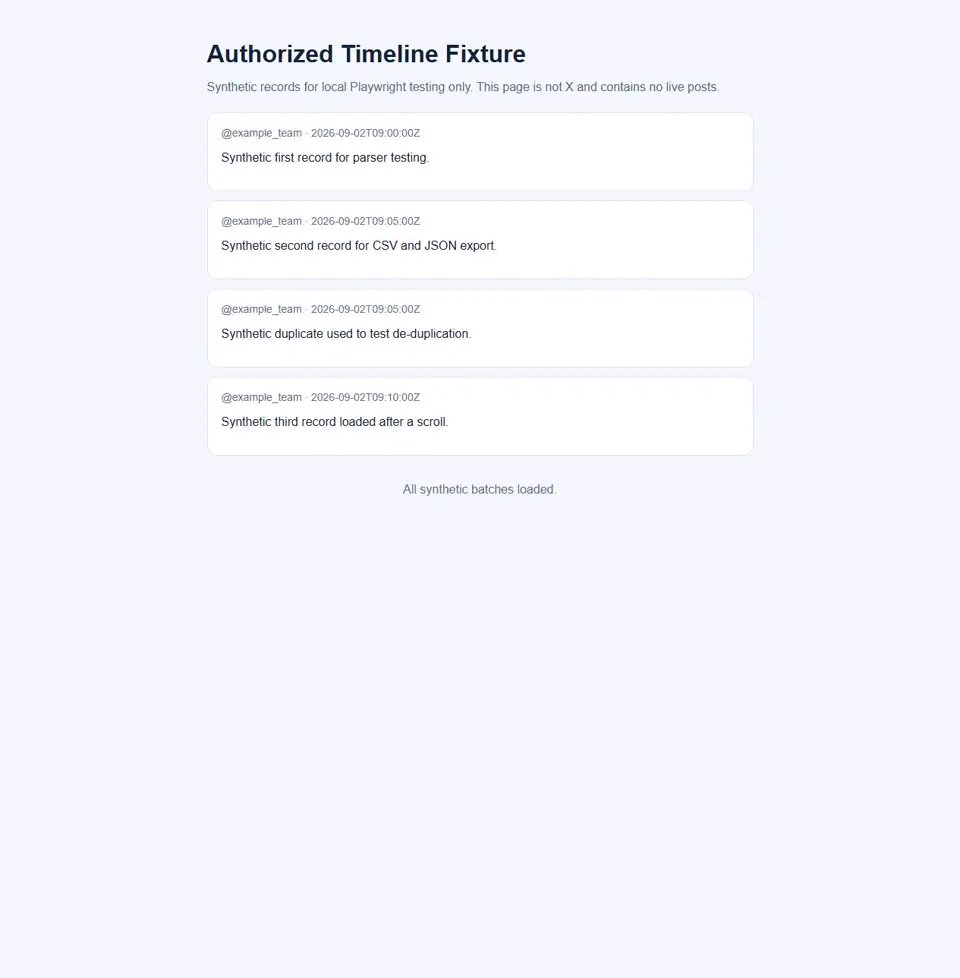
The tutorial uses a synthetic local page containing four rendered cards, including one deliberate duplicate. It demonstrates loading, field extraction, bounded scrolling, stable-ID deduplication, validation, and export without requesting X.
Step 1: Install Python and Playwright
python -m venv .venv
python -m pip install "playwright==1.55.0"
python -m playwright install chromium
python -m http.server 8765 --directory examples/twitter-scraper-python-fixture
Activate the virtual environment before installation using the command appropriate for your operating system.
Step 2: Launch an Isolated Browser Context
from playwright.sync_api import sync_playwright

with sync_playwright() as p:
    browser = p.chromium.launch(headless=True)
    context = browser.new_context(locale="en-US")
    page = context.new_page()
    page.goto("http://127.0.0.1:8765/timeline.html", wait_until="domcontentloaded")
    # extraction steps follow
An isolated context prevents the test from inheriting cookies, local storage, or account state from a normal browser profile.
Step 3: Open an Authorized Page and Wait for Content
Do not replace the fixture URL with x.com without an approved route. Wait for a stable semantic attribute instead of using a fixed sleep:
cards = page.locator('[data-testid="post-card"]')
cards.first.wait_for(state="visible", timeout=10_000)
If the locator times out, preserve the URL and screenshot evidence, then stop and review the authorization and selector contract.
Step 4: Extract Post Fields with Resilient Locators
Prefer stable test attributes, documented IDs, semantic elements, and owned data contracts. Avoid generated CSS classes. Missing required fields should raise an error or enter a review queue.
from datetime import datetime, timezone

PARSER_VERSION = "fixture-parser-1.1"

def extract_visible_posts(page):
    records = []
    for card in page.locator('[data-testid="post-card"]').all():
        post_id = card.get_attribute("data-post-id")
        author = card.locator('[data-field="author"]').inner_text().strip()
        text_raw = card.locator('[data-field="text"]').inner_text()
        time_raw = card.locator("time").get_attribute("datetime")
        if not all([post_id, author, text_raw, time_raw]):
            raise ValueError("Required field missing; review selectors.")
        records.append({
            "id": post_id,
            "author": author,
            "created_at_raw": time_raw,
            "text_raw": text_raw,
            "text_normalized": " ".join(text_raw.split()),
            "language": card.get_attribute("lang") or "und",
            "canonical_url": f"fixture://post/{post_id}",
            "collection_source": "authorized-local-fixture",
            "collected_at": datetime.now(timezone.utc).isoformat(),
            "parser_version": PARSER_VERSION,
        })
    return records
Step 5: Handle Infinite Scroll with Bounded Stops
Stop after a maximum number of scrolls, records, seconds, or consecutive rounds without new IDs. Stop immediately on access-control text.
from time import monotonic

MAX_SCROLLS, MAX_POSTS, MAX_SECONDS, MAX_STALE = 8, 100, 30, 2
STOP_MARKERS = ("captcha", "access denied", "too many requests", "log in to continue")
seen, stale, deadline = {}, 0, monotonic() + MAX_SECONDS

for _ in range(MAX_SCROLLS):
    body = page.locator("body").inner_text().lower()
    if any(marker in body for marker in STOP_MARKERS):
        raise RuntimeError("Access-control marker detected; stop.")
    before = len(seen)
    for record in extract_visible_posts(page):
        seen[record["id"]] = record
    if len(seen) >= MAX_POSTS or monotonic() >= deadline:
        break
    stale = stale + 1 if len(seen) == before else 0
    if stale >= MAX_STALE:
        break
    page.mouse.wheel(0, 1_200)
    page.wait_for_timeout(350)
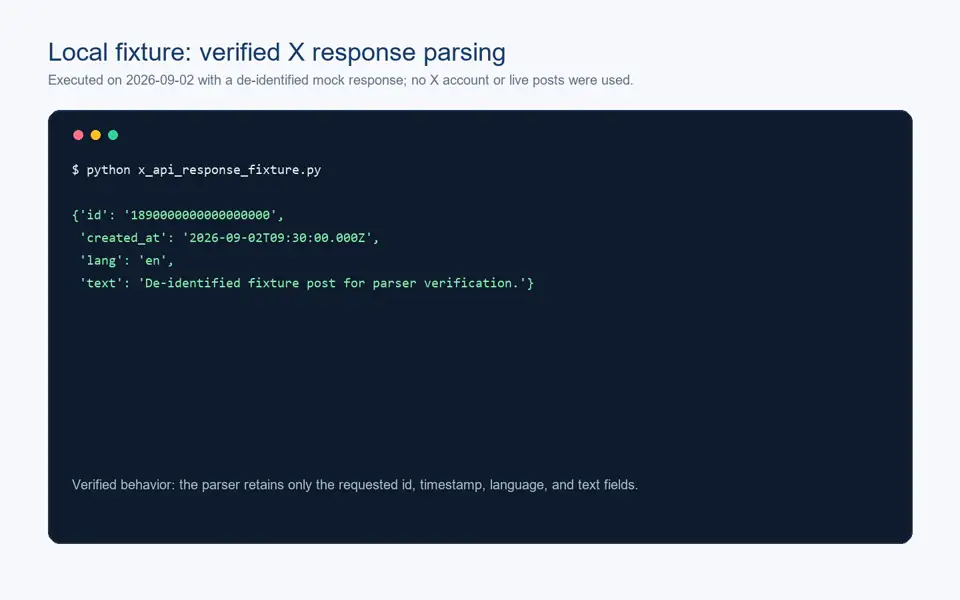
Step 6: Normalize and Deduplicate Posts
The seen dictionary uses the post ID as its key, so the repeated fixture-002 becomes one output row. Stable source IDs are preferable to text hashes because edits, identical text, and whitespace changes can otherwise produce false matches.
records = list(seen.values())
if not records:
    raise RuntimeError("No fixture records were extracted.")
assert len({row["id"] for row in records}) == len(records)
assert all(row["text_normalized"] for row in records)
Step 7: Export Results to CSV and JSON
import csv, json
from pathlib import Path

out = Path("output")
out.mkdir(exist_ok=True)
(out / "posts.json").write_text(json.dumps(records, ensure_ascii=False, indent=2), encoding="utf-8")
with (out / "posts.csv").open("w", newline="", encoding="utf-8") as stream:
    writer = csv.DictWriter(stream, fieldnames=list(records[0]))
    writer.writeheader()
    writer.writerows(records)
print({"unique_posts": len(records), "ids": [row["id"] for row in records]})
Expected fixture output:
{'unique_posts': 3, 'ids': ['fixture-001', 'fixture-002', 'fixture-003']}
The recorded browser check observed two initial cards, four rendered cards after scrolling, and three unique IDs after deduplication.
Keep the permission basis, target version, parser version, run time, stop reason, and validation result beside each export.
Connecting an Authorized Real Page or API
Moving beyond the fixture requires a documented integration contract. Record the exact target URL or official endpoint, the page owner or authorization reference, approved account or app, allowed fields, maximum records, collection window, retention period, and stop conditions before changing the fixture URL.
For an owned browser-visible page, replace only the target URL and locator contract after a fixture regression test. Do not reuse personal browser state. For X data exposed by an approved app, use the documented endpoint, authentication scope, fields and pagination tokens. If a required field or historical range is unavailable, treat that as a product constraint rather than switching silently to an unapproved collection route.
Playwright vs Selenium for Twitter Scraping
Playwright is the stronger default for a new authorized dynamic-page test because it combines isolated contexts, modern locators, auto-waiting, screenshots, and network tooling. Selenium remains valid for teams with WebDriver Grid or existing page objects. Neither grants permission or should be used beyond the approved test scope.
Why Requests and BeautifulSoup Usually Fall Short
requests downloads an HTTP response; Beautiful Soup parses it. They do not execute JavaScript. A dynamic application may return an app shell rather than rendered posts. They remain useful for saved HTML fixtures, owned static pages, and parser unit tests. If the response is a login page, challenge, error, or empty shell, stop.
Using GitHub Twitter Scraper Libraries Safely
A Twitter-scraper GitHub search surfaces projects with different architectures. Check releases, commits, open issues, authentication, secret storage, output schema, pagination, tests, and license. Determine whether the project uses an official API, internal endpoint, browser, account credentials, or saved cookies. Never test an unreviewed repository with a personal or production account.
Using Apify or Managed Scraping Tools
A Twitter scraper Apify actor listed in the Apify Store can supply scheduling, storage, and exports. Review the exact maintainer, collection route, authentication, update history, schema, retention, security, pricing, and denied-access behavior. A free plan may support a small evaluation, but free credits do not establish completeness, maintenance, permission, or reuse rights. These actor-level details must be rechecked before publication or purchase.
When the Official X API Is the Better Option
The official API is generally more durable for supported production X data. X API search availability, historical coverage, pricing, permissions, API versions and rate limits can change. Check the current Search Posts documentation and rate-limit documentation before implementation; this article’s API statements were reviewed on September 2, 2026. On HTTP 429, stop and wait for the documented reset.
Where Proxies Fit and Where They Do Not
A proxy may support an authorized regional QA environment or approved external worker. Review Rola’s web scraping proxy scope and Python proxy integration configuration. A proxy checker can diagnose an approved endpoint. Proxies do not create permission and must not evade login requirements, CAPTCHAs, 403/429 responses, limits, or bans.
Common Errors and Safe Troubleshooting
| Symptom | Safe response |
|---|---|
| Empty HTML | Check final URL, content type, title, and expected markers; use a fixture or authorized browser/API route |
| Locator timeout | Save evidence and compare the approved page with the fixture contract |
| Duplicate posts | Deduplicate with stable IDs and preserve batch provenance |
| Missing fields | Reject or quarantine the row; never invent values |
| Login wall/CAPTCHA/403 | Stop and verify authorization or use an approved API |
| 429 | Read reset information, wait, reduce schedule, and cache approved results |
| Encoding damage | Write UTF-8 and test emoji, line breaks, and non-Latin text |
For every failed run, capture an engineering evidence record before changing code. Log the requested and final URLs, HTTP status, relevant response headers, redirect chain, page title, request and response times, locator or endpoint, record count, parser version, screenshot or sanitized response reference, and explicit stop reason. Remove credentials, cookies, tokens and unnecessary personal data from logs. This evidence distinguishes network failures, access restrictions, rendering changes and parser defects.
Practical Use Cases
Authorized collection can support owned-account archiving, brand monitoring, campaign analysis, support triage, interface regression testing, and approved research. Define the question, field whitelist, time window, and deletion rule first. Preserve source IDs and timestamps, treat engagement counters as time-sensitive observations, and validate language or sentiment models on labeled samples.
Production and Data Validation Checklist
- Record the purpose, owner, authorized source, and restrictions.
- Pin dependencies and rerun fixture tests after upgrades.
- Use stable locators and bounded runtime, record, scroll, and stale-round limits.
- Stop on login walls, CAPTCHAs, 403, 429, or unexpected targets.
- Deduplicate by stable ID and validate required fields.
- Save raw and normalized values with parser provenance.
- Never place cookies, tokens, or secrets in code, screenshots, or exports.
- Define retention, deletion, access control, and permitted reuse.
Conclusion
A useful X scraper Python tutorial should teach the workflow searchers expect while remaining honest about its boundaries. For authorized dynamic pages, Playwright can wait for stable locators, extract fields, apply bounded scrolling, deduplicate records, and export reviewable files. The included fixture makes the process reproducible without contacting X.
For supported production data, evaluate the official API before maintaining browser selectors. Whichever route you choose, preserve authorization, scope, dependency versions, stop conditions, parser provenance, validation results, and retention rules.