
How to Scrape Images From a Website With Python

Sep 4, 2026 · Guides · 11 min read
TL;DR: Use Requests and Beautiful Soup when image URLs are present in the initial HTML. Resolve relative URLs with
urljoin(), prefer the largestsrcsetcandidate, check lazy-loading attributes, and validateContent-Typebefore saving. Use Playwright only when JavaScript or scrolling reveals the real URLs. Always review robots directives, site terms, copyright, privacy, and licensing before collecting or reusing images.
Why Scrape Images From a Website?
Image extraction can support legitimate tasks such as archiving your own site, auditing broken assets, migrating a content library, monitoring product imagery with permission, testing responsive images, or building an authorized research dataset. The technical workflow is similar across these cases, but the right to download and reuse the content depends on the source, license, jurisdiction, and purpose.
Before writing code, define exactly what you need: URLs only, binary files, alt text, dimensions, captions, hashes, or page context. Collecting fewer fields reduces bandwidth, storage, privacy exposure, and maintenance work.
How Websites Deliver Images
An image scraper should diagnose the page before choosing a library.
Standard Image Elements
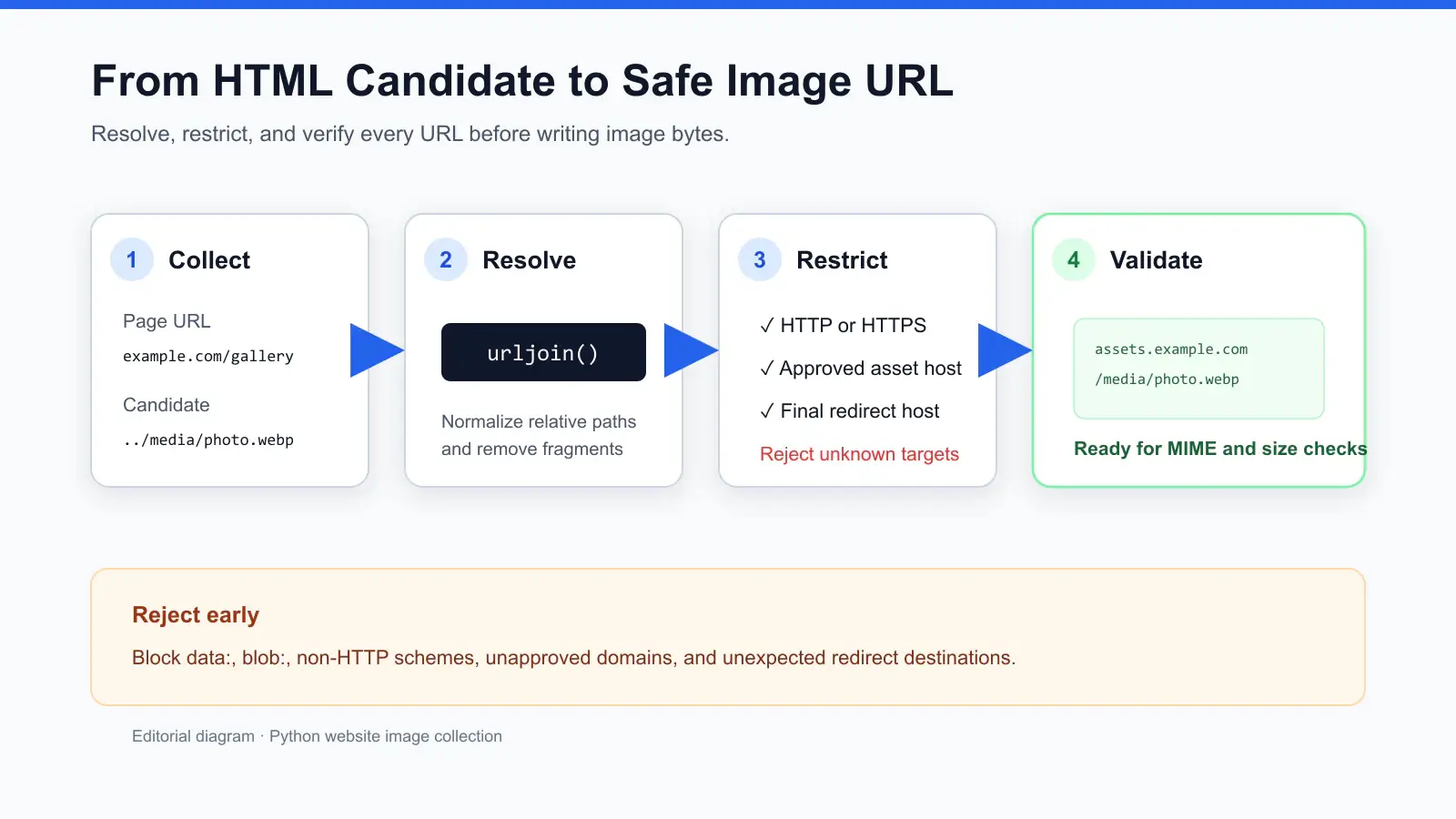
The simplest page contains an <img src="..."> element. The URL may be absolute, protocol-relative, root-relative, or relative to the current document. Python’s standard-library urljoin() safely resolves these forms against the page URL.
Responsive Images and Srcset
Responsive pages often provide multiple candidates through srcset. Each candidate may include a width descriptor such as 1200w or a pixel-density descriptor such as 2x. Selecting only src can download a thumbnail even when a larger asset is available. Parse every candidate and choose the highest numeric descriptor that fits your quality and bandwidth needs.
Lazy Loaded Images
Lazy-loading libraries may place a placeholder in src while storing the real URL in data-src, data-lazy-src, data-original, or a site-specific attribute. Native lazy loading can also use loading="lazy" while keeping the real URL in src. Inspect several image nodes instead of assuming one attribute pattern applies to the entire site.
Picture Sources and CSS Backgrounds
The <picture> element can contain several <source srcset="..."> nodes for different formats or viewport rules. Images can also appear in inline style="background-image: url(...)" declarations or external stylesheets. CSS extraction requires a separate parser and should remain scoped to styles you are authorized to inspect.
JavaScript Rendered Images
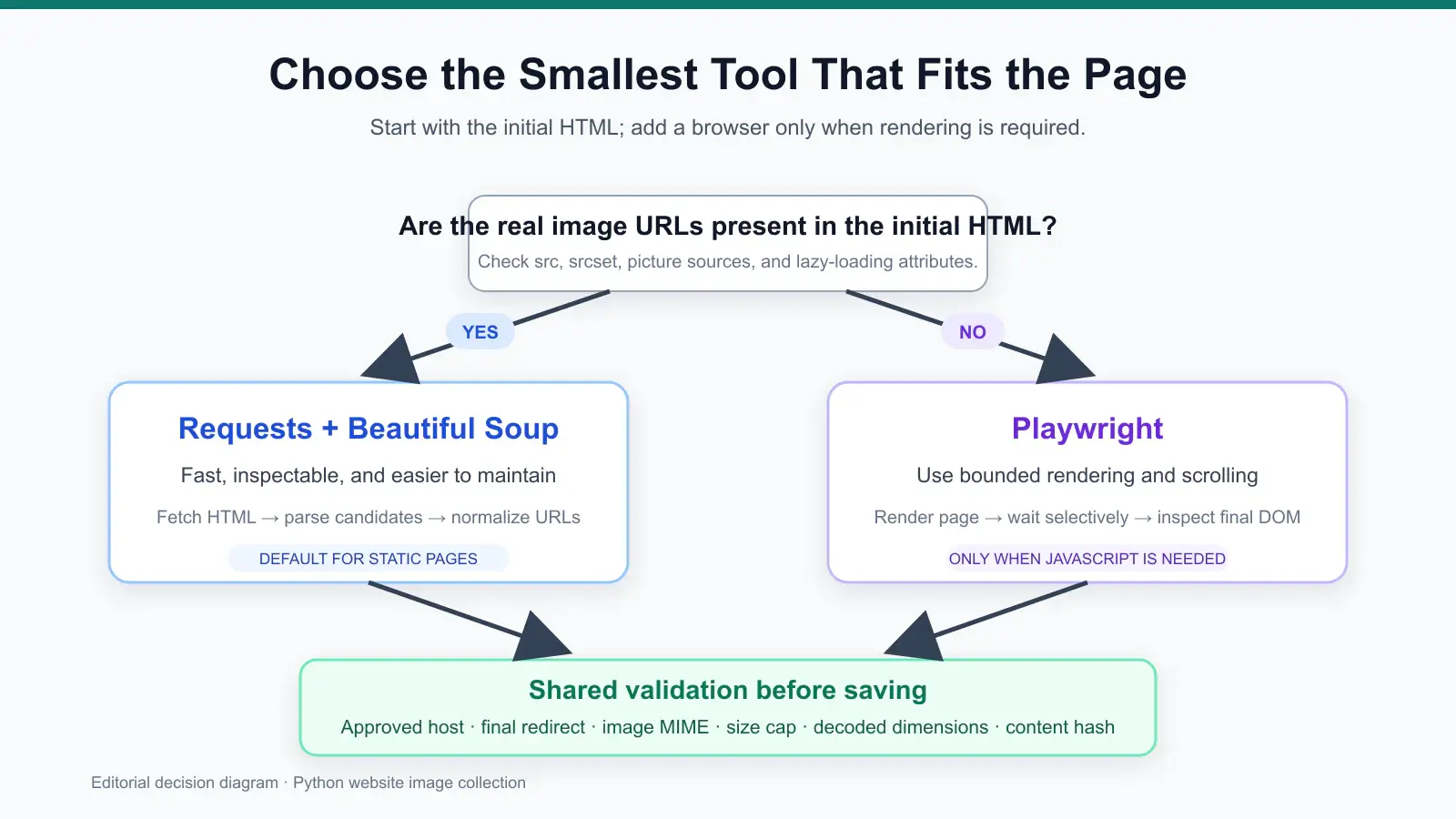
If the initial HTML contains no useful URLs, JavaScript may create image nodes after page load or fetch data from an API. A browser automation tool such as Playwright can render the page, scroll through lazy content, and expose the final DOM. Browser automation is more resource-intensive, so use it only after confirming a plain HTTP request is insufficient.
Choose the Right Python Libraries
Requests and Beautiful Soup
Use Requests for HTTP and Beautiful Soup for parsing static HTML. This combination is fast, understandable, and appropriate when the image URLs appear in the server response. Requests supports timeouts, streaming downloads, headers, sessions, and status checks; Beautiful Soup provides flexible tag and attribute selection.
Playwright
Use Playwright when the page needs JavaScript, user-visible scrolling, or asynchronous rendering before images appear. Its Python API can wait for page states, query the rendered DOM, and inspect network responses. Avoid adding a browser when Requests already returns the required content.
Pillow
Pillow is useful after download. It can verify that a file is decodable, read dimensions and format, remove unwanted metadata, resize images, and convert supported inputs to WebP. HTTP Content-Type is helpful but not sufficient; decoding provides stronger validation.
Requirements and Project Setup
This tutorial targets Python 3.11 or newer and was reviewed on September 4, 2026. Install the static-page dependencies in a virtual environment:
python -m venv .venv

# macOS or Linux
source .venv/bin/activate

# Windows PowerShell
.venv\Scripts\Activate.ps1

python -m pip install requests beautifulsoup4 pillow
For dynamic pages, install Playwright separately:
python -m pip install playwright
python -m playwright install chromium
This article and its Python 3.11 syntax were reviewed on September 4, 2026. After saving the static example as scraper.py, you can run python -m compileall scraper.py as a basic syntax check. The code uses https://example.com/gallery as a placeholder; replace it only with a page you own or have permission to collect from.
Step by Step Static Image Scraper With Python
The static workflow has four stages: fetch HTML, extract candidate URLs, normalize and deduplicate them, then download validated image responses.
Step 1 Fetch the HTML Safely
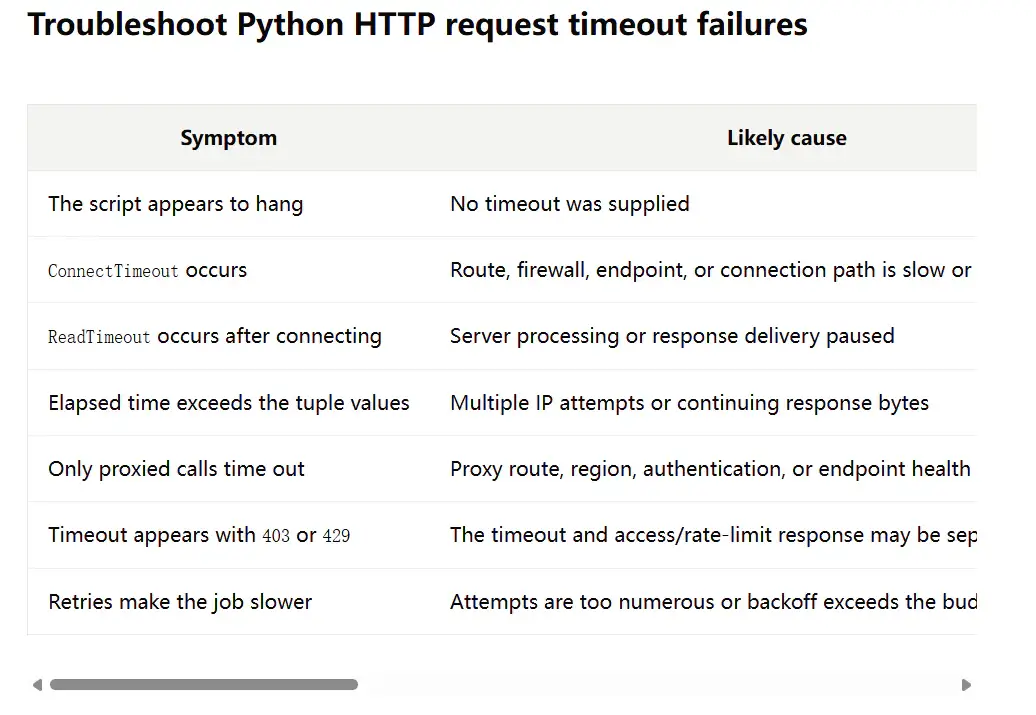
Always set a timeout and identify your client honestly. Call raise_for_status() so error pages are not silently parsed as successful responses. If you need a deeper explanation of request metadata, see this guide to Python requests headers. For production jobs, also define a clear Python requests timeout rather than relying on an unlimited wait.
Step 2 Extract Src Lazy Attributes and Srcset
The helper below checks common lazy-loading fields, parses srcset, resolves relative URLs, rejects non-HTTP schemes and unapproved hosts, and removes duplicates while preserving discovery order.
Step 3 Validate and Download Images
Stream each response to limit memory use. Enforce a maximum file size, accept only image/* content types, derive an extension from the response, create a filesystem-safe name, and use a SHA-256 digest to skip duplicate content. Restrict downloads to approved page and asset domains. After every redirect, verify the final hostname against the allowlist before writing bytes to disk. Do not follow arbitrary image URLs from untrusted pages in an unrestricted batch job.
Complete Static Scraper Code
from __future__ import annotations

import hashlib
import mimetypes
import re
from pathlib import Path
from urllib.parse import unquote, urljoin, urlparse

import requests
from bs4 import BeautifulSoup


PAGE_URL = "https://example.com/gallery"
OUTPUT_DIR = Path("downloaded_images")
TIMEOUT = (5, 30)
MAX_BYTES = 15 * 1024 * 1024
USER_AGENT = "AuthorizedImageAudit/1.0 (+https://example.org/contact)"
APPROVED_PAGE_HOSTS = {"example.com"}
APPROVED_ASSET_HOSTS = {"example.com", "assets.example.com"}

LAZY_ATTRIBUTES = (
    "data-src",
    "data-lazy-src",
    "data-original",
    "data-url",
)


def best_srcset_url(srcset: str) -> str | None:
    candidates: list[tuple[float, str]] = []
    for item in srcset.split(","):
        parts = item.strip().split()
        if not parts:
            continue
        url = parts[0]
        score = 1.0
        if len(parts) > 1:
            descriptor = parts[1].lower()
            try:
                score = float(descriptor.rstrip("wx"))
            except ValueError:
                score = 1.0
        candidates.append((score, url))
    return max(candidates, default=(0, None), key=lambda item: item[0])[1]


def normalize_url(base_url: str, candidate: str | None) -> str | None:
    if not candidate or candidate.startswith(("data:", "blob:")):
        return None
    absolute = urljoin(base_url, candidate.strip())
    parsed = urlparse(absolute)
    if (
        parsed.scheme not in {"http", "https"}
        or not parsed.hostname
        or parsed.hostname.lower() not in APPROVED_ASSET_HOSTS
    ):
        return None
    return absolute


def require_approved_host(url: str, approved_hosts: set[str]) -> None:
    hostname = urlparse(url).hostname
    if not hostname or hostname.lower() not in approved_hosts:
        raise ValueError(f"Unapproved redirect or hostname: {url}")


def extract_image_urls(html: str, page_url: str) -> list[str]:
    soup = BeautifulSoup(html, "html.parser")
    found: list[str] = []

    for tag in soup.select("img, picture source"):
        srcset = tag.get("srcset") or tag.get("data-srcset")
        if srcset:
            found.append(best_srcset_url(srcset))

        for attribute in ("src", *LAZY_ATTRIBUTES):
            found.append(tag.get(attribute))

    for styled in soup.select('[style*="background-image"]'):
        style = styled.get("style", "")
        found.extend(re.findall(r"url\(['\"]?([^'\")]+)", style))

    normalized = (normalize_url(page_url, value) for value in found)
    return list(dict.fromkeys(url for url in normalized if url))


def safe_stem(image_url: str, index: int) -> str:
    name = Path(unquote(urlparse(image_url).path)).stem
    cleaned = re.sub(r"[^A-Za-z0-9._-]+", "-", name).strip("-._")
    return cleaned[:80] or f"image-{index:04d}"


def extension_for(content_type: str) -> str:
    mime = content_type.split(";", 1)[0].lower()
    return mimetypes.guess_extension(mime) or ".img"


def download_image(
    session: requests.Session,
    image_url: str,
    index: int,
    known_hashes: set[str],
) -> Path | None:
    with session.get(image_url, timeout=TIMEOUT, stream=True) as response:
        response.raise_for_status()
        require_approved_host(response.url, APPROVED_ASSET_HOSTS)
        content_type = response.headers.get("Content-Type", "")
        if not content_type.lower().startswith("image/"):
            print(f"Skip non-image response: {image_url}")
            return None

        chunks: list[bytes] = []
        total = 0
        for chunk in response.iter_content(chunk_size=64 * 1024):
            if not chunk:
                continue
            total += len(chunk)
            if total > MAX_BYTES:
                raise ValueError(f"Image exceeds {MAX_BYTES} bytes: {image_url}")
            chunks.append(chunk)

    payload = b"".join(chunks)
    digest = hashlib.sha256(payload).hexdigest()
    if digest in known_hashes:
        print(f"Skip duplicate content: {image_url}")
        return None
    known_hashes.add(digest)

    filename = safe_stem(image_url, index) + extension_for(content_type)
    destination = OUTPUT_DIR / filename
    destination.write_bytes(payload)
    return destination


def main() -> None:
    OUTPUT_DIR.mkdir(parents=True, exist_ok=True)
    session = requests.Session()
    session.headers.update({"User-Agent": USER_AGENT})

    require_approved_host(PAGE_URL, APPROVED_PAGE_HOSTS)
    response = session.get(PAGE_URL, timeout=TIMEOUT)
    response.raise_for_status()
    require_approved_host(response.url, APPROVED_PAGE_HOSTS)
    image_urls = extract_image_urls(response.text, response.url)

    known_hashes: set[str] = set()
    for index, image_url in enumerate(image_urls, start=1):
        try:
            saved = download_image(session, image_url, index, known_hashes)
            if saved:
                print(f"Saved {saved}")
        except (requests.RequestException, ValueError) as error:
            print(f"Failed {image_url}: {error}")


if __name__ == "__main__":
    main()
This implementation is intentionally conservative. Update both allowlists for the exact page and CDN domains approved for your project; do not replace them with an unrestricted wildcard. The code checks the final URL after Requests follows redirects, and it does not evade access controls, solve challenges, or retry indefinitely. For very large files, replace the in-memory chunk list with a temporary file and compute the digest while streaming.
Handle Base64 Data URLs and Blob URLs
A data:image/...;base64,... value embeds bytes directly in HTML. Decode it only when the content is in scope, validate the declared media type, use base64.b64decode(..., validate=True), and cap the decoded size. Missing Base64 padding can sometimes be repaired, but malformed input should be rejected rather than guessed.
A blob: URL is different: it identifies browser-managed data and cannot be downloaded through Requests. Use the browser context to find the underlying network response or read the rendered resource with page-side JavaScript. Do not treat a blob identifier as a normal public URL.
Scrape Images From Dynamic Websites With Playwright
Use the following pattern when JavaScript creates the image nodes. It renders the page, scrolls a bounded number of times, waits briefly for lazy loading, and passes the final HTML to the same extraction logic used by the static scraper.
from playwright.sync_api import sync_playwright


def rendered_html(url: str, scrolls: int = 5) -> str:
    with sync_playwright() as playwright:
        browser = playwright.chromium.launch(headless=True)
        page = browser.new_page(viewport={"width": 1440, "height": 1000})
        page.goto(url, wait_until="domcontentloaded", timeout=30_000)

        for _ in range(scrolls):
            page.mouse.wheel(0, 1200)
            page.wait_for_timeout(750)

        html = page.content()
        browser.close()
        return html


html = rendered_html("https://example.com/gallery")
urls = extract_image_urls(html, "https://example.com/gallery")
print(f"Discovered {len(urls)} image URLs")
Keep scrolling bounded. Infinite-scroll pages can expose an unending dataset, consume excessive bandwidth, and create accidental load. If images arrive through XHR or Fetch, inspect only authorized responses and prefer a documented API when the site provides one.
Why Image Downloads Fail
HTTP 403 Forbidden
A 403 response can mean the server requires authentication, checks the referring page, blocks automated access, or denies the resource entirely. Confirm authorization and the site’s documented access method. Do not copy browser credentials, forge identity signals, or rotate routes to bypass a deliberate restriction.
You Downloaded HTML Instead of an Image
CDNs may return an error page with a 200 status. Check Content-Type, then verify the bytes with Pillow before trusting the extension. Store failed URLs and response metadata in logs, but avoid logging cookies, authorization headers, or signed query parameters.
Only Thumbnails Were Saved
Inspect srcset, <picture><source>, JSON-LD, or data attributes. Select a candidate deliberately instead of assuming the last srcset item is always best; descriptor order is usually meaningful but not guaranteed.
Placeholder or Tracking Pixels
Filter images by decoded width and height, not just filename. A one-pixel GIF, transparent placeholder, or low-resolution preview may be technically valid but useless for the project.
Duplicate Filenames
Two URLs can share the same path basename or use query parameters to select different content. Include a short URL hash when names collide, and use a content hash to identify identical bytes served from different URLs.
Verify and Convert Downloads With Pillow
This helper verifies that Pillow can decode the file, rejects tiny images, and writes a WebP derivative without overwriting the source:
from pathlib import Path

from PIL import Image, UnidentifiedImageError


def verify_and_convert(path: Path, minimum_width: int = 200) -> Path | None:
    try:
        with Image.open(path) as image:
            image.verify()
        with Image.open(path) as image:
            if image.width < minimum_width or image.height < minimum_width:
                return None
            output = path.with_suffix(".webp")
            image.convert("RGB").save(output, "WEBP", quality=85, method=6)
            return output
    except (UnidentifiedImageError, OSError):
        return None
Be careful with animated GIFs, transparency, ICC profiles, and EXIF orientation. Converting everything to RGB can flatten transparency and discard animation. Decide what the downstream system needs before normalizing formats or metadata.
Scale the Scraper Responsibly
Add Retries With Limits
Retry only transient failures such as selected 5xx responses or short network interruptions. Use exponential backoff with jitter and a small maximum attempt count. Do not retry 401, 403, robots exclusions, or explicit rate limits as if they were random failures.
Use Checkpoints and a Manifest
Write a JSON Lines or CSV manifest containing the source page, normalized image URL, local filename, content type, byte size, checksum, status, and timestamp. A manifest makes reruns idempotent and supports deletion requests without rescanning the entire collection.
Control Concurrency
Parallel downloads improve throughput but can overload a site. Begin with one worker, measure response behavior, and increase only when the site permits it. A queue with per-domain limits is safer than launching an unrestricted task for every URL.
When Should You Use Rola IP for Image Scraping?
Most single-page image downloads can use a direct connection. An authorized project may consider a web scraping proxy when it needs to compare regional image delivery, verify CDN behavior, test a self-owned site from approved locations, or collect permitted assets across controlled network environments. Python teams can consult the Python proxy integration guide and confirm the current endpoint, protocol, location options, authentication method, and usage policy before deployment.
Keep proxy credentials outside source code and load the complete connection URL from an environment variable:
import os

ROLA_PROXY_URL = os.environ["ROLA_PROXY_URL"]
proxies = {"http": ROLA_PROXY_URL, "https": ROLA_PROXY_URL}

# Use only when an authorized project requires the configured route.
response = requests.get(PAGE_URL, proxies=proxies, timeout=TIMEOUT)
A proxy does not create permission, override copyright, or justify bypassing blocks, CAPTCHAs, authentication, robots directives, or rate limits. A 403 response should trigger an authorization and access-method review, not automatic route rotation.
Legal Copyright Privacy and Site Rules
Can you scrape images from websites? Technically, often yes; legally and contractually, it depends. Public visibility does not automatically grant permission to download, train on, republish, sell, or redistribute an image.
Before collection:
- Read the site’s terms of service and relevant API or licensing documentation.
- Check
robots.txtand page-level robot directives as operational signals, while recognizing they are not a complete legal analysis. - Confirm copyright ownership or license terms for each intended use.
- Avoid personal, sensitive, private, or access-controlled content without a documented lawful basis.
- Record source URLs, license evidence, collection dates, and deletion procedures.
- Minimize the dataset and retention period.
- Seek qualified legal advice for commercial, biometric, large-scale, or cross-border projects.
Maintainable Image Scraper Checklist
- Scope collection to approved domains and paths
- Use timeouts, bounded retries, and per-domain rate limits
- Normalize URLs and remove fragments before deduplication
- Parse
src, lazy attributes,srcset,<picture>, and scoped CSS - Reject unsupported schemes and unexpected redirects
- Validate status, MIME type, size, dimensions, and decodability
- Generate safe filenames and preserve a source manifest
- Hash content to prevent duplicate storage
- Protect credentials, cookies, and signed URLs from logs
- Monitor parser yield and alert on sudden structural changes
- Document licensing, retention, and deletion handling
Conclusion
The most dependable approach is to match the tool to the page. Use Requests and Beautiful Soup for static HTML, then add Playwright only when rendering is necessary. Treat srcset, lazy loading, CSS, validation, redirect checks, domain allowlists, deduplication, and manifests as core requirements rather than optional refinements.
Above all, separate technical access from permission to collect and reuse content. A small, well-scoped, observable scraper is easier to maintain, less disruptive to the source site, and safer for the people and rights represented in the images. If authorized regional QA or controlled multi-location collection becomes necessary, evaluate Rola IP against the project’s exact routing, compliance, and budget requirements, then begin with a small validation job.