
Python Web Scraping JavaScript Pages: 3 Reliable Methods

Sep 4, 2026 · Guides · 8 min read
Quick Answer
To scrape JavaScript-rendered pages with Python, inspect initial HTML and Fetch/XHR calls first. Request an authorized JSON endpoint when possible. If browser execution or interaction is required, use Playwright or Selenium and wait for a specific condition. Validate records before saving. Start with the included three-record fixture, then test one permitted target.
This guide is about using Python to scrape content produced by JavaScript. It is not a Python-versus-JavaScript language comparison.
Before You Scrape
Confirm that you are authorized to automate the target, that its rules and authentication boundaries allow the workflow, and that you know which fields count as success. Also check whether an official API, export, feed, or licensed dataset already provides the data.
A public URL does not answer every permission question. The Robots Exclusion Protocol lets owners publish crawler rules, but RFC 9309 distinguishes those rules from access authorization. Treat permission, robots.txt, contractual terms, privacy, and applicable law as separate checks.
This tutorial uses a controlled local fixture. It returns three fictional product records from /api/products after a 700 ms JavaScript delay. Each method sends one request, uses bounded timeouts, performs no retries, needs no login, and sends no traffic to a third-party target.
Why Requests and Beautiful Soup Return Empty Results
A browser page has two relevant states: the initial HTTP response and the live DOM after scripts, API calls, and interactions run.
Requests downloads an HTTP response; it does not provide a browser JavaScript runtime. Beautiful Soup parses supplied HTML or XML. It can parse rendered markup captured by another tool, but it does not create that rendered state.
The fixture makes the difference measurable. Requests and Beautiful Soup find zero .product-card elements in the initial HTML. After Chromium runs the script and the first card becomes visible, Playwright finds three.
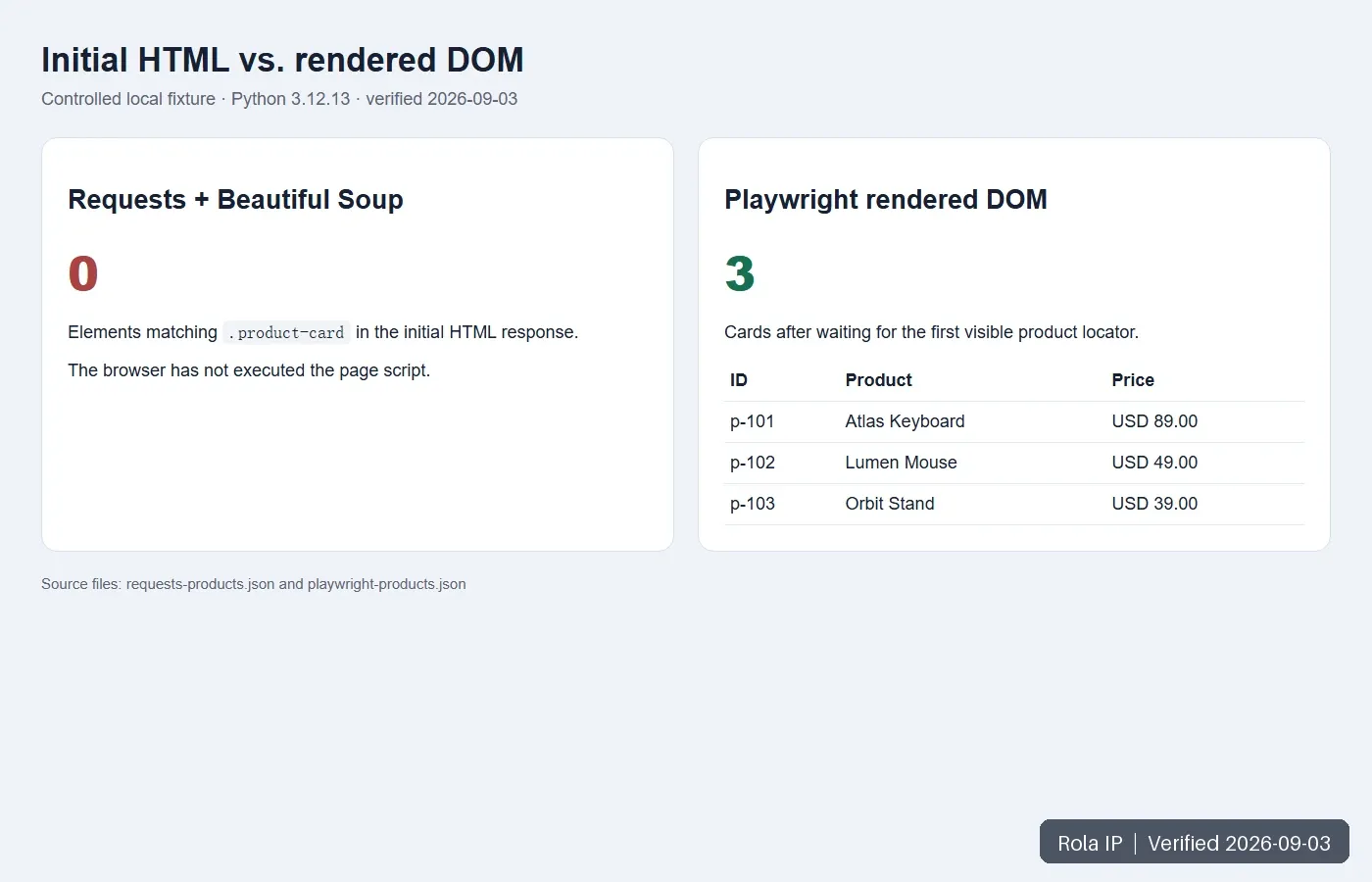
An empty selector is not automatic proof of JavaScript rendering. The selector may be wrong, or the response may be a consent page, authentication redirect, iframe shell, or access denial. Record the final URL, status, content type, title, and body sample before changing tools.
Find the Real Data Source First
Open View Source or save response.text, then search for one value visible in the browser. If it is absent from the response but present in DevTools Elements, JavaScript probably added it later.
Next, open Chrome DevTools, select Network, reload the page, and reproduce the click or scroll that reveals the data. Inspect responses containing the required value. The official Chrome DevTools Network guide documents response, initiator, timing, and filtering workflows.
Do not copy every browser header. Reproduce only what an authorized endpoint requires. Never put a private token, session cookie, CSRF token, API key, or proxy credential in source code.
| Method | Use it when | Advantage | Limitation |
|---|---|---|---|
| Requests + JSON endpoint | A documented or permitted endpoint exposes all fields | Fast and structured | Endpoint and authorization can change |
| Playwright | A new project needs execution or interaction | Modern locators, contexts, auto-waiting | Browser binaries and resource cost |
| Selenium | Existing WebDriver/Grid infrastructure matters | Mature ecosystem and organizational fit | More explicit synchronization |
| Managed rendering | Browser infrastructure should be outsourced | Less local maintenance | Provider cost and less control |
The Python web scraping library comparison explains why clients, parsers, crawlers, and browsers occupy different layers.
Reproduce the Controlled Test
The package contains the fixture, server, three scraper scripts, outputs, and images.
python-web-scraping-javascript-package/
├── fixture/index.html
├── scripts/fixture_server.py
├── scripts/requests_probe.py
├── scripts/playwright_scraper.py
├── scripts/selenium_scraper.py
├── requirements.txt
├── output/
└── images/
Tested environment
| Component | Verified value |
|---|---|
| Operating system | Windows 11 |
| Python | 3.12.13 |
| Requests | 2.32.5 |
| Beautiful Soup | 4.14.3 |
| Playwright / Chromium | 1.55.0 / 140.0.7339.16 |
| Selenium / Chrome | 4.35.0 / 152.0.7977.64 |
| Last run | September 3, 2026 |
Pin deployed versions and rerun the fixture after package or browser upgrades.
Install and start the fixture
Windows PowerShell:
python -m venv .venv
.\.venv\Scripts\python.exe -m pip install -r requirements.txt
.\.venv\Scripts\python.exe -m playwright install chromium
.\.venv\Scripts\python.exe scripts\fixture_server.py
macOS or Linux:
python3 -m venv .venv
source .venv/bin/activate
python -m pip install -r requirements.txt
python -m playwright install chromium
python scripts/fixture_server.py
The official Playwright installation guide separates package installation from browser installation. Expected server output is Fixture: http://127.0.0.1:8765/.
Method 1: Request the JSON Endpoint Directly
Run the probe in a second terminal:
.\.venv\Scripts\python.exe scripts\requests_probe.py
Its core logic checks both the initial page and the JSON endpoint:
page = requests.get(BASE_URL, timeout=(3, 10))
page.raise_for_status()
initial_cards = BeautifulSoup(page.text, "html.parser").select(".product-card")

api = requests.get(urljoin(BASE_URL, "/api/products"), timeout=(3, 10))
api.raise_for_status()
records = [validate(item) for item in api.json()["results"]]
assert len(records) == 3
Expected output:
Initial HTML cards: 0
API records: 3
Saved: requests-products.json
This is preferable when the endpoint is stable, permitted, and complete. A request visible in DevTools is not automatically public or reusable; check its documented access model.
Method 2: Render with Playwright
Use a browser when the data requires execution, clicks, scrolling, storage, or another browser state.
from playwright.sync_api import sync_playwright

BASE_URL = "http://127.0.0.1:8765/"

with sync_playwright() as p:
    browser = p.chromium.launch(headless=True)
    page = browser.new_page(viewport={"width": 1280, "height": 800})
    page.goto(BASE_URL, wait_until="domcontentloaded", timeout=30_000)

    cards = page.locator(".product-card")
    cards.first.wait_for(state="visible", timeout=10_000)
    assert cards.count() == 3

    records = []
    for card in cards.all():
        record = {
            "id": card.get_attribute("data-product-id"),
            "name": card.locator("h2").inner_text().strip(),
            "raw_price": card.locator(".price").inner_text().strip(),
        }
        if not all(record.values()):
            raise ValueError(f"Invalid record: {record!r}")
        records.append(record)

    browser.close()
Run scripts/playwright_scraper.py. The verified output is:
Rendered cards: 3
First record: p-101 | Atlas Keyboard | USD 89.00
Saved: playwright-products.json
Screenshot: 02-playwright-rendered-page.png
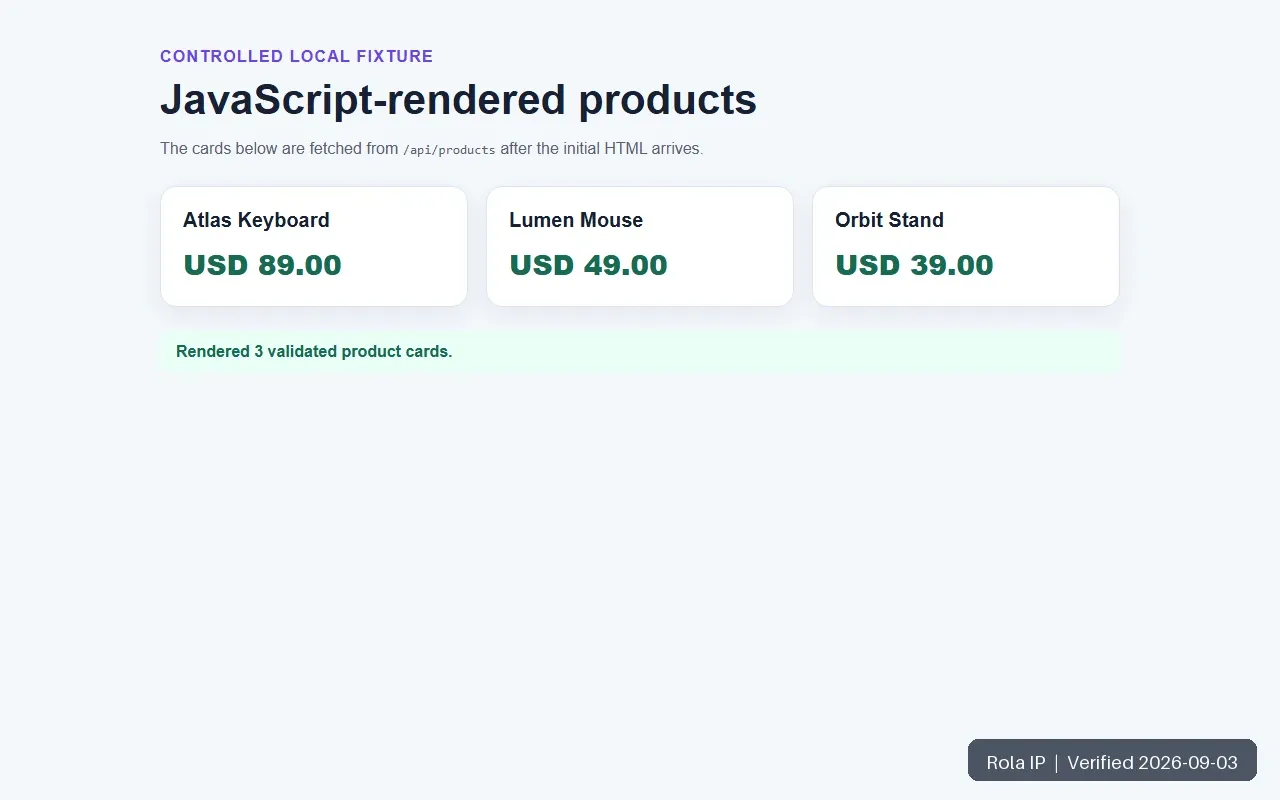
Playwright auto-waiting covers actionability checks. Extraction still needs a condition tied to the data. The Playwright Page API labels networkidle discouraged for readiness assertions. Prefer a visible record, a known response, a count increase, a URL state, or schema validation.
Method 3: Use Selenium with Explicit Waits
Selenium fits teams with WebDriver/Grid or established browser tooling. The included script waits for visible cards, validates records, writes JSON, captures a screenshot, and closes the driver.
wait = WebDriverWait(driver, 10)
cards = wait.until(
    EC.visibility_of_all_elements_located((By.CSS_SELECTOR, ".product-card"))
)
Run:
.\.venv\Scripts\python.exe scripts\selenium_scraper.py
The verified run returned the same three records. Selenium’s waiting strategies describe explicit waits and warn against mixing implicit and explicit waits because timeout behavior can become unpredictable.
For a larger Selenium project with pagination, logs, and diagnostics, see How to Use Selenium for Web Scraping.
Handle Tables, Pagination, and Infinite Scroll
A rendered first page is not proof of completeness. Watch Network while changing pages, sorting a table, clicking Load more, or scrolling. A permitted endpoint with a page, offset, or cursor is usually easier to validate.
If browser interaction is required, record the current item count, perform one action, and wait for the count or cursor to change. Cap the rounds and stop when no new records arrive. Never use an unbounded loop against a live site.
Minimum output fields should include source_url, record_id, the raw value, normalized value, retrieved_at, method, region where relevant, status, and an evidence path. Treat zero rows, missing required fields, implausible counts, duplicates, or denial pages as failures.
Add a Proxy Only for a Measured Requirement
A browser executes JavaScript. A proxy changes the network route, exit region, and session behavior.
Rola IP’s Proxy Networks documentation lists rotating residential, rotating datacenter, and mobile networks. All support country parameters; rotating residential also supports state and city. The page also documents credential and API-whitelist access, 1–120 minute session time, and -f-1 per-request rotation.
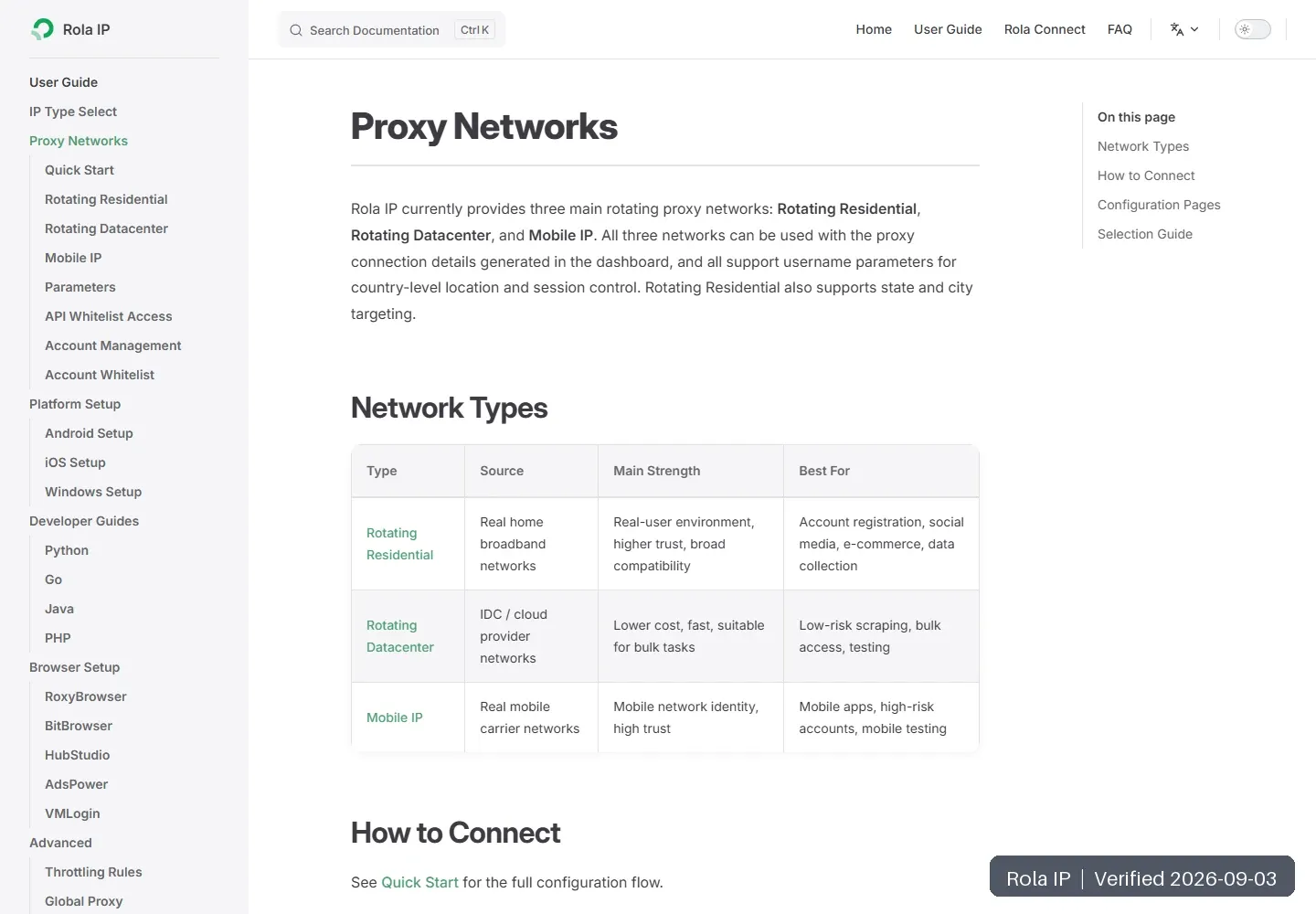
Use no proxy when direct access already returns the correct authorized content. Consider rotating residential for independent regional checks that genuinely need residential or state/city routing. Consider rotating datacenter for low-risk, country-level, stateless, cost-sensitive collection. Keep one sticky session for an authorized multistep flow. Mobile IP should be limited to mobile-carrier-specific requirements.
The packaged scripts/rola_playwright_proxy.py is syntax-checked but not live-tested because no account credentials were available. It reads values from environment variables:
proxy = {
    "server": required("ROLA_PROXY_SERVER"),
    "username": required("ROLA_PROXY_USERNAME"),
    "password": required("ROLA_PROXY_PASSWORD"),
}
browser = p.chromium.launch(headless=True, proxy=proxy)
Generate exact connection values in the current dashboard. Environment variables reduce source-code exposure but are not a secret vault; use an approved secret manager in production and clear temporary credentials after testing.
If the gateway uses http://, do not call the client-to-proxy authentication hop TLS-protected unless Rola IP confirms TLS for that gateway. Target HTTPS and first-hop protection are separate questions.
Use the residential proxy setup guide for configuration. If you receive 403, 429, CAPTCHA, or a denial page, stop and diagnose instead of escalating evasion; the scraping block troubleshooting guide covers classification, rate control, and caching.
Verify Three URLs Before Scaling
Choose three authorized URLs: one expected success, one delayed/interactive page, and one empty or regional edge case. Run them directly first. Record valid-record rate, P50/P95 latency, retries, browser time, and bytes.
Add a proxy only if the direct test proves a region or session need. Verify the exit separately, rerun the same URLs, and compare cost per usable record. The Rola IP Proxy Checker can support a controlled connectivity check. Do not expose long-lived credentials in screenshots, logs, tickets, or shared files.
Track fixture downloads, Playwright copies, Selenium copies, proxy-tool clicks, documentation clicks, and registrations as separate analytics events. Report direct and assisted conversions separately.
Common Errors and Fixes
| Symptom | Verify | Fix |
|---|---|---|
| HTTP 200, zero records | Body, final URL, title, content type | Inspect JSON/XHR; otherwise render and wait |
| Locator timeout | Screenshot, HTML, frames, failed requests | Correct state/selector; do not only increase timeout |
| Only first batch | Count and requests after interaction | Request next cursor or use a bounded loop |
| Headless differs | Viewport, cookies, locale, browser build | Reproduce settings and preserve evidence |
| 403/429/CAPTCHA | Response class and retry count | Stop/back off, review rules, cache, or use licensed route |
| Wrong region | Exit, cookie, language, timezone, page values | Align context and verify content |
| Memory grows | Open pages, contexts, drivers | Close resources in finally |
Production Checklist
- Prefer an official API or export.
- Keep an authorized fixture in CI.
- Pin package and browser versions.
- Set connect, read, navigation, and element timeouts.
- Separate navigation, extraction, validation, denial, and routing errors.
- Use bounded retries with backoff.
- Throttle per host and cache to the freshness requirement.
- Preserve raw values before normalization.
- Save permitted failure evidence and redact secrets/personal data.
- Keep credentials out of source, logs, screenshots, and outputs.
- Measure valid records, latency, retries, browser minutes, and bandwidth.
- Recheck official documentation and target rules before scaling.
Conclusion
For Python web scraping of JavaScript pages, inspect the initial response, embedded state, and permitted Fetch/XHR calls before using a browser. Choose Playwright for a new browser workflow or Selenium when WebDriver infrastructure makes it the better fit. Wait for measurable state and validate records in either case.
The controlled test produced zero cards in initial HTML and three validated records through direct JSON, Playwright, and Selenium on September 3, 2026. Add Rola IP only after a direct pilot establishes a legitimate region or session requirement.