
10 Best Python Web Scraping Libraries in 2026 (Compared)

Aug 26, 2026 · Use Cases · 13 min read
Quick answer
There is no single best choice among all Python web scraping libraries because the leading tools solve different parts of the job. For a small server-rendered page, start with Requests + Beautiful Soup. Choose HTTPX when you need one modern client for synchronous and asynchronous HTTP. Use Scrapy for a maintainable multi-page crawler, Playwright when authorized extraction genuinely requires JavaScript or browser interaction, lxml for XPath and XML, and selectolax only after profiling shows that HTML parsing is the bottleneck.
The most useful 2026 answer is therefore a category map:
| Need | Best starting point | Why |
|---|---|---|
| Simple synchronous HTTP | Requests | Mature API, Sessions, connection reuse, and a large learning ecosystem |
| Modern sync + async HTTP | HTTPX | Requests-like API, AsyncClient, resource limits, and optional HTTP/2 |
| asyncio-native networking | aiohttp | Detailed connector, streaming, and WebSocket control |
| Beginner-friendly HTML parsing | Beautiful Soup | Readable navigation and tolerant parser choices |
| XPath, XML, or complex tree work | lxml | Rich XML/HTML features implemented largely in C |
| Parser throughput worth benchmarking | selectolax | Fast HTML5 parser with CSS selectors and a Lexbor backend |
| Full website crawling | Scrapy | Scheduler, spiders, middleware, pipelines, exports, and statistics |
| New browser-based project | Playwright | Sync/async APIs, auto-waiting, isolated contexts, and three browser engines |
| Existing WebDriver/Grid stack | Selenium | W3C WebDriver ecosystem, remote infrastructure, and Safari support |
| Actual HTML tables | pandas.read_html() |
Converts <table> elements into DataFrames for downstream cleanup |
A library belongs to a layer, not a universal ranking
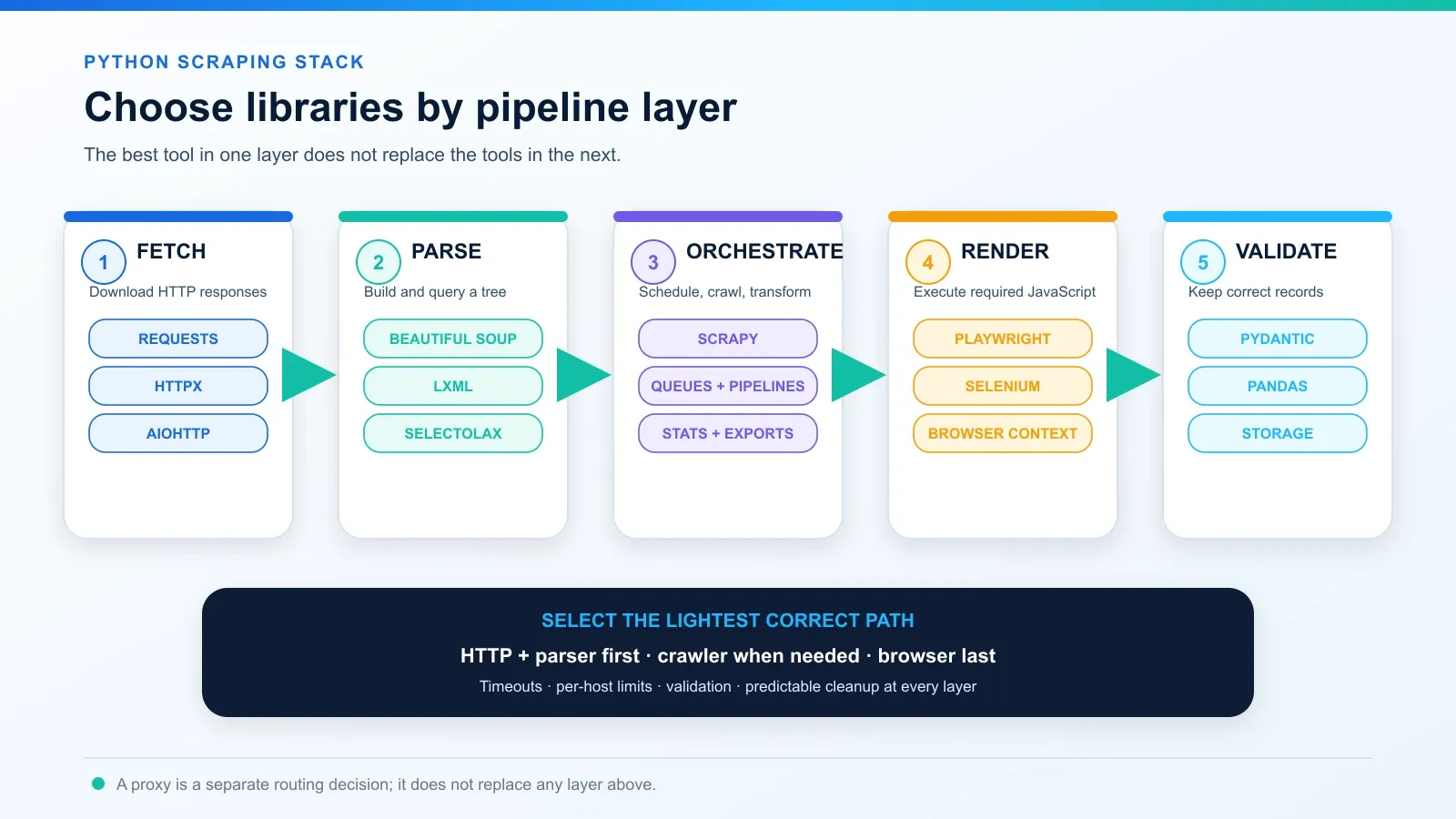
A web scraper is a pipeline. An HTTP client downloads bytes. A parser builds a searchable tree. A crawler schedules URLs and moves items through a workflow. A browser executes JavaScript. Validation determines whether the extracted record is usable. Storage preserves the result.
Many “best library” lists compare those layers as if they were substitutes. They are not. Beautiful Soup cannot download a page or execute JavaScript. Requests cannot parse a DOM. Playwright can retrieve rendered markup, but it is expensive compared with direct HTTP. Scrapy coordinates a project, while pandas is primarily a data tool.
Use these questions before choosing anything:
- Is the required data already in the initial HTML, embedded JSON, or an authorized API response?
- Do you need one URL, a known list of URLs, or link discovery across a site?
- Does the page truly require browser-side JavaScript or interaction?
- Is the workload synchronous, asynchronous, or managed by a crawler engine?
- Do you need CSS selectors, XPath, XML schemas, HTML5 error recovery, or only tables?
- Which library can your team test, deploy, observe, and update reliably?
How these libraries were evaluated
This guide does not publish a fake overall speed score. A parser microbenchmark, an HTTP concurrency test, and a full browser navigation measure different work.
Each library was assessed on:
- Role clarity: fetcher, parser, framework, browser, or special-purpose helper.
- Target fit: static HTML, APIs, JavaScript-rendered pages, XML, or table-shaped data.
- Concurrency model: synchronous, asyncio, framework-managed, or browser-managed.
- Production controls: timeouts, connection reuse, limits, retries, lifecycle cleanup, and observability.
- Maintenance signals: current official documentation, supported Python versions, active release channels, and explicit migration notes.
- Total operating cost: development time, memory, browser capacity, deployment complexity, and repair effort.
- Responsible use: per-host limits, truthful identification where appropriate, data minimization, and respect for authorization and documented rules.
Python scraping library comparison
Library |
Layer |
Best for |
JavaScript execution |
Main trade-off |
|---|---|---|---|---|
Requests |
HTTP client |
Small and medium synchronous jobs |
No |
No native async; no timeout unless you set one |
HTTPX |
HTTP client |
Modern sync/async applications |
No |
Redirect and timeout behavior differs from Requests |
aiohttp |
HTTP client |
Existing asyncio systems and low-level control |
No |
More lifecycle and concurrency decisions for the developer |
Beautiful Soup |
Parser facade |
Readable extraction and malformed HTML |
No |
Result and speed depend on the chosen parser backend |
lxml |
Parser/toolkit |
XPath, XML, schemas, and complex tree operations |
No |
Native dependency and more detailed API surface |
selectolax |
HTML parser |
Profiling-backed parser optimization |
No |
Narrower ecosystem; CSS selectors rather than a complete crawler |
Scrapy |
Crawler framework |
Persistent multi-page crawl projects |
Not by its normal downloader |
More project structure than a small URL list needs |
Playwright |
Browser automation |
Modern JavaScript pages and approved interaction |
Yes |
Higher CPU, memory, binary, and lifecycle cost |
Selenium |
Browser automation |
Existing WebDriver/Grid and broad browser infrastructure |
Yes |
Explicit wait design and remote-driver complexity |
pandas.read_html() |
Table helper |
Real HTML <table> elements |
No |
Not a general DOM extractor or crawler |
Best HTTP clients for web scraping
1. Requests: best simple synchronous HTTP client
Requests remains the clearest starting point for a small or moderate authorized collector. A Session persists cookies and reuses connections, while the response API covers status checks, streaming, decoding, and headers. The learning curve is low, and its behavior is familiar to most Python teams.
The important limitation is scope: Requests downloads HTTP responses; it does not parse HTML or render JavaScript. It is also synchronous. Most production requests should set an explicit timeout because Requests otherwise waits without a built-in limit. That timeout is not a guaranteed wall-clock deadline for the whole download, so monitor end-to-end duration separately.
Use a Session for repeated calls, call raise_for_status(), and close or fully consume every response. If you configure request metadata, Sessions, or prepared requests, the Python Requests headers tutorial explains the fetch layer in more detail.
Install: python -m pip install requests
SOCKS support: python -m pip install "requests[socks]"
Choose Requests when the job is straightforward and synchronous. Move to HTTPX or aiohttp only when async or transport features create a real benefit.
2. HTTPX: best modern sync/async HTTP client
HTTPX combines a Requests-like interface with both Client and AsyncClient, typed APIs, resource limits, and optional HTTP/2. It is a strong choice when the application already uses asyncio, when one codebase needs sync and async paths, or when pool, connect, read, and write limits need to be configured explicitly.
Repeated requests should use a Client; top-level calls do not give you the same connection reuse. Reuse one AsyncClient instead of constructing clients inside a hot loop. HTTPX applies network timeouts by default, does not follow redirects by default, and requires optional packages for HTTP/2 or SOCKS. Those differences matter when migrating code from Requests.
Install: python -m pip install httpx
HTTP/2: python -m pip install "httpx[http2]"
SOCKS support: python -m pip install "httpx[socks]"
Choose HTTPX for a modern service or async pipeline. Do not select it merely because “async is faster”; the target, per-host limits, parsing, validation, and storage may dominate the job.
3. aiohttp: best for an established asyncio stack
aiohttp is a mature asyncio-native client and server framework. Its ClientSession, connectors, streaming APIs, WebSockets, and timeout controls give experienced teams detailed control over network behavior.
That flexibility also creates responsibility. The official guidance is to reuse a ClientSession so its connection pool can work. Use async with or otherwise close sessions and responses. Configure both total and per-host limits; a global connector limit does not by itself define a responsible rate for every host. Bound concurrency with a queue or semaphore and add pacing based on the target’s documented rules.
Install: python -m pip install aiohttp
Choose aiohttp when your application already speaks asyncio or needs its connector and streaming model. For a new project that wants a familiar Requests-like API plus async, HTTPX is usually easier to introduce.
Best HTML parsing libraries
4. Beautiful Soup: best for beginners and readable extraction
Beautiful Soup creates a friendly interface for navigating, searching, and modifying a supplied HTML or XML tree. It is often the fastest path from an inspected page to maintainable selectors, especially for people new to scraping.
Beautiful Soup is a parser facade, not a downloader. It can use Python’s html.parser, lxml, or html5lib, and the same malformed markup may produce different trees under different backends. Production code should therefore name the parser explicitly and test it against representative saved pages rather than relying on whichever dependency happens to be installed.
Install: python -m pip install beautifulsoup4 lxml
Choose Beautiful Soup when readability and tolerant extraction matter most. Do not call it the fastest parser without a workload-specific benchmark.
5. lxml: best for XPath, XML, and complex tree operations
lxml binds Python to libxml2 and libxslt. It supports HTML and XML parsing, XPath, XSLT, schemas, incremental parsing, and detailed error logs. It is the strongest general choice when the extraction logic depends on XPath, namespaces, XML validation, or more advanced tree operations.
Its HTML parser can recover from broken input, but recovery is not magic: seriously malformed markup may still produce a different tree or lose content. lxml also includes native code. Mainstream platforms commonly have wheels, while unusual deployment environments may need extra build work.
Install: python -m pip install lxml
Choose lxml for features first and performance second. The project’s own performance notes warn that different tree operations have different costs, so old microbenchmarks should not be treated as a universal 2026 ranking.
6. selectolax: best parser to benchmark for raw HTML throughput
selectolax is a Cython-based HTML5 parser with CSS selectors. Its maintainers recommend the Lexbor backend for new work. It is a credible candidate when profiling shows that parsing saved HTML—not downloading pages, running browsers, or writing data—is the real bottleneck.
The project publishes a useful benchmark, but it tests a specific extraction task across a fixed set of pages. Reproduce the comparison with your own HTML snapshots, selectors, encodings, malformed cases, and required fields. A faster wrong tree is not an optimization.
Install: python -m pip install selectolax
Choose selectolax for focused, CSS-selector-based parsing after measuring. Choose Beautiful Soup for ease of maintenance or lxml when XPath/XML features matter more.
Best crawler framework
7. Scrapy: best for maintainable multi-page crawlers
Scrapy is a complete crawling framework, not just another request library. Spiders define discovery and extraction, the scheduler manages requests, downloader middleware handles transport concerns, item pipelines transform records, feed exports write results, and built-in statistics support operations.
That structure pays off for recurring crawls, link discovery, deduplication, multiple spider types, and team ownership. It can be overkill for ten known URLs. Scrapy’s normal downloader retrieves HTTP responses; it does not automatically create a JavaScript-rendered DOM. First inspect the initial HTML and authorized network data before adding a browser.
Use DOWNLOAD_DELAY, per-domain concurrency, download slots, or AutoThrottle deliberately. For proxy middleware, gateway, retry, and session patterns, continue with the Scrapy rotating proxies guide instead of duplicating that setup here.
Install: python -m pip install scrapy
Best browser automation libraries
8. Playwright: best default for a new browser-based Python project
Playwright offers synchronous and asynchronous Python APIs for Chromium, Firefox, and WebKit. Locators include auto-waiting and actionability checks, while BrowserContext provides isolated sessions without launching a separate browser process for every job.
Use it only when the required data genuinely depends on JavaScript execution, client-side state, or approved interaction. Before launching a browser, inspect the page source, embedded JSON, and network calls for a stable authorized data source. A browser increases CPU, memory, startup, binary, and failure-recovery costs.
Playwright versions expect compatible browser binaries, so deployment should pin versions and run the matching browser installation step. Reuse the browser where appropriate, bound the number of contexts/pages, and close pages, contexts, and browsers predictably.
Install:
python -m pip install playwright
python -m playwright install chromium
If the initial HTML lacks the target fields, the Rola guide to scrape dynamic web pages with Python compares direct data endpoints, Playwright, and Selenium.
9. Selenium: best for existing WebDriver, Grid, or Safari requirements
Selenium WebDriver remains the better fit when an organization already operates Selenium Grid or remote WebDriver infrastructure, needs branded Safari automation, or maintains a mature cross-browser testing stack. Selenium Manager also reduces much of the manual driver setup that older tutorials required.
For a new Python-only extraction project, compare it with Playwright on the actual browser, wait conditions, remote execution, and team knowledge. Avoid the blanket claim that one is always faster or more reliable. Both drive browsers, and both require explicit resource budgets and deterministic cleanup.
Install: python -m pip install selenium
For a complete implementation with explicit waits, bounded pagination, validation, and browser cleanup, see how to use Selenium for web scraping.
Best special-purpose helper
10. pandas.read_html(): best for actual HTML tables
pandas.read_html() searches for HTML table structures and returns a list of DataFrames. It is convenient when the page contains genuine <table>, <tr>, <th>, and <td> elements and the next step is tabular cleaning or analysis.
It is not a general crawler, browser, or arbitrary DOM selector. Its parser stack still relies on lxml and/or Beautiful Soup with html5lib, and the returned frames often need type conversion, missing-value handling, and column cleanup. If JavaScript creates the table, obtain the data through an authorized endpoint or render the page first.
Install: python -m pip install pandas lxml
A production-minded starter stack
For an authorized server-rendered page, Requests + Beautiful Soup is still a sensible baseline. This example sets a connect/read timeout, checks the HTTP status, chooses a parser explicitly, reuses a Session, and closes the response after use.
import requests
from bs4 import BeautifulSoup

url = "https://example.com/"
headers = {
    "User-Agent": "ExampleResearchBot/1.0 (+https://example.org/contact)"
}

with requests.Session() as session:
    response = session.get(url, headers=headers, timeout=(5, 20))
    try:
        response.raise_for_status()
        soup = BeautifulSoup(response.content, "lxml")
        heading = soup.select_one("h1")
        record = {
            "url": response.url,
            "heading": heading.get_text(" ", strip=True) if heading else None,
        }
    finally:
        response.close()

print(record)
response.close() is in finally, so it runs after a successful parse and after an exception. When streaming, either consume the body fully or close the response before reusing the connection. Add retries only for failures that are safe to retry, cap the attempts, use backoff, and honor Retry-After rather than retrying every error immediately.
Five recommended Python scraping stacks
| Workload | Recommended stack | Why |
|---|---|---|
| Small static pages | Requests + Beautiful Soup using lxml | Simple fetch lifecycle and readable selectors |
| Concurrent API/static HTML | HTTPX AsyncClient + selectolax + schema validation | Async connection reuse with a parser worth benchmarking |
| Recurring site crawler | Scrapy + item pipelines + feed export | Scheduling, discovery, deduplication, throttling, and operations |
| JavaScript-required pages | Playwright + lxml/Beautiful Soup + schema validation | Browser only for rendering; parser and validator remain separate |
| Real HTML tables | Requests/HTTPX + pandas.read_html() |
Minimal path from a table response to a DataFrame |
Pydantic can validate records after extraction, Parsel provides standalone CSS/XPath/JMESPath selectors, and Crawlee for Python offers a newer unified HTTP/browser crawler interface. They are useful supporting options, but none changes the first decision: identify the layer and the target’s delivery model.
Which Python web scraping library should you choose?
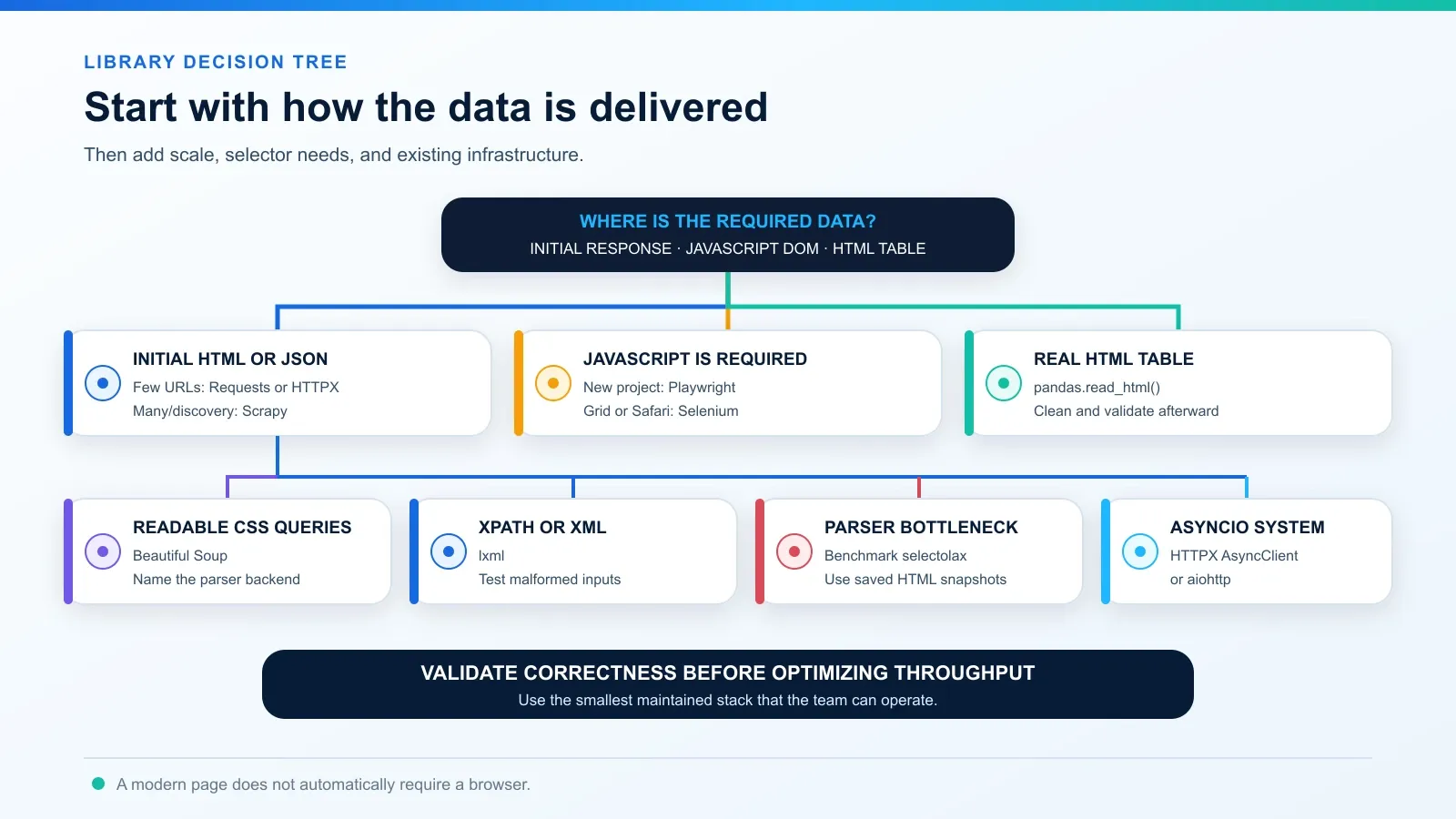
Follow this sequence:
- Look for a documented API or export. Use it when it supplies the required fields under acceptable terms.
- Inspect the first HTTP response. If the fields are present in HTML or JSON, use an HTTP client rather than a browser.
- Choose the parser by query and correctness. Start with Beautiful Soup; use lxml for XPath/XML or benchmark selectolax when parsing is measured as slow.
- Add orchestration only when the workflow needs it. Scrapy is valuable for discovery, queues, pipelines, and recurring multi-page jobs—not for one simple page.
- Add a browser last. Prefer Playwright for a new project; keep Selenium for Grid, Safari, or existing WebDriver ownership.
- Validate the record. Missing or shifted fields should fail clearly instead of silently entering the dataset.
What many 2026 library lists still get wrong
Treating every tool as a direct substitute
Requests, Beautiful Soup, Scrapy, and Playwright cannot be ranked on one axis because they perform different work. A useful comparison names the layer, input, output, and operating cost.
Calling a library “fastest” without a reproducible benchmark
A local parser may win a microbenchmark while the real crawler remains network-bound. A browser may render the target successfully but cost far more per valid record. Compare equivalent work and publish the environment.
Recommending a browser for every modern website
Modern design does not prove that the required data needs JavaScript. Initial HTML, embedded application data, or an authorized JSON endpoint may be simpler and more stable.
Copying old examples without checking the dependency chain
Requests-HTML remains convenient, but its JavaScript rendering path is based on Pyppeteer and its public examples include legacy targets. For a new 2026 project, verify release activity, supported Python/browser versions, and cleanup behavior before adopting it. Playwright is a clearer default for a fresh browser-rendering workflow.
Mixing proxy routing with parsing or permission
A proxy changes network egress, location, or session continuity. It does not execute JavaScript, find selectors, validate records, or grant access. Library selection and proxy selection are separate architecture decisions.
How to benchmark libraries fairly
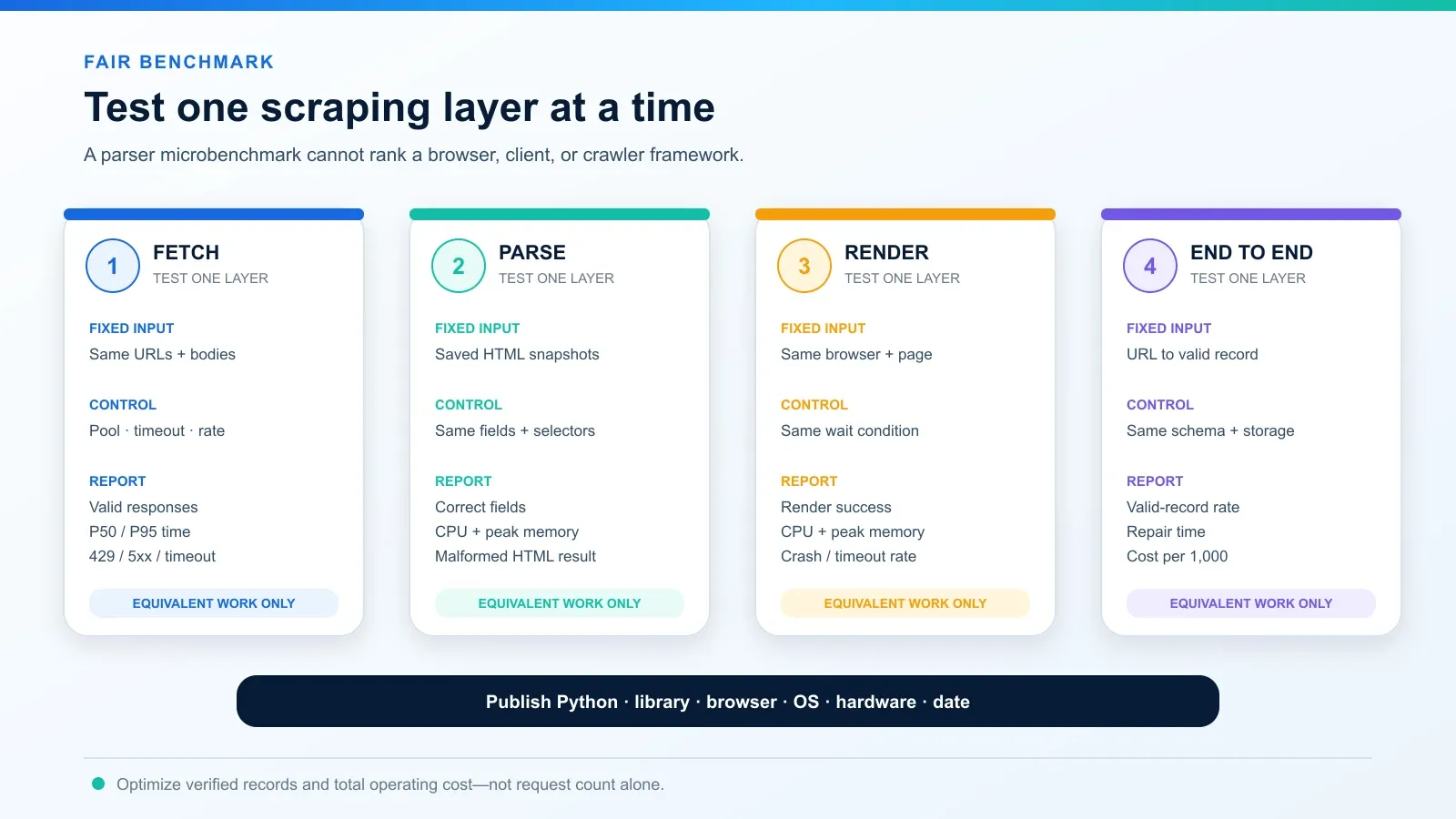
Use a controlled sample of authorized pages and report four tests:
- Fetch-only: same URLs, headers, connection reuse, timeout policy, concurrency, and response bodies.
- Parse-only: saved local HTML snapshots, same fields, same selectors, and identical correctness rules.
- Render-only: same browser engine, wait condition, resource policy, and page lifecycle.
- End-to-end: URL to validated record, including retries, storage, and failures.
Measure correct fields, valid-record rate, P50/P95 time, CPU, peak memory, timeout/429/5xx counts, repair time, and cost per 1,000 validated records. Record Python, library, browser, operating system, hardware, and test date. Do not compare a sequential Requests sample with a tuned asynchronous crawler and call the result a language or library benchmark.
Where a proxy fits
Requests, HTTPX, aiohttp, Scrapy, Playwright, and Selenium can all use proxies through client, browser, environment, or middleware configuration. Protocol support and syntax differ, and optional SOCKS packages may be required.
A web scraping proxy is an optional network layer for an authorized workflow that has a documented routing or location requirement. It does not make collection compliant, guarantee access, solve a CAPTCHA, render JavaScript, or repair selectors. Stateful flows may need a stable session rather than a different exit for every request.
Responsible web scraping checklist
- Confirm authorization, the target’s terms, API policy, privacy requirements, and applicable law before collection.
- Prefer a documented API, bulk export, or public data feed when it meets the need.
- Read applicable
robots.txtrules and documented rate limits. Robots rules guide crawler behavior; they are not access authorization. - Do not bypass authentication, paywalls, CAPTCHAs, explicit denials, or technical access controls.
- Use a truthful, contactable crawler identity where appropriate instead of pretending to be a personal browser.
- Set per-host concurrency, explicit timeouts, capped retries, backoff, and a global resource budget.
- Honor
Retry-After, slow down on errors, and stop when the target signals that the job should not continue. - Collect only the fields required for the approved purpose, especially when personal or sensitive data may be present.
- Store credentials in environment variables or an approved secret manager; never commit them to source code.
- Log status, timing, validation outcome, and retry reason without leaking credentials or unnecessary personal data.
Legal, contractual, privacy, database, and copyright rules vary by jurisdiction, data type, and use. This article is technical guidance, not legal advice.
Final recommendation
For most first projects, install Requests, Beautiful Soup, and lxml. Upgrade the HTTP layer to HTTPX when async or transport requirements justify it. Move the project into Scrapy when URL discovery, scheduling, pipelines, and recurring operations become the problem. Use Playwright only for data that truly requires browser execution; keep Selenium when WebDriver/Grid or Safari support is an organizational requirement. Benchmark selectolax only after profiling identifies parser time as the constraint.
The best Python web scraping libraries in 2026 are not the longest list of packages. They are the smallest, maintained combination that returns correct records, closes resources, respects the target, and remains affordable to operate and repair.