How to Avoid Getting Blocked While Web Scraping: 12 Practical Methods

Aug 20, 2026 · Guides · 21 min read
TL;DR
To avoid getting blocked while web scraping, start by lowering request rate, reusing sessions, honoring 429 Retry-After, and checking whether a 403, CAPTCHA, or missing data is caused by rate limits, permissions, browser rendering, or the network exit. If controlled testing shows that blocks follow the IP or region, use a stable proxy session or controlled IP rotation instead of changing IPs on every request. Keep the IP region, cookies, headers, and browser context consistent, and stop when the target does not permit automated access.
Web scraping gets blocked when a site detects excessive request volume, low-trust or overused IP addresses, inconsistent sessions, missing browser context, or access that falls outside the site’s permitted scope. The most reliable way to avoid getting blocked is to identify which layer is causing the failure first, then reduce request pressure and change only the relevant variable.
Why Do Websites Block Web Scrapers?

Websites rarely rely on a single signal. They usually combine network reputation, request patterns, client consistency, and session behavior into a risk score. Understanding the layer where a block occurs lets you choose the lowest-cost, most stable fix.
| Detection Layer | Common Signals | Common Symptoms | First Response |
|---|---|---|---|
| Network | IP reputation, ASN, geography, requests per IP | 403, connection reset, regional restriction | Slow down and verify the exit; change proxy type only when evidence points to the network layer. |
| HTTP | 429, inconsistent headers, cookie errors, URL patterns | Rate limiting, redirects, empty pages | Honor Retry-After, reuse sessions, and keep headers consistent. |
| Browser | JavaScript, TLS, Canvas, WebGL, automation signals | Challenge pages, CAPTCHAs, missing rendered content | Use a real browser process only when rendering is genuinely required. |
| Behavior | Fixed intervals, excessive concurrency, linear traversal, unusual jumps | Works initially, then becomes progressively blocked | Reduce throughput and structure requests around coherent workflows. |
| Content and Permission | Authentication, payment, personal data, prohibited paths | 401, login wall, permission prompt | Stop scraping and use authorized accounts or an official API. |
Why Does a Scraper Work at First but Get Blocked Later?
The most common cause is that one exit gradually accumulates request volume, failed retries, and a lower reputation score. Scaling concurrency can also expose fixed timing, repeated paths, and inconsistent sessions. A small sample that succeeds briefly proves only that connectivity and parsing work—not that the same rate is sustainable.
Compare the usable-data success rate, 429/403 counts, response time, and requests per IP within consistent time windows. If errors rise with throughput, reduce concurrency and honor Retry-After. If errors change only with a particular exit or region, investigate proxy routing and IP reputation.
Why Do You Still Get a 403 or CAPTCHA After Changing the Proxy IP?
Because the proxy only changes the network exit, it cannot automatically fix unauthorized access, expired cookies, JavaScript challenges, request header conflicts, TLS fingerprints, or excessive request frequency. Frequent proxy changes can even make sessions look more unusual when the new IP doesn’t match the old cookie, language, or time zone.
Identify the failing layer first. If both direct and proxied requests fail, check permissions, rate limits, and rendering. Treat the proxy as the main variable only when the result clearly follows the exit IP, ASN, or region.
How Can You Tell a Real Block from Rate Limiting or a Parsing Failure?
The most reliable diagnosis records the status code, response headers, final URL, body characteristics, and required business fields together. Do not assume an IP block merely because the parser returned an empty list.
429 Too Many Requests: usually a rate-limit signal. Read Retry-After before applying exponential backoff.
403 Forbidden: It may be access policy, permissions or anti-bot checks. Do not retry endlessly when it appears continuously.
200 OK with challenge content: if the title changes to Access Denied, Verify you are human, or the target selector disappears, this is a soft block.
Normal response but empty data: check page structure, XHR endpoints, regional variations, and authentication state first.
Visible in a browser but missing from requests: the content may require JavaScript rendering; this is not necessarily a block.
Authoritative reference: MDN’s HTTP 429 documentation explains that a server can use Retry-After to tell the client when to retry. Production scrapers should treat it as a scheduling signal rather than immediately switching IPs and retrying.
How to Avoid IP Blocking While Web Scraping
If your tests show that failures follow the same IP address, ASN, or region, treat the problem as a network-layer issue rather than changing every part of the scraper. Start by reducing concurrency and requests per IP, then keep related requests in one stable session so cookies, locale, and IP location remain consistent. For authorized workloads that genuinely need multiple exits, rotate IPs between independent tasks or sessions instead of switching on every request.
A proxy should be introduced only after you have confirmed that the block follows the network exit. If 403s or CAPTCHAs continue across different verified exits, investigate permissions, authentication, request rate, browser rendering, and page changes before rotating again.
Complete a Compliance and Scope Check Before Scraping
The first step in reducing blocks is not technical disguise. Confirm that the target, scope, and access method are appropriate. Clear compliance boundaries make the engineering design more stable.
- Check the target site’s robots.txt, terms of service, API documentation, and data permissions.
- Prefer official APIs, data exports, RSS feeds, sitemaps, or authorized endpoints called by the public frontend.
- Collect only the fields your business truly needs and avoid collecting personal data, copyrighted content, or restricted data.
- Set clear boundaries for domains, paths, pagination, dates, and data volume so the scraper cannot discover URLs without limits.
- Set up a recognizable User-Agent and contact information for the scraper; if the site requires authorization, obtain it first.
Google’s robots.txt guidance and the IETF Robots Exclusion Protocol (RFC 9309) help teams understand allowed and disallowed crawl paths. robots.txt is not an authorization mechanism and does not replace terms of service or legal review.
12 Ways to Avoid Getting Blocked While Web Scraping
Method 1: Prevent IP Blocks with Stable Sessions and Controlled Rola IP Rotation
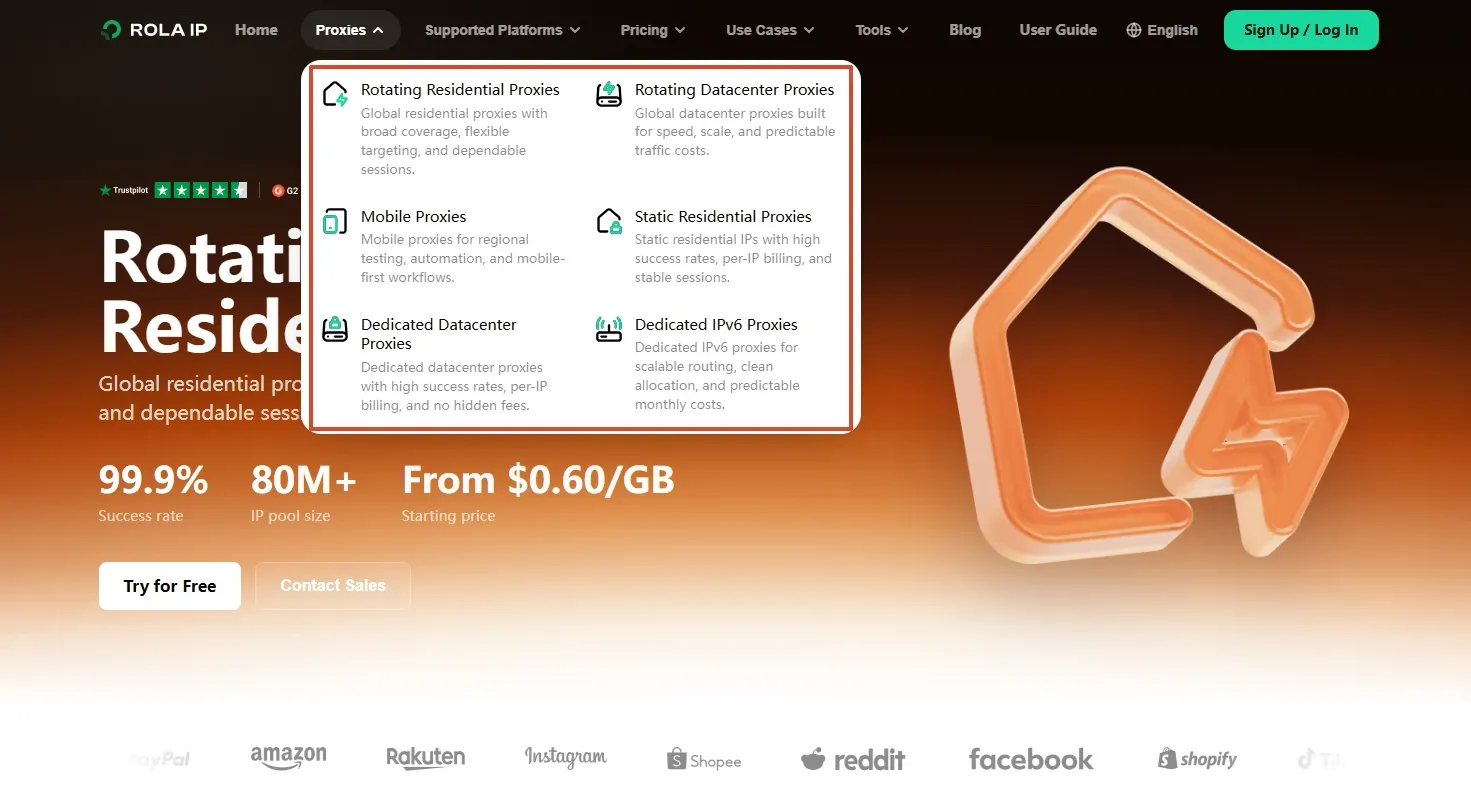
When controlled testing shows that blocks or regional differences follow the network exit, Rola IP should be one network-layer option to evaluate. Its rotating residential proxy network, rotating datacenter proxy network, and mobile proxy network should be selected according to the authorized workflow. Use a sticky session for continuous pagination or identity-dependent workflows; use per-request rotation only for unrelated, stateless public pages.
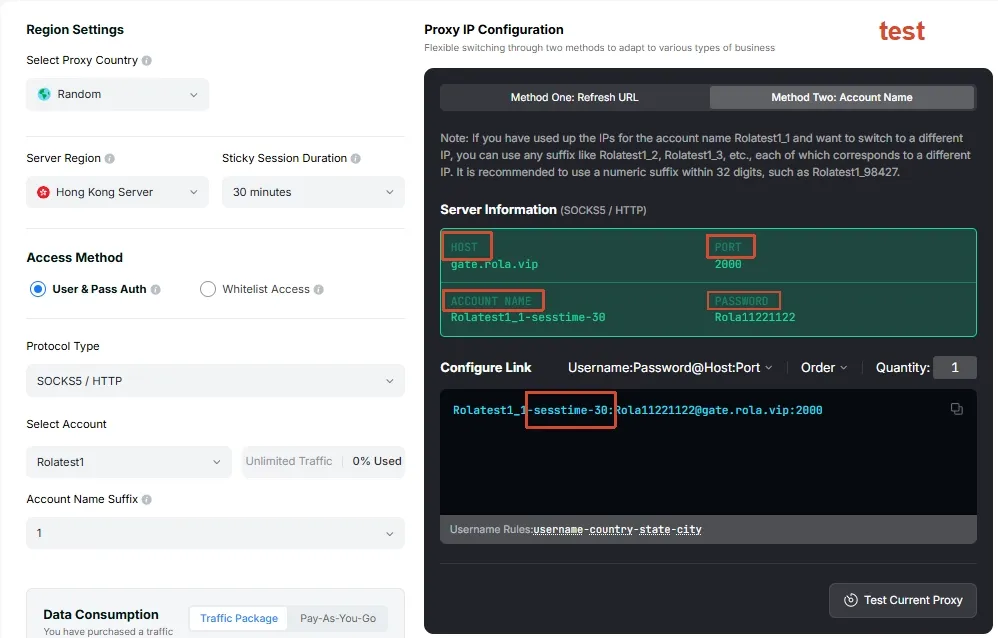
Use the Host, Port, Username, and Password generated by the Rola IP dashboard. For current fields and parameter rules, see the official Rola IP Quick Start.
Step 1: Choose the Right Proxy Network in the Dashboard
- Rotating residential proxies: suitable for authorized public-page collection, regional pricing, and search-result checks.
- Rotating datacenter proxies: suitable for cost- and speed-sensitive batch tasks on lower-risk targets.
- Mobile proxies: use them only when the workflow genuinely requires a mobile-network exit.
For the first test, do not add country, city, sticky-session, and forced-rotation parameters at the same time. Confirm basic connectivity with the simplest username first, then add one parameter at a time.
Step 2: Copy the Four Dashboard-Generated Connection Parameters
Copy the Host, Port, Username, and Password from the selected network’s settings page. Consult the official proxy parameters documentation and use the final username generated by the dashboard. The examples below use account as a placeholder; replace it with your actual account name.
Examples below are illustrative only; do not assume these username suffixes are current. Use the final username generated by the dashboard and verify it against the proxy parameters documentation.
Step 3: Create the Python proxy integration Environment and Install Dependencies
Requests is sufficient for an HTTP/HTTPS proxy. If the dashboard provides SOCKS5, install requests[socks], which includes PySocks.
python -m venv .venv
# macOS / Linux
source .venv/bin/activate
# Windows PowerShell:.venv\Scripts\Activate.ps1
python -m pip install --upgrade pip
python -m pip install "requests[socks]" beautifulsoup4
Step 4: Store the Proxy Parameters in Environment Variables
# macOS / Linux:replace these values with the dashboard output
export ROLA_PROXY_SCHEME="socks5h"
export ROLA_PROXY_HOST="PROXY_DOMAIN"
export ROLA_PROXY_PORT="PORT"
export ROLA_PROXY_USERNAME="account-country-us"
export ROLA_PROXY_PASSWORD="YOUR_PASSWORD"
# Windows PowerShell:
$env:ROLA_PROXY_SCHEME="socks5h"
$env:ROLA_PROXY_HOST="PROXY_DOMAIN"
Step 5: Run the Exit-IP Verification Script First
Verify the exit IP, country, and authentication before starting the full scraper. The code below URL-encodes the username and password and supports HTTP, HTTPS, or socks5h proxy URLs.
import os
from urllib.parse import quote
import requests
required = [
    "ROLA_PROXY_HOST",
    "ROLA_PROXY_PORT",
    "ROLA_PROXY_USERNAME",
    "ROLA_PROXY_PASSWORD",
]
missing = [name for name in required if not os.getenv(name)]
if missing:
    raise RuntimeError(f"Missing environment variables: {', '.join(missing)}")

scheme = os.getenv("ROLA_PROXY_SCHEME", "socks5h")
host = os.environ["ROLA_PROXY_HOST"]
port = os.environ["ROLA_PROXY_PORT"]
username = quote(os.environ["ROLA_PROXY_USERNAME"], safe="")
password = quote(os.environ["ROLA_PROXY_PASSWORD"], safe="")
proxy_url = f"{scheme}://{username}:{password}@{host}:{port}"
proxies = {"http": proxy_url, "https": proxy_url}

response = requests.get(
    "https://httpbingo.org/ip", proxies=proxies, timeout=(10, 30)
)
response.raise_for_status()
print(response.json())
Verification passes when the returned public IP differs from the direct-connection IP, the location matches the country parameter in the Username, and repeated tests show the expected sticky or rotating behavior. If authentication fails, copy the dashboard parameters again instead of repeatedly guessing the password.
Step 6: Run a Small Scraping Sample with the Same Configuration
After exit verification succeeds, scrape three public practice pages and validate the target selector. Before running the full job, replace the sample URL with an authorized target and begin with low concurrency.
import os
from urllib.parse import quote
import requests
from bs4 import BeautifulSoup
scheme = os.getenv("ROLA_PROXY_SCHEME", "socks5h")
proxy_url = (f"{scheme}://{quote(os.environ['ROLA_PROXY_USERNAME'], safe='')}:"
    f"{quote(os.environ['ROLA_PROXY_PASSWORD'], safe='')}@"
    f"{os.environ['ROLA_PROXY_HOST']}:{os.environ['ROLA_PROXY_PORT']}")
proxies = {"http": proxy_url, "https": proxy_url}
urls = [f"https://quotes.toscrape.com/page/{page}/" for page in range(1, 4)]
with requests.Session() as session:
    session.headers.update({
        "User-Agent": "RolaResearchBot/1.0 ([email protected])",
        "Accept-Language": "en-US,en;q=0.9",
    })
    for url in urls:
        response = session.get(url, proxies=proxies, timeout=(10, 30))
        response.raise_for_status()
        quotes = BeautifulSoup(response.text, "html.parser").select(".quote .text")
        if not quotes:
            raise ValueError(f"Expected content missing: {url}")
        print(url, len(quotes))
Method 2: Identify the Detection Layer Before Changing Anything
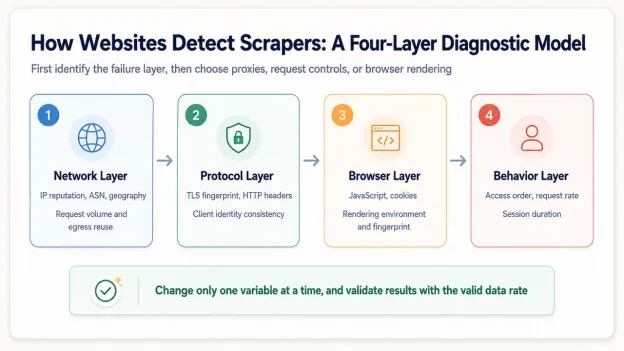
Websites rarely identify a scraper with one signal. A practical model divides detection into four layers: network, TLS/HTTP, browser, and behavior. IP reputation and request volume belong to the network layer; handshake and header consistency belong to the protocol layer; JavaScript, cookies, and rendering belong to the browser layer; pacing, navigation paths, and session duration belong to the behavioral layer.
Do not change IPs immediately after a 403. Save the status, headers, final URL, body length, and a body summary first. Success after switching to a browser points toward JavaScript or browser context; success after changing only the network points toward the exit or IP reputation. If every method receives 429, reduce the rate and read Retry-After.
Runnable Diagnostic Script: Log Status, Redirects, Headers, and Soft-Block Signals
from pathlib import Path
import requests
TARGET_URL = "https://httpbingo.org/headers"  # Switch to a public URL authorized for crawling
BLOCK_MARKERS = ("captcha", "access denied", "verify you are human")
response = requests.get(
    TARGET_URL,
    headers={"User-Agent": "RolaResearchBot/1.0 ([email protected])"},
    timeout=(5, 30),
    allow_redirects=True,
)
text_lower = response.text.lower()
report = {
    "status": response.status_code,
    "final_url": response.url,
    "content_type": response.headers.get("Content-Type"),
    "content_length": len(response.content),
    "retry_after": response.headers.get("Retry-After"),
    "possible_soft_block": any(x in text_lower for x in BLOCK_MARKERS),
}
print(report)
Path("debug-response.html").write_text(response.text, encoding="utf-8")
Method 3: Establish a Small-Sample Baseline and Measure Usable-Data Success
HTTP 200 does not prove that a scrape succeeded. A site can return a login page, CAPTCHA, empty template, or regional notice with 200. Build the baseline from 10–30 representative URLs covering lists, details, pagination, and regions; record usable-data success, 429/403 rates, P95 latency, and bytes per usable record.
The baseline distinguishes isolated page changes from systematic blocking. If only one page type loses its selector, the template may have changed. If every page begins returning the same challenge at the same time, investigate anti-bot controls or rate limiting.
Complete Example: Scrape a Public Practice Site and Validate the Results
import statistics
import time
import requests
from bs4 import BeautifulSoup
URLS = [f"https://quotes.toscrape.com/page/{i}/" for i in range(1, 4)]
session = requests.Session()
session.headers.update({"User-Agent": "RolaResearchBot/1.0 ([email protected])"})
results = []
for url in URLS:
    started = time.perf_counter()
    try:
        response = session.get(url, timeout=(5, 30))
        soup = BeautifulSoup(response.text, "html.parser")
        records = [q.get_text(strip=True) for q in soup.select(".quote .text")]
        valid = response.status_code == 200 and bool(records)
        results.append({"url": url, "status": response.status_code,
                        "valid": valid, "records": len(records),
                        "seconds": time.perf_counter() - started})
    except requests.RequestException as exc:
        results.append({"url": url, "status": None, "valid": False,
                        "records": 0, "seconds": time.perf_counter() - started,
                        "error": str(exc)})

success_rate = sum(r["valid"] for r in results) / len(results)
latencies = [r["seconds"] for r in results]
print(*results, sep="\n")
print({"valid_data_rate": round(success_rate, 3),
       "median_seconds": round(statistics.median(latencies), 3)})
Method 4: Prefer Official APIs, Page XHR, or Structured Data
If the web page just renders JSON data into cards, directly requesting the approved API/XHR is often more stable and saves traffic than launching the browser. First observe the request URL, query parameters, paging method and return structure in Network → Fetch/XHR of the browser developer tools; also confirm whether the interface is public, whether authorization is required, and whether the terms allow automatic access.
Do not copy private tokens, signing parameters, or bypass login permissions. For public interfaces, normal rates should also be maintained and results cached. If the interface requires authentication, the official API key and the authentication method specified in the documentation should be used.
Complete Example: Paginate JSON, Validate the Schema, and Save Atomically
import json
from pathlib import Path
import requests
API_URL = "https://jsonplaceholder.typicode.com/posts"
session = requests.Session()
session.headers.update({"Accept": "application/json",
    "User-Agent": "RolaResearchBot/1.0 ([email protected])"})
all_rows = []
for page in range(1, 4):
    response = session.get(API_URL, params={"_page": page, "_limit": 10}, timeout=(5, 30))
    response.raise_for_status()
    rows = response.json()
    if not isinstance(rows, list) or any("id" not in row for row in rows):
        raise ValueError("API schema changed or response is not expected JSON")
    all_rows.extend(rows)
    if len(rows) < 10:
        break

tmp = Path("posts.json.tmp")
tmp.write_text(json.dumps(all_rows, ensure_ascii=False, indent=2), encoding="utf-8")
tmp.replace("posts.json")
print(f"saved {len(all_rows)} records")
Method 5: Honor 429 and Retry-After, Then Use Exponential Backoff with Jitter
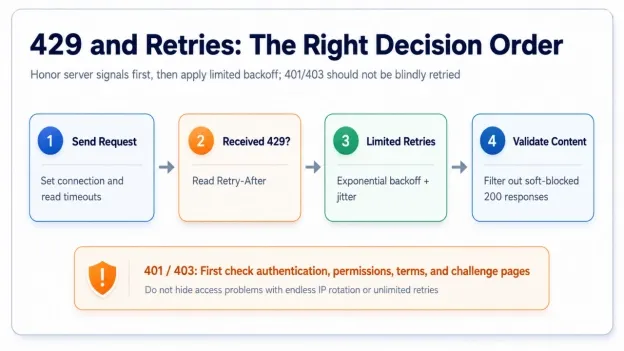
429 is a clear signal from the server to slow down, and the stress should not be amplified by high-frequency retries. Retry-After is read first; if there is no such field, exponential backoff is used. Jitter is used to prevent multiple worker processes from retrying at the same time in the same second, but random delays cannot replace the waiting time given by the server.
401 and 403 are usually not transient errors. A 401 commonly indicates missing or expired authentication; a 403 may indicate insufficient permission, a policy denial, or a challenge page. Blind retries will not repair permission and may worsen the risk score.
Complete Example: Handle Retry-After Dates, Connection Errors, and Soft Blocks
from email.utils import parsedate_to_datetime
from datetime import datetime, timezone
import random
import time
import requests
def retry_after_seconds(value):
    if not value:
        return None
    if value.isdigit():
        return max(0, int(value))
    try:
        retry_at = parsedate_to_datetime(value)
        return max(0, int((retry_at - datetime.now(timezone.utc)).total_seconds()))
    except (TypeError, ValueError, OverflowError):
        return None


def fetch_with_backoff(session, url, *, max_attempts=5):
    for attempt in range(max_attempts):
        try:
            response = session.get(url, timeout=(5, 30))
        except (requests.Timeout, requests.ConnectionError):
            if attempt == max_attempts - 1:
                raise
            time.sleep(min(30, 2 ** attempt) + random.uniform(0, 0.5))
            continue
        if response.status_code == 429:
            if attempt == max_attempts - 1:
                response.raise_for_status()
            wait = retry_after_seconds(response.headers.get("Retry-After"))
            time.sleep((wait if wait is not None else min(60, 2 ** attempt)) + random.uniform(0, 0.5))
            continue
        if response.status_code in (401, 403):
            raise PermissionError(f"Access rejected: HTTP {response.status_code}")
        response.raise_for_status()
        return response
    raise RuntimeError("Retry loop finished without a response")


with requests.Session() as session:
    session.headers["User-Agent"] = "RolaResearchBot/1.0 ([email protected])"
    print(fetch_with_backoff(session, "https://httpbingo.org/status/200").status_code)
Method 6: Reuse Sessions, Cookies, and the Same Workflow Context
Real browsing rarely consists of isolated requests. List pages, detail pages, and pagination share cookies, connection pools, language, and navigation context. requests.Session reuses connections and cookies. Authorized paginated or authenticated workflows should also retain the same proxy session instead of changing identity on every request.
Sessions need lifecycle boundaries: use one Session per task or account and close it when the task finishes. Do not mix cookies across accounts, countries, or unrelated jobs. Never commit persisted authentication data to a repository.
Complete Example: Save and Restore Cookies While Preserving Navigation Context
import json
from pathlib import Path
import requests
COOKIE_FILE = Path("cookies.json")
BASE = "https://httpbingo.org"
with requests.Session() as session:
    session.headers.update({"User-Agent": "RolaResearchBot/1.0 ([email protected])",
                            "Accept-Language": "en-US,en;q=0.9"})
    if COOKIE_FILE.exists():
        session.cookies.update(requests.utils.cookiejar_from_dict(
            json.loads(COOKIE_FILE.read_text(encoding="utf-8"))))
    session.get(f"{BASE}/cookies/set?session_id=demo123", timeout=(5, 30)).raise_for_status()
    response = session.get(f"{BASE}/cookies", headers={"Referer": f"{BASE}/"}, timeout=(5, 30))
    response.raise_for_status()
    print(response.json())
    COOKIE_FILE.write_text(json.dumps(requests.utils.dict_from_cookiejar(session.cookies), indent=2), encoding="utf-8")
Method 7: Keep Request Headers Realistic, Stable, and Internally Consistent
The default python-requests User-Agent is easy to identify, but randomly stacking browser headers can create contradictions. A Windows Chrome User-Agent paired with macOS client hints, a U.S. exit paired with fr-FR, or a completely different identity on every request is more anomalous than one stable, truthful client identity.
For low-risk public crawling, prefer a contactable custom User-Agent and set Accept by target content. Only use a full set of headers that match the actual browser version if the target explicitly requires browser semantics; do not impersonate Googlebot or other search engines.
Complete Example: Build a Consistent Session and Inspect the Echoed Headers
import requests
def build_session(locale="en-US"):
    session = requests.Session()
    session.headers.update({
        "User-Agent": "RolaResearchBot/1.0 ([email protected])",
        "Accept": "text/html,application/xhtml+xml,application/xml;q=0.9,*/*;q=0.8",
        "Accept-Language": f"{locale},en;q=0.8",
        "Accept-Encoding": "gzip, deflate",
        "Cache-Control": "no-cache",
    })
    return session


with build_session("en-US") as session:
    response = session.get("https://httpbingo.org/headers", timeout=(5, 30))
    response.raise_for_status()
    received = response.json()["headers"]
    print(received)
    assert "RolaResearchBot/1.0" in received["User-Agent"]
Decision rule: Consistency matters more than randomness: keep the IP region, language, cookies, and client identity stable within a session.
Method 8: Rotate Rola IP by Workflow Session, Not Mechanically on Every Request
Rotation strategy depends on task semantics. Unrelated public detail pages can use rotating proxies to distribute network exits. Pagination, shopping carts, authorized post-login workflows, and cookie-dependent flows should use a static proxy or sticky session. Changing IP midway can trigger security checks and make the cookies inconsistent with the region.
Rola IP handles the network layer by providing rotating residential, static residential, datacenter, and mobile proxies with country, city, and session controls. It cannot replace pacing, rendering, or content validation. Bind the session ID to a business task and record usable-data success plus 429/403 rates for each exit.

Complete Example: Configure Rola IP with Environment Variables and Keep One Task on One Session
import os
import requests
# Example:http://username:password@host:port
proxy_url = os.environ["ROLA_PROXY_URL"]
proxies = {"http": proxy_url, "https": proxy_url}
urls = ["https://httpbingo.org/ip", "https://httpbingo.org/headers"]
with requests.Session() as session:
    session.headers.update({"User-Agent": "RolaResearchBot/1.0 ([email protected])",
                            "Accept-Language": "en-US,en;q=0.9"})
    for url in urls:
        response = session.get(url, proxies=proxies, timeout=(5, 30))
        response.raise_for_status()
        print(url, response.json())
Decision rule: Generate the appropriate proxy credentials in the Rola IP dashboard, verify the exit with an IP-check endpoint, keep one continuous task on one session, and rotate between tasks.
Method 9: Use Playwright Only When JavaScript Rendering Is Necessary
Upgrade to Playwright only when the HTML returned by requests lacks the target data and browser Network tools show that JavaScript, scrolling, or clicking is required. Browser automation uses more resources, so block unnecessary images and fonts and wait for explicit selectors instead of using fixed sleep calls.
Playwright auto-waiting checks whether an element is visible, stable, and actionable before an operation, but navigation still needs timeouts and an explicit content condition. If the target data comes from an authorized public XHR endpoint, request that endpoint directly first.
Complete Example: Rola IP + Playwright + Explicit Waiting + Structure Validation
import os
from urllib.parse import urlparse
from playwright.sync_api import sync_playwright, TimeoutError as PlaywrightTimeoutError
proxy = urlparse(os.environ["ROLA_PROXY_URL"])
proxy_config = {"server": f"{proxy.scheme}://{proxy.hostname}:{proxy.port}"}
if proxy.username:
    proxy_config.update({"username": proxy.username, "password": proxy.password or ""})

with sync_playwright() as p:
    browser = p.chromium.launch(headless=True, proxy=proxy_config)
    context = browser.new_context(locale="en-US", timezone_id="America/New_York")
    page = context.new_page()
    page.route("**/*", lambda route: route.abort()
               if route.request.resource_type in {"image", "font", "media"}
               else route.continue_())
    try:
        page.goto("https://quotes.toscrape.com/js/", wait_until="domcontentloaded", timeout=30_000)
        page.locator(".quote").first.wait_for(state="visible", timeout=15_000)
        rows = page.locator(".quote .text").all_text_contents()
        if not rows:
            raise ValueError("Expected quote elements were not found")
        print(rows[:3])
    except PlaywrightTimeoutError as exc:
        page.screenshot(path="playwright-timeout.png", full_page=True)
        raise RuntimeError("Page did not reach the expected state") from exc
    finally:
        context.close()
        browser.close()
Install Playwright with pip install playwright, then run playwright install chromium. If no proxy is required, remove the proxy argument from launch().
Decision rule: A browser is for JavaScript and interaction, not a universal answer to every block. Prove that rendering is necessary before accepting its cost.
Method 10: Detect 200 OK Soft Blocks and Page-Structure Changes
A soft block is dangerous because monitoring may count it as success. Validate that the final URL did not redirect to a login or challenge, Content-Type is correct, the body contains no known challenge markers, required selectors exist, and record counts remain plausible. Save redacted failure samples to distinguish an anti-bot page from a site redesign.
Complete Example: Content Validation, HTML Snapshots, and Explainable Errors
from pathlib import Path
from bs4 import BeautifulSoup
BLOCK_MARKERS = ("captcha", "access denied", "verify you are human",
    "unusual traffic", "challenge-platform")
def validate_html(response, selector, minimum_records=1):
    content_type = response.headers.get("Content-Type", "").lower()
    if "html" not in content_type:
        raise ValueError(f"Unexpected content type: {content_type}")
    lower = response.text.lower()
    marker = next((m for m in BLOCK_MARKERS if m in lower), None)
    if marker:
        raise RuntimeError(f"Possible soft-block marker: {marker}")
    soup = BeautifulSoup(response.text, "html.parser")
    rows = soup.select(selector)
    if len(rows) < minimum_records:
        Path("unexpected-page.html").write_text(response.text, encoding="utf-8")
        raise ValueError("Expected content missing; snapshot saved")
    return rows


# Example: rows = validate_html(response, ".quote", minimum_records=1)
Decision rule: Validate structure on every scrape. Status, body, and required selectors must all satisfy the success criteria.
Method 11: Limit Crawl Boundaries and Avoid Hidden Links, Calendar Traps, and Infinite URLs
Scrapers can amplify themselves through uncontrolled URL discovery. Calendar links can generate infinite months, reordered filter parameters can create duplicate URLs, and hidden or logout links should not be followed automatically. Restrict the domain, allowed paths, depth, and page count; remove fragments, tracking parameters, and parameter-order duplicates.
For browser crawling, only follow links that are visible and within the scope of the task; for HTML crawling, don’t rely solely on CSS strings to determine hidden status, as final visibility may be determined by inherited styles or JavaScript.
Complete Example: Same-Domain URL Normalization and a Crawl Budget
from collections import deque
from urllib.parse import urljoin, urlparse, parse_qsl, urlencode, urlunparse
import requests
from bs4 import BeautifulSoup
def normalize(url):
    p = urlparse(url)
    query = urlencode(sorted((k, v) for k, v in parse_qsl(p.query)
                            if not k.lower().startswith("utm_")))
    return urlunparse((p.scheme, p.netloc.lower(), p.path or "/", "", query, ""))


start = normalize("https://quotes.toscrape.com/")
domain = urlparse(start).netloc
queue, seen, max_pages = deque([(start, 0)]), set(), 10
with requests.Session() as session:
    session.headers["User-Agent"] = "RolaResearchBot/1.0 ([email protected])"
    while queue and len(seen) < max_pages:
        url, depth = queue.popleft()
        if url in seen or depth > 2:
            continue
        response = session.get(url, timeout=(5, 30))
        response.raise_for_status()
        seen.add(url)
        for link in BeautifulSoup(response.text, "html.parser").select("a[href]"):
            candidate = normalize(urljoin(url, link["href"]))
            parsed = urlparse(candidate)
            if parsed.netloc == domain and parsed.path.startswith(("/page/", "/author/")):
                queue.append((candidate, depth + 1))
print(f"visited {len(seen)} pages")
Decision rule: Every scraper needs a budget: allowed domains, paths, depth, page count, and deduplication rules.
Method 12: Monitor Block Rates, Schema Drift, and Cost per Usable Record
Production monitoring must do more than alert when the process crashes. Track requests, usable records, 429/403 responses, timeouts, CAPTCHA markers, latency, and bytes by target domain, page type, proxy product, and region. Falling usable-data success with a stable 200 rate suggests a soft block or template change; degradation isolated to one region or proxy product suggests an exit-quality or geo-routing issue.
Use two thresholds: a short window for automatic concurrency reduction and retry suspension, and a longer window for human review. Save a small set of redacted failure samples and response headers, but never log passwords, cookies, proxy credentials, or personal data.
Complete Example: Structured Logging and Run Summaries
import json
import logging
from collections import Counter
from statistics import median
logging.basicConfig(level=logging.INFO, format="%(message)s")
events = [
    {"status": 200, "valid": True, "seconds": 0.42, "bytes": 8420},
    {"status": 200, "valid": False, "seconds": 0.31, "bytes": 1210},
    {"status": 429, "valid": False, "seconds": 0.18, "bytes": 220},
]
for event in events:
    logging.info(json.dumps({"event": "scrape_result", **event}))
status_counts = Counter(e["status"] for e in events)
summary = {
    "requests": len(events),
    "valid_data_rate": sum(e["valid"] for e in events) / len(events),
    "status_counts": dict(status_counts),
    "median_seconds": median(e["seconds"] for e in events),
    "bytes_per_valid_response": sum(e["bytes"] for e in events) / max(1, sum(e["valid"] for e in events)),
}
print(json.dumps(summary, indent=2))
Decision rule: Optimize for stable, compliant acquisition of usable data—not unlimited request volume.
What to Do When Your Web Scraper Gets Blocked
If your web scraper gets blocked, do not rotate everything at once. Record the failure first, then test rate, session, network exit, and browser requirements one variable at a time.
The most effective debugging process changes one layer at a time while retaining a control group. That is how you learn whether rate, proxy routing, session state, browser rendering, or page structure actually changed the success rate.
- Confirm URL, permissions, robots.txt, terms of service, and official API.
- Check status codes, Retry-After, final URL and response body to rule out parsing errors and soft blocks.
- Reduce concurrency to 1, extend the interval, and retest using a single session.
- Keep the client unchanged and switch only to a verified Rola IP exit.
- If changing the exit restores results, optimize proxy type, region, and session. If it does not, return to the HTTP or browser layer.
- Only upgrade to Playwright/Selenium if JavaScript is absolutely necessary.
- Open the circuit and require human review after repeated 403s, CAPTCHAs, or missing-data results cross the threshold.
Decision principle | A working proxy does not justify increasing scrape pressure, and one failed test does not prove that a proxy pool is poor. The test shows only whether this failure primarily follows the network-exit layer.
Common Mistakes: Why These Approaches Still Get Blocked
| Wrong Approach | Why It Fails | Better Approach |
|---|---|---|
| Randomize every header on every request | Creates browser combinations that do not exist | Maintain a small set of realistic, internally consistent client profiles. |
| Change IP on every request | Breaks cookie, pagination, and regional continuity | Define rotation boundaries by task or session. |
| Retry a 403 without limits | Increases target pressure and can damage exit reputation | Open the circuit, save a sample, and review access rules. |
| Count every HTTP 200 as success | CAPTCHA and login pages may also return 200 | Validate required fields, templates, and the final URL. |
| Use a headless browser by default | Adds substantial cost and more failure modes | Check static HTML, XHR, and official APIs first. |
| Treat proxy capacity as target permission | Provider capacity does not define an acceptable crawl rate | Control throughput using target rules and observed server feedback. |
Conclusion
The most reliable way to avoid getting blocked while web scraping is to diagnose the failure before changing the scraper. Reduce request pressure, honor 429 and Retry-After, keep sessions and client signals consistent, and verify whether the problem actually follows the IP or network exit. Use controlled proxy rotation only when the evidence points to an IP-level issue, and validate the required data on every run instead of treating every HTTP 200 as success.
A stable scraping workflow is built around clear access rules, measurable stop conditions, and one-variable-at-a-time troubleshooting—not endless retries or random IP changes.
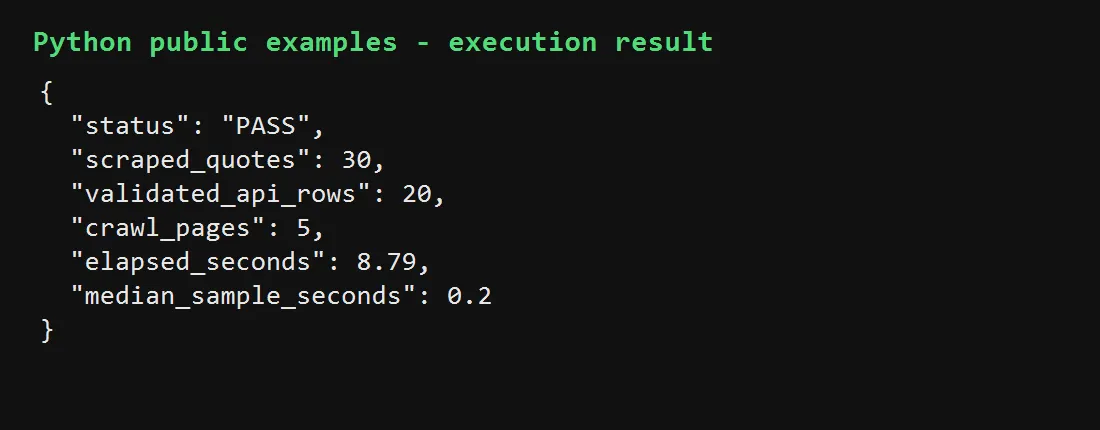
Verified Public-Example Output
The following run validates public HTTP headers, HTML extraction, JSON pagination, and bounded same-domain crawling.