Best Buy Scraper with Python: Extract Product Data to CSV

Sep 23, 2026 · Guides · 11 min read
The hard part of building a Best Buy scraper is not simply “finding a number on the page.” It is confirming which SKU, seller, item condition, and observation time that number belongs to. The same page may display the product price, monthly financing amounts, protection-plan prices, and both new and refurbished offers. A reliable workflow should first verify the product on the page, then inspect the structured data, and finally use Python to generate traceable Offer records.
This guide demonstrates the following workflow: verify page fields → distinguish BreadcrumbList from Product in DevTools → save an authorized input → parse it with Python → validate the data → export it to CSV.
What Data Sources Can a Best Buy Scraper Use?
For small-scale field verification, start with authorized saved HTML or JSON-LD and validate “whether the page can be accessed” separately from “whether the parsing logic is correct.” For continuous collection or large catalog jobs, first evaluate the official Best Buy Products API. The official API, third-party scraping APIs, and proxies are different products: the official API returns authorized structured data; a scraping API handles page requests or rendering; Rola IP provides proxy egress and IP resources, but it does not automatically convert a webpage into product fields. For Python proxy setup, see the Python proxy integration documentation.
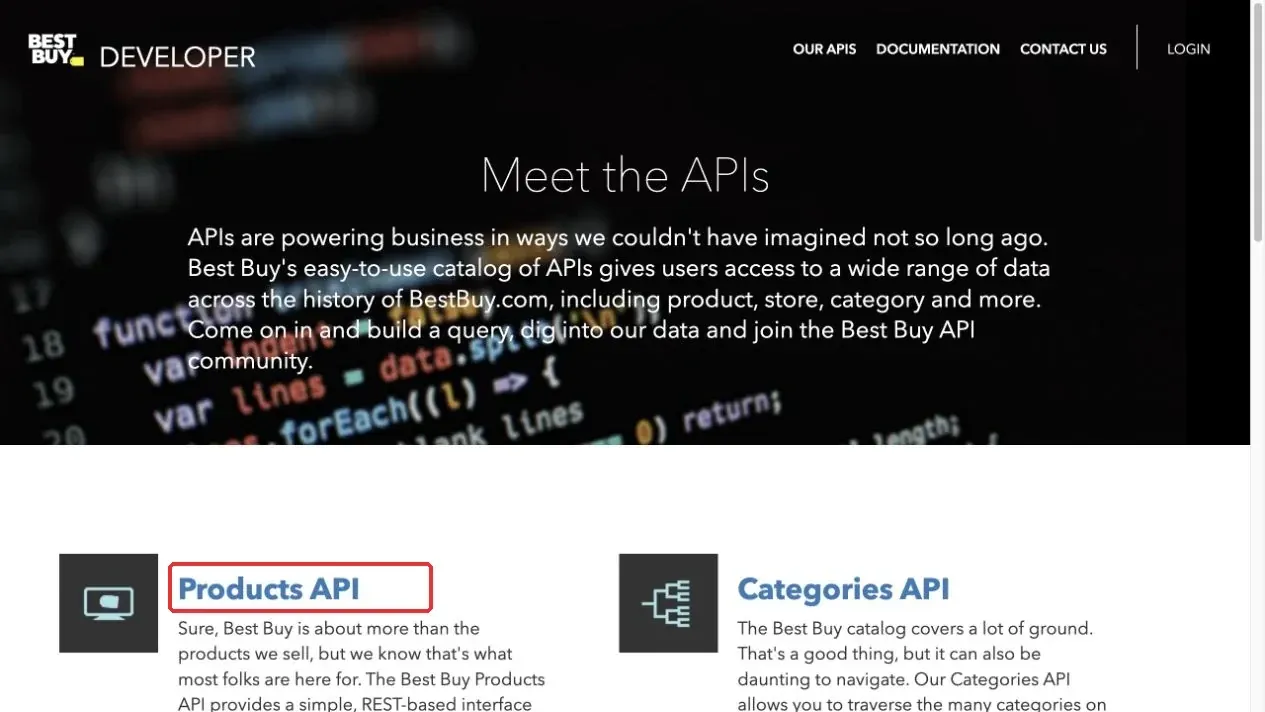
Figure 1. Best Buy Products API entry on the official developer page.
The official API requires a valid API key and is subject to field, authorization, rate, and data-storage rules. Being able to open a product page in a browser does not mean you have permission for bulk collection. Before implementation, review the website terms, robots rules, intended data use, and applicable laws. Do not collect account, order, or payment information.
How to Verify the Target Product on a Best Buy Page
Step 1: Verify the SKU and Product Type in Search Results
When you search Best Buy for a target model, the results may include ads, different colors, bundles, new items, and refurbished products. Do not assume the first result is the correct one. After opening a product card, verify at least the product name, model, SKU, color, seller, and condition.
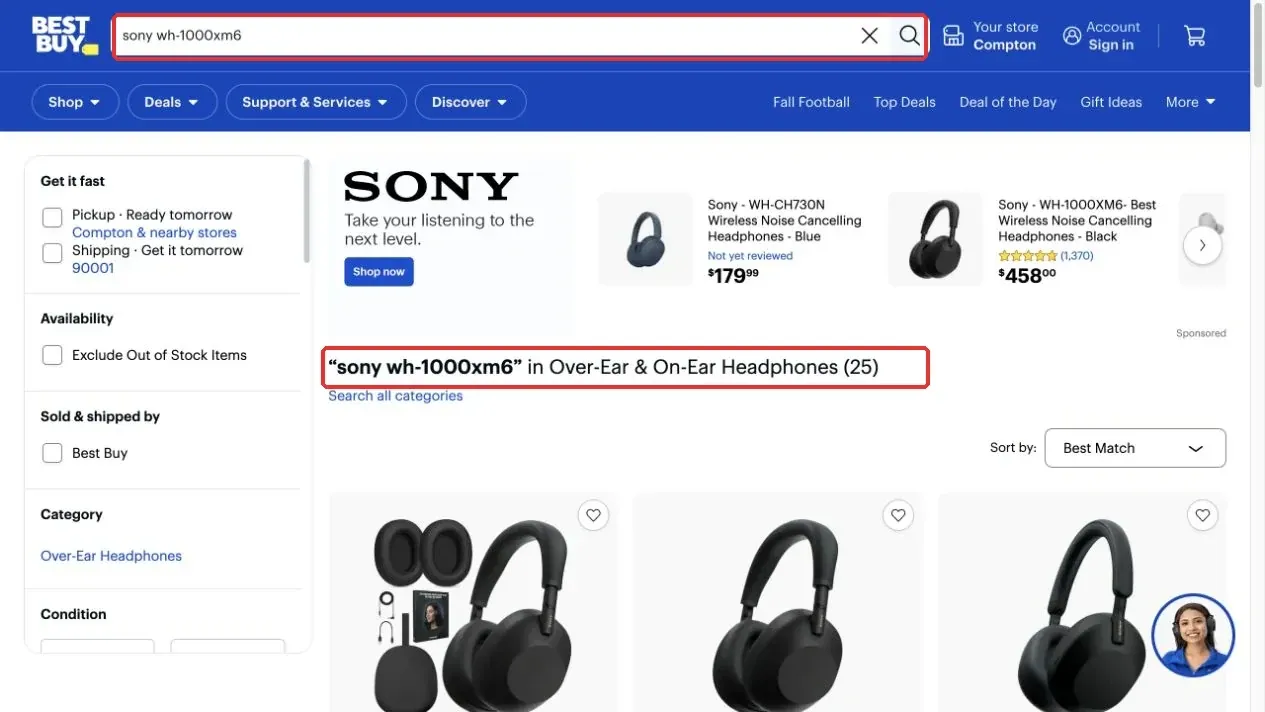
Figure 2. Example of the keyword and result area on a Best Buy search results page.
Step 2: Separate Product Identity from Offer Identity
Use the SKU to identify the product, and use the model and name for manual verification. An Offer should also distinguish the seller, item condition, currency, availability, and observation time. Even when the SKU is the same, a new offer and a refurbished offer must not overwrite each other.
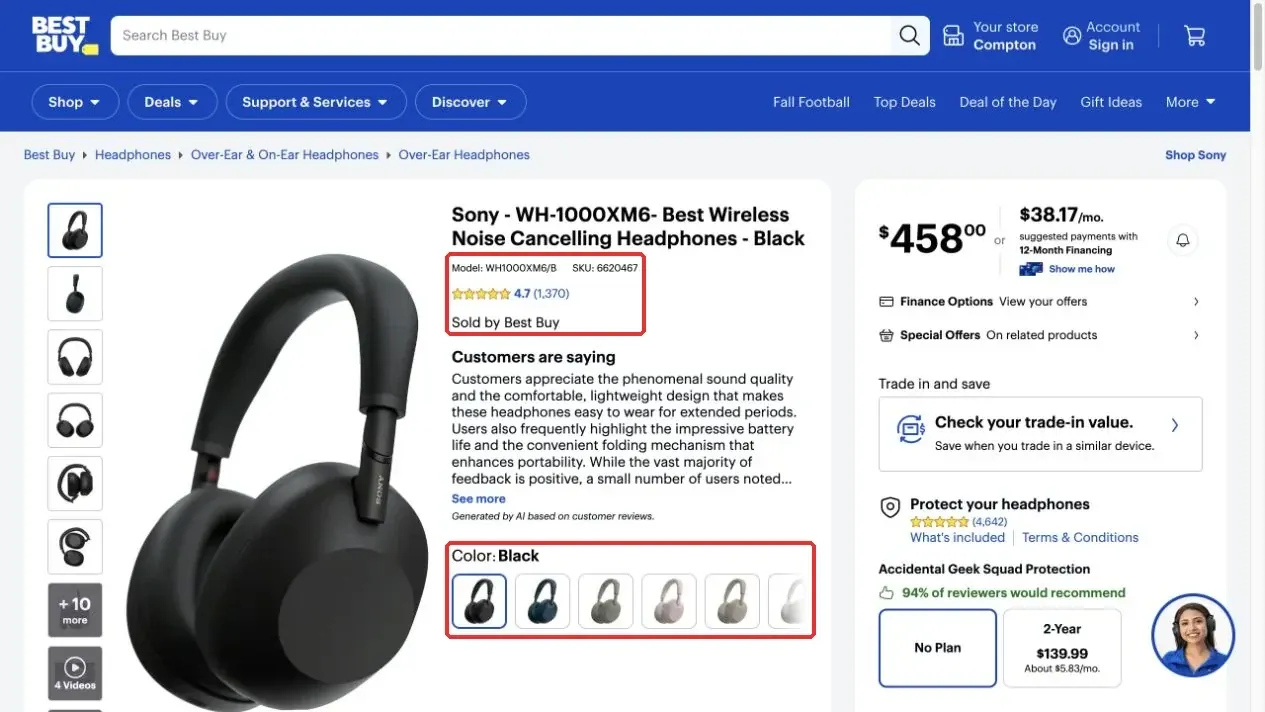
Figure 3. Model, SKU, seller, and color locations on a Best Buy product detail page.
Step 3: Do Not Mistake Financing or Protection-Plan Amounts for the Product Price
A product page may show monthly financing, protection plans, membership discounts, taxes, or delivery information next to the main price. The price field should store the product price for the target Offer, while currency should store the currency. Taxes, shipping fees, and checkout conditions should not be combined into a “final price” without supporting evidence.
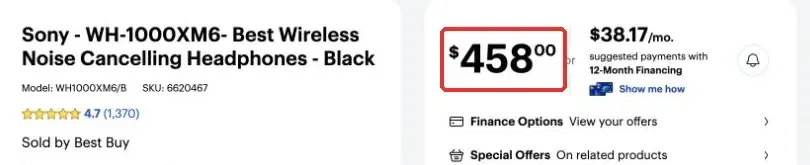
Figure 4. Example showing the main product price and other monetary amounts.
Step 4: Verify Ratings, Review Counts, and Specifications
aggregateRating.ratingValue and reviewCount are aggregate fields. They do not mean that all individual review texts have been extracted. An AI-generated review summary on the page also must not be treated as an original review written by a specific user.
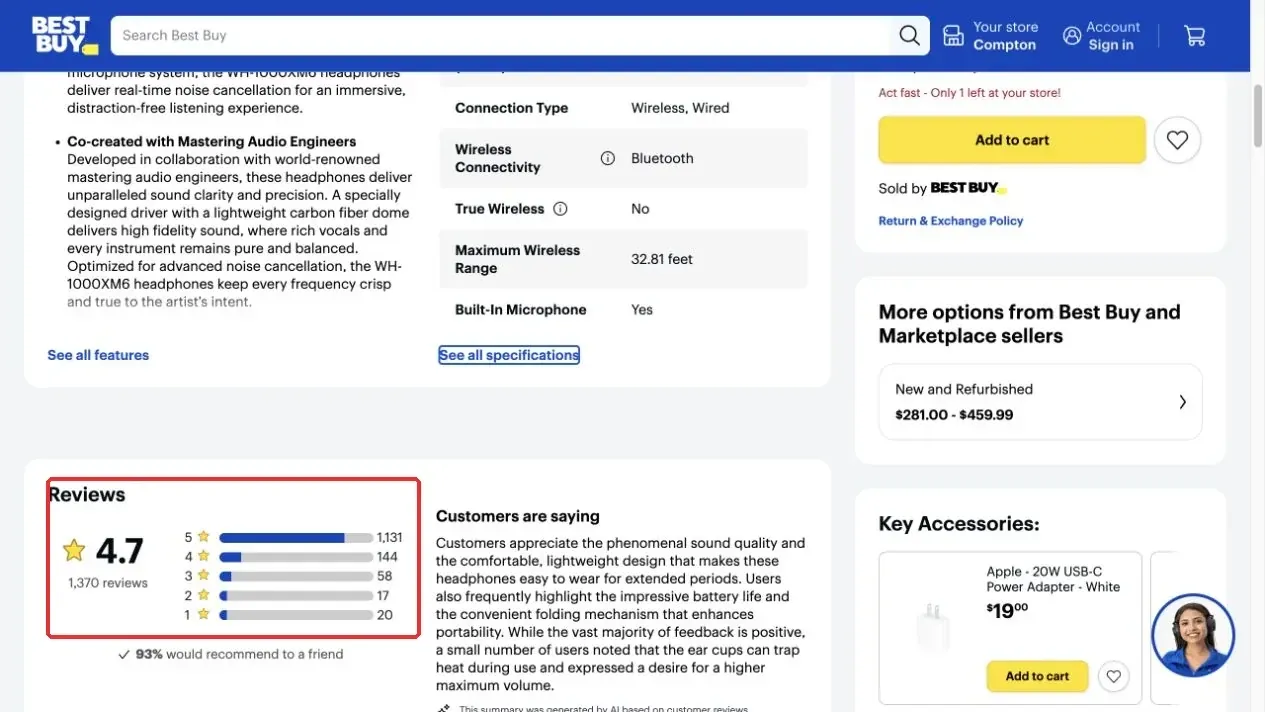
Figure 5. Rating and review-count locations in the Reviews section.
The specifications dialog can help verify the model, connection type, and other attributes, but a basic export should only promise fields that the code actually parses.
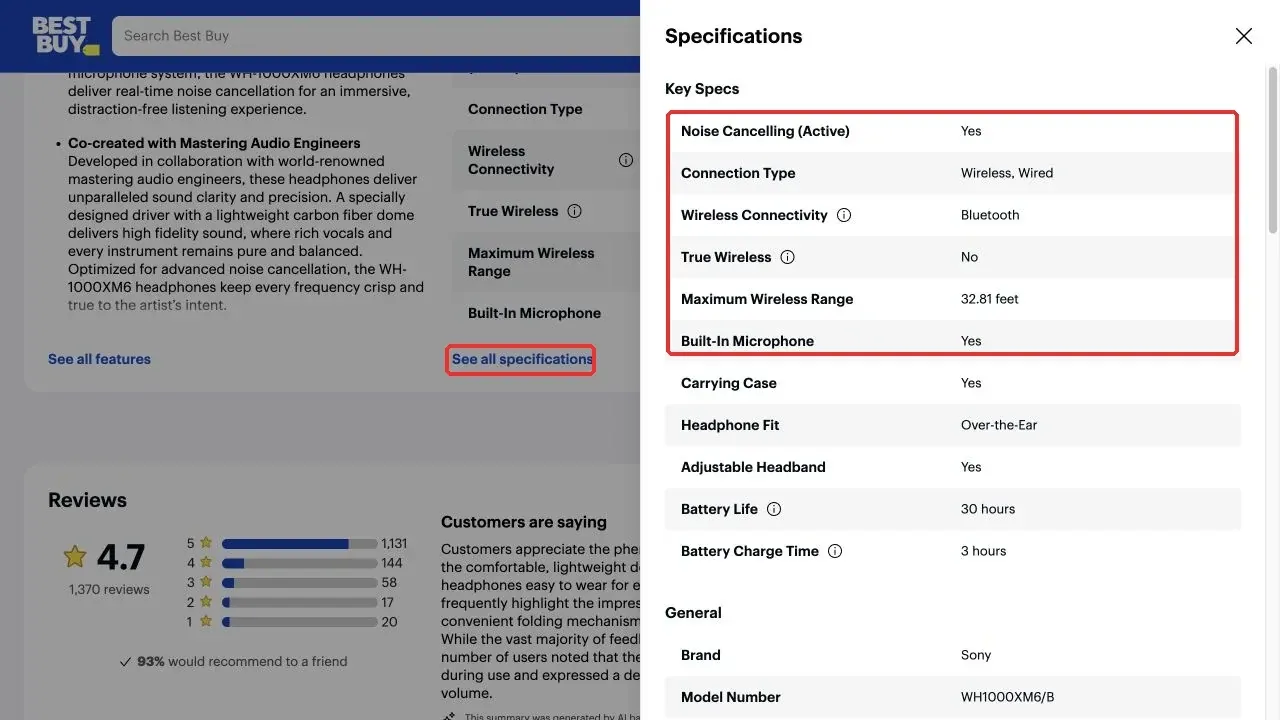
Figure 6. Expanded product specifications dialog.
How to Find Product JSON-LD in DevTools
Step 1: Open Elements and Search for JSON-LD
Right-click an empty area of the product page and select Inspect, or press Command + Option + I on macOS or Ctrl + Shift + I on Windows. Open Elements, then press Command + F or Ctrl + F and search for application/ld+json. The Elements panel shows the current DOM. It is not the website server’s backend code, and it is not guaranteed to match the raw response received by Python requests.
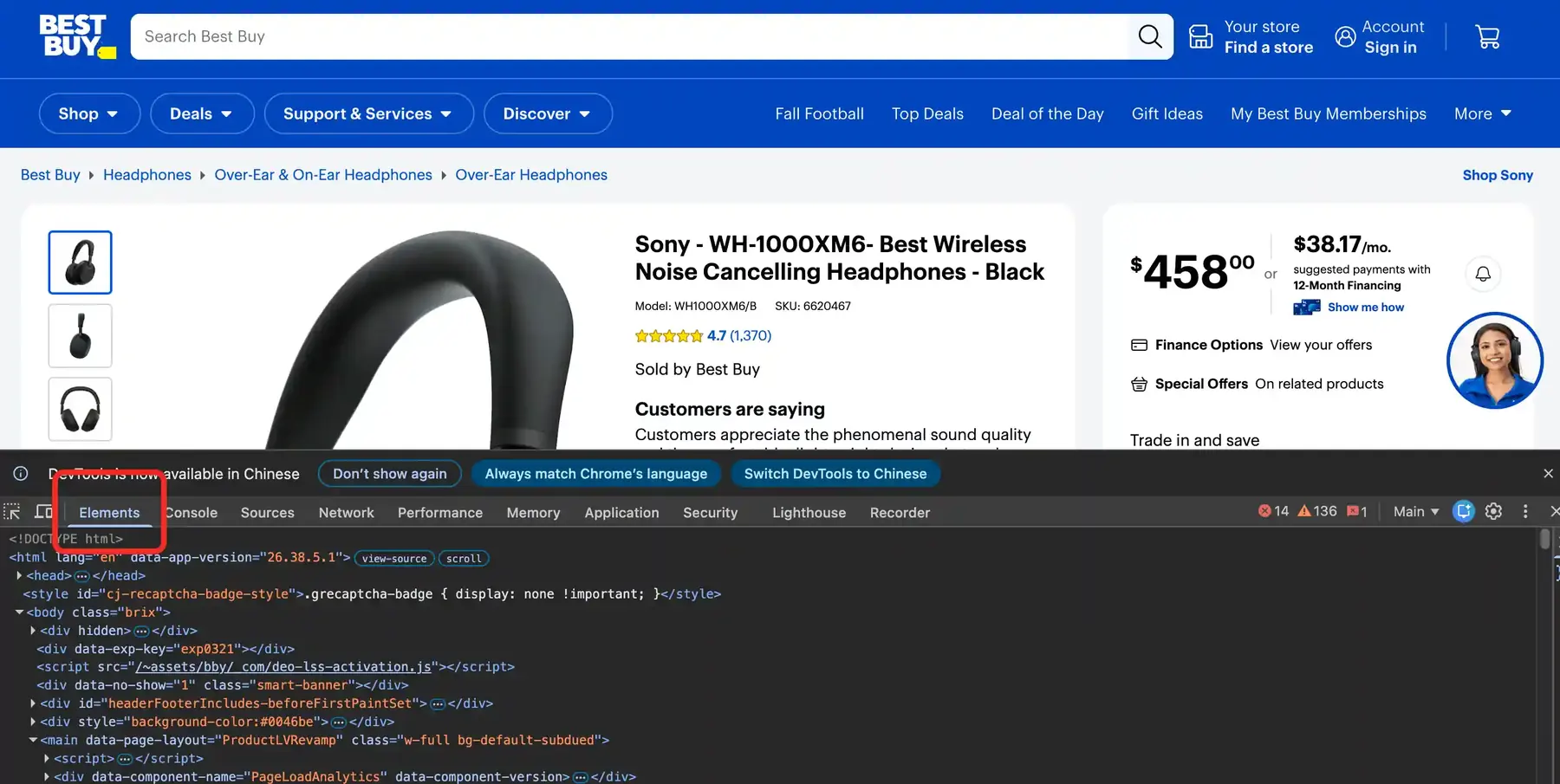
Figure 7. Elements panel in Chrome DevTools.
Step 2: Do Not Mistake BreadcrumbList for Product
A page may contain multiple JSON-LD blocks. BreadcrumbList describes the navigation path, while ItemList may describe a list. For this tutorial, only an object whose @type is Product is a valid product input. After expanding the script, first confirm @type, then verify the sku.
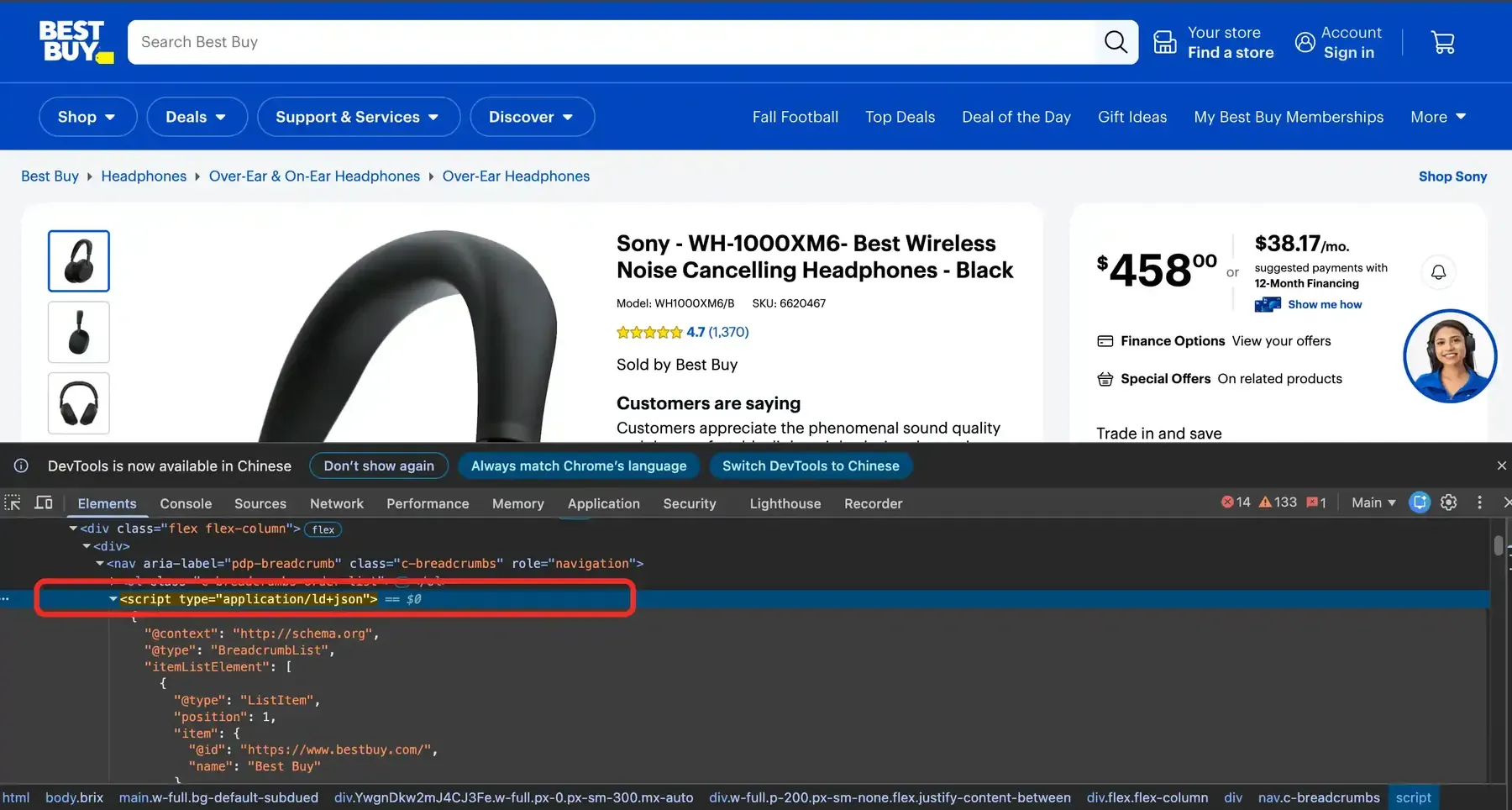
Figure 8. BreadcrumbList JSON-LD example in DevTools.
Figure 8 clearly shows a BreadcrumbList. You cannot read a Product SKU, Offer, or rating from it. The correct object has @type: Product, after which you should verify the target SKU.
Step 3: Save the Authorized Product Input
Select the verified Product script, right-click it, and choose Copy → Copy outerHTML. Paste it into a plain-text editor and save it as product-jsonld.html using UTF-8 encoding. If you need to compare it with the raw network response, open Network → Doc, refresh the page, select the product document request, and search for application/ld+json in Response.
How to Build a Best Buy Scraper with Python
Step 1: Prepare a Real, Consistent Runtime Environment
Example environment: Python 3.12.10 and Requests 2.32.5. Confirm the versions in your own environment before running the examples. The local parsing script uses the standard library. The examples below require only the Python standard library and pandas; install Requests 2.32.5 if you also need to send HTTP requests.
python3 --version
python3 -m venv .venv
source .venv/bin/activate
python -m pip install "requests==2.32.5" pandas
In Windows PowerShell, you can run the later commands with .venv\Scripts\python.exe. Keep versions and dependencies consistent across your README, requirements file, and run logs.
Step 2: Parse the Saved JSON-LD
The following code only parses a local file; it does not request Best Buy. It supports one or more JSON-LD scripts, @graph, and @type arrays, and it keeps only Product objects.
from html.parser import HTMLParser
from pathlib import Path
import json

class JsonLdParser(HTMLParser):
    def __init__(self):
        super().__init__()
        self.inside = False
        self.buffer = []
        self.blocks = []

    def handle_starttag(self, tag, attrs):
        attr = dict(attrs)
        if tag == "script" and attr.get("type", "").lower() == "application/ld+json":
            self.inside = True
            self.buffer = []

    def handle_data(self, data):
        if self.inside:
            self.buffer.append(data)

    def handle_endtag(self, tag):
        if tag == "script" and self.inside:
            self.blocks.append("".join(self.buffer).strip())
            self.inside = False

def walk(value):
    if isinstance(value, dict):
        yield value
        for child in value.values():
            yield from walk(child)
    elif isinstance(value, list):
        for child in value:
            yield from walk(child)

def is_product(obj):
    kinds = obj.get("@type", [])
    if isinstance(kinds, str):
        kinds = [kinds]
    return "Product" in kinds

html = Path("product-jsonld.html").read_text(encoding="utf-8")
parser = JsonLdParser()
parser.feed(html)
products = []
for block in parser.blocks:
    data = json.loads(block)
    products.extend(obj for obj in walk(data) if is_product(obj))
if not products:
    raise RuntimeError("No Product JSON-LD found")
Step 3: Generate a Structured Record for Each Offer
offers may be a single object, an array, or an AggregateOffer. The lowPrice in an AggregateOffer is only the aggregate lowest price and should not be described as the transaction price from a specific seller.
from decimal import Decimal, InvalidOperation

def listify(value):
    if value is None:
        return []
    return value if isinstance(value, list) else [value]

def named(value):
    if isinstance(value, dict):
        return str(value.get("name", ""))
    return str(value or "")

def money(value):
    if value in (None, "") or isinstance(value, bool):
        return ""
    try:
        amount = Decimal(str(value))
    except InvalidOperation as error:
        raise ValueError(f"Invalid price: {value}") from error
    if not amount.is_finite() or amount < 0:
        raise ValueError(f"Invalid price: {value}")
    return format(amount, "f")

rows = []
for product in products:
    rating = product.get("aggregateRating") or {}
    offers = listify(product.get("offers"))
    for offer in offers:
        if not isinstance(offer, dict) or offer.get("@type") == "AggregateOffer":
            continue
        rows.append({
            "sku": str(product.get("sku", "")),
            "name": str(product.get("name", "")),
            "model": str(product.get("model", "")),
            "brand": named(product.get("brand")),
            "color": str(product.get("color", "")),
            "seller": named(offer.get("seller")),
            "condition": str(offer.get("itemCondition", "")),
            "price": money(offer.get("price")),
            "currency": str(offer.get("priceCurrency", "")),
            "availability": str(offer.get("availability", "")),
            "rating": str(rating.get("ratingValue", "")),
            "review_count": str(rating.get("reviewCount", "")),
        })
if not rows:
    raise RuntimeError("Product found but no individual Offer was exported")
Run this parser against an authorized, redacted product-jsonld.html and retain the input file, command, Python version, and resulting CSV together as the validation record. The code sample is not evidence of a live Best Buy request. Before publication, verify at least one real Product object against its SKU, seller, condition, price, and currency; if those files are unavailable, label the implementation “not live-tested” rather than reporting a successful scrape.
A missing price should remain blank rather than being filled with 0. If a Product has multiple Offers, export them separately; do not let the last seller overwrite the earlier records.
Step 4: Define Acceptance Rules
HTTP 200 only means that a response was received; it does not mean you received the target product. A valid record should at least match the target SKU, identify the Offer, and parse the price and currency. Batch jobs should also record the number of inputs, valid Offers, missing prices, SKU mismatches, 403 responses, 429 responses, and parsing-failure reasons.
required = {"sku", "seller", "price", "currency"}
for index, row in enumerate(rows, start=1):
    missing = sorted(key for key in required if not row.get(key))
    if missing:
        raise ValueError(f"Row {index} missing: {missing}")
How to Export a CSV That Excel Can Read
import csv
from pathlib import Path

def safe_cell(value):
    text = str(value or "")
    return "'" + text if text[:1] in {"=", "+", "-", "@"} else text

columns = list(rows[0])
output = Path("bestbuy.csv")
if output.exists():
    raise FileExistsError(f"Refusing to overwrite {output}")
with output.open("w", newline="", encoding="utf-8-sig") as handle:
    writer = csv.DictWriter(handle, fieldnames=columns)
    writer.writeheader()
    writer.writerows({key: safe_cell(row[key]) for key in columns} for row in rows)
In Excel, choose Data → From Text/CSV, set the encoding to UTF-8 and the delimiter to a comma, then set SKU to text and price to decimal. After import, review the data in this order: SKU → price and currency → seller and condition → rating and review count. Without a matching real Product input and CSV output, do not claim that the specific SKU, price, and rating shown in the screenshots were successfully exported by the code.
How Should Multiple Products and Pagination Be Handled?
Multiple authorized files can be parsed one by one, while preserving input_file and the actual save time in the output. At minimum, the business key should include SKU, seller, condition, regional context, and observation time.
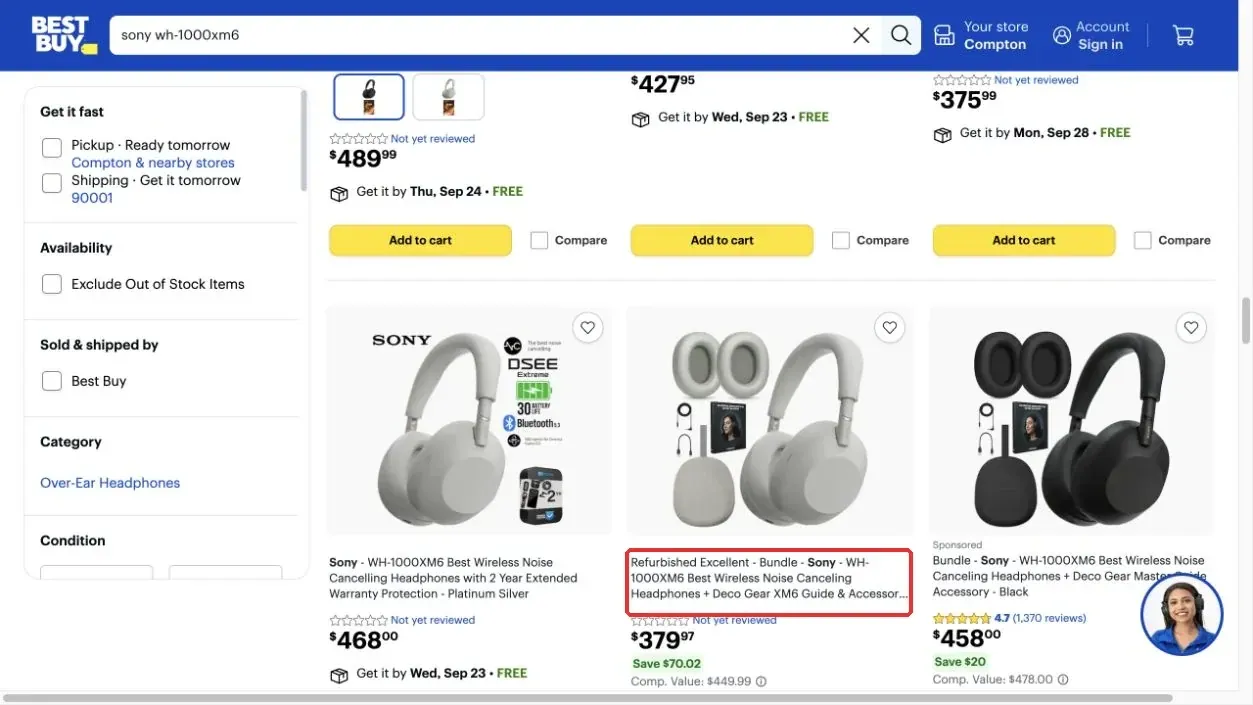
Figure 9. Example of the Show more interface in Best Buy search results.
Production jobs need link discovery, SKU deduplication, scope limits, checkpoints, failure logs, and compliant rate controls. When using the official API, follow the page, pageSize, or cursor rules in the Best Buy API documentation. Do not mix webpage loading parameters with API parameters.
How to Configure Rola IP for a Best Buy Scraper
Rola IP provides proxy egress and IP resources. It does not replace a Product parser, an official API key, or access authorization. Before choosing a product, determine whether your task needs short-term session consistency or a long-term fixed egress IP. For host, port, session, and authentication fields, consult the Rola IP proxy parameters page.
How to Choose Between Rotating and Static Residential Proxies
Rotating residential proxies are suitable for authorized regional network verification and task-level sticky sessions. Static residential proxies are suitable for long-running tasks that require a fixed egress IP. The Rola IP Rotating Residential Proxies page, checked on September 23, 2026, currently states coverage in 190+ countries and regions and an 80M+ residential IP pool.
The same page shows bandwidth pricing and plan-specific validity periods, so those conditions should be checked before purchase. The Static Residential Proxies page, checked on the same date, describes fixed IPs billed per IP with unlimited traffic within the validity period. These are current website claims, subject to product, plan, region, and validity conditions; they are not guarantees of Best Buy success rates or permanent availability.
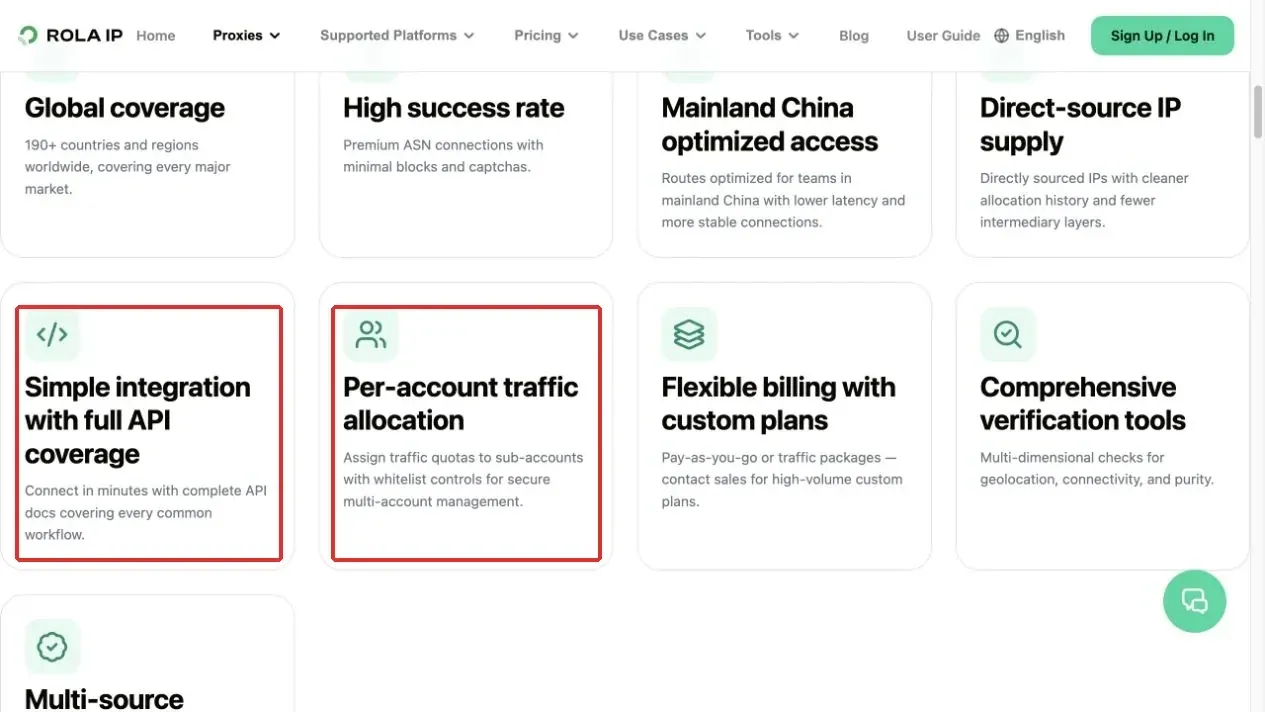
Figure 10. API integration and per-account traffic-management information on a Rola IP product page.
Verify Parameters and Authentication
Get the Host, Port, Username, and Password from your own Rola account, then verify the protocol and username format against the current English documentation. Do not combine ports from different tutorials, products, or protocols.
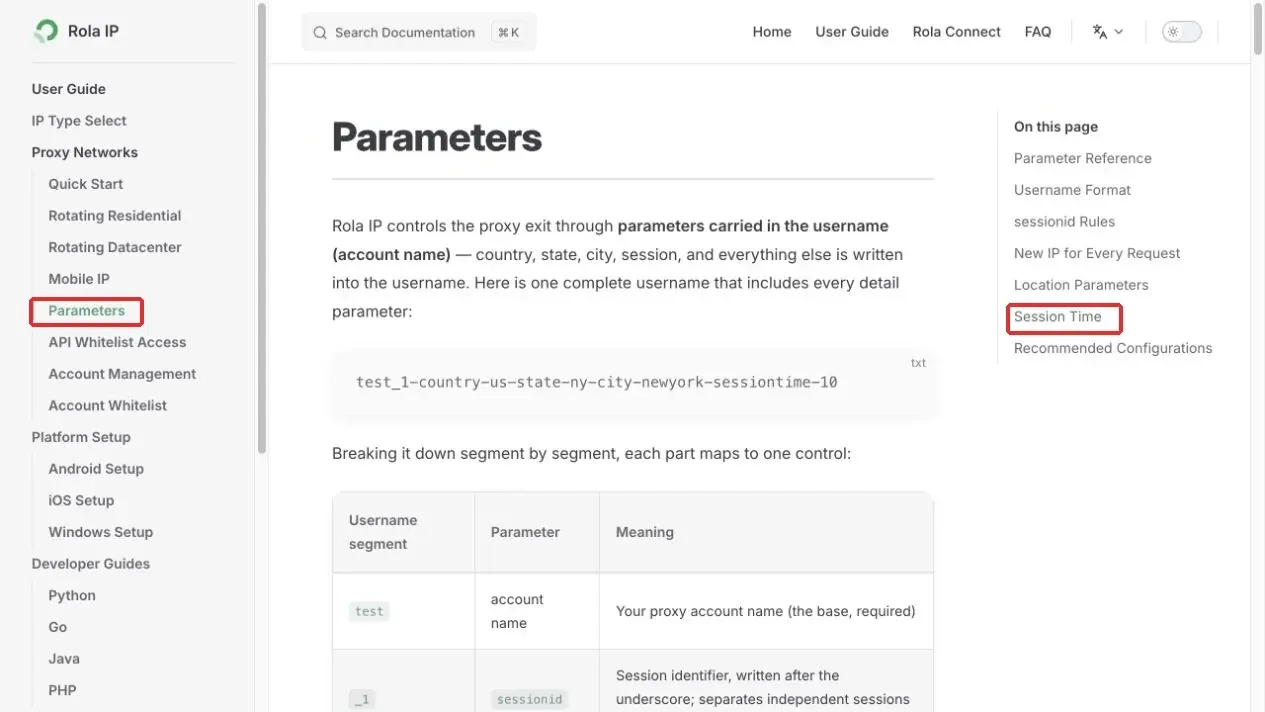
Figure 11. Username Format and Session Time entries on the Rola IP parameters page.
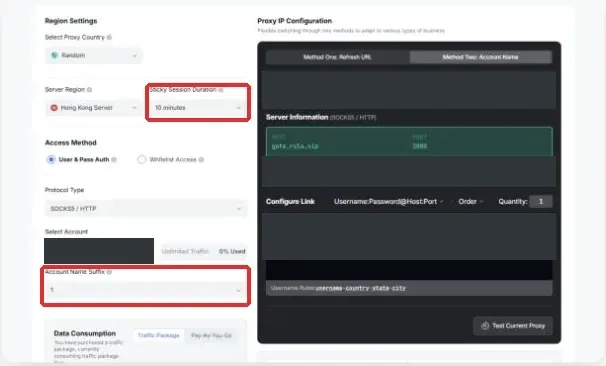
Figure 12. Example Rola IP configuration fields; account credentials and the connection string are redacted.
Pass Proxy Credentials Safely in Python
Credentials should be read from environment variables. The username and password must be URL-encoded, and TLS verification should remain enabled.
import os
from urllib.parse import quote
import requests

user = quote(os.environ["ROLA_PROXY_USER"], safe="")
password = quote(os.environ["ROLA_PROXY_PASSWORD"], safe="")
host = os.environ["ROLA_PROXY_HOST"]
port = os.environ["ROLA_PROXY_PORT"]
proxy = f"http://{user}:{password}@{host}:{port}"

session = requests.Session()
session.trust_env = False
session.proxies.update({"http": proxy, "https": proxy})
try:
    response = session.get("https://ipinfo.io/json", timeout=20)
    response.raise_for_status()
    print(response.json().get("country"))
except requests.exceptions.ProxyError as error:
    raise RuntimeError("Proxy authentication or connection failed") from error
except requests.exceptions.Timeout as error:
    raise RuntimeError("Proxy request timed out") from error
except requests.exceptions.HTTPError as error:
    raise RuntimeError(f"Diagnostic request failed with HTTP {response.status_code}") from error
A successful IP check only proves that the diagnostic request used the expected egress route. It does not prove that the Best Buy response or product fields are valid. If you encounter 403, 429, CAPTCHA, or an explicit restriction, stop the request, preserve the status, and review the authorization and permitted interface. Do not automatically rotate and retry.
Common Errors and Troubleshooting Order
| Symptom | Check First | Correct Handling |
|---|---|---|
| HTTP 403 or 429 | Rejection or rate limiting rather than a parsing error | Stop requests and verify authorization and permitted interfaces |
| Price appears in the browser but Python has no data | Response status, page type, and JSON-LD | Save an authorized input and validate the parser offline |
No Product JSON LD found |
Whether you copied Product rather than BreadcrumbList | Return to Elements and verify @type and SKU |
| Price is obviously too low | Financing amount, protection plan, or an incorrect division by 100 | Compare against Offer price and priceCurrency |
| Multiple rows for the same product | Seller, condition, region, and observation time | Store each Offer separately |
| Garbled CSV text | Encoding and delimiter | Import using UTF-8 and a comma delimiter |
| Proxy connection failure | Protocol, port, authentication, and quota | Check the console and do not disable TLS verification |
Conclusion
A high-quality Best Buy scraper should prioritize product identity, Offer identity, and the evidence chain. First verify the SKU, seller, condition, and main price, then locate the real Product JSON-LD in DevTools; BreadcrumbList only describes navigation. The parser should support one or more Offers, reject invalid monetary values, preserve missing values, and export CSV safely. Record 403 responses, 429 responses, and proxy connectivity separately from field parsing. Rola IP can provide egress and session management for authorized tasks, but platform-level figures should always be accompanied by the official URL, verification date, and plan conditions, and they should not be converted into a Best Buy success-rate claim.