
Error 1015 You Are Being Rate Limited: How to Fix It

Aug 25, 2026 · Troubleshooting · 12 min read
Error 1015: You are being rate limited means your requests exceeded a Cloudflare limit set by the website owner. Stop refreshing, pause scripts and repeated submissions, wait for the time shown on the page or in Retry-After, and then test once.
Cloudflare Error 1015, an origin server’s HTTP 429 response, and Discord’s “You are being rate limited” message can come from different rate-limit layers. Cloudflare 1015 comes from the site’s Cloudflare rule. A Discord message may apply to a normal user action or the Discord API. A plain 429 may come from an origin server, an API gateway, or another provider.
This guide helps three groups take the right path: ordinary users, including website visitors and Discord users; API developers; and site owners. Start with the evidence table, move to the section that matches your role, and use one controlled request to confirm recovery.
Key takeaways:
- Stop refreshes, scripts, duplicate tabs, and repeated submissions.
- Save the Ray ID, status, response body, headers, and affected action.
- Wait for the page message,
Retry-After, or the service’s official instruction, then verify once. - Visitors should contact the site owner if the limit persists; developers should pause the affected API scope; site owners should inspect the matching rule before changing thresholds.
What does Error 1015 mean?
Error 1015 means a visitor exceeded a Cloudflare rate-limiting rule configured by the website owner. Cloudflare temporarily rejects matching traffic. The official Cloudflare Error 1015 documentation confirms that the website owner controls the rule and that visitors should wait or contact the site’s support team.
Error 1015 commonly arrives as HTTP 429 Too Many Requests. RFC 6585 defines 429 as too many requests within a period. RFC 9110 allows Retry-After to contain either a delay in seconds or an HTTP date. Cloudflare currently gives retryable 1015 responses a default 30-second value, but a dynamic value from the site’s WAF rate-limiting rule takes precedence.
Recovery depends on letting the mitigation period end and the request count return to an acceptable level. Repeated refreshes add more rejected requests. They can also make the practical wait longer because the client never stops generating traffic.
Why does Error 1015 happen?
Cloudflare returns Error 1015 when the number of matching requests exceeds the threshold in a rate-limiting rule. Common triggers include:
- repeated refreshes, login attempts, or form submissions;
- several tabs loading the same page or endpoint at the same time;
- auto-refresh extensions, download tools, or browser plugins that keep requesting data;
- polling scripts, monitoring jobs, Workers, or bots caught in a loop;
- several users sharing one public IP and therefore sharing one counter;
- a rule with a match that is too broad or with a threshold, period, or mitigation duration that does not fit normal traffic;
- repeated authentication failures, permission errors, or malformed requests to a protected endpoint.
Background polling, duplicate tabs, and shared public IPs can consume the allowance before you click anything. That is why the first request you notice may receive Error 1015 immediately.
Identify which layer returned the rate limit
The error page, response format, and provider-specific fields usually reveal the limiting layer. Identify that layer before changing browser or network settings.
| What you see | Limiting layer | Evidence to save | Correct section |
|---|---|---|---|
A Cloudflare page with Error 1015 and a Ray ID |
The website’s Cloudflare rate-limiting rule | Ray ID, time, URL, page wait message, and Retry-After when present |
Website visitor fix; owners use Cloudflare rule diagnosis |
| HTTP 429 in JSON, HTML, or plain text without a Cloudflare 1015 page | Origin server, API gateway, or provider quota | Content-Type, response body, standard Retry-After, and provider documentation |
Developer HTTP 429 handling |
| Discord login, invite, normal action, or phone verification says “You are being rate limited” | Discord user action or verification cooldown | Exact action, page message, phone verification error name, and support response | Discord user fix |
| A Discord bot or integration receives HTTP 429 JSON | Discord API route, shared resource, or global limit | retry_after, X-RateLimit-Bucket, X-RateLimit-Scope, and global |
Discord API handling |
Retry-After is a standard HTTP field. X-RateLimit-Bucket, X-RateLimit-Scope, and the JSON field retry_after are provider-specific API fields used by Discord and some other services. A Cloudflare Error 1015 page does not provide them as a standard set.
What to do immediately after Error 1015
These three steps apply to Cloudflare, Discord, and a normal HTTP 429. Complete them before choosing the fix for your role.
Stop every request source
Close duplicate tabs. Pause auto-refresh tools, extensions, downloads, scripts, Workers, monitoring jobs, and bot loops. Stop repeated login, SMS verification, and form submissions as well.
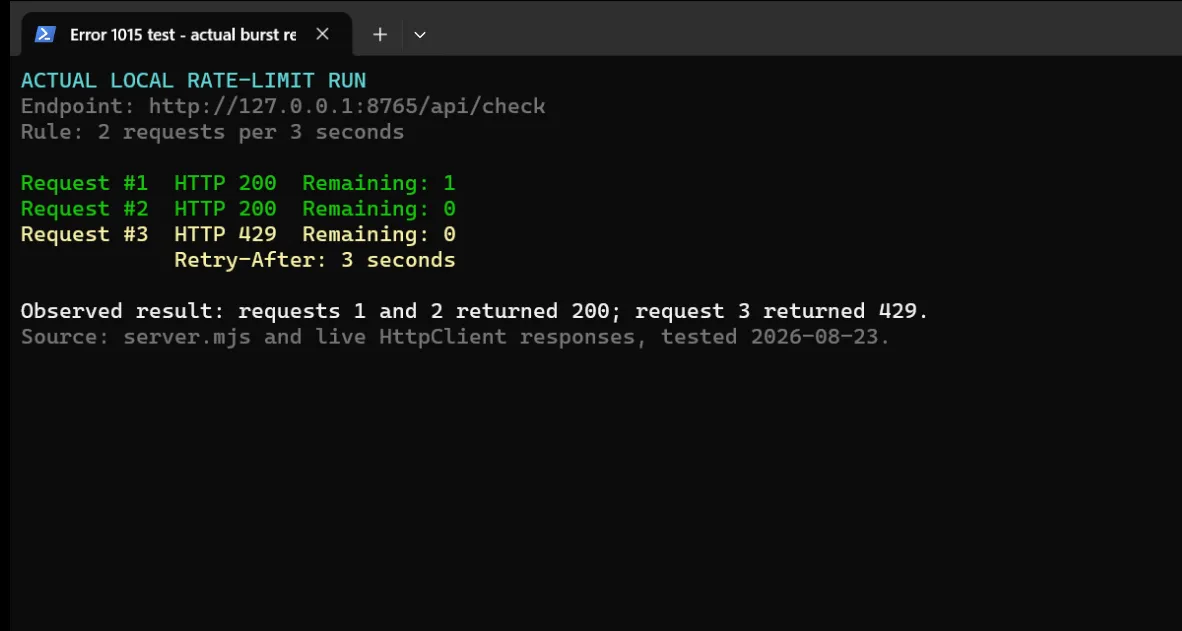
Local rate-limit test output: the first two requests returned HTTP 200, and the third returned HTTP 429 with Retry-After: 3.
Save useful evidence
Website visitors should record the complete error, URL, time, and Ray ID. Developers should also save the HTTP status, Content-Type, response body, standard Retry-After, and any rate-limit fields defined in the provider’s documentation. Remove cookies, authorization headers, email addresses, phone numbers, and tokens before sharing evidence.
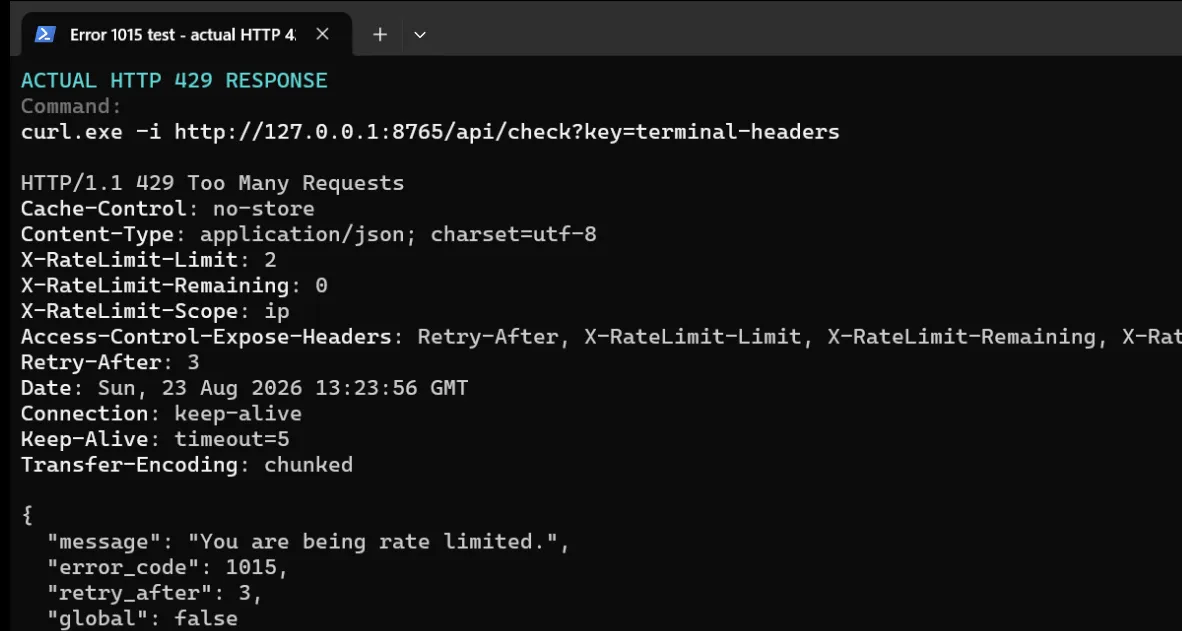
Local curl response: the HTTP 429 includes Retry-After: 3, the limit, the remaining request count, and the IP scope.
Wait, then verify once
Use the time shown on the page, in Retry-After, or in the service’s official instructions. Do not repeat the affected action during that interval. When it ends, send one request. If the request succeeds, resume at a lower rate. If it fails, stop again and use the evidence above to recheck the limiting layer.
How website visitors can fix Error 1015
An ordinary website visitor can recover without opening browser developer tools:
- Close duplicate tabs for the affected site. Pause extensions, download tools, or automation that accesses it.
- Check the error page for a wait time. If it does not show one, follow the website’s support instructions.
- After the wait, open one affected page once.
- If it works, restore normal activity gradually. Avoid opening several pages or repeating a submission at the same time.
- If Error 1015 remains, send the website’s support team the Ray ID, time, URL, and action that triggered the error.
Clearing cookies is a conditional test, not a universal fix. Use it when the same account works in another browser and the problem appears limited to the current browser session. Clearing cookies will not reset a counter tied to a public IP, account, token, endpoint, or shared resource.
Changing networks is also a diagnostic test. If the same action works on another network while the account and browser action stay the same, the original public IP may be part of the limiting scope. First make sure a local extension, script, or background task is not still generating requests.
How to fix Discord You Are Being Rate Limited
Discord may temporarily stop a login, verification, invite, normal user action, or API request. The page’s wait time or the API’s 429 response determines the correct recovery path. This section covers ordinary Discord users. Bot and API developers can go to the developer section.
Discord login, invite, or normal action is limited
Stop repeating the specific action. Do not keep entering credentials, clicking an invite, sending a message, or requesting verification codes. Close Discord clients on other devices if they are repeating the same operation.
If Discord shows a cooldown, wait for it. If no duration appears, leave that action idle and try it once later. If the error continues, contact Discord Support with the exact action, time, and a screenshot. Never include a password, SMS code, backup code, or token.
A rate limit is not the same as an account ban. It applies to a request pattern or action. A separate account status or official notice would indicate an enforcement action.
Discord phone verification is limited
If phone verification shows Rate Limit/Recently Used, the official Discord account verification guide says to wait 24 to 48 hours before trying the same number again. That period applies only to this phone verification error. Do not use it as a general duration for Discord login, invite, message, bot, or API rate limits.
Discord requires a valid mobile number that is not attached to another Discord account. Its guide says that VOIP, burner, and landline numbers cannot be used for verification. If the page shows Existing account, follow Discord’s number removal process. If verification still fails after the stated wait, submit a support ticket.
How developers should handle HTTP 429 and API rate limits
An API client should pause the correct request scope and handle JSON, HTML, or plain-text 429 responses without assuming one response format.
Discord bot or API integration
When the Discord API returns 429, use the Retry-After response header or JSON retry_after field to calculate the wait. X-RateLimit-Bucket groups related route limits. X-RateLimit-Scope can be user, global, or shared. A response with global: true means the bot must pause requests globally.
Put rate-limit handling in one scheduler. Pause the exhausted bucket so that several workers do not retry the same operation independently. Discord counts 401, 403, and 429 responses toward its invalid-request limit. Stop using an invalid token after 401, correct role or channel permissions after 403, and wait for the bucket after 429.
Use an official bot or app integration with a valid User-Agent. Do not automate a normal Discord user account.
A bounded Python retry for HTTP 429
The following Python 3.12 example checks Content-Type before parsing JSON, HTML, or plain text. It supports both numeric and HTTP-date forms of Retry-After, performs at most one retry, caps the total wait at five seconds, and only retries GET, HEAD, and OPTIONS automatically.
import json
import sys
import time
from dataclasses import dataclass
from datetime import datetime, timezone
from email.utils import parsedate_to_datetime
from urllib.error import HTTPError
from urllib.request import Request, urlopen


SAFE_RETRY_METHODS = {"GET", "HEAD", "OPTIONS"}


@dataclass
class HttpResult:
    status: int
    headers: object
    content_type: str
    body: object


def decode_body(headers, data):
    content_type = headers.get_content_type()
    charset = headers.get_content_charset() or "utf-8"
    text = data.decode(charset, errors="replace")
    if content_type == "application/json" or content_type.endswith("+json"):
        try:
            return content_type, json.loads(text)
        except json.JSONDecodeError:
            return content_type, text
    return content_type, text


def read_response(url, method="GET"):
    request = Request(
        url,
        method=method,
        headers={
            "Accept": "application/json, text/html, text/plain",
            "User-Agent": "RateLimitClient/1.0",
        },
    )
    try:
        with urlopen(request, timeout=10) as response:
            data = response.read()
            content_type, body = decode_body(response.headers, data)
            return HttpResult(response.status, response.headers, content_type, body)
    except HTTPError as error:
        data = error.read()
        content_type, body = decode_body(error.headers, data)
        return HttpResult(error.code, error.headers, content_type, body)


def retry_after_seconds(value, now=None):
    if value is None:
        return None
    text = value.strip()
    if text.isdigit():
        return float(text)
    retry_at = parsedate_to_datetime(text)
    if retry_at.tzinfo is None:
        retry_at = retry_at.replace(tzinfo=timezone.utc)
    current = now or datetime.now(timezone.utc)
    return max(0.0, (retry_at - current).total_seconds())


def request_with_bounded_retry(
    url,
    method="GET",
    max_retries=1,
    max_total_wait=5.0,
):
    method = method.upper()
    result = read_response(url, method)
    waited = 0.0

    for _ in range(max_retries):
        if result.status != 429 or method not in SAFE_RETRY_METHODS:
            return result

        delay = retry_after_seconds(result.headers.get("Retry-After"))
        if delay is None:
            return result

        pause = delay + 0.15
        if waited + pause > max_total_wait:
            return result

        time.sleep(pause)
        waited += pause
        result = read_response(url, method)

    return result


if __name__ == "__main__":
    final = request_with_bounded_retry(sys.argv[1])
    print(f"Final status: HTTP {final.status}")
    print(f"Content-Type: {final.content_type}")
    print(f"Body: {final.body}")
    raise SystemExit(0 if final.status == 200 else 1)
This code was written for this article and run on Windows 11 with Python 3.12.13. Tests covered JSON, HTML, and plain-text 429 bodies; numeric and HTTP-date forms of Retry-After; the total wait cap; and the rule that POST requests are not retried automatically.
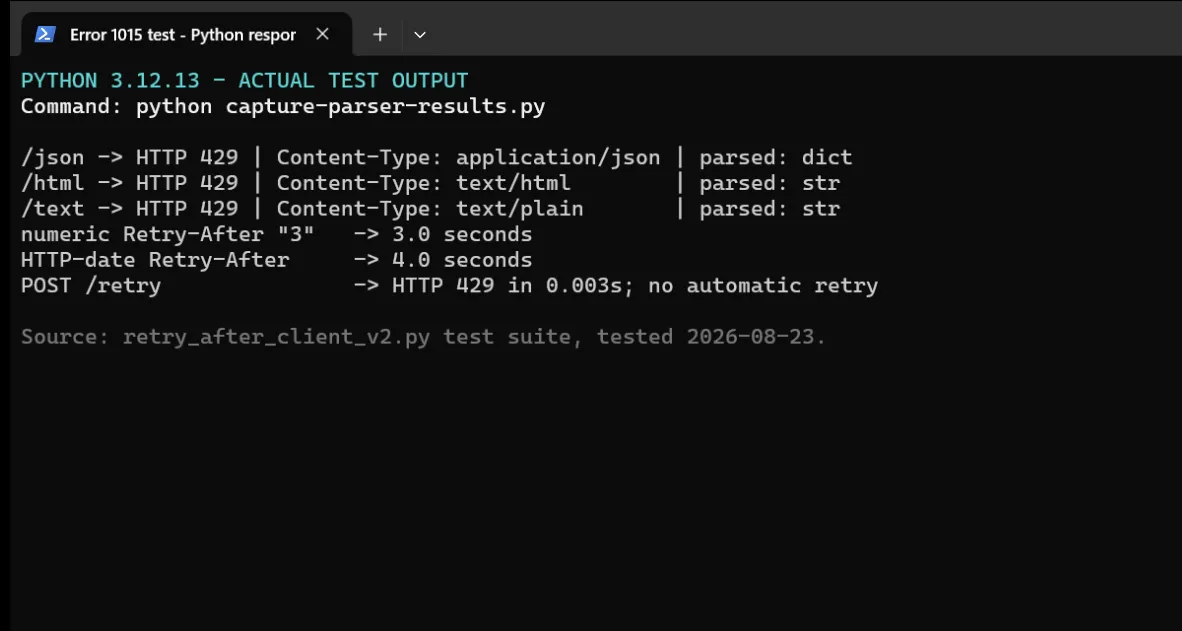
Python 3.12 test output: JSON is parsed as a dictionary, HTML and plain text remain strings, both Retry-After formats are converted to seconds, and POST stops after HTTP 429.
The local recovery test used Retry-After: 3. The client sent no requests during the wait, then made one verification request and received HTTP 200. Login, payment, form submission, and other non-idempotent operations need business-level status checks and should not enter this automatic retry path.
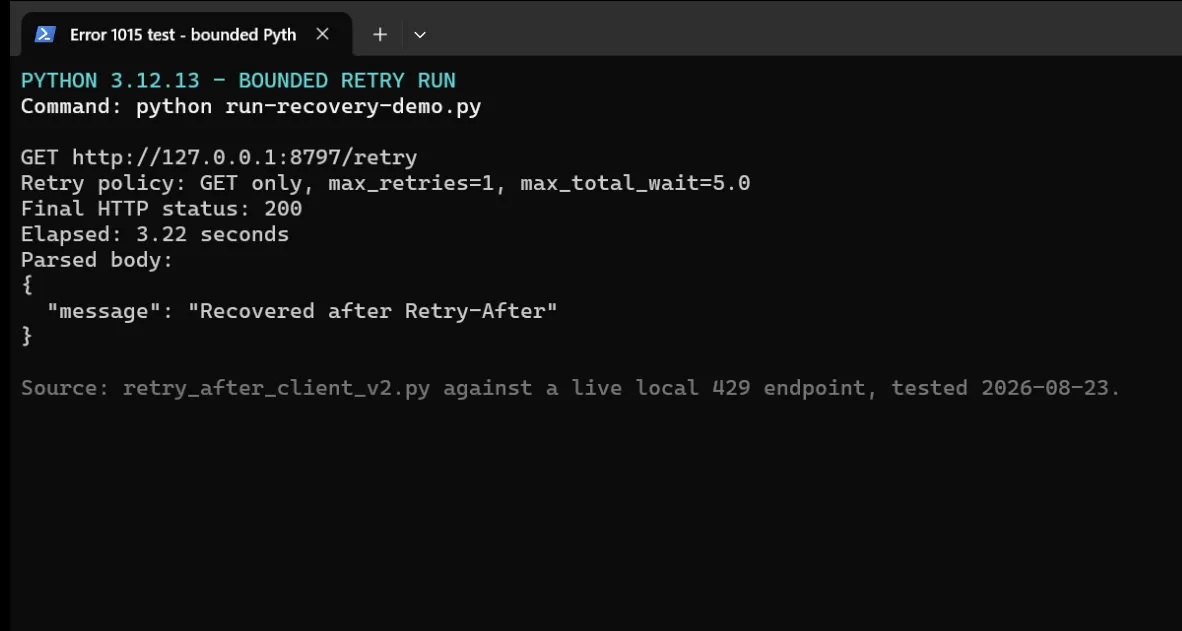
Python recovery test output: the client read Retry-After: 3, waited 3.22 seconds, and received HTTP 200 on the single verification request.
How site owners can diagnose and fix Cloudflare Error 1015
Site owners need to identify the rule and requests that were counted. The fix may be a narrower rule, a corrected client, or a parameter change.
Find the Cloudflare rule that triggered
Start with the visitor’s Ray ID, event time, affected URL, and request method. Cloudflare’s current documentation says every request that passes through Cloudflare receives a Ray ID. All customers can search sampled Ray IDs in Security Events. If the sample does not contain the event, narrow the time range. Log Explorer and longer log access depend on the product and plan.
Check the match and counting characteristics
Open the relevant rate-limiting rule under Security rules in the Cloudflare dashboard. Confirm that the expression matches the intended host, path, and HTTP method. Then review With the same characteristics, any custom counting expression, the treatment of cached assets, the request threshold, and the counting period.
Sort matching events by URL, method, and time. This can separate a front-end redirect, polling loop, repeated asset request, double form submission, normal burst, or sustained abuse. If shared NAT traffic produces false positives, check which counting characteristics your Cloudflare plan supports. Evaluate options such as IP with NAT support together with path or header characteristics according to Cloudflare’s documentation.
Tune the threshold, period, and mitigation duration
Narrow the rule first and repair repeated client requests. Then tune the request threshold and period under When rate exceeds, followed by the mitigation Duration. Cloudflare’s Error 1015 guidance says that if a one-second period causes false positives, try a ten-second period. Available periods, durations, and counting features vary by plan.
Keep protection on login, payment, and sensitive API routes. Raising a global threshold affects all matching traffic, so restrict a change to a confirmed path, method, and counting characteristic.
Verify the revised rule
Test the normal user flow first, including page load, login, or the relevant API call. Then send an authorized controlled burst. Normal requests should continue to succeed. Traffic above the new threshold should receive the configured mitigation, and one request after the wait should recover. Record the test time, rule version, request count, and result so the change can be compared or rolled back.
Why common Error 1015 fixes fail
Each fix needs matching evidence.
| Common fix | When it applies | What happens when it does not apply | Better action |
|---|---|---|---|
| Clear cookies | The account works in another browser and the current browser session is broken | The IP, account, endpoint, or shared-resource counter remains unchanged | Reset only the affected browser session |
| Use incognito mode | You need to compare local cookies or extension behavior | The server-side counter remains active | Use incognito as a session comparison test |
| Change networks | The same action works on another network and evidence points to the source IP | An account, token, action, or endpoint limit continues | Stop background traffic before testing the original exit IP |
| Wait a fixed 15 minutes | The service’s official instructions specify 15 minutes | You retry too soon or wait without fixing anything | Use the page time, Retry-After, or official instructions |
| Retry forever with backoff | It does not apply | Rejected requests continue and a configuration error stays hidden | Set retry and total wait limits, then surface the failure |
| Raise the Cloudflare threshold globally | A rule truly covers one low-risk case | All matching traffic receives weaker protection | Narrow the match before tuning the period and threshold |
Can a proxy help after an IP rate limit is confirmed?
A proxy can be relevant to an authorized, stateless workflow after evidence confirms a source-IP limit and the total request rate follows the target site’s rules. Login, payment, phone verification, and account actions need a consistent identity path and should not use rotating exits as a workaround.
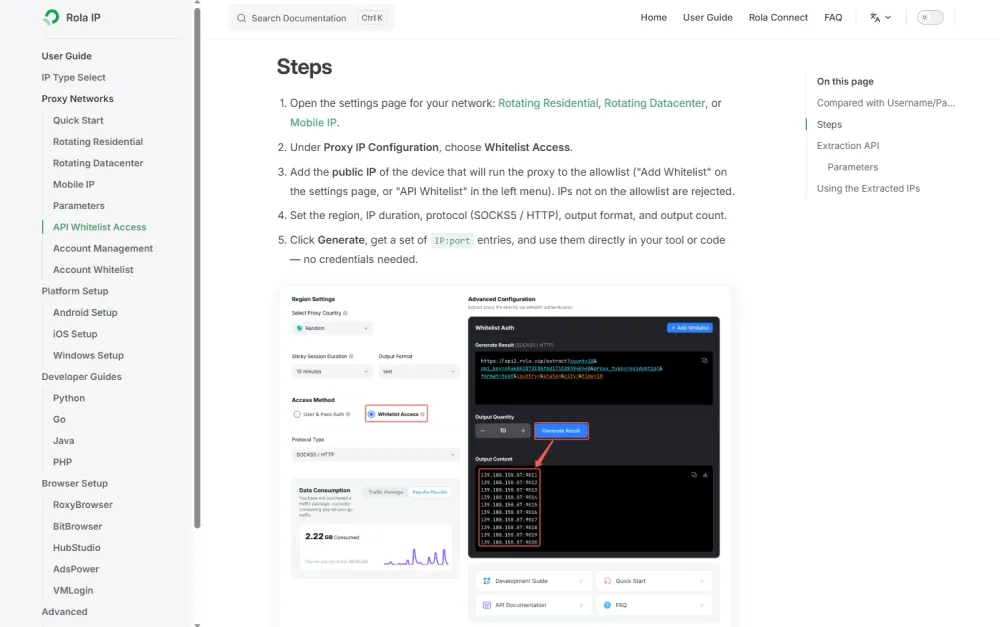
For independent requests, Rola IP dynamic proxies can rotate the exit by request. Session parameters can keep one exit for a group of related requests. The Rola IP proxy quick start explains integration and session parameters. The Scrapy rotating proxies guide covers pacing, bounded retries, and session routing.
A proxy changes the network exit. It does not reset an account, token, phone number, session, route, provider quota, or shared-resource limit. Continue to honor Retry-After, reduce duplicate work, and follow the target site’s terms, published rate limits, applicable robots rules, and relevant laws.
Summary
- Error 1015 is a specific response from a website’s Cloudflare rate-limiting rule. Discord user limits and API 429 responses need their own paths.
- Stop every request source, save the evidence, wait for a stated interval, and verify once.
- Website visitors use the page message and Ray ID. Discord’s 24 to 48 hour wait applies specifically to the
Rate Limit/Recently Usedphone verification error. - Developers should read standard
Retry-Afterand follow provider documentation for buckets, scopes, and JSON fields. - Site owners should use the Ray ID and logs to find the rule, then review its match, counting method, period, threshold, and mitigation duration.
- Use a proxy only for an authorized stateless task after confirming a source-IP limit.