
Python Web Scraping for Product Information: 3 Tested Methods

Aug 25, 2026 · Guides · 22 min read
TL;DR
A reliable Python product-scraping workflow is more than requests.get() plus a CSS selector. The correct sequence is: confirm access permissions and robots.txt, determine whether the data lives in raw HTML, structured data, or JavaScript/XHR, build a stable field model, then add timeouts, retries, response classification, data validation, logging, and proxy routing.
| Page/Task Characteristic | First-Choice Approach | When to Upgrade |
|---|---|---|
| Raw HTML already contains name, price, and stock | Requests + BeautifulSoup/lxml | Migrate to Scrapy once page volume grows |
| HTML contains JSON-LD or embedded state | Parse the structured JSON first | Fall back to DOM parsing only when fields are missing |
| Price is loaded by JavaScript | Look for an authorized XHR/JSON endpoint first; otherwise use Selenium/Playwright | When clicks, scrolling, or browser state are required |
| Thousands to millions of URLs, scheduled incremental jobs | Scrapy + queue/persistence | Add distributed scheduling across multiple machines |
| Authorized regional content or session continuity is required | Use a documented region and controlled network route | Choose residential, ISP, or datacenter routing based on the valid-data rate |
What Is Python Web Scraping for Product Information?
Python web scraping for product information refers to using Python scripts to automatically visit e-commerce sites or product listing pages and extract structured product data from the HTML, instead of copying entries by hand. This kind of scraping typically targets the following fields:
- Product name
- Price
- SKU / product code
- Availability (In stock / Out of stock)
- Rating and review count
- Image URL
- Specifications
Together, these fields form a complete product record that can feed into price-comparison systems, product-selection analysis, inventory monitoring, or market research. Compared with a generic “Python scraping tutorial,” product-information scraping puts more emphasis on field completeness and data usability — what you collect should be ready to drop into a spreadsheet or database, not just a block of HTML text.
Why Use Python for Product Data Scraping?
Python is widely used for product-information scraping because its ecosystem covers HTTP requests, HTML parsing, browser automation, validation, and data processing.
- Request layer:
requestshandles HTTP requests and session management. - Parsing layer: BeautifulSoup, lxml, and parsel handle HTML/XML parsing.
- Browser automation layer: Selenium and Playwright handle JavaScript-rendered pages.
- Framework layer: Scrapy handles large-scale, multi-page concurrent scraping.
- Data processing layer: pandas turns scraped results directly into structured tables.
This means whether you’re scraping a few dozen product pages for a one-off study, or scheduling daily scrapes of tens of thousands of SKUs for price monitoring, you can do it all within the same Python stack without switching languages or tools.
Is Python Web Scraping for Product Information Legal?
Whether python web scraping product information is compliant depends on access permissions, site terms, the type of data, the collection method, request load, and applicable regional law — not on which Python library you used. Being publicly visible does not automatically mean content can be freely copied, republished, or used for any commercial purpose. The following is an engineering risk checklist, not legal advice.
- Before accessing a site, read its terms of service, robots.txt, API usage policy, and authorization scope; robots.txt is a technical rule, not full legal authorization.
- Prioritize collecting only the product fields your business goal actually requires, and avoid collecting personal data, account information, or unrelated content.
- Do not bypass logins, paywalls, CAPTCHAs, or other access controls, and do not use proxies to evade an explicit access ban.
- Set domain-level rate limits, caching, and incremental updates to reduce repeated requests and impact on the site’s service.
- Keep records of source, timestamp, authorization basis, and a deletion process; consult a qualified legal professional when personal data, copyrighted content, or large-scale republishing is involved.
Python can use the official urllib.robotparser documentation to read robots.txt rules, but it can only help enforce a site’s declared crawling rules — it’s not a substitute for reviewing terms of service or legal judgment.
What Data Fields Do E-Commerce Product Pages Typically Contain?
The table below lists the most common, and highest-priority, fields to extract from e-commerce product pages.
| Data Field | Description | Example |
|---|---|---|
| Product Name | The product title, usually in an h1 tag or a tag with a title/name-related class |
Wireless Noise Cancelling Headphones |
| Price | The current selling price — watch for differences between list price, discounted price, and tax-inclusive/exclusive price | $129.99 |
| SKU | The unique product code, commonly found in a data-sku or itemprop="sku" attribute |
WH-NC-2026-BLK |
| Availability | Stock status, commonly In Stock / Out of Stock / Preorder | In Stock |
| Rating | Rating score, usually out of 5 or as a percentage | 4.7 |
| Reviews | Number of reviews | 2,318 reviews |
| Image URL | Main image or gallery URL — watch for lazy-load attributes (data-src) |
https://cdn.example.com/img/wh-nc.jpg |
Environment and Dependency Versions
The examples in this article were actually run in an isolated local test environment. The test machine used macOS 14.6 (Apple Silicon, arm64), Python 3.12.13, and Google Chrome 151.0.7922.172. Selenium automatically matched the browser driver through Selenium Manager, so there was no need to manually fill in a ChromeDriver path in the code. Windows or Linux will also work, but the virtual-environment activation command, Chrome install location, and system dependencies may differ.
| Component | Version Used in This Article | Role in the Examples |
|---|---|---|
| Python | 3.12.13 | Runs the Requests, Beautiful Soup, Selenium, and Scrapy examples |
| requests | 2.34.2 | Sends HTTP requests, sets timeouts, Session and retry strategy |
| beautifulsoup4 | 4.15.0 | Parses HTML and extracts product fields with CSS selectors |
| lxml | 6.1.1 | Serves as Beautiful Soup’s high-performance HTML parser |
| Selenium | 4.47.0 | Executes JavaScript and reads dynamic prices via explicit waits |
| Google Chrome | 151.0.7922.172 | Provides a real browser runtime environment for Selenium |
| Scrapy | 2.18.0 | Handles batches of URLs, scheduling, deduplication, retries, and structured export |
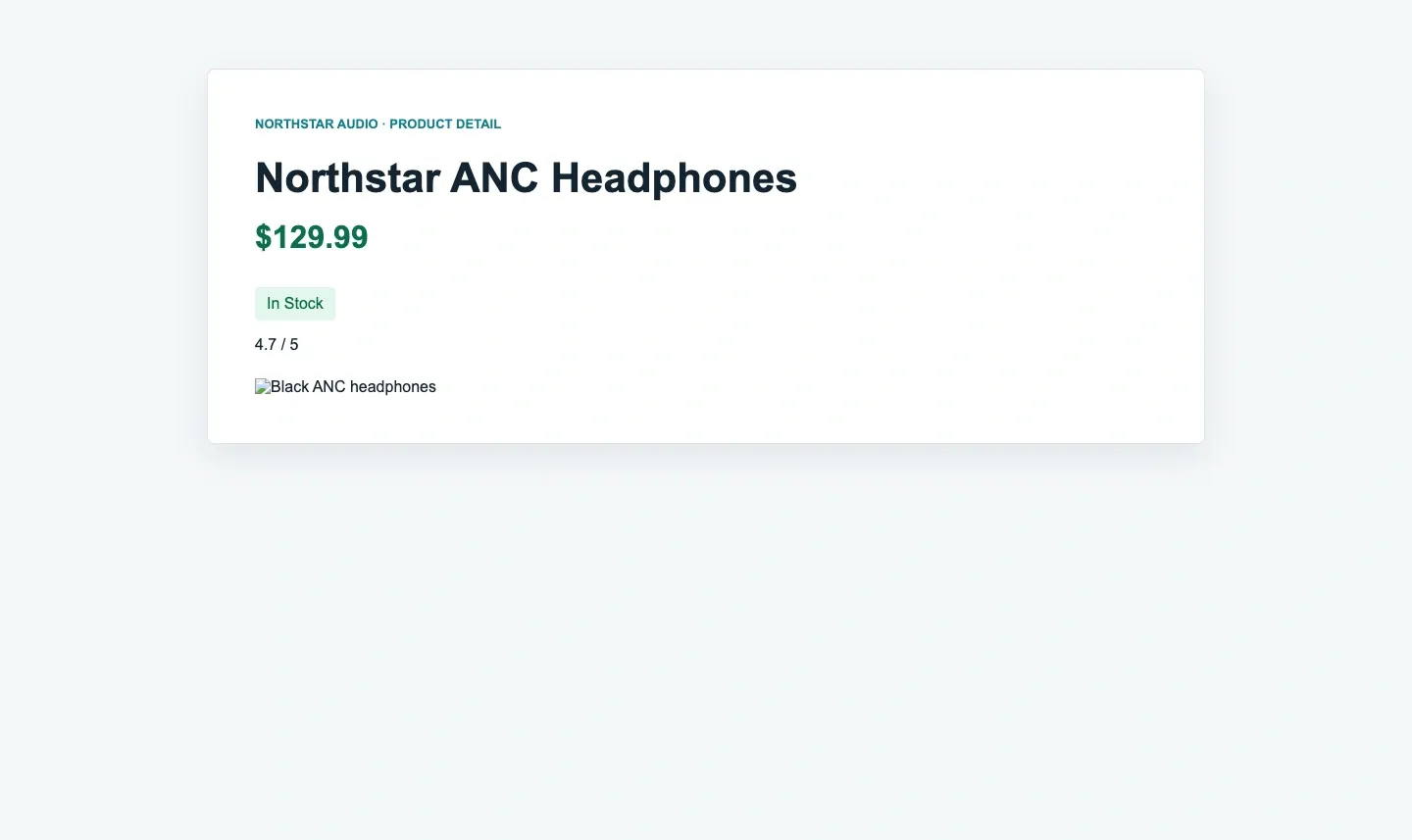
To let readers see the difference between the same HTML under a static request versus browser rendering, this article set up two local product pages: the static page returns name, price, SKU, and stock directly in the HTML; the dynamic page returns the page structure first, then writes the price via JavaScript 600 ms later. The test server only listens on 127.0.0.1 and is not exposed to the local network or the public internet.
1. Create and Activate an Isolated Python Environment
Open a terminal in the directory containing the example files and create a .venv virtual environment, to avoid conflicts between this article’s dependencies and your system Python or other projects. macOS/Linux and Windows PowerShell use different activation commands.
python3 -m venv .venv

# macOS / Linux
source .venv/bin/activate

# Windows PowerShell
.venv\Scripts\Activate.ps1
2. Create and Install requirements.txt
Pinning versions reduces behavioral differences caused by future dependency upgrades. Create a file named requirements.txt in the example directory with the exact direct dependencies verified for this article:
requests==2.34.2
beautifulsoup4==4.15.0
lxml==6.1.1
selenium==4.47.0
scrapy==2.18.0
Install the file and record the resolved environment. The relevant lines from the actual pip freeze output are shown below; a production repository should retain the complete output or use a lockfile when exact transitive reproducibility is required.
python -m pip install --upgrade pip
python -m pip install -r requirements.txt
python -m pip freeze > pip-freeze.txt
beautifulsoup4==4.15.0
lxml==6.1.1
requests==2.34.2
scrapy==2.18.0
selenium==4.47.0
urllib3==2.7.0
3. Create the Reproducible Static Test Pages
The scraper below expects two local fixtures. Save the first block as product.html and the second as product-2.html in the same directory as the Python scripts. These complete fixtures make the selectors, lazy-loaded image case, numeric conversion, and expected output independently reproducible.
<!-- product.html -->
<!doctype html>
<html lang="en">
<head><meta charset="utf-8"><title>Northstar ANC Headphones</title></head>
<body>
  <main class="product" data-sku="NS-ANC-2026-BLK">
    <h1 class="product-title">Northstar ANC Headphones</h1>
    <span class="price" data-currency="USD">$129.99</span>
    <p class="stock-status">In Stock</p>
    <div itemprop="aggregateRating" data-rating="4.7">4.7 / 5</div>
    <meta itemprop="reviewCount" content="2318">
    <img class="main-image" src="/assets/headphones.jpg"
         alt="Black ANC headphones">
  </main>
</body>
</html>
<!-- product-2.html -->
<!doctype html>
<html lang="en">
<head><meta charset="utf-8"><title>Northstar Wireless Earbuds</title></head>
<body>
  <main class="product" data-sku="NS-BUD-2026-WHT">
    <h1 class="product-title">Northstar Wireless Earbuds</h1>
    <span class="price" data-currency="USD">$79.50</span>
    <p class="stock-status">Preorder</p>
    <div itemprop="aggregateRating" data-rating="4.4">4.4 / 5</div>
    <meta itemprop="reviewCount" content="842">
    <img class="main-image" data-src="/assets/earbuds.jpg"
         alt="White wireless earbuds">
  </main>
</body>
</html>
4. Start the Local Product Test Server
Keep the virtual environment active and run the command below from the directory containing the test HTML. Once you see Serving HTTP on 127.0.0.1 port 8765, don’t close that terminal — open a second terminal for the subsequent scraping scripts. You can confirm the test page displays correctly by visiting http://127.0.0.1:8765/product.html in a browser.
python -m http.server 8765 --bind 127.0.0.1
Reproducibility check | If port 8765 is already in use, switch to a free port, but update the test URL to match. Before running the Selenium example, confirm Chrome is installed and its version can be recognized by Selenium Manager; on restricted networks, automatic driver resolution may need to be pre-configured.
Hands-On 1: Requests + BeautifulSoup for a Static Product Page
1. Save the Complete Standalone Scraper
The following is the complete scrape_static.py, not a fragment. It includes every import and definition required by parse_product(): the Product dataclass, text_or_none(), decimal_price(), retry-capable session, URL normalization, batch loop, and CSV export. Production code should distinguish connect and read timeouts and should only retry idempotent requests and selected transient status codes. It should not blindly retry a 403 or a parsing failure.
from __future__ import annotations

import csv
import re
import sys
from dataclasses import asdict, dataclass
from decimal import Decimal
from pathlib import Path
from urllib.parse import urljoin

import requests
from bs4 import BeautifulSoup
from requests.adapters import HTTPAdapter
from urllib3.util.retry import Retry


@dataclass
class Product:
    url: str
    name: str | None
    price: str | None
    currency: str | None
    sku: str | None
    availability: str | None
    rating: str | None
    reviews: int | None
    image_url: str | None


def text_or_none(node) -> str | None:
    return node.get_text(" ", strip=True) if node else None


def decimal_price(text: str | None) -> str | None:
    if not text:
        return None
    match = re.search(r"\d[\d,]*(?:\.\d+)?", text)
    if not match:
        return None
    return str(Decimal(match.group(0).replace(",", "")))


def build_session() -> requests.Session:
    retry = Retry(
        total=3,
        connect=3,
        read=3,
        status=3,
        backoff_factor=0.4,
        status_forcelist=(429, 500, 502, 503, 504),
        allowed_methods=frozenset({"GET"}),
        respect_retry_after_header=True,
    )
    session = requests.Session()
    session.headers.update({
        "User-Agent": "ProductResearch/1.0 (+authorized-test)"
    })
    adapter = HTTPAdapter(
        max_retries=retry,
        pool_connections=10,
        pool_maxsize=10,
    )
    session.mount("http://", adapter)
    session.mount("https://", adapter)
    return session


def parse_product(html: str, url: str) -> Product:
    soup = BeautifulSoup(html, "lxml")
    root = soup.select_one("main.product")
    if not root:
        raise ValueError(
            "Expected main.product; page may be blocked or changed"
        )

    price = root.select_one(".price")
    rating = root.select_one('[itemprop="aggregateRating"]')
    reviews = root.select_one('[itemprop="reviewCount"]')
    image = root.select_one("img.main-image")
    image_src = (
        image.get("src") or image.get("data-src")
        if image else None
    )
    review_text = reviews.get("content", "") if reviews else ""

    return Product(
        url=url,
        name=text_or_none(root.select_one("h1.product-title")),
        price=decimal_price(text_or_none(price)),
        currency=price.get("data-currency") if price else None,
        sku=root.get("data-sku"),
        availability=text_or_none(root.select_one(".stock-status")),
        rating=rating.get("data-rating") if rating else None,
        reviews=int(review_text) if review_text.isdigit() else None,
        image_url=urljoin(url, image_src) if image_src else None,
    )


def main(base_url: str) -> None:
    urls = [
        urljoin(base_url, "product.html"),
        urljoin(base_url, "product-2.html"),
    ]
    session = build_session()
    products = []

    for url in urls:
        response = session.get(url, timeout=(5, 20))
        response.raise_for_status()
        product = parse_product(response.text, url)
        products.append(asdict(product))
        print(
            f"OK {response.status_code} {product.sku} "
            f"{product.name} {product.currency} {product.price}"
        )

    if not products:
        raise RuntimeError("No valid product records were collected")

    output = Path(__file__).with_name("products.csv")
    with output.open("w", newline="", encoding="utf-8-sig") as file:
        writer = csv.DictWriter(file, fieldnames=products[0].keys())
        writer.writeheader()
        writer.writerows(products)
    print(f"WROTE {len(products)} records -> {output}")


if __name__ == "__main__":
    base = sys.argv[1] if len(sys.argv) > 1 else "http://127.0.0.1:8765/"
    main(base)
Key improvements include using Decimal instead of float for price, checking both src and data-src for lazy-loaded images, converting relative URLs with urljoin, separating session construction from parsing, and raising an explicit error when the expected root node is missing. The official Requests documentation covers timeout, Session, and proxy configuration.
2. Run the Script and Verify the Raw Output
With the local HTTP server still running in the first terminal, execute the complete script in a second terminal:
python scrape_static.py
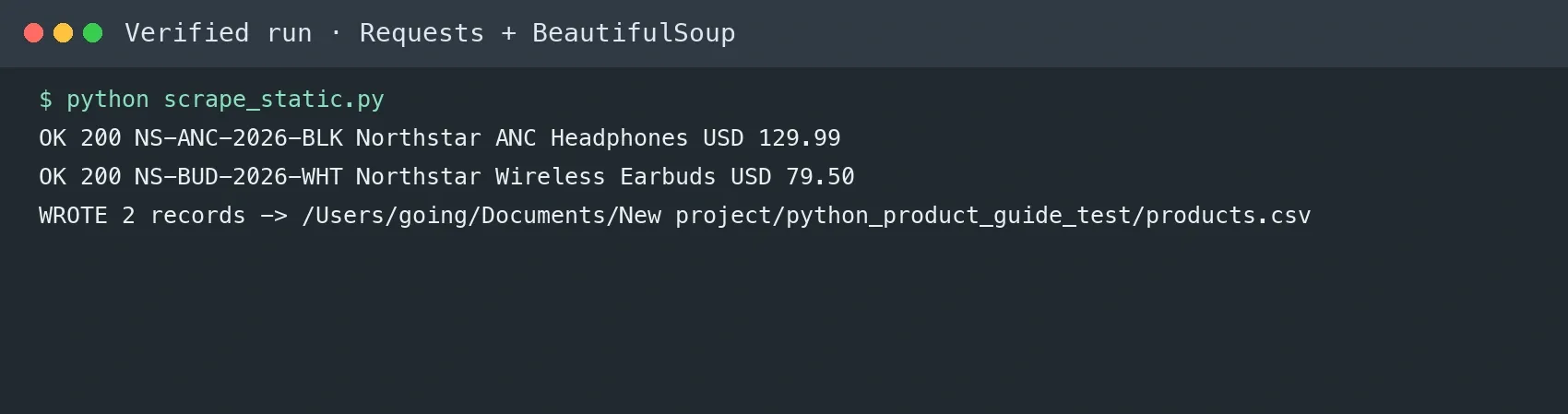
Actual output from the verified environment:
OK 200 NS-ANC-2026-BLK Northstar ANC Headphones USD 129.99
OK 200 NS-BUD-2026-WHT Northstar Wireless Earbuds USD 79.50
WROTE 2 records -> /path/to/example/products.csv
3. Inspect the Generated CSV
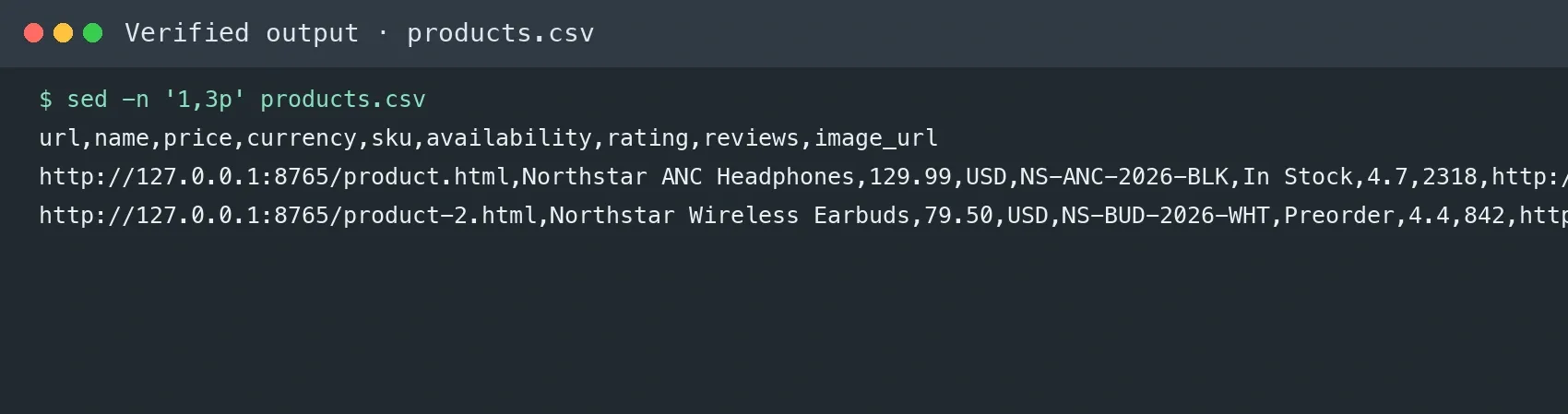
The complete script writes products.csv with utf-8-sig encoding so Excel recognizes non-ASCII characters. The verified file contains two data rows plus the header. A batch job should preserve the separation between fetching and parsing, and it should never catch every Exception and silently discard failed URLs.
Hands-On 2: Selenium for Dynamic JavaScript Prices
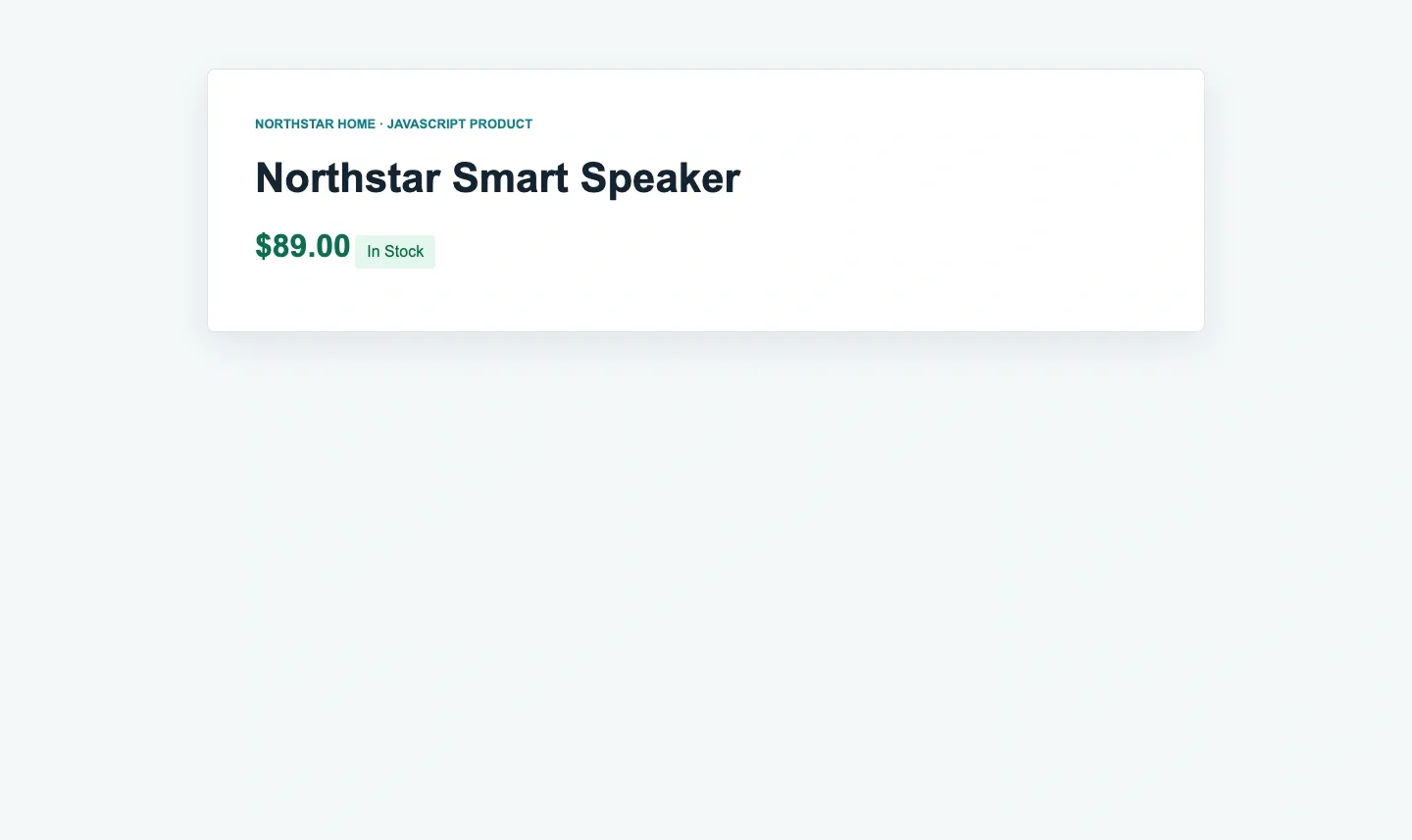
A browser should only be brought in when the data genuinely depends on browser execution and there’s no more stable, authorized JSON endpoint available. Save this complete fixture as dynamic-product.html beside the two static pages. Its initial HTML contains Loading...; JavaScript replaces that value with $89.00 after 600 milliseconds.
<!doctype html>
<html lang="en">
<head><meta charset="utf-8"><title>Dynamic product</title></head>
<body>
  <main class="product" data-sku="NS-DYN-2026">
    <h1 class="product-title">Northstar Smart Speaker</h1>
    <span id="price" class="price">Loading...</span>
    <p class="stock-status">In Stock</p>
  </main>
  <script>
    setTimeout(() => {
      document.querySelector("#price").textContent = "$89.00";
    }, 600);
  </script>
</body>
</html>
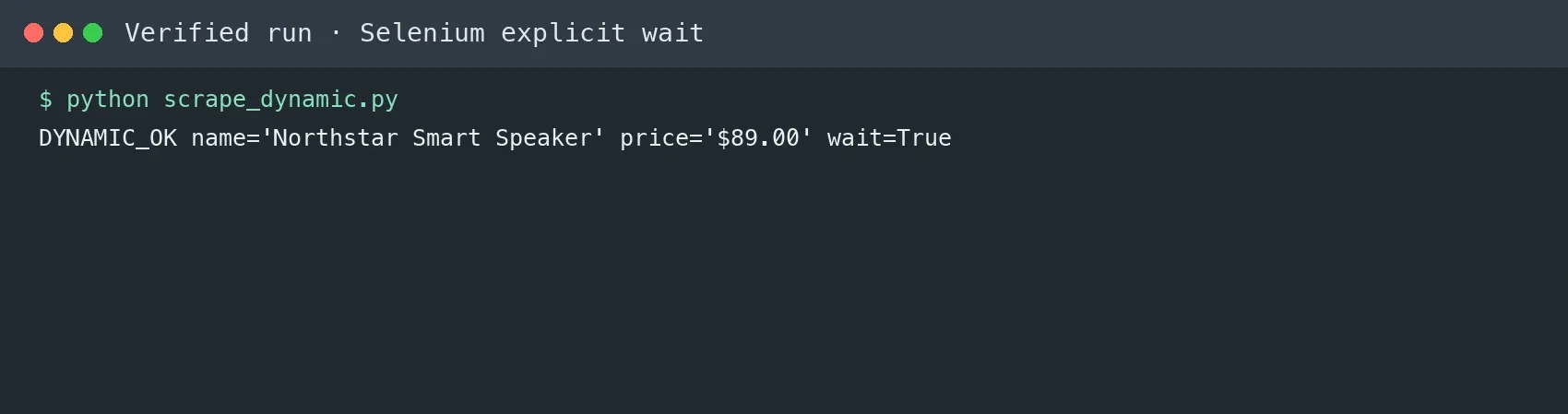
Save the complete Python program below as scrape_dynamic.py. It includes all imports and a default local URL. The explicit wait checks for the price text instead of using a fixed sleep, while finally closes the browser even if extraction fails.
import sys

from selenium import webdriver
from selenium.webdriver.common.by import By
from selenium.webdriver.support import expected_conditions as EC
from selenium.webdriver.support.ui import WebDriverWait


url = (
    sys.argv[1]
    if len(sys.argv) > 1
    else "http://127.0.0.1:8765/dynamic-product.html"
)
options = webdriver.ChromeOptions()
options.add_argument("--headless=new")
options.add_argument("--window-size=1280,900")
driver = webdriver.Chrome(options=options)
try:
    driver.get(url)
    WebDriverWait(driver, 10).until(
        EC.text_to_be_present_in_element((By.CSS_SELECTOR, "#price"), "$")
    )
    name = driver.find_element(By.CSS_SELECTOR, "h1.product-title").text
    price = driver.find_element(By.CSS_SELECTOR, "#price").text
    print(f"DYNAMIC_OK name={name!r} price={price!r}")
finally:
    driver.quit()
Run it while the local server is active:
python scrape_dynamic.py
Verified output:
DYNAMIC_OK name='Northstar Smart Speaker' price='$89.00'
ChromeDriver check | Selenium Manager can resolve a compatible driver automatically. If
SessionNotCreatedExceptionreports that an olderchromedriverinPATHonly supports a different Chrome major version, remove that stale executable fromPATHor install a driver matching the installed browser, then rerun the same command. Do not hard-code an unrelated driver version.
For the conditions and usage of explicit waits, see the official Selenium Waits documentation. If the dynamic field comes from a public, permitted XHR/JSON endpoint, requesting that data endpoint directly is usually faster and more stable.
Hands-On 3: Choosing a Framework for Large-Scale Scraping — Scrapy
Once the number of URLs, concurrency, retries, deduplication, feed export, and scheduling all start to grow, Scrapy is easier to maintain than a hand-rolled requests loop. The Spider below was actually run against the same test pages and exported two JSON Lines records. In production, control AUTOTHROTTLE, concurrency, download delay, caching, and logging through settings, rather than simply cranking up the thread count.
import scrapy


class ProductSpider(scrapy.Spider):
    name = "products"
    custom_settings = {
        "ROBOTSTXT_OBEY": True,
        "CONCURRENT_REQUESTS_PER_DOMAIN": 2,
        "DOWNLOAD_DELAY": 0.5,
        "RETRY_TIMES": 2,
        "FEEDS": {
            "scrapy-products.jsonl": {
                "format": "jsonlines",
                "encoding": "utf-8",
                "overwrite": True,
            }
        },
        "LOG_LEVEL": "ERROR",
    }
    start_urls = [
        "http://127.0.0.1:8765/product.html",
        "http://127.0.0.1:8765/product-2.html",
    ]

    def parse(self, response):
        root = response.css("main.product")
        yield {
            "url": response.url,
            "name": root.css("h1.product-title::text").get(),
            "price": root.css(".price::text").get(),
            "sku": root.attrib.get("data-sku"),
            "availability": root.css(".stock-status::text").get(),
        }
Save the file as product_spider.py, keep the local server running, and execute it from the same directory. The feed configuration writes the output itself, so no separate -O argument is required.
python -m scrapy runspider product_spider.py
wc -l scrapy-products.jsonl
The verified run produced two JSON Lines records. This is the raw feed output, not a screenshot-only claim:
{"url":"http://127.0.0.1:8765/product.html","name":"Northstar ANC Headphones","price":"$129.99","sku":"NS-ANC-2026-BLK","availability":"In Stock"}
{"url":"http://127.0.0.1:8765/product-2.html","name":"Northstar Wireless Earbuds","price":"$79.50","sku":"NS-BUD-2026-WHT","availability":"Preorder"}
2 scrapy-products.jsonl
For how Scrapy’s engine, scheduler, downloader, and item pipeline relate to each other, see the official architecture overview.
How Do You Find More Stable Data Sources: HTML, JSON-LD, and XHR?
| Data Location | Advantages | Risks / How to Verify |
|---|---|---|
| HTML DOM | Intuitive — BeautifulSoup/CSS selectors work directly | Classes change easily; sample multiple templates |
| JSON-LD | Clear field structure, often includes Product/Offer | May be missing stock or regional price; cross-check against the displayed page |
| Embedded state JSON | Information-rich, can reduce browser rendering | Structure is a front-end implementation detail and changes quickly across versions |
| XHR/Fetch response | Fast, fields are direct | Confirm endpoint permissions, parameters, and terms; don’t bypass authentication |
| Browser DOM | Handles genuine JS interaction | Resource-intensive, complex fingerprinting, sensitive to page changes |
Why Does an HTTP 200 Still Fail to Return the Product Price?
An HTTP 200 only means the server returned a response — it doesn’t mean the response contains usable product data. The price may be written in by JavaScript after the page loads, or it may be missing because of region, cookies, login state, or an anti-automation challenge. So a collection program can’t treat “request succeeded” as equivalent to “data succeeded.”
The most direct check is to save a failing response and compare the final browser DOM, the raw HTML, and the XHR/Fetch calls in the Network panel. If the fields already exist in the raw HTML, fix the CSS selector; if the data only exists via XHR, use a stable data endpoint where permissions allow; if a script must be executed or interaction is required, then use Selenium.
Production jobs should classify the page first, then validate fields, and log status_code, content_type, final_url, elapsed_ms, body_bytes, template, parse_status, and error_code. This lets you distinguish network failure, a challenge page, a broken parser, and a genuinely out-of-stock product, instead of writing empty values into your production data.
- Normal page: the product root node, name, and at least one identifying field (SKU/canonical URL) are present.
- Challenge page: a CAPTCHA/Access Denied appears in the title or body, or the normal root node has disappeared.
- Template change: the page still looks like a product page, but key selectors are consistently missing — trigger an alert instead of writing an empty record.
- Regional anomaly: currency, language, or shipping region doesn’t match the requested region — cross-check both the exit IP and the page content.
- Soft 404: status code 200, but the canonical URL, title, or body content indicates the product doesn’t exist.
How Do You Scrape Pagination, Infinite Scroll, and “Load More” Products?
The key to pagination isn’t endlessly concatenating page numbers — it’s identifying the site’s actual pagination mechanism and setting a reliable stop condition. Traditional pagination usually switches via a next link or a page parameter; infinite scroll and “Load More” often return the next batch of products plus a cursor via XHR/Fetch. Prefer the next-page link the page explicitly provides, rather than assuming every site increments sequentially from page=1.
| Page Mechanism | How to Detect It | Recommended Strategy | Stop Condition |
|---|---|---|---|
| Page numbers or a next-page link | Check a[rel="next"], pagination buttons, and the canonical URL |
Request page by page, keeping track of the source page number | No next, a 404 response, or an empty list |
| Infinite scroll | Observe XHR/Fetch calls in the browser Network panel | Request the data source directly where permitted; otherwise scroll and use explicit waits | Cursor is empty or there are no new product IDs |
| Load More | Watch the request and DOM change after the button click | Log the request parameters, page size, and total count returned | The button disappears or the new-item count is 0 |
| Cursor-based pagination API | Look for next_cursor/has_more in the response |
Save the cursor so it can resume from a checkpoint after a failure | has_more=false or the cursor repeats |
Regardless of the method, maintain a set of “seen product IDs” and “seen page fingerprints.” If two consecutive pages return the same set of SKUs, the same cursor appears again, or the page has no new products, stop the loop immediately and log the reason. This prevents an endless request loop when the site behaves unexpectedly.
How Do You Scrape Product Variants, Specs, and Different SKUs?
Color, size, and capacity on a product detail page usually aren’t a single field — they represent a group of independently sellable SKUs. The correct data model should distinguish the parent product from its variants: the parent product stores the title, brand, and canonical URL; each variant separately stores variant_id, SKU, attribute combination, price, stock, currency, and image. Saving only the currently selected default price will miss promotional prices, out-of-stock sizes, and regional differences.
- First check the JSON-LD
Product,Offer, orAggregateOffer, but don’t assume it contains every variant and real-time stock. - Observe whether switching color/size updates embedded state, calls a variant endpoint, or navigates to a new URL.
- Normalize attribute names and values, e.g.
Color=Black,Size=42, while keeping the site’s original text for traceability. - Use the site’s product ID plus
variant_id/SKU as a stable key — don’t use an easily-changed title or array order as the primary key. - If different countries display different currencies, taxes, or stock, include locale/region in the unique key rather than overwriting across regions.
How Do You Normalize Product URLs and Avoid Duplicate Data?
Product deduplication should use both the canonical URL and a stable product identifier — not a simple comparison of the full URL. utm_source, ad click parameters, sort parameters, and session parameters can make the same product appear under dozens of addresses; on the other hand, the same path on different country sites may represent different prices and stock, so it shouldn’t be merged carelessly.
- Parse the URL, normalize protocol, host casing, and trailing-slash rules, and strip tracking parameters that are confirmed not to affect content.
- Read the page’s canonical link, but verify first that it still points to the same region and product — don’t trust it unconditionally.
- Prefer product ID, SKU, or variant ID for the dedup key; fall back to the canonical URL only when no identifier is available.
- Include locale, currency, seller, or marketplace in the business primary key, preserving meaningful regional and seller differences.
- When a key conflict occurs, compare fetch time, source, and field completeness, and log the merge process instead of silently overwriting.
How Do You Run Incremental Scraping and Price-Change Detection?
Long-term monitoring shouldn’t rewrite all the data every day. A more robust approach is to keep both a current snapshot and a history of events: each run first looks up the product by its stable key, computes a normalized hash only over the fields you care about (price, stock, promotion, seller, etc.), writes a history record and updates changed_at when the hash changes, and only updates last_seen for unchanged products.
| Field | Purpose | Update Rule |
|---|---|---|
| first_seen | When the product was first discovered | Set once on first insert, unchanged after that |
| last_seen | The last time it was successfully confirmed to exist | Updated on every valid fetch |
| changed_at | The last time a key business field changed | Updated when the field hash changes |
| content_hash | A digest of the normalized price/stock/etc. | Ignores whitespace, display formatting, and other non-business changes |
| raw_snapshot | For failure review and parser replay | Saved based on a change, sampling, or exception policy |
Price alerts must fire only after field validation: confirm the currency is consistent, the price is parseable, and the page isn’t a challenge page, and consider re-verifying an unusual change with a second request or another data source. Otherwise, an empty value or a decimal-point error caused by a template change could be misreported as a price drop.
Should Python Product-Scraping Data Be Saved to CSV, a Database, or Object Storage?
The right storage choice depends on task scale and whether you need change history. CSV suits small batch exports, manual review, and one-off deliverables; SQLite suits single-machine prototypes and small-to-medium scheduled jobs; PostgreSQL is better for concurrent writes, deduplication, historical queries, and team use; object storage suits raw HTML, JSON, and screenshots.
| Storage Method | Best-Fit Scenario | Main Limitation |
|---|---|---|
| CSV/JSONL | One-off tasks, sample review, deliverable files | Concurrency and updates are difficult; weak type constraints |
| SQLite | Single-machine tasks, prototypes, resumable runs | Limited under high-concurrency writes or multi-team access |
| PostgreSQL | Continuous monitoring, price history, team collaboration | Requires schema design, backups, and operations |
| Object storage | Raw responses, screenshots, large-file archiving | Not suited to complex queries directly |
It’s recommended to separate “current state,” “change history,” and “raw snapshots”: the current table serves the latest queries, the history table records auditable field changes, and the raw files support replay after a parser upgrade. Every record should keep at least source_url, fetched_at, region, parser_version, and the fetch status.
Why Does Large-Scale Product Scraping Need Proxies?
Proxies are an optional network-routing layer for authorized product-data workflows, not a remedy for denied access. They are useful when a permitted project needs a documented regional exit, controlled egress, or session continuity. Before adding a proxy, confirm the site’s terms and authorization, set conservative domain-level rate limits, and measure whether the network route improves regional accuracy or session stability.
In compliant product-data projects, proxies mainly support three operational requirements:
- Regional validation: Authorized market-research and price-monitoring projects may need to confirm the prices, promotions, and availability presented in a documented target region.
- Controlled egress: Teams may need separate credentials, quotas, and network routes for different approved projects so traffic and cost can be audited.
- Session continuity: Paginated or multi-step workflows may require the same approved region and exit identity for the duration of one session.
A 403, 429, CAPTCHA, or explicit denial is a signal to pause. Verify permission, reduce request frequency, inspect Retry-After, and use the site’s approved API or support path where available. Do not rotate IPs to bypass access controls or continue collection after authorization has been denied.
How Does Rola IP Fit Product Information Scraping?
The requirements above correspond to different proxy types. In an authorized e-commerce data workflow, Rola IP offers network options for regional validation, controlled routing, and session continuity rather than a single generic pool:
- Regional product-data validation: Rola IP has 80M+ residential IP resources covering 190+ countries and regions worldwide. A residential proxy can provide a requested country or city route for permitted checks of localized prices, promotions, and stock. Per-request rotation and sticky sessions serve different collection patterns and should be selected deliberately.
- High-volume approved projects: Rola IP supports 3,000+ concurrent connections for dynamic products. Concurrency is a platform capacity, not a recommended request rate; each target still needs its own rate limit, authorization, and acceptance test.
- Session consistency: ISP proxies provide a fixed identity suited to authorized pagination or long workflows that need to retain the same region and session. Validate the exact traffic allowance, availability, and product terms shown in the account before deployment.
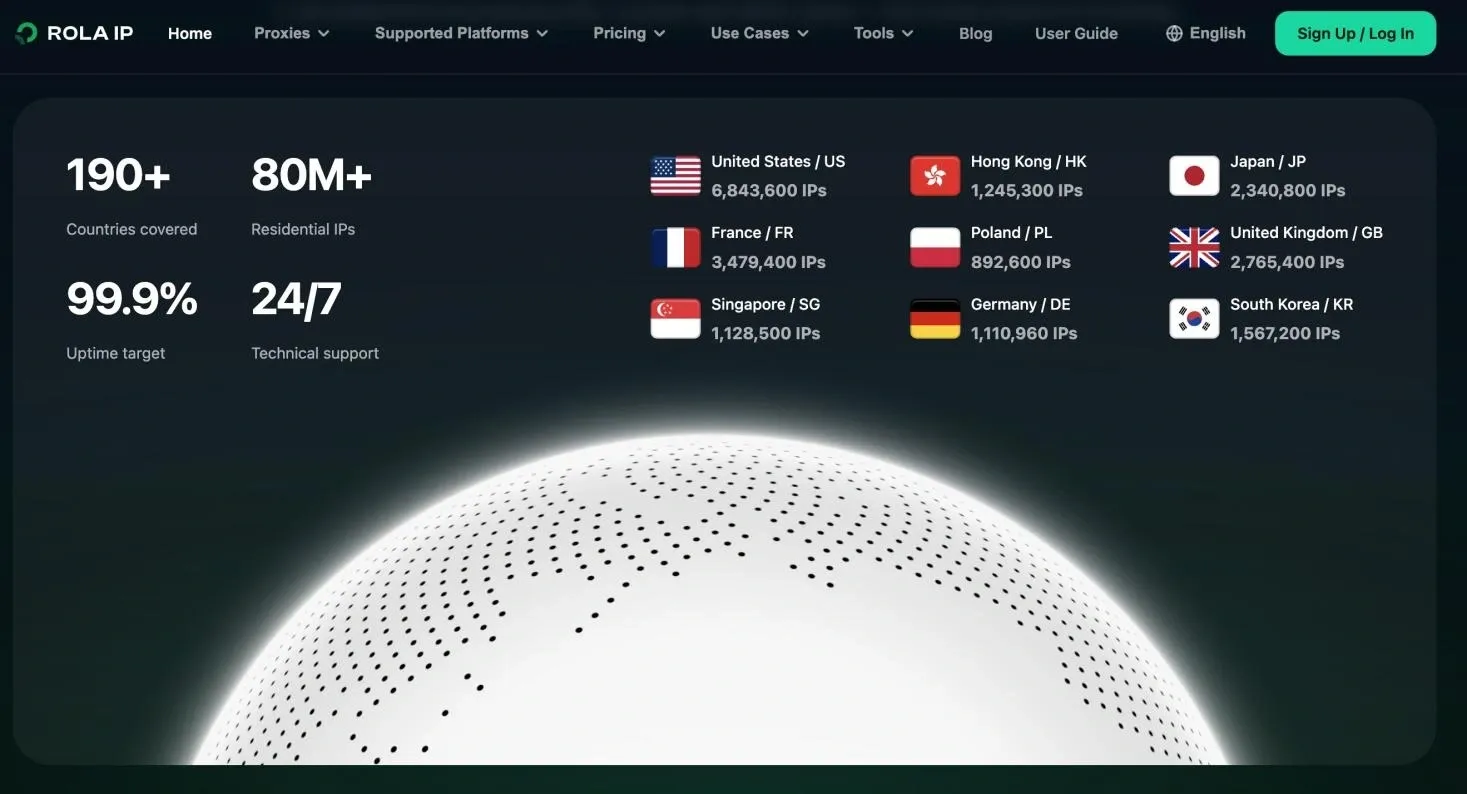
Rola IP also provides first-party residential resources and an IP/network checking tool. Before an approved collection job, verify connectivity, the reported region, latency, and page content. Treat an IP check as a network test only: it does not prove that a target page permits collection or that the parser returned valid product data.
| Task | Recommended Rola IP Type | Configuration Focus | Acceptance Metric |
|---|---|---|---|
| Open, lightly protected product pages | Dynamic/static datacenter | Start with low concurrency, rate-limit by domain | Valid-data rate, P95 latency, cost |
| Bulk collection of e-commerce listing and detail pages | Dynamic residential | Rotate per request; country/city targeting | Challenge-page ratio, regional accuracy |
| Pagination, shopping cart, or an authorized login session | Static residential/ISP or sticky residential | Fix the same region and session for the session’s duration | Session-persistence rate, exit stability |
| Mobile / carrier-network perspective | Mobile proxy | Only enable for an explicit mobile need | Page version, region, and cost |
| Multi-project teams | Matching product + sub-account | Set traffic quotas and whitelists per project | Budget isolation, credential auditing |
For a broader view of routing choices and acceptance metrics, see the Rola IP web scraping proxy use-case page. Product capabilities should still be tested against representative, authorized URLs before a rollout.
The Correct Steps for Integrating Rola IP with Python
- In the Rola IP dashboard, choose the product type and target region, and decide whether you need per-request rotation or a sticky session.
- Create a proxy account or whitelist to get the host, port, username, and password. Do not put credentials into source code, screenshots, or Git.
- Store the credentials in environment variables; the username and password must be URL-encoded, to avoid characters like
@,:, and/breaking the proxy URL. - First request an IP-lookup endpoint to verify the exit and region, then send low-concurrency requests to an authorized product page.
- Log the exit, region, status code, page type, valid fields, traffic, and P95 latency; scale up gradually only after passing acceptance criteria.
from __future__ import annotations

import os
from urllib.parse import quote

import requests


def required(name: str) -> str:
    value = os.getenv(name)
    if not value:
        raise RuntimeError(f"Missing required environment variable: {name}")
    return value


def main():
    username = quote(required("ROLA_PROXY_USERNAME"), safe="")
    password = quote(required("ROLA_PROXY_PASSWORD"), safe="")
    host = required("ROLA_PROXY_HOST")
    port = required("ROLA_PROXY_PORT")
    proxy_url = f"http://{username}:{password}@{host}:{port}"
    proxies = {"http": proxy_url, "https": proxy_url}
    response = requests.get(
        "https://httpbin.org/ip",
        proxies=proxies,
        timeout=(10, 30),
    )
    response.raise_for_status()
    print(response.json())


if __name__ == "__main__":
    main()
The exact parameters should match what your account actually generates — follow the Python proxy integration documentation for the current host, port, authentication, and parameter format. This code has been tested through Python compilation and the failure path for missing environment variables; since no Rola IP credentials for a real user were available while writing this article, it does not fabricate a successful network result.
Security note | Screenshots and logs should only show the exit result — never the full proxy URL, password, cookies, or API keys. If you see a 407, first check the credentials, whitelist, and URL encoding; if you see a 403/429, don’t endlessly rotate IPs — first check permissions, rate, request characteristics, and the target site’s policy.
Conclusion
This article walked through a complete python web scraping product information exercise: defining product fields, scraping a static page with Requests + Beautiful Soup, handling a JavaScript-rendered page with Selenium, validating results, and adding optional network routing for authorized regional or session requirements. You should now be able to write a script that extracts product name, price, stock, and SKU, while distinguishing parser failures from network responses and access-policy signals.
To go further, consider: connecting the scraping results to a scheduled job for daily price monitoring; refactoring the existing scripts with Scrapy to improve concurrency and fault tolerance; and choosing the right proxy type and geographic parameters for your target market’s region to further improve data accuracy and stability.