
aiohttp Multiple Requests in Python: A Practical asyncio Guide

Sep 15, 2026 · Guides · 10 min read
Your Python script can collect a page title, but a batch of URLs still runs one page at a time. Each download has to finish before the next request starts, so network waits add up as the list grows. Python asynchronous programming lets independent requests make progress during one another’s waits.
TL;DR: Use one
aiohttp.ClientSessionfor a batch of independent URLs, create a coroutine for each request, and await them withasyncio.gather(). Add timeouts and a connection limit before increasing volume. A connection limit controls in-flight requests; a site’s rate limit may also require pacing.
This tutorial is for Python beginners who can write functions and loops and are moving from a single-page request to a small scraping script. It also suits developers maintaining a script that spends time waiting for web responses.
You will work through async and await, share an aiohttp ClientSession across requests, and run a complete three-page scraper with recorded output to compare against. Once that flow is clear, the tutorial explains how to control request volume and where rotating proxies fit.
What Is Python Asynchronous Programming?
Python asynchronous programming lets a script pause a task that is waiting for a result and run other ready tasks. Python’s asyncio library coordinates that work. Python’s asyncio documentation identifies network code as one of its uses.
Consider a script that needs three web pages. A sequential version requests page A, waits for the response, then moves to B and C. A concurrent version starts the requests and lets them make progress during one another’s waits.
Two names help explain what happens. A coroutine is an asynchronous task that can pause and resume. An event loop schedules the work: when a task finishes or yields control, it gives other ready tasks a turn. The asyncio conceptual guide explains how these pieces cooperate.
To decide whether async fits your program, look at where the time goes. Downloading several known URLs involves network waits that can overlap. If the program spends its time calculating, changing the function to async will still leave that calculation on the event loop’s thread.
Dependencies matter, too. If the first page contains the address of the next page, the script must read it before requesting that address. Once a list of independent URLs is available, those requests can be scheduled together.
How Do async, await, and asyncio Fit Together?
To turn that task flow into code, distinguish the syntax, the task scheduler, and the HTTP client:
| Name | Meaning in this tutorial |
|---|---|
async def |
Defines a coroutine function. Calling it creates a coroutine object. |
await |
Waits for an awaitable operation. If the operation suspends, other scheduled work can run. |
asyncio |
Runs the event loop and coordinates asynchronous tasks. |
aiohttp |
Provides an HTTP client for asynchronous network requests. |
aiohttp.ClientSession |
Manages the settings and connections shared by a group of requests. |
Writing async def does not make a function run as soon as you call it. The call gives you a coroutine object, which you still need to await or schedule. This behavior is defined in the Python language reference.
Start with a small example that does not need a network connection. A compatible Python 3 installation includes asyncio, so there is no separate async platform to set up. This example uses a short pause to stand in for a wait:
import asyncio


async def show_message(name):
    print(f"{name}: started")
    await asyncio.sleep(1)
    print(f"{name}: finished")


async def main():
    await asyncio.gather(
        show_message("A"),
        show_message("B"),
    )


asyncio.run(main())
With the default scheduling behavior, the expected output is:
A: started
B: started
A: finished
B: finished
Look at the output: B starts before A finishes. asyncio.sleep(1) pauses the current task for one second, and asyncio.gather() schedules both coroutines. While A waits, B gets a chance to run.
asyncio.run(main()) starts the asynchronous entry point and manages its event loop. Use this form in a regular .py script. An interactive notebook with an existing event loop instead uses a top-level await main(), as explained in the Python runner documentation.
For a closer look at how a coroutine pauses and resumes, continue with the BBC’s asyncio concepts article.
How to Send Multiple Requests with aiohttp
The pause example shows how tasks share waiting time. To apply the same idea to web pages, use aiohttp for the network requests: first fetch one page, then schedule several requests together.
Create and Reuse an aiohttp ClientSession
Install the HTTP client and the HTML parser used later in the tutorial:
python -m pip install aiohttp beautifulsoup4
asyncio comes with Python; aiohttp and Beautiful Soup need a one-time installation. Use the same Python installation for the install command and the scraper so it can find those packages. On Windows, if python is unavailable but py works, replace python at the start of each command with py.
The following example requests the home page of Books to Scrape, a website designed for scraping practice:
import asyncio
import aiohttp


async def main():
    timeout = aiohttp.ClientTimeout(total=20)
    async with aiohttp.ClientSession(timeout=timeout) as session:
        async with session.get("https://books.toscrape.com/") as response:
            response.raise_for_status()
            html = await response.text()
            print(html[:200])


asyncio.run(main())
session.get() sends an HTTP GET request, and await response.text() reads the full response body as text. html[:200] then selects just the first 200 characters to display.
Think of ClientSession as the connection manager for this batch. The outer async with closes it when the block ends; the inner one releases the response’s resources. Sharing a session lets requests reuse connections, which is why the aiohttp quickstart advises against creating a new session for every request.
The timeout gives each request a 20-second total budget in this example. raise_for_status() turns HTTP errors such as 404 or 500 into exceptions. The first example lets those exceptions stop the script; the complete scraper below records them by URL. These options are defined in the aiohttp client reference.
Schedule the requests together
For the batch, create the shared session in main() and pass it to the request function. The next choice is how to schedule those calls.
Inside an asynchronous function, this pattern waits for each request before starting the next:
results = []
for url in urls:
    results.append(await fetch_page(session, url))
For independent URLs, replace that scheduling block with:
requests = [fetch_page(session, url) for url in urls]
results = await asyncio.gather(*requests)
These fragments compare two scheduling choices. They need urls, session, and fetch_page to exist already. To copy and run a complete program, use the next example.
The * passes the coroutine objects as separate arguments to gather(). Its result list follows the input order, even when responses arrive in a different order. Python’s gather reference documents both the scheduling and result-order behavior.
A Complete Asynchronous Web Scraping Example in Python
Once you have the HTML, you need to find the data inside it. This example extracts just the page title: aiohttp downloads the page, and Beautiful Soup finds its <title> element.
Save this complete program as async_scraper.py. You do not need to assemble the earlier fragments:
import asyncio
import aiohttp
from bs4 import BeautifulSoup


URLS = [
    "https://books.toscrape.com/",
    "https://books.toscrape.com/catalogue/page-2.html",
    "https://books.toscrape.com/catalogue/page-3.html",
]


async def fetch_page(session, url):
    try:
        async with session.get(url) as response:
            response.raise_for_status()
            html = await response.text()
            return {"url": url, "html": html, "error": None}
    except (aiohttp.ClientError, asyncio.TimeoutError) as exc:
        return {
            "url": url,
            "html": None,
            "error": f"{type(exc).__name__}: {exc}",
        }


async def main():
    timeout = aiohttp.ClientTimeout(total=20)
    async with aiohttp.ClientSession(timeout=timeout) as session:
        requests = [fetch_page(session, url) for url in URLS]
        results = await asyncio.gather(*requests)

    for result in results:
        if result["error"] is not None:
            print(result["url"], "FAILED:", result["error"])
            continue

        soup = BeautifulSoup(result["html"], "html.parser")
        title_tag = soup.find("title")
        title = title_tag.get_text(" ", strip=True) if title_tag else "No title found"
        print(result["url"], "->", title)


if __name__ == "__main__":
    asyncio.run(main())
Run the scraper and inspect its output
Run it from the environment where the packages were installed:
python async_scraper.py
Each successful request produces a URL and its page title. A failed request produces the URL and an error message. Several pages can share a title, so the URL remains part of every result.
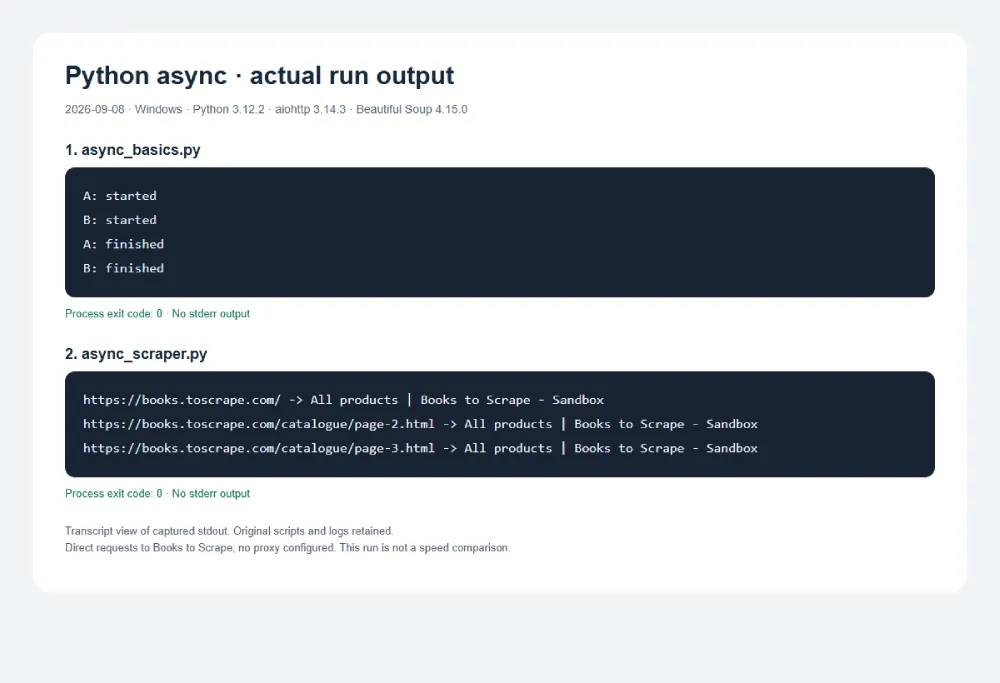
On September 8, 2026, we ran the basic example and this complete scraper on Windows with Python 3.12.2. The scraper used aiohttp 3.14.3 and Beautiful Soup 4.15.0, and all three pages returned the title All products | Books to Scrape - Sandbox. Both programs exited successfully without error output.
Read the results and change the extracted field
fetch_page() catches the listed request and timeout exceptions and returns them as data. That lets the output loop handle a failed page alongside successful ones. An unexpected exception outside those handlers still propagates to the caller.
The network requests run concurrently. After the batch finishes, the program parses each returned page in turn. soup.find("title") locates the title tag, and get_text(" ", strip=True) extracts its text with surrounding whitespace removed. The fallback covers a missing title element. These methods are described in the Beautiful Soup documentation.
For a first change, extract a page heading instead of its title by adjusting the parser. To request other pages, change URLS. Change one part at a time so you can trace a problem to requesting or parsing.
How to Handle Errors and Scale Up Requests
A working three-page example is the starting point. Before adding URLs, fix code or environment errors, then decide how to control request volume and routing.
Start with code and environment errors
Use the symptom to locate the part that needs attention:
| Symptom | Cause to check | Action |
|---|---|---|
Coroutine was never awaited |
A coroutine was created without being awaited or scheduled. | Await the call or pass it to the scheduling code. |
| Requests run one at a time | A loop awaits each call before beginning the next. | Use the gather() pattern for independent requests. |
| Other tasks stop progressing | A blocking call or lengthy calculation occupies the event loop. | Check for time.sleep() and synchronous work inside async functions. |
Unclosed client session |
The session was created without a reliable cleanup path. | Manage it with async with. |
| A request times out | It exceeds the configured time budget. | Inspect the URL and error before changing the timeout. |
asyncio.run() reports a running event loop |
The script is being run inside an environment that already has one. | In a notebook supporting top-level await, use await main(). |
The asyncio development guide explains forgotten awaits and blocking work. Changing a function declaration to async def leaves any synchronous calls inside it synchronous.
Limit concurrent requests with aiohttp.TCPConnector
Once the three-page scraper works, give its shared session a connection limit before adding more URLs. The same fetch function and title extraction can stay in place.
In the complete program’s main(), replace the block from timeout = ... through results = ... with the following. Keep the for result in results: loop immediately after it, at the same indentation level as timeout:
    timeout = aiohttp.ClientTimeout(total=20)
    connector = aiohttp.TCPConnector(limit=2)
    async with aiohttp.ClientSession(
        timeout=timeout, connector=connector
    ) as session:
        requests = [fetch_page(session, url) for url in URLS]
        results = await asyncio.gather(*requests)
TCPConnector(limit=2) allows this session to use at most two connections at once. In this example, two page downloads can proceed while the third request waits for a connection to become available. Passing connector=connector applies the limit to the shared session; its async with block also closes the connector when the session ends.
The value 2 makes the limit easy to see with three URLs. Choose the value for a larger job according to the target’s published limits and the script’s resource use. An asyncio semaphore is another option when the limit needs to cover a wider part of each task, such as requesting and processing together.
This setting controls simultaneous connections. Requests per second depend on how quickly those connections finish their work, so a site’s time-based rate limit needs separate pacing. That distinction explains why a script can still trigger restrictions even with a small connection pool.
What happens when too many requests use one IP?
When your script connects directly, the target sees the public IP of the network running it: your home or office connection, or the server hosting the script. This is the “real IP” in this context. If requests exceed a site’s thresholds, that address can be restricted. Cloudflare’s rate-limiting documentation describes rules that act on an IP when its request rate crosses a configured threshold.
Start by reducing simultaneous requests and spacing out request starts to match the target’s published limits. A concurrency limit controls how many requests are in progress; a rate limit controls how many begin in a time window. If responses show throttling or a block, pause the batch and check the cause before sending more requests.
Where rotating proxies fit into the scraper
For an ongoing public-data project that needs requests distributed across multiple exit IPs, add rotating proxies alongside those request limits. A rotating proxy gateway selects exit addresses from a pool according to its rotation settings. The target then receives the proxied connections from those exits, instead of your script’s direct public IP.
Rola IP residential proxies offer rotating and sticky sessions, with country, state, and city targeting. Independent page requests can use rotation; a sequence that needs the same network identity can use a sticky session, which retains an exit IP for that session’s supported duration. This lets you manage routing through a gateway while keeping the scraper’s shared ClientSession and parsing logic.
For an HTTP proxy gateway, aiohttp accepts its address through the request’s proxy= option and credentials through proxy_auth=. Take the actual endpoint and proxy parameters from your provider’s configuration; creating a new ClientSession does not rotate your IP. The aiohttp proxy documentation explains the supported configuration.
The following minimal pattern keeps proxy credentials out of the URL. Replace the placeholders only with credentials for a proxy service you are authorized to use:
proxy_url = "http://YOUR_PROXY_HOST:PORT"
proxy_auth = aiohttp.BasicAuth("USERNAME", "PASSWORD")

async with session.get(
    url,
    proxy=proxy_url,
    proxy_auth=proxy_auth,
) as response:
    response.raise_for_status()
    html = await response.text()
For provider-specific endpoint and authentication details, see the Python proxy integration guide.
Keep the total request rate within the target’s limits across all exit IPs. Rotation distributes connections; it does not reduce the total traffic reaching a website. Begin with a small batch and check returned content as well as status codes before expanding it.
Conclusion
Python asynchronous programming lets independent network requests make progress during one another’s waits. With asyncio scheduling tasks and a shared aiohttp ClientSession managing requests, a single-page script can grow into a multi-page scraper. A complete asynchronous scraping workflow also brings together data extraction, error handling, request-rate control, and routing choices, keeping multi-page collection manageable as it becomes more efficient.