
Apify Proxy Configuration for Custom Proxies and Sessions

Sep 15, 2026 · Guides · 13 min read
TL;DR
Apify supports managed Apify Proxy access and custom proxy URLs from providers such as Rola IP, but the right configuration depends on the required location, session behavior, traffic model, and target authorization. Connect the proxy configuration to the crawler or HTTP client, and verify the observed exit IP rather than assuming that a saved URL proves the setup works. Compare proxy options with the same small pilot: location accuracy, session continuity, valid-result cost, and failure reasons. A stable gateway URL does not guarantee a fixed exit IP; align crawler cookies and sessions with the provider’s rotation settings before scaling.
Choose between Apify Proxy and custom proxies
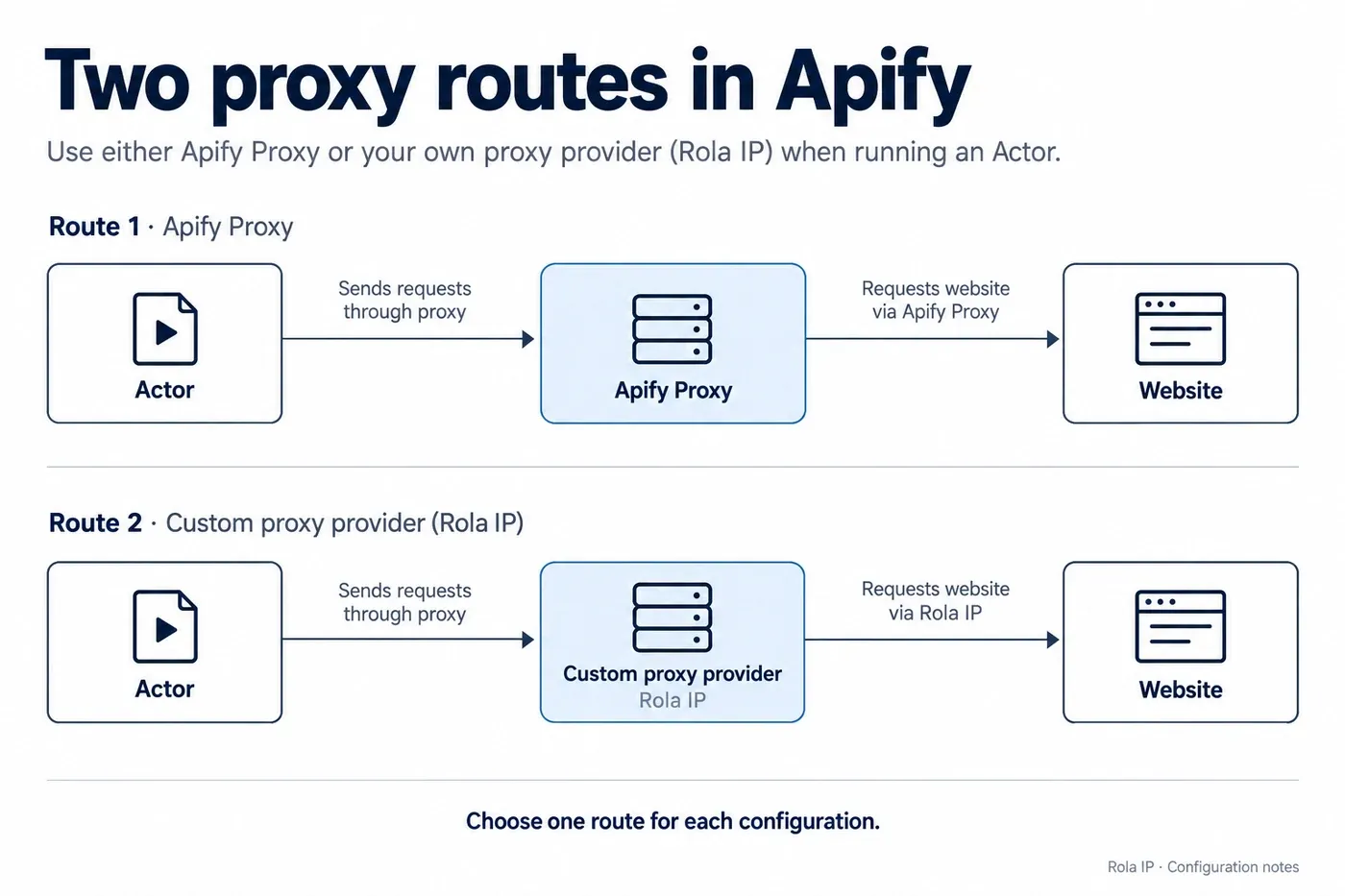
Apify runs Actors: programs that collect or process data. Apify Proxy supplies network access through managed proxy pools. Those are separate capabilities. An Actor can run on Apify while sending its website requests through a third-party proxy.
With custom proxies, the request path is Actor → provider gateway → destination. Apify Proxy is not an extra hop in that path. The Actor’s compute and any applicable Actor charges still apply; the external provider bills its own proxy service. See Apify’s custom proxy documentation.
Match the IP type to the workload
| IP type | Useful starting point | Main tradeoff |
|---|---|---|
| Datacenter | Public catalogs and endpoints that accept hosting-network IPs | Often economical; destination acceptance still needs testing |
| Rotating residential | Regional price checks, market research, and distributed collection | Traffic consumption and temporary peer availability matter |
| Static residential or ISP | Workflows that need a stable network identity | A fixed address cannot spread load across a large rotating pool |
| Mobile | Tests that specifically require a mobile-network exit | Usually unnecessary if a residential or datacenter route already works |
Start by testing the least expensive suitable network against a representative sample. A residential address does not repair a missing login, incorrect request, broken selector, or JavaScript rendering requirement. Likewise, a mobile IP is a network characteristic, not a guarantee that an automated browser looks like a phone.
Where Rola IP fits
Rola IP supplies residential, datacenter, and ISP proxy resources. It lists 80M+ residential IPs across 190+ countries and regions, along with a 99.9% uptime target and 24/7 technical support. These describe the provider’s network offering; they do not predict a particular website’s acceptance rate.
For recurring regional sampling, its residential proxies offer a practical way to separate IP sourcing from the Actor implementation. For a longer-lived authorized session, static residential proxies provide dedicated fixed IPs with unlimited traffic during the purchased validity period. Unlimited traffic does not mean unlimited bandwidth, request rate, or Actor compute.
Choose the product around the job. A daily regional price sample benefits from geographic coverage; a workflow that must retain the same exit address benefits from a dedicated static allocation. Avoid paying for an IP characteristic your collection does not require.
Prerequisites and verification scope
Prepare an Apify account for Console runs, an Actor that supports proxy settings, and a working proxy URL. For local custom-proxy examples, have Node.js 24 or Python 3.12 available. Select one language path; you do not need both.
The examples use an HTTP proxy gateway and Apify’s browser-info endpoint to inspect the observed client IP. They do not require JavaScript rendering, website login, or cookies. Browser crawlers are discussed separately below.
Local validation used Windows, Node.js 24.19.0, Apify JavaScript 3.7.2, Crawlee 3.18.1, Python 3.12.14, Apify Python 4.0.2, and HTTPX 0.28.1. JavaScript and Python syntax, session URL reuse, URL rotation, Actor input mapping, and dynamic callbacks passed checks. Authenticated provider connections and signed-in Console runs remain account-dependent acceptance tests. Replace all example credentials and gateway addresses before making a network request.
Keep proxy passwords in a secret environment variable or your deployment’s secret facility. Treat saved Actor input containing proxy URLs as sensitive, and check who can read it. Do not publish complete URLs in logs, datasets, screenshots, or repositories.
Configure custom proxies in Apify Console
Step 1 — Check the Actor’s supported input
Open the Actor and select its Input tab. Look for its proxy settings, commonly grouped under Proxy and browser configuration. The exact section title depends on the Actor.
This control is available only when the Actor exposes it. An absent proxy field is not a hidden account setting. Check the Actor’s documentation, use an Actor with custom-proxy support, or modify an Actor you own. Adding an arbitrary JSON field cannot force someone else’s implementation to use it.
Step 2 — Export a provider-generated proxy URL
In your Rola account, select the purchased product and required location, authentication mode, and rotation behavior. Copy the generated connection details. Do not guess the gateway hostname, port, or username suffix from another provider’s tutorial.
Open Rola IP documentation and use its Parameters or Quick Start entry when checking the account’s generated configuration. Product-specific gateway and session settings must come from your current account or provider documentation.
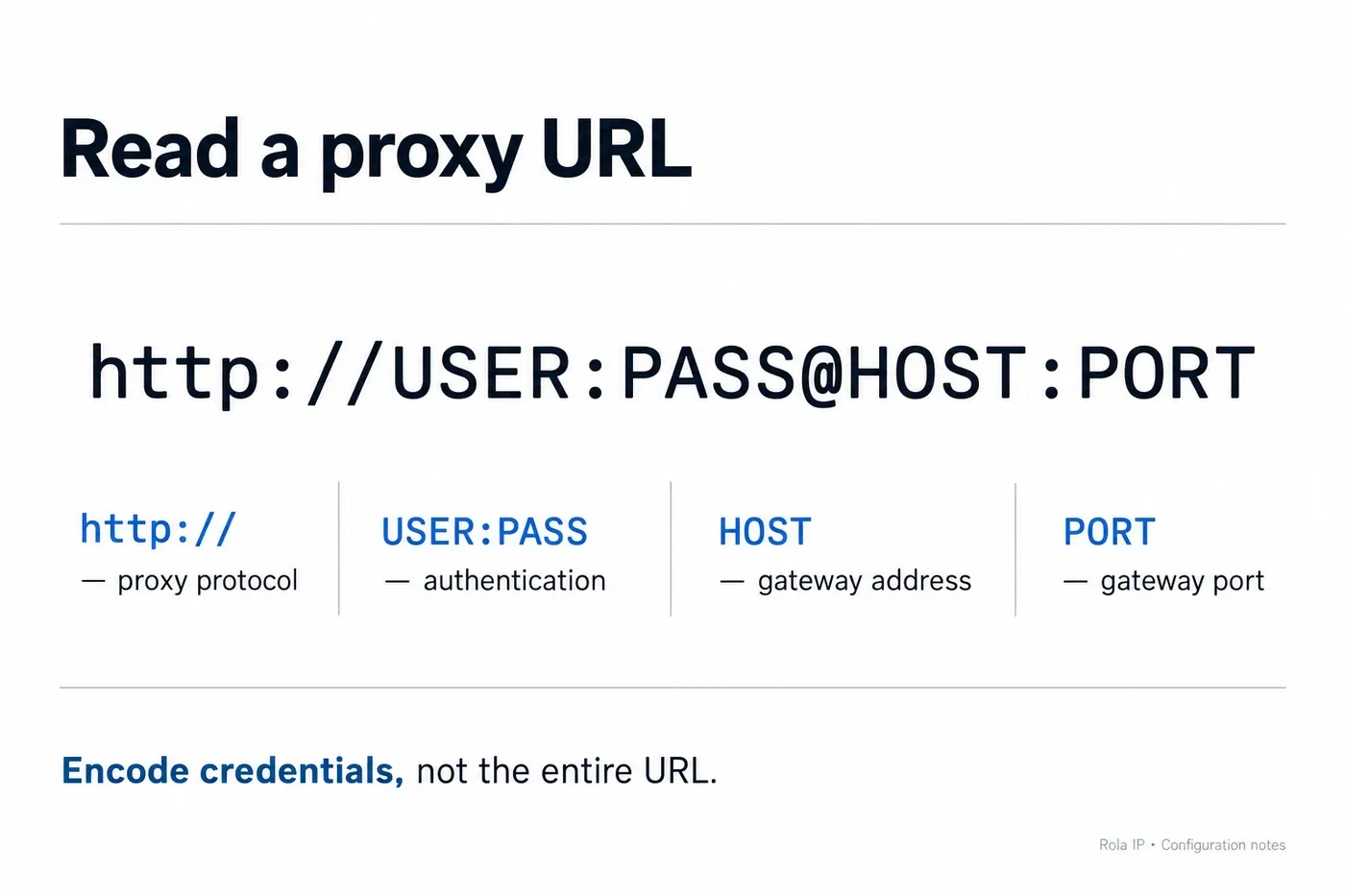
The generic authenticated format is:
http://USERNAME:PASSWORD@GATEWAY_HOST:PORT
For IP-allowlist authentication, the provider may supply a URL without credentials. The address to authorize is the source address that reaches the proxy gateway. Your laptop’s public IP does not automatically authorize an Actor running in a cloud container. Username/password authentication is often easier when runtime egress is not fixed; if the product requires combined authentication, both checks must pass.
Step 3 — Select custom proxies and save
Select Custom proxies in the Actor’s proxy control, paste the full URL, and add additional URLs as separate entries. Save the input and start a small run with one or two targets.
For an Actor whose proxy field is named proxyConfiguration, the relevant JSON fragment is:
{
  "proxyConfiguration": {
    "useApifyProxy": false,
    "proxyUrls": ["http://USER:[email protected]:8000"]
  }
}
proxy.example is a documentation placeholder. Keep the Actor’s other required input fields and use its actual proxy field name. Inspect the run log and output to confirm that requests succeeded; a saved configuration only proves that input was accepted.
Use custom proxies with the JavaScript SDK
Install a small HTTP crawler
In a new project directory, run the following commands in Windows PowerShell or a macOS/Linux shell with Node.js and npm installed:
npm init -y
npm install [email protected] [email protected]
Save the code below as main.mjs. Set PROXY_URL using your environment or secret manager before running node main.mjs. For a local Windows PowerShell test, the variable assignment is $env:PROXY_URL = 'http://USER:[email protected]:8000'. In a macOS/Linux shell, use export PROXY_URL='http://USER:[email protected]:8000'. Replace the placeholder URL with your actual connection details; keep real credentials out of shared shell history and scripts.
import { Actor } from 'apify';
import { CheerioCrawler } from 'crawlee';

await Actor.main(async () => {
  const proxyUrl = process.env.PROXY_URL;
  if (!proxyUrl) throw new Error('Set PROXY_URL first');
  const gateway = new URL(proxyUrl);
  if (gateway.protocol !== 'http:') {
    throw new Error('This example requires an HTTP gateway');
  }

  const proxyConfiguration = await Actor.createProxyConfiguration({
    proxyUrls: [proxyUrl],
  });
  if (!proxyConfiguration) throw new Error('Proxy is disabled');

  const crawler = new CheerioCrawler({
    proxyConfiguration,
    useSessionPool: true,
    persistCookiesPerSession: true,
    maxConcurrency: 1,
    maxRequestsPerCrawl: 1,
    maxRequestsPerMinute: 10,
    maxRequestRetries: 1,
    maxSessionRotations: 1,
    async requestHandler({ json, proxyInfo }) {
      if (!json?.clientIp) throw new Error('Missing observed IP');
      await Actor.pushData({
        exitIp: json.clientIp,
        gatewayHost: proxyInfo?.hostname,
        sessionId: proxyInfo?.sessionId,
      });
    },
  });

  await crawler.run(['https://api.apify.com/v2/browser-info']);
});
The dataset should contain an exitIp, a gateway hostname, and a session identifier. The exit IP is the address observed by the diagnostic endpoint; the gateway hostname is where the crawler connected. They are different measurements. The example deliberately avoids storing the proxy URL or password.
Passing proxyConfiguration into the crawler is the step that routes its requests. Creating the object alone does not configure every library used inside an Actor. The JavaScript proxy management guide explains this integration.
Use a browser only when the page needs one
For a JavaScript-rendered destination, pass the configuration to PlaywrightCrawler or PuppeteerCrawler, then use that crawler’s page-based handler. Install the relevant browser and use a compatible Actor image. Changing only the class name in the JSON diagnostic example is insufficient because its handler expects parsed JSON.
Start with one browser session and verify both content and exit IP. Browser subresources can add substantial proxy traffic. Disable unnecessary image or video downloads only after checking that the page still renders and your required data remains available. See the Crawlee browser-rendering guide.
Configure Apify Proxy groups and countries
To use Apify’s managed residential pool in the JavaScript example, replace the environment-variable validation and custom configuration block with:
const proxyConfiguration = await Actor.createProxyConfiguration({
  groups: ['RESIDENTIAL'],
  countryCode: 'US',
});
if (!proxyConfiguration) throw new Error('Proxy is disabled');
For the default managed configuration, call Actor.createProxyConfiguration() without custom URLs. Check your Console proxy access before running; do not invent a universal DATACENTER group name. Specific datacenter group identifiers depend on the resources available to the account.
Local managed-proxy runs need Apify authentication or the appropriate proxy credentials. An Apify API token and an Apify Proxy password serve different purposes. When connecting directly to its gateway, obtain the connection values from Console rather than substituting your account login password. See the Apify Proxy overview.
groups and countryCode configure Apify Proxy. They do not translate into Rola settings when you supply custom URLs. For a third-party gateway, geographic targeting belongs in the provider-generated connection configuration. Confirm the resulting location at the destination as well as with an IP lookup service; geolocation databases may disagree.
Keep Console fields separate from SDK options
| Purpose | Actor proxy-editor input | JavaScript options | Python options |
|---|---|---|---|
| Custom URLs | proxyUrls |
proxyUrls |
proxy_urls |
| Managed groups | apifyProxyGroups |
groups |
groups |
| Managed country | apifyProxyCountry |
countryCode |
country_code |
| Input mode switch | useApifyProxy |
Accepted by Actor helper | Passed within actor_proxy_input |
The table distinguishes the proxy editor’s input representation from direct configuration options. Use the language’s Actor helper to interpret editor input. The underlying configuration class and helper do not necessarily accept identical arguments. References: JavaScript Actor helper and Python Actor helper.
How to use proxies with Apify in Python
Generate a proxy URL and pass it to HTTPX
In an isolated Python 3.12 virtual environment, install:
python -m pip install apify==4.0.2 httpx==0.28.1
Save the following as main.py, provide PROXY_URL through your environment, and run python main.py:
import asyncio
import os
from urllib.parse import urlsplit

import httpx
from apify import Actor


async def main() -> None:
    async with Actor:
        supplied_url = os.environ.get("PROXY_URL")
        if not supplied_url:
            raise RuntimeError("Set PROXY_URL first")
        if urlsplit(supplied_url).scheme != "http":
            raise ValueError("This example requires an HTTP gateway")

        config = await Actor.create_proxy_configuration(
            proxy_urls=[supplied_url]
        )
        if config is None:
            raise RuntimeError("Proxy is disabled")
        proxy_url = await config.new_url(session_id="check_01")

        async with httpx.AsyncClient(
            proxy=proxy_url,
            timeout=30.0,
            follow_redirects=True,
            trust_env=False,
        ) as client:
            response = await client.get(
                "https://api.apify.com/v2/browser-info"
            )
            response.raise_for_status()
            exit_ip = response.json()["clientIp"]
            await Actor.push_data({"exitIp": exit_ip})


if __name__ == "__main__":
    asyncio.run(main())
Here, new_url() chooses the connection URL and HTTPX makes the request. Use the singular proxy= argument for this HTTPX version. An HTTP gateway can carry an HTTPS destination through a tunnel; the destination’s https:// scheme does not require changing the gateway URL to https://. References: Apify Python proxy management and HTTPX proxy configuration.
This script has no automatic retry loop. That makes it easier to diagnose one failed connection without silently consuming additional traffic. In a collection job, add bounded retries for transient failures, but do not repeatedly retry incorrect credentials.
Expose proxy settings in your own Actor input
Add a proxy-editor field to an Actor you control. This minimal input_schema.json defines the field; merge it with any other required properties:
{
  "title": "Proxy diagnostic input",
  "type": "object",
  "schemaVersion": 1,
  "properties": {
    "proxyConfiguration": {
      "title": "Proxy configuration",
      "description": "Choose managed or custom proxy access.",
      "type": "object",
      "editor": "proxy",
      "prefill": { "useApifyProxy": true }
    }
  },
  "required": ["proxyConfiguration"]
}
Set the existing .actor/actor.json file’s input property to the schema path, resolved relative to that file. For a schema placed beside it, use "input": "./input_schema.json". Rebuild the Actor. The input schema specification documents how the control is generated.
Inside the JavaScript Actor lifecycle, replace the hardcoded configuration block with:
const input = await Actor.getInput();
if (!input?.proxyConfiguration) {
  throw new Error('Select proxy settings in Actor input');
}
const proxyConfiguration = await Actor.createProxyConfiguration(
  input.proxyConfiguration,
);
if (!proxyConfiguration) throw new Error('Proxy is disabled');
Then pass this object to the crawler as before. In Python, supply the corresponding input dictionary through Actor.create_proxy_configuration(actor_proxy_input=...). Keep the input key and the code’s lookup key identical. A rendered Console control is only useful if the implementation reads its value.
Make rotation and sticky sessions work together
Distinguish the three session layers
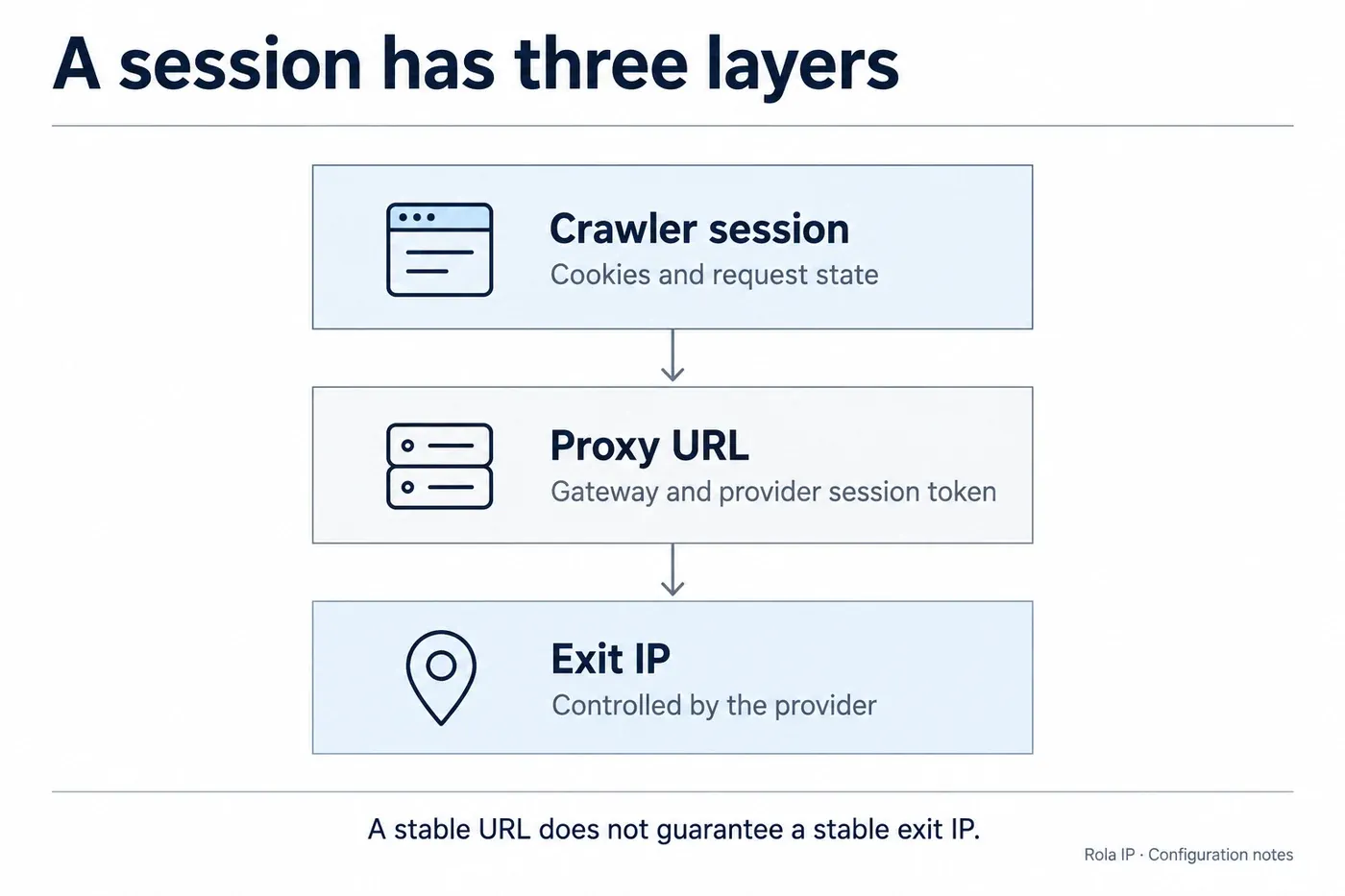
A crawler session holds cookies and request state. A proxy configuration maps that session to a connection URL. The provider chooses the exit IP behind that URL. You need all three layers to cooperate when a workflow requires continuity.
With a list of custom URLs, a session can retain its assigned URL. But if that URL points to a gateway that rotates on every request, the public IP can still change. Conversely, repeatedly selecting the same static endpoint can keep the same exit IP even when crawler sessions change. See Crawlee’s proxy configuration reference.
For Apify residential sessions, the documentation currently describes an approximately 30-minute IP association, with reassignment if the peer becomes unavailable or the session expires. Datacenter sessions have a 26-hour inactivity window that resets with use, subject to server failure or group replacement. Do not apply either lifetime to Rola products. Sources: residential session persistence and datacenter session persistence.
Test continuity before using cookies
Use one session identifier to request the diagnostic endpoint three times. Compare the observed IPs, then repeat with a different session identifier. For a sticky product, the first three should remain consistent while the provider session is valid. A new session may receive the same IP, especially in a small pool, so a different identifier is not proof of a different exit address.
Enable useSessionPool and persistCookiesPerSession for Crawlee workflows that need cookie continuity. However, a pool does not automatically assign all steps of one business workflow to a particular session. Design account or workflow affinity explicitly, and avoid assuming that sequential queued URLs always reuse the same session. See Crawlee session management.
Generate custom URLs dynamically
Use newUrlFunction in JavaScript or new_url_function in Python when each crawler session needs its own provider-issued sticky URL. The callback should return a complete URL and retain a consistent assignment for each session. Do not combine a fixed URL list and a custom callback in the same configuration.
This JavaScript pattern belongs inside the Actor lifecycle. Set PROXY_URLS_JSON to a JSON array of distinct provider-generated sticky URLs:
const urls = JSON.parse(process.env.PROXY_URLS_JSON || '[]');
if (!Array.isArray(urls) || !urls.length ||
    urls.some((url) => typeof url !== 'string')) {
  throw new Error('Supply a nonempty array of proxy URLs');
}
urls.forEach((url) => new URL(url));
const assignments = new Map();
let cursor = 0;

const proxyConfiguration = await Actor.createProxyConfiguration({
  newUrlFunction: async (sessionId) => {
    if (!sessionId) return urls[cursor++ % urls.length];
    if (!assignments.has(sessionId)) {
      assignments.set(sessionId, urls[cursor++ % urls.length]);
    }
    return assignments.get(sessionId);
  },
});
This is an in-memory assignment demonstration, not a production allocator. It does not persist across Actor restarts, remove old map entries, or guarantee unique endpoints after exhausting the list. A production implementation needs bounded storage, provider-session expiry handling, and the required degree of workflow isolation.
The Python equivalent uses an async callback and a dictionary with the same assignment policy; pass the callback to new_url_function. Both interfaces accept a session identifier. Use the provider’s documented token format if generating credentials programmatically, rather than inventing a session- suffix. References: JavaScript configuration options and Python configuration reference.
Verify the connection and diagnose failures
Separate gateway access from target access
First verify the proxy against the diagnostic endpoint. Then request a representative destination page with the same configuration. If the first works and the second fails, investigate destination-specific restrictions, rendering, headers, or session state before replacing gateway credentials.
Inspect status, content type, page title, and a required data field. A 200 response containing a challenge page or empty application shell is not a successful extraction. Log the failure category and a redacted endpoint identifier; avoid logging complete request objects that may include authentication data.
| Symptom | Check first | Next action |
|---|---|---|
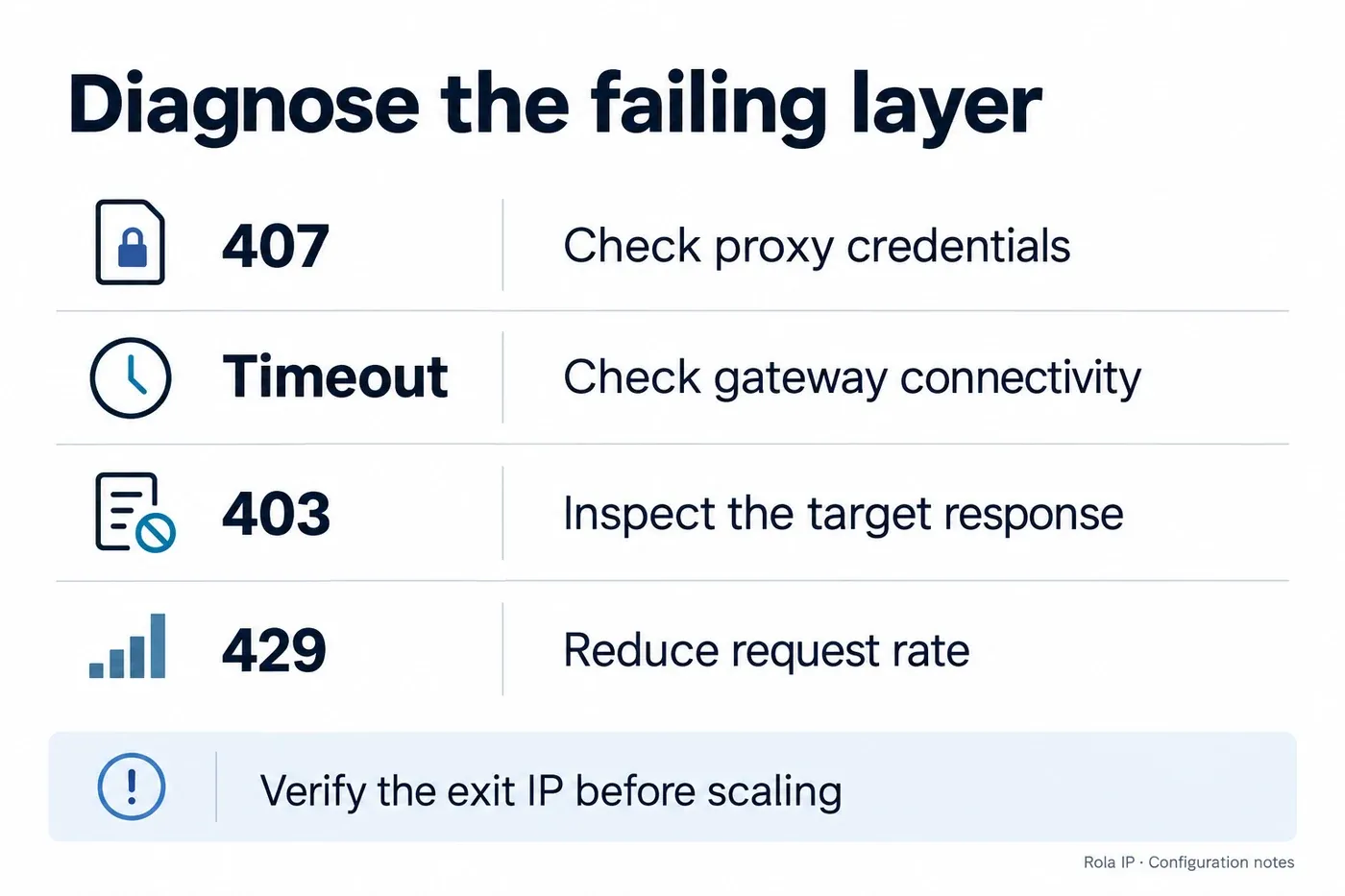
| 407 authentication required | Credentials, URL encoding, allowlist and product status | Correct access settings; stop blind retries |
| DNS error or connection timeout | Host, port, scheme and runtime network access | Test from the same environment as the Actor |
| 403 response | Response body, destination permissions and session state | Identify who returned it; correct the request or access conditions |
| 429 response | Request frequency, shared limits and Retry-After | Reduce traffic and schedule a bounded delayed retry |
| 502 or 503 | Whether the gateway or target generated the response | Compare diagnostic and target requests; retry transient failures conservatively |
| Unexpected IP or country | Client wiring, provider-generated settings and geolocation | Verify the observed exit; do not infer it from the gateway host |
| Session IP changes | Sticky settings, lifetime, peer availability and callback mapping | Align session duration or use a fixed allocation |
The status-code distinctions follow HTTP semantics and the 429 definition. A gateway can generate an error that resembles a target failure, so inspect the response rather than classifying by code alone.
Encode special characters correctly
Encode the username and password separately when assembling a URL. A password such as p@ss:word becomes p%40ss%3Aword in the credentials component. Do not encode the entire URL or double-encode a provider URL that is already escaped.
In JavaScript, use a URL object’s username and password setters with raw credentials. In Python, use urllib.parse.quote(value, safe="") for each credential component. A misplaced @ can change how the hostname is parsed and produce a misleading connection failure.
Control concurrency and total collection cost
Start with low concurrency and a short representative sample. Record successful records, failed attempts, observed IPs, median and tail latency, and provider-reported traffic. Increase concurrency gradually while comparing useful output per minute, not just attempted requests.
Crawler concurrency, request rate, pool size, and provider connection limits measure different things. A large session pool does not create extra physical exit IPs. A gateway that supports thousands of connections also cannot guarantee that a destination accepts thousands of simultaneous requests.
Keep retries bounded at both levels. In Crawlee, session-rotation retries have a separate limit from maxRequestRetries; a small request-retry value alone is not a complete attempt budget. The starter example sets both. See Crawlee crawler options.
For provider comparison, calculate total job cost divided by valid records delivered. Include proxy charges, Actor compute, any Actor usage fee, and traffic spent on failed requests. For example, a hypothetical $12 job producing 8,000 valid records costs $1.50 per 1,000 records. A $10 job producing only 5,000 costs $2.00 per 1,000. These are illustrative calculations, not provider prices.
Use separate small runs to compare datacenter and residential access on the same target sample. If adding provider failover, preserve the workflow’s session requirements and define explicit switching conditions. Do not change countries or exit identities midway through a stateful transaction simply because one request was slow.