
Cloudflare Error 522: Causes, Diagnosis, and Fixes

Sep 15, 2026 · Troubleshooting · 10 min read
TL;DR
- A 522 is a timeout between Cloudflare and the origin—not a standard client-side timeout.
- Site owners should verify origin health, DNS, Cloudflare IP allowlisting, capacity, keepalives, and packet loss.
- Visitors should record the URL, time, timezone, and Ray ID, then report a persistent failure to the site owner.
- Automated clients should stop high-volume retries, preserve diagnostic headers, and use bounded backoff.
- A different proxy route can help isolate a path-specific symptom, but it does not fix the origin or bypass Cloudflare.
- Rola IP routes can support authorized route comparison and session control; they cannot guarantee target acceptance.
What Does Cloudflare Error 522 Mean?
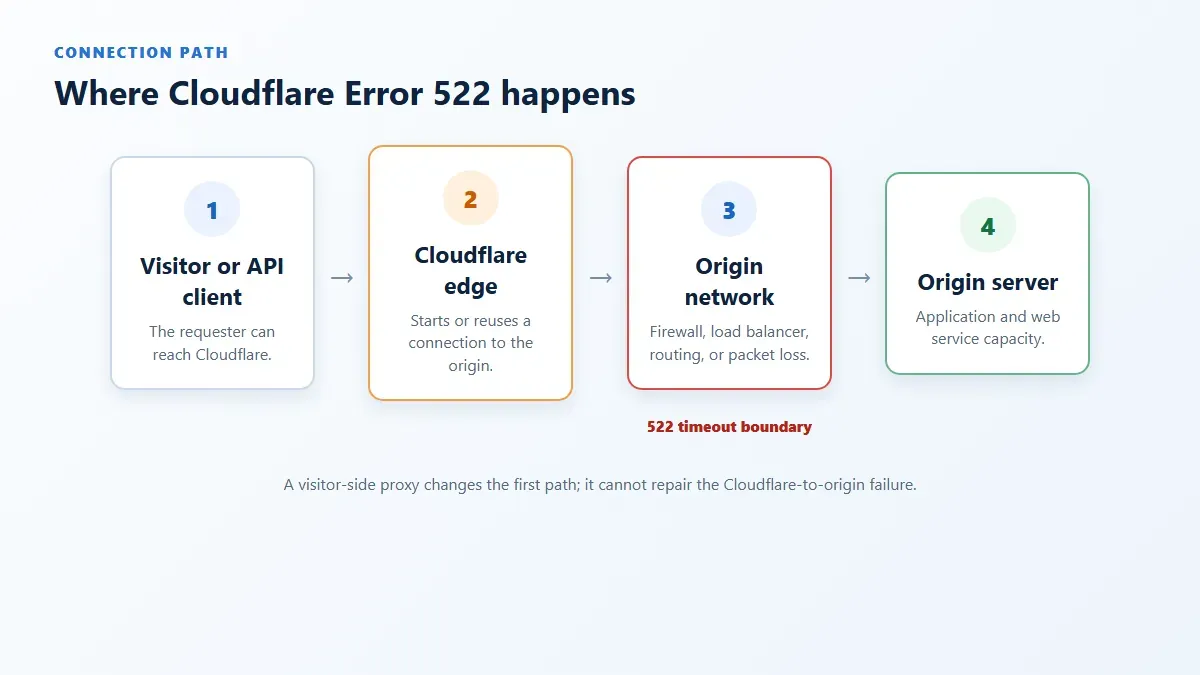
Cloudflare sits between a requester and a proxied website:
visitor or API client -> Cloudflare edge -> origin firewall/load balancer -> web server
The first connection may be healthy even when the second one fails. Your browser or code can reach a Cloudflare data center, yet Cloudflare may be unable to complete or continue the TCP exchange with the origin. Cloudflare then generates the 522 response.
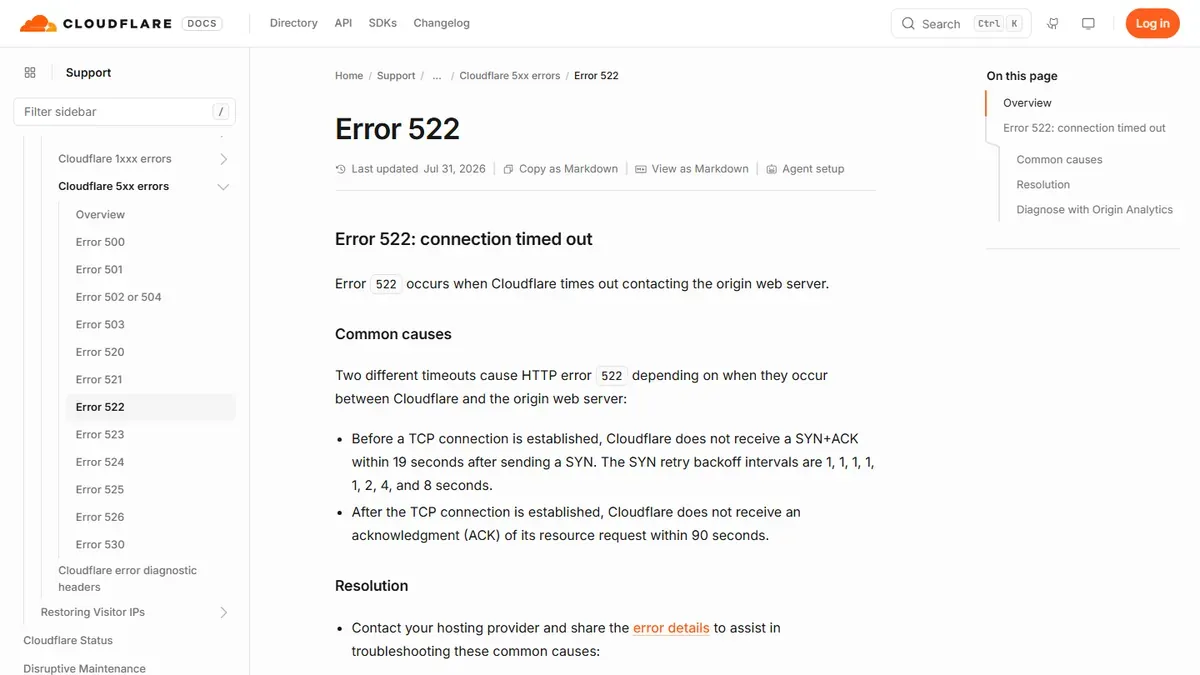
According to Cloudflare’s official Error 522 documentation, the current timeout boundaries are:
| Stage | What Cloudflare waits for | Current documented limit | Result |
|---|---|---|---|
| TCP connection setup | SYN+ACK from the origin | 19 seconds | 522 |
| After TCP connection | ACK of Cloudflare’s resource request | 90 seconds | 522 |
These values are time-sensitive platform behavior. Check the current official page before relying on them in monitoring rules or incident documentation.
Is Error Code 522 Cloudflare Anti-Bot Blocking?
Usually, no. A 522 describes Cloudflare-to-origin connectivity, whereas anti-bot or access-control decisions more commonly surface as a challenge, block page, 403, 429, or a Cloudflare-specific 1xxx response. A custom site can alter an error page’s appearance, so capture the status, response headers, Ray ID, and timestamp instead of diagnosing from the page design alone.
This distinction matters for proxy users. Repeatedly changing an exit IP after a 522 can conceal the pattern, increase load on an unhealthy origin, and violate a destination’s rules. It does not repair an offline server, an incorrect origin IP, a firewall blocking Cloudflare, or packet loss between Cloudflare and the host.
Direct recommendation
Treat Cloudflare 522 errors as origin incidents first. Use a proxy only to compare authorized network paths after preserving the original evidence, and never use rotation to defeat a block, rate limit, CAPTCHA, or account restriction.
Cloudflare 521 vs 522 vs 523 vs 524
Nearby error codes point to different stages, so do not apply a generic “Cloudflare timeout fix” to all of them.
| Code | Cloudflare’s documented meaning | Diagnostic focus |
|---|---|---|
| 521 | The origin refuses Cloudflare’s connection | Web service listening state, firewall rejection, SSL mode |
| 522 | Cloudflare times out contacting the origin | TCP handshake/ACK, origin capacity, firewall drops, keepalive, DNS |
| 523 | The origin is unreachable | Origin address and routing path |
| 524 | Cloudflare connected, but the origin did not respond in time | Slow application work or origin response time |
Cloudflare maintains a current 5xx error index and individual pages for each code. Use the exact code before changing infrastructure.
Who Can Fix an Error 522 Cloudflare Response?
| Your role | What you can verify | What you should do |
|---|---|---|
| Site visitor | URL, occurrence time, browser/network scope, Ray ID | Wait briefly, retry once, and report a persistent incident |
| Site owner or operator | Origin health, DNS, firewall, Cloudflare ranges, load, keepalive, routes, logs | Diagnose and repair the Cloudflare-to-origin path |
| Authorized API or scraping operator | Status, headers, timing, concurrency, proxy route, geographic pattern | Back off, preserve evidence, compare only approved routes, notify the owner |
| Proxy provider customer | Endpoint health, authentication, route label, observed exit | Separate proxy failures from destination-origin failures |
If you do not control the website, you cannot complete most server-side fixes below. Do not search for or connect directly to a hidden origin address to bypass Cloudflare; report the problem through the site’s normal support channel.
How Site Owners Should Fix Cloudflare Error 522
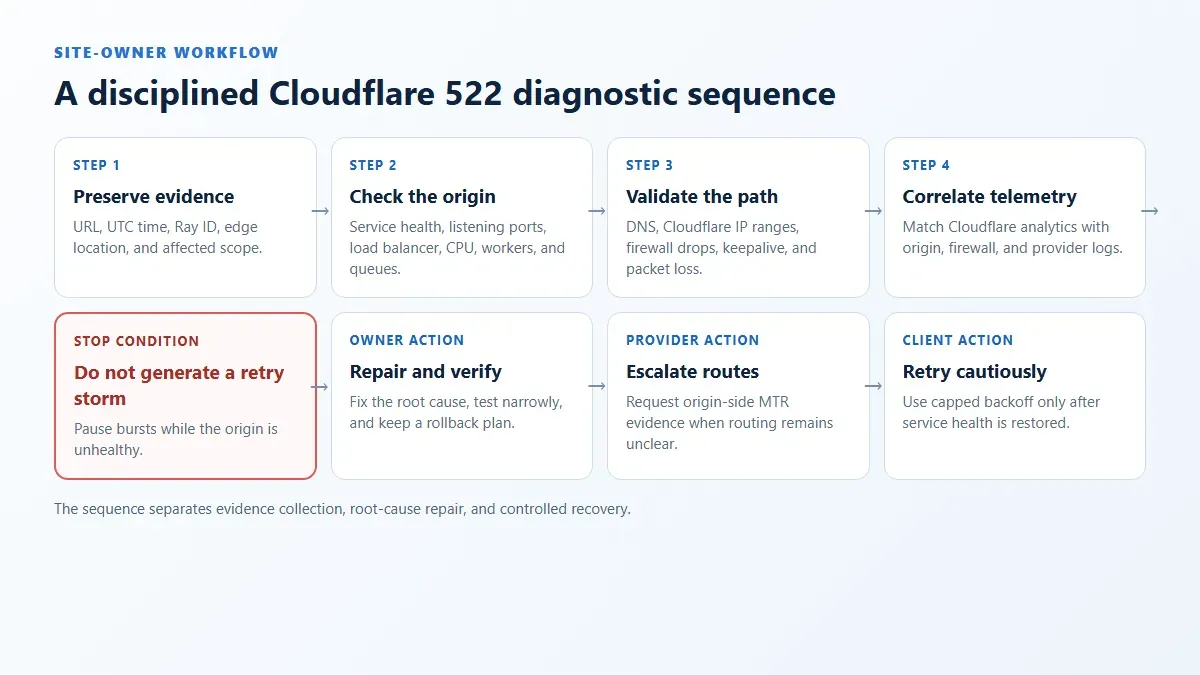
Step 1: Capture the incident before changing anything
Record the full URL, UTC time, local timezone, HTTP status, Ray ID, requester region, and whether the error affects every path or only one endpoint. Cloudflare recommends sharing the error code, message, time, timezone, and URL with the hosting provider. Also inspect load balancers, caches, proxies, and firewalls between Cloudflare and the web server—not only the application log.
For a controlled request:
curl --silent --show-error --dump-header headers.txt \
  --output response.html \
  --max-time 30 \
  https://www.example.com/health
Do not paste cookies, authorization headers, internal IPs, or complete user data into a public ticket. A Ray ID and timestamp are normally more useful than repeated screenshots of the same error page.
Step 2: Confirm the origin is online and listening
Check the application, reverse proxy, and load balancer from an authorized administrative network. Verify that the expected service is listening on the port required by the Cloudflare SSL mode. Review CPU, memory, worker saturation, connection queues, restarts, and upstream dependency failures around the incident time.
Useful owner-side checks include:
curl --include --max-time 10 http://127.0.0.1/health
ss -lntp
systemctl --no-pager --full status nginx
Adapt these commands to the actual service and operating system. A healthy loopback response does not prove that Cloudflare can reach the public listener, but a failed local health check gives the owner a concrete place to start.
Step 3: Verify the Cloudflare DNS origin address
Confirm that the proxied A or AAAA record points to the origin address currently assigned by the hosting provider. Pay attention to stale records after migrations, failovers, load-balancer replacements, or IPv6 changes. If an Origin Rule rewrites the hostname, verify that the resulting hostname resolves correctly.
Do not publish or test the origin address from an untrusted network. Direct-origin testing should be restricted to authorized owners and should preserve Cloudflare’s security purpose.
Step 4: Check firewalls and security tools
The most common documented cause is Cloudflare address ranges being blocked or rate-limited at the origin. Check host firewalls, cloud security groups, network ACLs, intrusion prevention systems, hosting controls, .htaccess, and upstream appliances.
Cloudflare advises origin operators to permit its current IP ranges. Retrieve ranges only from Cloudflare’s official list, maintain both IPv4 and IPv6 where applicable, and test changes in a controlled environment. Do not copy an old range list from a blog. Broad allow rules can weaken security, so restrict the rule to the required ports and keep the origin protected from direct public traffic. Cloudflare’s origin configuration guidance explains this model.
Step 5: Investigate overload and connection limits
An origin can drop new handshakes while CPU looks normal. Inspect maximum workers, file descriptors, listen backlog, load-balancer targets, SYN backlog, connection tracking, database waits, and sudden traffic changes. Compare a healthy period with the 522 window rather than assuming one metric explains the incident.
Reduce unnecessary work at the origin, cache appropriate content, scale constrained components, and apply destination-side rate controls deliberately. Do not “solve” overload by encouraging clients to retry faster.
Step 6: Enable and tune keepalive correctly
Cloudflare reuses connections to the origin. Its current connection limits documentation recommends keeping origin keepalives enabled. Check whether the web server, load balancer, or upstream proxy closes connections too aggressively or maintains more idle connections than the origin can support.
Keepalive changes affect resource usage. Measure active and idle connections, test under representative load, and keep a rollback plan.
Step 7: Look for packet loss or asymmetric routing
If the server is healthy and correctly configured, ask the hosting provider to inspect packet drops and routes. Cloudflare recommends an MTR or traceroute from the origin toward a Cloudflare IP that previously connected to the origin, identified from server logs. A trace from an unrelated laptop does not represent the Cloudflare-to-origin path.
Step 8: Correlate Cloudflare and origin telemetry
Use Cloudflare Error Analytics, Origin Analytics, Log Explorer, or Logpush according to the account plan. Correlate Ray ID, edge location, URL, origin status, TCP failure rate, and timestamp with origin and load-balancer logs. A cluster tied to one path may indicate endpoint-specific load; a cluster tied to one data center or route may indicate a network problem.
How Visitors and Automated Clients Should Respond
For a normal visitor
Wait a short period and retry once. If the error persists, send the site owner the URL, time and timezone, Ray ID, and a concise description. Switching browsers or clearing cookies rarely repairs a Cloudflare-to-origin TCP timeout.
For an authorized API client or crawler
Handle 522 as a bounded, observable failure. Stop the current burst, honor any Retry-After value, introduce capped exponential backoff with jitter, and set a retry ceiling. Do not treat 522 as permission to start aggressive proxy rotation.
This Python diagnostic records non-secret response metadata and stops after one request:
import os
import time
import requests

target_url = os.environ["AUTHORIZED_TARGET_URL"]
proxy_url = os.environ.get("HTTPS_PROXY")

proxies = {"http": proxy_url, "https": proxy_url} if proxy_url else None
started = time.monotonic()

response = requests.get(
    target_url,
    proxies=proxies,
    timeout=(10, 30),
    allow_redirects=False,
)

print({
    "status": response.status_code,
    "elapsed_ms": round((time.monotonic() - started) * 1000),
    "cf_ray": response.headers.get("cf-ray"),
    "cf_error_type": response.headers.get("cf-error-type"),
    "server": response.headers.get("server"),
})

if response.status_code == 522:
    raise SystemExit("Origin path timed out; stop the burst and preserve evidence.")
Install the dependency with python -m pip install requests, pin the tested version in the project, and never place proxy credentials directly in source code. The diagnostic does not bypass Cloudflare and does not claim that the target permits automated access.
Can a Proxy Fix or Bypass Cloudflare Error 522?
Not directly. Because the failing connection is usually Cloudflare edge to origin, a visitor-side proxy cannot restart the origin, correct its DNS, change its keepalive configuration, or allow Cloudflare through its firewall.
A proxy can still help with controlled diagnosis:
- Compare one direct or corporate route with one approved proxy route.
- Check whether failures cluster by requester geography or Cloudflare edge location.
- Keep a stable exit for a stateful reproduction so route changes do not corrupt the test.
- Verify that the proxy endpoint itself is healthy before blaming the destination.
Start with the Rola IP proxy setup guide and verify a simple authorized destination before testing the affected site. A residential proxy may provide a different authorized requester path, but a different path is evidence—not a 522 fix.
Rola IP documentation describes session and location controls for supported endpoints. Review the current proxy parameters before using a sticky session or country selector. Keep the same session while reproducing one incident; otherwise, changing the exit, Cloudflare edge, cookies, and timing simultaneously makes the result difficult to interpret.
For a permitted collection workflow, a web scraping proxy supplies network routing, not authorization. It cannot grant access, override robots directives or terms, repair the target’s origin, or justify continuing after blocks, rate limits, CAPTCHA, or account warnings.
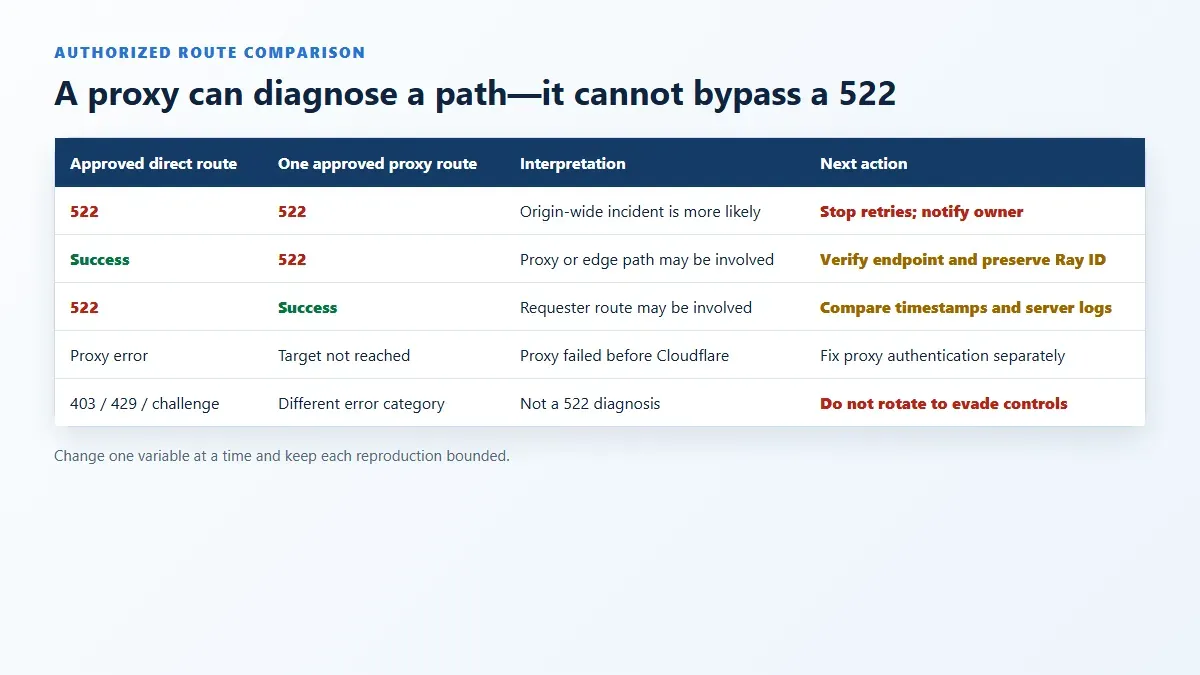
A Safe Route-Comparison Matrix
Run only the minimum tests authorized by the destination and your organization.
| Direct/approved route | One approved proxy route | Likely interpretation | Next action |
|---|---|---|---|
| 522 | 522 | Origin-wide or broadly distributed incident is more likely | Stop retries and notify the owner |
| Success | 522 | Proxy path, edge location, or route-specific symptom is possible | Verify proxy health and share route evidence |
| 522 | Success | Requester route or edge-specific symptom is possible | Preserve both Ray IDs and timestamps; investigate routing |
| Proxy connection error | Not reached | The proxy failed before the destination | Fix endpoint/authentication separately |
| 403/429/challenge | Different category | This is not a 522 diagnosis | Follow access policy; do not rotate to evade it |
These outcomes are hypotheses, not proof. Cloudflare’s anycast routing, cache state, origin recovery, and timing can change between requests. Reproduce cautiously and correlate server-side data whenever possible.
Common Fixes That Do Not Address the Root Cause
Clearing browser cache or changing DNS on the client
These steps can solve other problems but usually do not repair Cloudflare’s connection to the configured origin. They may also erase useful reproduction state.
Rotating through many proxy IPs
Large-scale rotation creates more requests while changing several variables at once. It can intensify origin load and resemble evasive behavior. Use one controlled comparison, not an unbounded loop.
Disabling TLS validation or firewall protections
Certificate bypasses and broad firewall changes introduce security risk without proving the 522 cause. Repair trust, ports, routes, and narrowly scoped rules instead.
Pointing automation at the origin directly
This bypasses the website’s intended Cloudflare security layer and may expose infrastructure. Only an authorized owner should perform controlled direct-origin testing.
Increasing every timeout
A longer client timeout does not change Cloudflare’s fixed connection boundaries. Fix the origin path and distinguish 522 from 524 before tuning application response timeouts.
Cloudflare 522 Troubleshooting Checklist
Site owner
- [ ] Capture URL, UTC time, timezone, status, Ray ID, and affected scope.
- [ ] Confirm the application, reverse proxy, and load balancer are healthy.
- [ ] Verify current
A/AAAArecords and Origin Rule hostnames. - [ ] Confirm the origin permits Cloudflare’s current IPv4 and IPv6 ranges.
- [ ] Inspect connection queues, limits, worker saturation, and packet drops.
- [ ] Confirm keepalives are enabled and appropriately sized.
- [ ] Correlate Cloudflare analytics with origin, firewall, and load-balancer logs.
- [ ] Obtain provider-side MTR or route evidence if the cause remains unclear.
Authorized client or proxy operator
- [ ] Confirm the exact status and preserve diagnostic headers.
- [ ] Stop bursts and apply capped backoff rather than immediate rotation.
- [ ] Verify proxy connectivity against an approved diagnostic destination.
- [ ] Use one stable route/session for each reproduction.
- [ ] Compare routes only when permitted and record Ray IDs and timestamps.
- [ ] Treat
403,429, CAPTCHA, and account restrictions as separate stop signals. - [ ] Report persistent 522 evidence to the site owner; do not probe a hidden origin.
Conclusion
Cloudflare Error 522 is an origin connectivity timeout, so the durable fix belongs on the Cloudflare-to-origin path. Site owners should preserve incident evidence, restore origin health, verify DNS and Cloudflare ranges, inspect connection capacity and keepalives, and correlate network telemetry before changing production controls.
Visitors and authorized automation operators should retry sparingly, keep routes stable during diagnosis, and report persistent evidence. Rola IP can help compare approved requester paths and sessions, but it does not bypass Cloudflare or repair the destination’s origin.