
Twitter IP Ban Signs, Causes, and Safe Recovery Guide

Sep 15, 2026 · Troubleshooting · 11 min read
TL;DR
A failed login or a successful connection on another network does not prove that X banned your IP. Identify the exact account notice, API response, or connection error first. Use official recovery for account restrictions and endpoint-specific guidance for API limits. For generic connectivity problems, an authorized comparison of a trusted route and a verified Rola IP route can help isolate network issues. It cannot reverse enforcement or establish why X rejected the original request.
Can You Get IP Banned on Twitter?
X may evaluate many security, abuse, and authenticity signals, but its public help pages do not describe a single consumer-facing “IP banned” flag. Therefore, a user cannot prove an IP ban merely because several accounts fail on the same Wi-Fi or because access works differently on another connection.
The absence of a published IP-ban test does not prove that network information is irrelevant. It means the diagnosis should remain an inference unless X confirms it. Shared residential connections, mobile carrier NAT, offices, universities, and public Wi-Fi can place many unrelated users behind one public address, so an IP-only conclusion is often too simple.
Does Twitter Ban IP Addresses or Accounts?
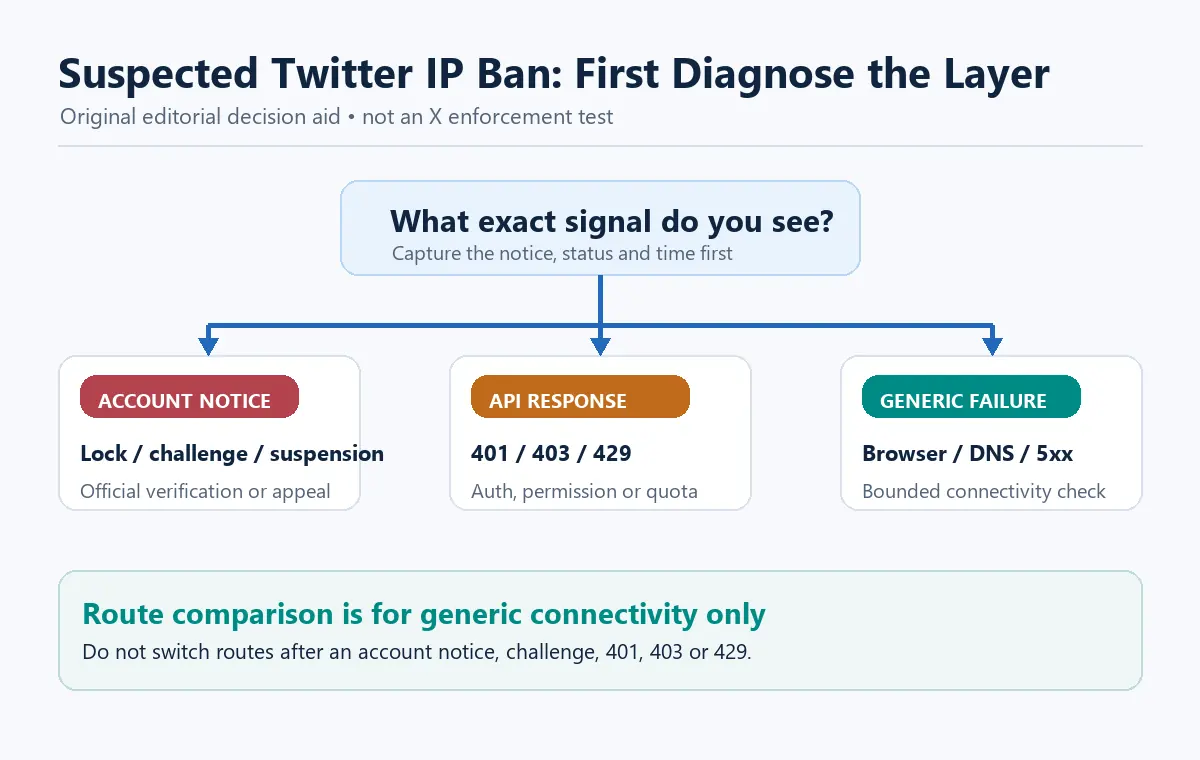
The observable action is often account- or product-specific. X publicly documents locked accounts, limited account features, suspended accounts, suspicious login checks, temporary login lockouts, API rate limits, and developer-access enforcement. It also explicitly prohibits circumventing enforcement actions.
Use this table before labeling the incident an IP ban:
| Symptom | More likely category | What distinguishes it | Correct first action |
|---|---|---|---|
| “Account suspended” on the profile or login | Account enforcement | Follows the account across normal networks | Read the notice and appeal if it is a mistake |
| Phone, email, or CAPTCHA ownership check | Security or automation lock | X asks for a defined verification step | Complete only the official verification |
| Temporary lock after repeated passwords | Login protection | X documents a cooling-off period | Stop attempts and wait before retrying |
429 Too Many Requests from the API |
Endpoint, app, user, or plan limit | Rate-limit headers or usage cap explain the response | Wait for reset and reduce request frequency |
401 from the API |
Authentication failure | Token is absent, expired, revoked, or invalid | Correct OAuth credentials; do not change IP |
403 or policy message |
Permission or enforcement | Request is understood but denied | Stop and review access, plan, and policy |
| X fails only in one browser | Local browser state | Private window or clean profile behaves differently | Review cookies, extensions, and browser updates |
| X fails on one network for logged-out visitors | Network or regional path | Other unrelated sites and approved routes provide context | Diagnose DNS, ISP, VPN, or egress filtering |
| Multiple accounts fail after coordinated automation | Account or authenticity enforcement is plausible | Shared behavior is a stronger signal than one IP | Stop automation and use official support |
Why a Suspected Twitter IP Ban Happens
Account enforcement or ban-evasion detection
X’s Authenticity policy states that users may not circumvent enforcement actions. It gives examples such as creating new accounts, repurposing accounts, or having someone else operate an account to replace a suspended one. If a suspension preceded the network problem, do not use a proxy, new profile, or new device to continue the same activity.
Suspicious automation or spam-like behavior
High-frequency actions, repetitive content, coordinated accounts, unsolicited replies, or unauthorized automation can trigger limits or enforcement. X’s automation rules prohibit spam and duplicative automated activity and warn that associated accounts or developer access may be suspended.
Failed login attempts or compromised credentials
Repeated password attempts can cause a temporary login lock. X’s current login-lock guidance, reviewed on September 14, 2026, says the lock lasts about an hour and advises users to stop retrying while it clears. Because this timing may change, follow the period shown in the current help page. A different IP does not correct invalid credentials, a stolen token, or an account-level restriction.
API rate limits and usage caps
An X API 429 is not proof of an IP ban. X documents rate limits at app and user-context levels, as well as product usage caps. Check the endpoint documentation, developer dashboard, and rate-limit headers. Wait for the applicable window to reset instead of switching IPs to continue requests.
Network, VPN, DNS, or browser failure
X’s general web troubleshooting recommends checking the network, trying a private browser, updating the browser, clearing relevant state, reviewing extensions, and turning off a problematic VPN. A failure limited to one corporate egress, ISP, DNS resolver, or VPN endpoint may be a connectivity problem rather than enforcement.
Shared-network reputation
Many users can share an office, campus, hotel, carrier, or residential gateway address. If activity from that address receives more challenges, the network association may be relevant, but the symptom alone cannot reveal X’s internal decision. Avoid attributing unrelated accounts to one cause without account notices, response codes, and controlled evidence.
How to Diagnose a Twitter IP Ban Claim
Step 1: Preserve the original evidence
Before clearing cookies, changing networks, or rotating a proxy, record:
- Exact on-screen message or API response body
- HTTP status and relevant response headers
- UTC timestamp and local timezone
- Account identifier or redacted account label
- Browser, app, or API client version
- Network type and a non-secret route label
- Whether the user was logged in
- Last successful action and recent automation changes
- Whether one account or several accounts are affected
Do not publish session cookies, OAuth tokens, email addresses, phone numbers, full IP addresses, or appeal details in screenshots.
Step 2: Stop automated and repeated activity
Pause scheduled posts, crawlers, browser automation, third-party social tools, and repeated login attempts. Continuing can extend a temporary lock, consume remaining API quota, obscure the first failure, or create additional policy signals.
Do not rotate IPs after a 403, 429, CAPTCHA, suspension, or explicit access warning. Those responses are stop signals, not instructions to find another route.
Step 3: Identify the enforcement layer
Ask the narrowest useful questions:
- Does the account show a lock, limitation, or suspension notice after a normal login?
- Does X request phone, email, password, or CAPTCHA verification?
- Is the problem confined to the API, and what exact status is returned?
- Does logged-out
x.comfail on the same network? - Does one clean browser reproduce the problem without extensions?
- Is there a known X service incident?
- Did the failure begin immediately after a policy-sensitive action or automation change?
These observations help narrow the affected layer, but several causes may coexist. Treat them as evidence to combine, not a mutually exclusive decision tree or proof of an IP ban.
Step 4: Test the browser safely
Use X’s normal login page and follow only the message shown for the affected account. For generic web errors—not enforcement—try an updated browser or one private window. Disable untrusted extensions and check whether a VPN is breaking connectivity. If access returns only after turning off the VPN, contact the VPN or network provider rather than cycling endpoints.
A private window is a browser-state test, not a way to evade account restrictions. Do not sign into replacement accounts or repeat prohibited actions during the test.
Step 5: Read API status and rate-limit headers
Use this example only with an endpoint whose current documentation supports app-only bearer-token authentication. It accepts only HTTPS on the exact api.x.com hostname, rejects embedded credentials, query strings, and fragments, and refuses redirects before sending the token. Supply any documented query values separately only after reviewing whether they contain secrets. Other X endpoints may require a different OAuth context. The connection and read timeouts are separate limits, not a 40-second total deadline. This checks an API response; it does not configure or verify a Rola IP proxy.
import os
import time
from urllib.parse import urlsplit

import requests

endpoint = os.environ["AUTHORIZED_X_API_ENDPOINT"]
token = os.environ["X_BEARER_TOKEN"]
parts = urlsplit(endpoint)

if (
    parts.scheme != "https"
    or parts.hostname != "api.x.com"
    or parts.username
    or parts.password
    or parts.query
    or parts.fragment
):
    raise SystemExit("Refusing an untrusted API endpoint.")

started = time.monotonic()

try:
    response = requests.get(
        endpoint,
        headers={"Authorization": f"Bearer {token}"},
        timeout=(10, 30),  # separate connect and read limits
        allow_redirects=False,
    )
except requests.exceptions.ProxyError:
    raise SystemExit("Proxy connection or authentication failed.")
except requests.exceptions.SSLError:
    raise SystemExit("TLS verification failed; do not disable certificate checks.")
except requests.exceptions.ConnectTimeout:
    raise SystemExit("Connection timed out before an HTTP response.")
except requests.exceptions.ReadTimeout:
    raise SystemExit("Server response timed out after connection.")
except requests.exceptions.RequestException as exc:
    raise SystemExit(f"Transport error: {type(exc).__name__}")

if 300 <= response.status_code < 400:
    raise SystemExit("Unexpected redirect; verify the documented endpoint.")

print(
    {
        "status": response.status_code,
        "elapsed_ms": round((time.monotonic() - started) * 1000),
        "rate_limit_limit": response.headers.get("x-rate-limit-limit"),
        "rate_limit_remaining": response.headers.get("x-rate-limit-remaining"),
        "rate_limit_reset": response.headers.get("x-rate-limit-reset"),
    }
)

if response.status_code in {401, 403, 429}:
    raise SystemExit(
        "Stop requests and resolve authentication, permission, or rate limits."
    )
Install and pin requests in the project, protect the bearer token with a secret manager, and do not log headers, cookies, query values, or response bodies that may contain secrets. Confirm the endpoint, authentication method, and plan in current X developer documentation. Do not change routes to work around an app-, user-, endpoint-, or plan-level limit.
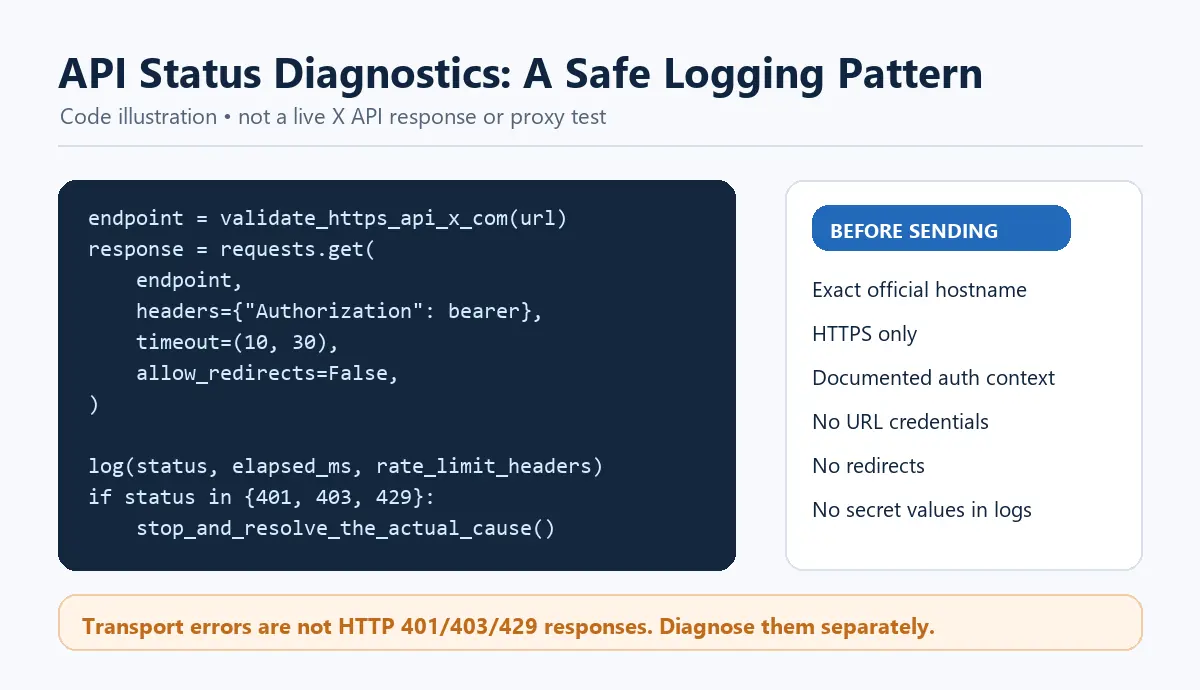
Step 6: Compare a network path only for generic connectivity
If there is no account restriction, challenge, 403, 429, or policy notice, an administrator may compare one approved route to determine whether a corporate egress, ISP, DNS resolver, or VPN is failing. Keep the comparison read-only and bounded—for example, loading the logged-out home page once.
Do not perform this comparison to regain access to a suspended account, exceed a rate limit, or continue blocked automation. When enforcement is visible, move directly to verification, security recovery, or appeal.
Step 7: Use the official recovery path
- Locked account: complete the ownership verification X presents.
- Repeated login lock: stop attempts, wait for the documented interval, and remove stale third-party connections if applicable.
- Compromised account: change the password, secure the associated email, enable two-factor authentication, and revoke unknown apps.
- Suspended account: review the notice and submit an official appeal if you believe the decision is wrong.
- API restriction: correct authentication, wait for rate-limit reset, review plan access, or contact developer support.
What Can a Proxy Change After a Suspected Twitter IP Ban?
A proxy does not remove a restriction applied to the original IP address or reverse an account suspension. It changes the network exit used for a connection, which may produce a different connectivity result. That difference alone does not prove an IP ban. Follow X’s official recovery process for account enforcement; use route comparisons only for authorized connectivity diagnosis.
A different route also cannot satisfy an ownership check, reset an app quota, restore a revoked token, or authorize prohibited automation. For account recovery, use a familiar trusted device and the official flow whenever possible.
When Rola IP Can Be Used Safely With X
Rola IP can support network operations that are authorized independently of an enforcement action. Verify the endpoint against a neutral, approved diagnostic service before involving X.
A residential proxy may provide an ISP-associated route for permitted regional quality assurance or public availability testing. It does not make an account authentic, remove platform limits, or grant permission to collect data.
For reproducible diagnosis, keep one approved fixed session while comparing page availability. Changing country, session, browser state, cookies, and timing simultaneously destroys the value of the test. Session syntax and supported ranges vary by product and must come from the current Rola documentation.
A web scraping proxy provides network routing for an otherwise authorized collection workflow. Before using it with X, confirm that the access method, data, account state, automation, storage, and downstream use comply with X’s current rules, developer agreement, privacy obligations, and applicable law.
Appropriate diagnostic uses
- Verify whether a company-owned monitoring system can reach a public, permitted X page from an approved region.
- Compare one normal corporate egress with one approved proxy route after excluding account enforcement.
- Maintain a stable route for a permitted localization or availability test.
- Separate proxy authentication failures from X API authentication or permission failures.
- Reproduce a generic connection issue without posting, logging in, or automating engagement.
How Can You Tell a Proxy Failure From an X Restriction?
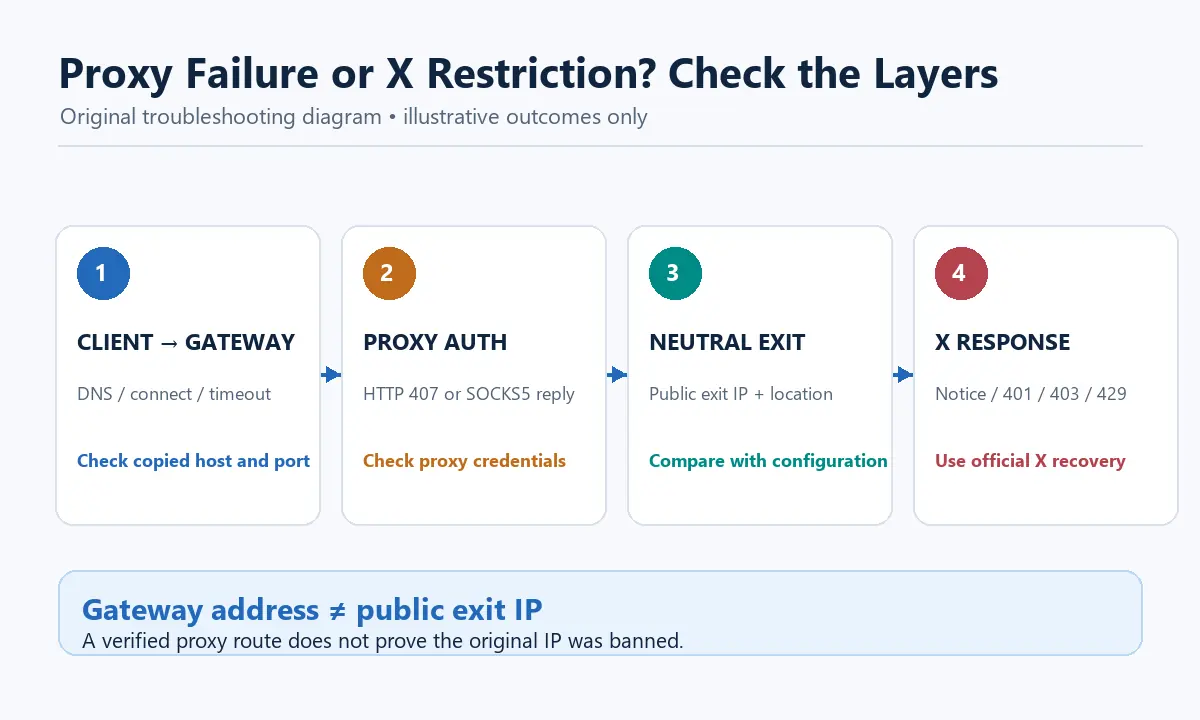
Test the proxy against an approved neutral diagnostic service before involving X. Confirm that the client can reach the gateway, authenticate successfully, and obtain the expected exit information. The proxy gateway address is not necessarily the public exit IP. An HTTP proxy may return 407 Proxy Authentication Required; SOCKS5 reports connection and authentication failures through protocol-level replies rather than HTTP status codes.
| Observed layer | Evidence to record | What it suggests | Next action |
|---|---|---|---|
| Client to proxy gateway | DNS failure, refused connection, or connect timeout before any HTTP response | Gateway address, port, local firewall, or upstream reachability problem | Recheck the copied host and port; contact the proxy provider if they are correct |
| Proxy authentication | HTTP 407 or a SOCKS5 authentication reply |
Proxy credentials, allowlist, or authentication mode problem | Recheck credentials or approved allowlist; never send X credentials to the proxy gateway |
| Neutral exit check | Proxy connects, but the reported public IP or location differs from the configured target | Exit selection or parameter problem | Compare the result with the current Rola settings and parameter documentation |
| Target response | Neutral check succeeds, but X returns 401, 403, 429, CAPTCHA, or an account notice |
X authentication, permission, rate-limit, security, or enforcement layer | Stop route testing and follow the matching X recovery or API process |
| Target availability | Neutral check succeeds, while logged-out X returns a transport error or 5xx |
Target, path, or upstream availability problem remains possible | Record the result, check service status, and use only a bounded read-only comparison |
This sequence isolates the failing layer; it does not prove why X made an internal decision. Do not insert a proxy into account recovery merely because the gateway and exit checks succeed.
Diagnostic Result Matrix
Account state |
Direct/trusted route |
One approved diagnostic route |
Likely category |
Next step |
|---|---|---|---|---|
Suspended notice |
Restricted |
Not required—follow the account recovery process |
Account enforcement |
Stop testing and appeal if appropriate |
Ownership challenge |
Challenge |
Not required—follow the account recovery process |
Security verification |
Complete official verification on a trusted route |
Normal |
X unavailable |
X available |
Network, DNS, VPN, ISP, or egress issue possible |
Preserve evidence and contact the network provider |
Normal |
X available |
Proxy fails |
Proxy endpoint, authentication, or route issue |
Fix the proxy separately |
Normal |
API 429 |
Not required—follow the API recovery process |
App/user/endpoint limit likely |
Wait for reset and reduce requests |
Normal |
API 401 or 403 |
Not required—follow the API recovery process |
Authentication, scope, plan, or policy issue |
Correct authorization; do not rotate |
Normal |
Intermittent 5xx |
Intermittent 5xx |
Platform or upstream service issue possible |
Check service status and retry with capped backoff |
The second-route column describes a test only for generic transport or 5xx failures. For account notices, challenges, 401, 403, or 429, “not required” means do not perform that comparison. The matrix supports triage, not proof of X’s internal signals.
How to Reduce Future Locks and False IP-Ban Diagnoses
Keep account access stable
Use strong unique passwords, two-factor authentication, a secured email account, current software, and familiar devices. Avoid sudden, unnecessary shifts between countries or many proxy endpoints during normal account use.
Review connected applications
Remove integrations you no longer trust or use. A stale tool can continue making failed logins or automated requests after the user stops interacting with it.
Use official APIs for application access
Use supported authentication and endpoints, follow the developer plan’s limits, and monitor remaining quota. Treat rate-limit resets and product caps as application controls, not network obstacles.
Bound automation and retries
Set request timeouts, concurrency limits, backoff, retry ceilings, and circuit breakers. Pause on 401, 403, 429, CAPTCHA, account notices, or unexpected login pages. Do not automatically feed those states into a proxy rotator.
Separate identities and test purposes legitimately
Keep production accounts, authorized test accounts, API apps, cookie stores, and logs clearly assigned. Do not use separation to conceal common control or coordinate inauthentic behavior.
Keep an evidence trail
Record configuration version, client version, UTC time, endpoint, non-secret route label, status, and policy-review date. Good evidence prevents a temporary password lock or API quota from being mislabeled as an IP ban.
Limits and Safe-Use Boundaries
This diagnostic method cannot reveal X’s private risk controls or prove that X never uses network information. A successful second route does not establish that the first IP was banned. It also does not restore a suspended account, authorize access to restricted data, or guarantee that X will accept a Rola IP connection. Stop testing when X presents an account notice, verification challenge, 401, 403, or 429, and use the applicable official process.
Conclusion
A suspected Twitter IP ban cannot be confirmed from one failed login or one successful alternate network. First identify whether the actual state is an account suspension, ownership challenge, temporary login lock, API authentication error, rate limit, browser problem, or generic network failure.
Use X’s official verification, security, and appeal paths for account restrictions. Rola IP can support one bounded, authorized network comparison after enforcement has been excluded, but it cannot remove a suspension, reset platform limits, or make prohibited automation acceptable.