
Crawlee Web Scraping: Configure Rola IP Proxies

Sep 11, 2026 · Guides · 12 min read
TL;DR
For Crawlee web scraping, use Crawlee’s HTTP crawlers when data is already in the response; use PlaywrightCrawler when JavaScript renders it in the browser. Add a Rola IP endpoint through ProxyConfiguration, keep credentials in environment variables, verify the exit route, and choose stable sessions or per-request rotation only for an authorized workflow.
Before You Scrape
Proxy configuration is not the first decision. First define what the crawler is allowed to do and what a successful response looks like.
Confirm authorization and scope
Use only public, owned, or contractually authorized targets. Check the target’s terms, robots guidance where applicable, rate limits, API availability, privacy obligations, and any restrictions on automated collection. A Rola IP endpoint can change the network route; it does not grant permission to access a private resource or guarantee that a target will return data.
Write down the pilot scope before coding:
- The approved hostnames and URL paths.
- The fields you need, such as title, price, URL, or JSON property.
- The maximum number of URLs and request rate.
- Whether login, cookies, custom headers, or a browser are required.
- The verification endpoint and the fields you will record.
- The cleanup step for temporary credentials and logs.
Decide whether the page is static or rendered
Open one approved URL and inspect the initial HTML. If the data is present in the response, an HTTP or Cheerio-based crawler is usually the simpler first test. If the data appears only after JavaScript runs, use PlaywrightCrawler and wait for a specific selector or state change. Do not select Playwright merely because the URL starts with HTTPS; the choice depends on how the page delivers the data.
Choose the Right Crawlee Crawler
| Situation | Starting point | Why | First failure to check |
|---|---|---|---|
| Data is in initial HTML | CheerioCrawler or another HTTP crawler | Lower browser overhead and easy HTML extraction | Selector mismatch or content delivered by an API after load |
| Data is in a JSON endpoint you are authorized to call | HttpCrawler | Keeps the response close to the API and avoids unnecessary browser work | Authentication, headers, rate limits, or endpoint policy |
| Data is rendered in the browser | PlaywrightCrawler | Runs a real browser context and supports DOM waits | Selector timing, browser dependency, or page-side errors |
| You need browser-specific behavior | PlaywrightCrawler or PuppeteerCrawler | Lets you test the browser flow explicitly | Cookies, headers, navigation timeout, and target rules |
| You need Python | BeautifulSoupCrawler or PlaywrightCrawler for Python | The concepts are similar, but the parameter names differ | Mixing JavaScript names such as proxyUrls with Python proxy_urls |
The current Crawlee documentation describes ProxyConfiguration integration with HTTP and browser crawler classes. The examples below use JavaScript modules so the main path matches the sampled English SERP and can be translated to Python later.
Create a Minimal Crawlee Project
Use a current Node.js version approved by your team and keep the exact tested dependency in the project lockfile. The commands below create a small module-based project.
mkdir crawlee-rola-demo
cd crawlee-rola-demo
npm init -y
npm install crawlee
npm pkg set type=module
The installation step should finish without a package-resolution error. Do not copy a floating dependency into production without reviewing the lockfile and the current Crawlee release notes.
For local testing, provide the proxy URL through an approved secret mechanism. The value below is a shape example only:
ROLA_PROXY_URL=http://USERNAME:PASSWORD@HOST:PORT
Do not replace the placeholders with a real credential in a committed file, screenshot, shell-history example, issue, or log. An environment variable reduces accidental exposure but is not a complete secret vault; same-user or privileged processes may still inspect it. Use an approved secret manager for shared or production environments.
Run a No-Proxy Baseline First
A baseline tells you whether the selector, target, and crawler work before a proxy is introduced. Create baseline.mjs:
import { CheerioCrawler } from 'crawlee';

const crawler = new CheerioCrawler({
    maxConcurrency: 1,
    maxRequestsPerCrawl: 3,
    maxRequestRetries: 0,

    async requestHandler({ request, $, response, log }) {
        const record = {
            url: request.loadedUrl ?? request.url,
            status: response?.statusCode ?? null,
            title: $('title').text().trim(),
            h1: $('h1').first().text().trim(),
        };

        log.info(JSON.stringify(record));
        await new Promise((resolve) => setTimeout(resolve, 5000));
    },
});

await crawler.run([
    'https://books.toscrape.com/',
]);
The public demo target above is used because the page is intended for scraping practice. Replace it with an owned or authorized target for a real project. The expected output is one JSON log record per URL with a URL, status, title, and heading. If the title or heading is empty, fix the selector or page-type decision before adding a proxy.
The baseline intentionally uses one concurrent request, three URLs at most, no automatic retries, and a five-second delay. Those are pilot controls, not universal performance recommendations.
Configure a Rola IP Endpoint with ProxyConfiguration
Once the baseline works, add the Rola endpoint through Crawlee’s ProxyConfiguration. This Crawlee proxy configuration keeps the Rola IP endpoint separate from crawler logic and makes route verification easier. Create crawl-with-rola.mjs:
import { CheerioCrawler, ProxyConfiguration } from 'crawlee';

const proxyUrl = process.env.ROLA_PROXY_URL?.trim();

if (!proxyUrl) {
    throw new Error('ROLA_PROXY_URL is required');
}

const proxyConfiguration = new ProxyConfiguration({
    proxyUrls: [proxyUrl],
});

const crawler = new CheerioCrawler({
    proxyConfiguration,
    maxConcurrency: 1,
    maxRequestsPerCrawl: 3,
    maxRequestRetries: 0,

    async requestHandler({ request, $, response, log }) {
        const record = {
            url: request.loadedUrl ?? request.url,
            status: response?.statusCode ?? null,
            title: $('title').text().trim(),
            h1: $('h1').first().text().trim(),
        };

        log.info(JSON.stringify(record));
        await new Promise((resolve) => setTimeout(resolve, 5000));
    },
});

await crawler.run([
    'https://books.toscrape.com/',
]);
The important detail is what the log does not contain: it does not print proxyUrl, the username, the password, or a raw proxy-info object. Crawlee receives the endpoint from the environment, and the request handler records only the fields needed to evaluate the pilot.
Use the generated Rola values exactly as they appear in your account. The protocol, host, port, account name, and password are provider-generated connection details; do not invent a host or substitute a destination URL scheme for the proxy protocol. Rola’s official Quick Start workflow shows the connection-information screen and the fields you need to copy.
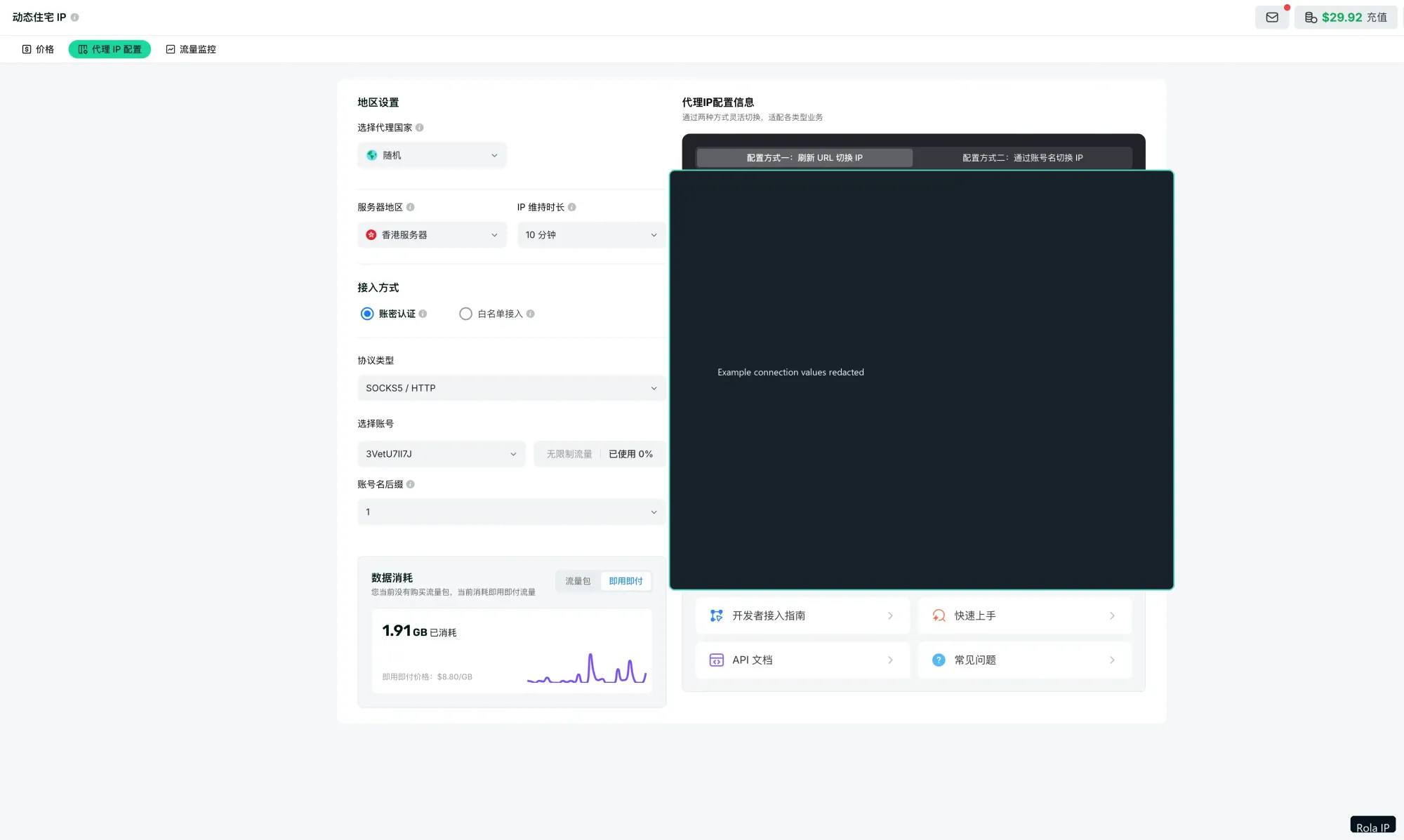
If the provider gives you separate fields rather than a complete URL, assemble them only in memory and encode reserved username or password characters correctly. Prefer the generated connection format and an approved secret manager over manually constructing a URL in a shell command.
Choose a Rola IP Network for the Crawl
The proxy type should follow the task, not a generic claim that one network is always better. Rola’s current proxy networks documentation describes three main rotating networks and their targeting limits.
| Rola network | Suitable starting point | Location controls | Main caveat |
|---|---|---|---|
| Rotating Residential | Location-sensitive e-commerce checks, localization, or authorized collection where a residential network context matters | Country, state, and city; session controls | Availability and target treatment vary; exact third-party geolocation is not guaranteed |
| Rotating Datacenter | Low-risk, high-volume, cost-sensitive checks or availability tests | Country and session controls | Some targets may classify datacenter traffic as server traffic |
| Mobile IP | Mobile-network identity or mobile page QA | Country and session controls | Resources and location options may be more limited; verify the current account configuration |
Rola documents country-level targeting across the three rotating networks, while state and city targeting are documented for Rotating Residential. Choose the smallest network capability that satisfies the authorized test. Do not use a proxy type as a substitute for target permission, correct selectors, or a reasonable request rate.
Understand Crawlee Sessions and Rola Sessions
There are two different session layers:
- Crawlee SessionPool groups request state such as cookies, a session identity, and session health inside the crawler.
- Rola session parameters influence the provider-side proxy identity and how long that identity is reused.
Crawlee’s current session guide shows explicit useSessionPool: true and persistCookiesPerSession: true settings for crawler examples. Make the settings explicit when the workflow depends on continuity:
const crawler = new CheerioCrawler({
    proxyConfiguration,
    useSessionPool: true,
    persistCookiesPerSession: true,
    maxConcurrency: 1,
    // requestHandler follows
});
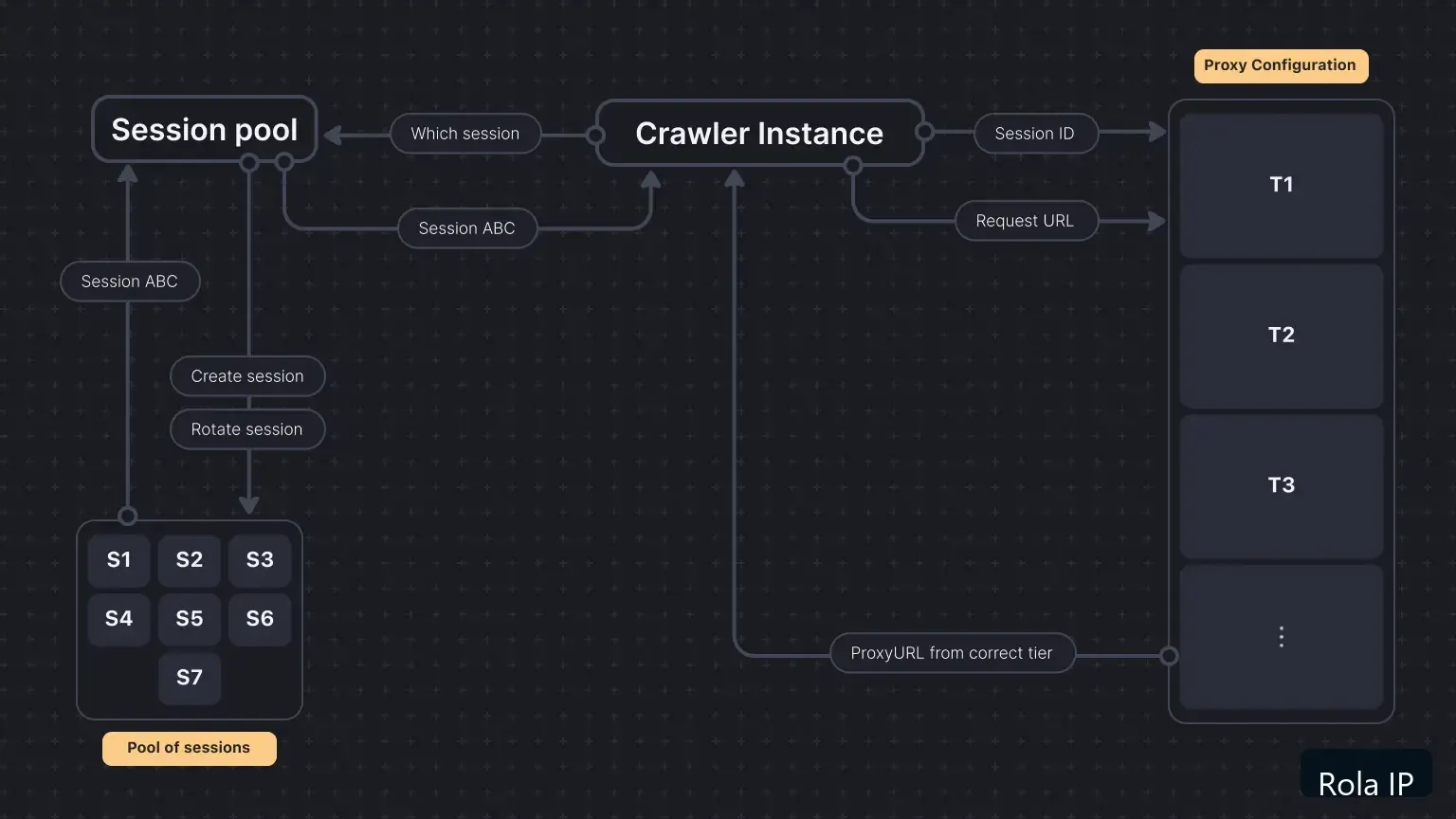
For a cookie-dependent flow, generate a Rola account name with a session identifier and a suitable session duration, then reuse that endpoint for the relevant pilot. Rola documents sessiontime from 1 to 120 minutes and describes the session ID as the value after an underscore in the account name. The current proxy parameters documentation should be treated as authoritative for the exact account format.
For stateless checks where each request should use a new IP, Rola documents the -f-1 pattern. Do not add per-request rotation to login, checkout, form submission, or any flow whose cookies and network identity must remain aligned. A changing IP does not repair a bad selector or grant authorization.
Scrape a JavaScript-Rendered Page with PlaywrightCrawler
Switch to a browser crawler only when the data requires browser execution. Create crawl-rendered.mjs:
import { PlaywrightCrawler, ProxyConfiguration } from 'crawlee';

const proxyUrl = process.env.ROLA_PROXY_URL?.trim();

if (!proxyUrl) {
    throw new Error('ROLA_PROXY_URL is required');
}

const proxyConfiguration = new ProxyConfiguration({
    proxyUrls: [proxyUrl],
});

const crawler = new PlaywrightCrawler({
    proxyConfiguration,
    maxConcurrency: 1,
    maxRequestsPerCrawl: 1,
    maxRequestRetries: 0,
    navigationTimeoutSecs: 60,

    async requestHandler({ request, page, log }) {
        await page.waitForSelector('h1', { timeout: 15000 });

        const record = {
            url: request.loadedUrl ?? request.url,
            title: await page.title(),
            h1: (await page.locator('h1').first().innerText()).trim(),
        };

        log.info(JSON.stringify(record));
    },
});

await crawler.run([
    'https://example.com/',
]);
The example target is a placeholder for a page you are authorized to test. Replace the selector and URL together. If the selector never appears, verify whether the page uses a different frame, a consent step, a login, a client-side API, or a changed DOM. Do not “fix” an unloaded page by increasing concurrency or rotating IPs blindly.
A browser session also changes the verification surface. Record browser errors, navigation timeouts, response status where available, and the final URL. Keep certificate validation enabled. An HTTPS destination does not automatically mean that the browser-to-proxy authentication hop is TLS-protected; confirm the exact gateway and protocol behavior before describing transport as protected.
Verify the Proxy Route Before Scaling
Use an approved IP echo endpoint or the Rola Proxy Checker to distinguish a route problem from a target-content problem. A small HTTP verification script can use the same Rola endpoint:
import { HttpCrawler, ProxyConfiguration } from 'crawlee';

const proxyUrl = process.env.ROLA_PROXY_URL?.trim();

if (!proxyUrl) {
    throw new Error('ROLA_PROXY_URL is required');
}

const proxyConfiguration = new ProxyConfiguration({
    proxyUrls: [proxyUrl],
});

const crawler = new HttpCrawler({
    proxyConfiguration,
    maxConcurrency: 1,
    maxRequestsPerCrawl: 1,
    maxRequestRetries: 0,

    async requestHandler({ request, response, body, log }) {
        const text = Buffer.isBuffer(body) ? body.toString('utf8') : String(body);

        log.info(JSON.stringify({
            url: request.url,
            status: response?.statusCode ?? null,
            bodyPreview: text.slice(0, 200),
        }));
    },
});

await crawler.run([
    'https://api.ipify.org?format=json',
]);
This check is intentionally limited. A changed response from an IP-information endpoint confirms a transport result for that check. It does not prove that a different website will return the same content, accept the request, or map the exit IP to the exact city you selected.
The proxy checker can be used as a separate authorized validation path. Use a temporary endpoint when possible, and do not paste production credentials into a public or shared tool. Record status, protocol, latency, observed country, and the target URL used for the check. Delete temporary test credentials and logs when the pilot ends.
Use API Whitelist Access When Password Distribution Is a Problem
Username/password authentication is convenient for a local development profile. If a machine has a stable public IP and multiple approved tools need access without copying a proxy password into each process, evaluate Rola’s API whitelist setup.
The workflow is:
- Add the public IP of the approved machine to the Rola allowlist.
- Select the network, supported location parameters, protocol, duration, and output format.
- Generate the proxy entry.
- Pass the resulting IP and port to Crawlee without username/password fields.
- Verify the actual exit IP with an authorized request.
- Update the allowlist if the machine’s public IP changes.
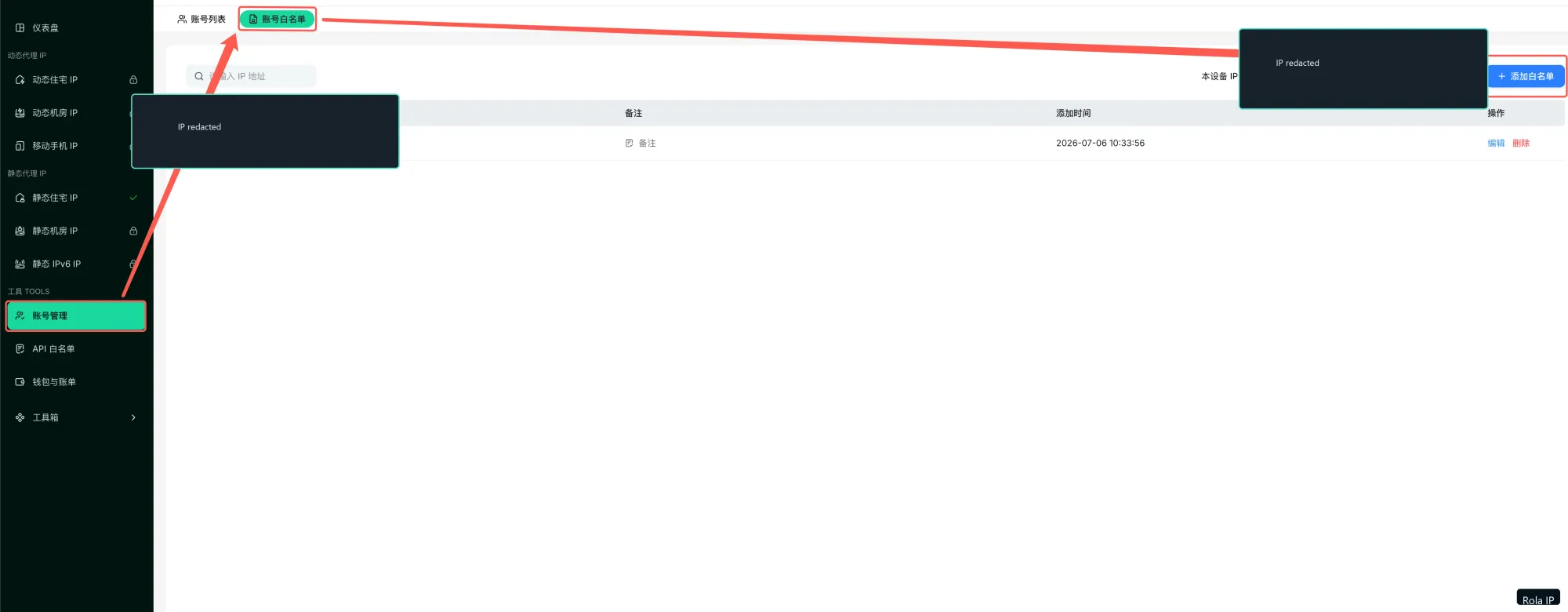
An extracted IP:port value is a relay endpoint, not proof of the final exit location. API whitelist access also changes the deployment assumption: a laptop on a changing residential connection is a poor fit unless the allowlist is maintained. Choose between credential access and whitelist access based on the environment, not on a claim that one method is universally safer.
Troubleshoot Crawlee Proxy Configuration
| Symptom | Likely cause | How to verify | Fix |
|---|---|---|---|
ROLA_PROXY_URL is required |
The environment variable is missing from the process that runs Node.js | Print only whether the variable exists, never its value | Load the approved secret in the same shell, container, or CI job |
| Invalid proxy URL or authentication error | Missing scheme, wrong host/port, expired credential, or reserved character in a credential | Recopy the generated Rola details and test one endpoint | Use the exact generated protocol and separate secret fields; do not put destination credentials in the proxy URL |
| The IP does not change | Proxy configuration was not passed, the endpoint failed, or the check was direct | Run the one-request HTTP verification and compare direct versus proxied results if policy allows | Fix the configuration before adding concurrency or more sessions |
| 403 or 429 from the target | Target policy, request rate, cookies, headers, proxy reputation, or authorization issue | Compare status and response body at low volume; review target rules | Slow down, reduce scope, use the approved access method, and stop if authorization is unclear |
| Empty data from a rendered page | Cheerio received initial HTML before JavaScript loaded the data | Inspect initial HTML and test the same URL with PlaywrightCrawler | Wait for a stable selector or use an authorized API response |
| Browser navigation timeout | Slow route, page-side script, blocked resource, or an incorrect URL | Record timeout, final URL, and browser console information | Test one URL, keep concurrency at one, and adjust timeout only after the cause is understood |
| The location is not what you expected | Wrong network, unsupported state/city control, or approximate IP geolocation | Confirm the Rola network and account parameters; compare observed country and city | Use state/city only where Rola documents it and treat city output as approximate |
| Every request gets a new IP | Rola per-request rotation, changing session parameters, or a retired Crawlee session | Log a non-secret session label and compare the provider account pattern | Use a stable provider session for continuity; reserve per-request rotation for stateless work |
| Credentials appear in logs or exports | Raw proxy URL or proxy-info object was logged | Search logs, CI artifacts, and screenshots for host/user patterns | Rotate exposed credentials, remove artifacts, and log only redacted status fields |
Do not treat a 403 or 429 as proof that a different proxy should be tried indefinitely. The correct next step may be an API, a lower request rate, a permission review, or stopping the collection.
Run a Bounded Three-URL Pilot
Before adding a large queue, run a controlled pilot with these parameters:
- Target: Three approved URLs from one permitted host, plus one approved IP-information endpoint for route verification.
- Crawler: Start with CheerioCrawler for initial HTML; use PlaywrightCrawler only when the data is rendered in the browser.
- Concurrency: One request at a time.
- Schedule: About five seconds between requests.
- Retries: No automatic retries in the first run. Manually retry once only for a classified connection timeout, not for 403, 407, 429, authentication, or authorization errors.
- Session policy: Use one stable Rola session for cookie-dependent work; use per-request rotation only for stateless checks.
- Output fields: URL, status, duration, extracted field count, crawler type, protocol label, non-secret session label, observed exit country if authorized, and error category.
- Success criteria: The expected fields are present, the route verification returns the expected transport result, and no credential is written to logs or output.
- Cleanup: Disable or remove the temporary endpoint, clear environment variables, delete pilot logs containing sensitive metadata, and rotate credentials if any exposure occurred.
The pilot measures whether this crawler, endpoint, target, and policy combination works for the chosen scope. It does not establish a universal success rate or guarantee future target acceptance.
Security and Authorized-Use Checklist
Before increasing scope:
- Confirm authorization for every hostname and path.
- Keep proxy credentials out of URLs where the environment supports separate secret fields.
- Never commit
.env, generated proxy lists, browser storage, or raw request logs. - Redact
proxyInfo.urlbefore logging; it may contain credentials. - Treat environment variables as exposure reduction, not a complete secret vault.
- Keep TLS certificate validation enabled.
- Distinguish the HTTPS target from the transport protection between Crawlee and the proxy gateway.
- Keep request rate, concurrency, and retry behavior bounded.
- Use a stable session for continuity and rotation only for stateless work.
- Stop when permission, target policy, or data-handling requirements are unclear.
Python Mapping
Crawlee for Python uses the same conceptual flow but different import and option names. The official Python proxy guide uses ProxyConfiguration with proxy_urls and passes it to a crawler. A minimal shape is:
from crawlee.crawlers import BeautifulSoupCrawler
from crawlee.proxy_configuration import ProxyConfiguration

proxy_url = os.environ["ROLA_PROXY_URL"]

proxy_configuration = ProxyConfiguration(
    proxy_urls=[proxy_url],
)

crawler = BeautifulSoupCrawler(
    proxy_configuration=proxy_configuration,
    use_session_pool=True,
)

# Add a router handler and run only authorized URLs.
Add import os and a real handler before running this code. Keep the Python example as a mapping unless the site has separate evidence that a full Python article should own the query. Do not copy JavaScript option names into Python or assume that browser behavior is identical across the two APIs.
Conclusion: Verify One Route Before Scaling
The practical Crawlee web scraping path is:
- Confirm authorization and identify whether the data is in initial HTML or rendered by JavaScript.
- Run a no-proxy baseline with the smallest suitable crawler.
- Read a generated Rola IP endpoint from an approved secret mechanism and pass it through ProxyConfiguration.
- Verify the route with a controlled IP check before testing the target workflow.
- Choose a Rola session for continuity or per-request rotation for stateless work.
- Run the three-URL pilot and keep the output, timing, retry, and cleanup rules explicit.
This approach gives you a measurable integration between Crawlee and a proxy network without confusing a route change with target acceptance.
Next step: run three approved URLs through one temporary Rola IP endpoint, then check the route in the Rola Proxy Checker. Record status, protocol, latency, and the observed location. If the route matches the pilot scope, choose the Rola network and session policy for the larger authorized workload; if it does not, fix the configuration before adding volume.