
DDoS CAPTCHA: When It Helps and When It Fails

Aug 31, 2026 · Troubleshooting · 14 min read
Quick answer

A DDoS CAPTCHA is best treated as an edge-based step-up for suspicious browser traffic at Layer 7. It may reduce some automated HTTP floods before requests trigger expensive application work. It does not absorb volumetric Layer 3 or Layer 4 traffic, stop every application-layer bot, or make a site DDoS-proof.
The practical pattern is:
- Absorb network-layer attacks upstream.
- Cache what can be cached and hide the origin behind the edge.
- Use managed DDoS rules, WAF rules, and scoped rate limits.
- Challenge uncertain, browser-compatible traffic.
- Block confirmed abuse or traffic above a hard safety ceiling.
- Monitor origin health and user impact, then tune or roll back.
The word CAPTCHA is often used loosely. A modern provider may issue a silent browser check, a managed challenge, or an interactive puzzle. Those mechanisms have different compatibility, accessibility, privacy, and failure characteristics.
What is a DDoS CAPTCHA?
“DDoS CAPTCHA” is a search term, not a formal protocol or a standalone category of DDoS service. It usually means that a CDN, web application firewall (WAF), reverse proxy, or security gateway asks selected visitors to complete a browser check before their request may continue to the protected application.
The control is useful only when three conditions are true:
- The suspicious traffic reaches the website as HTTP or HTTPS requests.
- The clients are expected to behave like browsers and can complete the chosen challenge.
- The challenge is handled before the request triggers costly work at the origin.
Passing a challenge proves only that a particular request or session satisfied that challenge at that time. It does not prove that the device is clean, the person is trustworthy, the account is authorized, or the IP address is permanently safe. Real browsers can be automated, infected devices can be used by real people, and some challenges can be outsourced or solved by machine learning. OWASP therefore treats visible CAPTCHA as a defense-in-depth or last-step control, not a definitive identity test.
CAPTCHA, managed challenge, and challenge page are not identical
An interactive CAPTCHA asks the user to perform an explicit task. A managed or silent challenge evaluates browser capabilities and risk signals and may complete without a visible puzzle. A challenge page replaces the requested response with an HTML interstitial until the browser earns a valid passage token or cookie.
That last distinction matters. Cloudflare documents that a challenge page returns full HTML and can break requests that expect JSON, XML, or another non-HTML response. APIs, webhooks, background XHR calls, health checks, and native clients often need authentication, signed requests, quotas, and gateway rate limits instead of a browser interstitial.
For a fuller discussion of user interaction and background scoring, see Rola IP’s traditional vs invisible CAPTCHA comparison. This guide stays focused on the DDoS control boundary.
The challenge belongs at the edge
The edge should detect risk, issue the challenge, validate passage, and reject failed requests without waking the application or database. If every suspicious request first reaches an overloaded origin so the origin can generate or verify a puzzle, the control may add work during the incident it is supposed to relieve.
Direct access to the origin also weakens the design. Restrict origin traffic to approved edge paths, use authenticated origin connections where supported, and monitor for traffic that bypasses the CDN or WAF. CAPTCHA cannot protect a route that attackers can simply avoid.
Does CAPTCHA stop DDoS? Match the control to the attack layer
The accurate answer to “does CAPTCHA prevent DDoS?” is: it can reduce some challengeable Layer 7 traffic, but it does not absorb DDoS traffic in general. CISA and Cloudflare distinguish network-layer attacks from HTTP-layer attacks because the mitigations are different.
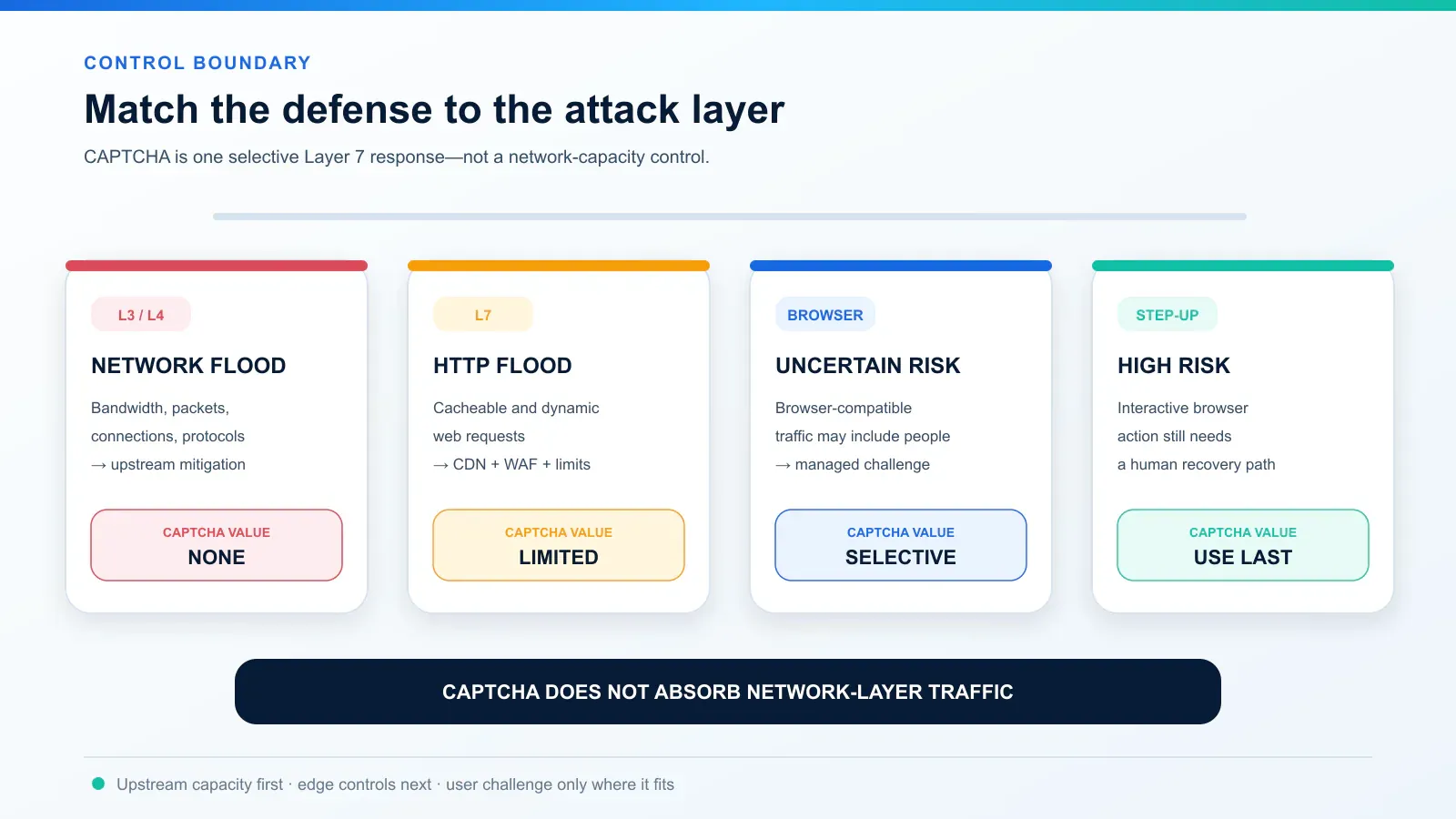
| Traffic or attack | CAPTCHA value | Primary controls | Why |
|---|---|---|---|
| Layer 3/4 volumetric flood | None | Upstream or managed DDoS mitigation; provider coordination; sufficient edge capacity | The link or network stack can be saturated before an HTML challenge is possible |
| Protocol or connection exhaustion | None to negligible | Network firewalls; managed L3/4 protection; connection controls | The client may never reach an application response |
| Static HTTP flood | Limited | CDN caching; HTTP DDoS rules; edge rate controls | Serving cached content cheaply is usually more efficient than challenging every request |
| Dynamic browser-like HTTP flood | Selective value | WAF; endpoint rate limits; managed challenge; CAPTCHA | A challenge can keep unverified requests away from expensive application work |
| Login, search, signup, or form abuse | Useful as step-up | Account and session controls; rate limits; CAPTCHA; business rules | Real users may be mixed with automation, so a soft gate may be safer than a blanket block |
| API or webhook flood | Usually unsuitable | Authentication; signed requests; quotas; API gateway and WAF rate limits | Machine clients normally cannot complete an HTML browser challenge |
Where CAPTCHA can help
CAPTCHA has the most value when a rule has identified elevated risk but the service still expects legitimate people in the same traffic. Examples include a browser-loaded login page, a public search endpoint, signup, checkout, ticket inventory, or an expensive anonymous form. A managed challenge can screen moderate risk, while an interactive CAPTCHA can be reserved for higher risk that is not yet certain enough to block.
This is a “soft gate.” It gives some legitimate visitors a path forward while increasing the cost of basic automation. AWS describes its CAPTCHA and Challenge actions for this middle ground: traffic that is too costly to allow freely but too mixed to block outright.
The benefit depends on placement. A solved token should be validated before password hashing, full-text search, inventory calculation, database writes, or other expensive operations. Passage should be scoped and time-limited according to the provider’s mechanism and the sensitivity of the endpoint.
Where CAPTCHA does not help
CAPTCHA is not useful when the attack exhausts bandwidth, packets per second, state tables, or connections before the HTTP layer. It also does not fit clients that do not render HTML and JavaScript. A challenge cannot repair an origin that is publicly reachable around the edge, and it cannot guarantee that browser-capable automation will fail.
It may even create new failure modes if deployed carelessly:
- An origin-hosted puzzle adds work to an already stressed origin.
- A universal challenge breaks APIs, webhooks, monitoring, and search crawlers.
- A long or inaccessible puzzle blocks people who cannot complete it.
- An external challenge provider outage can become an availability incident.
- Rules that bind passage too tightly to changing network signals can create loops.
- Repeatedly challenging known-bad traffic can waste edge resources compared with blocking it.
That is why OWASP’s Denial of Service Cheat Sheet warns that CAPTCHA is not a general DoS defense. Treat it as one possible application-layer response inside a layered plan.
DDoS CAPTCHA vs CDN, WAF, rate limiting, and managed DDoS
These controls are not interchangeable products competing for one slot. Each performs a different job.
Control |
Best fit |
Browser/API fit |
User friction |
Main limitation |
|---|---|---|---|---|
Managed DDoS protection |
Large network and HTTP attacks |
Both, depending on service |
Usually none |
Coverage and activation differ by provider and plan |
CDN and caching |
Cacheable pages and assets |
Both |
None |
Dynamic and personalized work still reaches the application |
WAF rule |
Known request, protocol, or exploit pattern |
Both |
None if allowed; hard failure if blocked |
A broad rule can create false positives |
Rate limiting |
Excess frequency by route, identity, key, session, or source |
Both |
Possible delay or HTTP 429 |
Source IP alone can group many users or miss distributed abuse |
Managed challenge |
Uncertain browser traffic |
Browser-focused |
Low to moderate |
Can disrupt non-HTML calls and privacy-restricted browsers |
Interactive CAPTCHA |
High-risk browser action with a human path still needed |
Browser-focused |
Highest |
Accessibility, abandonment, solver, and outage risks |
Block |
Confirmed abuse or hard safety ceiling |
Both |
Complete denial |
Wrong classification directly blocks legitimate traffic |
An HTTP 429 Too Many Requests, a provider-specific rate-limit page, and a CAPTCHA are different responses. Seeing one of them does not prove that a DDoS attack is underway. Rola IP’s guide to Error 1015 You Are Being Rate Limited explains that specific Cloudflare response and the appropriate owner and visitor actions.
The usual order is upstream capacity first, then cache and WAF controls, then scoped rate limits, then challenges for uncertain browser traffic. High-confidence malicious traffic can go directly to block; it does not need the courtesy or cost of a puzzle.
How a DDoS challenge works at the edge
A vendor-neutral browser challenge has five stages:
- Detection: the edge observes a managed DDoS rule, route-specific rate signal, reputation input, session behavior, or another configured risk condition.
- Decision: policy allows, counts, rate-limits, challenges, or blocks the request. No single IP, country, ASN, or browser characteristic should automatically be treated as proof of abuse.
- Challenge: a browser receives a managed check or interactive task. Non-browser routes should take a different branch.
- Validation: the edge or server validates the result, including expiry, expected action or hostname when supported, and replay or reuse rules.
- Passage: a short-lived token or cookie lets suitable requests continue. The application still performs normal authentication and authorization.
The challenge should fail before expensive origin work, and the passage should not become a universal bypass. Scope exceptions narrowly, set an owner and expiry, and audit changes.
Build a progressive challenge policy
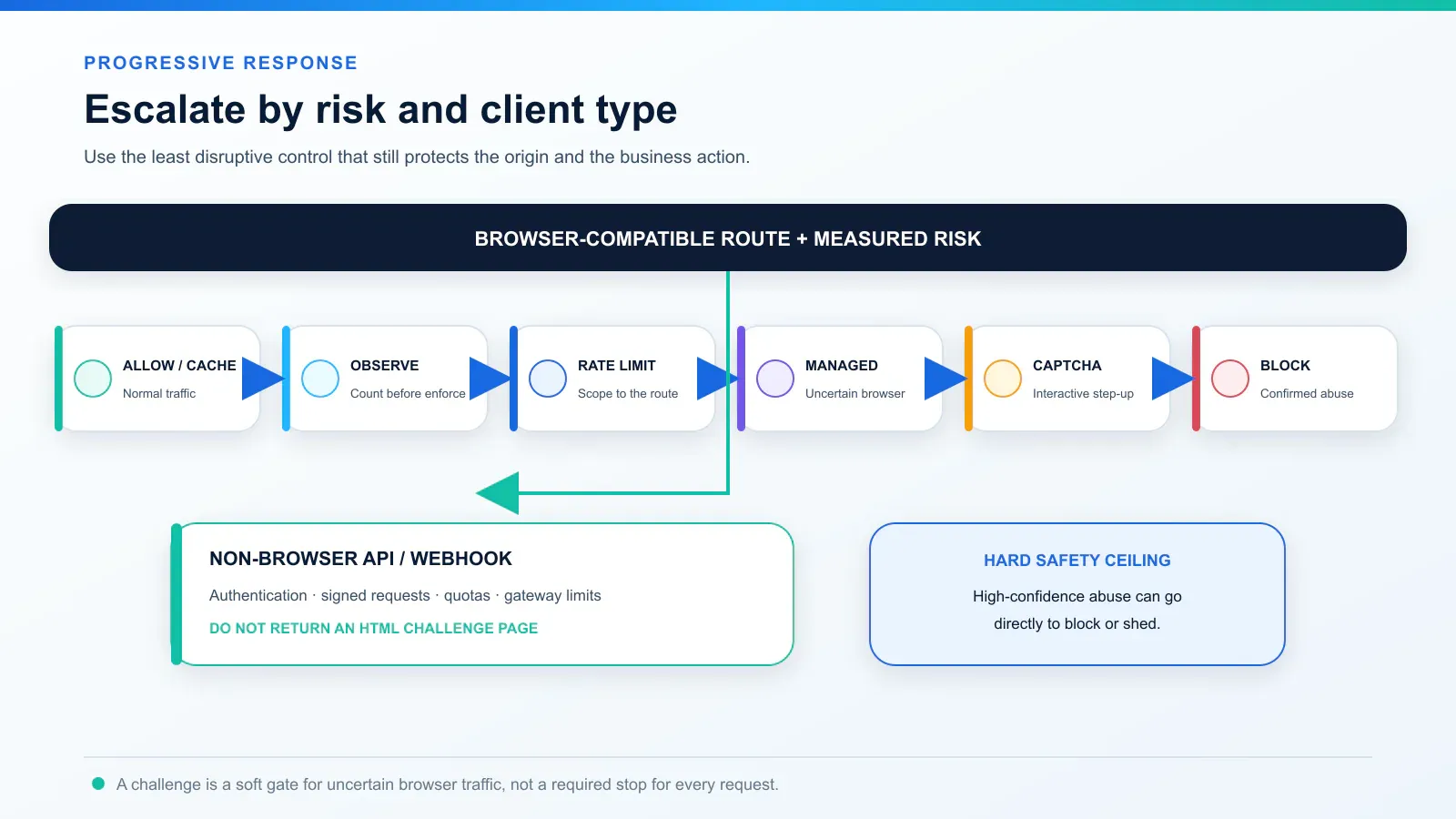
A progressive policy minimizes both origin load and unnecessary friction:
- Allow and cache normal traffic.
- Observe or count a new rule before enforcing it.
- Apply a scoped rate limit to the affected host, path, method, account, session, or API key.
- Issue a managed challenge when the request looks risky but may still come from a real browser user.
- Escalate to interactive CAPTCHA only when additional assurance is worth the accessibility and conversion cost.
- Block confirmed abuse or traffic beyond a hard safety ceiling.
The non-browser branch uses authentication, request signing, quotas, idempotency, bounded concurrency, and gateway rate limits. Do not force a webhook or mobile API to parse a full-page HTML challenge.
Use context rather than one magical threshold. Useful defensive signals include the affected endpoint, HTTP method, recent velocity, authenticated session or account state, origin latency and errors, cache misses, and a provider’s confirmed rule or risk score. Geography and network identity can add context, but they are poor standalone verdicts: a shared corporate gateway, mobile carrier NAT, campus network, or privacy service may represent many legitimate users.
How to deploy DDoS CAPTCHA safely: eight steps
Step 1: classify the traffic and establish a baseline
Record normal behavior before choosing a threshold. At minimum, measure requests per second by endpoint, cache-hit ratio, origin CPU, p95 and p99 latency, 5xx rate, successful logins or form submissions, current 403/429/challenge rates, and the client types that use each route.
Do not copy a fixed “five requests per second” rule from a generic blog. Five requests may be abusive for one expensive search and normal for a page that loads several assets. Build limits from your own traffic, business risk, and origin capacity.
Step 2: put upstream and edge protection first
Confirm which Layer 3/4 and Layer 7 protections your ISP, hosting platform, cloud provider, or managed service actually supplies. Document which controls are automatic and which require activation during an incident. Put the CDN, managed DDoS layer, WAF, and rate controls in front of the origin, then restrict direct origin access.
CAPTCHA is not a substitute for capacity planning, health monitoring, an escalation contact, or a response runbook. CISA’s DDoS guidance emphasizes provider coordination, upstream mitigation, and tested response processes for exactly this reason.
Step 3: select routes that can support a browser challenge
Good candidates are browser-loaded, dynamic endpoints where real people and automation may be mixed: login, signup, account recovery, search, checkout, reservation, and expensive public forms.
Usually exclude static assets, JSON APIs, webhooks, native-app endpoints, health checks, payment callbacks, verified search crawlers, and approved monitoring. These routes need controls compatible with their protocol and identity model. An exception should be as narrow, temporary, and auditable as the challenge rule itself.
Step 4: start in count mode and canary the policy
Express the rule in vendor-neutral terms before translating it into a provider console:
IF browser-compatible route AND anomalous traffic or medium risk
THEN issue managed challenge

IF recent valid passage AND endpoint quota remains
THEN allow normal application processing

IF confirmed abuse OR hard safety ceiling is exceeded
THEN block or shed the request
Run in count or log mode first. Compare the proposed matches with business success, monitoring, verified crawlers, accessibility paths, and origin load. Then enforce on one endpoint or a small traffic segment. Expand only after checking false positives, challenge loops, conversion, and provider cost.
Step 5: validate passage before expensive work
Rendering a widget is not validation. The trusted edge or server must validate the challenge result according to the provider’s instructions. Check expiry and any supported hostname, action, or replay controls. Reject a missing, expired, mismatched, or reused result; do not silently treat validation errors as success.
Keep provider secrets out of browser code, URLs, screenshots, analytics, and ordinary application logs. Log a safe rule or request identifier that support staff can correlate without exposing a token.
Step 6: design for accessibility, privacy, and recovery
W3C documents that interactive CAPTCHA can exclude people with visual, auditory, cognitive, motor, or language-related barriers. Prefer a lower-friction non-interactive control when it meets the risk, minimize how often a person is challenged, provide different accessible ways to proceed, and test keyboard, screen-reader, focus, language, timeout, zoom, and retry behavior.
Provide a support or recovery path that does not simply show the same impossible challenge again. Review what a third-party challenge collects, why it is collected, how long it is kept, where it is processed, and which subprocessors receive it. Data minimization and transparent notice are design requirements; a vendor badge does not establish legal compliance.
Step 7: define safe behavior when the challenge service fails
There is no universal fail-open or fail-closed answer. Decide by endpoint before the incident:
- A low-risk public read can use cached or stale content, a limited read-only mode, or a controlled fail-open path.
- An expensive anonymous write may be queued, temporarily disabled, or answered with a clear service-unavailable response.
- Login, payment, account recovery, and privilege elevation often need a safer fail-closed path with understandable recovery instructions.
Test provider script failure, blocked cookies, timeouts, and an unavailable verification API. Keep a bounded emergency rule and a documented rollback procedure.
Step 8: monitor, tune, and remove incident-only rules
Track security, availability, and user outcomes together. Useful measures include challenges issued and solved, abandonment, repeated challenges per session, requests stopped before the origin, origin RPS, cache-hit ratio, CPU, latency, 5xx, login or form conversion, and support contacts.
A high solve rate can mean many real users were unnecessarily challenged. A low solve rate can mean automation, but it can also mean broken JavaScript, accessibility barriers, incompatible clients, or abandonment. No single ratio proves success. Review by rule, endpoint, region, browser family, network type, and time window, then narrow or roll back the rule that caused harm.
Monitor the rule with an evidence loop
| Metric change | Possible meaning | Check next | Safe response |
|---|---|---|---|
| Origin RPS falls and business success holds | Challenge or edge controls may be helping | Cache hit, rule matches, latency, and conversion | Continue the canary and expand gradually |
| Challenges rise but origin load does not fall | The rule may target cheap or irrelevant traffic | Endpoint cost and direct-origin paths | Move the control earlier or narrow it to costly routes |
| Solve rate is high and abandonment rises | Too many legitimate users may be challenged | Rule scope, session passage, browser and accessibility segments | Reduce challenge frequency or step down to a managed check |
| Solve rate is low and errors rise | Bots, compatibility failure, or provider outage are all possible | Script errors, cookies, token validation, status page, and support reports | Pause expansion; use the endpoint’s tested degradation path |
| Repeated challenges per session rise | Passage is not persisting or a rule is re-triggering | IP changes, cookie scope, clock, expiry, overlapping rules | Fix state handling; do not simply weaken all protection |
429 or 1015 rises without attack evidence |
A rate rule may be too broad | Route baseline, shared NAT, account and session context | Tune the specific limiter and retain hard origin safeguards |
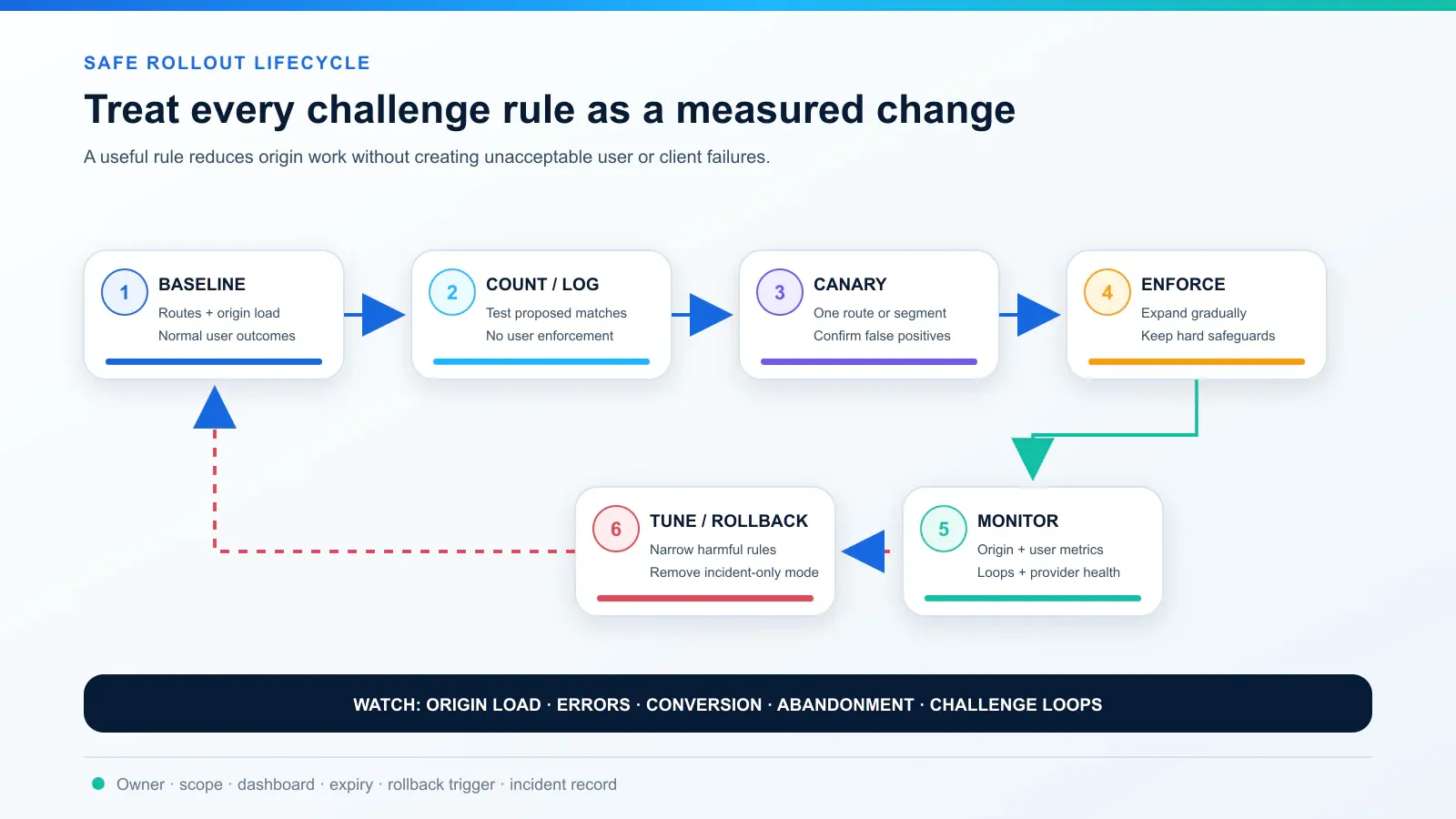
Every enforced rule should have an owner, change identifier, scope, start time, reason, dashboard, rollback trigger, and maximum duration. After an incident, withdraw temporary rules in stages and watch whether origin load returns. Update the baseline and runbook with what actually happened.
Why legitimate visitors see a challenge or get stuck in a loop
A challenge page is not proof that the visitor attacked the site. It may be triggered by an incident-wide policy, unusual request velocity, shared network reputation, missing browser state, a privacy extension, disabled JavaScript or cookies, an old browser, overlapping security rules, or provider error.
Try these safe visitor-side checks:
- Confirm the domain is the site you intended to visit.
- Do not download or run anything to “verify” yourself.
- Allow ordinary JavaScript and first-party cookies for the intended site if your policy permits them.
- Update or restart the browser and avoid an embedded browser view.
- Stop rapid refreshes; wait briefly, then retry once.
- If an authorized session changes exit IP during the challenge, keep the network path stable long enough to finish. Cloudflare notes that a challenge issued from one IP and solved from another can fail.
- If the loop continues, contact the site owner with the time, URL, challenge or request ID, browser version, and a screenshot that excludes secrets.
When a shared NAT or corporate gateway may be involved, record the public egress using what is my IP and include it privately in the support report. This is diagnostic context, not evidence that the IP is malicious or a recommendation to switch IPs.
For authorized automation, repeated retries can amplify a problem. Stop, inspect the status and response type, confirm the route permits automation, obey Retry-After or documented quotas, and coordinate with the owner for an API or allowlisted integration. Rola IP’s guide on how to avoid getting blocked while scraping explains safer request pacing and access-boundary practices; neither a proxy nor IP rotation grants permission or makes CAPTCHA bypass acceptable.
How to tell a real DDoS challenge from a fake CAPTCHA
Attackers imitate familiar DDoS protection screens because users expect a short interruption. Historical campaigns have used fake pages to request browser-notification permission or download malware. More recent “ClickFix” social engineering has told people to open a run dialog or terminal, paste a command, and execute it.
| Legitimate challenge behavior | High-risk or fake behavior |
|---|---|
| Stays in the browser on the domain you intended to visit or a documented provider flow | Sends you to an unrelated or misspelled domain without a clear business reason |
| Runs a browser check or asks for a bounded interactive task | Asks you to download, mount, install, or run a file |
| May require JavaScript and cookies for that site | Tells you to press Win+R, open PowerShell or Terminal, paste a command, or disable security tools |
| Does not need browser notifications to prove you are human | Demands that you click Allow notifications to continue |
| Provides a request ID or recovery path when it fails | Creates urgency with fake virus warnings, prizes, or repeated notification prompts |
No single signal—HTTPS, a padlock, domain age, an ASN, or a familiar logo—proves legitimacy. Check the full domain and the requested action. A genuine web challenge should never require an ISO, EXE, script, browser extension, copied shell command, remote-support tool, cryptocurrency payment, or disabled antivirus.
If a suspicious page asked you to run something, close it without following the instructions. If you already executed a command or file, disconnect the affected device as appropriate for your organization, notify the security team, preserve relevant details, and follow the incident-response process. Site owners should investigate unauthorized script changes, CMS compromise, tag-manager abuse, and content-integrity alerts rather than merely hiding the fake page.
DDoS CAPTCHA deployment checklist
- Confirm the attack layer and affected routes.
- Confirm upstream or managed L3/4 protection.
- Put the CDN, WAF, and rate controls before the origin.
- Restrict direct-to-origin access.
- Record route-specific normal traffic and origin capacity.
- Challenge only browser-compatible routes.
- Use count mode and a small canary before enforcement.
- Validate challenge passage before expensive application work.
- Keep APIs, webhooks, monitoring, and narrow approved integrations on compatible controls.
- Test accessibility, recovery, and privacy requirements.
- Monitor origin health and user outcomes, not solve rate alone.
- Assign every rule an owner, expiry, rollback trigger, and incident record.
Conclusion
A DDoS CAPTCHA is a selective Layer 7 gate, not a shield for every attack. Put it at the edge, trigger it from measured risk, reserve visible puzzles for the cases that need them, and judge success by both origin relief and legitimate-user outcomes. Layered protection—and the ability to roll back a harmful rule—is what keeps the service available.