
How to Find Pages That Link to a URL: Practical Guide

Aug 26, 2026 · Guides · 19 min read
TL;DR
If you need pages that link to one target URL, start with Google Search Console for a site you own, use a site crawler for internal links, and use a page-level backlink index for external or competitor links. Treat every export as a candidate list: open important source pages and verify the live <a href> link, redirect, canonical target, anchor text, and rel attributes before counting it.
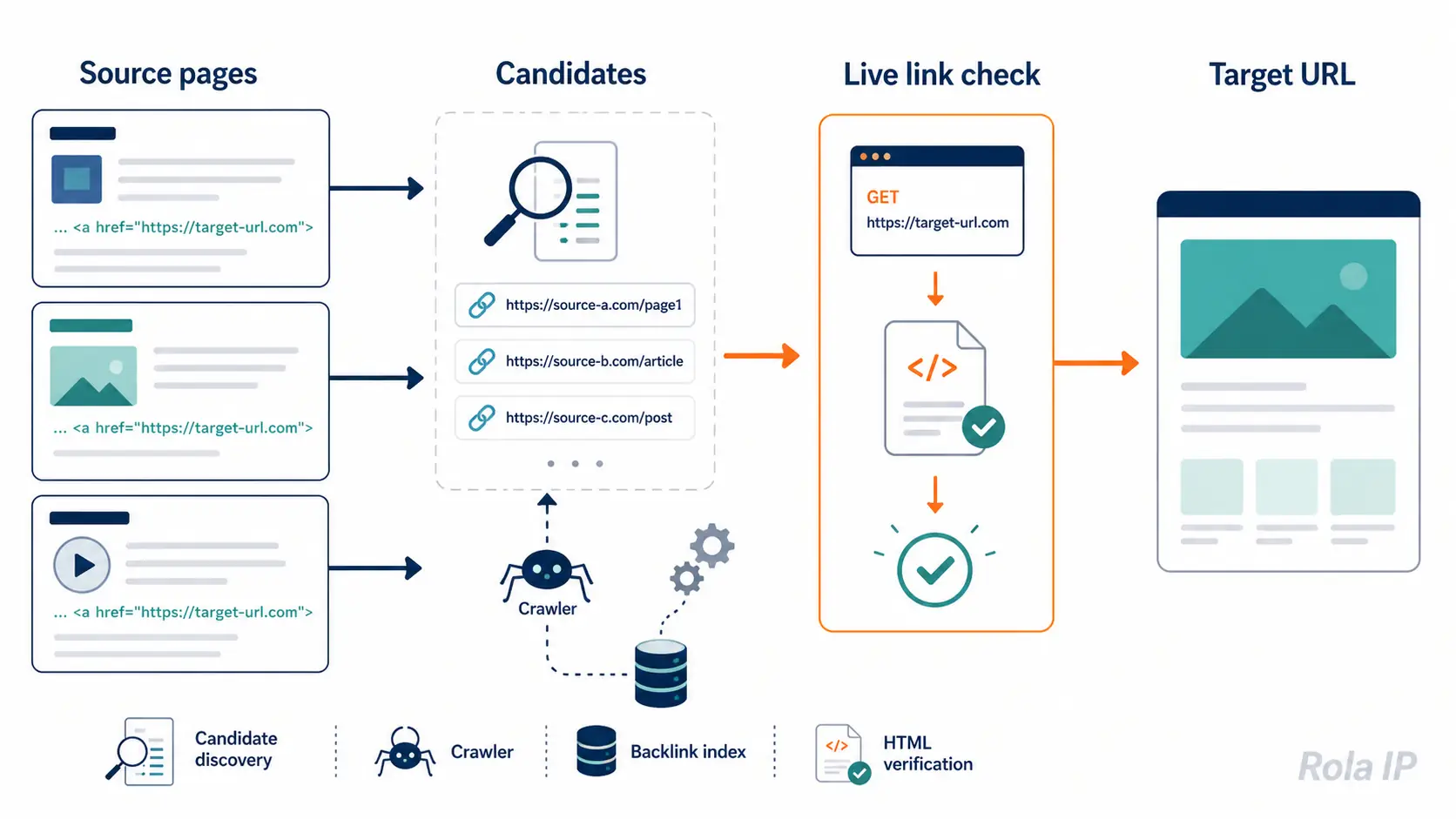
What “pages that link to a URL” means
The phrase can describe three different jobs:
| Job | What you are looking for | Best starting point |
|---|---|---|
| Internal inlinks | Pages on your own domain that point to a target page | Search Console or a site crawler |
| External backlinks | Pages on other domains that cite the target | A page-level backlink index, followed by manual verification |
| URL inventory | Every discoverable page on a domain | Sitemap, robots.txt, and a bounded crawler |
An inventory is not a backlink report. A sitemap can list a page without any HTML page linking to it, and a crawler that follows links can miss an orphan page. Keep source_url (the page containing the link) and target_url (the page being linked to) as separate fields throughout the workflow.
Choose a method before you collect data
Use the smallest method that can answer the question you actually have.
| Situation | Method | What you get | Main limitation |
|---|---|---|---|
| You own the property and need a fast first check | Google Search Console Links report | Google’s view of linking sites/pages for the property | It is not a complete backlink database; canonical URLs and duplicates are grouped, and the report is limited |
| You need all known internal inlinks | Site crawler | Source page, anchor, link location, response status, and crawl date | Scope, robots rules, JavaScript, and orphan pages affect coverage |
| You need competitor or external referring pages | Page-level backlink index | Candidate referring pages, domains, anchors, and historical records | Index freshness and coverage vary; verify high-value rows on the source page |
| You have fewer than a few dozen candidates | Search operators plus manual HTML checks | Quick leads from indexed pages | A mention in search results is not proof of a live hyperlink |
Prepare a reproducible, authorized run
Before opening a tool or writing code, record:
- The exact target URL and whether a redirect or canonical URL should count as a match.
- Whether the source set is internal, external, or both.
- Your authorization to fetch the source pages. Only verify public pages you are allowed to access, and follow the site’s terms and machine-readable rules.
- A run date, user agent, timeout, request delay, and maximum number of source pages.
- The fields you will retain: raw source URL, final source URL, target URL, anchor text,
rel, HTTP status, source canonical, verification status, and timestamp.
For a small pilot, use one owned target page and 20–50 candidate source pages. Fetch at most 20 pages in the first pass, wait about one second between requests to the same host, stop on repeated errors, and keep a separate row for blocked, missing, redirected, and unverified pages.
Method 1: Find links in Google Search Console
This route is for a property you control.
- Open the verified property in Search Console and open the Links report.
- In External links, open Top linked pages and select the target page you want to audit.
- Open Top sites linking to this page to see the sites that link to the selected page. Export the table when the report offers an export option.
- Keep the export date and the selected target URL with the file. Search Console groups pages by canonical URL, combines duplicate links, and does not promise a complete list. Its link tables are limited to 1,000 rows, so treat the result as triage data rather than a census.
- For an internal-link audit, compare this view with a crawl of your own site. Search Console’s external-link view is not a substitute for a source-page crawl.
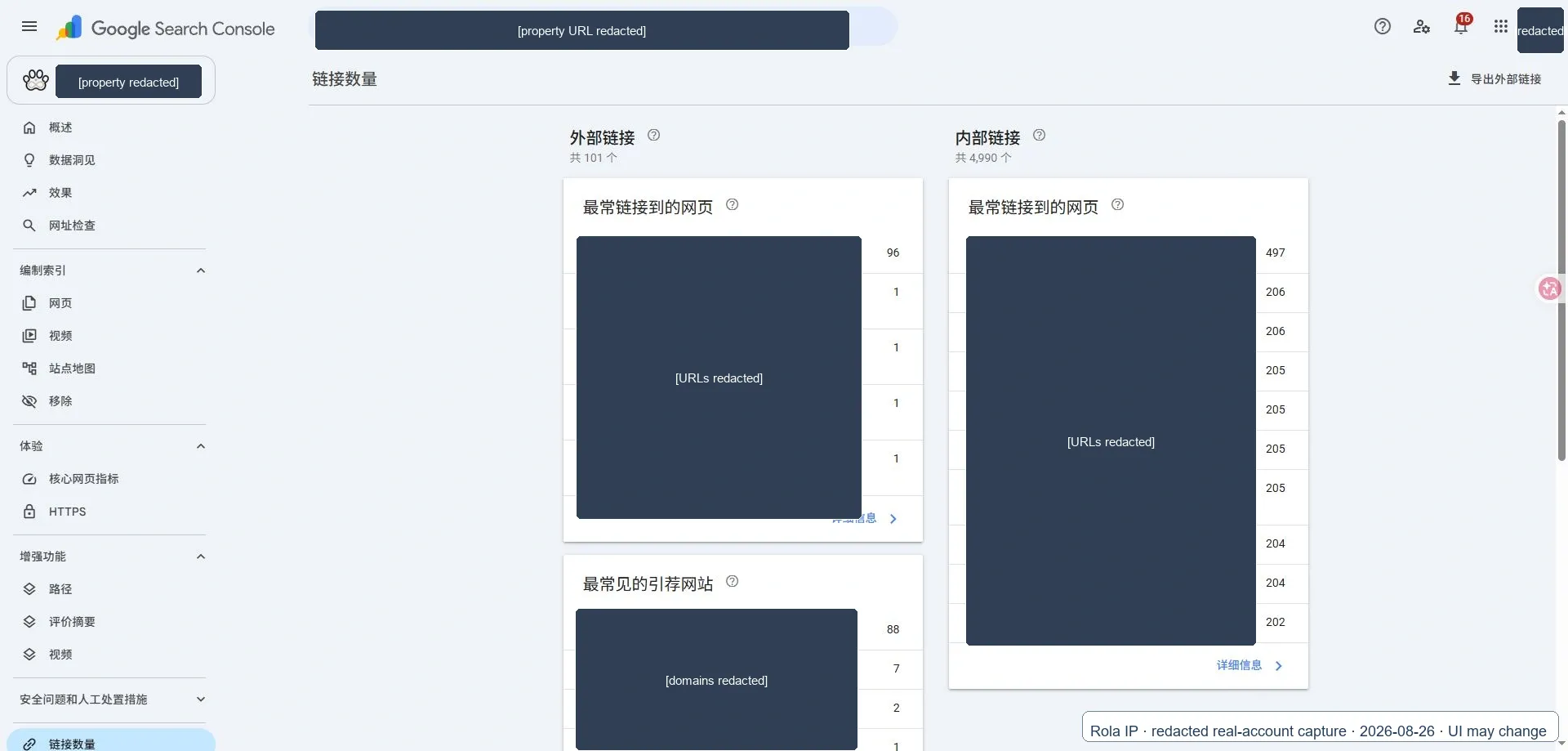
Search Console is useful because it is first-party data for your property, but a missing row does not prove that a page has never linked to the target. The source may be outside Google’s current data, the page may be canonicalized differently, or the link may have changed since Google last processed it.
Method 2: Find internal inlinks with a crawler
A crawler answers a narrower question well: “Which pages in this permitted crawl contain an anchor to my target?”
Configure the crawl to:
- Start from the site’s homepage, sitemap URLs, or a supplied URL list.
- Stay inside the approved host and URL paths.
- Respect robots.txt and set a conservative delay and concurrency.
- Record the raw
href, resolved target, anchor text,rel, source location, HTTP status, and crawl timestamp. - Include a rendered pass only when the site owner has authorized it and static HTML does not contain the link.
Scrapy’s LinkExtractor can filter domains, tags, attributes, and duplicate links. Its link object exposes the absolute URL, text, fragment, and whether nofollow appears in rel. Scrapy’s generated projects also provide a ROBOTSTXT_OBEY setting; keep that behavior enabled for an ordinary audit.
The result is still bounded by your crawl. A page that is not linked from your seeds, is blocked by robots.txt, or renders its navigation only after JavaScript executes may not appear. Label such rows as “not crawled” or “unverified,” not “no backlink.”
Method 3: Find external or competitor referring pages
For external backlinks, use a tool that exposes page-level referring URLs rather than only a domain-level count. Export the target URL, source page, anchor, first/last seen dates (if supplied), link type, and any status or redirect fields.
Use the same target URL and filters across tools if you are comparing them. Do not compare one provider’s live index with another provider’s historical index and call the larger number “better.” A useful test is:
- Export the top 20–50 referring pages for the same target.
- Deduplicate by normalized source URL.
- Open a fixed sample of 10–20 sources.
- Search the rendered page or source for the target and inspect the surrounding text.
- Record whether the link is live, redirected, canonicalized, nofollowed, JavaScript-only, or absent.
Ahrefs’ manual-check guidance follows this same principle: a reported backlink is a lead; the referring page is where you confirm the target, anchor, and context. That verification step is the difference between “the index says a link existed” and “the page currently contains a link.”
Method 4: Use search operators for candidate discovery
Search operators are useful when the list is short or you need to find likely mentions before checking them manually. Try a quoted target URL, a distinctive URL path, or a brand-plus-topic phrase. Combine that with site: when you are checking one domain.
Operators discover indexed pages and text. They do not expose a complete backlink graph, and a result can contain a plain-text mention, a redirect, a removed link, or no link at all. Open each candidate, inspect the page HTML, and save the verification status. Do not use the old link: operator as a completeness promise.
Prerequisites and Environment
The verifier uses only the Python standard library and is written for Python 3.10 or newer. Python 3.10 is required for the str | None type syntax used in the annotations.
Check the version before running:
python --version
On Windows, run the commands in PowerShell. On macOS or Linux, use a POSIX shell and replace PowerShell environment-variable syntax with export:
export TARGET_URL="https://example.com/guide"
export SOURCE_FILE="sources.txt"
export OUTPUT_FILE="verified_links.csv"
python verify_links.py
On Windows, the equivalent is:
$env:TARGET_URL = "https://example.com/guide"
$env:SOURCE_FILE = "sources.txt"
$env:OUTPUT_FILE = "verified_links.csv"
python verify_links.py
Create sources.txt as a UTF-8 plain-text file, with one absolute http:// or https:// source-page URL per line. Blank lines, invalid schemes, and duplicate normalized URLs are skipped. Do not place usernames, passwords, API keys, or proxy credentials in this file.
The pilot defaults are intentionally conservative: a 15-second timeout, a 2 MB HTML read limit, one request per second, and no automatic retry. Change those values only after confirming that you are authorized to collect the pages and that the target’s rules allow the traffic.
The package also includes a safe local fixture in demo/ so you can reproduce the sample without contacting a customer site. In a second PowerShell window, serve it with python -m http.server 8765 --directory demo, then run the verifier with TARGET_URL="http://127.0.0.1:8765/target.html", SOURCE_FILE="demo\sources.txt", and OUTPUT_FILE="verified_links.csv". The fixture contains one verified link and one intentional not_found_in_html row; stop the local server when the run is complete.
Output Schema and Sample CSV
The script keeps the URL representations separate:
| Field | Meaning |
|---|---|
source_url |
URL supplied in sources.txt |
final_source_url |
Source URL after HTTP redirects |
source_canonical |
<link rel="canonical"> found on the source page |
target_url |
Normalized URL requested through TARGET_URL |
target_final_url |
Target URL after the one-time target fetch and redirects |
target_canonical |
Canonical URL found on the target page |
raw_href |
The exact matching href attribute from the source HTML |
matched_url |
Normalized URL produced from raw_href |
anchor_text |
Visible text inside the matching anchor |
rel |
Raw rel value, such as nofollow, ugc, or sponsored |
link_location |
Approximate HTML region such as header, nav, main, article, or footer |
found_at |
UTC timestamp when that source row was verified |
verification_status |
verified, not_found_in_html, blocked_by_robots, stale, or another review state |
For example, a redacted run can look like this:
source_url,final_source_url,http_status,target_url,target_final_url,target_canonical,target_resolution_status,matched_url,raw_href,anchor_text,rel,link_location,source_canonical,found_at,verification_status,error
https://docs.example.test/source-a,https://docs.example.test/source-a,200,https://example.test/guide,https://example.test/guide,https://example.test/guide,resolved,https://example.test/guide,/guide#overview,read the guide,,article,https://docs.example.test/source-a,2026-08-26T08:10:00Z,verified,
https://docs.example.test/source-b,https://docs.example.test/source-b,200,https://example.test/guide,https://example.test/guide,https://example.test/guide,resolved,,,,,,https://docs.example.test/source-b,2026-08-26T08:10:01Z,not_found_in_html,
The sample is illustrative and uses reserved .test domains; it is not a benchmark. In a real run, keep the raw and normalized values together so a redirect or canonical mismatch can be reviewed instead of silently merged.
Verify candidate pages with Python
The following standard-library script verifies a bounded list of known candidate source pages. It does not discover the public web, bypass access controls, or solve CAPTCHAs. It checks robots.txt, applies a 15-second timeout, reads at most 2 MB of HTML, resolves relative URLs, removes fragments for comparison, and writes a reviewable CSV.
Save the script as verify_links.py, then create a sources.txt file with one authorized source URL per line.
#!/usr/bin/env python3
"""Verify links from a bounded list of public, authorized source pages."""

from __future__ import annotations

import csv
import os
import time
from datetime import datetime, timezone
from html.parser import HTMLParser
from pathlib import Path
from urllib.error import HTTPError, URLError
from urllib.parse import urldefrag, urljoin, urlsplit, urlunsplit
from urllib.request import Request, urlopen
from urllib.robotparser import RobotFileParser

USER_AGENT = "AuthorizedLinkVerifier/1.0 (+https://example.com/contact)"
TIMEOUT_SECONDS = 15
MAX_BYTES = 2_000_000
DELAY_SECONDS = 1.0


def normalize_url(raw_url: str, base_url: str | None = None) -> str:
    if not raw_url:
        return ""
    absolute = urljoin(base_url or "", raw_url.strip())
    absolute, _fragment = urldefrag(absolute)
    try:
        parts = urlsplit(absolute)
        port = parts.port
    except ValueError:
        return ""
    if parts.scheme not in {"http", "https"} or not parts.hostname:
        return ""
    host = parts.hostname.lower()
    default_port = (parts.scheme == "http" and port == 80) or (
        parts.scheme == "https" and port == 443
    )
    netloc = host if not port or default_port else f"{host}:{port}"
    return urlunsplit((parts.scheme, netloc, parts.path or "/", parts.query, ""))


class LinkParser(HTMLParser):
    REGION_TAGS = {"header", "nav", "main", "article", "aside", "footer"}

    def __init__(self, base_url: str) -> None:
        super().__init__(convert_charrefs=True)
        self.base_url = base_url
        self.links: list[dict[str, str]] = []
        self.canonical_url = ""
        self._current: dict[str, str | list[str]] | None = None
        self._region_stack: list[str] = []

    def handle_starttag(self, tag: str, attrs: list[tuple[str, str | None]]) -> None:
        values = {key.lower(): (value or "") for key, value in attrs}
        tag_name = tag.lower()
        if tag_name in self.REGION_TAGS:
            self._region_stack.append(tag_name)
        if tag_name == "a":
            self._current = {
                "raw_href": values.get("href", ""),
                "anchor_text": [],
                "rel": values.get("rel", ""),
                "link_location": self._region_stack[-1] if self._region_stack else "document",
            }
        elif tag_name == "link" and "canonical" in values.get("rel", "").lower().split():
            self.canonical_url = normalize_url(values.get("href", ""), self.base_url)

    def handle_data(self, data: str) -> None:
        if self._current is not None:
            text_parts = self._current["anchor_text"]
            assert isinstance(text_parts, list)
            text_parts.append(data)

    def handle_endtag(self, tag: str) -> None:
        if tag.lower() == "a" and self._current is not None:
            text_parts = self._current["anchor_text"]
            assert isinstance(text_parts, list)
            self.links.append(
                {
                    "raw_href": str(self._current["raw_href"]),
                    "target_url": normalize_url(
                        str(self._current["raw_href"]), self.base_url
                    ),
                    "anchor_text": " ".join("".join(text_parts).split()),
                    "rel": str(self._current["rel"]),
                    "link_location": str(self._current["link_location"]),
                }
            )
            self._current = None
        if tag.lower() in self.REGION_TAGS and tag.lower() in self._region_stack:
            index = len(self._region_stack) - 1 - self._region_stack[::-1].index(tag.lower())
            self._region_stack.pop(index)


def robots_allows(source_url: str) -> tuple[bool, str]:
    parts = urlsplit(source_url)
    robots_url = urlunsplit((parts.scheme, parts.netloc, "/robots.txt", "", ""))
    parser = RobotFileParser(robots_url)
    try:
        parser.read()
    except HTTPError as exc:
        if exc.code == 404:
            return True, "no_robots_file"
        return False, f"robots_http_{exc.code}"
    except (OSError, URLError):
        return False, "robots_unavailable"
    if not parser.can_fetch(USER_AGENT, source_url):
        return False, "blocked_by_robots"
    return True, "allowed"


def utc_now() -> str:
    return datetime.now(timezone.utc).replace(microsecond=0).isoformat().replace("+00:00", "Z")


def resolve_target_metadata(target_url: str) -> dict[str, str]:
    """Resolve the target once and extract its HTML canonical, if available."""
    metadata = {
        "target_url": normalize_url(target_url),
        "target_final_url": "",
        "target_canonical": "",
        "target_resolution_status": "not_attempted",
    }
    if not metadata["target_url"]:
        metadata["target_resolution_status"] = "invalid_target"
        return metadata
    allowed, policy_status = robots_allows(metadata["target_url"])
    if not allowed:
        metadata["target_resolution_status"] = policy_status
        return metadata
    request = Request(
        metadata["target_url"],
        headers={
            "User-Agent": USER_AGENT,
            "Accept": "text/html,application/xhtml+xml;q=0.9,*/*;q=0.1",
        },
    )
    try:
        with urlopen(request, timeout=TIMEOUT_SECONDS) as response:
            metadata["target_final_url"] = normalize_url(response.geturl())
            if response.headers.get_content_type() not in {"text/html", "application/xhtml+xml"}:
                metadata["target_resolution_status"] = "non_html"
                return metadata
            body = response.read(MAX_BYTES).decode(
                response.headers.get_content_charset() or "utf-8", errors="replace"
            )
    except HTTPError as exc:
        metadata["target_resolution_status"] = f"http_{exc.code}"
        return metadata
    except (OSError, URLError, TimeoutError) as exc:
        metadata["target_resolution_status"] = type(exc).__name__
        return metadata
    parser = LinkParser(metadata["target_final_url"] or metadata["target_url"])
    try:
        parser.feed(body)
    except Exception as exc:
        metadata["target_resolution_status"] = f"parse_{type(exc).__name__}"
        return metadata
    metadata["target_canonical"] = parser.canonical_url
    metadata["target_resolution_status"] = "resolved"
    return metadata


def verify_source(source_url: str, target_metadata: dict[str, str]) -> dict[str, str]:
    found_at = utc_now()
    target_url = target_metadata["target_url"]
    result = {
        "source_url": source_url,
        "final_source_url": "",
        "http_status": "",
        "target_url": target_url,
        "target_final_url": target_metadata["target_final_url"],
        "target_canonical": target_metadata["target_canonical"],
        "target_resolution_status": target_metadata["target_resolution_status"],
        "matched_url": "",
        "raw_href": "",
        "anchor_text": "",
        "rel": "",
        "link_location": "",
        "source_canonical": "",
        "found_at": found_at,
        "verification_status": "",
        "error": "",
    }
    allowed, policy_status = robots_allows(source_url)
    if not allowed:
        result["verification_status"] = policy_status
        return result

    request = Request(
        source_url,
        headers={
            "User-Agent": USER_AGENT,
            "Accept": "text/html,application/xhtml+xml;q=0.9,*/*;q=0.1",
        },
    )
    try:
        with urlopen(request, timeout=TIMEOUT_SECONDS) as response:
            result["final_source_url"] = response.geturl()
            result["http_status"] = str(getattr(response, "status", ""))
            if response.headers.get_content_type() not in {"text/html", "application/xhtml+xml"}:
                result["verification_status"] = "non_html"
                return result
            body = response.read(MAX_BYTES).decode(
                response.headers.get_content_charset() or "utf-8", errors="replace"
            )
    except HTTPError as exc:
        result["http_status"] = str(exc.code)
        result["verification_status"] = "fetch_error"
        result["error"] = f"HTTP {exc.code}"
        return result
    except (OSError, URLError, TimeoutError) as exc:
        result["verification_status"] = "fetch_error"
        result["error"] = type(exc).__name__
        return result

    parser = LinkParser(result["final_source_url"] or source_url)
    try:
        parser.feed(body)
    except Exception as exc:
        result["verification_status"] = "parse_error"
        result["error"] = type(exc).__name__
        return result

    result["source_canonical"] = parser.canonical_url
    target_keys = {
        key
        for key in {
            target_metadata["target_url"],
            target_metadata["target_final_url"],
            target_metadata["target_canonical"],
        }
        if key
    }
    for link in parser.links:
        if link["target_url"] in target_keys:
            result["matched_url"] = link["target_url"]
            result["raw_href"] = link["raw_href"]
            result["anchor_text"] = link["anchor_text"]
            result["rel"] = link["rel"]
            result["link_location"] = link["link_location"]
            result["verification_status"] = "verified"
            return result
    result["verification_status"] = "not_found_in_html"
    return result


def main() -> None:
    target_url = os.environ.get("TARGET_URL", "").strip()
    source_file = Path(os.environ.get("SOURCE_FILE", "sources.txt"))
    output_file = Path(os.environ.get("OUTPUT_FILE", "verified_links.csv"))
    target_metadata = resolve_target_metadata(target_url)
    if not target_metadata["target_url"]:
        raise SystemExit("Set TARGET_URL to a valid http(s) URL before running.")
    if not source_file.exists():
        raise SystemExit(f"Source file not found: {source_file}")

    fields = [
        "source_url", "final_source_url", "http_status", "target_url",
        "target_final_url", "target_canonical", "target_resolution_status",
        "matched_url", "raw_href", "anchor_text", "rel", "link_location",
        "source_canonical", "found_at", "verification_status", "error",
    ]
    seen: set[str] = set()
    with source_file.open("r", encoding="utf-8") as handle, output_file.open(
        "w", newline="", encoding="utf-8"
    ) as output:
        writer = csv.DictWriter(output, fieldnames=fields)
        writer.writeheader()
        for line in handle:
            source_url = line.strip()
            source_key = normalize_url(source_url)
            if not source_key or source_key in seen:
                continue
            seen.add(source_key)
            writer.writerow(verify_source(source_url, target_metadata))
            output.flush()
            time.sleep(DELAY_SECONDS)


if __name__ == "__main__":
    main()
Run it in PowerShell without putting credentials in the command line:
$env:TARGET_URL = "https://example.com/guide"
$env:SOURCE_FILE = "sources.txt"
$env:OUTPUT_FILE = "verified_links.csv"
python verify_links.py
The expected output is a CSV row for each unique source URL. A verified row contains the normalized matching target, the original raw_href, anchor text, rel, approximate link location, source canonical, target final URL, target canonical, and UTC found_at timestamp. not_found_in_html means the fetched static HTML did not contain any accepted target representation; it does not prove that a JavaScript-rendered page never links to it. blocked_by_robots, robots_unavailable, non_html, and fetch_error are review states, not zero-link evidence.

Original local-fixture capture, not a production benchmark. It shows python verify_links.py, verified_links.csv, http_status, raw_href, anchor_text, rel, link_location, found_at, and verification status. Captured 2026-08-26; Rola IP watermark included.
The script uses Python’s urljoin to resolve relative links. Because urljoin accepts an absolute href, the code validates the resulting scheme and host before treating it as a comparison key. The RobotFileParser.can_fetch() check is a permission signal, not a legal authorization decision.
Handle redirects, canonicals, and JavaScript links
Keep these values separate when they differ:
- The raw
hreffound in the source page. - The normalized
target_urlused for comparison. - The source page’s
final_source_urlafter redirects. - The source page’s
source_canonicalvalue. - The target page’s
target_final_urlafter the one-time target fetch. - The target page’s
target_canonicalvalue.
Do not silently replace one with another. A redirect may be a valid link to the intended resource, while a canonical tag is only a page preference. The script accepts a match against the requested, redirected, or canonical target representation and records which normalized matched_url was found. Decide whether that policy fits your audit before counting results, and expose the policy in the CSV.
For JavaScript-rendered links, first save the static result as not_found_in_html. If you own or are authorized to test the page, run a browser-rendered pass and record rendered_html as a separate method. Do not increase concurrency or add stealth behavior to force a response from a site that is blocking your client.
Cost and Scale Model
There is no universal winner because these methods return different kinds of data and bill different units. Use one worksheet with 1,000 target/source queries as the denominator. Count both candidate rows and rows verified live; do not substitute a provider’s domain count for a page count.
Method |
Cash cost per 1,000 queries |
Result quantity per 1,000 queries |
Cache / repeat runs |
Failed or empty query billing |
Safe concurrency and maintenance |
|---|---|---|---|---|---|
Search Console |
N/A as a 1,000-query API unit; report export has no per-request charge |
Google’s sampled rows for an owned property; candidate and live counts are not equivalent |
Export date matters; no user-controlled cache |
No per-request charge, but report limits can hide rows |
Low engineering cost; UI and limits need monitoring |
Site crawler |
Infrastructure and operator cost for 1,000 source fetches |
Pages discovered inside the seed/scope; verified live rows require a second check |
Local cache is optional; record cache age |
HTTP errors consume crawl time, not a provider credit |
Moderate concurrency; robots, deduplication, and JavaScript maintenance |
Backlink index/API |
Provider’s published price converted to 1,000 target/source lookups or rows |
Indexed referring pages; report candidate and verified-live counts separately |
Provider freshness and cache rules vary |
Mark unknown when empty, failed, or retried requests are billed differently |
High scale with low code, but schema, freshness, and price need monitoring |
Search operators |
Search-request price (if any) plus analyst time for 1,000 checks |
Indexed candidates, not verified links |
Search results change; no stable cache contract |
Empty/noisy results cost analyst time |
Low setup, high manual maintenance |
Python verifier |
Your compute, bandwidth, and operator cost for 1,000 source fetches |
Verified rows from the supplied candidate list |
You control the local cache and retry policy |
Timeouts and blocked pages still consume requests |
Low-to-moderate scale; code and HTML edge cases need tests |
Normalize every method to the same columns: cash_cost, candidate_rows, verified_live_rows, cache_age, failed_query_charge, safe_concurrency, and maintenance_hours, all measured over 1,000 queries. If a provider does not disclose comparable billing, cache, or failed-request rules, write “unknown” rather than estimating it—and do not announce a winner.
How to Run a Result Quality Test
Run the same 10–20 target/source checks through each method you plan to use. Compare:
- Field completeness: percentage of rows with source URL, target URL, anchor,
rel, and status. - Verification precision: verified live links divided by candidate rows.
- Duplicate rate: repeated source-target pairs after normalization.
- Empty-result rate: runs that return no candidates when a known link exists.
- Position or freshness difference: for search-derived candidates, note ranking/ordering changes; for backlink tools, record first/last seen dates when supplied.
- JavaScript-only rate: links found only after rendering.
Use one fixed sample, one country, one target-URL policy, one timeout, and one retry rule. This section defines a test method; it does not claim a benchmark result for any provider. Report the numbers as your sample’s result, not as a universal provider ranking.
Coverage, Freshness, and Recheck Schedule
Treat every source as a different observation window:
| Source | Suggested recheck | What to record |
|---|---|---|
| Search Console | Monthly for an active site; after a major migration | Export date, selected target, row count, and canonical grouping |
| Backlink index | At the provider’s documented refresh cadence or before a campaign decision | Provider, target mode, first/last seen values, index date, and export filters |
| Authorized crawler | After template changes, releases, or at least monthly for high-value sites | Crawl scope, robots result, page count, status distribution, and cache age |
| Python verifier | Immediately after a migration or link-remediation batch; then on a defined cadence | found_at, response status, redirect chain, HTML verification, and retry policy |
Use stable status labels so a dashboard does not turn a policy block into a missing link:
verified_live: the source HTML currently contains an accepted target representation.stale: an earlier report found the link, but the latest check is outside the freshness window.redirected: the source or target resolves to a different URL and needs review.blocked: robots, authorization, or an access response prevented verification.not_found_in_html: fetched static HTML did not contain the target.unverified: the source was not checked or the result requires a rendered/authorized pass.
The Python script writes found_at for each verification row. A backlink database’s last_seen date is a different field and should not be renamed to found_at.
Privacy, authorization, and the limited role of a proxy
Do not upload confidential URL lists to a free extractor. Verify only public pages you are authorized to collect, follow robots.txt and site terms, and keep credentials out of URLs, logs, screenshots, and CSVs.
Rola IP is not a backlink index and cannot prove that a source page links to a target. It may be considered for an authorized regional QA or high-volume public-page collection workflow where the target site allows the traffic. Rola documents describe country targeting on rotating residential, datacenter, and mobile networks, with state/city targeting available on rotating residential; session parameters can preserve continuity when a test needs it. Those capabilities do not guarantee access, bypass CAPTCHAs, or override a site’s rules. Keep proxy routing separate from the verifier and validate the actual exit location before interpreting regional results. See the Rola IP proxy network guide, parameter reference, and Python integration guide for configuration details.
Common failures and fixes
| Symptom | Likely cause | Fix |
|---|---|---|
| Search Console has fewer rows than a tool | Canonical grouping, duplicate aggregation, or report limits | Treat GSC as a first-party sample; verify important candidates elsewhere |
| A tool reports a link that is not on the page | Index lag, deleted link, redirect, or canonical mismatch | Fetch the source, follow redirects, inspect HTML, and label the row |
The script returns not_found_in_html |
JavaScript-only link, wrong target variant, or page changed | Compare normalized/redirect/canonical values; use permitted rendering if needed |
Every row is robots_unavailable |
The site blocks or times out on robots.txt | Stop and review authorization; do not disable the policy check to force a result |
| A crawler loops through filters or calendars | URL parameters create crawl traps | Set allow/deny rules, canonicalize carefully, and cap pages per host |
| Results mix mentions and links | Search operators return text references | Open the page and confirm a real <a href> element |
| A target looks different by country | Locale, proxy exit, and page personalization differ | Record country, method, timestamp, and exit IP; do not attribute differences to the link graph without a controlled test |
What to Do After You Find the Linking Pages
Finding the source pages is the input to an SEO action, not the action itself. Sort the verified rows by business impact and link state:
- A source points to an old URL: update the source to the preferred new URL when you control the page. Keep the redirect for external sources you cannot edit.
- A source points to a 404 or soft-404 page: repair the source link or create a relevant replacement target. Do not redirect every broken URL to a generic homepage.
- A high-traffic or high-conversion source is linking: prioritize it before low-value navigation links. Preserve the surrounding context and anchor intent when you update it.
- Several canonical versions appear: choose one preferred target, update internal links to that version, and keep the raw and canonical values in the audit history.
- The link uses
nofollow,ugc, orsponsored: classify it separately from an ordinary followed link. It can still be useful for discovery and referral traffic, but it should not be reported as the same link type. - The source belongs to a competitor or a third party: treat it as a content, partnership, or outreach lead. It is not an internal-link task, and you should not edit or crawl beyond the access you are authorized to use.
A practical triage score can combine source traffic, source relevance, target status, link type, and remediation effort. Keep the score explainable; a giant authority metric without an action attached is just another export.
Find Pages Linking to an Old URL After a Migration
Migration audits need two target keys: the old URL and the preferred new URL.
- Export or crawl pages that reference the old URL before changing templates.
- Check the old URL’s HTTP response and record whether it returns a 301, 308, 404, or an unexpected 200 page.
- Verify whether the new URL is the target’s canonical and whether source pages already link to it directly.
- Update the internal source pages you control, then re-run the same candidate list.
- Keep external sources in a separate outreach or referral queue; do not assume that a redirect makes every external link equally valuable.
The before/after comparison should show fewer source pages linking to the old URL, more direct links to the new URL, no new 404s, and a stable canonical policy. A redirect is a routing signal; it is not a substitute for fixing important internal links.
Choose Your Next Step
- You already use Google Search Console: export the selected target page’s linking data, then verify a fixed sample of source pages.
- You are starting a new external SERP/backlink project: test one supported page-level backlink API against 10–20 known candidates and compare verification precision, freshness, fields, and cost before scaling.
- You own the site or a limited domain: run a bounded crawler from the sitemap and key templates, then use the Python verifier for pages that matter to a migration, orphan-page, or internal-link audit.
Measurement After Publication
Track more than the head keyword. Review:
- The number of related long-tail queries entering the top 20.
- Downloads, copies, or repository clicks for
verify_links.py. - Scroll depth through the Search Console, backlink-index, and Python sections.
- Visits to the Rola proxy-configuration documentation as an assisted action, not the article’s only success metric.
- Answer Share of Voice for “which pages link to this URL?” and “how do I verify a backlink?”
- Organic registrations or MQLs attributed or assisted by the article.
Review at 30, 60, and 90 days. If the page gains long-tail impressions and code engagement but produces little commercial demand, keep it as a supporting SEO/data-audit article. If the broad query remains ambiguous, split the next article around the clearer jobs: “find internal links to a page” and “verify whether a backlink exists.”
Conclusion
The reliable way to find pages that link to a URL is a two-stage workflow: use the right discovery source for the job, then verify the source page. Search Console is a sensible first step for owned properties, crawlers expose internal inlinks, and backlink indexes help with external pages. A bounded Python verifier makes the final decision auditable without pretending that any single tool can see every link.