
How to Scrape Google Hotel Listings: A Practical Workflow

Aug 26, 2026 · Guides · 10 min read
Collecting hotel data manually from Google becomes impractical once you need hundreds of properties, multiple cities, changing prices, or repeatable market research.
To scrape hotel listings from Google, load Google Travel hotel results with a JavaScript-capable browser such as Selenium, build destination-specific searches, extract hotel cards, paginate through the results, normalize the fields, remove duplicates, and export the final dataset to CSV or JSON. For larger projects, split searches by city or region instead of relying on one broad country query.
The difficult part is not saving an h2 into a CSV file. Google hotel results are dynamic, prices depend on the search context, page markup can change, and large geographic searches quickly create duplicate or incomplete records. A reliable workflow therefore starts with defining exactly what data you need and how you will partition the search.
Compliance note: Before automating collection, review the current Google Terms of Service, applicable machine-readable access instructions, and local data-use requirements. Collect only data you are authorized to access, use conservative request rates, and treat consent pages, verification prompts, or unexpected responses as failed collection states rather than valid empty results.
Validation note: Google Hotels layouts and visible fields can vary by query, locale, device, and experiment. Before a production run, validate selectors and a representative sample of records against the current rendered page.
ROLA-IP Practical Walkthrough
Start on: ROLA-IP Blog — How to Use Selenium for Web Scraping: A Practical Python Guide | Section: Quick Start: Scrape a JavaScript Page with Selenium
Source: https://rola-ip.co/blog/how-to-use-selenium-for-web-scraping/
- Step 1. Chrome loads the page and runs JavaScript
- Step 2. Use an explicit wait for the target results
- Step 3. Extract structured fields from the DOM
- Step 4. Paginate to the next result set
- Step 5. Validate records and remove duplicates
- Step 6. Write the validated dataset to CSV**
What Hotel Data Can You Scrape from Google?
Hotel search pages contain far more than property names. If you collect only titles and prices, you lose much of the data needed for useful analysis.
You can scrape hotel names, displayed prices, ratings, review counts, locations, amenities, property photos, hotel URLs, check-in and check-out context, room information, and other details visible in Google hotel results. The exact fields available depend on the search query, location, dates, currency, and page layout.
Which Hotel Fields Are Most Useful?
I would divide the data into property data, commercial data, and search-context data instead of treating every field as one flat record.
| Data Type | Example Fields | Typical Use |
|---|---|---|
| Property identity | Hotel name, address, URL, coordinates | Matching and deduplication |
| Reputation | Rating, review count, hotel class | Competitor analysis |
| Pricing | Nightly price, currency, booking source | Price monitoring |
| Amenities | Wi-Fi, parking, pool, breakfast | Property comparison |
| Search context | City, dates, guests, rooms | Reproducing results |
| Media | Property photos | Catalog enrichment |
| Collection metadata | Query, timestamp, page number | Auditing |
A hotel name alone is not a reliable identifier. The same hotel can appear in several searches, while different properties can have similar names.
For hotel data scraping, I prefer to keep the search context beside every record. A price such as $199 has limited analytical value unless you also know the destination, check-in date, check-out date, guest count, room count, and currency.
This becomes even more important when scraping hotel prices repeatedly. Property information should usually be stored separately from price observations so that a new scrape creates a new historical price record instead of overwriting the previous one.
For authorized hotel price research across locations, a travel fare proxy can support consistent regional collection conditions. Keep the destination, dates, language, currency, and guest count stable when comparing observations.
What Tools Can You Use to Scrape Google Hotel Listings?
Choosing the wrong scraping tool can create unnecessary complexity. A simple HTTP request may fail when the hotel information you need is rendered dynamically in the browser.
You can use Selenium or Playwright for browser automation, BeautifulSoup for parsing rendered HTML, pandas for cleaning and exporting data, official place APIs for structured location metadata, or managed scraping APIs when you want to reduce browser, proxy, retry, and infrastructure maintenance.
Which Tool Fits Each Part of the Workflow?
A practical hotel scraper usually combines several tools rather than relying on one library for everything.
| Tool | Role | Best For | Main Limitation |
|---|---|---|---|
| Selenium | Browser automation | Dynamic pages and interaction | Higher resource usage |
| Playwright | Browser automation | Modern browser workflows | Requires browser maintenance |
| BeautifulSoup | HTML parsing | Extracting rendered HTML | Does not execute JavaScript |
| pandas | Data processing | Cleaning, deduplication, export | Does not collect pages |
| Places API | Structured place data | Location and business metadata | Not the same as hotel pricing |
| Scraping API | Managed retrieval | Scaling without browser operations | External service cost |
When Should You Use Browser Automation?
I would use Selenium or Playwright when the required fields appear only after JavaScript rendering, scrolling, filtering, or other browser interaction.
For implementation details, consult the official Selenium documentation and Playwright documentation. Their browser automation, locator, waiting, and test-runner guidance should be used alongside validation against the current Google Hotels page.
A typical Python stack might include:
pip install selenium pandas beautifulsoup4
The workflow then becomes:
Hotel Search
→ Browser Rendering
→ HTML / DOM Extraction
→ Data Parsing
→ Cleaning
→ CSV / JSON
For larger workloads, a web scraping proxy can become part of the collection architecture when authorized regional testing requires a different network location. Use the documented Python proxy integration steps to configure the client, then verify the resulting exit location before collection.
The proxy should support the scraping workflow rather than replace correct browser automation, error handling, or compliance checks.
How Do You Build Google Hotel Search Queries?
A broad hotel query may return useful examples but poor geographic coverage. Poorly designed searches also make prices and rankings difficult to compare across different collection runs.
Build hotel search queries around a precise destination and preserve important variables such as city, neighborhood, check-in date, check-out date, guests, language, and currency. For large datasets, split broad markets into smaller geographic queries instead of expecting one country-level search to expose every hotel.
ROLA-IP Practical Walkthrough
Start on: ROLA-IP Docs — Quick Start
Step 1. Open the rotating residential proxy setup
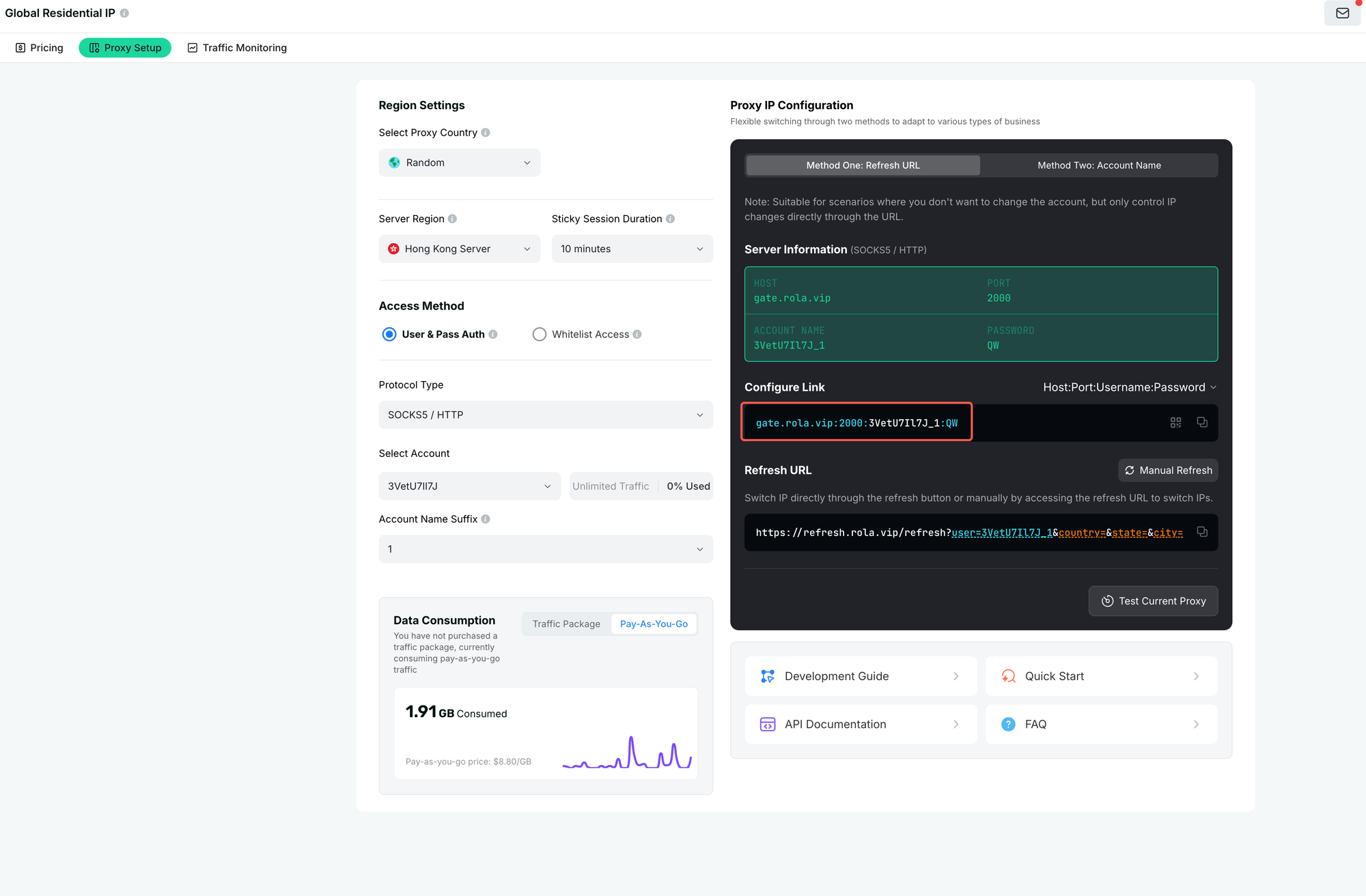
Official ROLA-IP screenshot — Step 01 Open Rotating Residential Settings
Step 2. Copy the proxy host, port, username, and password
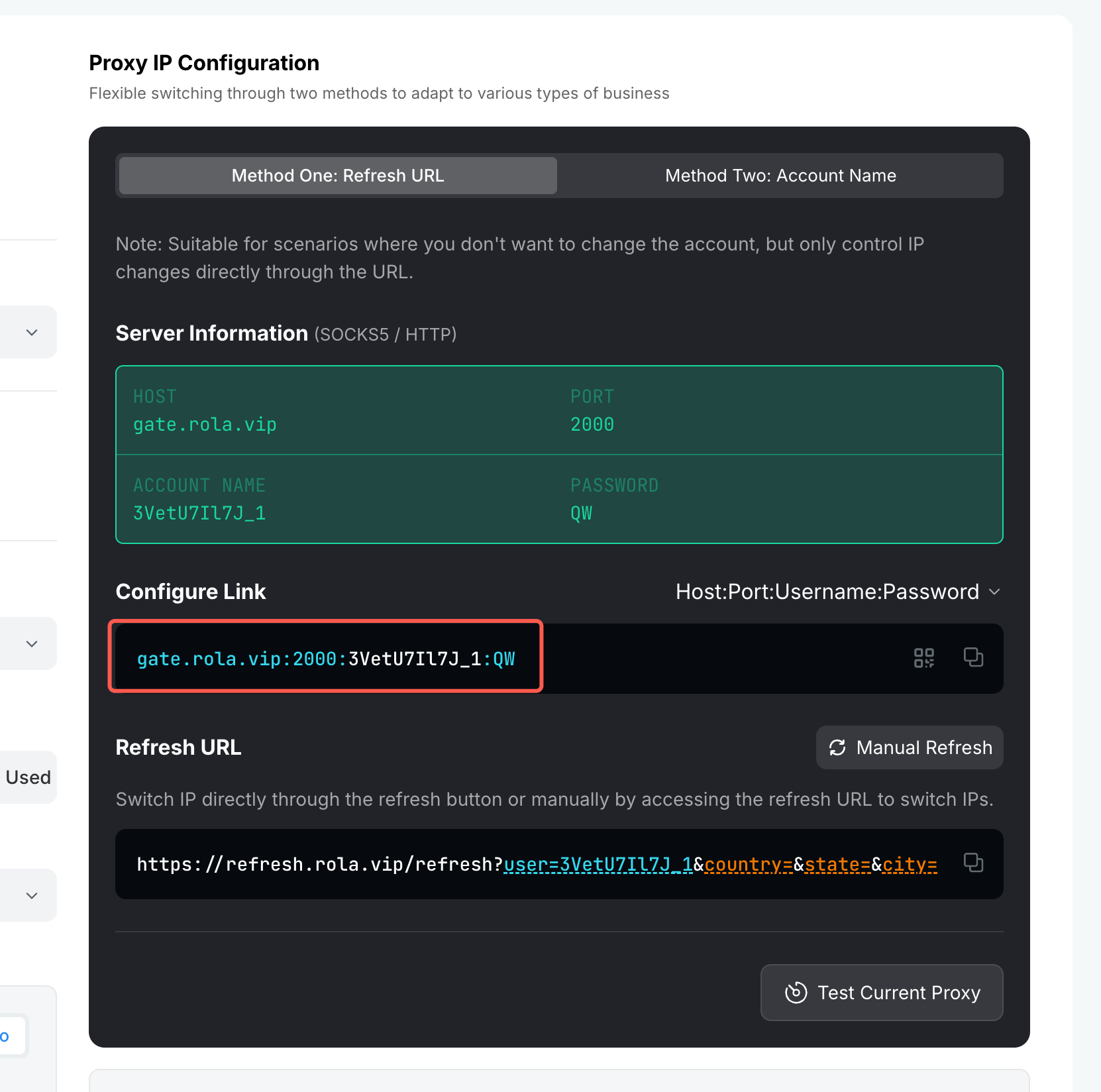
Official ROLA-IP screenshot — Step 02 Copy Host Port Username Password
Step 3. Add the country target to the username configuration
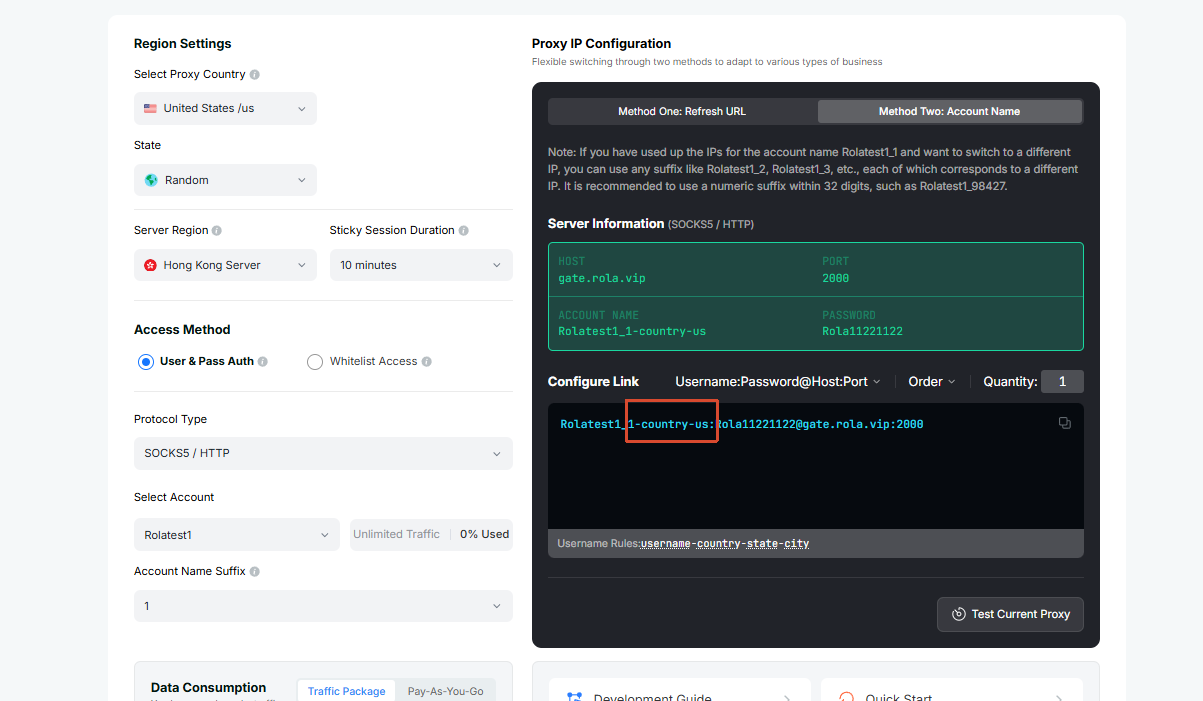
Official ROLA-IP screenshot — Step 03 Set Country in Username
Step 4. Test the exit IP and location before running the hotel query

Official ROLA-IP screenshot — Step 04 Test Exit IP and Location with curl
Start with Specific Destination Queries
A simple query structure can be:
hotels in New York
hotels in Miami
luxury hotels in Manhattan
airport hotels in Los Angeles
boutique hotels in Barcelona
For Python, I would encode the search term instead of manually concatenating a URL:
from urllib.parse import urlencode

def build_hotel_search_url(query):
    params = {"q": query}
    return "https://www.google.com/travel/search?" + urlencode(params)
What Search Variables Should You Preserve?
| Variable | Example | Why Store It? |
|---|---|---|
| Destination | New York | Identifies target market |
| Check-in | 2026-09-10 | Affects available prices |
| Check-out | 2026-09-12 | Defines stay length |
| Guests | 2 | Can affect offers |
| Currency | USD | Needed for price comparison |
| Language | en-US | Can affect labels and content |
| Query | hotels in Manhattan | Tracks discovery source |
A useful search record might look like:
search_context = {
    "destination": "New York",
    "query": "hotels in New York",
    "check_in": "2026-09-10",
    "check_out": "2026-09-12",
    "adults": 2,
    "currency": "USD",
    "language": "en-US"
}
For country-scale projects, I would not depend on a query such as hotels in United States. Break the market into cities, metro areas, or smaller geographic units. This produces more controlled coverage and makes later deduplication much easier.
How Do You Extract Hotel Names, Prices, Ratings, and Other Details?
Finding hotel cards is only the first step. If selectors are too broad, the scraper can accidentally pair one property’s name with another property’s price or rating.
Extract each hotel as one self-contained card, then parse the name, displayed price, rating, review count, amenities, location, and URL from elements inside that card. Keep missing fields as null values, validate a small sample manually, and avoid assuming that Google’s CSS classes will remain unchanged.
Parse One Hotel Card at a Time
The safer pattern is:
Find hotel card
    ↓
Find name inside card
Find price inside card
Find rating inside card
Find amenities inside card
Find property URL inside card
    ↓
Create one structured record
A simplified record can look like:
record = {
    "name": hotel_name,
    "price": displayed_price,
    "rating": rating,
    "reviews": review_count,
    "amenities": amenities,
    "url": property_url
}
Which Fields Should You Validate?
| Field | Verification Method |
|---|---|
| Hotel name | Compare with visible card title |
| Price | Confirm amount and currency |
| Rating | Compare with visible rating |
| Reviews | Confirm review count belongs to same card |
| Amenities | Verify they are inside the same result container |
| URL | Open and confirm the intended property |
| Location | Compare with visible destination information |
Selectors should be treated as maintained configuration, not permanent facts.
Generated CSS class names can change. The page may also differ by language, country, experiment, device width, or search state.
For production collection, I would save enough debugging information to diagnose failures:
scraped_at
query
page_number
record_count
page_url
error_type
If a scraper suddenly produces zero results, inspect the returned page or browser screenshot before assuming that the website contains no hotels.
How Do You Scrape Multiple Pages of Google Hotel Listings?
Collecting only the first visible result set creates a biased dataset. But blindly clicking “next” can also cause duplicates, loops, and incomplete collections.
To scrape multiple pages, extract the current result set, record which hotels have already been seen, move to the next page or result batch, and continue until navigation ends, no new hotels appear, or a predefined limit is reached. Track page state and deduplicate records during collection.
Use a Controlled Pagination Loop
A simplified process is:
Load Page 1
→ Extract Hotels
→ Save New Records
→ Move to Next Page
→ Extract Hotels
→ Remove Duplicates
→ Repeat
→ Stop
The stopping condition matters as much as the next-page action.
| Stop Condition | Why It Matters |
|---|---|
| No next-page control | Results are exhausted |
| No new hotel records | Prevents infinite loops |
| Maximum page limit reached | Controls workload |
| Unexpected page state | Prevents saving invalid data |
| Repeated page signature | Detects pagination failure |
A simple structure might use a set of previously seen property keys:
seen = set()

for page_number in range(1, max_pages + 1):
    records = scrape_current_page(driver)

    for record in records:
        key = record.get("url") or record.get("name", "").lower()

        if key in seen:
            continue

        seen.add(key)
        record["page"] = page_number
        collected.append(record)
Do Not Confuse More Concurrency with Better Pagination
Increasing request volume does not solve incomplete pagination.
You still need to control:
- page number
- source query
- hotel identity
- retry state
- result count
- collection timestamp
If the page shows a challenge, consent page, empty state, or other unexpected response, classify it as a collection failure rather than treating it as a valid page with zero hotels.
How Do You Scrape Hotels Across Multiple Cities or an Entire Country?
A single national hotel search cannot reliably represent every property in a large market. The broader the query becomes, the more likely important local properties are omitted.
To scrape hotels across multiple cities or an entire country, divide the target market into cities, metro areas, neighborhoods, or geographic cells. Run separate hotel searches for each segment, preserve the originating location, and merge overlapping properties later using URLs, addresses, coordinates, or other stable identifiers.
ROLA-IP Practical Walkthrough
Start on: proxy parameters | Section: Username example + Location Parameters + sessionid Rules
Source: https://doc.rola-ip.co/guide/proxy-networks/parameters.html
Step 1. Create an independent session for the first city or worker
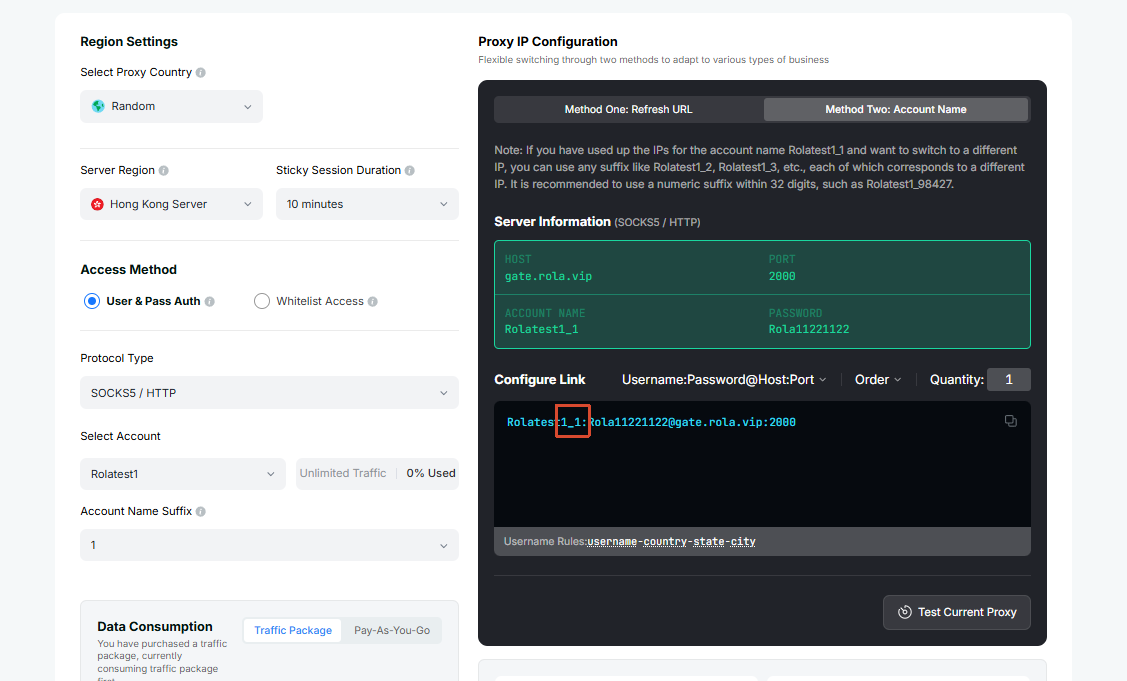
Official ROLA-IP screenshot — Step 01 Create First Independent Session
Step 2. Set sticky session time when continuity is required
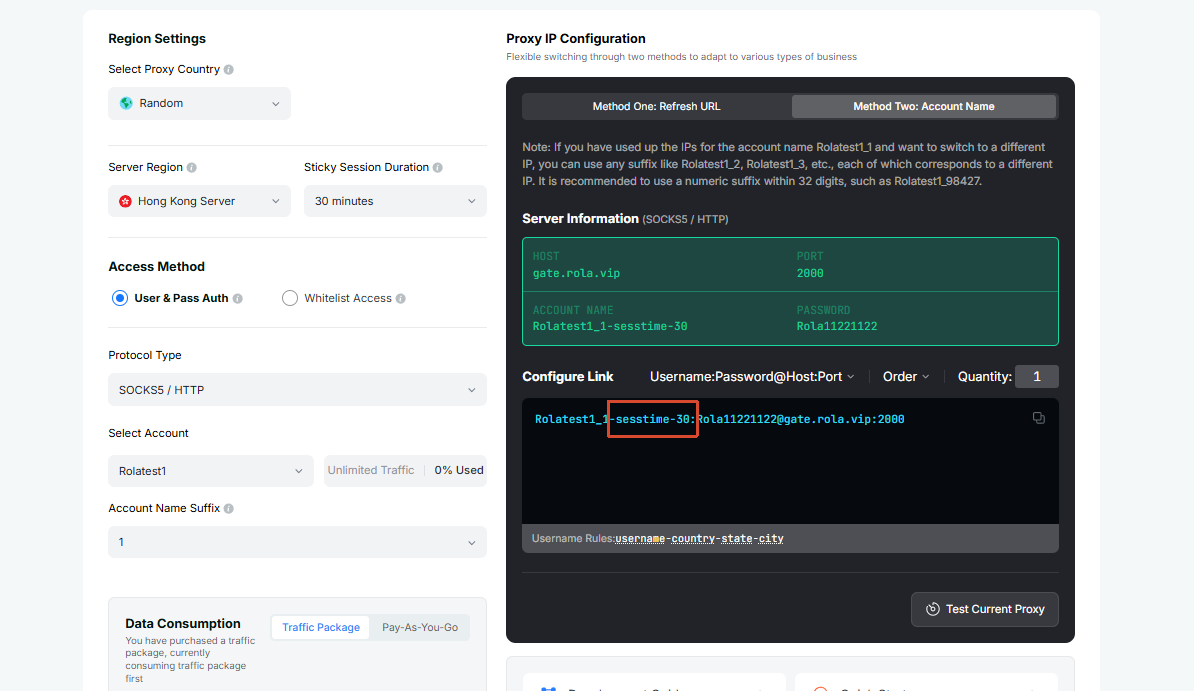
Official ROLA-IP screenshot — Step 02 Set Sticky Session Time
Step 3. Create another independent session for the next city or worker
Step 4. Apply geographic targeting to each city job
Step 5. Verify the actual exit location before collecting results
Build a Geographic Search Queue
For example:
cities = [
    "New York, NY",
    "Los Angeles, CA",
    "Chicago, IL",
    "Houston, TX",
    "Miami, FL",
    "Dallas, TX"
]

queries = [f"hotels in {city}" for city in cities]
For dense markets, city-level searches can be divided further:
hotels in Manhattan
hotels in Brooklyn
hotels in Queens
hotels near JFK Airport
hotels near Times Square
What Should You Store for Each Geographic Search?
| Field | Example |
|---|---|
| Country | United States |
| State / Region | New York |
| Source city | New York |
| Source query | hotels in Manhattan |
| Proxy region | United States |
| Currency | USD |
| Language | en-US |
| Scraped time | 2026-08-17T14:00:00Z |
Geographic consistency becomes important when you are comparing markets.
If a project requires authorized regional data collection, review the available residential proxy options and the documented proxy parameters before configuring country, city, or session settings. Confirm the actual exit location in a test request before using the configuration for collection.
I would keep the configuration stable for each market:
Miami search
→ US location
→ English
→ USD
→ same stay dates
→ same guest count
Do not change language, currency, dates, location, and guest count simultaneously if you later want to compare the results. Otherwise, you cannot easily determine which variable caused the difference.
How Do You Clean, Deduplicate, and Export Google Hotel Data?
Raw hotel records are rarely analysis-ready. The same property may appear in several searches with different capitalization, URLs, prices, or location formats.
Clean hotel data by normalizing names, locations, prices, currencies, and missing values before deduplication. Prefer a stable property identifier or canonical URL over name-only matching. Store hotel identity separately from price observations, then export the cleaned records to formats such as CSV, JSON, XLSX, or a database.
Normalize Data Before Deduplication
For example:
import re

def normalize_name(value):
    if not value:
        return None

    value = value.casefold()
    value = re.sub(r"\s+", " ", value)

    return value.strip()
Raw values such as:
Sea View Hotel
sea view hotel
Sea   View Hotel
should normally produce the same normalized name.
Which Deduplication Key Should You Use?
I would use the strongest identifier available.
| Priority | Deduplication Key | Reliability |
|---|---|---|
| 1 | Property/platform ID | Highest |
| 2 | Canonical property URL | High |
| 3 | Name + full address | Medium-high |
| 4 | Name + coordinates | Medium-high |
| 5 | Name only | Low |
Do not delete price history just because the hotel is duplicated.
For example:
| Hotel | Stay Date | Scraped Date | Price |
|---|---|---|---|
| Hotel A | Sep 10 | Aug 17 | $210 |
| Hotel A | Sep 10 | Aug 20 | $235 |
This is one hotel but two valid price observations.
Export the Clean Dataset
With pandas:
import pandas as pd

df = pd.DataFrame(records)

df["normalized_name"] = (
    df["name"]
    .fillna("")
    .str.casefold()
    .str.replace(r"\s+", " ", regex=True)
    .str.strip()
)

df = df.drop_duplicates(
    subset=["url"],
    keep="first"
)

df.to_csv("google_hotels.csv", index=False)
df.to_json(
    "google_hotels.json",
    orient="records",
    force_ascii=False,
    indent=2
)
For hotel price research, keep source collectors separate and normalize their outputs into the same property and price tables. This makes cross-platform price observations easier to compare without conflating records from different sources.
Next Step
Before running an authorized regional collection job, review the Python proxy integration guide, configure the required proxy parameters, and verify the exit location with a test request. Then run a small, manually validated sample before scaling the collection.