
Web Scraping JavaScript vs Python: Which Language Is Better?

Aug 26, 2026 · Comparisons · 13 min read
TL;DR
- Choose Python when your workflow centers on static HTML, JSON APIs, batch cleaning, CSV/database ingestion, and long-term data pipelines.
- Choose JavaScript when browser interaction or an existing Node.js/front-end stack is the main constraint; Python Playwright remains a valid option for data-focused teams.
- Both Python and JavaScript can handle browser automation, and Playwright supports both. The real differences are in downstream data processing, team maintenance, and system integration.
- For web scraping Java vs Python, the decision is more engineering-oriented: Java is stable and suitable for embedding in enterprise services, but scraping development speed and the data ecosystem are usually stronger in Python.
- In anti-bot scenarios, the programming language is not the deciding factor. Request pacing, proxy quality, session strategy, headers, browser fingerprints, error retries, and compliance boundaries matter more for stability.
Which Is Better for Web Scraping: Python or JavaScript?
For the question “web scraping javascript vs python,” the most accurate answer is not an absolute either-or choice. You should first look at the type of page you need to scrape and the final output you need to deliver. Python behaves more like a data engineering language: its ecosystem covers requests, parsing, cleaning, deduplication, storage, and analysis. JavaScript behaves more like a browser-control language: it is closer to the DOM, asynchronous requests, front-end frameworks, and headless-browser runtimes.
If you are scraping e-commerce listings, news articles, job postings, SEO search results, or public directory pages, and the data can be obtained directly from HTML or an API, Python can often complete the task with less code. Requests/httpx, BeautifulSoup, lxml, parsel, Scrapy, and pandas form a mature workflow. You can first validate the target fields with a script of a few dozen lines, then move the logic into Scrapy or a task queue when you need to scale.
If you are scraping React, Vue, Angular, Next.js, or other heavily front-end-rendered pages, JavaScript is often convenient when the team already owns the front-end stack. Puppeteer and Playwright can wait for elements, execute scripts, click filters, scroll to load content, and intercept network requests like a browser. For front-end teams, using JavaScript to work with DOM state, the event loop, and the page lifecycle can reduce communication overhead.
However, “JavaScript is better for dynamic pages” does not mean “dynamic pages can only be scraped with JavaScript.” Python can also control browsers with Playwright or Selenium. Conversely, JavaScript can scrape static HTML with axios + cheerio. The key question is not whether a language can do the job, but which stack can keep the task stable over time with lower maintenance cost.
Key Feature Comparison: Python vs JavaScript for Web Scraping
| Comparison | Python | JavaScript | Practical Takeaway |
|---|---|---|---|
| Getting started | Simple syntax and abundant scraping/parsing tutorials | Easy for front-end developers; unified Node.js environment | Python is usually faster to learn for non-front-end teams |
| Static pages | Requests/httpx + BeautifulSoup/lxml are highly mature | axios/got + cheerio are also sufficient | Prefer Python for large volumes of static pages |
| Dynamic pages | Playwright/Selenium can handle them, but browser semantics feel slightly less native | Puppeteer/Playwright are closely aligned with the browser ecosystem | For highly interactive pages, prefer JavaScript or Python Playwright |
| Concurrency model | Scrapy, asyncio, and aiohttp work well for I/O concurrency | The event loop is naturally suited to asynchronous I/O | Network waiting is usually the bottleneck, so do not compare language speed alone |
| Data cleaning | Mature pandas, polars, numpy, and Jupyter ecosystem | Often uses databases, scripts, or external analytics tools | Python is often convenient when analysis follows scraping |
| Engineering | Smooth path from scripts to queues and pipelines | Fits Node.js APIs and unified front-end/back-end stacks | Follow your team’s primary technology stack |
| Browser resource cost | You still need to control browser/page counts | You still need to control browser/page counts | The cost comes from browser resources, not the language name |
| Long-term maintenance | Rich scraping examples, documentation, and debugging experience | Can be convenient for teams already maintaining DOM selectors and front-end tooling | Favor the language used by the team maintaining page logic |
Ease of Use and Learning Curve: Python Has a Lower Barrier, JavaScript Fits Front-End Teams Better
For someone starting web scraping from scratch, Python usually has a gentler learning curve. Its syntax is close to pseudocode, and the flow of requests.get, soup.select, and a for loop for extracting fields is straightforward. Beginners can build a working script quickly. This advantage is especially noticeable for data analysts, SEO specialists, and market researchers without a deep software engineering background: after scraping, they can immediately use pandas to clean, aggregate, export to Excel, or write data into a database.
JavaScript’s learning curve depends heavily on the reader’s background. Front-end developers often find JavaScript natural because the DOM, CSS selectors, events, Promises, async/await, and browser DevTools are already part of their daily work. But for someone without front-end experience, the Node.js module system, asynchronous control flow, browser contexts, and the difference between client-side and server-side execution can add complexity.
For a data-focused beginner, Python is often a practical starting point. For a front-end developer who already works with browser tooling, JavaScript may feel more familiar. The better fit depends on the project and the team that will maintain it.
Libraries, Frameworks, and Ecosystems: Python Has the Full Data Pipeline, JavaScript Has the Stronger Browser Pipeline
Python’s scraping ecosystem covers a wide range of tasks. Requests and httpx handle HTTP requests; BeautifulSoup, lxml, and parsel handle HTML/XML parsing; Scrapy handles queues, deduplication, downloader middleware, throttling, retries, and data pipelines; Playwright/Selenium handle browser automation; and pandas/polars handle downstream cleaning and analysis. Its main advantage is the short path from a raw web page to structured data.
The JavaScript ecosystem is centered more around browsers and asynchronous I/O. axios, got, and undici can handle HTTP requests; cheerio can parse HTML; Puppeteer and Playwright are the main tools for dynamic-page scraping; and Crawlee/Apify can manage more complete crawling workflows. If a team already uses TypeScript, Node.js, NestJS, Next.js, or front-end monitoring systems, a JavaScript solution can reduce cross-language deployment and maintenance costs.
The ecosystem question is not about which language has “more libraries.” It is about which ecosystem covers your primary workflow. If the workflow is centered on data processing, Python is often a convenient fit. If it is centered on browser behavior and front-end state, JavaScript may fit an existing front-end workflow more naturally.
Dynamic Content, JavaScript Rendering, and Async Scraping: Find the API First, Then Decide Whether You Need a Browser
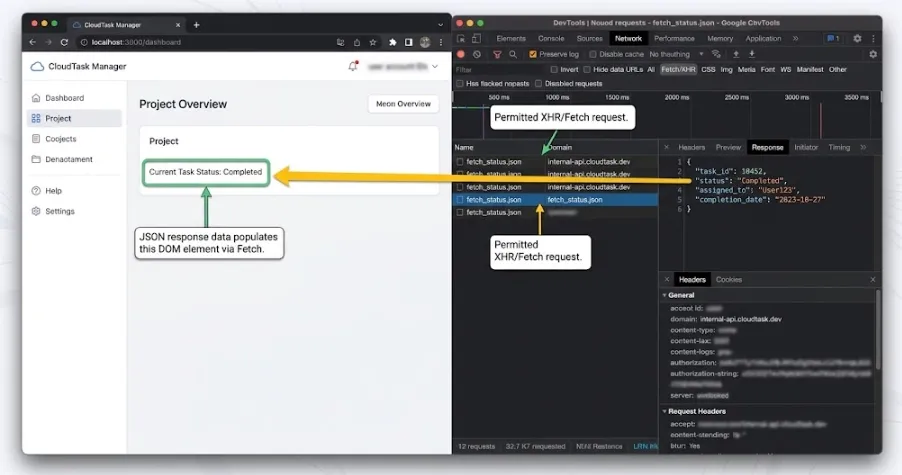
Many high-ranking articles emphasize that JavaScript is better for dynamic pages, but this can be misleading. A dynamic page does not automatically require full browser rendering. Many pages get their data from XHR/Fetch APIs, and the browser simply renders the returned JSON into the DOM. In that case, the better solution is usually to request the API directly instead of launching Playwright or Puppeteer to render the entire page.
Both Python and JavaScript can perform asynchronous scraping. Python can use asyncio, aiohttp, httpx AsyncClient, or Scrapy to schedule large numbers of I/O requests. JavaScript is naturally based on the event loop, so async/await syntax is concise. The real difference is how you control asynchronous scraping: you need per-domain concurrency limits, backoff for 403/429 responses, retries for timeouts, and saved failure samples instead of simply throwing every URL into Promise.all or asyncio.gather.
When the page genuinely requires JavaScript execution—for example, infinite scrolling, clicking filters, waiting for front-end route changes, reading localStorage, or handling post-login pages—Playwright and Puppeteer become appropriate tools. JavaScript is a natural choice for teams already using browser tooling, while Python is convenient when the browser output needs to flow directly into a data-processing pipeline.
Performance, Efficiency, and Scalability: Network Conditions, Target-Site Limits, and Proxy Quality Matter More
In web scraping, the main performance bottleneck is usually not Python or JavaScript syntax execution. It is network latency, DNS, TLS handshakes, target-site response time, rate limiting, proxy exit quality, and browser rendering cost. A single page request may take hundreds of milliseconds or several seconds, so language-level differences rarely determine final throughput.
Python’s Scrapy is strong for large-scale static-page scraping because it already includes queues, concurrency control, download delays, middleware, deduplication, and data pipelines. JavaScript is also strong at I/O concurrency and browser automation, but launching large numbers of headless browsers can quickly make CPU and memory the bottleneck. Production systems usually use a layered approach: pages that can be fetched over HTTP do not use a browser, pages that truly require rendering are sent to a browser pool, and failed tasks are routed to a retry queue.
Scalability also depends on the proxy layer. Without high-quality IPs, session control, geographic targeting, and failure-rate monitoring, even well-designed asynchronous code will be slowed down by 403s, 429s, CAPTCHAs, and connection failures.
Deployment, Automation, and Ongoing Maintenance: Choose a Stack That Can Stay Stable Long Term
A one-off script only needs to work once. A long-running scraping system must account for deployment and maintenance. Python scripts fit well with cron, Airflow, Prefect, Celery, Docker, and data pipelines. JavaScript/TypeScript fits well with Node.js services, serverless environments, queue workers, and existing front-end platforms.
Ongoing maintenance should include dependency version pinning, browser binary updates, selector-change monitoring, failure screenshots, status-code statistics, proxy failure rates, data-quality validation, and alerting. Dynamic-page projects especially need to record Playwright/Puppeteer versions, browser versions, wait conditions, and timeout strategies. Otherwise, even a small page redesign can become difficult to diagnose.
If the team does not have dedicated maintenance staff, prefer a solution with fewer components: use HTTP requests for static pages, request JSON APIs directly when possible, and introduce browser automation only for pages that truly require interaction. The lighter the stack, the lower the long-term cost.
Choose by Page Type First, Not by Programming Language
Many failed scraping projects choose the wrong layer from the beginning: they launch a headless browser even though an API already returns JSON, or they insist on parsing empty HTML with ordinary HTTP requests even though the page requires scrolling and clicking. The correct approach is to inspect where the data comes from first, then decide on the language and tools.
- Static HTML: The target fields are already present in the page source. Prefer Python Requests/httpx or JavaScript axios/got, then use a parser to extract fields.
- XHR/Fetch API: The browser Network panel shows a JSON endpoint. Prefer reusing the API request instead of rendering the full page.
- Client-rendered DOM: The initial HTML does not contain the data, and the API parameters or signatures are difficult to reproduce. Use Playwright, Puppeteer, or Selenium.
- Authenticated pages: Focus on cookies, sessions, account risk controls, and permission boundaries. The language is only an implementation detail.
- Strong anti-bot protection: You need rate limiting, proxies, fingerprint management, retries, monitoring, and failure-sample analysis. Simply switching between Python and JavaScript usually does not solve the problem.
How Should You Choose for Different Scenarios? Reusable Code Examples
The following sections break down the most common real-world scraping scenarios. Each scenario includes a recommended language, the reason, and a reusable code skeleton. Replace the CSS selectors with the actual structure of your target site. The example domain example.com is used only to illustrate the code structure.
Scenario 1: Static Product Listing Pages — Prefer Python
When fields such as product name, price, and rating are already present in the HTML, Python’s advantage is short code, fast parsing, and convenient downstream cleaning. This works well for e-commerce catalogs, blog listings, business directories, and job boards.
import requests
from bs4 import BeautifulSoup

url = "https://example.com/products"
headers = {"User-Agent": "Mozilla/5.0"}
response = requests.get(url, headers=headers, timeout=20)
response.raise_for_status()

soup = BeautifulSoup(response.text, "html.parser")
products = []

for card in soup.select(".product-card"):
    products.append({
        "name": card.select_one(".title").get_text(strip=True),
        "price": card.select_one(".price").get_text(strip=True),
    })

print(products)
The extension path is straightforward: add pagination queues, failure retries, field validation, and CSV/database output. Only when the required fields are not available in the HTML should you move to API scraping or browser automation.
For production request handling, review Python Requests headers when configuring request headers and Python Requests timeout when setting timeout and retry behavior.
Scenario 2: Static Pages with a Node.js Team — JavaScript Is Also a Good Fit
If the project is already a Node.js service, or the scraped results need to flow directly into an Express/NestJS API, JavaScript can reduce deployment and collaboration costs. Static HTML does not automatically require Python.
import axios from "axios";
import * as cheerio from "cheerio";

const { data: html } = await axios.get("https://example.com/products", {
  timeout: 20000,
  headers: { "User-Agent": "Mozilla/5.0" }
});

const $ = cheerio.load(html);
const products = [];

$(".product-card").each((_, el) => {
  products.push({
    name: $(el).find(".title").text().trim(),
    price: $(el).find(".price").text().trim()
  });
});

console.log(products);
This approach works well for lightweight scraping, internal APIs, and monitoring scripts maintained by front-end teams. Its drawback is that data cleaning, statistical analysis, and exploratory processing are generally less convenient than in Python.
Scenario 3: Pages That Depend on JavaScript Rendering — Prefer Playwright/Puppeteer
If the initial HTML contains only an empty container, the target data is rendered into the DOM by a front-end API, or the page requires clicking filters, scrolling to load content, and waiting for components to appear, browser automation is more reliable. A JavaScript Playwright example looks like this:
import { chromium } from "playwright";

const browser = await chromium.launch({ headless: true });
const page = await browser.newPage({
  userAgent: "Mozilla/5.0"
});

await page.goto("https://example.com/products", {
  waitUntil: "networkidle",
  timeout: 30000
});

await page.waitForSelector(".product-card", { timeout: 15000 });

const products = await page.$$eval(".product-card", cards =>
  cards.map(card => ({
    name: card.querySelector(".title")?.textContent?.trim(),
    price: card.querySelector(".price")?.textContent?.trim()
  }))
);

console.log(products);
await browser.close();
The key point is not page.goto itself, but the wait condition. waitUntil: "networkidle" is not always reliable because some sites keep network connections open continuously. In production, prefer waiting for a business-relevant element such as .product-card, a price node, or a specific API response.
Scenario 4: Dynamic Pages with Downstream Data Analysis — Python Playwright Is More Convenient
If the page must be rendered but the scraped results will later go into pandas, ETL, or machine-learning workflows, you can use the Python version of Playwright. It preserves browser automation while keeping downstream data processing inside the Python ecosystem.
from playwright.sync_api import sync_playwright

with sync_playwright() as p:
    browser = p.chromium.launch(headless=True)
    page = browser.new_page(user_agent="Mozilla/5.0")

    page.goto(
        "https://example.com/products",
        wait_until="domcontentloaded"
    )
    page.wait_for_selector(".product-card", timeout=15000)

    products = page.eval_on_selector_all(
        ".product-card",
        """cards => cards.map(card => ({
            name: card.querySelector('.title')?.textContent?.trim(),
            price: card.querySelector('.price')?.textContent?.trim()
        }))"""
    )

    print(products)
    browser.close()
This combination is well suited to data teams: the browser is responsible only for obtaining the rendered structured result, while cleaning, deduplication, anomaly detection, and report export remain in Python.
Scenario 5: High-Concurrency Scraping — Focus on Scheduling, Rate Limits, and Failure Recovery
In high-concurrency scenarios, both Python and JavaScript can run asynchronous tasks. The difference is not syntax, but whether you have queues, rate limits, proxy management, retries, and monitoring. For static pages, Python Scrapy has strong engineering capabilities. For dynamic pages, a Node.js + Playwright browser pool is also common.
# Python: control HTTP concurrency with aiohttp for APIs or static pages
import asyncio
import aiohttp

URLS = [
    "https://example.com/page/1",
    "https://example.com/page/2",
]

async def fetch(session, url, max_retries=3):
    for attempt in range(max_retries):
        async with session.get(url, timeout=20) as resp:
            if resp.status in {429, 503}:
                retry_after = resp.headers.get("Retry-After", "")
                delay = int(retry_after) if retry_after.isdigit() else 2 ** attempt
                await asyncio.sleep(delay)
                continue
            resp.raise_for_status()
            return await resp.text()
    raise RuntimeError(f"Retry limit reached for {url}")

async def main():
    connector = aiohttp.TCPConnector(limit=20, limit_per_host=5)
    async with aiohttp.ClientSession(connector=connector) as session:
        pages = await asyncio.gather(*(fetch(session, url) for url in URLS))
        print(len(pages))

asyncio.run(main())
This example keeps per-host concurrency low and pauses after 429 or 503 responses. In production, also set limits by page type, account, and proxy exit; honor Retry-After where present; and stop collection when access is not authorized.
Scenario 6: Price Monitoring, SEO Monitoring, and Public Data Collection — You Need a Proxy Layer
When the same workflow needs to view search results, product prices, or ad displays across different regions, the proxy layer matters more than the language choice. You need to control country, city, session duration, rotation frequency, and retry behavior. Both Python and JavaScript code should centralize proxy configuration instead of scattering it throughout scraping functions.
# Python requests proxy example
import requests

proxy_url = "http://USERNAME:PASSWORD@HOST:PORT"
proxies = {
    "http": proxy_url,
    "https": proxy_url,
}

resp = requests.get(
    "https://example.com/products",
    proxies=proxies,
    headers={"User-Agent": "Mozilla/5.0"},
    timeout=20,
)

print(resp.status_code)
// JavaScript Playwright proxy example
import { chromium } from "playwright";

const browser = await chromium.launch({
  headless: true,
  proxy: {
    server: "http://HOST:PORT",
    username: "USERNAME",
    password: "PASSWORD"
  }
});

const page = await browser.newPage();
await page.goto("https://example.com/products");
console.log(await page.title());
await browser.close();
Projects like these can use a web scraping proxy as collection infrastructure and choose different proxy types based on the target page’s country or region, access frequency, and session requirements.
Only collect data you are authorized to access and follow the target site’s terms, applicable rate limits, and relevant laws.
Using Rola IP in Web Scraping Workflows
When a scraping task grows from a small script into a production system, a proxy can become part of the network infrastructure. Evaluate Rola IP only when the workflow requires geographic targeting, session control, or centralized proxy configuration. Verify current product availability, coverage, IP-pool scope, pricing, and service commitments on official product and SLA pages before selecting a plan.
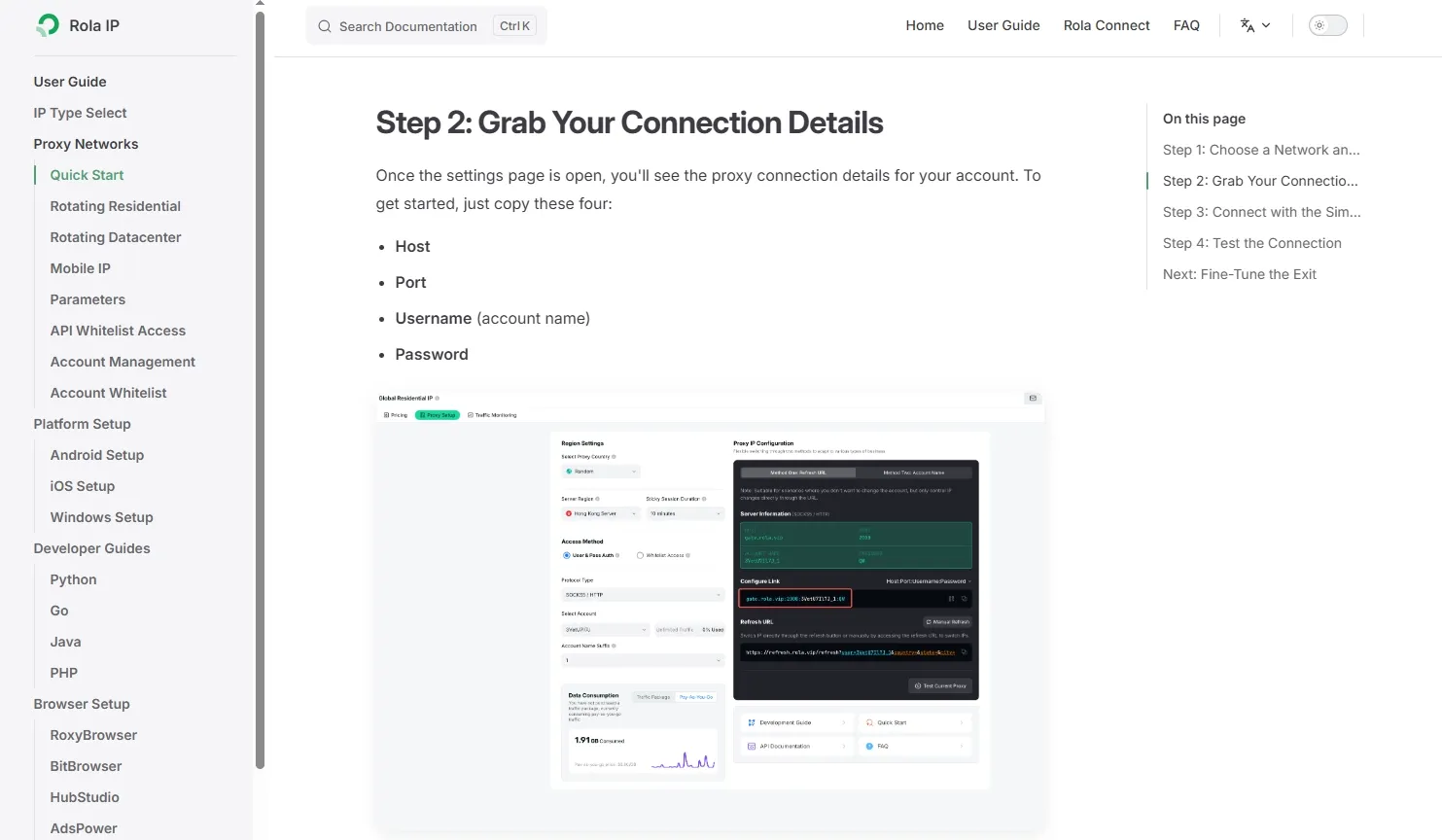
For authorized public-data collection, search-result monitoring, or multi-region testing, keep proxy settings separate from Python or JavaScript parsing logic. A web scraping proxy can be evaluated alongside request pacing, monitoring, and failure handling. Where the workflow requires residential exits, review the current residential proxies documentation and test authentication, protocol, host, port, and a permitted request with the proxy quick-start guide.
Final Recommendation: Choose by Scenario, Not Popularity
| Your Scenario | Preferred Choice | Why |
|---|---|---|
| Static HTML, public listing pages, batch data cleaning | Python | Mature HTTP fetching, parsing, cleaning, and ingestion workflow |
| React/Vue dynamic pages, clicking, scrolling, filtering | JavaScript or Python Playwright | Browser automation is the core requirement; team background should decide the language |
| Existing scraping API in a Node.js backend | JavaScript/TypeScript | More unified deployment, logging, typing, and service integration |
| Extending a Scrapy project to dynamic pages | Python + Playwright | Keep the existing scheduler and pipelines while adding browser capability |
| Scraping module embedded in an enterprise Java system | Java | Reuse existing service governance and deployment infrastructure |
| Strong anti-bot protection and large-scale long-running scraping | Language is secondary; architecture comes first | Proxies, rate limits, retries, and monitoring determine stability |
Conclusion
Choose the smallest reliable layer for the page and workflow: direct HTTP requests for accessible static HTML or APIs, and browser automation only when rendering or interaction is required. Then choose the language your team can maintain alongside data validation, rate limits, retries, and monitoring.