
How to Scrape Zillow With Python: A Step-by-Step Guide

Sep 1, 2026 · Proxy Basics · 16 min read
TL;DR
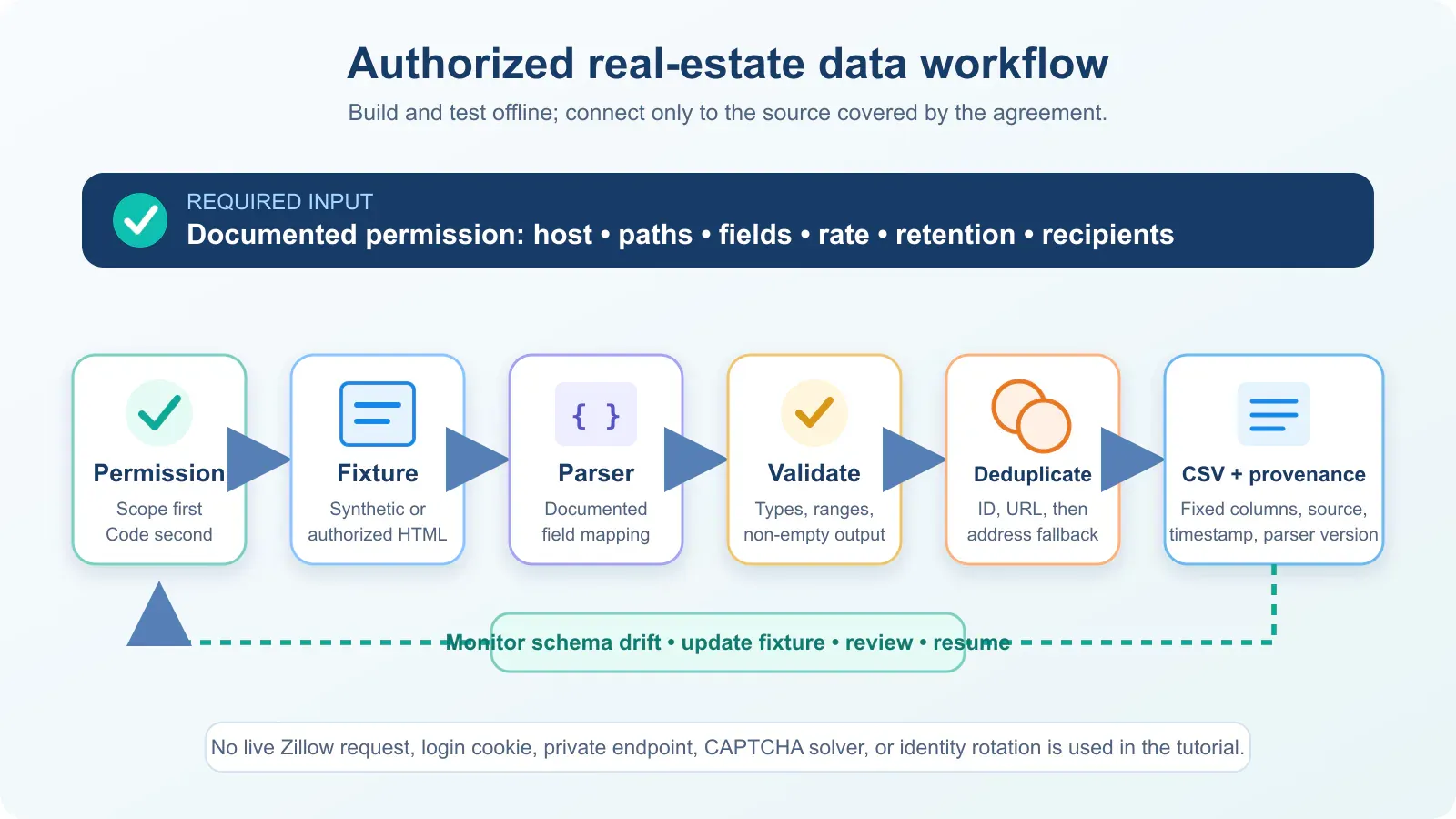
This practical Python tutorial shows how to scrape Zillow-style listing data from an authorized HTML or JSON input, extract property fields, process multiple saved pages, remove duplicates, validate missing values, and export a stable CSV. The included project runs end to end against fictional offline fixtures. It also explains how to replace the fixture input with an approved API, licensed feed, or explicitly authorized response, plus when an official Zillow Research CSV is the better source.
How to Scrape Zillow With Python: Quick Overview

To scrape Zillow with Python, start with a Zillow data source you are authorized to access, load its HTML or JSON response, extract listing IDs, addresses, prices, bedrooms, bathrooms, and square footage, then validate, deduplicate, and export the records to CSV. This tutorial builds that Zillow scraper step by step with runnable fixtures and shows how an approved API or authorized response can replace the local test input.
The workflow has eight practical steps:
- Confirm that the source and automated use are authorized.
- Install Python and Beautiful Soup.
- Add an authorized Zillow response or one of the supplied fixtures.
- Locate property records in documented JSON, JSON-LD, or approved HTML fields.
- Normalize listing IDs, URLs, addresses, prices, beds, baths, and square footage.
- Process multiple saved pages and remove duplicate listings.
- Export a fixed-column UTF-8 CSV.
- Run tests and inspect the resulting records.
Zillow’s current Terms of Use prohibit automated queries against ordinary Zillow pages. The network-input step therefore applies only to an approved API, licensed feed, or page automation covered by explicit written permission. Without that authorization, use the included fixtures or an official Zillow Research download.
Run the included Zillow scraper
The delivery package already contains the parser, two fictional Zillow-shaped HTML pages, tests, and an output folder. Run the complete example with:
cd code
python -m venv .venv
source .venv/bin/activate        # Windows: .venv\Scripts\activate
python -m pip install -r requirements.txt
python parse_listings.py --input fixtures --output output/listings.csv
python -m unittest discover -s tests -v
Expected command output:
Wrote 3 unique records to output/listings.csv
Ran 5 tests
OK
The generated CSV contains three unique fictional listings:
listing_id |
street_address |
price |
bedrooms |
bathrooms |
floor_size |
|---|---|---|---|---|---|
DEMO-1001 |
101 Example Cedar Lane |
525000 |
3 |
2.5 |
1840 |
DEMO-1002 |
202 Fictional Pine Avenue |
319000 |
2 |
1 |
980 |
DEMO-1003 |
303 Imaginary Oak Street |
610000 |
4 |
blank |
2120 |
DEMO-1002 appears on both fixture pages but is written once. The missing bathroom for DEMO-1003 remains blank instead of becoming zero. In an approved production workflow, replace only the fixture-input layer; the parser, validation, deduplication, tests, and CSV export stages stay the same.
Before You Start: Choose an Authorized Zillow Data Source
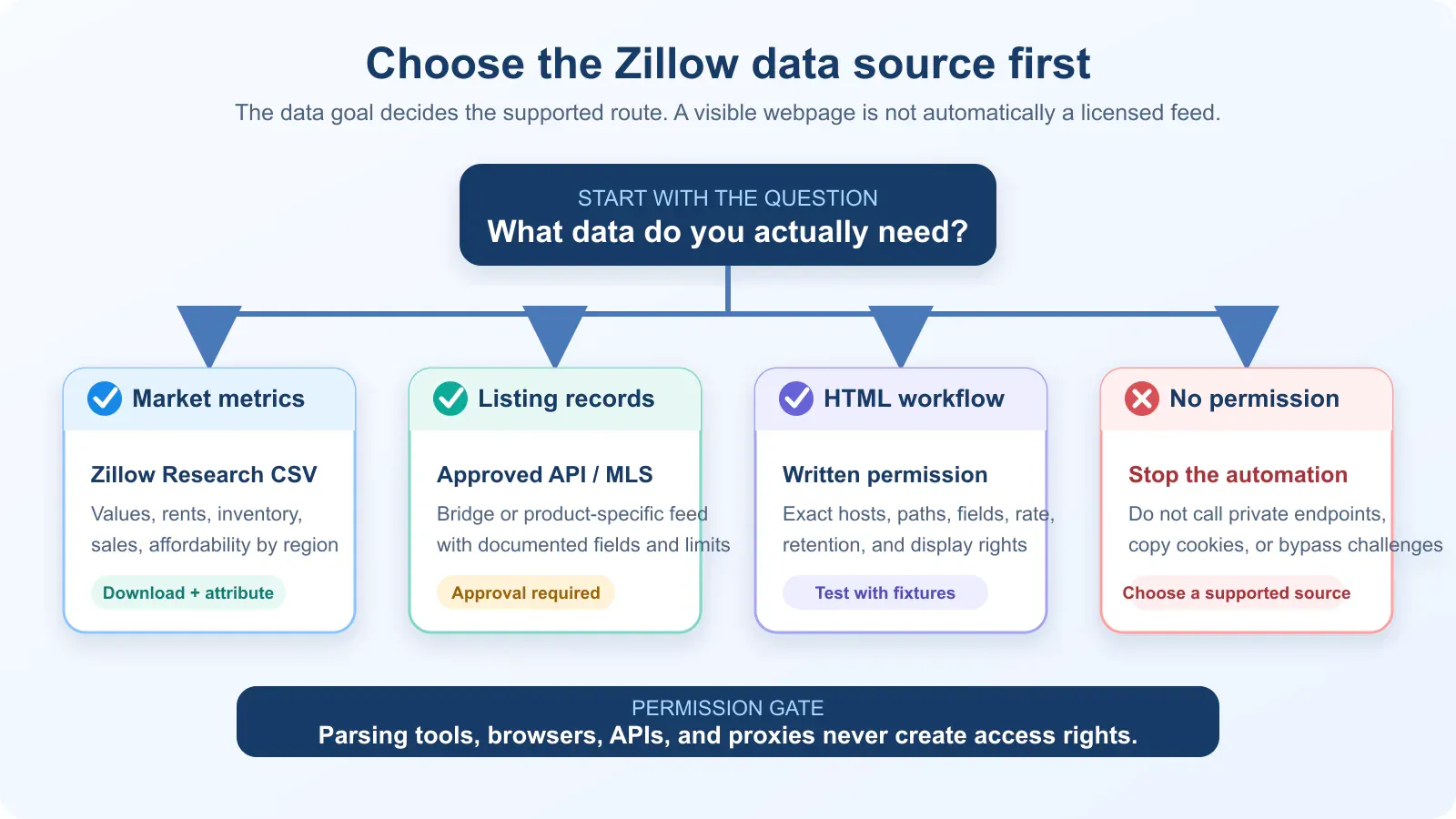
The phrase Zillow data scraper hides several very different goals. A market analyst may need a monthly home-value series by ZIP code. A licensed real estate application may need MLS records. A QA engineer may need to test an export the organization is contractually allowed to receive. Those are not the same project, and they do not have the same permissions.
Before writing Zillow-specific code, use this compliant workflow for scraping real estate data to define the approved source, a minimal schema, and an auditable provenance plan. Then use the decision table below.
Data goal |
Best starting source |
Approval needed? |
What it provides |
Main limitation |
|---|---|---|---|---|
Home values, rents, inventory, sales, or affordability by region |
No separate application for the published downloads; current terms and attribution still apply |
Downloadable CSV time series at several geographic levels |
Aggregate metrics, not a feed of individual live listings |
|
MLS listing data for a real estate product |
Bridge API or an MLS-approved feed |
Yes |
Normalized, licensed listing data governed by the provider agreement |
Access, fields, storage, and redistribution depend on approval |
Parcel, assessment, or transaction records |
Yes; the current product is invite-only |
Commercial public-record data returned as JSON |
Not an anonymous public API; separate terms apply |
|
A specific Zillow Group data product |
Usually product-specific |
APIs and datasets for approved public or partner use cases |
A page in the directory does not itself grant a license |
|
HTML from a page you own or are explicitly allowed to automate |
A saved fixture plus the approved page |
Written permission should define the scope |
Only the fields and pages included in the authorization |
DOM changes, privacy, copyright, and operational limits remain |
Live Zillow pages with no permission |
None |
Permission is missing |
Nothing should be collected automatically |
Stop and select a supported source |
Zillow Research CSV files are the simplest route for market metrics
Zillow says its Real Estate Metrics include measures such as values, rents, inventory, sale prices, sales volume, and forecasts. Many datasets are available by neighborhood, ZIP code, city, county, metro, state, or nation. The supported download format is CSV, and Zillow requires proper, clear attribution.
This route is often better than web scraping Zillow pages because it is designed for analysis, is easier to validate, and avoids brittle page selectors. Download the current file from the Research page rather than hard-coding a files.zillowstatic.com URL that may change.
Approved APIs and MLS feeds are for licensed record-level data
Zillow’s developer directory mixes public datasets and partner products. Its API Terms describe access for approved licensees and impose product-specific restrictions. Bridge similarly says developers request data access from an MLS or data provider before using its REST API.
Do not copy a code sample that calls an undocumented search endpoint and assume it is an official API. Use only the endpoint, token, fields, rate limits, storage period, and redistribution rights named in your approved documentation and agreement.
robots.txt is not permission
Zillow’s robots.txt contains a mixture of narrow Allow rules and broad Disallow rules, including restrictions for /api/, /graphql/, many /homes/ routes, search-query state, and CAPTCHA paths. Robots directives primarily guide crawlers; they do not override the Terms, grant a data license, or authorize CAPTCHA bypass. A 200 OK response does not grant those rights either.
What Zillow Data the Scraper Extracts
The included Zillow scraper extracts the property fields readers normally expect from a listing workflow: a stable listing ID, detail URL, address, price, currency, bedrooms, bathrooms, floor size, availability, source information, and collection time. A maintainable scraper still begins with the minimum data contract required for the approved use case rather than collecting every visible field.
For a property-record workflow, a practical schema is:
| Field | Type | Required? | Validation rule |
|---|---|---|---|
listing_id |
string | Recommended | Stable only within the approved source; never invent 0 for missing values |
detail_url |
string | Recommended | Absolute HTTPS URL from the allowed host or approved API |
street_address |
string | Optional | Preserve source spelling; do not infer a resident or owner |
city, region, postal_code |
string | Optional | Keep postal codes as strings so leading zeros survive |
price |
decimal text | Optional | Digits and decimal point only; blank when absent |
currency |
string | Optional | ISO-style code such as USD when the source supplies it |
bedrooms, bathrooms |
decimal text | Optional | Non-negative; blank is different from zero |
floor_size, floor_size_unit |
decimal text, string | Optional | Store the unit beside the value |
availability |
string | Optional | Preserve the source vocabulary and map it separately if needed |
source_file |
string | Yes in fixture tests | The exact input artifact used for extraction |
source_url |
string | When authorized | Provenance, not proof of permission |
extraction_source |
string | Yes | For example json-ld or an approved HTML mapping version |
collected_at |
ISO 8601 timestamp | Yes | Extraction time in UTC, not the listing’s publication time |
Avoid collecting listing photos, descriptive text, agent contact details, account data, or other personal information unless the agreement and your lawful purpose specifically require them. Zillow’s Terms restrict displaying listing content and professional profile information, and the underlying images or descriptions may belong to third parties.
How to Scrape Zillow With Python: Step-by-Step Tutorial
The runnable workflow below shows how to scrape Zillow-style property records from multiple HTML inputs, map the fields into a consistent schema, deduplicate listings across pages, and export the result. It is suitable for the supplied synthetic fixtures, a page you own, or HTML and JSON responses you have explicit authorization to process.
Authorization note: This parser demonstrates extraction from synthetic fixtures, pages you own, or HTML you are authorized to analyze. It is not a recipe for bypassing Zillow’s access controls.
Step 1: Create the Zillow scraper project
python -m venv .venv
source .venv/bin/activate
python -m pip install -r requirements.txt

mkdir -p fixtures output tests
Use this layout:
authorized-listing-parser/
├── fixtures/
│   ├── page-001.html
│   └── page-002.html
├── output/
├── tests/
│   └── test_parse_listings.py
├── requirements.txt
└── parse_listings.py
The supplied package contains runnable versions of these files. The examples were retested on September 1, 2026, with Python 3.10.6 and Beautiful Soup 4.14.3; the included requirements file pins that tested dependency version. The fictional fixture uses Schema.org-shaped JSON-LD so no real address, listing, Zillow page, selector, or proprietary response is copied.
Step 2: Add and inspect an authorized Zillow response
Each supplied page-*.html file represents a saved response that the parser is allowed to read. In a real project, place only synthetic pages, owned pages, licensed exports, or responses covered by written automation permission in this directory. One fixture contains an ItemList with property records shaped like this:
<script type="application/ld+json">
{
  "@context": "https://schema.org",
  "@type": "SingleFamilyResidence",
  "identifier": "DEMO-1001",
  "url": "/properties/demo-1001",
  "address": {
    "@type": "PostalAddress",
    "streetAddress": "101 Example Cedar Lane",
    "addressLocality": "Sampleton",
    "addressRegion": "WA",
    "postalCode": "00001"
  },
  "numberOfBedrooms": 3,
  "numberOfBathroomsTotal": 2.5,
  "floorSize": {"value": 1840, "unitText": "sq ft"},
  "offers": {"price": "525,000", "priceCurrency": "USD"}
}
</script>
Generated CSS class names and private application-state paths can change without notice. When an authorized document exposes standard structured data, parse that first and treat all fields as optional. The following core parser expands arrays, @graph, ItemList, and ListItem containers before mapping property candidates.
import json
from bs4 import BeautifulSoup

PROPERTY_TYPES = {
    "Residence", "House", "SingleFamilyResidence", "Apartment", "Accommodation"
}

def types_of(node):
    value = node.get("@type", [])
    if isinstance(value, str):
        return {value}
    if isinstance(value, list):
        return {str(item) for item in value}
    return set()

def walk_jsonld(node):
    if isinstance(node, list):
        for item in node:
            yield from walk_jsonld(item)
        return
    if not isinstance(node, dict):
        return

    if "@graph" in node:
        yield from walk_jsonld(node["@graph"])
    if "itemListElement" in node:
        yield from walk_jsonld(node["itemListElement"])
    if "ListItem" in types_of(node) and "item" in node:
        yield from walk_jsonld(node["item"])

    if types_of(node) & PROPERTY_TYPES:
        yield node

def parse_jsonld(html):
    soup = BeautifulSoup(html, "html.parser")
    for script in soup.select('script[type="application/ld+json"]'):
        try:
            payload = json.loads(script.get_text(strip=True))
        except json.JSONDecodeError:
            continue
        yield from walk_jsonld(payload)
Schema.org fields are not guaranteed on every approved source, nor is Zillow required to expose them. If your authorized source uses HTML instead, create a documented selector mapping tied to a fixture version. If a permitted page does not expose the required fields in its initial HTML, first determine whether you actually need to scrape dynamic web pages with Python or can use an approved API or export.
Step 3: Extract and normalize Zillow listing fields
from decimal import Decimal, InvalidOperation
from urllib.parse import urljoin

def scalar(value):
    if isinstance(value, dict):
        return value.get("value") or value.get("name") or ""
    return "" if value is None else str(value).strip()

def decimal_text(value):
    cleaned = "".join(ch for ch in scalar(value) if ch.isdigit() or ch in ".-")
    if not cleaned:
        return ""
    try:
        number = Decimal(cleaned)
    except InvalidOperation:
        return ""
    return format(number, "f") if number >= 0 else ""

def map_listing(
    node,
    source_file,
    *,
    base_url="https://example.invalid/",
    collected_at,
):
    address = node.get("address") if isinstance(node.get("address"), dict) else {}
    offers = node.get("offers") if isinstance(node.get("offers"), dict) else {}
    floor_size = node.get("floorSize")
    size_unit = floor_size.get("unitText", "") if isinstance(floor_size, dict) else ""

    identifier = node.get("identifier", "")
    if isinstance(identifier, dict):
        identifier = identifier.get("value") or identifier.get("name") or ""

    source_url = scalar(node.get("url"))

    return {
        "source_file": source_file,
        "source_url": source_url,
        "listing_id": scalar(identifier),
        "detail_url": urljoin(base_url, source_url) if source_url else "",
        "street_address": scalar(address.get("streetAddress")),
        "city": scalar(address.get("addressLocality")),
        "region": scalar(address.get("addressRegion")),
        "postal_code": scalar(address.get("postalCode")),
        "price": decimal_text(offers.get("price")),
        "currency": scalar(offers.get("priceCurrency")),
        "bedrooms": decimal_text(node.get("numberOfBedrooms")),
        "bathrooms": decimal_text(node.get("numberOfBathroomsTotal")),
        "floor_size": decimal_text(floor_size),
        "floor_size_unit": scalar(size_unit),
        "availability": scalar(offers.get("availability")),
        "extraction_source": "json-ld",
        "collected_at": collected_at,
    }
Missing bedrooms do not mean zero bedrooms, and a missing price does not mean a free property. Preserve blanks, validate them, and decide at the product layer whether a record is usable.
The https://example.invalid/ value is deliberately reserved for the fictional fixtures. It only resolves their relative demo URLs and is never contacted. For an approved source, use the documented base URL associated with that licensed or explicitly authorized input.
Step 4: Process saved pages, deduplicate, and export CSV
import csv
from datetime import datetime, timezone
from pathlib import Path

COLUMNS = [
    "source_file", "source_url", "listing_id", "detail_url",
    "street_address", "city", "region", "postal_code", "price",
    "currency", "bedrooms", "bathrooms", "floor_size", "floor_size_unit",
    "availability", "extraction_source", "collected_at",
]
Use the listing ID first, the approved canonical URL second, and a normalized address only as the final deduplication fallback:
def record_key(record):
    if record["listing_id"]:
        return ("id", record["listing_id"])
    if record["detail_url"]:
        return ("url", record["detail_url"])
    parts = [
        record[name].casefold().strip()
        for name in ("street_address", "city", "region", "postal_code")
    ]
    address = "|".join(parts)
    return ("address", address) if any(parts) else ("missing", "")

collected_at = datetime.now(timezone.utc).isoformat()
records_by_key = {}

paths = sorted(Path("fixtures").glob("*.html"))
if not paths:
    raise FileNotFoundError("No .html fixtures found in fixtures")

for path in paths:
    html = path.read_text(encoding="utf-8")
    page_records = [
        map_listing(node, path.name, collected_at=collected_at)
        for node in parse_jsonld(html)
    ]
    if not page_records:
        raise ValueError(f"No property records found in {path}; inspect the fixture")
    for record in page_records:
        key = record_key(record)
        if key[0] == "missing":
            raise ValueError(f"Record in {path} has no stable identity")
        records_by_key.setdefault(key, record)

destination = Path("output/listings.csv")
destination.parent.mkdir(parents=True, exist_ok=True)
with destination.open("w", encoding="utf-8", newline="") as handle:
    writer = csv.DictWriter(handle, fieldnames=COLUMNS, extrasaction="ignore")
    writer.writeheader()
    writer.writerows(records_by_key.values())

print(f"Wrote {len(records_by_key)} unique records to {destination}")
Using newline="" follows Python’s CSV module guidance and prevents extra blank rows on some platforms. A fixed column order also makes diffs and downstream contracts easier to review.
Step 5: Run the Zillow scraper and inspect the CSV
From the code directory, run:
python parse_listings.py --input fixtures --output output/listings.csv
The command scans every saved *.html input in filename order, parses the supported property nodes, rejects empty pages, removes the duplicate DEMO-1002 record across the two fixtures, and writes three unique listings. Open output/listings.csv and confirm the IDs, addresses, normalized numeric fields, blank bathroom value, source filenames, and UTC collection timestamp before sending the file downstream.
Step 6: Test the Zillow Scraper Before You Trust the Data
An HTTP success code is not a data-quality check. A challenge page, login wall, consent page, or changed template can still return HTML with status 200. Your tests should prove that expected records and types survive the current fixture.
import unittest
from pathlib import Path

from parse_listings import map_listing, parse_jsonld

STAMP = "2026-09-01T00:00:00+00:00"

def records(name="page-001.html"):
    path = Path("fixtures") / name
    return [
        map_listing(node, path.name, collected_at=STAMP)
        for node in parse_jsonld(path.read_text(encoding="utf-8"))
    ]

class ParserTests(unittest.TestCase):
    def test_fixture_has_expected_records(self):
        rows = records()
        self.assertEqual(len(rows), 2)
        self.assertEqual(rows[0]["listing_id"], "DEMO-1001")
        self.assertEqual(rows[0]["price"], "525000")

    def test_missing_value_stays_blank(self):
        rows = records("page-002.html")
        self.assertEqual(rows[0]["bathrooms"], "")
Add fixtures for malformed JSON-LD, a missing field, a duplicate listing, an empty result, and every approved template you support. CI should use fixtures or mocked licensed responses, never live Zillow pages. Version the parser and fixtures together so a schema change produces a visible test failure instead of silently writing an empty CSV.
Alternative: Process a Zillow Research CSV Instead of Scraping
When the goal is regional market analysis rather than individual listings, the supported Zillow Research downloads are simpler and more stable than page extraction. This is the recommended alternative to how to scrape Zillow data for home values, rents, inventory, sales, or affordability by region.
1. Create the Research data project
python -m venv .venv
source .venv/bin/activate        # Windows: .venv\Scripts\activate
python -m pip install pandas
mkdir -p input output
From the official Zillow Research page, select the current metric and geography, download its CSV, and save it as input/zillow-research.csv. Keep the original filename and download date in production metadata even if you use a short local name for the tutorial.
2. Validate the shape and convert it to long format
Research CSV schemas vary by metric. The following script checks for a region column, detects date columns instead of assuming a fixed range, rejects an empty dataset, and creates an analysis-friendly long file.
from pathlib import Path
import re
import pandas as pd

SOURCE = Path("input/zillow-research.csv")
OUTPUT = Path("output/zillow-research-long.csv")
DATE_COLUMN = re.compile(r"^\d{4}-\d{2}-\d{2}$")

if not SOURCE.is_file():
    raise SystemExit(f"Missing input file: {SOURCE}")

frame = pd.read_csv(SOURCE, dtype={"RegionName": "string"})
if frame.empty:
    raise ValueError("The downloaded CSV contains no rows")
if "RegionName" not in frame.columns:
    raise ValueError("Expected a RegionName column; inspect the current dataset schema")

date_columns = [name for name in frame.columns if DATE_COLUMN.match(str(name))]
if not date_columns:
    raise ValueError("No YYYY-MM-DD metric columns were found")
After the schema checks pass, reshape the date columns, normalize numeric values, and write a separate output file:
id_columns = [name for name in frame.columns if name not in date_columns]
long_frame = frame.melt(
    id_vars=id_columns,
    value_vars=date_columns,
    var_name="period",
    value_name="value",
)
long_frame["period"] = pd.to_datetime(long_frame["period"], errors="raise")
long_frame["value"] = pd.to_numeric(long_frame["value"], errors="coerce")
long_frame = long_frame.dropna(subset=["value"])

OUTPUT.parent.mkdir(parents=True, exist_ok=True)
long_frame.to_csv(OUTPUT, index=False, encoding="utf-8")
print(f"Wrote {len(long_frame):,} observations to {OUTPUT}")
3. Record attribution and provenance
Store at least the source page, metric name, geography, original filename, download time, transform version, and the attribution required by Zillow. Do not replace the original CSV in place. Keeping the raw file makes later audits and schema-drift investigations possible.
What if the authorized page needs JavaScript?
First confirm that the approved API or export cannot supply the field. Browser automation is heavier, slower, and more fragile than parsing an authorized response. It also does not change the permission boundary.
When an authorized workflow genuinely requires JavaScript rendering, this guide shows how to use Selenium for web scraping with explicit waits, bounded execution, screenshots, and record validation. Point development tests at a local dynamic fixture or your own staging site. Do not add stealth plugins, copy logged-in browser cookies, simulate a person to evade detection, or outsource a CAPTCHA.
Scale only inside the permission you received
Written authorization should identify the hosts, paths, fields, purpose, rate, retention period, recipients, and whether redistribution is allowed. An approved API may also provide continuation tokens, quotas, and specific retry rules. Follow those rules instead of guessing page-number URLs or reverse-engineering private XHR calls.
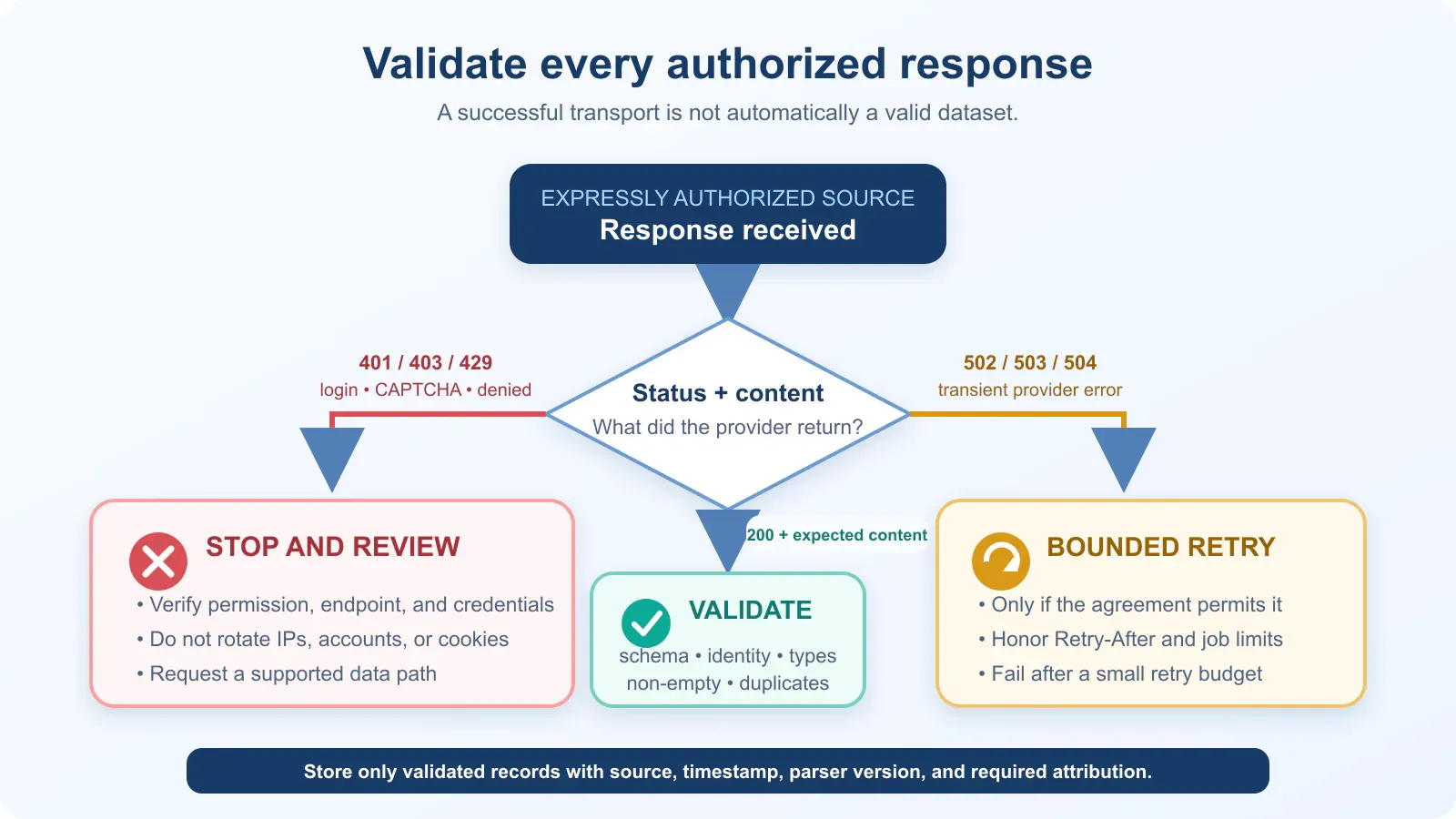
For an expressly authorized HTTP collector:
- Allowlist the exact host and route patterns.
- Send an identifying User-Agent and contact address if the provider requests one.
- Set connection and read timeouts; validate status, content type, and expected markers.
- Keep concurrency low and enforce the contractual request rate.
- Follow only documented API continuation tokens or approved same-origin next links.
- Retry a small number of transient
502,503, or504responses with bounded backoff. - Honor
Retry-Afterwhen the provider’s agreement permits a later retry. - Stop on
401,403,429, login walls, CAPTCHA, or access-denied content and review authorization with the provider. - Never write API tokens, cookies, signed URLs, or personal data to logs.
The Requests documentation explains that a timeout is not a complete wall-clock limit; it raises when the server has not sent bytes for the configured interval. Apply an overall job deadline separately if the workflow needs one.
Where a proxy fits—and where it does not
A proxy can provide a documented corporate egress IP, network segmentation, or authorized regional QA for a source whose owner permits that testing. It cannot create a data license, make an anonymous endpoint official, or convert a prohibited request into an allowed one.
Do not rotate proxies, accounts, fingerprints, or cookies after 403, 429, or a challenge. Treat those responses as stop-and-review signals. For a broader diagnostic workflow, see Rola IP’s guide to troubleshoot authorized scraping failures.
Common failures and safe fixes
| Symptom | Likely cause | Safe response |
|---|---|---|
401 or login page |
Authentication is required or expired | Stop; use the approved authentication flow and never paste a personal browser cookie into code |
403 or access-denied page |
The request is outside the accepted route or has been refused | Stop; verify the agreement, endpoint, credentials, and provider instructions |
429 Too Many Requests |
Contractual or technical rate limit exceeded | Stop or wait as documented; reduce the approved rate and honor Retry-After |
| CAPTCHA or browser challenge | The service is asking the client to prove browser access | Do not solve or route around it; request an official feed or written automation path |
200 OK with zero records |
Selector drift, challenge content, empty input, or a schema change | Check expected markers and fail loudly; inspect a sanitized fixture before changing the parser |
| Duplicate listings | A record appears in more than one approved page or feed batch | Deduplicate by source ID, then canonical URL, then normalized address as a last resort |
| Price or square footage will not parse | Formatting, units, ranges, or missing values differ | Keep the raw value, normalize in a separate field, and log the validation error |
| An internal JSON path disappeared | The implementation depended on an undocumented interface | Remove the dependency; use the approved API, export, or documented fixture mapping |
Practices a responsible Zillow data scraper avoids
Several common competitor patterns make a tutorial look easy but create legal, security, or maintenance problems:
- Copying
JSESSIONID,zguid, or other browser cookies. Session tokens are credentials. Publishing or reusing them can expose the account and does not prove automation is authorized. - Calling private
/api/,/graphql/,searchQueryState, or internal Next.js paths. An endpoint visible in developer tools is not automatically a supported API. - CAPTCHA solving, stealth browsers, fingerprint spoofing, or “human” mouse simulation. These techniques attempt to defeat access controls rather than establish permission.
- Rotating IPs or accounts after a refusal. A different network identity does not change the Terms or the provider’s decision.
- Depending on generated class names. A selector such as a long
ListItem-c11n-*class can change during an ordinary deployment. - Using a stale browser User-Agent as a magic header. Headers cannot make an unauthorized request compliant and should not substitute for an approved integration.
- Catching every exception and returning blanks. Silent failure produces plausible-looking but incomplete datasets.
- Treating “publicly visible” as “free to republish.” Access, copyright, privacy, contract, and display rights are separate questions.
Final checklist
Before you run any scrape Zillow workflow, confirm all of the following:
- [ ] The data goal cannot be met by Zillow Research CSV files.
- [ ] The exact data source and automated use are permitted in writing or under the applicable product terms.
- [ ] The approved fields, routes, authentication, request rate, storage period, and redistribution rules are documented.
- [ ] Development and CI use synthetic fixtures or mocked licensed responses.
- [ ] The parser validates content type, expected markers, required identity fields, types, and non-empty output.
- [ ] Missing values remain blank instead of becoming zero.
- [ ] Deduplication uses a stable source identifier or canonical approved URL.
- [ ] Raw inputs, parser version, timestamps, provenance, and attribution are recorded.
- [ ]
401,403,429, CAPTCHA, and access-denied pages stop the job. - [ ] No cookie, token, signed URL, personal data, or listing content is exposed in logs.
- [ ] A human owner reviews source and schema changes before collection resumes.
Conclusion
The practical answer to how to scrape Zillow is to choose an authorized input, load its HTML or JSON, extract the required property fields, normalize missing and numeric values, deduplicate records across pages, and export a tested CSV. Use the included fixture project to build that pipeline, then connect it only to an approved API, licensed feed, owned page, or explicitly authorized response.
Once the permission is real, build the same way you would build any reliable data pipeline: start from fixtures, parse documented structures, validate every record, preserve provenance, deduplicate deterministically, stop on access-control signals, and test for schema drift. That approach produces data you can defend and software you can maintain.