
IPRoyal Review: Features, Costs, and Fit for 2026

Aug 12, 2026 · Comparisons · 16 min read
Executive summary: the decision in brief
- Bottom line: IPRoyal is worth shortlisting when its available proxy type, location coverage, traffic terms, and support model match a defined, authorized workflow. It is not possible to judge it as universally “good” or “bad” without a small, like-for-like pilot.
- What to compare first: Choose the network pattern before comparing prices. If the task needs an ongoing identity, test a bounded sticky session; if it is stateless and approved for rotation, test rotation separately. Map those requirements to residential, datacenter, mobile, or static IP options before comparing providers.
- Practical recommendation: Use IPRoyal’s public claims to form a shortlist, then compare it with a relevant alternative such as Rola IP on the same small, permitted sample. Record completion rate, exit-location fit, session consistency, latency, valid billable use, and cost per completed task before scaling.
IPRoyal can be a reasonable provider to evaluate when you need a self-serve proxy product with residential, ISP, datacenter, or mobile options. Its fit depends less on the brand name than on four details: your approved use case, required geography, whether the workflow needs a persistent session, and the real cost of a small pilot. This review uses published product information and dated third-party evidence; it is not a live performance benchmark.
What this IPRoyal review evaluates—and what it does not
This review is for developers, researchers, SEO teams, and operations staff running authorized workflows such as localization checks, public-web research, price monitoring, or QA. The practical outcome is a buying decision you can verify with a limited, controlled test.
It evaluates IPRoyal’s published product range, residential billing model, session and location controls, and publicly available independent observations. It does not claim to have tested IPRoyal against a specific target, measured its current success rate, or verified that it will work for every website. Proxy performance changes with the target, request pattern, geography, time of day, and the provider’s available routes.
Use any proxy service only for lawful, authorized activity and in accordance with the target site’s terms and applicable rules. A proxy can change the network route for a request; it does not create permission to collect data, access an account, or ignore rate limits.
IPRoyal at a glance
| Evaluation area | What the published evidence shows | What a buyer should verify |
|---|---|---|
| Product range | IPRoyal lists residential, ISP, datacenter, and mobile proxy products. | Which product is available in the exact location and quantity you need. |
| Residential billing | Its residential pricing page presents pay-as-you-go and subscription options. | Minimum purchase, expiry rules, discounts, taxes, and effective cost at your expected usage. |
| Location and sessions | The residential product page advertises country, state, and city options plus rotation and sticky-session controls. | Whether the needed city has usable supply and whether the session behavior matches your workflow. |
| Independent evidence | Proxyway publishes dated test observations and methodology for IPRoyal. | Whether your own target, geography, payload, and request rate produce acceptable results. |
| Customer feedback | Trustpilot provides a useful, changing pool of user feedback. | Whether recent reviews raise issues that matter for your plan, region, billing, or support needs. |
The first two rows are provider-published information, not independent performance proof. That distinction matters. A product page can accurately describe an available setting while telling you little about how a particular target will respond to your workload.
IPRoyal proxy types: match the product to the workload
The most important decision is not whether residential IPs are “better.” It is whether you need rotation, a persistent identity, a particular network type, or simple throughput on an authorized low-risk task. A practical datacenter vs residential proxies comparison helps turn that requirement into a network choice before the provider comparison begins.
| Workload requirement | Proxy pattern to evaluate | Why it may fit | What to test first |
|---|---|---|---|
| Stateless requests across approved public pages | Rotating residential or datacenter | A new route can be used as requests are distributed. | Completion rate, response time, cost per completed page, and rate-limit behavior. |
| A multi-step flow that legitimately needs the same route | Sticky residential or a static/ISP product | A persistent session can reduce unnecessary changes mid-flow. | Session continuity, route replacement behavior, and the target’s own session rules. |
| Localized content or ad/SEO QA | A product with the required country, state, or city selection | Geographic selection lets a team test the context it is responsible for. | The exit location from more than one IP-intelligence service and the page’s localized result. |
| Mobile-specific testing | Mobile proxy product | The task may require a mobile-network context. | Available country/carrier options, session behavior, and the app or page’s permitted test path. |
| High-volume, lower-risk technical checks | Datacenter product | It can be a simpler and more economical starting point when residential identity is not needed. | Target compatibility, concurrency rules, and how errors affect unit cost. |
IPRoyal’s public pages describe residential routes, geographic selection, dashboard controls, API-related functions, and both rotation and sticky-session behavior. Treat these as configuration possibilities. Do not turn them into a promise that a target will accept every request or that a chosen city will always be available. Start broad enough to confirm connectivity, then narrow the geography only when the task truly requires it.
IPRoyal residential proxy pricing: what to compare before buying
IPRoyal markets residential proxies as a traffic-based product and publishes both pay-as-you-go and subscription choices. On August 11, 2026, its Residential Proxies Pricing page stated that purchased traffic remained available until used; this is a vendor term, not a permanent guarantee.[^traffic-validity] Recheck the live pricing page and checkout terms on the purchase date.
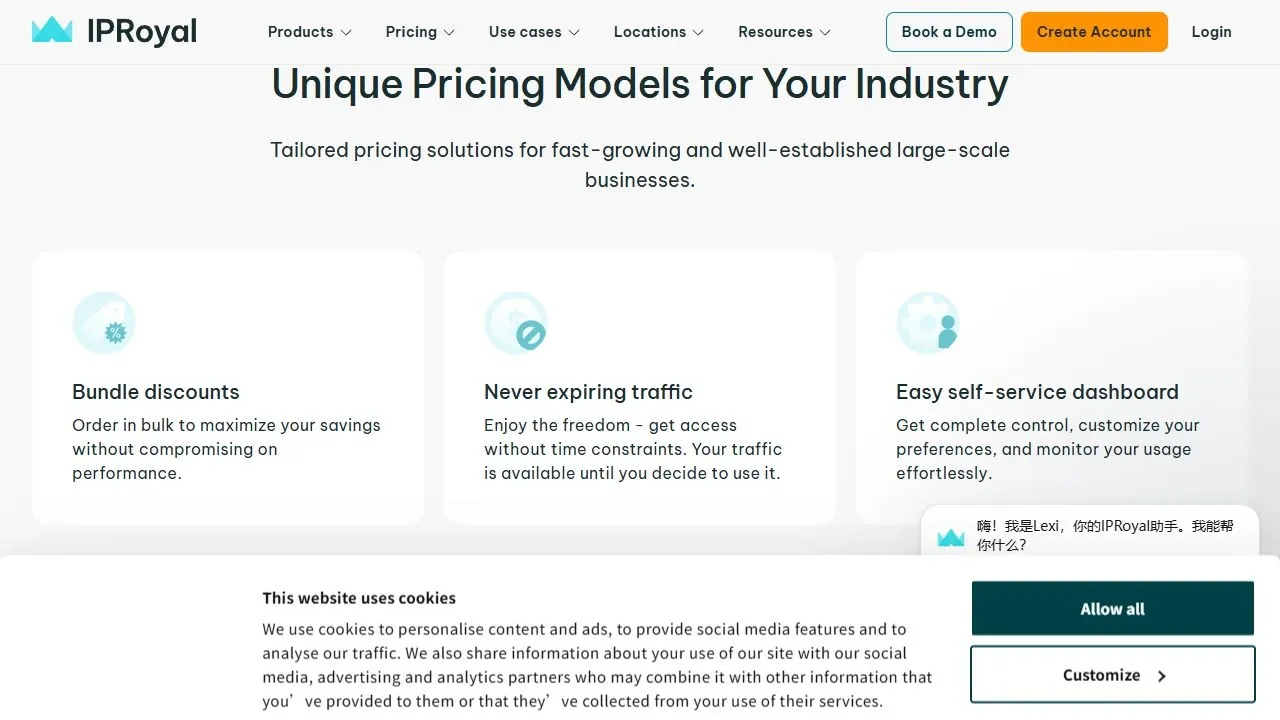
Figure 1. Evidence capture from IPRoyal’s Residential Proxies Pricing page, section “Unique Pricing Models for Your Industry” > “Never expiring traffic,” captured August 11, 2026. The live page remains the source of truth.
Price per GB is only one part of a useful IPRoyal pricing review. Compare these items instead:
- Traffic validity and rollover. Confirm when purchased traffic expires, whether unused traffic carries over, and whether this differs between plans.
- Your actual data footprint. A 20 KB HTML page is not the same as a JavaScript-rendered page with images and API calls. Record bytes transferred, not only request count.
- Cost of retries. A low sticker price does not help if timeouts, bad routes, or misconfigured sessions force repeated requests.
- Location granularity. A country-level route may be enough for a global availability check. City-level testing may cost more in time and have more limited supply.
- Operational features. Include the time required to issue credentials, rotate a session, retrieve usage data, and hand access to a teammate.
For example, a team that checks a few approved regional pages each month may value a flexible traffic model. A team with a stable, persistent workflow may care more about session continuity and a predictable lease than an advertised per-GB rate. These are different buying decisions, even when both teams say they need “residential proxies.”
Sessions, targeting, and integration: the questions that matter
Before choosing IPRoyal residential proxies, write down the route policy for one workflow. The policy should answer four questions:
- Does each request need an independent route, or must a sequence preserve its session?
- Is country-level selection sufficient, or is a state or city essential to the test?
- Will the application authenticate with credentials, an allowlist, or another supported method?
- How will the team confirm the observed exit route and investigate a failed request?
IPRoyal’s residential page lists HTTP(S) and SOCKS5 support in the product summary,[^protocol-support] and its “Rotating residential IPs” feature says a buyer can rotate per request or keep the same proxy for a bounded period.[^session-control] These are vendor-published capabilities, not proof that every gateway, target, or client library will behave identically. Copy endpoint details and credential syntax only from the account documentation available at setup time. Never place a proxy password, API token, cookies, or customer data in a shared script, screenshot, or support ticket without appropriate redaction.
What independent tests and customer reviews can—and cannot—tell you
Independent sources are useful when they identify test dates and methods. In its detailed IPRoyal review, Proxyway states in the Residential Proxies > Benchmarks tab that it last tested the residential product in April 2026 for its annual market report.[^proxyway-test-date] The page reports results from its own gateways, regions, targets, and sampling windows; those conditions should not be generalized to every buyer.
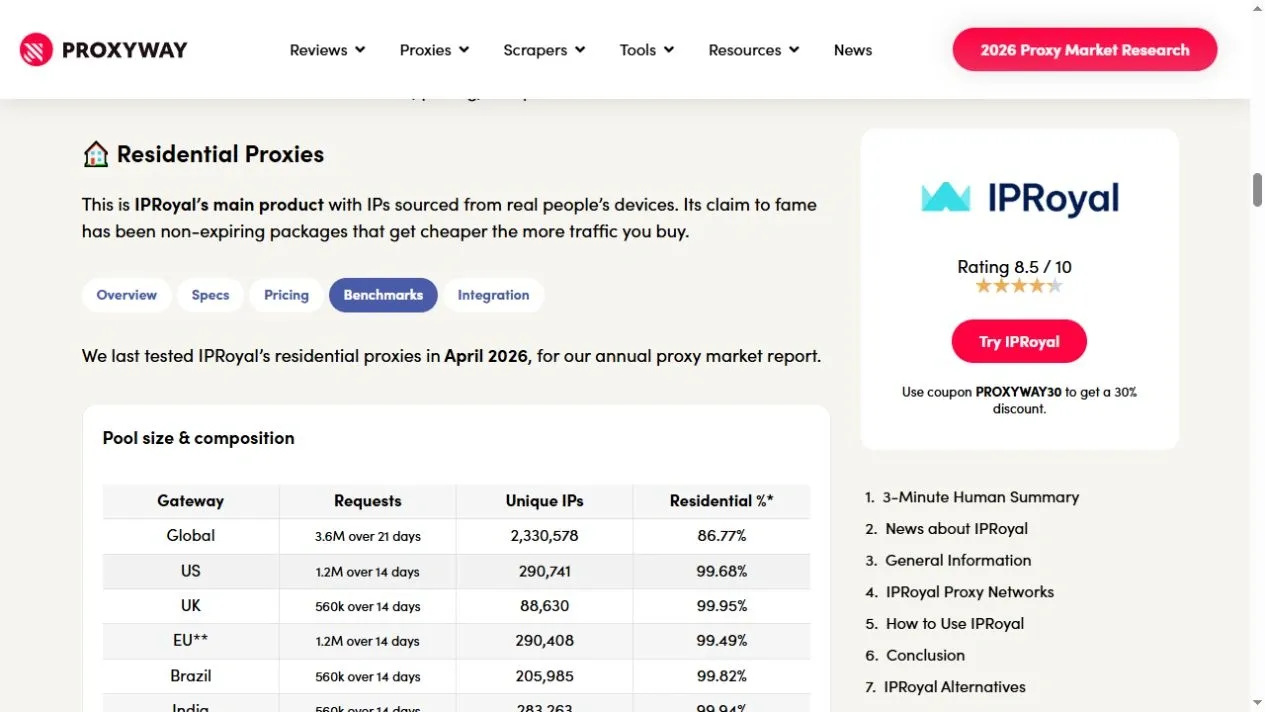
Figure 2. Proxyway’s IPRoyal review, “Residential Proxies” > “Benchmarks,” captured August 11, 2026. The sentence identifying April 2026 appears directly above the pool-size table.
That is useful evidence to investigate, not a universal verdict. A test against a given endpoint, packet size, geography, and sample size cannot predict your result on a different target. It should prompt a buyer to measure error type, P95 response time, and completed-task cost in their own permitted environment.
Customer-review sites add another signal, but not laboratory evidence. IPRoyal’s Trustpilot profile contains both positive and negative accounts, while its review count and rating distribution change continuously.[^trustpilot-profile] This review therefore does not freeze a total-review number. Read recent, specific comments for patterns involving billing, replacement handling, documentation, or support response, and do not use an aggregate rating as proof of proxy quality, legality, or target-specific access.
IPRoyal pros and considerations
Potential strengths
- A broad published product catalog lets a buyer compare rotating and static patterns without immediately changing providers.
- The residential offer’s traffic-based purchasing model may suit intermittent, authorized workloads when the current plan terms are acceptable.
- Location and session controls can be relevant for localization testing and workflows that need either rotation or continuity.
- Public pages expose enough product information to design a small pilot rather than making a blind commitment.
Considerations before committing
- Published network size, country coverage, price, and availability are time-sensitive vendor claims. Verify them on the day you buy.
- A city filter is not a guarantee of available routes or an exact result in every third-party IP database.
- Independent benchmark findings are conditional on the evaluator’s methodology. Your target and traffic shape may produce very different results.
- A proxy cannot guarantee that a platform will accept an action, keep an account safe, remove CAPTCHAs, or override the target’s rules.
When to consider Rola IP as an alternative
An IPRoyal alternative deserves consideration only after you define the workload. If you need to rotate routes per request or preserve a session while checking authorized, geographically localized content, Rola IP’s residential proxies are a relevant product to include in the pilot. Rola IP also positions static residential/ISP proxies for longer-lived sessions and lists residential, datacenter, and mobile options.
That makes Rola IP a sensible candidate for the same pilot, not an automatic replacement. Compare the exact geography, route consistency, team-access controls, billing validity, response times, completion rate, and cost per successful approved task. Rola IP’s official site makes current coverage and availability claims, but those claims should be rechecked at checkout and should not be read as a guarantee of target access or a fixed performance outcome.
IPRoyal vs Rola IP: neutral pilot comparison dimensions
Use the same target, authorization, location, request payload, sample size, schedule, timeout, and retry policy for both providers. The table defines evidence to collect; it does not assign a winner in advance.
Comparison dimension |
Hold constant |
Record for IPRoyal |
Record for Rola IP |
Decision rule |
|---|---|---|---|---|
Proxy type |
Match residential with residential, or another like-for-like product |
Exact product and plan |
Exact product and plan |
Exclude mismatched network types from the comparison. |
Geography |
Same country and, where supported, the same state/city requirement |
Requested and observed location |
Requested and observed location |
Prefer the option that meets the required granularity more consistently. |
Session mode |
Separate fixed-session and per-request-rotation runs |
Session duration and observed exit changes |
Session ID/time or rotation setting and observed exit changes |
Select the behavior that fits the workflow, not the highest rotation count. |
Connection path |
Same client, destination, timeout, and local network |
Protocol, authentication method, and TLS observations |
Protocol, authentication method, and TLS observations |
Reject a setup whose credential or transport risk is unacceptable. |
Reliability |
Same request count and schedule |
Completion rate and categorized failures |
Completion rate and categorized failures |
Compare successful authorized tasks, not connection attempts alone. |
Latency |
Same endpoint, payload, and region |
P50 and P95 elapsed time |
P50 and P95 elapsed time |
Use tail latency if slow requests affect the job deadline. |
Billing |
Same measured workload |
Traffic charged, validity terms, and effective cost |
Traffic charged, validity terms, and effective cost |
Compare cost per completed task using current plan terms. |
Support |
Same redacted diagnostic case |
Response time and actionable next step |
Response time and actionable next step |
Score the usefulness of the resolution, not only reply speed. |
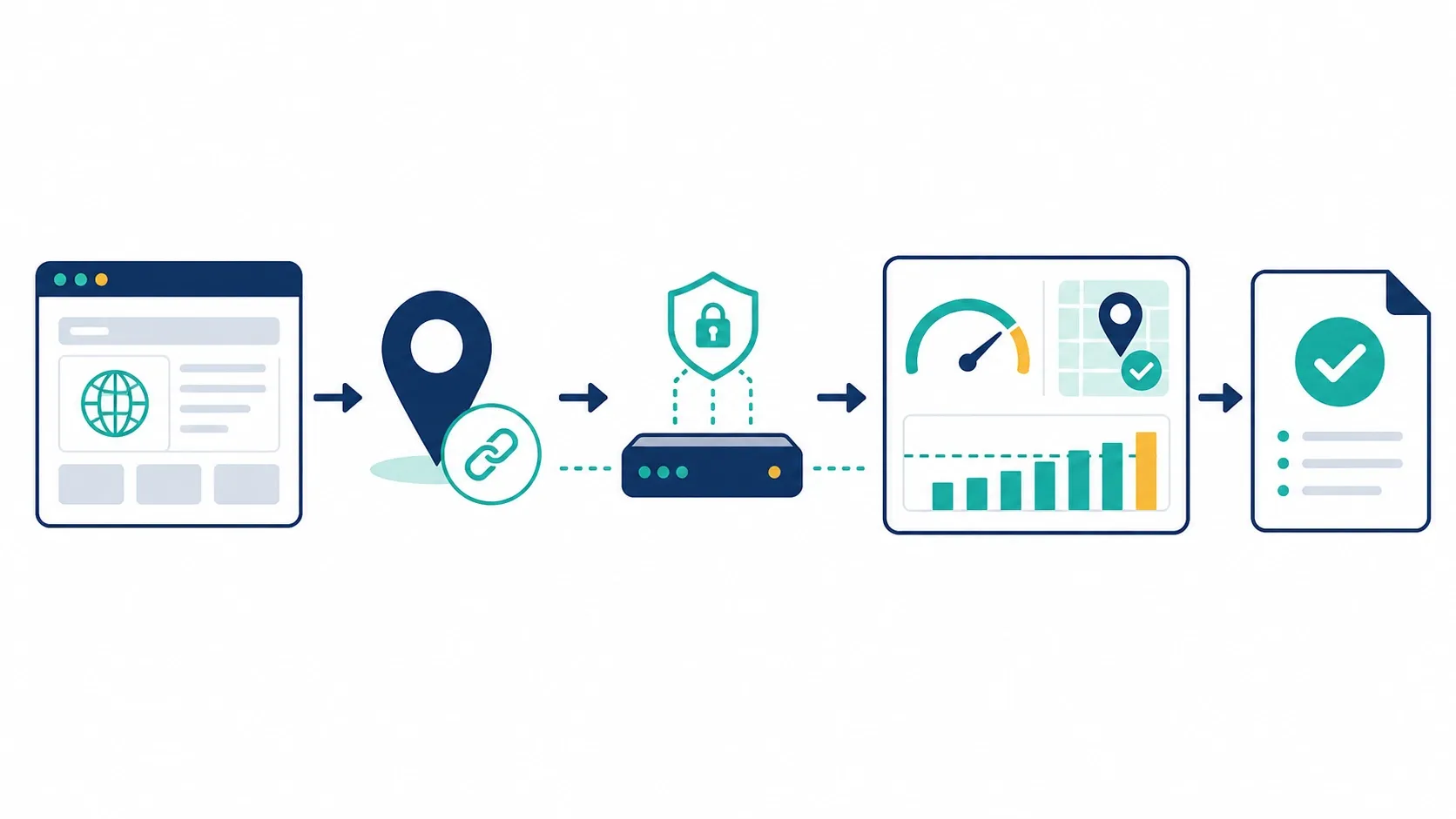
Figure 3. A controlled pilot measures a permitted workflow; it does not attempt to override a target site’s rules or controls.
Reproducible Rola IP residential proxy pilot
Use this workflow when you want to compare Rola IP with IPRoyal or another candidate on the same authorized test. It validates three observable outcomes: the proxy can connect, its returned exit information is plausible for the requested location, and a session behaves as expected. It does not test whether a third-party site will accept a login, remove a CAPTCHA, or allow a higher request rate.
Prerequisites and environment
- An active Rola IP account and permission to test the destination URL.
- The host, port, username, and password generated by the Rola IP residential settings page. Do not use credentials copied from a screenshot or article example.
- Python 3.11 or later. The script uses only the Python standard library.
- A terminal: PowerShell 7+ on Windows, or a recent macOS/Linux shell.
- A small approved sample. Begin with five requests to the script’s HTTPS IP-only check endpoint, then increase only when your authorization and the destination’s rules allow it.
For a fixed-session check, Rola’s current documentation shows an account-name pattern such as test_1-country-us-sessiontime-10. For a stateless rotation check, it shows a pattern such as test-country-us-f-1. Its parameter documentation explains how state, city, sessionid, sessiontime, and f-1 change the connection; use only values generated in your own dashboard, because available locations can change.
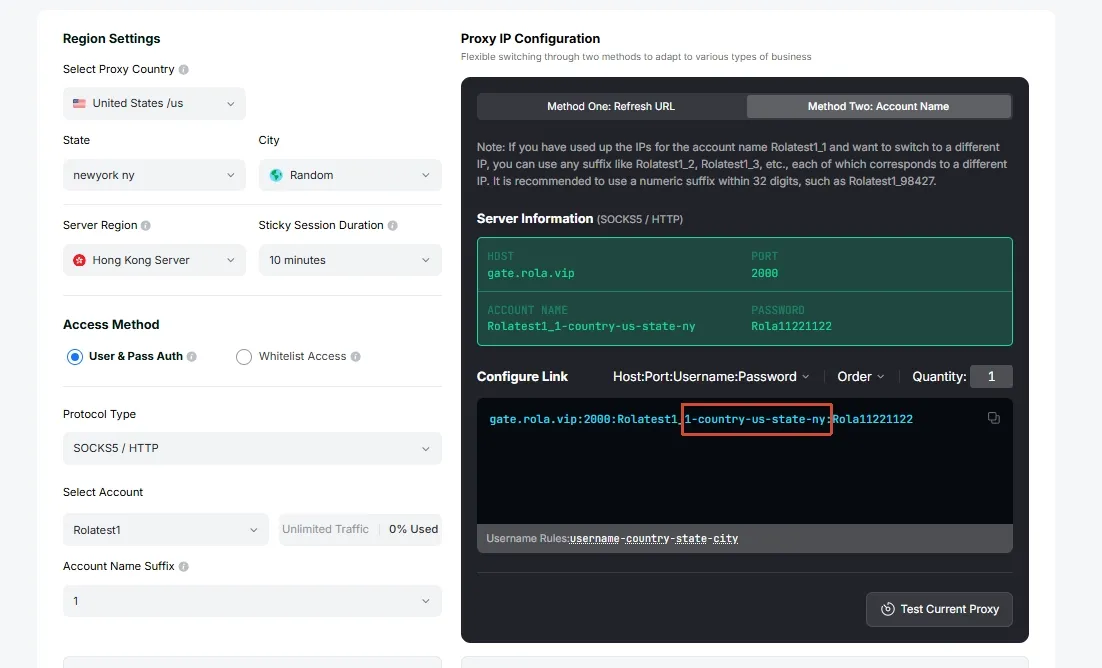
Figure 4. Rola IP’s official residential configuration example highlights the account-name parameters used for location selection. The values shown are documentation examples, not credentials to reuse. Source: Rola IP Rotating Residential documentation; see Sources.
Step 1: create one controlled connection profile
In the Rola IP residential settings page, choose the country first. Add state or city only when the pilot requires that precision and the dashboard offers the location. For a continuity test, give the task a unique session suffix and a bounded sessiontime; for a rotation test, use the documented -f-1 modifier instead. Do not mix the two tests in the same run. If the pilot runs from a server or office network with a fixed public egress IP, whitelist access is a credential-free alternative to evaluate before distributing usernames and passwords across tools.
Place the generated host, port, username, and password in short-lived environment variables. The revised script reads them directly, so the password does not appear in the command line, process argument list, or CSV. Environment variables are not a secret vault: same-user or privileged processes may still inspect them, so prefer an approved secret manager in production and clear the variables after the pilot.
$env:ROLA_PROXY_HOST = 'your-generated-host'
$env:ROLA_PROXY_PORT = 'your-generated-port'
$env:ROLA_PROXY_USERNAME = 'your-generated-username'
$env:ROLA_PROXY_PASSWORD = 'your-generated-password'
$env:ROLA_PROXY_SCHEME = 'http'
On macOS or Linux, use export ROLA_PROXY_HOST=... and the same variable names. Never commit these values to a repository. Rola IP’s public examples currently show an HTTP proxy gateway. With ROLA_PROXY_SCHEME=http, the script emits a warning because the client-to-proxy hop is not TLS-protected; an HTTPS destination protects the request after the proxy tunnel is established, but does not by itself encrypt proxy credentials on that first hop. Set the scheme to https only when Rola IP confirms that the exact gateway supports a TLS-protected HTTPS proxy connection, and then also set ROLA_PROXY_TLS_CONFIRMED=1.
Step 2: run the pilot script
Save the implementation below as rola_ip_proxy_pilot.py; the complete copy supplied with this article follows the same credential rules. The Python proxy integration guide is the relevant Rola IP reference for connecting Python code. This pilot sends only the requested number of HTTPS requests through the configured proxy to https://api.ipify.org?format=json by default, then records status, latency, exit IP, and errors in a local CSV file. Use a separately approved IP-information service if the pilot must validate country, region, or city.
#!/usr/bin/env python3
import argparse, csv, json, math, os, sys, time
import urllib.error, urllib.parse, urllib.request
from datetime import datetime, timezone

def percentile(values, fraction):
    ordered = sorted(values)
    return ordered[max(0, math.ceil(fraction * len(ordered)) - 1)]

def required_env(name):
    value = os.environ.get(name)
    if not value:
        raise SystemExit(f"Missing required environment variable: {name}")
    return value

def proxy_url(scheme, host, port, username, password):
    auth = f"{urllib.parse.quote(username, safe='')}:{urllib.parse.quote(password, safe='')}"
    return f"{scheme}://{auth}@{host}:{port}"

def location(payload):
    return (str(payload.get("ip", "")), str(payload.get("country", "")),
            str(payload.get("region", payload.get("region_code", ""))),
            str(payload.get("city", "")))

parser = argparse.ArgumentParser()
parser.add_argument("--requests", type=int, default=5)
parser.add_argument("--timeout", type=float, default=20.0)
parser.add_argument("--url", default="https://api.ipify.org?format=json")
parser.add_argument("--csv", default="rola-proxy-pilot.csv")
args = parser.parse_args()

if args.requests < 1:
    parser.error("--requests must be at least 1")
if urllib.parse.urlsplit(args.url).scheme.lower() != "https":
    raise SystemExit("--url must use HTTPS so the destination request is TLS-protected")

host = required_env("ROLA_PROXY_HOST")
username = required_env("ROLA_PROXY_USERNAME")
password = required_env("ROLA_PROXY_PASSWORD")
try:
    port = int(required_env("ROLA_PROXY_PORT"))
except ValueError as error:
    raise SystemExit("ROLA_PROXY_PORT must be an integer") from error

scheme = os.environ.get("ROLA_PROXY_SCHEME", "http").lower()
if scheme not in {"http", "https"}:
    raise SystemExit("ROLA_PROXY_SCHEME must be http or https")
if scheme == "https" and os.environ.get("ROLA_PROXY_TLS_CONFIRMED") != "1":
    raise SystemExit("Set ROLA_PROXY_TLS_CONFIRMED=1 only after provider confirmation")
if scheme == "http":
    print("WARNING: client-to-proxy credentials are not TLS-protected.", file=sys.stderr)

proxy = proxy_url(scheme, host, port, username, password)
opener = urllib.request.build_opener(
    urllib.request.ProxyHandler({"http": proxy, "https": proxy})
)
fields = ["iteration", "timestamp_utc", "elapsed_ms", "status", "ok", "error",
          "exit_ip", "country", "region", "city"]
rows, successful_latencies = [], []

for iteration in range(1, args.requests + 1):
    started = time.perf_counter()
    row = dict.fromkeys(fields, "")
    row.update(iteration=iteration, timestamp_utc=datetime.now(timezone.utc).isoformat(), ok=False)
    try:
        request = urllib.request.Request(args.url, headers={"User-Agent": "rola-ip-authorized-pilot/1.0"})
        with opener.open(request, timeout=args.timeout) as response:
            payload = json.loads(response.read().decode("utf-8"))
            row["status"] = getattr(response, "status", 200)
            row["exit_ip"], row["country"], row["region"], row["city"] = location(payload)
            row["ok"] = 200 <= int(row["status"]) < 300
    except urllib.error.HTTPError as error:
        row["status"], row["error"] = error.code, f"HTTPError: {error.reason}"
    except (urllib.error.URLError, TimeoutError, json.JSONDecodeError) as error:
        row["error"] = f"{type(error).__name__}: {error}"
    finally:
        row["elapsed_ms"] = round((time.perf_counter() - started) * 1000, 1)
        rows.append(row)
        if row["ok"]:
            successful_latencies.append(row["elapsed_ms"])

with open(args.csv, "w", newline="", encoding="utf-8") as file:
    writer = csv.DictWriter(file, fieldnames=fields)
    writer.writeheader()
    writer.writerows(rows)

print(f"completed={len(successful_latencies)}/{args.requests}")
print(f"csv={args.csv}")
if successful_latencies:
    print(f"p50_ms={percentile(successful_latencies, 0.50):.1f}")
    print(f"p95_ms={percentile(successful_latencies, 0.95):.1f}")
    print("exit_ips=" + ", ".join(sorted({row["exit_ip"] for row in rows if row["ok"]})))
    sys.exit(0)
print("No requests completed. Check the CSV for the first failure type before retrying.")
sys.exit(2)
Run it from the directory containing the script:
py .\rola_ip_proxy_pilot.py `
  --requests 5 `
  --csv .\rola-proxy-pilot.csv
The expected success output looks like this; the timings, IPs, and locations will differ:
completed=5/5
csv=rola-proxy-pilot.csv
p50_ms=412.7
p95_ms=794.1
exit_ips=example values only
The revised script’s syntax, environment-variable validation, HTTPS-target check, TLS-confirmation guard, and failure CSV path were validated with Python 3.13 on Windows. It was not run with a customer Rola IP account, so the published output does not assert a live proxy result. Run it with credentials generated in your own Rola IP console to complete the connection test, then clear the four credential variables from the shell.
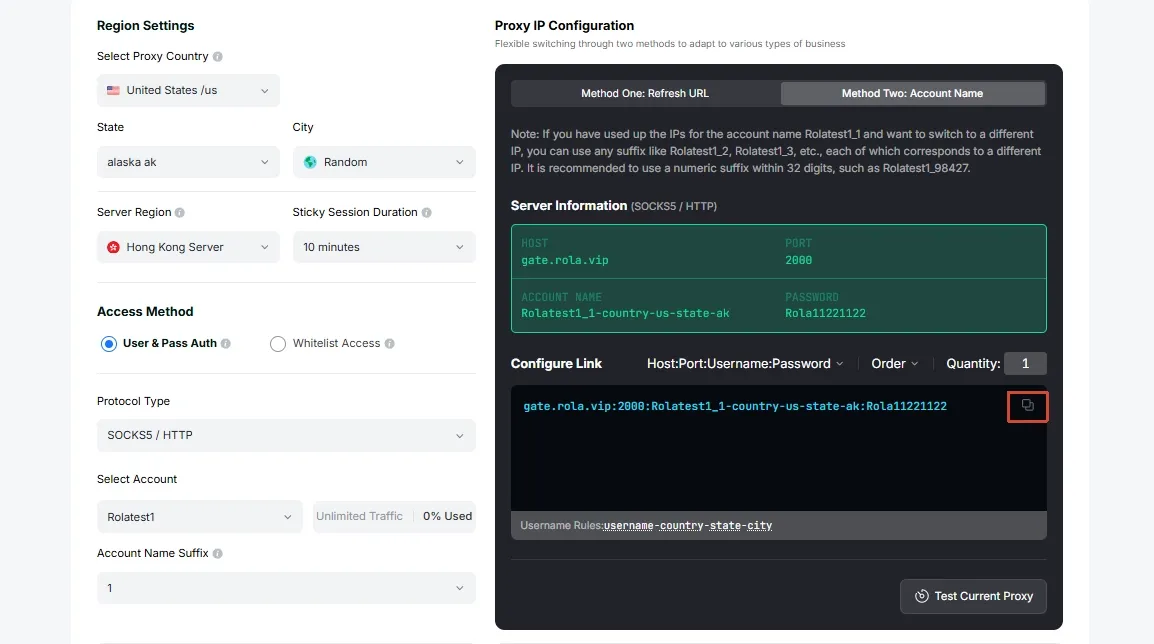
Figure 5. Rola IP’s official documentation highlights the copy control for generated connection information. Treat all displayed account details as examples and use only your own dashboard-generated values. Source: Rola IP Rotating Residential documentation; see Sources.
Step 3: interpret the CSV before changing scale
For a fixed-session run, the successful rows should normally show the same exit_ip over the requested session window. For a -f-1 rotation run, multiple exit IPs are expected; the exact count is not a quality score. In both cases, compare the returned country, region, and city against the intended test condition, then record P50/P95 latency and failure types.
| Symptom | Likely cause | How to verify | Safe fix |
|---|---|---|---|
HTTPError: 407 or no completed rows |
Credentials, access method, or copied connection fields do not match | Regenerate the connection fields in the dashboard and compare the host, port, and username without exposing the password | Replace the environment variables with freshly generated values; do not put them in the article or CSV. |
URLError, DNS error, or connection refusal |
Incorrect host/port, network egress rule, or local firewall | Test the generated connection with the official curl example before modifying the script | Correct the generated endpoint or local network rule; keep the test request rate unchanged. |
| Fixed-session results show different exits | The account-name session suffix or sessiontime is missing or expired |
Compare the generated username with the intended session pattern | Create a new bounded session, then rerun the same small sample. |
| Country/state/city is unexpected | Location inventory, the requested granularity, or IP-information databases differ | Check the current dashboard selection and compare more than one IP-information service | Begin at country level, then add state/city only when required and available. |
| Timeout or 4xx/5xx from an approved target | Target-side condition, request rate, page behavior, or network delay | Inspect the CSV error type and the target’s documented rules | Reduce scope, honor the target’s terms, and troubleshoot the approved request rather than adding retries blindly. |
Run a controlled pilot before you commit
Use a small, approved sample rather than an unbounded crawl. Keep the test traffic within the target’s published rules and any permission you have received.
| Measure | How to record it | Why it matters |
|---|---|---|
| Completion rate | Completed authorized checks ÷ attempted checks | Separates a usable route from one that merely connects. |
| Failure type | DNS, connect, TLS, timeout, 4xx/5xx, or application validation | Tells you whether the proxy is likely involved and what to investigate. |
| P50 and P95 latency | Record elapsed time per completed request | Averages can hide slow-tail behavior that affects scheduled jobs. |
| Session continuity | Record the observed route across a permitted multi-step flow | Validates the sticky or static requirement. |
| Location result | Check more than one reputable IP-information service | Acknowledges that geolocation databases can disagree. |
| Cost per useful result | Total pilot cost ÷ completed checks | Links pricing to the outcome the team actually needs. |
Keep one provider, one location, one request pattern, and one time window fixed for each comparison. Do not increase request volume to force a result. If failures occur, first verify credentials, proxy configuration, target authorization, request rate, and the application’s retry logic. Then ask the provider for diagnostic help with redacted timestamps and error codes.
Final verdict: evaluate the workflow, not the brand name
This IPRoyal review finds a provider with a broad public proxy catalog and a residential offering designed around traffic purchases, geographic selection, and session choices. That can be a good starting point for an authorized pilot. The right verdict, however, depends on a measured fit with your target, location, request volume, and session requirements.
Use published claims to form a shortlist, use independent reviews to develop questions, and use a controlled pilot to make the purchase decision. If your workflow needs dynamic residential rotation or persistent sessions, include Rola IP in the same evaluation set and compare like for like.