Best Smartproxy(Decodo) Alternatives: 5 Options That Actually Work

Aug 12, 2026 · Comparisons · 15 min read
The Smartproxy alternative most worth considering in 2026 is Rola IP. It suits teams that want to keep their existing scrapers while gaining flexible residential proxy pricing and a clear setup process; Bright Data, Oxylabs, SOAX, and ScraperAPI are better suited to enterprise scale, compliance management, granular targeting, and managed scraping, respectively.
The 5 Best Smartproxy Alternatives at a Glance
Rola IP is the most direct proxy-layer replacement on this list, while the other products address different requirements for enterprise scale, targeting precision, and operations.
| Provider | Best For | Entry Price | Billing Model |
|---|---|---|---|
| Rola IP | Flexible, proxy-first teams | $4/GB PAYG; $2/GB at 100GB | Residential traffic |
| Bright Data | Enterprise scale and compliance controls | $4/GB promotional PAYG | Residential traffic |
| Oxylabs | Enterprise proxies and technical support | $30/month including 5GB | Residential traffic |
| SOAX | Granular targeting and unified credits | Free Sandbox; tiered paid plans | Credits/traffic |
| ScraperAPI | Managed scraping API | $49/month for 100,000 credits | API credits |
Smartproxy Review: Is Decodo Still Worth Buying?
Yes. Independent tests and numerous customer reviews describe Decodo as fast, reliable, and easy to use, but value for low-volume users, occasional proxy issues, and the inability to freely select individual residential IPs remain recurring complaints.
Smartproxy and Decodo: What Is the Relationship?
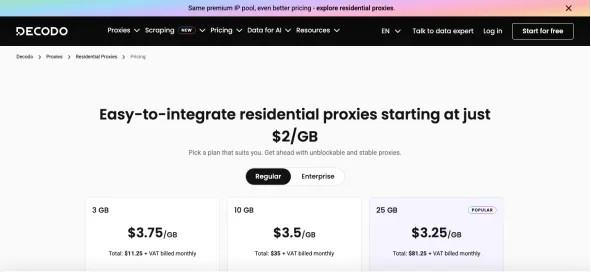
Smartproxy rebranded as Decodo. Decodo is now the primary brand, while Smartproxy remains a legacy name that users may still use in searches, reviews, documentation, and existing configurations. This article uses Smartproxy/Decodo when discussing historical Smartproxy materials or the search term, and Decodo when referring to current official product, pricing, and policy pages. Decodo official website
Smartproxy Buying and Onboarding Test: From Choosing a Plan to Generating Proxies
Smartproxy has a low learning curve. I could complete the setup by purchasing a plan, configuring authentication, selecting a location and session type, and generating proxy endpoints without first studying complex proxy parameters.
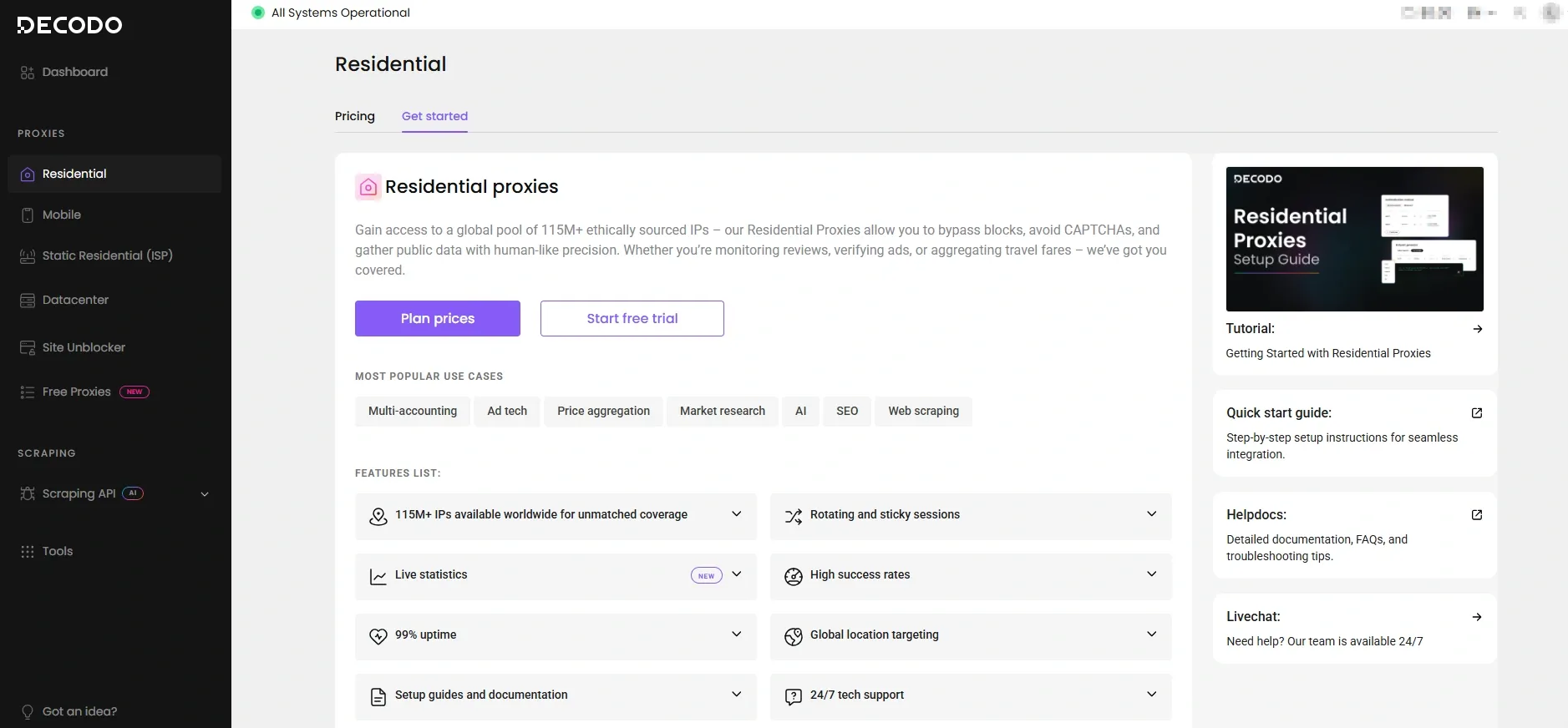
I started with the residential proxy plans. The low-volume options and PAYG are easy to try, but the prominently advertised lowest price per GB requires higher usage. The headline rate does not tell the whole story: if monthly traffic fluctuates, plan thresholds, validity periods, and unused traffic also affect the real cost.
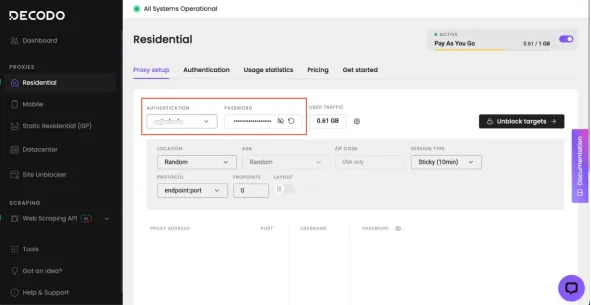
After opening Residential → Proxy setup, I found all the key options on one page. I could choose username/password or IP allowlist authentication, then set the country, state, city, ZIP code, ASN, and rotating or sticky sessions. The generated endpoints can be copied directly or exported as CSV/TXT, so the first setup requires almost no manual assembly of parameters.
After completing the setup, I cared less about whether the proxy could connect and more about three things: whether the exit location was accurate, whether success rates were stable on the target website, and how much traffic was required to obtain one usable record. Smartproxy makes connecting easy, but these three factors still need to be validated against your own business goals.
My onboarding verdict: Decodo has a clear dashboard and smooth endpoint generation, making it friendly to first-time residential proxy buyers. Its limitations become more apparent as traffic grows or a project requires precise control over individual IPs.
Smartproxy Dashboard Experience
The Smartproxy/Decodo dashboard is one of its strongest features: authentication, traffic, targeting, session settings, and endpoint generation are combined in one workflow.
When I opened the Residential page, the authentication method and consumed traffic appeared first, followed by location, ASN/ZIP targeting, rotating or sticky sessions, protocol, and endpoint count. The page follows the actual setup sequence, and the results can be copied or exported as CSV/TXT. Even users unfamiliar with proxy username parameters are unlikely to get stuck.
- Good: accounts, passwords, traffic, locations, sessions, and endpoints are consolidated on one page.
- Good: copy buttons, downloadable proxy lists, and preconfigured examples reduce setup errors.
- Good: traffic limits can be set for each proxy user, which is useful for teams and agencies.
- Limitation: traffic data shows how many GB were consumed but cannot explain whether failures came from the IP, anti-bot defenses, request headers, rendering, or the parser.
- Limitation: residential proxies use a pooled model, so customers control targeting and sessions rather than permanently selecting a specific household IP.
Proxy Generation, Targeting, and Session Control Experience
Generating proxies is straightforward, but Decodo focuses on retrieving IPs from a pool according to parameters rather than letting customers select fixed residential IPs individually.
I could select a continent, country, state, city, ZIP code, and ASN in the endpoint generator, then choose rotating or sticky sessions. However, this control model still retrieves an IP from the pool according to parameters; it does not let me lock in any household IP indefinitely. Some G2 users have also mentioned the inability to select specific proxies, and public communities occasionally report mismatches between the chosen and detected exit locations. Projects that rely on granular targeting should therefore verify a sample before launch.
Recommended test: Generate 20–50 endpoints for the same country, check the exits with at least two IP geolocation databases, then test rotating and sticky sessions separately and record the mismatch rate.
Traffic Data and Day-to-Day Management
Decodo can display traffic by proxy user and set quotas, which is useful for cost management, but customers still need to monitor CAPTCHAs, usable pages, and the cost per usable record themselves.
The dashboard let me quickly confirm how much traffic each proxy user had consumed and set quotas for different accounts. This helps prevent team members from accidentally using too many GB, but a traffic graph cannot show whether the correct pages were captured, whether CAPTCHA rates increased, or whether there were too many retries. In production, I would still track successful pages, valid fields, and cost per record on the crawler side.
Independent Performance Data
Independent testing in 2026 supports the view that Decodo’s residential proxies perform strongly overall, while customer reviews show that a minority of users still experience outages or unstable proxies.
Proxyway reported that, in its April 2026 residential proxy test, more than 99% of requests succeeded, average response time was under one second, and the infrastructure performed close to enterprise providers such as Oxylabs. Across 557 G2 reviews, reliability and performance received 162 positive mentions, while proxy issues or outages appeared in 89 negative-theme mentions. Proxyway review
Smartproxy Residential Proxies, Pricing, Coupons, and Extensions
Decodo currently offers 115M+ residential IPs across 195+ locations, HTTP(S)/SOCKS5 support, and rotating and sticky sessions. Its smallest plan starts at 3GB for $11.25, while PAYG costs $4/GB.
Higher-volume options include 10GB for $35, 25GB for $81.25, 50GB for $150, and 100GB for $275. The advertised “from $2/GB” rate corresponds to higher usage, so buyers should calculate costs using their actual monthly traffic rather than comparing only the lowest headline rate.
Is There a Smartproxy Coupon?
Do not treat a Smartproxy coupon as a dependable discount. Decodo’s current page says its lower prices require “no coupon,” while temporary partner offers should be rechecked at checkout.
Before using a coupon, I would confirm its expiration date, renewal price, VAT, trial conversion terms, and refund conditions at checkout. If a third-party code does not work at checkout, it should not be included in the budget.
Is the Smartproxy Extension Any Good?
The Smartproxy extension is now called the Decodo Chrome Proxy Extension, with a Firefox version also available. It is useful for manually switching proxies, configuring sessions, and performing location QA.
The extension is useful for browser testing, but it cannot replace credential management, rotation, retries, monitoring, and cost controls in a production crawler.
Why Do Users Look for Smartproxy Alternatives?
Users usually look for Smartproxy alternatives not because Decodo is unusable, but because it has clear limits in low-volume pricing, individual-IP control, consistency across target websites, location accuracy, and production monitoring.
Smartproxy/Decodo offers a polished dashboard and onboarding experience, but “easy to configure” does not mean “right for every project.” After using it for a while, I found the following limitations more noticeable.
1. Low-Volume Users May Not Get the Most Attractive Pricing
Smartproxy’s lowest per-GB rates require a larger traffic commitment, so small projects usually pay a higher effective rate than the most prominent price on the landing page.
The 3GB/$11.25 plan and $4/GB PAYG option are suitable for getting started quickly, but growing projects must account for plan thresholds, validity periods, renewal prices, and unused traffic. For teams with inconsistent monthly traffic, buying a larger plan for a lower unit price may actually waste budget.
2. You Cannot Freely Select and Retain a Specific Residential IP
Smartproxy’s residential service is fundamentally a shared proxy pool. Users mainly control location and session parameters rather than choosing any household IP from a list and retaining it long term.
This has little impact on ordinary rotating scraping, but it may be too inflexible for account logins, continuous checkout tests, long sessions, or workflows that require a persistent identity. Sticky sessions can retain an exit temporarily, but the IP may still change when the session expires or because of node or network conditions. Some G2 users also cite the inability to select specific proxies as a drawback.
3. A High Overall Success Rate Does Not Mean Every Target Is Equally Stable
Smartproxy performs strongly in independent benchmarks, but success rates can vary significantly by target website, location, request frequency, and anti-bot strategy.
Proxyway’s residential proxy test reported an overall success rate above 99%, yet G2’s negative review themes still include proxy issues and brief outages. These findings are not contradictory: large-scale averages can look excellent while a heavily protected target, a specific country, or a particular time window still produces more CAPTCHAs, slower responses, or connection failures.
If a business depends on a small number of high-value websites, I would not rely solely on the pool’s overall success rate. I would track each target’s usable-page rate, CAPTCHA rate, retry count, and cost per usable record separately.
4. Granular Geolocation Still Requires Independent Verification
Smartproxy supports country, state, city, ZIP, and ASN targeting, but the availability of these parameters does not guarantee that every exit’s geolocation data will always be completely accurate.
Residential IP attribution can differ because of IP database update cycles, carrier routing, and changes in the proxy pool. Public communities have also reported mismatches between selected regions and detection results. Before launching ad verification, localized pricing, SERP, or city-level content projects, sample the exits with multiple IP databases.
5. Dashboard Traffic Statistics Cannot Explain Why a Scrape Failed
The Decodo dashboard can tell me how much traffic was consumed, but it cannot directly determine whether the correct page was captured, why CAPTCHA rates increased, or whether a failure came from the proxy, renderer, or parser.
Viewing traffic by user and setting quotas are useful for budget control, but production environments still need their own monitoring for target success rates, valid fields, retries, blocks, and cost per record. Without mature crawler observability, the proxy dashboard alone makes it difficult to identify the real problem.
6. The Browser Extension Suits Manual Testing, Not Production Orchestration
The Smartproxy extension can quickly switch proxies and inspect localized pages, but it cannot replace the credential management, concurrency control, automatic rotation, retries, and failover required by a production crawler.
The extension is convenient for browser QA. However, processing large numbers of URLs every day, responding automatically to blocks, or running browser-rendering tasks requires additional engineering or an alternative with managed scraping capabilities.
When switching makes sense: Test Smartproxy alternatives when your project is constrained by low-volume unit pricing, individual-IP control, target-specific stability, granular location accuracy, or crawler maintenance costs. If Decodo performs reliably on your target websites and the total cost is acceptable, there is no need to migrate solely for a larger advertised proxy pool.
Best Smartproxy Alternatives
Rola IP: The Most Recommended Direct Smartproxy Alternative

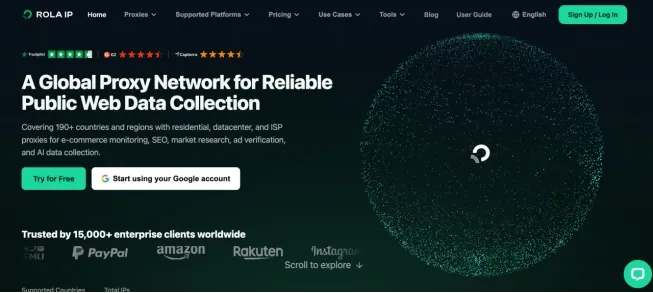
Rola IP is the closest alternative to Smartproxy’s core residential proxy experience. It retains key capabilities such as traffic-based purchasing, geotargeting, rotating proxies, and sticky sessions while offering more competitive high-volume pricing and optimized access for teams in mainland China.
If a team already has its own crawler, automation scripts, or anti-detect browser, it usually does not need to buy a new managed scraping platform. It only needs to replace the Smartproxy endpoints. Rola IP fits this migration model because the product remains focused on the proxy network, so most changes involve the host, port, account parameters, and authentication details.
Rola IP’s residential proxies cover 80M+ IPs across 190+ countries and regions, with HTTP(S)/SOCKS5, country, state, city, and ASN targeting, rotating and sticky sessions, unlimited concurrency, and 24/7 support. For cross-border e-commerce, SEO monitoring, price collection, and regional content verification, these capabilities cover the most common requirements when migrating from Smartproxy. Verify the current pool size, coverage, concurrency policy, and support terms on the linked official pages before publication.
Core Differences Between Rola IP and Smartproxy
Both services meet core residential proxy requirements, but Rola IP places greater emphasis on direct proxy connectivity and high-volume pricing,
| Comparison | Rola IP | Smartproxy / Decodo |
|---|---|---|
| Residential proxy pool | 80M+ IPs, 190+ countries and regions | 115M+ IPs, 195+ locations |
| Protocols | HTTP(S)、SOCKS5 | HTTP(S)、SOCKS5 |
| Targeting | Country, state, city, ASN | Country, state, city, ZIP, ASN |
| Sessions | Rotating; 1–120-minute sticky sessions | Rotating and sticky sessions |
| Authentication | Username/password, IP allowlist | Username/password, IP allowlist |
| PAYG | Currently $4/GB | Currently $4/GB |
| Volume pricing | 50GB $2.50/GB;100GB $2/GB;1,000GB $1/GB | Decreases by selected traffic tier |
| Better suited to | Existing crawlers, cost-sensitive teams, cross-border teams | Teams that value an established brand and extensive public reviews |
Rola IP Dashboard Setup Experience
Rola IP offers a more focused setup path. After entering the dashboard, I could obtain connection details, configure residential proxy parameters, generate proxies, and test them without first learning an entire suite of scraping products.
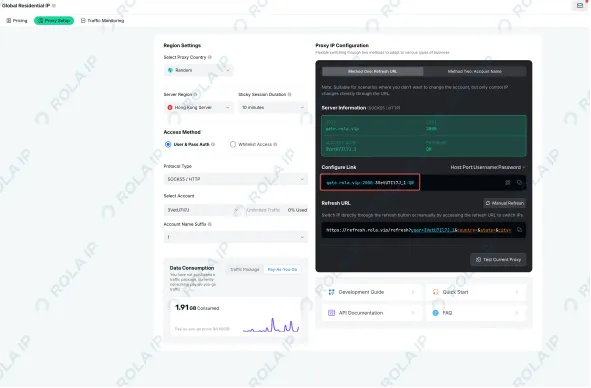
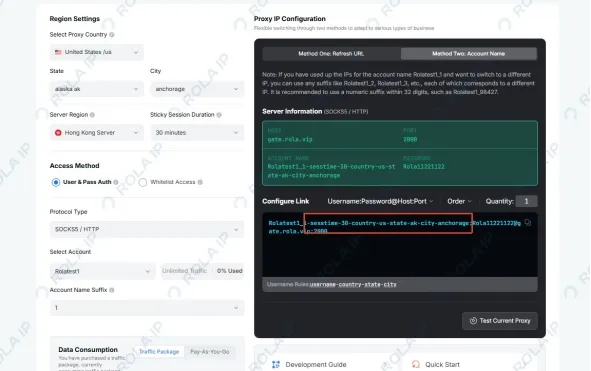
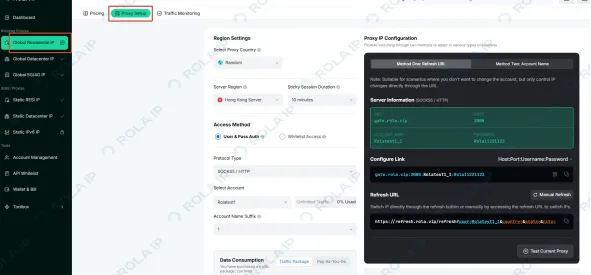
After completing the setup process, I found that Rola IP’s main advantage is its clear workflow. After selecting an account and location and configuring the session behavior, the dashboard generates the host, port, username, and password. I could enter these details directly into a browser, system proxy, anti-detect browser, or existing code without changing the request logic.
For authentication, users can choose username/password credentials or an IP allowlist. Teams can also allocate traffic quotas to different accounts, avoiding shared credentials across all tasks and making it easier to identify which task consumed traffic.
Geotargeting, IP Rotation, and Sticky Session Experience
Rola IP supports both batch tasks that require a new exit for every request and continuous operations that need to retain the same identity for a period of time.
For stateless collection, I could append -f-1 to the account parameters so that every request received a new exit IP. For continuous actions such as logging in, browsing, pagination, or submitting forms, I could use different session IDs to separate tasks and use sessiontime to retain a session for 1–120 minutes. See the Rola proxy parameters and session duration FAQ for the documented syntax and limits.
Location parameters can combine country, state, and city, while ASN targeting is useful for tasks that need to verify carriers or network origins. I recommend generating a batch of endpoints, checking their exit locations with at least two IP databases, and testing rotating and sticky sessions separately to confirm that performance on the target website meets expectations.
Practical recommendation: Use rotation for stateless tasks such as price monitoring and SERP collection. Use sticky sessions for logins, shopping flows, ad landing-page checks, and account operations. Avoid changing IPs frequently within the same continuous workflow.
How Should You Choose a Rola IP Plan?
Rola IP currently charges $4/GB for PAYG, $2.50/GB for 50GB, $2/GB for 100GB, $1/GB for 1,000GB, and $0.60/GB for 10,000GB. See the Rola IP residential pricing page for the current published rates and promotion terms.
The total plan prices are $125 for 50GB, $200 for 100GB, $1,000 for 1,000GB, and $6,000 for 10,000GB. Volume plans significantly reduce unit costs for teams that can consistently use the traffic; when monthly traffic fluctuates, PAYG may prevent spending on unused capacity.
Important: Buy residential proxies prepaid traffic packages are valid for 30 days, and unused traffic does not roll over. Choose a plan based on actual traffic during the previous 30 days and leave room for retries and fluctuations instead of automatically buying the largest plan with the lowest unit rate.
Recommended Steps for Migrating from Smartproxy to Rola IP
- Export the countries, cities, session durations, concurrency, and average monthly traffic currently used with Smartproxy.
- Create the corresponding account in Rola IP and choose username/password or IP allowlist authentication.
- Run a comparison task using the same URLs, request headers, concurrency, and parsing rules.
- Record successful pages, CAPTCHA rate, location accuracy, average response time, traffic consumption, and cost per usable record.
- Migrate low-risk tasks first. After observing performance for 7–14 consecutive days, gradually switch high-traffic or login-based tasks.
For the initial setup, see rotating residential proxy setup; after connecting, use the proxy checker to verify the exit IP, location, and anonymity.
Final Rola IP verdict: If you like Smartproxy’s direct proxy model but want lower high-volume rates, a more focused setup path, or connectivity better suited to teams in mainland China, Rola IP is the alternative most worth testing side by side first.
Bright Data: Best for Enterprise Scale and Compliance Controls
Bright Data suits organizations that prioritize network scale, granular controls, and formal compliance processes over ease of use and low cost.
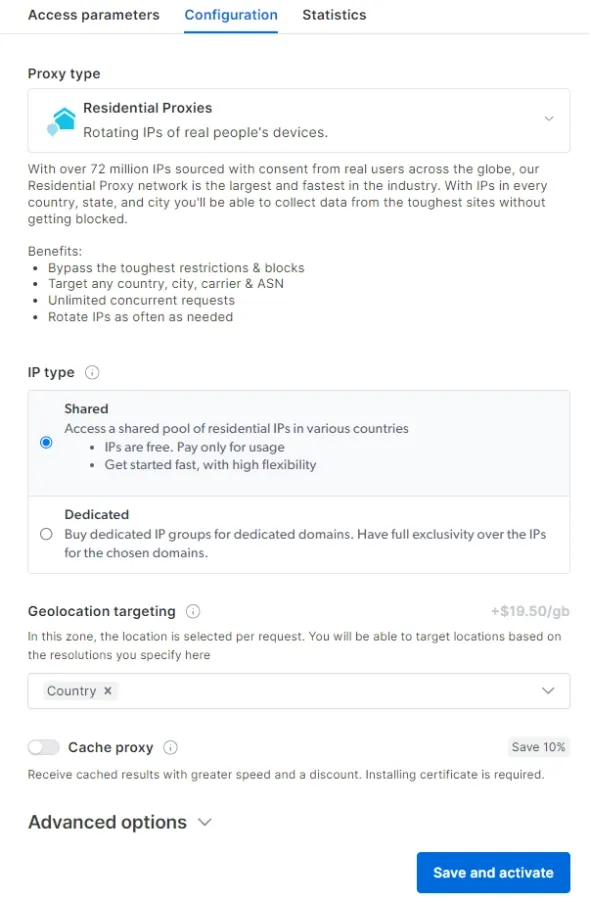
Bright Data’s official residential pricing page lists 400M+ monthly rotating residential IPs in 195 countries and free country, state, city and ZIP targeting. It also lists a current 50%-off promotion: $4/GB pay-as-you-go, $3.50/GB at a $499 monthly commitment, $3/GB at $999 and $2.50/GB at $1,999.
- Strengths: very large stated pool, Proxy Manager, extensive targeting and adjacent Web Unlocker/Scraping Browser products.
- Trade-offs: KYC may be required for residential/mobile access; the breadth of products adds configuration and procurement complexity.
- Best for: regulated enterprises, high-volume public-web data programs and teams that value governance controls.
Pricing note: The published rates above use the temporary RESIGB50 promotion. Recheck the non-promotional renewal price before publishing or committing.
Oxylabs: Best for Enterprise Proxy Operations and Support
Oxylabs suits customers who want a large residential proxy pool, clearly defined self-service plans, enterprise support, and comprehensive protocol and session controls.
Oxylabs’ pricing page lists a 175M+ residential IP pool and 195 locations. Current self-service tiers are 5GB for $30 ($6/GB), 20GB for $100 ($5/GB), 125GB for $500 ($4/GB) and 1TB for $2,500 ($2.50/GB). The page also lists unlimited concurrent sessions, sticky sessions, HTTP(S), HTTP/3 and SOCKS5.
- Strengths: large stated pool, detailed targeting, account support and published target restrictions.
- Trade-offs: small workloads pay a higher unit rate; some categories of target sites are restricted.
- Best for: enterprises that want proxy-first architecture with support and compliance processes.
SOAX — best for geo-targeting and unified proxy credits
SOAX is the best alternative when teams want one credit system across residential, mobile and other proxy products, plus granular location filtering.
SOAX’s current pricing page uses location tiers and plan credits rather than one universal residential rate. It lists a free Sandbox, a $200 Builder base plan and higher Team, Scale and Enterprise tiers; the site’s worked example shows $300 total for 100GB of Tier 1 traffic on Builder. Country, region, city and ISP targeting are broadly included, while ASN and ZIP controls appear on higher tiers.
- Strengths: residential and mobile access under one model; location filtering; team and SLA upgrades.
- Trade-offs: effective cost changes by geography, plan base price, included credits and overage usage.
- Best for: teams whose targets span multiple proxy types and countries and who can model monthly traffic accurately.
ScraperAPI — best when the scraper, not the proxy, is the bottleneck
ScraperAPI is a better fit than purchasing residential proxies directly when a team wants the provider to handle proxy rotation, retries, anti-bot detection, and browser rendering.
ScraperAPI’s official pricing page prices by API credits rather than GB. It lists Hobby at $49/month for 100,000 credits, Startup at $149 for 1,000,000 credits and Business at $299 for 3,000,000 credits. It also lists a seven-day trial with 5,000 credits and includes rotating proxy pools, automatic retries, JS rendering, JSON auto-parsing and CAPTCHA/anti-bot detection.
- Strengths: less proxy orchestration; a single endpoint; rendering and retry logic included.
- Trade-offs: credit multipliers vary by target and feature, and the product is not a general-purpose proxy endpoint.
- Best for: e-commerce, SERP and other public-web extraction where developer time is the dominant cost.
Smartproxy alternatives comparison: what changes in practice?
The most important distinction is whether you still operate the scraper: proxy providers change access infrastructure, while ScraperAPI changes the operating model.
| Option | You manage scraper? | Pricing unit | Targeting/control | Best migration trigger |
|---|---|---|---|---|
| Smartproxy/Decodo | Yes | GB / subscription | Granular; extensions | Stay if current success and support are acceptable |
| Rola IP | Yes | GB / 30-day package | Country, city, ASN; sessions | Direct replacement and flexible volume |
| Bright Data | Yes or use add-ons | GB / product | Very granular | Enterprise scale, governance, unlocker tools |
| Oxylabs | Yes or use APIs | GB / subscription | Granular | Enterprise support and large stated pool |
| SOAX | Yes | Credits / geo tier | Strong geo filtering | Multiple proxy types under one credit model |
| ScraperAPI | Less | API credits | API parameters | Reduce scraping infrastructure work |
Which Smartproxy alternative should you choose?
Choose by bottleneck, not by the biggest advertised IP pool or the lowest headline price.
- Choose Rola IP if you want a direct proxy replacement with flexible volume tiers and documented session controls.
- Choose Bright Data if enterprise governance, extensive product tooling and very large advertised scale justify added complexity.
- Choose Oxylabs if enterprise support, clear self-service tiers and protocol/session options are your priorities.
- Choose SOAX if geography-specific pricing and one credit model across residential and mobile fit your workload.
- Choose ScraperAPI if maintaining retries, browser rendering and anti-bot logic costs more than the API premium.
Practical example: A price-monitoring team downloading image-heavy pages may pay far more per usable record on a cheap per-GB proxy than on a managed API. A lightweight SERP checker with stable HTML responses may see the opposite. Test the actual payload.