Scrape Bing Search Results with Python and Rola IP

Sep 22, 2026 · Guides · 16 min read
If you want to turn Bing search results into data you can analyze, first define what one record represents. This tutorial treats one organic result in a standard web search as a single record. It extracts the title, destination URL, snippet, and position on the page, then saves the data as JSON and as a CSV file that Excel can open. Ads, sitelinks, and Copilot answers are not mixed into the organic result list.
TL;DR: Use Requests and BeautifulSoup to extract Bing organic-result titles, destination URLs, snippets, and page-local positions. Keep the query, response URL, timestamp, and raw HTML for traceability. Stop on CAPTCHA, 403, or 429; a proxy can change the network exit but cannot guarantee access or ranking consistency.
The example query is python documentation. We first confirm where the information appears on the English search page, then use Python to inspect the HTML that was actually returned, and finally handle pagination, duplicate results, and proxy integration. Page structure and search ranking can change. The screenshots document one real run rather than a fixed result set for every region and time.
Decide What Data to Collect Before You Scrape Bing Search Results
For SEO monitoring, comparable records matter most. Saving only the title is not enough: the same keyword can produce different results at different times, from different network exits, with different language settings, or in different clients. Keep at least the following fields so you can later distinguish a page-content change from a change in collection conditions.
| Field | Meaning | How to Use It |
|---|---|---|
query |
Search keyword | Keep it consistent within the same batch of tasks |
page and position_on_page |
Fetched page number and organic-result position on that page | Do not directly claim this is a global ranking |
title and url |
Result title and destination URL | Use them to identify and compare pages |
snippet |
Search snippet | It may be missing and is not the full page text |
raw_href |
Original link | Keep the Bing redirect URL for verification |
source_url and fetched_at_utc |
Actual response URL and collection time | Use them to identify redirects and trace the data |
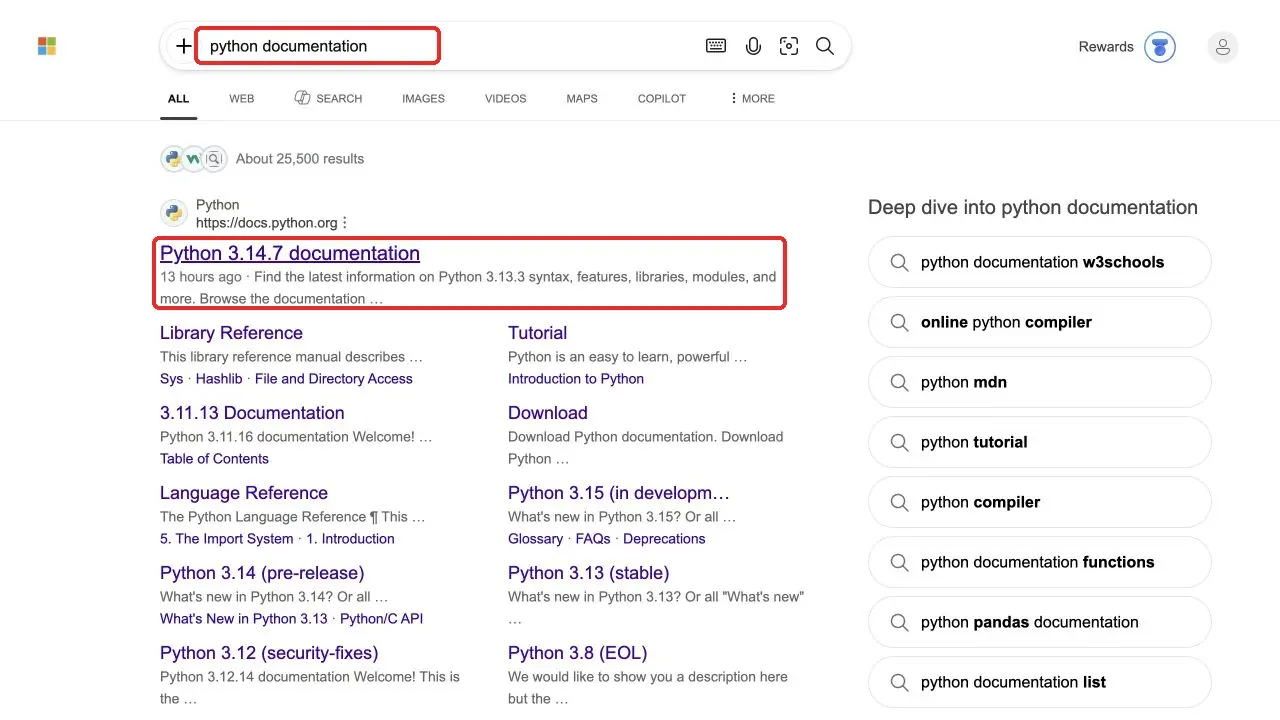
The main results on the left side of the browser, the sitelinks below a title, and the related searches on the right are different information types. Sitelinks such as Library Reference and Tutorial in the figure should not each be counted as a separate main result. The page’s “About results” number also cannot be treated as the exact number of records a script can download.
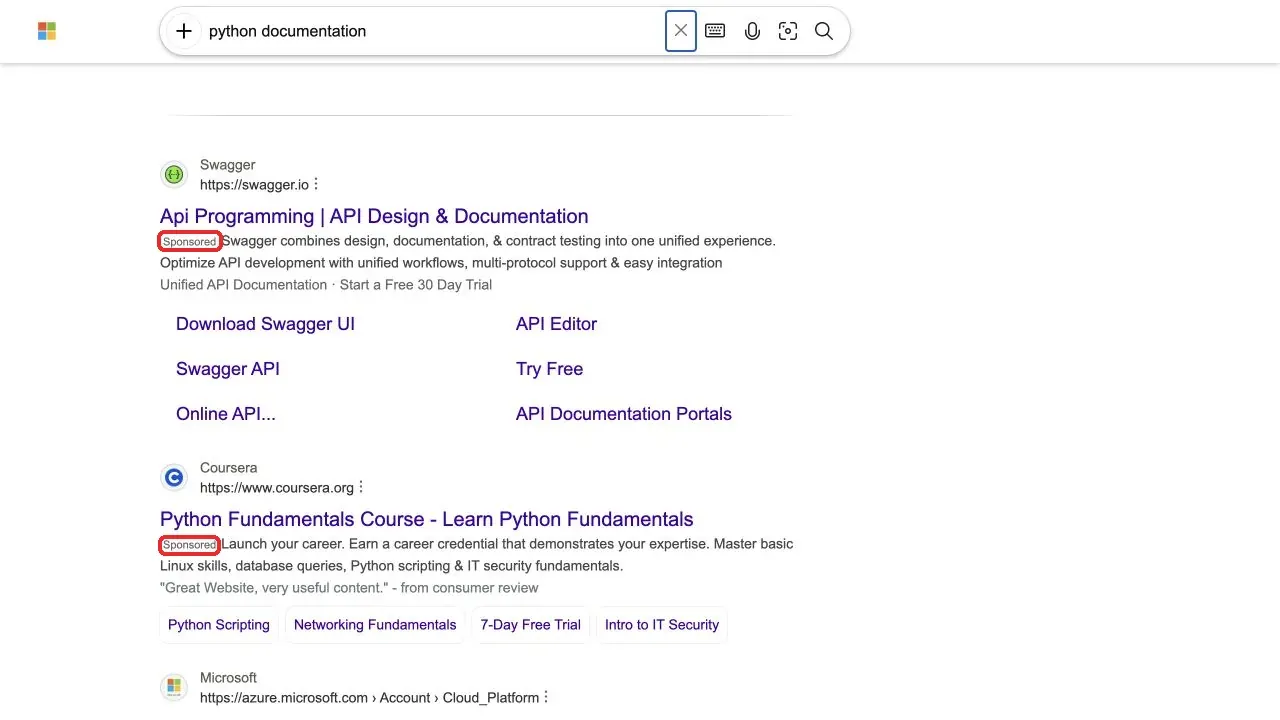
Items labeled Sponsored are ads. This tutorial extracts from the organic-result container instead of collecting every h2 heading and hyperlink on the page. That helps keep ads, navigation, and other components out of the result set.
Before starting, confirm that your collection is authorized and follows the target service’s usage rules. Refer to the Microsoft Services Agreement. Stop when access is denied or a verification page appears; this tutorial focuses on authorized collection and does not cover CAPTCHA bypassing.
How to Prepare a Bing Scraper Python Environment
Step 1: Create an Isolated Environment and Install Dependencies
Use Python 3.10 or newer. In a terminal, move into your project directory and create a virtual environment. On macOS, use the commands below. On Windows, replace python3 with py, and use .venv\Scripts\activate.bat in Command Prompt for activation. You do not need administrator privileges or to change the system proxy.
mkdir bing-scraper
cd bing-scraper
python3 -m venv .venv
source .venv/bin/activate
python -m pip install requests beautifulsoup4
If you want to run the tutorial cell by cell and inspect the output as shown here, you can additionally install JupyterLab. It is an actual Python notebook environment, not a required dependency. Readers who only run a .py file can skip it.
python -m pip install jupyterlab
python -m jupyterlab
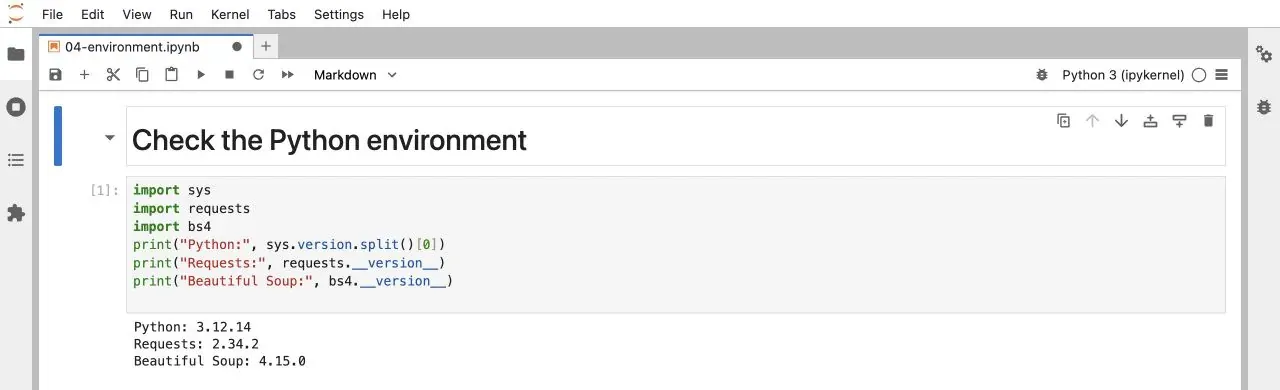
After JupyterLab opens, choose a Python 3 notebook, enter the following check code in a cell, and press Shift + Enter. If there are no import errors and the versions are displayed, the current kernel can use both libraries. Make sure the notebook uses the same virtual environment where you installed the dependencies.
import sys
import requests
import bs4
print("Python:", sys.version.split()[0])
print("Requests:", requests.__version__)
print("Beautiful Soup:", bs4.__version__)
Step 2: Create the Script File
Create a plain-text file named bing_scraper.py. Put the code sections labeled as parts of the script below into the same file in order. Do not mix terminal installation commands or helper code used only to inspect data into this file. Preserve the indentation in the code blocks and do not manually remove leading spaces when copying.
How to Locate Search Fields on the Bing Page and in the HTML
Step 1: Confirm the Title and Snippet on the Web Page
Open the Bing search page for python documentation. The setlang parameter requests an English interface. It does not mean the network exit is in the United States, and it does not guarantee that every search result will be in English. First record the title, displayed URL, and snippet of the first organic result.
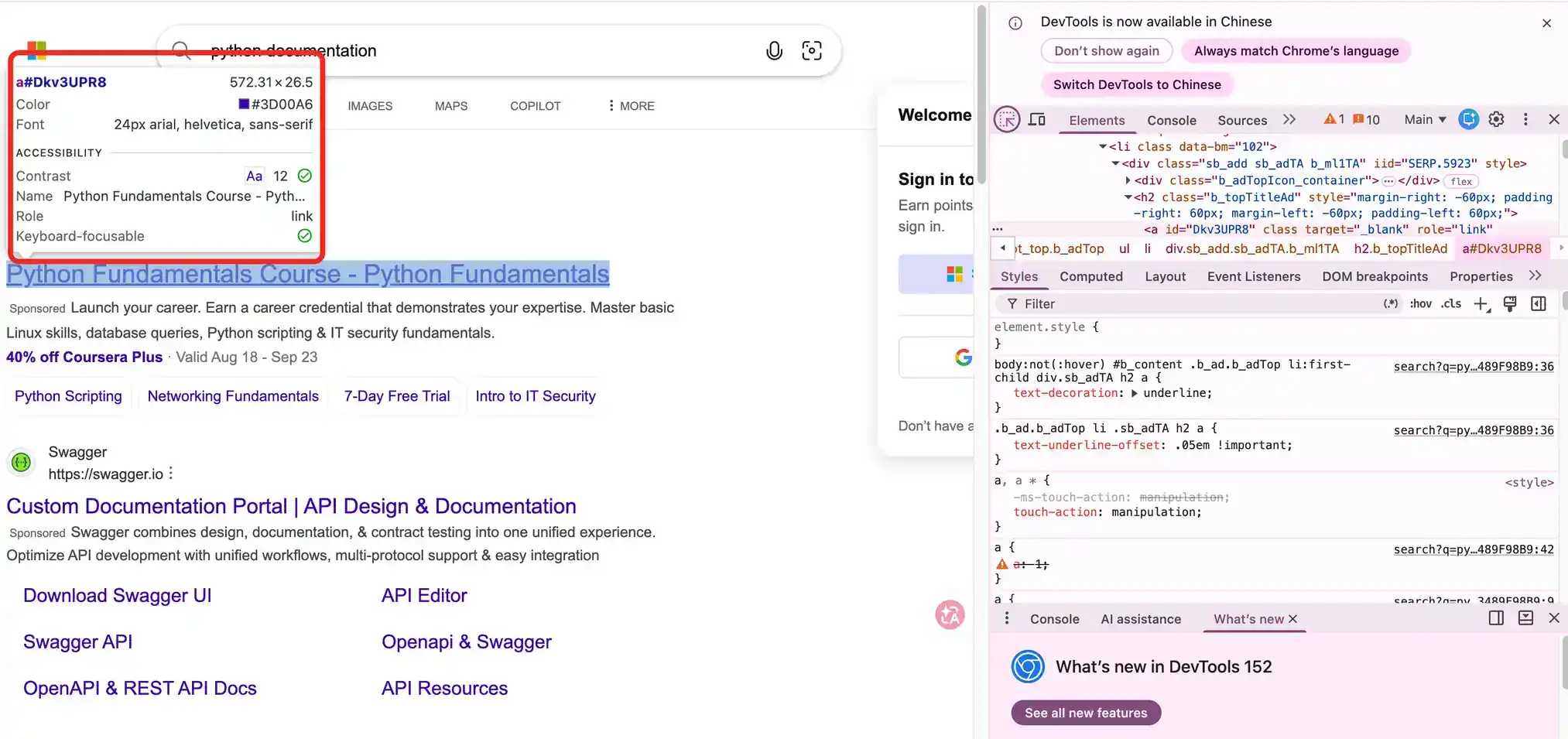
In Chrome, right-click the title and choose Inspect, or open DevTools with Ctrl + Shift + I on Windows or Command + Option + I on macOS. In Elements, locate the a element for the title, then move outward to inspect the surrounding h2 and li. In the page checked for this tutorial, the organic-result container was li.b_algo, and the title link was inside it at h2 a.
Step 2: Inspect the Response Returned by the Server
Switch to Network, click Doc, refresh the page, select the search request, and open Response. Search for b_algo or for the title you just recorded. This confirms whether the data is already present in the HTML instead of assuming that a particular JSON endpoint must exist. For the workflow, see Chrome’s official Network panel documentation.
Elements shows the browser’s current DOM, while Response shows the response content for that request. Both can provide clues, but the final parser must be written against the HTML that Python actually receives. If Response contains the data but Python does not, compare the response domain, status, language, and page content before concluding that the selector has failed.
Step 3: Verify the Actual Response with Python
The following is part one of the script. It imports the dependencies and defines the download function. The function validates the Bing search URL, checks each redirect before following it, sets timeouts, and stops on HTTP 403 or 429. Each connection and read phase has a timeout, but those values are not an overall time limit for the full task.
import argparse
import base64
import csv
import getpass
import json
import time
from datetime import datetime, timezone
from pathlib import Path
from urllib.parse import parse_qs, quote, urlencode, urljoin, urlsplit

import requests
from bs4 import BeautifulSoup


def bing_url(url):
    p = urlsplit(url)
    return (p.scheme == "https" and p.hostname in
            {"www.bing.com", "cn.bing.com", "bing.com"}
            and p.path == "/search" and not p.username)

def fetch(session, url):
    # Validate every redirect before sending the next request.
    for _ in range(5):
        if not bing_url(url):
            raise RuntimeError("Unexpected search URL; stopped.")
        r = session.get(url, timeout=(10, 30), allow_redirects=False)
        if r.is_redirect:
            url = urljoin(r.url, r.headers["Location"])
            continue
        if r.status_code in (403, 429):
            raise RuntimeError(f"HTTP {r.status_code}; stopped.")
        r.raise_for_status()
        if "text/html" not in r.headers.get("Content-Type", ""):
            raise RuntimeError("Expected HTML; stopped.")
        r.encoding = "utf-8"
        return r
    raise RuntimeError("Too many redirects; stopped.")
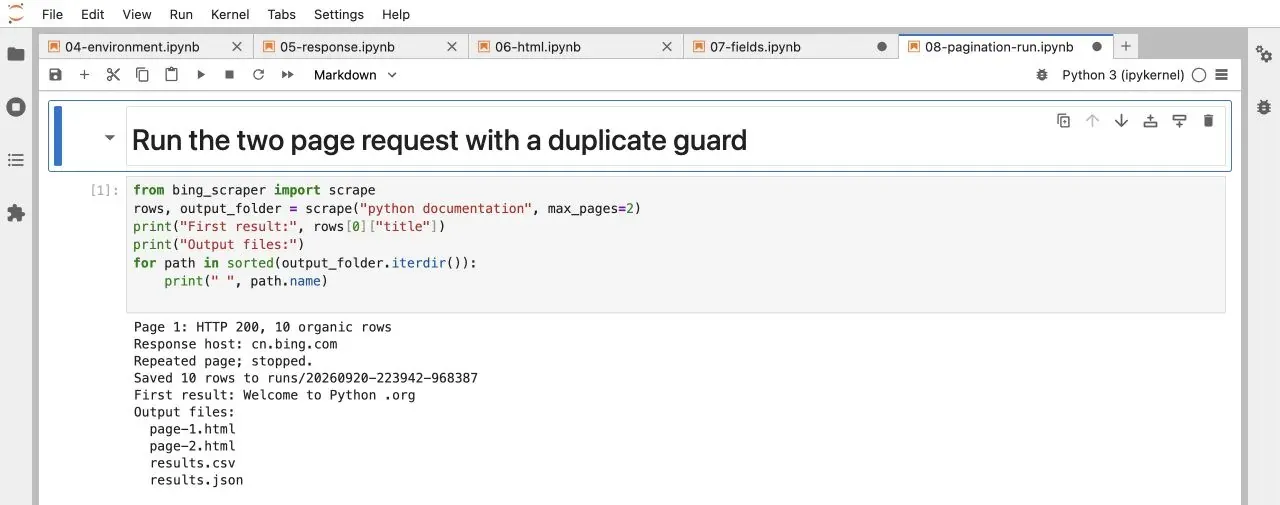
In this run, Requests redirected to cn.bing.com and returned “Welcome to Python .org.” The browser screenshot showed “Python 3.14.7 documentation,” illustrating why each client response should be recorded separately. The next screenshot checks the Python response and HTML nodes directly in JupyterLab.
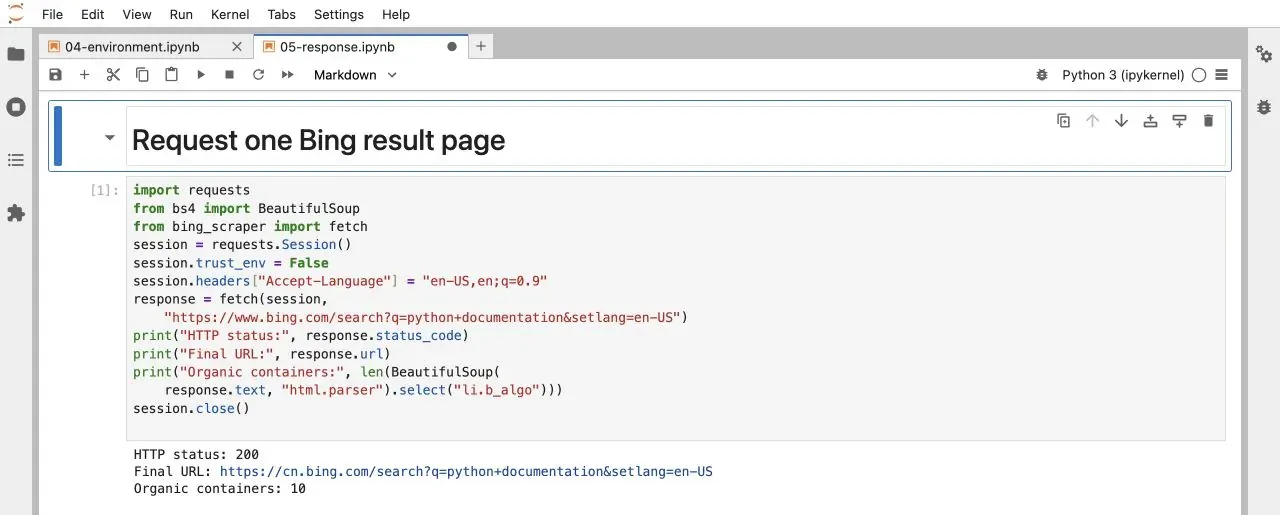
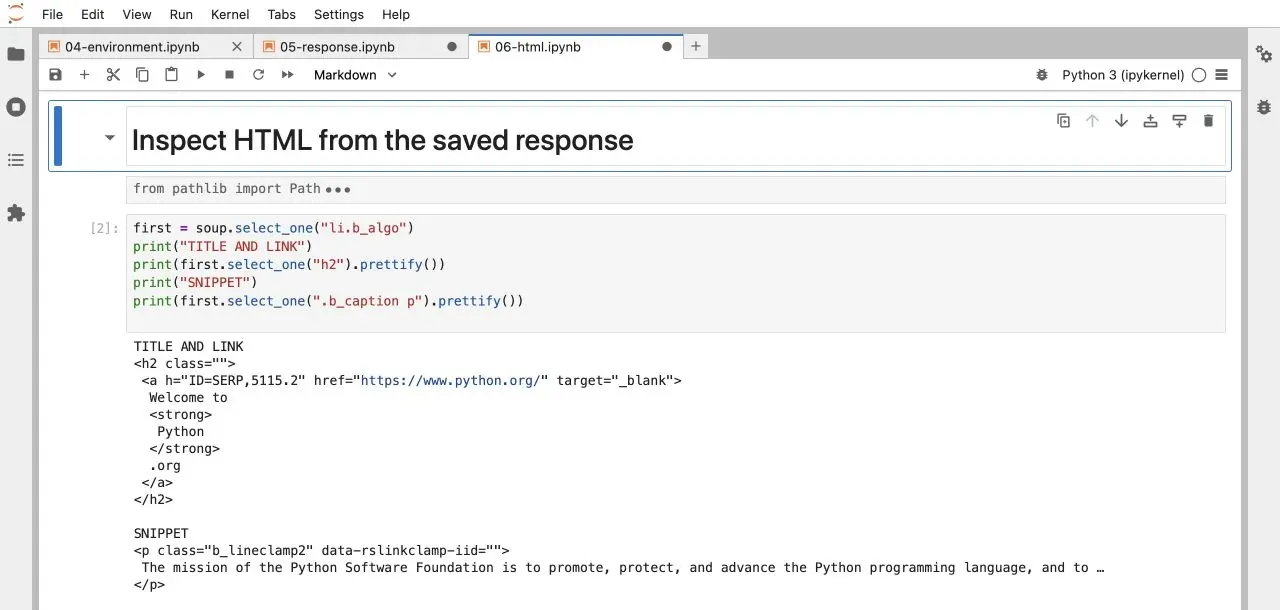
The HTML shown here is the response sent to the client. Locate the search fields in that response; server-side application code is outside the scope of this workflow.
How to Scrape Bing Search Result Titles, Links, and Snippets with Python
Step 1: Get the Destination URL Instead of the Displayed URL
The title comes from the text of h2 a, and the link comes from its href. The displayed URL may be shortened, so the cite text shown on the page should not be used as the full URL. Some href values are Bing /ck/a redirect links. This example decodes them only when the u parameter matches the recognized a1 encoding format. If the format is not recognized, the original link is kept and the result website is not visited.
Part two of the script is below. It accepts only HTTP or HTTPS result URLs so that non-web schemes such as javascript are not treated as destinations.
def destination(href, base_url):
    url = urljoin(base_url, href)
    p = urlsplit(url)
    if p.hostname in {"www.bing.com", "cn.bing.com", "bing.com"}:
        if p.path == "/ck/a":
            value = parse_qs(p.query).get("u", [""])[0]
            if value.startswith("a1"):
                try:
                    payload = value[2:]
                    decoded = base64.urlsafe_b64decode(
                        payload + "=" * (-len(payload) % 4)
                    ).decode("utf-8")
                    if urlsplit(decoded).scheme in {"http", "https"}:
                        return decoded
                except (ValueError, UnicodeError):
                    pass
    return url if p.scheme in {"http", "https"} else ""
Step 2: Extract the Title, Snippet, and Position on the Page
Iterate over each li.b_algo. Inside that container, find h2 a[href], then read .b_caption p. If the snippet is missing, write an empty string instead of deleting the entire result. Number the results according to the organic records actually extracted so that ad placeholders are not counted as organic positions.
Part three of the script also returns the next-page link. If a page has no organic results at all, the function raises an explicit error and asks you to inspect the response content. An empty page may be a verification page, a template change, or another anomaly; it should not automatically be interpreted as the end of the crawl.
def parse_page(html, page_url, query, page_number):
    soup = BeautifulSoup(html, "html.parser")
    if soup.select_one('#b_captcha, iframe[src*="captcha"]'):
        raise RuntimeError("Verification page; stopped.")
    rows = []
    stamp = datetime.now(timezone.utc).isoformat(timespec="seconds")
    for item in soup.select("li.b_algo"):
        a = item.select_one("h2 a[href]")
        if a is None or not a.get_text(strip=True):
            continue
        url = destination(a["href"], page_url)
        if not url:
            continue
        snippet = item.select_one(".b_caption p")
        if snippet is None:
            snippet = item.select_one("p.b_lineclamp2, p.b_lineclamp3")
        rows.append({
            "query": query, "page": page_number,
            "position_on_page": len(rows) + 1,
            "title": a.get_text(" ", strip=True),
            "url": url,
            "snippet": snippet.get_text(" ", strip=True) if snippet else "",
            "raw_href": urljoin(page_url, a["href"]),
            "source_url": page_url, "fetched_at_utc": stamp,
        })
    if not rows:
        raise RuntimeError("No organic rows; inspect HTML, do not assume end.")
    link = soup.select_one("a.sb_pagN[href]")
    next_url = urljoin(page_url, link["href"]) if link else None
    if next_url and not bing_url(next_url):
        raise RuntimeError("Unexpected next-page URL; stopped.")
    return rows, next_url
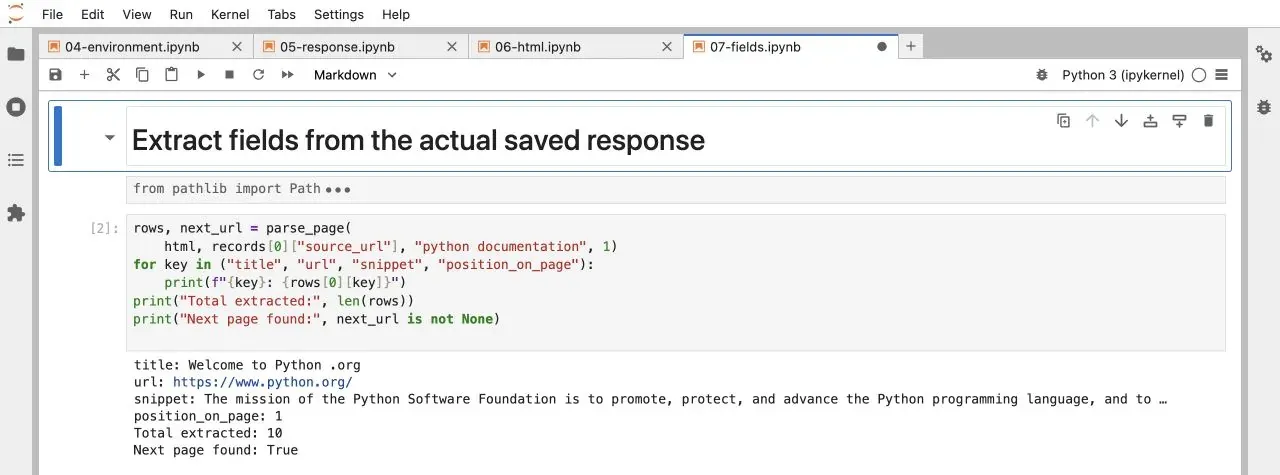
What is saved here is the Bing snippet, not the full description from the destination page. The snippet may be truncated, rewritten, or include a date. For keyword analysis, keep the original snippet and create a separate cleaned field so that the source can still be checked later. The HTML selectors are also not an interface that Bing promises to keep unchanged, so they need to be reviewed periodically.
How to Paginate Scrape Bing Search Results and Export an Excel-Compatible File
Step 1: Follow the Actual Next-Page Link
Scroll to the bottom of the search page and locate the right-arrow button. Use Inspect to examine its href. This tutorial prefers reading a.sb_pagN rather than assuming that every page has ten results and manually constructing first=11, 21, and so on. In the observed run, pagination parameters differed between the browser and the Python response. Reading the link provided by the current page is more likely to preserve the query conditions. If no next-page control is found, that only means the current parser has no link it can follow; it does not prove that every search result has been collected.
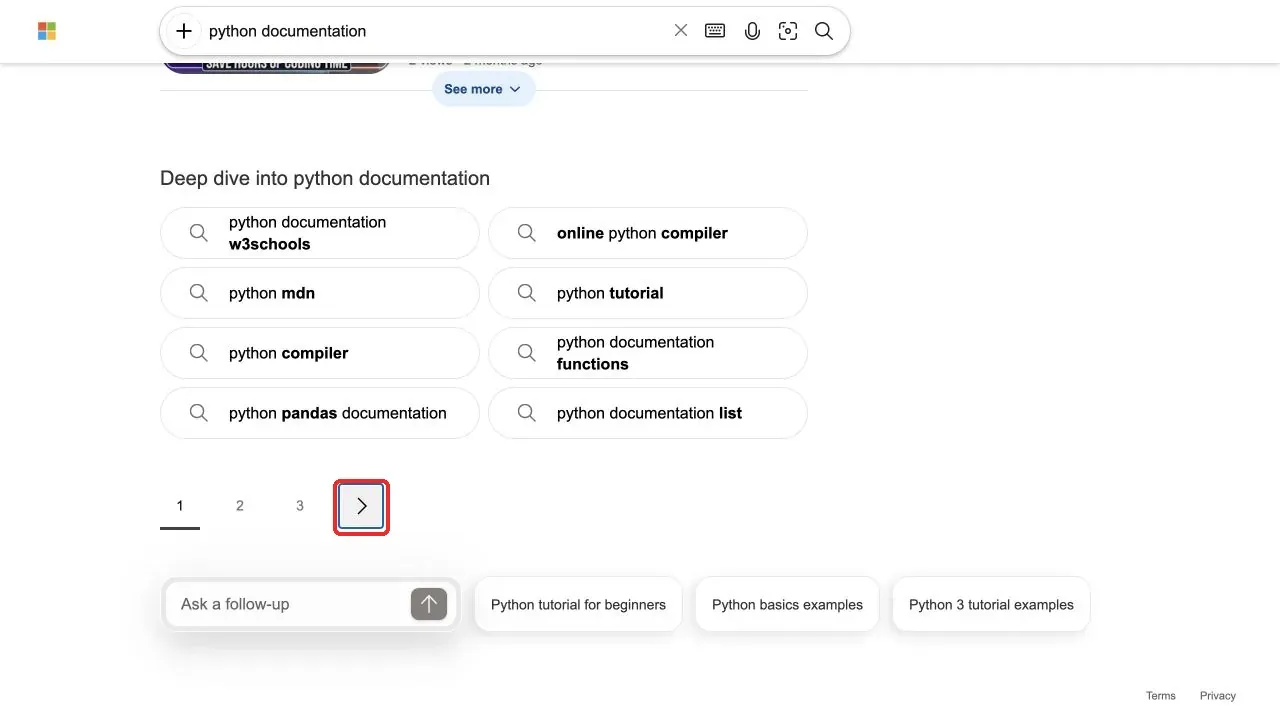
An HTTP 200 response for page two can still repeat page one. In the observed pagination run, the script detected the repeated result signature, kept the first valid data and saved both HTML responses for troubleshooting.
Step 2: Save CSV and Raw JSON
Part four of the script handles export. The CSV uses a UTF-8 BOM so Excel can recognize Chinese text more reliably. If web text begins with a potentially dangerous formula prefix such as an equals sign, plus sign, minus sign, or @, a single quote is added so spreadsheet software does not interpret it as a formula. The unmodified value remains in the JSON file.
def excel_safe(value):
    if isinstance(value, str):
        if value.lstrip().startswith(("=", "+", "-", "@")):
            return "'" + value
        if value.startswith(("\t", "\r", "\n")):
            return "'" + value
    return value

def save_rows(rows, folder):
    if not rows:
        raise RuntimeError("No data to export.")
    folder = Path(folder)
    folder.mkdir(parents=True, exist_ok=True)
    (folder / "results.json").write_text(
        json.dumps(rows, ensure_ascii=False, indent=2), encoding="utf-8")
    with (folder / "results.csv").open(
            "w", encoding="utf-8-sig", newline="") as f:
        writer = csv.DictWriter(f, fieldnames=list(rows[0]))
        writer.writeheader()
        writer.writerows({k: excel_safe(v) for k, v in r.items()} for r in rows)
Step 3: Add Optional Proxy Configuration
Part five provides interactive proxy input. Keep the function definition even if you are not using a proxy yet; the default run does not call it. The full username and password do not appear in command-line arguments, in the source code, or in normal screen output. Enter credentials in a local terminal and do not paste them into a public notebook or shared screenshot.
def configure_proxy(session):
    scheme = input("Proxy scheme (http/https/socks5h): ").strip()
    host = input("Proxy host only: ").strip()
    port = int(input("Proxy port: "))
    if scheme not in {"http", "https", "socks5h"}:
        raise ValueError("Unsupported scheme.")
    if not host or any(c in host for c in "/@?# "):
        raise ValueError("Enter only the proxy hostname or IPv4 address.")
    if not 1 <= port <= 65535:
        raise ValueError("Invalid port.")
    user = getpass.getpass("Proxy username (hidden): ")
    password = getpass.getpass("Proxy password (hidden): ")
    auth = quote(user, safe="") + ":" + quote(password, safe="")
    proxy = f"{scheme}://{auth}@{host}:{port}"
    session.proxies.update({"http": proxy, "https": proxy})
Step 4: Run the Complete Scraping Flow
The final part connects the functions above. It runs in a single thread, allows at most three pages, waits five seconds between pages, and blocks looping links and completely repeated result pages. The five-second interval is only a conservative example; it is not a request quota granted by Bing. Data already saved remains available if a later request fails, but partial data should not be labeled as a complete task result.
def scrape(query, max_pages=2, proxy=False):
    if not 1 <= max_pages <= 3:
        raise ValueError("This example supports 1 to 3 pages.")
    folder = Path("runs") / datetime.now().strftime("%Y%m%d-%H%M%S-%f")
    folder.mkdir(parents=True)
    session = requests.Session()
    session.trust_env = False
    session.headers["Accept-Language"] = "en-US,en;q=0.9"
    if proxy:
        configure_proxy(session)
    url = "https://www.bing.com/search?" + urlencode(
        {"q": query, "setlang": "en-US"})
    all_rows, seen_pages, seen_signatures = [], set(), set()
    try:
        for page in range(1, max_pages + 1):
            if url in seen_pages:
                break
            seen_pages.add(url)
            r = fetch(session, url)
            (folder / f"page-{page}.html").write_text(r.text, encoding="utf-8")
            rows, next_url = parse_page(r.text, r.url, query, page)
            signature = tuple(row["url"] for row in rows)
            if signature in seen_signatures:
                print("Repeated page; stopped.")
                break
            seen_signatures.add(signature)
            all_rows.extend(rows)
            print(f"Page {page}: HTTP {r.status_code}, {len(rows)} organic rows")
            print("Response host:", urlsplit(r.url).hostname)
            if not next_url or page == max_pages:
                break
            url = next_url
            time.sleep(5)
    finally:
        session.close()
        if all_rows:
            save_rows(all_rows, folder)
            print(f"Saved {len(all_rows)} rows to {folder}")
    return all_rows, folder

if __name__ == "__main__":
    parser = argparse.ArgumentParser()
    parser.add_argument("query")
    parser.add_argument("--pages", type=int, default=2)
    parser.add_argument("--proxy", action="store_true")
    args = parser.parse_args()
    try:
        scrape(args.query, args.pages, args.proxy)
    except (requests.RequestException, RuntimeError, ValueError) as error:
        # Never print proxy exception details, which can contain credentials.
        message = str(error) if not isinstance(error, requests.RequestException) else type(error).__name__
        raise SystemExit("Stopped: " + message)
After saving the file, run this command from the directory that contains it:
python bing_scraper.py "python documentation" --pages 2
The program creates a separate timestamped directory under runs and saves page-1.html, any subsequent HTML that it obtains, results.json, and results.csv. Do not mix data from different run directories when comparing results. The result count and content depend on the query, region, client, and collection time. If you report a specific run, include its UTC date, environment versions, command, response host, row count, and stop reason alongside the saved artifacts.
Step 5: Verify the Exported Data
Open results.csv from the current run directory in the JupyterLab file list, or import it in Excel with Data → From Text/CSV and select UTF-8 encoding. Verify that the first title, URL, and snippet match the HTML saved from the same run rather than forcing them to match a separate browser search. If you need a real .xlsx file, save the imported data as an Excel workbook; do not simply change the file extension.
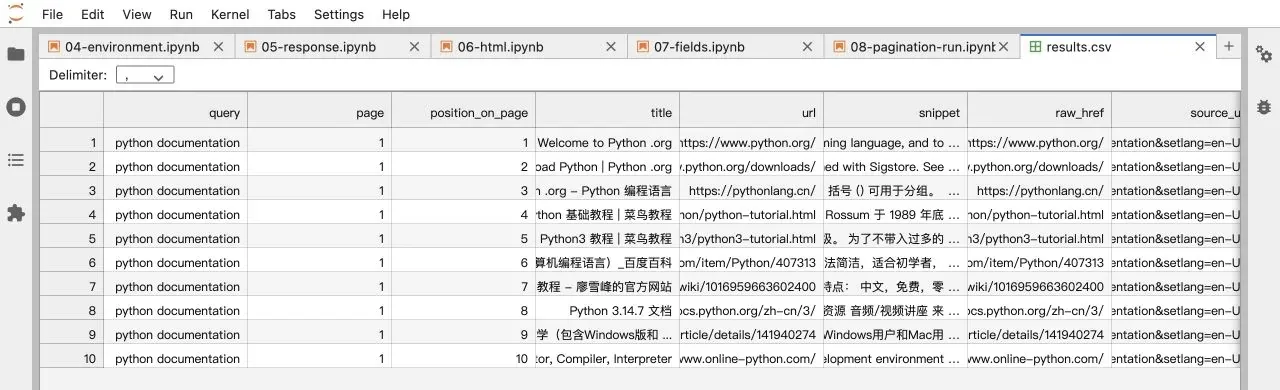
If the same URL appears on different pages, whether you deduplicate it depends on the purpose. For website-coverage analysis, you may deduplicate by URL. For result-order research, keep the position of each occurrence. This example blocks only completely repeated pages and does not silently delete individual records across pages, which avoids distorting position analysis.
How to Configure Rola IP Proxies for Bing Scraping
Step 1: Choose an Exit Type for the Collection Task
When a team needs to check the same keywords repeatedly in a fixed region, a stable network exit removes one variable. Rola IP static residential proxies provide fixed, dedicated IPs that can be used for long-term comparison. According to the official static residential product and pricing pages, ISP proxies are described as per-IP billed with unlimited bandwidth during the subscription/validity period; the applicable plan, region, and terms should still be confirmed before purchase. Dedicated resources can reduce interference from other proxy users sharing the same address, but they do not mean the target site will never restrict access.
If a task needs to compare search behavior across multiple regions, review the available locations and session options for Rola IP residential proxies. The official residential product page presents rotating residential plans as traffic-based and static/ISP plans as per-IP; do not apply the static plan’s unlimited-bandwidth statement to rotating products. Region availability and session duration should be based on the configuration actually generated in the dashboard and the current product terms.
Rola IP’s role is to provide and manage the network exit. Title parsing, pagination stopping rules, and field validation remain the scraper’s responsibility. Availability figures shown on the product page cannot be treated as the Bing scraping success rate. If you need to integrate collection tasks into an existing program, see the web scraping proxy integration scenarios and use cases.
Step 2: Get the Actual Connection Parameters
Sign in to the Rola IP dashboard, open the proxy product you purchased, choose the required region and session mode, and obtain the connection values shown for that product. The exact host, port, authentication mode, and parameter names depend on the product and dashboard version. Rola’s proxy parameters documentation explains that country, state, city, session, and related controls are carried in the proxy username; it also documents the supported ranges and product limits. Enter only the hostname or IP in Host, and enter Port as a separate number when the dashboard supplies those fields. The protocol must match what that port supports. Do not confuse the account sign-in password with the proxy authentication password, and do not invent region or session parameters.
If the account uses a whitelist, authorize the public network exit of the machine running the script before sending requests. The interactive function demonstrates username/password authentication; for other options, see the Python proxy integration guide.
Step 3: Enable the Proxy in the Script
If you already have an HTTP proxy port, run the following command and enter the requested values. Choose http only when the port supports HTTP. Accessing an HTTPS website does not mean the proxy entry itself must necessarily use https; these are separate protocol layers.
python bing_scraper.py "python documentation" --pages 1 --proxy
If you are actually using SOCKS5, install the dependency first and then choose socks5h. socks5h means the target hostname is resolved by the proxy side; it does not mean that the SOCKS transport itself is encrypted.
python -m pip install "requests[socks]"
This example sets session.trust_env=False so environment proxy settings do not unexpectedly override the explicit configuration. That also means CA certificate settings from the environment are not used automatically. If an enterprise network requires a custom certificate chain, explicitly configure the trusted CA file rather than disabling TLS certificate verification. You can compare the behavior with the Requests proxy documentation.
Step 4: Verify the Network Path and Data Quality
Use the same Python Session to check the proxy route, then send a one-page Bing request. Compare the response domain, organic-result count, snippets, and duplicate rate while keeping region and session settings consistent.
For HTTP 403, 429, or CAPTCHA responses, stop the task and review request frequency and authorization before choosing an allowed data interface or contacting the provider. A proxy does not replace selector validation or consistent collection settings.
How to Troubleshoot Bing Scraping Failures
| Symptom | Check First | What to Do |
|---|---|---|
| HTTP 200 but no organic results | Whether the saved HTML is a verification page or a new template | Stop and inspect the response; do not return an empty list and call it success |
| HTTP 403 or 429 | Access restrictions, request frequency, and usage permission | Stop the task; do not keep retrying by changing exits |
407 or ProxyError |
Proxy protocol, port, authentication, and whitelist | Compare against the dashboard parameters and verify the proxy connection separately |
Redirected to cn.bing.com |
Redirect behavior, network region, and language conditions | Record the actual domain; do not claim you obtained U.S. results |
| Page two repeats page one | Next-page link and the actual response | Compare the link sequence and stop repeated-page loops |
| Browser and Python titles differ | Region, cookies, client, and collection time | Keep the evidence separate; do not mix ranking data from different runs |
| Excel shows garbled text | CSV encoding and import method | Import as UTF-8 and keep the raw JSON copy |
The selectors in this tutorial correspond to the page structure that was actually inspected. When checking a new keyword, fetch only one page first and compare the HTML with the first three output records. Do not look only for a zero process exit code; confirm that the fields belong to the intended search results rather than navigation, ads, or unrelated components.
When to Use a Bing SERP API Instead
Hand-written HTML parsing is useful for learning the page structure, validating a small set of fields, and running limited experiments. If a business needs many keywords, a stable field schema, multiple device types, or ad components, evaluate the coverage, pricing, data-use terms, and error-handling model of third-party SERP APIs rather than comparing only the per-call price.
Microsoft’s former Bing Search APIs were retired on August 11, 2025, according to the Microsoft announcement. Use current provider documentation and do not describe a third-party API as an official Microsoft interface.
For example, the DataForSEO Bing SERP API documentation distinguishes Live mode, which returns results immediately, from Standard mode, which queues a task for later retrieval. When using structured results, you still need to filter for the organic type and check task status; HTTP 200 does not necessarily mean every task succeeded. Before integrating it, confirm account permissions, available fields, and pricing, then use one keyword to inspect the returned structure.
Conclusion
The key to scraping Bing search results is keeping page positions, parsing logic, and exported records aligned. First identify the organic-result container, then extract the title, link, and snippet field by field. Detect repeated pages during pagination, and retain the source and timestamp when exporting. If you need a fixed region or stable session, integrate Rola IP at the request layer. The result is data that can be reviewed and traced, rather than merely a scraper that appears to run.