
How to Scrape Ecommerce Website Data with Python

Sep 16, 2026 · Guides · 12 min read
To scrape ecommerce website data, you need a way to retrieve product pages, extract the right fields, and preserve the context that makes those fields useful. A price without its currency, product variant, or collection time is difficult to compare with yesterday’s result.
This guide builds a Python scraper that collects product titles, prices, availability, and URLs, follows pagination, and exports JSON and CSV. It also explains how to connect Rola IP residential proxies when your project needs regional access or a consistent proxy session.
Quick Answer
Use Requests and BeautifulSoup when product information appears in the HTML response. Use Playwright when JavaScript must run before the required fields become available. Define your output schema, test one page, then add bounded pagination and validation.
Rola IP supplies the proxy connection used by your HTTP client or browser. Your scraper still handles page rendering, product extraction, and storage. For regional monitoring, keep the proxy location, storefront settings, and cookies consistent throughout each collection task.
What Is Ecommerce Web Scraping?
Ecommerce web scraping is the automated extraction of product and storefront information into structured records. A typical workflow retrieves listing pages, discovers product URLs, extracts selected fields, and stores observations for analysis.
Retail teams use these records to compare prices, detect assortment gaps, and track changes in availability. A brand monitoring its products across sellers, for example, needs more than the lowest displayed number: it needs the seller, pack size, shipping conditions, and date associated with that offer.
Start with a specific question. “Which of our 200 matched products changed price in the UK this week?” gives a clearer collection scope than “download every product on the marketplace.”
Choose an Ecommerce Website Scraper
The right ecommerce website scraper depends on how the store delivers its data and who will maintain the workflow.
| Approach | Good fit | Work you still own |
|---|---|---|
| Official API or approved feed | Structured access provided by the store | Field mapping, quotas, updates, and storage |
| Requests + BeautifulSoup | Product fields included in the initial HTML | Selectors, pagination, sessions, and validation |
| Scrapy | Larger crawls with queues and multiple page types | Site-specific extraction and operational controls |
| Playwright | Product fields that require browser execution | Browser resources, waits, and session state |
| Managed scraping API | Outsourcing supported collection tasks | Coverage checks, field accuracy, and downstream processing |
| No-code scraper | Small workflows maintained by non-developers | Template changes, scheduling, and export quality |
Check whether an official feed meets your needs first. For a custom Python implementation, inspect the actual response before choosing a browser: some visually dynamic pages already include product data in HTML or embedded JSON.
A proxy service occupies a different part of this workflow. You can use Rola IP with a compatible client while retaining control of the scraper’s selectors, business rules, and output format.
What Data Should You Collect?
Before you scrape data from ecommerce websites, define one record clearly. For price monitoring, a useful record usually represents one product variant, one seller, one market, and one observation time.
| Field | Why it matters |
|---|---|
| Product ID, SKU, or GTIN | Matches the same item across observations where identifiers are available |
| Title and product URL | Makes a record traceable to its source |
| Variant and pack size | Prevents comparisons between different sizes, colors, or quantities |
| Current price and currency | Preserves the amount and its unit |
| Seller and offer type | Separates marketplace sellers, subscriptions, and one-time purchases |
| Availability | Records the displayed stock state without inventing inventory quantities |
| Market and delivery location | Explains regional differences in price and shipping |
| Collection timestamp | Shows when the observation was made |
Keep raw values alongside normalized fields when practical. A displayed “from $19.99” should not silently become a confirmed price for every variant. Likewise, a missing stock label should remain unknown, rather than becoming “out of stock.”
Customer reviews need a separate record schema from product offers. An Amazon review scraper can capture fields such as review ID, rating, body, and displayed date when they are available on a public product page, while preserving missing optional values and deduplicating records.
Web Scraping Ecommerce Websites Using Python
For a first project in web scraping ecommerce websites using Python, a purpose-built practice store makes the extraction steps easier to inspect. This tutorial uses Books to Scrape, a public scraping sandbox. Its prices and ratings are demonstration data, not real market observations.
1. Install the Dependencies
Use Python 3.10 or later in a project environment:
python -m venv .venv
Activate it with .venv\Scripts\Activate.ps1 in PowerShell or source .venv/bin/activate on macOS and Linux. Then install the two libraries:
python -m pip install requests beautifulsoup4
Requests retrieves the HTML. BeautifulSoup selects and reads elements from it. Python’s standard library handles URLs, timestamps, decimal prices, and file exports.
2. Inspect a Product Card
On the practice store, each listing card uses article.product_pod. The following selectors identify the fields used in the example:
| Value | Selector or attribute |
|---|---|
| Product card | article.product_pod |
| Full title | h3 a and its title attribute |
| Product URL | h3 a and its href attribute |
| Displayed price | .price_color |
| Availability text | .availability |
| Next listing page | li.next a |
Inspect each new target separately. These selectors describe this practice store, not a universal ecommerce template. If a required field only appears on the product detail page, add a separate detail-page parser instead of assuming the listing contains it.
3. Collect Products and Follow Pagination
Create scrape_ecommerce_website.py with the following code. It collects at most two listing pages, checks required fields, and stops if pagination leaves the original site.
The demo runs directly when no Rola environment variables are configured. If you configure any proxy field, all four are required, preventing a partly configured proxy from silently falling back to a direct connection.
import csv
import json
import os
import re
import time
from datetime import datetime, timezone
from decimal import Decimal
from urllib.parse import quote, urljoin, urlsplit

import requests
from bs4 import BeautifulSoup

START_URL = "https://books.toscrape.com/"
MAX_PAGES = 2


def proxy_config():
    names = (
        "ROLA_PROXY_HOST", "ROLA_PROXY_PORT",
        "ROLA_PROXY_USERNAME", "ROLA_PROXY_PASSWORD",
    )
    values = [os.getenv(name) for name in names]
    if not any(values):
        return None
    if not all(values):
        raise ValueError("Configure all four ROLA_PROXY variables.")
    host, port, username, password = values
    user = quote(username, safe="")
    secret = quote(password, safe="")
    endpoint = f"http://{user}:{secret}@{host}:{port}"
    return {"http": endpoint, "https": endpoint}


def parse_page(html, page_url):
    soup = BeautifulSoup(html, "html.parser", from_encoding="utf-8")
    cards = soup.select("article.product_pod")
    if not cards:
        raise ValueError("No product cards found; inspect the response.")
    observed_at = datetime.now(timezone.utc).isoformat()
    rows = []
    for card in cards:
        link = card.select_one("h3 a")
        price = card.select_one(".price_color")
        stock = card.select_one(".availability")
        if link is None or price is None or stock is None:
            raise ValueError("A required product element is missing.")
        title = link.get("title", "").strip()
        href = link.get("href")
        raw_price = price.get_text(strip=True)
        match = re.fullmatch(r"\u00a3(\d+\.\d{2})", raw_price)
        if not title or not href or match is None:
            raise ValueError("Unexpected title, URL, or GBP price format.")
        rows.append({
            "title": title,
            "price": str(Decimal(match.group(1))),
            "currency": "GBP",
            "price_raw": raw_price,
            "availability": stock.get_text(" ", strip=True),
            "product_url": urljoin(page_url, href),
            "source_page": page_url,
            "collected_at": observed_at,
        })
    next_link = soup.select_one("li.next a[href]")
    next_url = urljoin(page_url, next_link["href"]) if next_link else None
    return rows, next_url


def collect():
    proxies = proxy_config()
    products, seen_pages, seen_products = [], set(), set()
    page_url = START_URL
    origin = urlsplit(START_URL).netloc
    with requests.Session() as session:
        session.trust_env = False
        session.headers["User-Agent"] = "EcommerceTutorial/1.0"
        for _ in range(MAX_PAGES):
            if not page_url or page_url in seen_pages:
                break
            if urlsplit(page_url).netloc != origin:
                raise ValueError("Pagination left the approved site.")
            seen_pages.add(page_url)
            response = session.get(
                page_url, proxies=proxies, timeout=(10, 30),
                allow_redirects=False,
            )
            if response.status_code != 200:
                raise RuntimeError(
                    f"HTTP {response.status_code}; review before retrying."
                )
            rows, page_url = parse_page(response.content, response.url)
            for row in rows:
                if row["product_url"] not in seen_products:
                    seen_products.add(row["product_url"])
                    products.append(row)
            if page_url and len(seen_pages) < MAX_PAGES:
                time.sleep(2)
    return products


def export(rows):
    with open("products.json", "w", encoding="utf-8") as handle:
        json.dump(rows, handle, ensure_ascii=False, indent=2)
    with open("products.csv", "w", newline="", encoding="utf-8-sig") as handle:
        writer = csv.DictWriter(handle, fieldnames=list(rows[0]))
        writer.writeheader()
        for row in rows:
            # Keep spreadsheet applications from interpreting text as formulas.
            writer.writerow({
                key: "'" + value if value.startswith(("=", "+", "-", "@"))
                else value for key, value in row.items()
            })


if __name__ == "__main__":
    try:
        records = collect()
        if not records:
            raise ValueError("No validated products to export.")
        export(records)
        print(f"Exported {len(records)} products to JSON and CSV.")
    except requests.RequestException as exc:
        raise SystemExit(
            f"Request failed ({type(exc).__name__}); check connectivity."
        ) from None
Run the script:
python scrape_ecommerce_website.py
With the current practice-store layout, two complete listing pages should produce 40 product records. Check the files against the source pages before adapting the code. The GBP value and price parser are specific to this demo; a multi-market collector must extract and validate the actual currency for each offer.
Verified on September 15, 2026: The direct example ran with Python 3.12.10, Requests 2.34.2, and BeautifulSoup 4.15.0 and exported 40 unique product records from two listing pages. The JSON and CSV values matched, and a second retrieval of both source pages confirmed all extracted fields except the collection timestamps, which naturally change between runs. Proxy authentication and exit-location checks were not part of this test.
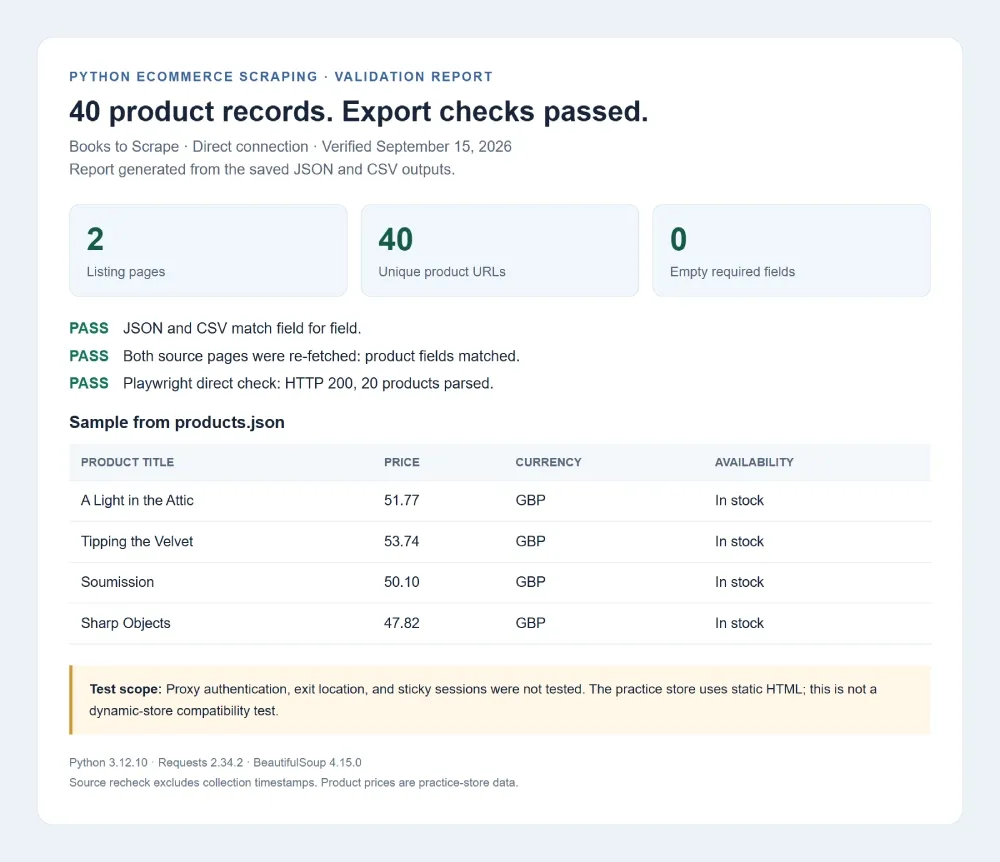
Validation report screenshot compiled from the actual export files and recorded test results.
4. Adapt the Example to Your Store
Replace the starting URL, selectors, price parser, and record schema together. Keep the page limit small while testing. The two-second pause is a demonstration setting; the target site’s permitted request rate should determine your production schedule.
For product details, queue discovered URLs and fetch each approved page once. Track variants separately, preserve collection timestamps, and use a stable product identifier when available. URL deduplication alone is suitable for this demo but may merge distinct offers on a marketplace.
Connect Your Scraper to Rola IP
Once extraction works, connect the network route needed for your collection task. Rola IP’s supported proxy protocols include HTTP/S and SOCKS5 for both rotating and static IPs. This tutorial uses an HTTP proxy endpoint with username/password authentication.
Configure the Issued Endpoint
Copy the host, port, username, and password supplied for your account from the Rola IP console. Configure these environment variables in the process that runs the scraper:
ROLA_PROXY_HOST=YOUR_ISSUED_HOST
ROLA_PROXY_PORT=YOUR_ISSUED_PORT
ROLA_PROXY_USERNAME=YOUR_GENERATED_USERNAME
ROLA_PROXY_PASSWORD=YOUR_PASSWORD
Use the complete username generated for your selected product and configuration, including any location or session parameters. Rola IP’s proxy parameters documentation describes country targeting for rotating residential, rotating datacenter, and mobile proxies; state and city parameters are supported only for rotating residential proxies. These username parameters should not be assumed to apply to static residential products. Keep the same generated session username across related requests when using a sticky session.
A .env file alone will not set these variables: load it through your application or set the variables in your shell or deployment environment. Keep credentials out of source control and shared logs.
The example maps both http and https destinations to the proxy. An HTTP proxy endpoint can carry HTTPS requests using a CONNECT tunnel; keep the endpoint scheme supplied by the provider. The username and password are URL-encoded separately so reserved characters do not break the proxy URL. The Requests proxy documentation covers this configuration.
The script deliberately ignores unrelated system proxy variables using trust_env = False, and leaves TLS certificate verification enabled. For applications that depend on an enterprise CA bundle, configure that trust explicitly.
Verify the Route and Market
Before a full collection run, make a small request through the same client to an approved IP-check service. Confirm that the observed exit location matches the selected market. Then inspect a product page and verify its currency, delivery region, language, and selected variant.
An exit IP alone does not determine every storefront setting. A saved delivery postcode or cookie can continue to select another region. For US and UK monitoring, use separate sessions and label every observation with its market and delivery context.
A Requests Session can preserve cookies and reuse connections. Its lifetime is independent of the proxy session lifetime, so configure both deliberately.
Scraping Ecommerce Websites That Use JavaScript
When product values appear only after browser execution, use Playwright to render the page and then pass its HTML to a parser. First inspect whether the required data is already available in the initial response or through an approved endpoint; browser rendering adds work to every page visit.
Install Playwright and its Chromium browser:
python -m pip install playwright
python -m playwright install chromium
The following standalone example demonstrates browser-level Rola IP configuration on the same practice store. That store does not require JavaScript; it is used here to keep the selectors inspectable. For a dynamic store, replace the URL and wait selector with the actual product element you need.
import os
from playwright.sync_api import sync_playwright

proxy = {
    "server": (
        f"http://{os.environ['ROLA_PROXY_HOST']}:"
        f"{os.environ['ROLA_PROXY_PORT']}"
    ),
    "username": os.environ["ROLA_PROXY_USERNAME"],
    "password": os.environ["ROLA_PROXY_PASSWORD"],
}

with sync_playwright() as p:
    browser = p.chromium.launch(headless=True, proxy=proxy)
    try:
        context = browser.new_context()
        page = context.new_page()
        response = page.goto(
            "https://books.toscrape.com/",
            wait_until="domcontentloaded",
            timeout=30000,
        )
        if response is None or not response.ok:
            raise RuntimeError("Page request failed; inspect the response.")
        page.locator("article.product_pod .price_color").first.wait_for(
            state="visible", timeout=15000
        )
        html = page.content()
        print("Rendered HTML ready for product parsing.")
        context.close()
    finally:
        browser.close()
Playwright accepts the proxy server and credentials as separate fields, as shown in its network documentation. Use a sticky proxy session for related browser requests. Repeatedly changing the route during one page load can introduce inconsistent session or location state.
To reuse the earlier parser, call parse_page(html.encode("utf-8"), page.url) while the page remains open. On a real dynamic store, wait for the required price or selected variant to finish updating; a visible product container alone may still contain placeholder values.
Keep each browser context associated with the intended market and proxy session, and close it when that collection task is complete.
Rotating vs. Sticky Proxy Sessions
Choose the session strategy according to the relationship between requests, rather than rotating on every request by default.
| Collection task | Session approach | Reason |
|---|---|---|
| Independent public product checks | Rotation between independent tasks, where appropriate | Each check can have its own route and state |
| Category pages followed by related detail pages | Sticky session when the store depends on session state | Keeps related requests aligned |
| Regional price comparison | Separate session for each market | Prevents cookies and location settings from crossing markets |
| Browser-rendered product page | Sticky session for the full page task | Keeps document, scripts, and data requests on a consistent route |
| Repeated observations requiring a fixed address | Evaluate static residential proxies | Supports workflows that need a persistent exit address |
Rola IP offers rotating residential and static residential products. A timed sticky session attempts to retain the same exit IP for the configured session duration; it is not a permanently fixed address. Static residential products provide a fixed IP during the subscription rather than using a timed rotation session. For that option, review the static residential proxy pricing, which covers static residential plans.
Proxy routing can support the network requirements of your scraper. It does not fix missing selectors, render JavaScript, guarantee access to a store, or turn an invalid response into usable product data.
Troubleshooting Ecommerce Scraping
| Symptom | What to inspect | Practical next step |
|---|---|---|
| HTTP 407 | Proxy credentials, authentication method, and issued endpoint | Correct authentication before collecting more pages |
| HTTP 403 or a challenge page | Response content and the site’s access requirements | Pause the job and review the permitted access method |
| HTTP 429 | Request volume and any Retry-After header |
Respect the delay and reduce the target-wide request rate |
| HTTP 200 but no products | HTML content, selector changes, or browser-only data | Inspect the response before classifying the page as empty |
| Wrong currency or delivery result | Cookies, selected market, postcode, and proxy route | Reset inconsistent state and repeat a small regional check |
| Duplicate or missing offers | Pagination, product IDs, sellers, and variants | Use offer-aware keys and record crawl coverage |
| Connection timeout | Gateway reachability, target latency, and timeout stage | Test a small request and use bounded retries for transient failures |
| Unexpected bandwidth use | Browser subrequests and repeated downloads | Measure bytes per validated record and avoid unnecessary downloads |
The tutorial stops on unexpected status codes so failures remain visible. A production collector can add limited retries for transient network errors, but should distinguish them from authentication failures, rate limits, and access denials. Never count a challenge page as a successful product response simply because its HTTP status is 200.
Validate Data Before Scaling
A collector becomes useful when its output can support a decision repeatedly. Before increasing coverage, manually compare a sample of records with the source pages and measure missing fields, duplicate offers, and unexpected price changes.
For example, a displayed price changing from 24.99 to 9.99 might reflect a promotion, a different pack size, or a subscription option. Keep the raw price label and offer context so the change can be investigated. Do not overwrite a known observation with an empty field from a failed extraction.
Track these operational measures together:
- Validated record rate: records meeting your schema divided by records attempted.
- Coverage: intended products and markets actually observed in the collection window.
- Freshness: elapsed time since the latest successful observation.
- Collection cost: compute, proxy traffic, retries, and maintenance per usable record.
Keep one rate budget per target across all workers and proxy routes. Cache unchanged pages where appropriate, schedule updates around your actual freshness needs, and download images only when the task requires their contents rather than their URLs.
For production collection, review the site’s terms and robots.txt, use an approved access method, and collect only the information required for the project. Robots.txt provides crawl instructions; it does not settle authorization or legal rights. Proxy access also does not change the permissions applicable to the data.
Build Your Ecommerce Collection Workflow with Rola IP
Start with one category and a small set of fields. Validate the direct Python example, add detail pages only where needed, and introduce browser rendering for fields that require it. When regional access or proxy session control becomes part of the requirement, connect the same scraper to Rola IP residential proxies.
Configure a route in the Rola IP console, verify it with a small collection job, and compare the results against the source pages before increasing coverage. This gives you a measurable foundation for product monitoring while keeping control over extraction and data quality.