
Scrape Google Finance with Python: A Practical, Validation-First Guide

Sep 3, 2026 · Guides · 10 min read
If you search for scrape google finance python, you will find several different tasks hidden behind the same phrase. You might want the Google Finance page as rendered in a browser, a few quote fields for a watchlist, historical prices, or simply a reliable market-data feed. Those are not the same problem.
The practical answer is to choose the data route first. Use GOOGLEFINANCE when a Google Sheet is enough, a maintained or licensed market-data API when you need a stable production feed, direct HTML for a small authorized experiment, and Playwright when the value exists only after the browser renders the page. Then validate every record instead of treating an HTTP 200 response as proof that the right price was extracted.
TL;DR: Google’s official documentation describes
GOOGLEFINANCEas a Google Sheets function; it does not document an official Python quote client. Use Sheets for spreadsheet workflows, a maintained market-data API for production history, Requests plus BeautifulSoup only when the required fields exist in the initial HTML, and Playwright when values appear only after JavaScript rendering. Always use an exchange-qualified ticker, record currency and UTC collection time, preserve the raw response, and stop when access is challenged, incomplete, or inconsistent with the source’s rules.
What “Google Finance data in Python” can mean
These four routes are often mixed together in tutorials. That is the central python google finance api distinction: a Sheets formula, a web page, a browser session, and a third-party API are separate interfaces.
| Route | Use it when | Main trade-off |
|---|---|---|
GOOGLEFINANCE in Google Sheets |
A spreadsheet workflow is acceptable | It is a Sheets function; quote availability and delay vary |
| Direct HTML | You need a small, page-level experiment | DOM classes and page structure are not a stable API |
| Playwright | The browser-rendered DOM contains the required value | More setup, runtime, and browser maintenance |
| Maintained or licensed API | You need a repeatable data contract or history | Terms, coverage, quotas, and cost must be checked |
Google’s official GOOGLEFINANCE documentation documents the function and recommends including an exchange symbol with the ticker when accuracy matters, for example NASDAQ:GOOG. It also says that quotes may be delayed by up to 20 minutes and that historical data cannot be downloaded or accessed through the Sheets API or Apps Script. Treat these as route and freshness constraints, not as a promise that every symbol is available.
If your application needs the exact presentation of google.com/finance, page extraction may be justified. If it only needs a price series, compare APIs designed for that purpose before maintaining a Google page parser.
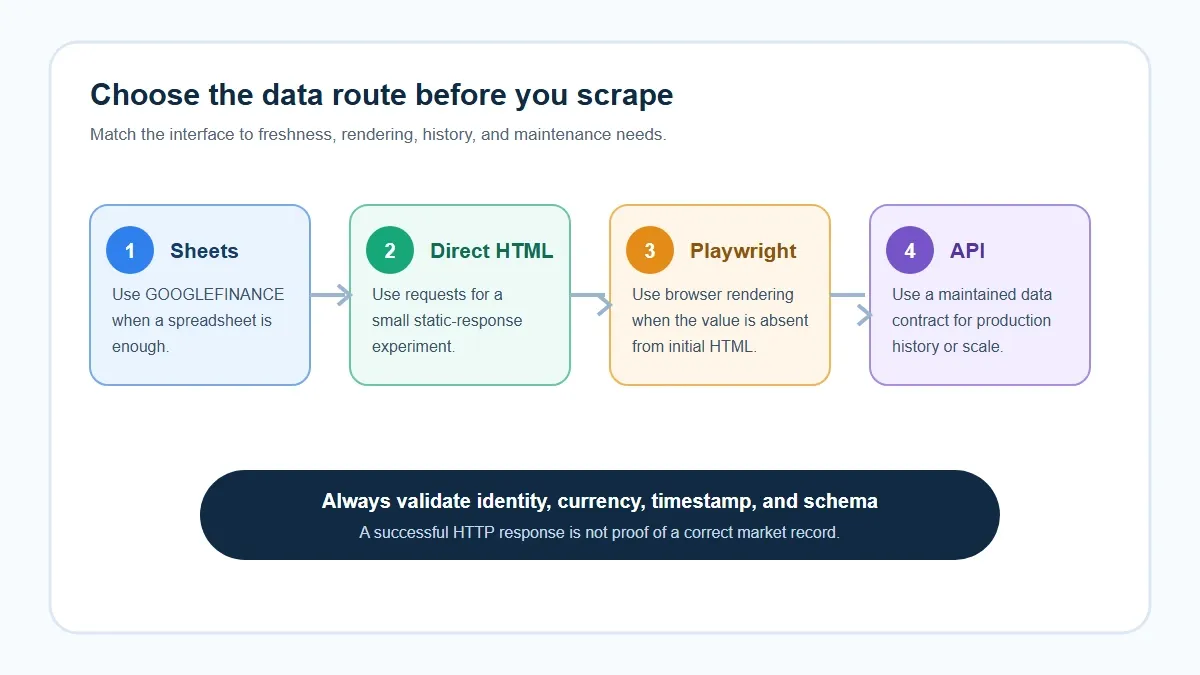
Figure 1. Choose the interface first: Sheets, direct HTML, Playwright, or a maintained API.
Choose the route before writing a Google Finance scraper
Define the output contract before installing packages. For a quote snapshot, that contract might contain ticker, exchange, company_name, price_text, currency, collected_at, source_url, and validation_status. For a market page, it might contain symbol, name, price_text, change_text, and market_page.
The important distinction is between “the transport succeeded” and “the expected record was extracted.” A response with status 200 can still contain a consent page, a challenge, a different locale, an incomplete shell, or markup that no longer contains the selector you expected.
For an authorized workflow that needs controlled egress, Rola documents HTTP/SOCKS5 connections and country-level proxy configuration; keep those transport settings separate from the parser.
Diagnose the Google Finance HTML before parsing
Create an isolated environment and install the parser dependencies:
python -m venv .venv
# macOS/Linux
source .venv/bin/activate
# Windows PowerShell: .venv\Scripts\Activate.ps1
python -m pip install requests beautifulsoup4 lxml
Use Python 3.11 or newer for the examples. The package versions are intentionally not pinned here because this is a method-only tutorial; record the requests, beautifulsoup4, and lxml versions in your own run log before deployment.
The following example reads visible text around the exchange-qualified symbol and validates the price and currency together. It fails closed when the expected context is missing. Save the response and rerun the check when Google changes its markup.
from __future__ import annotations

import re
from datetime import datetime, timezone
import requests
from bs4 import BeautifulSoup


def scrape_quote(ticker: str, exchange: str) -> dict:
    symbol = f"{ticker}:{exchange}"
    url = f"https://www.google.com/finance/quote/{symbol}"
    response = requests.get(
        url,
        headers={"User-Agent": "Mozilla/5.0 (compatible; research-client/1.0)"},
        timeout=20,
    )
    response.raise_for_status()

    soup = BeautifulSoup(response.text, "lxml")

    visible_text = " ".join(soup.stripped_strings)
    symbol_position = visible_text.find(symbol)
    if symbol_position == -1:
        raise ValueError(f"Requested symbol was not found: {symbol}")
    quote_context = visible_text[symbol_position:symbol_position + 500]
    match = re.search(
        rf"{re.escape(symbol)}.*?(\$[0-9,]+\.\d{{2}}).*?\bUSD\b",
        quote_context,
        flags=re.IGNORECASE,
    )
    if not match:
        raise ValueError(f"Validated price/currency context not found for {symbol}")
    return {
        "ticker": ticker,
        "exchange": exchange,
        "price_text": match.group(1),
        "currency": "USD",
        "page_title": soup.title.get_text(" ", strip=True)
        if soup.title else "",
        "source_url": url,
        "collected_at": datetime.now(timezone.utc).isoformat(),
        "validation_status": "symbol_price_currency_matched",
    }


if __name__ == "__main__":
    print(scrape_quote("AAPL", "NASDAQ"))
Validation status: a companion test was run on September 2, 2026 with Python 3.14.4, requests 2.33.1, BeautifulSoup 4.14.3, and lxml 6.1.1. The response returned HTTP 200, the expected page title, and a visible AAPL:NASDAQ block containing a dollar-formatted price and USD; the symbol-price-currency pattern matched. This is a current-page test, not a permanent contract: preserve a fixture and rerun it when the page or locale changes.
The observed record was: AAPL:NASDAQ, source URL https://www.google.com/finance/quote/AAPL:NASDAQ, page title Apple Inc (AAPL) Stock Price & News - Google Finance, a matched dollar-formatted price, and USD currency at 2026-09-02T10:56:26Z. The parser emits a record only after those identity and currency checks pass.
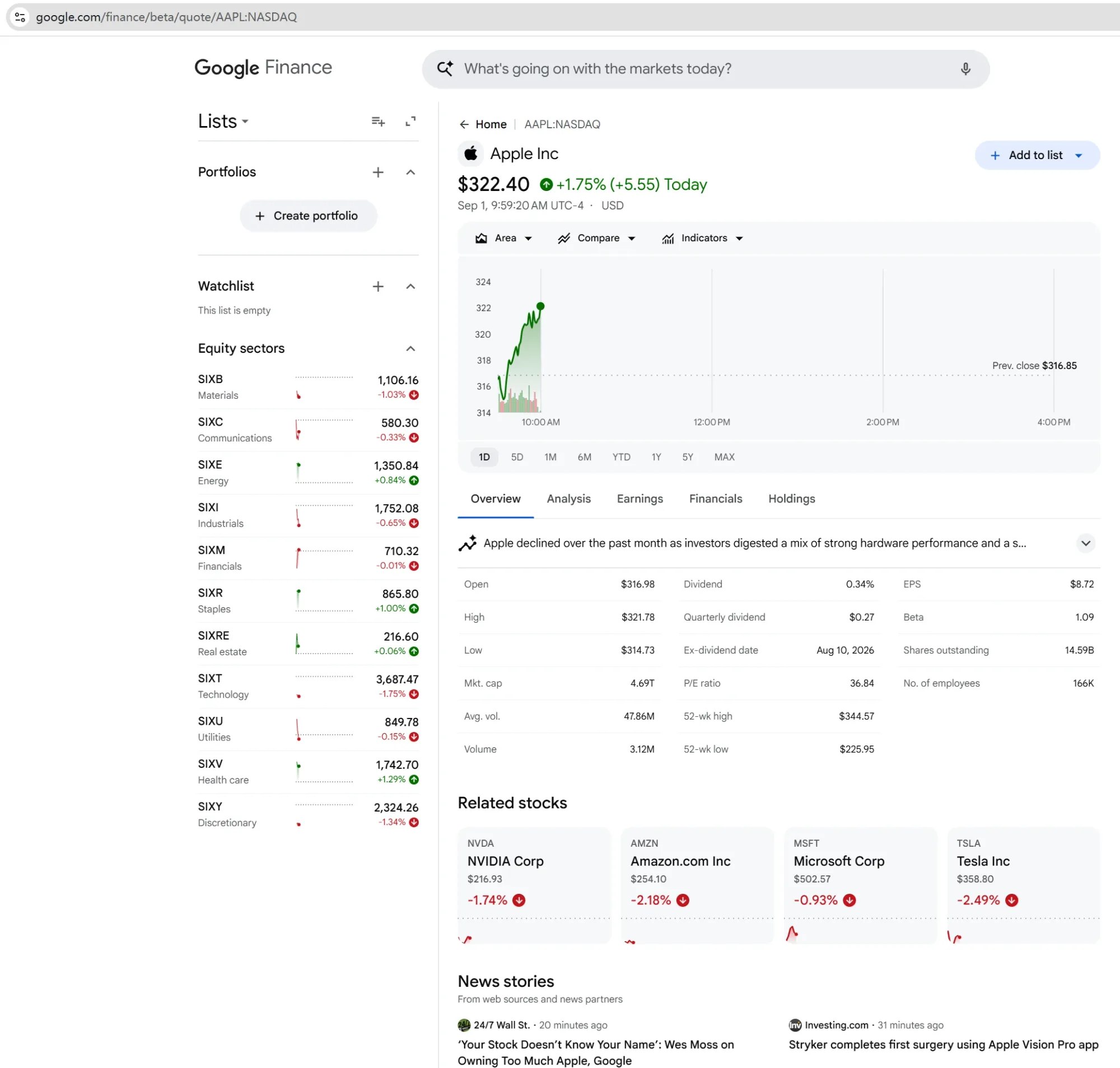
Figure 2. User-supplied Google Finance screenshot showing AAPL:NASDAQ, a displayed price in USD, chart controls, market fields, related stocks, and news modules. Values are time-sensitive and are not used as article test results.
For sensitive workflows, keep the proxy configuration separate from parsing logic. Rola’s Python integration documentation shows HTTP connections through gate.rola.vip:1000 and SOCKS5 connections through gate.rola.vip:2000, using username/password authentication. The same documentation also shows whitelist access and API extraction. Keep proxy construction in a small transport function and pass credentials through environment variables or a secret manager rather than source control.
Prototype market-page collection
Google Finance also exposes market-oriented pages such as gainers, losers, indexes, most-active, and cryptocurrencies. These pages are useful when the task is a market snapshot rather than one ticker. The exact nested markup can change, so normalize only fields you can identify and skip a row when its structure is incomplete.
import json
import csv
import re
from datetime import datetime, timezone
from pathlib import Path

import requests
from bs4 import BeautifulSoup


MARKET_PAGES = {
    "gainers": "https://www.google.com/finance/markets/gainers",
    "losers": "https://www.google.com/finance/markets/losers",
    "indexes": "https://www.google.com/finance/markets/indexes",
    "most-active": "https://www.google.com/finance/markets/most-active",
    "cryptocurrencies": (
        "https://www.google.com/finance/markets/cryptocurrencies"
    ),
}


def scrape_market_page(name: str) -> list[dict]:
    response = requests.get(
        MARKET_PAGES[name],
        headers={"User-Agent": "Mozilla/5.0 (compatible; research-client/1.0)"},
        timeout=20,
    )
    response.raise_for_status()
    soup = BeautifulSoup(response.text, "lxml")
    rows = []

    for item in soup.select("ul li"):
        links = item.select_one("a[href*='/quote/']")
        text = " ".join(item.stripped_strings)
        if not links or not text:
            continue
        rows.append({
            "market_page": name,
            "quote_url": links.get("href"),
            "raw_text_snapshot": text,
            "validation_status": "unmapped_prototype",
        })
    return rows


all_rows = []
for page_name in MARKET_PAGES:
    all_rows.extend(scrape_market_page(page_name))

Path("markets.json").write_text(
    json.dumps(all_rows, indent=2), encoding="utf-8"
)

if all_rows:
    with open("markets.csv", "w", newline="", encoding="utf-8") as handle:
        writer = csv.DictWriter(handle, fieldnames=all_rows[0].keys())
        writer.writeheader()
        writer.writerows(all_rows)
This example intentionally does not label arbitrary text as price, change, or symbol data. It is a method_only/not_run prototype for inspecting market-page responses, not a production parser. Before production use, confirm the row structure with a dated HTML fixture, map each field explicitly, add schema checks, and quarantine rows whose structure changes. Do not silently interpret a shifted column as a price.
Inspect the rendered DOM with Playwright
A browser’s Elements panel shows the current DOM after JavaScript has executed. requests sees the initial response. If the field exists only in the rendered DOM, use a browser automation branch or a maintained API.
import re
from datetime import datetime, timezone
from pathlib import Path
from playwright.sync_api import sync_playwright


def read_rendered_price(ticker: str, exchange: str) -> dict:
    url = f"https://www.google.com/finance/quote/{ticker}:{exchange}"
    with sync_playwright() as p:
        browser = p.chromium.launch(headless=True)
        try:
            page = browser.new_page()
            response = page.goto(url, wait_until="domcontentloaded", timeout=30_000)
            body_text = page.locator("body").inner_text()
            symbol = f"{ticker}:{exchange}"
            symbol_position = body_text.find(symbol)
            if symbol_position == -1:
                raise ValueError(f"Requested symbol was not found: {symbol}")
            quote_context = body_text[symbol_position:symbol_position + 500]
            Path("google-finance-rendered.html").write_text(
                page.content(), encoding="utf-8"
            )
            match = re.search(
                rf"{re.escape(ticker + ':' + exchange)}.*?(\$[0-9,]+\.\d{{2}}).*?\bUSD\b",
                quote_context, flags=re.IGNORECASE | re.DOTALL,
            )
            if not match:
                raise ValueError("Validated price/currency context was not found")
            return {"url": url, "status_code": response.status if response else None,
                    "title": page.title(), "price_text": match.group(1),
                    "currency": "USD",
                    "collected_at": datetime.now(timezone.utc).isoformat(),
                    "validation_status": "symbol_price_currency_matched"}
        finally:
            browser.close()
Install the browser separately with python -m pip install playwright and playwright install chromium. Keep a saved HTML or screenshot artifact when debugging a selector. A timeout, a missing locator, or a challenge page is a failed observation—not a reason to weaken the selector until some number appears.
Validation status: a companion Chromium run was attempted on September 2, 2026 with Playwright 1.62.1, Chromium 151.0.7922.34, and en-US locale. It returned HTTP 200 and rendered an AAPL:NASDAQ block containing a dollar-formatted price and USD; the semantic pattern matched. The code still saves the rendered DOM and fails when the identity, price, or currency context is absent. Do not treat one successful run as a permanent selector contract.
When a browser session needs a consistent regional context, Rola’s Quick Start documentation documents username parameters for country targeting, sessionid plus sessiontime for keeping an IP during a session, and f-1 for requesting a new IP per request. These settings describe the connection requested from Rola, not a guarantee that the target will accept it.
Batch collection: timestamps, throttling, and proxy transport
Start with one instrument, then a small watchlist. Add a delay between requests, cap retries, and record failures as data rather than hiding them. A simple batch loop should stop on a challenge or repeated schema failure. It should not run an unbounded loop against a public service.
Choose session semantics based on the workflow:
- Stateless checks can use independent requests when each observation stands alone.
- A continuous, authorized workflow may need the same egress for its short session.
- Country-level comparisons should keep the country, headers, timezone assumptions, and timestamp visible in the record.
Rola IP’s Python documentation describes HTTP/SOCKS5 integration, while its Quick Start documents host, port, username, password, whitelist access, country targeting, sessiontime, and f-1. A proxy changes the network path used by an authorized request; it does not guarantee access, prevent blocking, improve data accuracy, or bypass a target site’s controls. Use the smallest access pattern that fits the authorized task, and keep the source’s terms and stop conditions in scope.
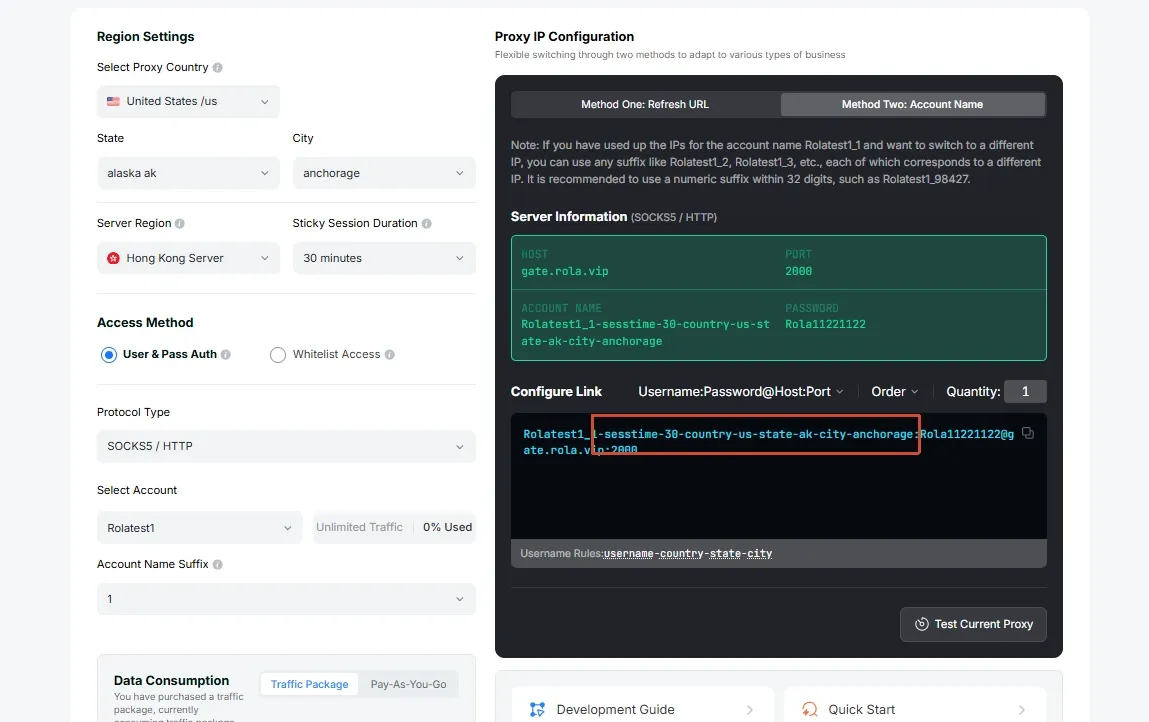
Figure 3. Rola documentation screenshot showing residential proxy configuration controls. Redact credentials and treat configuration as transport context, not proof of target-site acceptance.
What should you validate before storing a Google Finance quote?
Common fields include company name, exchange-qualified symbol, displayed price, change, day range, 52-week range, market capitalization, and P/E ratio. Availability varies by instrument, page type, locale, and markup version. Keep the raw text as well as any parsed numeric value so a formatting change can be detected. Treat locale, currency, exchange, timezone assumption, and network context as explicit record fields when comparing snapshots across regions; do not assume that two visually similar pages represent identical data conditions.
At minimum, validate:
- The URL contains the expected ticker and exchange.
- The page title and visible symbol match the request.
- The price field is present and non-empty.
- Currency is recorded separately from the numeric text.
collected_atis stored in UTC.- The record is not older than the freshness window your application allows.
- A missing or shifted field creates an alert instead of a plausible-looking row.
If you need historical data, do not assume that a live quote page or the Sheets API is a historical-data service. Compare a source that explicitly documents history, coverage, licensing, and frequency. For financially material decisions, compare important observations with a second approved source and retain the discrepancy for review.
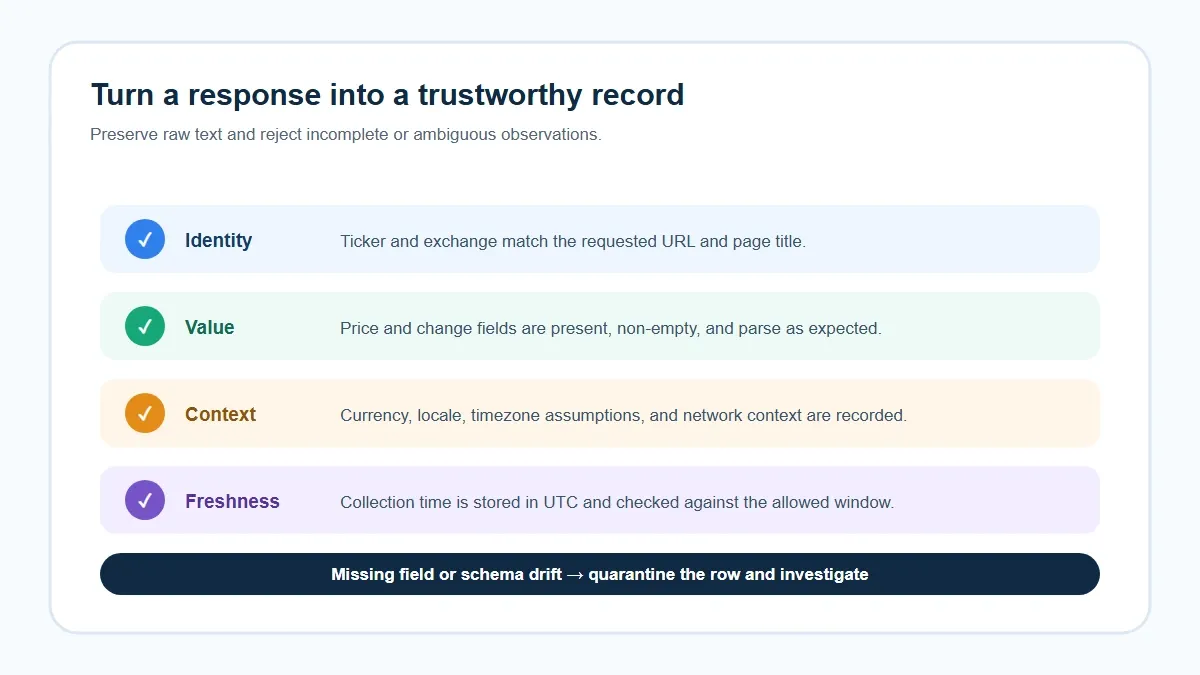
Figure 4. A practical validation sequence: identity, value, context, freshness, and schema handling.
Troubleshooting: symptom → cause → verify → fix
| Symptom | Likely cause | Verify | Fix |
|---|---|---|---|
| HTTP 200 but no price | Initial HTML, consent/challenge page, or selector drift | Save status, title, and a sanitized response sample | Inspect the response; use Playwright or an approved API if rendering is required |
None from BeautifulSoup |
The current DOM differs from the fetched source | Compare View Source with Elements; log selector count | Use a narrow, tested locator and fail when it is absent |
| 403, 429, or 503 | Access policy, request pattern, transient service failure, or transport issue | Record status, retry count, timestamp, and exit-IP check separately | Stop or back off; verify authorization and transport; do not teach bypassing controls |
| Wrong instrument | Ticker is ambiguous or exchange is missing | Check the URL, title, and exchange | Use an exchange-qualified symbol and maintain a symbol map |
| Price parses but currency is wrong | Locale or field mapping changed | Compare currency text and page locale | Store currency explicitly and reject unknown mappings |
| Browser timeout | Page did not render the expected element | Capture a screenshot/HTML artifact and inspect the actual DOM | Recheck the locator and wait condition; do not claim a successful run |
| CSV columns shift | Market-page markup changed | Compare row length and header/schema checks | Preserve raw text, quarantine the row, and update the parser deliberately |
Compliance and data limitations
Use only data and access methods permitted for your project. Check the current terms, machine-readable instructions, data licenses, and any restrictions that apply to automated collection. This tutorial does not provide financial advice, does not make a trading-data freshness guarantee, and does not describe a method for bypassing controls. Stop when access is challenged, login-gated, or inconsistent with the applicable rules.
For scheduled jobs, local execution is easiest to debug. A cloud worker can add scheduling, logging, and secret management, but it also changes the network location and operational responsibility. Deploy only after the single-record parser, schema checks, stop conditions, and retention policy are understood.
Conclusion
The most reliable way to approach a google finance scraper is not to begin with a selector. First decide whether you need Google’s presentation, Sheets data, a browser-rendered page, or a purpose-built market-data API. Then scrape one exchange-qualified instrument, validate its identity and freshness, add market-page or batch support only after the single-record path is observable, and stop on access or schema failures.
Documentation and runtime checks were last reviewed on September 2, 2026. Recheck Google’s documentation, the target page structure, data licenses, and any proxy-provider documentation before publishing or scheduling the workflow.