
What Is a Static IP Address? How It Differs From Dynamic IP Address

Jul 23, 2026 · Proxy Basics · 17 min read
TL;DR:
A static IP address is assigned to remain stable over time, which makes remote access, hosting, and IP-based allowlists easier to manage. For most people, a private static IP inside the local network is enough. A public static IP usually costs extra, and inbound access still depends on firewall, NAT, and provider policies.
If you have been asked to provide a fixed outbound IP for remote desktop, a home server, a company VPN, or a partner whitelist, the real question is not just what a static IP is. It is what problem it solves, where it applies, and whether you need a private static IP, a public static IP, or something broader. This guide covers the definition, the difference from dynamic IPs, common use cases, cost, setup, and how to decide whether it is worth it.
What is a static IP address?
A static IP address is an IP address that remains the same over time instead of being rotated automatically by the network. The simplest way to think about it is as a fixed street address for a device or service. Every time another device, application, or network service tries to reach it, the destination is still at the same address.
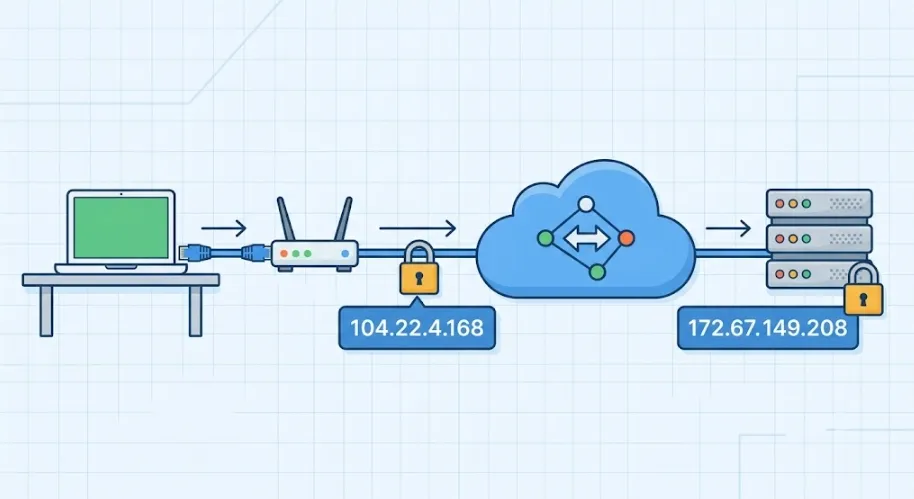
That is different from a dynamic IP address, which is usually assigned by DHCP and may change after a lease renewal, router reboot, network switch, reconnection event, or ISP resource reassignment. The biggest advantage of a static IP is predictability. You do not have to keep checking whether the address changed, and you do not need to keep updating DNS records, firewall rules, webhook allowlists, or remote access settings.
In practice, static IPs are usually implemented in one of two ways:
- Manual configuration on the device itself, including the IP address, subnet mask, default gateway, and DNS servers.
- DHCP reservation on the router or DHCP server, where a device always receives the same IP based on its MAC address.
Under RFC 2131, DHCP supports automatic allocation, dynamic allocation, and manual allocation. That means many “fixed IP” setups in real offices are not hand-configured one by one. They are often DHCP-based reservations managed centrally. A common example is assigning an office printer 192.168.1.20 so users do not have to rediscover it every time.
What is the purpose of a static IP address?
The purpose of a static IP address is simple: it ensures that a device or service can be reached at the same address every time.
That sounds basic, but it matters in a long list of real environments:
- Remote desktop and remote administration
- Office VPN access
- Website hosting
- API callbacks and IP-based allowlists
- Mail servers and reputation-sensitive delivery
- Security cameras, NAS devices, and home lab systems
For example, if a finance system only allows logins from one approved outbound IP, a dynamic address can break access the moment it changes. With a static IP, the whitelist remains valid. In many businesses, that kind of stability matters more than the raw question of whether the network is technically “up.” A surprising number of outages are really identity and policy failures caused by an IP address changing unexpectedly.
What is a public static IP address, and what is a private static IP address?
This is where many people get confused.
A public static IP address is a stable, publicly routable IP assigned by an ISP, cloud provider, or network service provider. It provides a consistent public identity, but it does not by itself open inbound access; firewall, NAT, cloud security-group, and provider policies still apply.
A private static IP address is a fixed IP used only inside a local network, such as a home, office, warehouse, or branch environment.
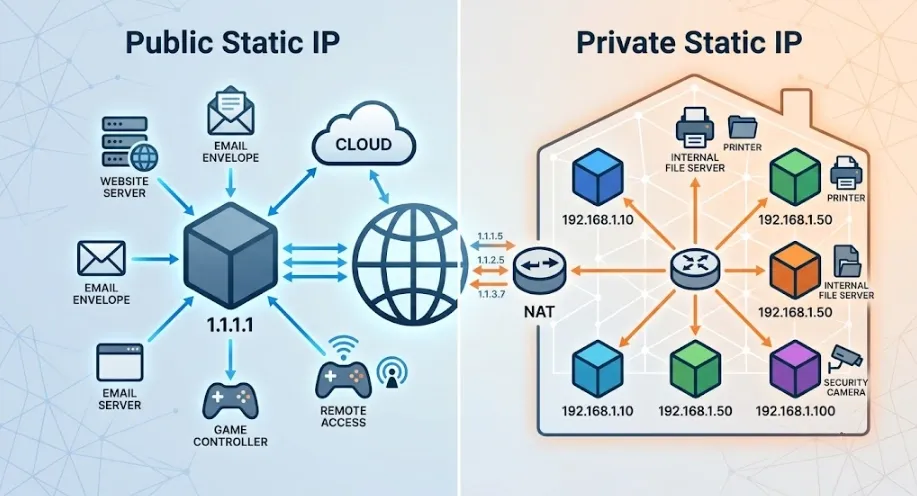
Under RFC 1918, private IPv4 address space typically falls into these ranges:
10.0.0.0/8172.16.0.0/12192.168.0.0/16
The important distinction is this:
- Static vs. dynamic describes whether an address changes.
- Public vs. private describes where that address is visible.
Those are different dimensions. A home NAS may only need a private static IP address. A public-facing API gateway may need a public static IP address. Not every static IP requirement is a public internet requirement.
Static IP vs. dynamic IP: what is the difference?
The difference between static and dynamic IP addressing is not about which one is more advanced. It is about which one fits your connection model.
Dynamic IP addresses are usually assigned automatically through DHCP. They work well for most end users who mainly consume online services, such as browsing, streaming, email, video calls, and general office work.
Static IP addresses are better suited to devices and services that must be reached consistently from the outside, including:
- Web servers
- VPN gateways
- Remote desktop hosts
- Network-attached storage
- Monitoring systems
- Business systems behind IP-based access control
- Long-term outbound allowlisting
Dynamic addressing optimizes resource reuse and operational simplicity. Static addressing optimizes consistency and reachability.
Many home broadband connections use dynamic public IPs by default, not because they are faster, but because that model helps providers manage limited IPv4 resources more efficiently. By contrast, enterprise circuits, cloud servers, and hosted infrastructure often come with static IPs because they must support inbound traffic, stable DNS, and fixed policy controls.
Which is better: a static IP address or a dynamic IP address?
Neither is universally better. The right choice depends on the job.
Dynamic IP is usually better when:
- You only browse, stream, or use third-party online services
- You want the lowest management overhead
- You do not need inbound access from the internet
- No partner system needs to recognize your traffic from a fixed source
Static IP is usually better when:
- Outside users or devices must initiate connections to you
- A third-party system uses IP allowlisting
- You host a service that should stay reachable at a stable address
- You need a consistent outbound identity for administration or integration
The practical rule is simple: if other systems need to find you reliably, static IP becomes more valuable. If you are mostly reaching out to other services rather than being reached, dynamic IP is often enough.
Why does port forwarding still fail on some home networks?
One of the most common mistakes is assuming that port forwarding alone guarantees internet reachability.
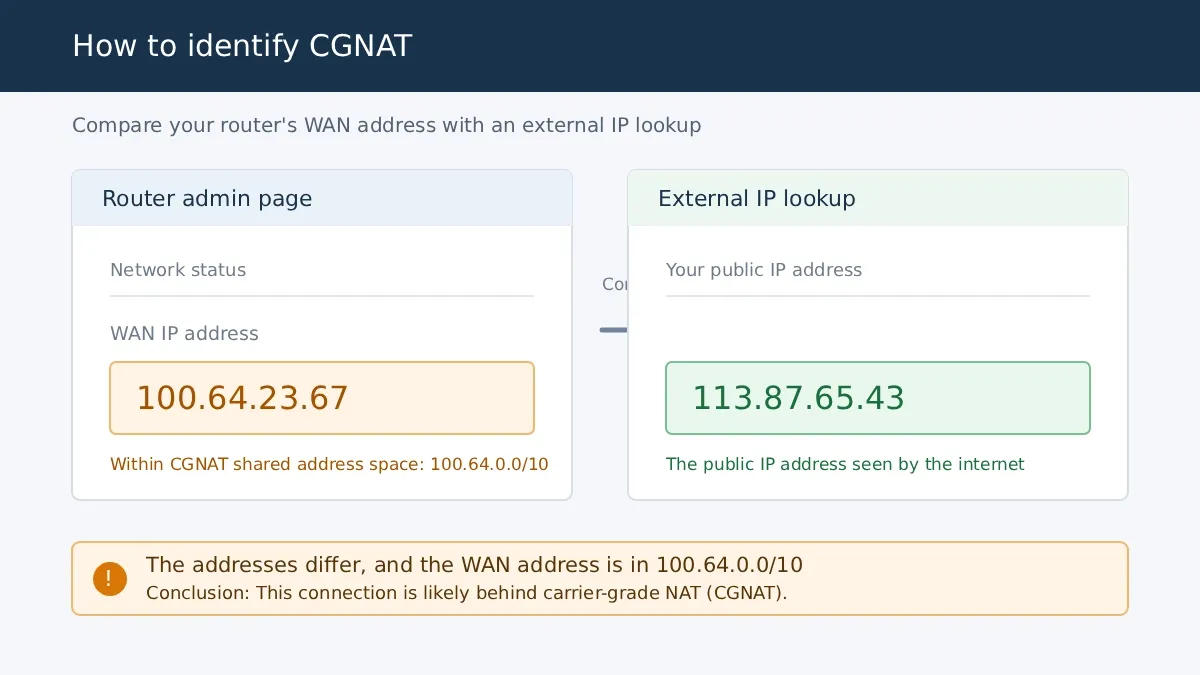
Sometimes the real issue is that the broadband connection is behind CGNAT (Carrier-Grade NAT). In that setup, the ISP places many subscribers behind shared public IP space. Your router may forward the right port inside your home network, but inbound traffic can still stop at the provider layer before it ever reaches your router.
That is why a private static IP address inside your LAN does not automatically give you public inbound access. Internal stability and internet reachability are separate issues.
RFC 6598 defines 100.64.0.0/10 as shared address space. A few practical signs of CGNAT are:
- Your router’s WAN address falls inside
100.64.0.0/10 - The router’s WAN IP does not match the result of an external what is my IP lookup
- Port forwarding looks correct locally, but inbound access still fails
The wrong response is repeatedly changing local firewall and port-forwarding rules without verifying the actual network edge. The right response is to confirm whether you have a real public-facing address first, then decide whether you need:
- A public IPv4 address or an ISP option to leave CGNAT
- Bridge mode only when the issue is double NAT on local provider equipment
- A VPN relay or tunnel
- Another service with public ingress capability
That single check can save a lot of wasted troubleshooting time.
| Category | Static IP Address | Dynamic IP Address |
|---|---|---|
| Assignment method | Manual configuration or DHCP reservation | Automatic DHCP lease |
| Does the address change? | Usually no, or only when intentionally changed | May change after lease renewal, reboot, reconnection, or provider reassignment |
| Typical public IPv4 cost | Often an extra charge | Usually included in standard consumer internet service |
| Best fit | Servers, remote access, allowlists, fixed egress | Everyday internet use, general home broadband, temporary devices |
| Maintenance overhead | Higher, because planning and records matter | Lower, because the system manages most of it automatically |
| Privacy and security considerations | A persistent public address is easier to correlate and scan repeatedly, so hardening matters | A changing address is not anonymity and does not replace security controls |
| DNS and hosting fit | Better for stable A records, mail services, and long-term policy rules | More moving parts when the address changes |
| Remote access fit | More reliable for persistent inbound connectivity | Often needs DDNS or a relay service |
Static IPv4 vs. static IPv6
Both IPv4 and IPv6 addresses can be stable, but the deployment requirements differ. Public static IPv4 often costs extra because IPv4 resources are limited. IPv6 address space is much larger, and some providers assign stable IPv6 prefixes without charging separately.
IPv6 availability does not mean a service is automatically reachable or safe to expose. Check that the client network supports IPv6, DNS has the required AAAA record, firewalls allow only the required traffic, and partner systems accept IPv6 source addresses. Static IPv4 can still be the practical choice for legacy systems and IPv4-only allowlists.
What is a static IP address used for?
Static IP addresses are used when a changing address would break access, policy, trust, or operational continuity.
Common business use cases
The most common business scenarios include:
- Remote office VPNs
- Admin-panel IP allowlists
- Website and server hosting
- Mail gateways
- SFTP and database access controls
- Branch-to-branch connectivity
- API integrations that restrict requests by source IP
Imagine an ERP platform that only accepts management traffic from the headquarters’ outbound IP. If the address changes every time the line reconnects, access can fail without any change to the ERP itself. A public static IP keeps the access list stable and reduces operational friction.
In more mature infrastructure, static IPs also matter for Static NAT. Public-facing traffic may never touch the internal private address directly. Instead, a firewall or edge router maps an internal host to a fixed public IP on a one-to-one basis. Outside users see a stable public endpoint, while the internal server keeps its private static address.
Mail infrastructure is another classic case. Receiving systems often evaluate reverse DNS, sender reputation, and the consistency of the originating IP. If a mail source changes frequently or belongs to a clearly dynamic residential pool, delivery is more likely to be delayed, rejected, or filtered into spam. That is one reason self-hosted mail gateways and long-term B2B allowlist integrations usually prefer stable public addressing.
Common home and small-office use cases
Static IPs are also common in homes and small offices, especially when people want stable access to:
- A NAS
- A security camera system
- A game server
- A smart home hub
- A printer
- A media server
In many of these cases, you do not need to buy a public static IP first. You may only need a private static IP or DHCP reservation inside the LAN. For example:
- NAS:
192.168.50.10 - Camera recorder:
192.168.50.30
That makes router rules, local name mappings, and internal access more reliable. A very common purchasing mistake is buying a public static IP to solve what is actually just an internal IP conflict or unstable local addressing problem.
Static IPs in testing, operations, and fixed egress workflows
Static IPs also matter in workflows where the source identity itself must remain stable, such as:
- Region-sensitive access testing
- Long-term allowlist integrations
- Fixed-egress operational environments
- Controlled partner access
- Stable remote administration from the same origin
At that point, the question is broader than “what is a static IP address.” You also need to consider line quality, network type, location consistency, and whether the provider’s network profile matches the workflow.
A static IP gives you a more stable source identity, but it does not replace compliant operations, sensible request pacing, or proper environment controls. When the requirement is a stable proxy exit rather than public server hosting, review the provider’s static residential proxy options separately from public-IP products.
What is the advantage of a static IP address?
The core benefits of a static IP fall into three groups: stability, simpler operations, and better compatibility with systems that rely on a fixed source identity.
1. Stable connectivity
When the address stays the same, remote desktop settings, DNS records, firewall rules, SaaS allowlists, webhook callbacks, and monitoring tools can keep using the same configuration. You do not need to keep repairing access every time the address drifts.
2. Lower troubleshooting overhead
In dynamic environments, the first question during an outage is often “did the IP change?” With a static IP, you can eliminate that variable immediately and move faster to real causes such as DNS problems, firewall rules, routing, ports, or application behavior.
This is especially helpful on local networks. If a printer is 192.168.1.45 today and 192.168.1.73 tomorrow, users often assume the printer is broken. A fixed address removes that guesswork.
3. Better continuity for allowlists and identity-based access
Many business systems care less about the device than about the source identity behind a connection. A stable IP helps with:
- Vendor allowlists
- API access control
- Partner integrations
- Long-term session consistency
- Administrative access restrictions
That said, boundaries matter. A static IP improves consistency, but it does not make traffic automatically trusted. Many platforms also consider cookies, browser fingerprinting, ASN type, TLS behavior, session history, and location consistency. For high-trust environments, fixed addressing should be treated as one part of a larger access design, not as a magic fix.
What are the downsides of a static IP address, and do you really need one?
Static IPs are useful, but they are not for everyone.
The main downsides
Higher cost: A private static IP inside your own LAN is usually free. A public static IPv4 address often costs extra, and in some markets it is mainly offered on business lines or higher-tier plans.
More administration: Manual addressing, IP planning, avoiding conflicts, maintaining records, and securing exposed services all require more operational discipline than a basic plug-and-play dynamic setup.
More persistent exposure: If a public static IP remains visible over time, scanners, logs, and third-party systems can correlate the same source more easily. That means firewall policy, minimal exposure, patching, and MFA become more important, not less.
So, do you actually need one?
You probably do not need a public static IP if you mainly:
- Browse the web
- Stream video
- Shop online
- Use messaging and video meetings
- Consume internet services without hosting anything yourself
You are more likely to need one if you:
- Host a service for outside access
- Need reliable remote access to your own environment
- Must provide a fixed IP to a partner or platform allowlist
- Need long-term fixed outbound identity for operations or integrations
For many home users, the real requirement is a private static IP plus DDNS, not a paid public static IP. For teams, the requirement is often not just “any fixed IP,” but a stable egress environment that fits the business use case.
Should you buy a public static IP or just set an internal fixed IP?
Ask one question: who needs to find you?
If the answer is only your router, printer, NAS, cameras, or other devices inside the same LAN, an internal fixed IP is usually enough.
If the answer includes outside customers, partner systems, remote employees, or internet-facing devices that must initiate connections to you over time, a public static IP becomes much more relevant.
A family printer needs internal stability. A public API gateway usually needs public stability.
Static IP vs. DDNS vs. fixed egress solutions
These options solve different problems.
Static IP solves: “The address itself should not change.”
DDNS solves: “The IP may change, but I still want to reach it through the same hostname.”
Fixed egress solutions solve: “I need not just a stable address, but also a specific egress location, network type, operational boundary, or long-term source consistency.”
If your NAS or camera only keeps changing internal addresses, start with DHCP reservation or a private static IP. If a changing public IP breaks lightweight remote access, DDNS may be enough. If a partner requires a fixed source IP on an allowlist, use a public static IP or another verified fixed-egress solution. If your requirement includes region-specific egress or multiple isolated environments, you have moved beyond a simple static-IP question and into a broader network architecture decision.
What is a good static IP address?
A “good” static IP matches the network design and business requirement without creating unnecessary risk. There is no one-size-fits-all answer.
What is a good private static IP address?
For a private static IP, a good choice usually meets four conditions:
- It is not already in use by another device.
- It belongs to the correct subnet.
- It is easy to document and remember.
- It stays outside the active DHCP pool unless the address is reserved through DHCP.
A common mistake is setting the router’s DHCP pool to 192.168.1.2-192.168.1.200 and then manually assigning 192.168.1.50 to a NAS. That creates a real risk of lease overlap and IP conflict.
A cleaner design is something like:
- DHCP pool:
192.168.1.100-192.168.1.200 - Static or reserved devices:
192.168.1.10-192.168.1.30
That keeps fixed infrastructure separate from dynamically assigned clients.
What is a good public static IP address?
For a public static IP, “good” depends less on the number itself and more on four practical qualities:
- The source is legitimate and clearly assigned.
- The address is stable over time.
- It is easy to control in firewalls and allowlists.
- It fits the actual business use case.
If the workflow is sensitive to source environment, a fifth factor matters too: ASN type. Some platforms do not just look at whether an IP is fixed. They also care whether it comes from a residential ISP, a mobile network, or a datacenter ASN.
For ordinary business allowlisting or remote administration, that distinction may not matter much. For environment-sensitive testing or region-specific workflows, it can matter a lot.
That is why the answer cannot be reduced to “the cheapest fixed one available.” It has to match the network type, trust model, and operational boundaries of the task.
What is the cost of a static IP address?
Start by separating private static IP cost from public static IP cost.
Private static IP cost
Inside your own LAN, a static IP is usually free. You are simply reorganizing your internal network. Assigning a printer, NAS, or camera a fixed local address normally does not require any extra fee.
Public static IP cost
The part that often costs money is a public static IPv4 address from an ISP or a cloud provider. A dedicated VPN IP or another fixed-egress service can also cost extra, but it usually provides a stable outbound identity rather than a publicly reachable static address.
The cost varies because of several factors:
- Resource type
- Region
- IPv4 scarcity
- Network reputation
- Quantity
- Bandwidth or service tier
- Additional operational controls
One reason public static IPv4 often carries an extra fee is scarcity. ARIN maintains an IPv4 Waiting List, illustrating the limited supply of routable IPv4 resources in its service region. Local availability and retail pricing still depend on the provider.
So the real pricing question is whether you only need a fixed address, or whether you need a fixed address plus a specific region, network type, and more controlled operational boundaries. Those are very different cost models.
How to get a static IP or fixed egress identity
There are usually three main ways to get a static IP, depending on what kind of stability you actually need.
1. Request a public static IP from your ISP
This is often the most direct option for:
- Home remote access
- Office fixed egress
- Self-hosted services
- Long-term IP allowlists
2. Use a dedicated VPN IP
This can make sense if you need a fixed outbound identity but do not want to expose your home broadband address directly. It does not necessarily provide inbound traffic, port forwarding, or server-hosting capability.
3. Use a network service with fixed egress capability
This is more relevant when you need:
- Multiple fixed addresses
- Region-specific deployment
- More detailed network-attribute control
- Segmentation across environments or teams
The difference among these options is not whether the address can stay fixed. The difference is where the fixed address lives, what it exposes, how much you can scale it, and what operational boundaries it gives you.
The safest way to set a static IP on a local network
For most local networks, the best approach is DHCP reservation, not manual input on every device.
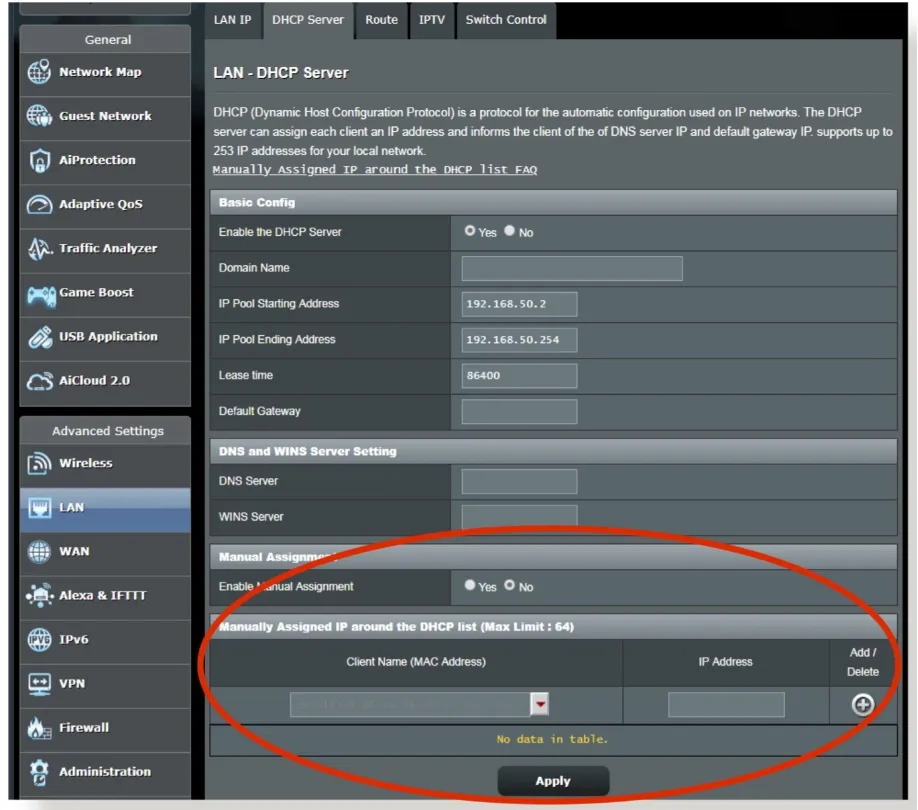
With DHCP reservation, you go into the router or DHCP server, find the device, and bind its MAC address to a specific IP. The device still receives its configuration through DHCP, but it always gets the same address.
That brings three practical advantages:
- Fewer typing mistakes
- Better centralized management
- Lower risk of wrong subnet mask, gateway, or DNS values
Manual static configuration is still useful for servers, network appliances, or environments without reliable DHCP. But it only works well if the subnet plan is already clear.
Why DHCP reservation is often better than manual assignment
At a design level, DHCP reservation binds a Layer 2 hardware identity (the MAC address) to a Layer 3 logical identity (the IP address) in one central place. That is usually easier to audit and maintain than typing settings into every endpoint individually.
For devices such as NAS units, printers, security cameras, and access-control hardware, DHCP reservation is often the lowest-cost and most maintainable way to keep addressing stable.
A simple four-step setup process
- Confirm the subnet and gateway, such as whether the router is
192.168.1.1. - Check the DHCP pool range so you do not place a fixed address inside a dynamic allocation block unless it is reserved properly.
- Record the target device’s MAC address and create a reservation, or manually assign the IP, subnet mask, gateway, and DNS values.
- Restart the network interface and verify local ping, cross-subnet access, and any external service connectivity you actually need.
If you use manual configuration, pay close attention to DNS. A very common mistake is filling in the IP, subnet mask, and gateway but leaving DNS blank. The result is a device that can ping an IP address but cannot open websites by hostname. That is not a broken link. It is an incomplete name-resolution setup.
On Windows, for example, the Internet Protocol Version 4 (TCP/IPv4) settings page should include both the IP configuration and DNS servers. With DHCP reservation, DNS is usually distributed automatically, which reduces configuration errors.
Common static IP mistakes and how to troubleshoot them
The most common problems tend to fall into six categories.
1. Confusing private static IPs with public static IPs
This leads to the wrong purchase or the wrong fix. If the real issue is internal addressing, buying a public static IP does not solve it.
2. Assuming a static IP will increase internet speed
It usually will not. Speed is far more affected by bandwidth, congestion, routing quality, and server performance than by whether the IP is static or dynamic.
3. Assigning a manual static IP inside the active DHCP pool
This can create duplicate addressing and unpredictable conflicts.
4. Exposing a public service without tightening access control
If you open management ports to the internet, but do not restrict source IPs or enable MFA, a fixed address has made the target more consistent for you and for attackers.
5. Buying public fixed resources without checking fit
If all you look at is whether the address is fixed, you can miss more relevant factors such as historical reputation, geographic fit, network type, and operational boundaries.
6. Focusing only on “fixed IP” in more complex workflows
In region-sensitive access, long-term integration, or fixed-egress operations, IP stability is just one variable. Network type, trust profile, request behavior, and environment consistency may matter just as much.
A practical troubleshooting order
When something breaks, work through the problem in this order:
- Identify the layer: local conflict, changing public address, expired DNS, firewall block, NAT issue, or platform rejection.
- Decide whether it is a configuration problem or a resource-quality problem.
- If the device works inside the LAN but not from the internet, check public reachability and port forwarding first.
- If an API or partner platform rejects access only at certain times, check whether the source IP changed, whether the allowlist was updated, or whether the platform is enforcing its own trust rules.
For external-identity-dependent systems, network connectivity is only step one. Identity synchronization is step two.
A practical example
If a warehouse printer keeps disappearing from local devices, a paid public static IP is unlikely to help. First check whether the router is reusing the printer’s address inside the DHCP pool. A DHCP reservation and a cleaner address-range split are often the correct fix. Identify whether the problem is internal addressing or public reachability before spending money.
Conclusion
The short version is simple: a static IP address stays the same over time, so devices and services can be reached more consistently.
That makes static IPs useful for hosting, remote access, IP allowlists, and other workflows that depend on a stable network identity. For ordinary household internet use, a public static IP is often optional. If you only need local devices to stop changing addresses, a private static IP or DHCP reservation is usually enough.
If you need outside users or systems to reach you reliably, a public static IP is more likely to be worth the cost. If the requirement extends beyond fixed addressing into region-specific egress or stricter network controls, evaluate the full solution rather than the IP alone. For stable proxy egress, review Rola IP’s static residential IP plans and its setup documentation; confirm current packages, supported regions, protocols, and fit for your workflow before purchasing.