
Idealista Scraper in Python: Extract Property Data to CSV

Oct 30, 2026 · Guides · 17 min read
Build an Idealista scraper in Python by connecting six steps: request a search page, extract listing links, read each detail page, follow pagination, remove duplicate listing IDs, and export CSV or JSON. Start with the included sample, configure the selectors against your pages, and run the same pipeline with a search URL.
TL;DR
- Run the bundled sample to export three property records to CSV and JSON.
- Configure the search URL and CSS selectors, then request search and detail pages.
- Parse within each listing card, follow the Next link and deduplicate by listing ID.
- Preserve missing fields and check prices, row counts and missing-value statistics.
What You Will Build
By the end, you will have a scraper that requests search and detail pages, extracts listing fields, follows pagination, removes duplicate IDs, validates numeric values, and writes UTF-8 CSV and JSON files. The bundled sample lets you test the full pipeline before using your search URL.

How an Idealista Scraper Parser Works
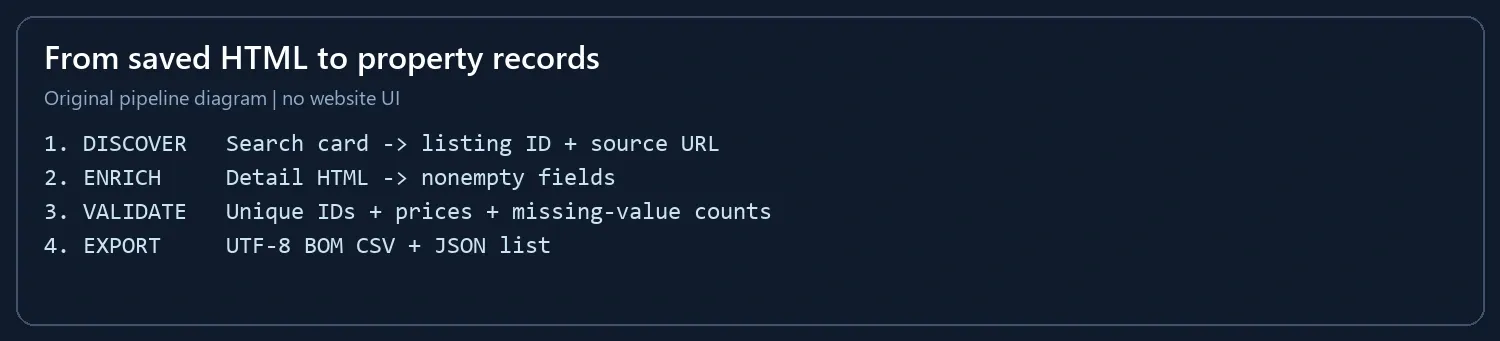
The pipeline has four stages: discovery finds listing URLs and IDs, enrichment merges detail fields, validation checks record quality, and export writes CSV/JSON. Keeping these stages separate makes it easier to distinguish a selector mismatch from a conversion error.
Extractable Fields and Field Dictionary
Search cards supply the listing ID, URL, title, price and location. Detail HTML adds area, room count and description, and can replace title or price with a nonempty value. Missing fields remain empty rather than being inferred.
| Field | Source in This Script | Validation |
|---|---|---|
| listing_id | Numeric /inmueble/ URL segment | Nonempty and unique within the batch |
| title / location | Card title and location; detail title can override | Values remain associated with the same listing ID |
| price_eur | Card or detail price containing € or EUR | Positive number using the configured separators |
| size_m2 / rooms | Detail feature elements | Area must be positive; unmatched fields remain null |
| description | Detail description element | Collect only the text needed for the dataset |
| property_url | Original search URL plus the listing link | Absolute HTTP(S) URL |
| scraped_at_utc | Time this parser processes the record | UTC processing time, not the original download time |
Keep the original download time separately if you need to track listing changes: parsing a saved file today does not make its price current.
Environment Setup and How to Run
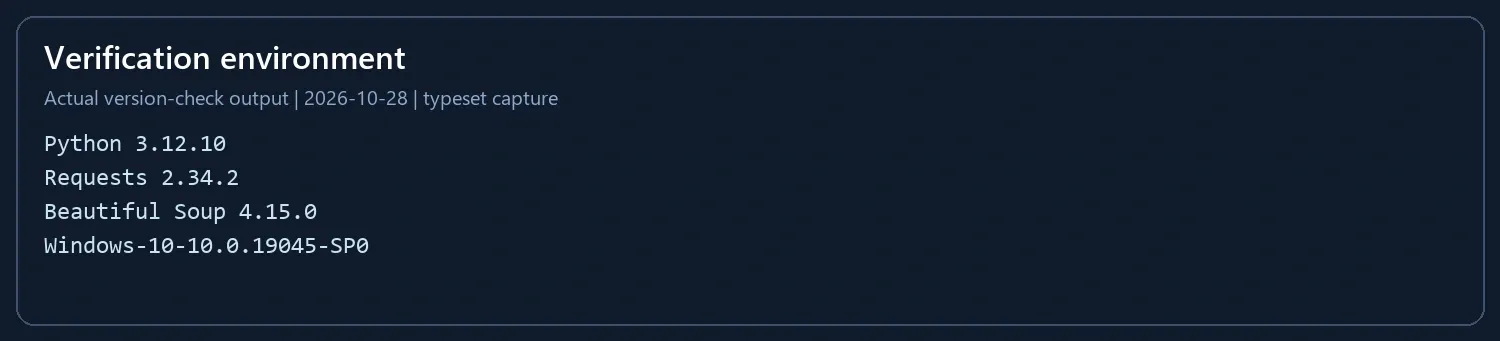
Use Python 3.10 or later. The sample environment is Windows 10, Python 3.12.10, Requests 2.34.2 and Beautiful Soup 4.15.0 (2026-10-28). Create an isolated environment and install the dependencies:
python -m venv .venv
Activate it on Windows PowerShell:
.\.venv\Scripts\Activate.ps1
On macOS or Linux:
source .venv/bin/activate
Then install the dependencies:
python -m pip install requests==2.34.2 beautifulsoup4==4.15.0
Save the complete code below as idealista_scraper.py, then run:
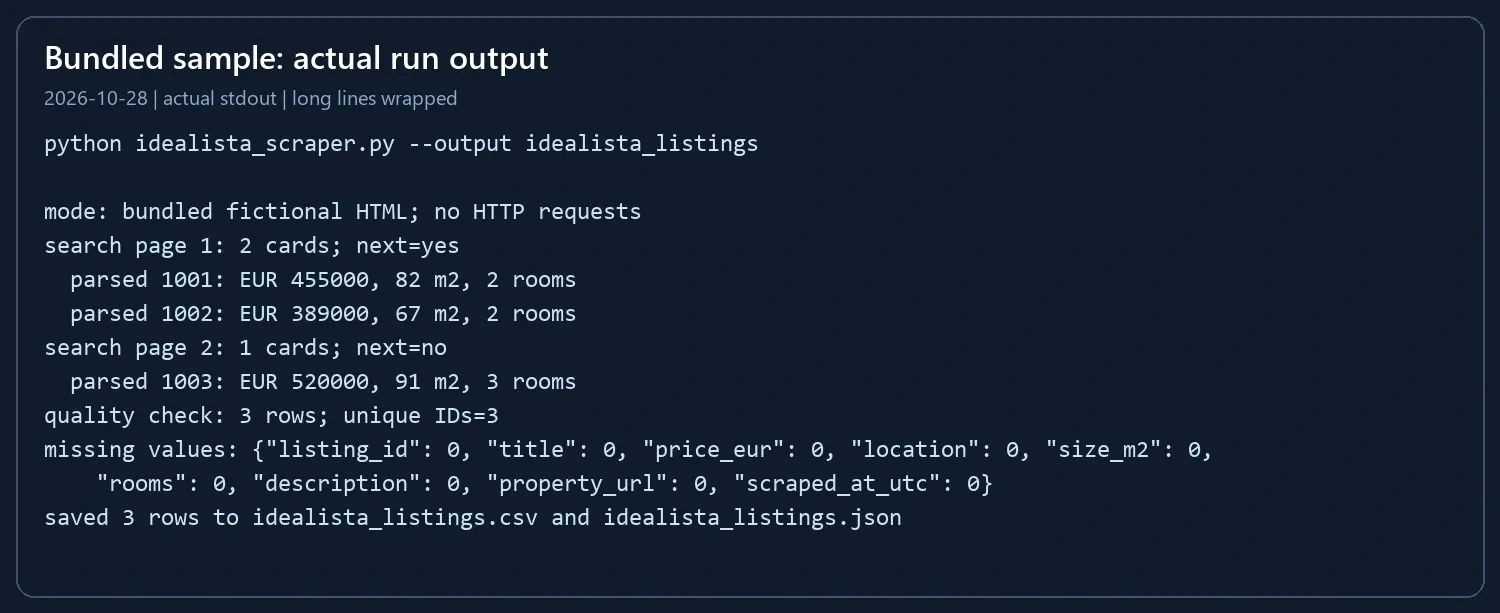
python idealista_scraper.py --output idealista_listings
Configure the Pages and Run Your Scraper
Step 1: Identify the Card and Detail Selectors
Open your search page in a browser. Inspect one complete listing card in developer tools, then identify its detail link, price and location. On a detail page, identify the title, price, description and feature elements containing area and room count.
Check candidate CSS selectors in the browser console:
document.querySelectorAll("YOUR_CARD_SELECTOR").length
document.querySelector("YOUR_PRICE_SELECTOR")?.textContent.trim()
Replace each uppercase selector with the CSS you found. The first command should count the property cards; the second should return the expected price. Narrow a selector when it includes navigation, advertisements or multiple unrelated values.
Create the sample configuration:
python idealista_scraper.py --write-demo saved_html
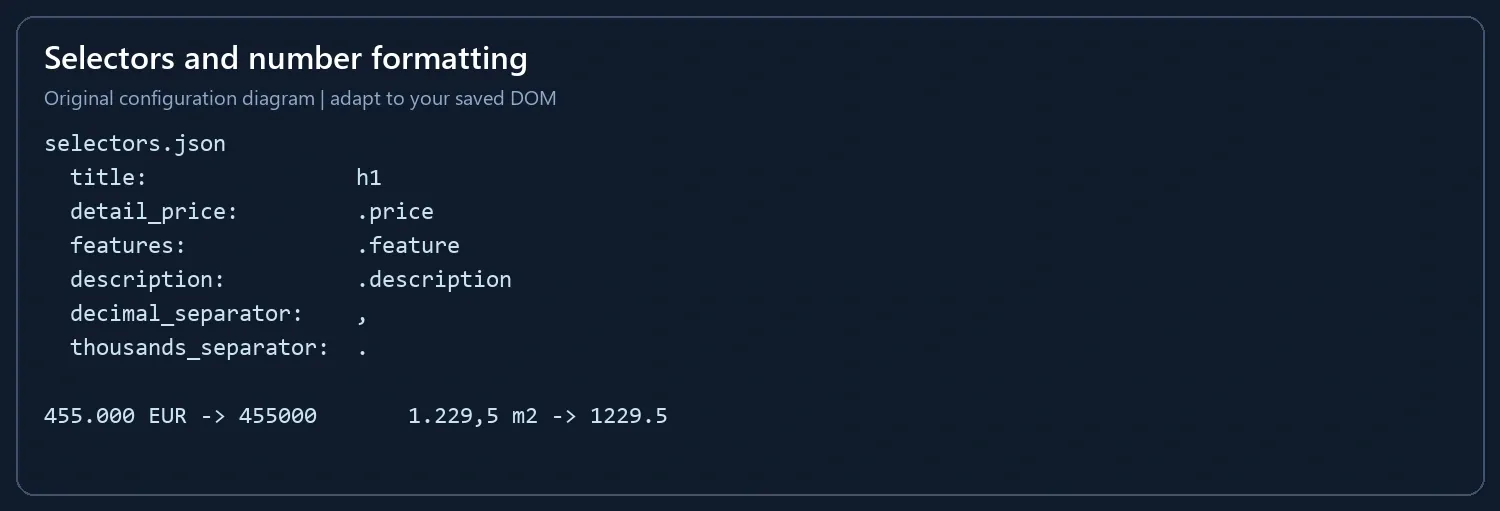
Open saved_html/selectors.json. Update card, link, card_price and location for the search page; title, detail_price, features and description for the detail page; and next for the Next anchor carrying an href. The configuration table later in this tutorial explains each key. Set the number separators to match the page language.
Step 2: Request One Search Page and Its Details
Replace the URL below with your search-page URL and keep the first batch small:
python idealista_scraper.py --url "https://www.idealista.com/YOUR_SEARCH_PATH/" --selectors saved_html/selectors.json --max-pages 1 --limit 3 --delay 2 --output property_check
The script requests the search page, resolves each listing URL, requests its detail HTML, merges fields by listing ID, and exports the first three records. Open property_check.csv and compare the ID, title, price and area with the source pages. Fix selectors or numeric settings before increasing the batch.
The --delay value sets the minimum interval between normal page requests. Use the interval allowed for your project. A request failure ends the run with an error message; the troubleshooting section explains the next action.
Step 3: Follow Pagination and Increase the Batch
Once the small batch contains the expected values, increase the limits:
python idealista_scraper.py --url "https://www.idealista.com/YOUR_SEARCH_PATH/" --selectors saved_html/selectors.json --max-pages 5 --limit 50 --delay 2 --output property_listings
–max-pages counts search pages, while --limit caps unique listings; detail pages are additional requests. The Next link controls pagination. The ID set skips repeated listings before making another detail request, and the visited-URL set prevents pagination loops. The run finishes when it reaches a limit or there is no Next link.
If you need to replay a run while adjusting selectors, save the search and detail documents as UTF-8 HTML and use the optional manifest mode in the next section. Keep the original search URL as the manifest key and map each detail file by the numeric listing ID in its /inmueble/ path.
Optional: Replay Saved HTML
First write the bundled HTML and configuration files to a folder:
python idealista_scraper.py --write-demo saved_html
python idealista_scraper.py --manifest saved_html/manifest.json --selectors saved_html/selectors.json --output saved_listings
This runs the parser against files on disk. Open saved_html/manifest.json; its structure maps original search-page URLs to local filenames and listing IDs to detail filenames:
{
  "start_url": "https://example.test/en/venta-viviendas/madrid/",
  "search_pages": {
    "https://example.test/en/venta-viviendas/madrid/": "search-1.html",
    "https://example.test/en/venta-viviendas/madrid/pagina-2.html": "search-2.html"
  },
  "details": {
    "1001": "detail-1001.html",
    "1002": "detail-1002.html",
    "1003": "detail-1003.html"
  }
}
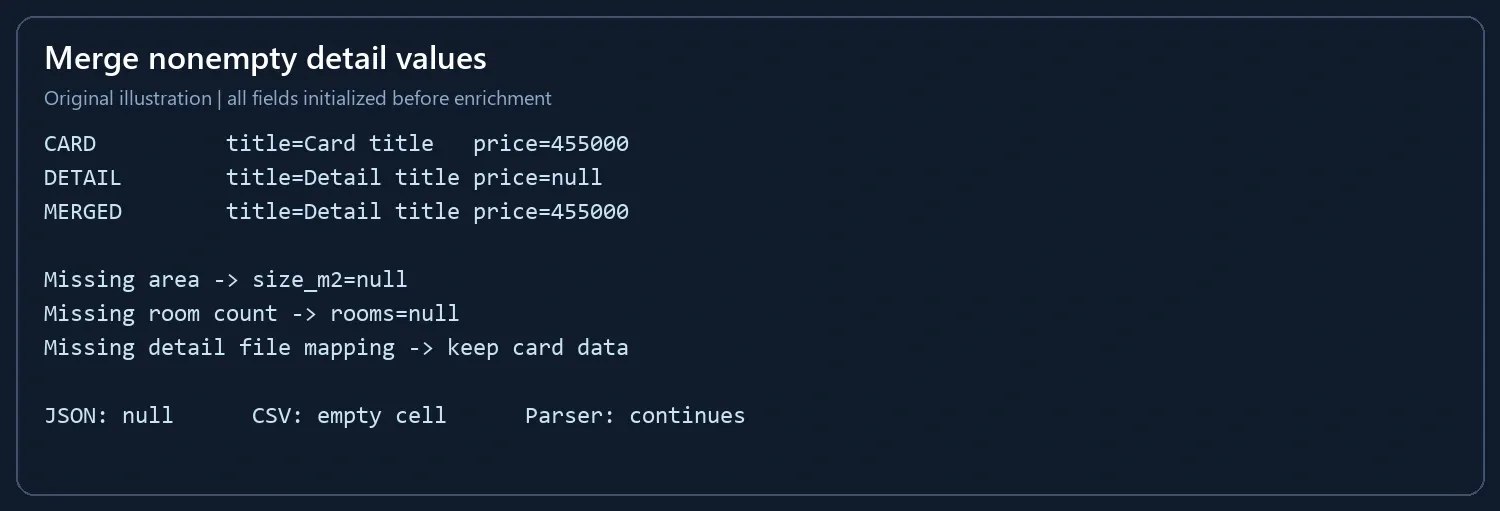
Replace the sample files with your saved UTF-8 HTML and update the URLs, IDs and filenames. File paths resolve relative to the manifest, so the input folder can move as one unit. The original page URL supplies the base for relative links. Include every Next URL you want to follow in search_pages; a missing mapped page raises an error. Omit a detail entry when you only have its card: the card values are retained and missing detail fields are exported as null. A mapped filename that does not exist is an input error.
Edit saved_html/selectors.json to match your saved DOM. Inspect one card and one detail page, test their fields together, then expand the input batch. For comma-grouped English numbers such as 1,229.5, set thousands_separator to , and decimal_separator to ..
Understand and Customize Each Parsing Step
Extract Links Within Each Search Card
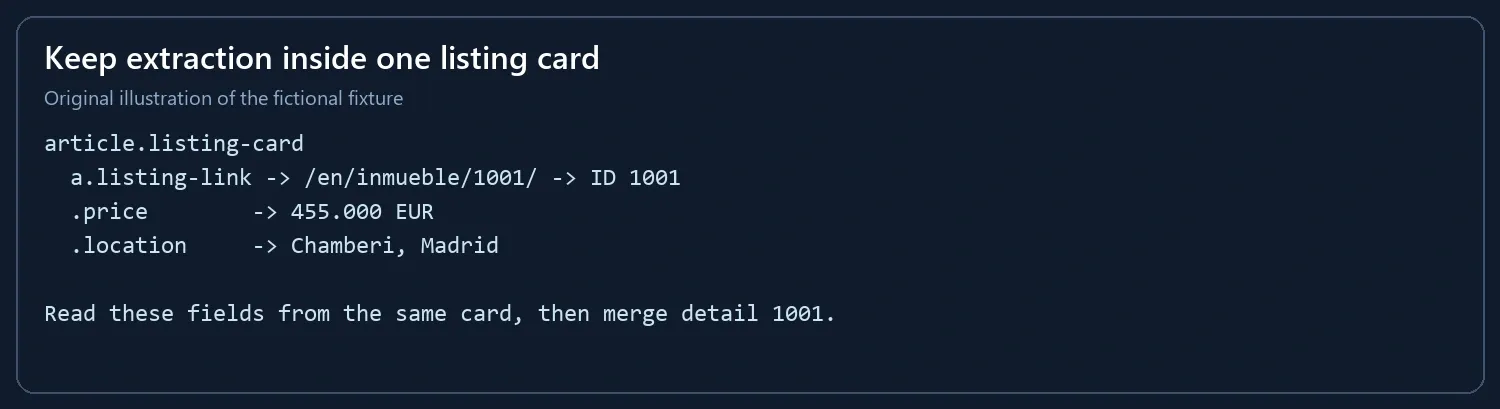
parse_search() selects each card before reading its link, price and location. This keeps fields from adjacent listings out of the same record. The sample files use these selectors:
| Configuration Key | Bundled Selector | What to Check in Saved HTML |
|---|---|---|
| card | article.listing-card | One complete listing card, excluding navigation |
| link | a.listing-link[href*=“/inmueble/”] | The listing’s own detail link |
| card_price / location | .price / .location | Nodes inside that same card |
| title / detail_price | h1 / .price | Detail title and exact EUR amount |
| features / description | .feature / .description | Area/room labels and the description block |
| next | a[rel=“next”][href] | The Next anchor carrying a real href |
Inspect one saved search card and one saved detail page, then change these configuration values to match your HTML. The parsing functions stay the same.
Normalize Price, Area and Room Count
The default locale accepts dot-grouped thousands and decimal commas: 455.000 € becomes 455000, and 1.229,5 m² becomes 1229.5. Unexpected number formats raise an error instead of silently concatenating digits. Prices must include € or EUR; this parser does not convert currencies or strip rental-period suffixes automatically.
Room matching recognizes numeric labels such as 2 rooms, 2 habitaciones, 1 habitación, 2 bedrooms and 2 bed. Other labels, including a studio without a numeric count, remain null. Area matching uses m² or m2. The first matching area is selected, so narrow the feature selector when a page contains several area measurements.
Follow the Next Link and Deduplicate by ID
In URL mode, the pipeline resolves the configured Next link with urljoin() and requests that page. In optional manifest mode, it reads the mapped local file instead. It does not guess page numbers. --max-pages and --limit cap the work; a set of visited URLs prevents pagination loops. Listing IDs are deduplicated within a batch, including repeated featured cards.
Merge Detail Fields Without Losing Card Values
Every record starts with all nine fields initialized. A detail value replaces a card value only when it is not null or empty. Missing area, room count or an entire detail entry therefore does not interrupt logging or export.
Complete Runnable Code
The script supports three inputs: its built-in sample, saved HTML through a manifest, or a search URL through --url. All three use the same parsing, pagination, deduplication and export functions.
"""Request or read property HTML, parse fields, and export CSV/JSON."""
import argparse
import csv
import json
import os
import time
import re
from datetime import datetime, timezone
from decimal import Decimal, InvalidOperation
from pathlib import Path
from urllib.parse import urljoin, urlparse

import requests
from bs4 import BeautifulSoup

BASE = "https://example.test/en/venta-viviendas/madrid/"
PAGES = {
    BASE: '''
      <article class="listing-card">
        <a class="listing-link" href="/en/inmueble/1001/">Piso en Chamberi</a>
        <span class="price">455.000 €</span><span class="location">Chamberi, Madrid</span>
      </article>
      <article class="listing-card">
        <a class="listing-link" href="/en/inmueble/1002/">Piso en Retiro</a>
        <span class="price">389.000 €</span><span class="location">Retiro, Madrid</span>
      </article>
      <a rel="next" href="pagina-2.html">Next</a>
    ''',
    urljoin(BASE, "pagina-2.html"): '''
      <article class="listing-card">
        <a class="listing-link" href="/en/inmueble/1003/">Atico en Tetuan</a>
        <span class="price">520.000 €</span><span class="location">Tetuan, Madrid</span>
      </article>
    ''',
}
DETAILS = {
    "1001": '''<h1>Piso en Chamberi</h1><span class="price">455.000 €</span>
      <ul><li class="feature">82 m²</li><li class="feature">2 rooms</li></ul>
      <div class="description">Bright apartment near the metro.</div>''',
    "1002": '''<h1>Piso en Retiro</h1><span class="price">389.000 €</span>
      <ul><li class="feature">67 m²</li><li class="feature">2 rooms</li></ul>
      <div class="description">Two-bedroom flat close to the park.</div>''',
    "1003": '''<h1>Atico en Tetuan</h1><span class="price">520.000 €</span>
      <ul><li class="feature">91 m²</li><li class="feature">3 rooms</li></ul>
      <div class="description">Top-floor flat with a terrace.</div>''',
}
FIELDS = ["listing_id", "title", "price_eur", "location", "size_m2", "rooms",
          "description", "property_url", "scraped_at_utc"]
SELECTORS = {
    "card": "article.listing-card",
    "link": 'a.listing-link[href*="/inmueble/"]',
    "card_price": ".price", "location": ".location",
    "next": 'a[rel="next"][href]', "title": "h1",
    "detail_price": ".price", "features": ".feature",
    "description": ".description",
    "decimal_separator": ",", "thousands_separator": ".",
}

def text(node):
    return node.get_text(" ", strip=True) if node else ""

def number(value, config):
    # One explicit locale for the input batch; reject unexpected formats.
    value = re.sub(r"[\s\u00a0\u202f]", "", value)
    decimal = config["decimal_separator"]
    thousands = config["thousands_separator"]
    grouped = rf"(?:[0-9]+|[0-9]{{1,3}}(?:{re.escape(thousands)}[0-9]{{3}})+)"
    pattern = grouped + rf"(?:{re.escape(decimal)}[0-9]+)?"
    if not re.fullmatch(pattern, value):
        raise ValueError(f"Unexpected number format: {value!r}; check locale settings")
    try:
        result = Decimal(value.replace(thousands, "").replace(decimal, "."))
    except InvalidOperation as exc:
        raise ValueError(f"Invalid number: {value!r}") from exc
    return int(result) if result == result.to_integral_value() else float(result)

def euro_amount(value, config):
    if not value:
        return None
    if "€" not in value and "EUR" not in value.upper():
        raise ValueError(f"Expected an EUR price: {value!r}")
    return number(re.sub(r"EUR|€", "", value, flags=re.I).strip(), config)

def parse_search(html, page_url, config=SELECTORS):
    soup = BeautifulSoup(html, "html.parser")
    items = []
    for card in soup.select(config["card"]):
        link = card.select_one(config["link"])
        if not link or not link.get("href"):
            continue
        url = urljoin(page_url, link["href"])
        match = re.search(r"/inmueble/([0-9]+)(?:/|$)", urlparse(url).path)
        if not match:
            continue
        # Initialize every field before optional detail enrichment.
        item = dict.fromkeys(FIELDS)
        item.update({
            "listing_id": match.group(1), "title": text(link),
            "price_eur": euro_amount(text(card.select_one(config["card_price"])), config),
            "location": text(card.select_one(config["location"])), "property_url": url,
        })
        items.append(item)
    nxt = soup.select_one(config["next"])
    return items, urljoin(page_url, nxt["href"]) if nxt and nxt.get("href") else None

def parse_detail(html, config=SELECTORS):
    soup = BeautifulSoup(html, "html.parser")
    features = " | ".join(text(x) for x in soup.select(config["features"]))
    size = re.search(r"([0-9][0-9., \u00a0\u202f]*)\s*m[²2]", features, re.I)
    rooms = re.search(r"([0-9]+)\s*(?:rooms?|habitaci[oó]n(?:es)?|bedrooms?|beds?|bed)\b", features, re.I)
    return {
        "title": text(soup.select_one(config["title"])),
        "price_eur": euro_amount(text(soup.select_one(config["detail_price"])), config),
        "size_m2": number(size.group(1).strip(), config) if size else None,
        "rooms": int(rooms.group(1)) if rooms else None,
        "description": text(soup.select_one(config["description"])),
    }

def build_authorized_session():
    session = requests.Session()
    session.headers["User-Agent"] = "AuthorizedRealEstateResearch/1.0"
    proxy_url = os.getenv("ROLA_PROXY_URL")
    if proxy_url:
        session.proxies.update({"http": proxy_url, "https": proxy_url})
    return session

def fetch_authorized_html(session, url, max_attempts=2):
    '''Fetch an explicitly authorized page with bounded retry behavior.'''
    host = (urlparse(url).hostname or "").lower()
    if host not in {"idealista.com", "www.idealista.com"}:
        raise ValueError("Use only an explicitly authorized Idealista URL")
    if urlparse(url).scheme != "https" or not 1 <= max_attempts <= 2:
        raise ValueError("Use HTTPS and 1 or 2 attempts")
    for attempt in range(1, max_attempts + 1):
        try:
            response = session.get(url, timeout=(10, 25), allow_redirects=False)
        except requests.Timeout as exc:
            if attempt == max_attempts:
                raise RuntimeError("Request timed out after bounded attempts") from exc
            time.sleep(1)
            continue
        except requests.exceptions.ProxyError as exc:
            raise RuntimeError("Proxy connection or authentication failed; check endpoint and credentials") from exc
        except requests.ConnectionError as exc:
            raise RuntimeError("Connection failed; verify DNS, host, port and the authorized network path") from exc
        except requests.RequestException as exc:
            raise RuntimeError(f"Network error; stop and inspect access policy: {exc}") from exc
        if response.status_code == 407:
            raise RuntimeError("HTTP 407; check proxy authentication")
        if response.status_code == 429:
            retry_after = response.headers.get("Retry-After")
            raise RuntimeError(f"HTTP 429; stop this run. Retry-After={retry_after!r}")
        if response.status_code in (401, 403):
            raise RuntimeError(f"HTTP {response.status_code}; stop and confirm authorization")
        if 300 <= response.status_code < 400:
            raise RuntimeError("Redirect returned; inspect the permitted workflow")
        response.raise_for_status()
        if "captcha" in response.url.lower() or "captcha" in response.text.lower():
            raise RuntimeError("Verification page returned; stop the run")
        return response.text
    raise RuntimeError("Request stopped after bounded attempts")

def scrape_pages(pages, details, start_url, max_pages=2, limit=10, config=SELECTORS, fetch_html=None):
    rows, seen, visited, page_url = [], set(), set(), start_url
    for page_no in range(1, max_pages + 1):
        if page_url in visited:
            break
        visited.add(page_url)
        if fetch_html:
            html = fetch_html(page_url)
        else:
            if page_url not in pages:
                raise ValueError(f"No saved search HTML mapped for {page_url}")
            html = pages[page_url]
        listings, next_url = parse_search(html, page_url, config)
        print(f"search page {page_no}: {len(listings)} cards; next={'yes' if next_url else 'no'}")
        for item in listings:
            lid = item["listing_id"]
            if lid in seen:
                print(f"  duplicate skipped: {lid}")
                continue
            seen.add(lid)
            detail_html = fetch_html(item["property_url"]) if fetch_html else details.get(lid, "")
            detail = parse_detail(detail_html, config)
            for key, value in detail.items():
                if value not in (None, ""):
                    item[key] = value
            item["scraped_at_utc"] = datetime.now(timezone.utc).isoformat(timespec="seconds")
            rows.append(item)
            print(f"  parsed {lid}: EUR {item['price_eur']}, {item['size_m2']} m2, {item['rooms']} rooms")
            if len(rows) >= limit:
                return rows
        if not next_url:
            break
        page_url = next_url
    return rows

def validate(rows):
    if not rows:
        raise ValueError("No records parsed; inspect the HTML and selectors")
    ids = [row["listing_id"] for row in rows]
    if any(not lid for lid in ids) or len(ids) != len(set(ids)):
        raise ValueError("Missing or duplicate listing IDs")
    for row in rows:
        if row["price_eur"] is not None and row["price_eur"] <= 0:
            raise ValueError("Invalid non-positive price")
        if row["size_m2"] is not None and row["size_m2"] <= 0:
            raise ValueError("Invalid non-positive area")
        if urlparse(row["property_url"]).scheme not in {"http", "https"}:
            raise ValueError("Expected an absolute HTTP(S) listing URL")
    missing = {field: sum(row.get(field) in (None, "") for row in rows) for field in FIELDS}
    print(f"quality check: {len(rows)} rows; unique IDs={len(set(ids))}")
    print("missing values:", json.dumps(missing, ensure_ascii=False))

def export(rows, basename):
    with open(f"{basename}.csv", "w", newline="", encoding="utf-8-sig") as f:
        writer = csv.DictWriter(f, fieldnames=FIELDS)
        writer.writeheader()
        writer.writerows(rows)
    with open(f"{basename}.json", "w", encoding="utf-8") as f:
        json.dump(rows, f, ensure_ascii=False, indent=2)
    print(f"saved {len(rows)} rows to {basename}.csv and {basename}.json")

def load_saved(manifest_path):
    path = Path(manifest_path).resolve()
    manifest = json.loads(path.read_text(encoding="utf-8"))
    def read_map(mapping):
        return {key: (path.parent / filename).read_text(encoding="utf-8")
                for key, filename in mapping.items()}
    return read_map(manifest["search_pages"]), read_map(manifest.get("details", {})), manifest["start_url"]

def write_demo(directory):
    directory = Path(directory)
    directory.mkdir(parents=True, exist_ok=True)
    manifest = {"start_url": BASE, "search_pages": {}, "details": {}}
    for i, (url, html) in enumerate(PAGES.items(), 1):
        filename = f"search-{i}.html"
        (directory / filename).write_text(html, encoding="utf-8")
        manifest["search_pages"][url] = filename
    for lid, html in DETAILS.items():
        filename = f"detail-{lid}.html"
        (directory / filename).write_text(html, encoding="utf-8")
        manifest["details"][lid] = filename
    (directory / "manifest.json").write_text(json.dumps(manifest, indent=2), encoding="utf-8")
    (directory / "selectors.json").write_text(json.dumps(SELECTORS, indent=2), encoding="utf-8")
    print(f"wrote demo HTML, manifest.json and selectors.json to {directory}")

def main():
    parser = argparse.ArgumentParser(description="Parse bundled or saved property HTML")
    mode = parser.add_mutually_exclusive_group()
    mode.add_argument("--url", help="HTTPS search-page URL")
    mode.add_argument("--manifest", help="JSON mapping original page URLs and listing IDs to local files")
    mode.add_argument("--write-demo", metavar="DIR", help="Write sample HTML and configuration files, then exit")
    parser.add_argument("--selectors", help="JSON overrides for CSS selectors and number separators")
    parser.add_argument("--max-pages", type=int, default=2)
    parser.add_argument("--delay", type=float, default=2, help="Seconds between page requests")
    parser.add_argument("--limit", type=int, default=10)
    parser.add_argument("--output", default="idealista_listings")
    args = parser.parse_args()
    if args.max_pages < 1 or args.limit < 1 or args.delay < 0:
        parser.error("max-pages and limit must be positive")
    if args.write_demo:
        write_demo(args.write_demo)
        return
    config = dict(SELECTORS)
    if args.selectors:
        overrides = json.loads(Path(args.selectors).read_text(encoding="utf-8"))
        if not isinstance(overrides, dict) or set(overrides) - set(SELECTORS):
            parser.error("selectors must be a JSON object containing known configuration keys")
        config.update(overrides)
    if ({config["decimal_separator"], config["thousands_separator"]} != {".", ","}):
        parser.error("number separators must be distinct dot/comma characters")
    session = None
    fetch_html = None
    if args.url:
        pages, details, start_url = {}, {}, args.url
        session = build_authorized_session()
        last_request = None
        def fetch_html(url):
            nonlocal last_request
            if last_request is not None:
                time.sleep(max(0, args.delay - (time.monotonic() - last_request)))
            last_request = time.monotonic()
            return fetch_authorized_html(session, url)
        print("mode: HTTP search and detail pages")
    elif args.manifest:
        pages, details, start_url = load_saved(args.manifest)
        print("mode: saved HTML; no HTTP requests")
    else:
        pages, details, start_url = PAGES, DETAILS, BASE
        print("mode: bundled fictional HTML; no HTTP requests")
    try:
        rows = scrape_pages(pages, details, start_url, args.max_pages, args.limit, config, fetch_html)
        validate(rows)
        export(rows, args.output)
    finally:
        if session is not None:
            session.close()

if __name__ == "__main__":
    main()
Check the Output and Data Quality
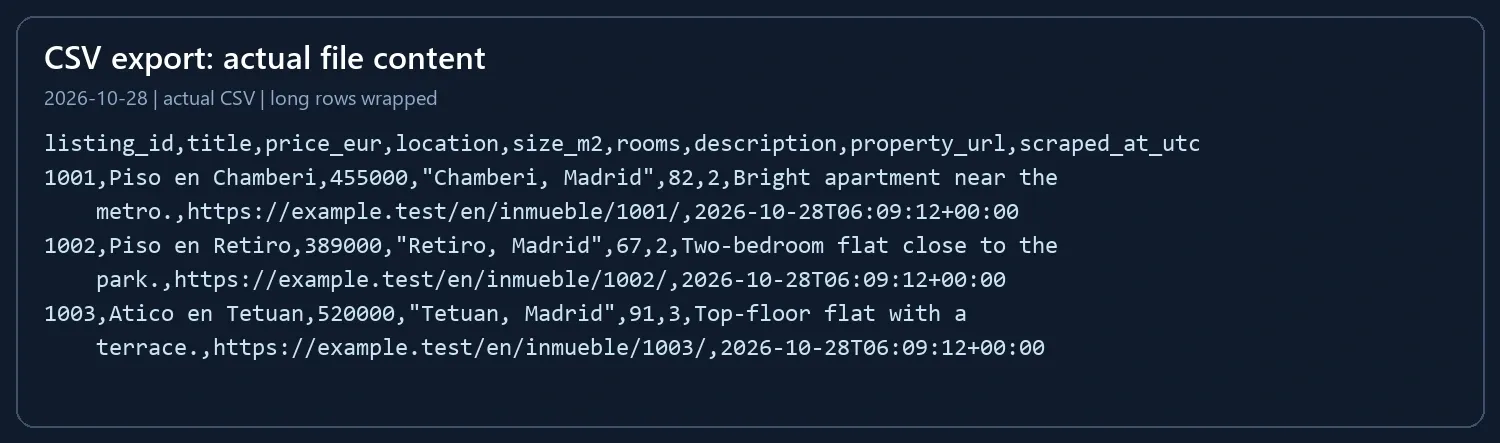
The bundled run produces idealista_listings.csv and idealista_listings.json in the current folder; the --url run writes the same fields from the requested pages. Expect three unique IDs and prices of 455000, 389000 and 520000. Compare each ID, title, URL and price together before using the data. A rise in missing fields can indicate changed selectors, labels or input completeness.
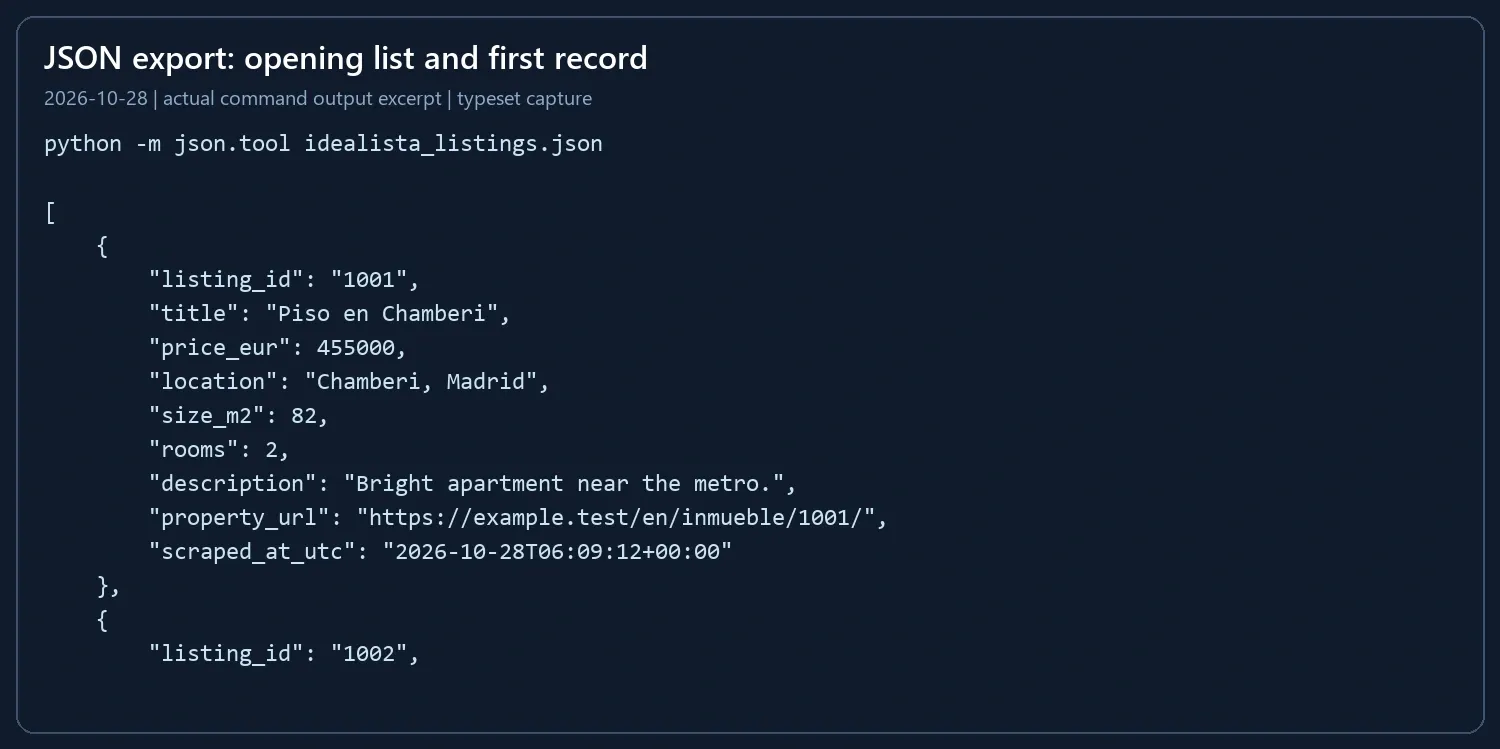
python -m json.tool idealista_listings.json
python -c "import csv; r=list(csv.DictReader(open('idealista_listings.csv', encoding='utf-8-sig'))); print(len(r), len({x['listing_id'] for x in r}))"
The second command prints 3 3 for the bundled sample. Missing numeric values become JSON null and empty CSV cells. CSV is UTF-8 with BOM; Excel can open it directly. If source text may begin with spreadsheet formula characters, import text columns explicitly as text before opening untrusted exports.
Connect ROLA IP to the Request Session
A web scraping proxy connects to the Requests Session before the first page request. Copy your endpoint, port and credentials into an environment variable:
# Windows PowerShell
$env:ROLA_PROXY_URL = "http://USERNAME:PASSWORD@HOST:PORT"
# macOS or Linux
export ROLA_PROXY_URL="http://USERNAME:PASSWORD@HOST:PORT"
Replace every uppercase placeholder, then rerun the --url command. build_authorized_session() loads the variable and configures the Session used for search and detail requests. Percent-encode reserved characters in username/password components when constructing the URL. Choose static residential proxies when a task requires a fixed exit address, and keep credentials outside the script and repository.
A Python Requests timeout can occur while connecting or waiting for response data. The helper uses 10/25-second connect/read timeouts and retries a timeout once. It ends the run on 403, 429 or a detected verification page; on 429 it records Retry-After. Pages involving traditional and invisible CAPTCHAs need response inspection before field parsing.
Error Diagnosis: From Symptom to Retest Result
For missing records or fields, inspect the HTML being parsed and check one card before changing the script. For a request error, diagnose the response status or network connection first. Then update selectors.json and rerun the smallest possible sample.
Symptom |
Likely Cause |
Check |
Fix |
Success Criterion |
|---|---|---|---|---|
No records |
Card or link selector does not match |
Count cards and inspect one href |
Update card or link in selectors.json |
Expected card count is parsed |
Missing price |
Price node or currency format differs |
Print the raw price text |
Update card_price or separators |
Price converts to a positive number |
Missing area or rooms |
Detail file or feature label differs |
Open the mapped detail file |
Update features or label patterns |
Missing values are intentional nulls |
Wrong page sequence |
Next URL is not in the manifest |
Compare rel="next" with search_pages keys |
Add the next file and URL mapping |
All intended pages are visited |
Duplicate rows |
Same listing appears on multiple pages |
Compare listing_id values |
Keep the ID deduplication step |
Each ID appears once |
Unexpected number format |
Locale or currency suffix differs |
Compare raw text with separator settings |
Change the explicit separators or add a rule |
Known amounts convert correctly |
403 |
Server denied the request |
Inspect the response title and access scope |
Resolve the permitted access route before rerunning |
A normal listing response is available |
429 |
Rate limit |
Record Retry-After |
End the run and schedule after the allowed wait |
A later permitted request succeeds |
407 / proxy connection error |
Proxy endpoint or authentication |
Check protocol, host, port and credentials |
Correct the proxy configuration |
Requests Session connects |
Connect/read timeout |
Connection or response delay |
Identify which stage timed out |
Helper retries once; diagnose persistent failures |
Request completes within configured settings |
Verification page |
HTML is a verification response |
Inspect its title and body |
Follow the site access process before parsing |
Listing fields are present |
Manifest error |
Missing key or file path |
Validate JSON and file names |
Correct start_url, mappings or filenames |
The command starts and exports files |
Data Access and Governance
Use pages and fields that your project is allowed to collect, keep only the data needed for the stated purpose, and follow the target platform’s current rules. Use the Idealista terms of use for the platform reference and the Beautiful Soup documentation for selector syntax.
Conclusion
Run the sample, configure the selectors against your pages, inspect a three-record URL run, then increase the page and record limits. Keep listing IDs and source URLs together, preserve missing values, and inspect the CSV/JSON output before using it for property analysis.