
PHP vs Python for Web Scraping: Code, Libraries, Performance, and Use Cases

Aug 31, 2026 · Comparisons · 12 min read
TL;DR
For web scraping, Python is usually the more complete default choice because its ecosystem — including requests, BeautifulSoup, Scrapy, Playwright, pandas, and data-processing tools — can cover the entire workflow from requests and cleaning to scheduling and analysis. PHP is more suitable for lightweight collection, scheduled jobs, and page parsing inside an existing PHP/Laravel system. This guide compares web scraping PHP vs Python and shows how to scrape a website using PHP and Python on the same static product page. If you only need static HTML, either language can do the job; reliability is usually determined more by the target page, rate limiting, retries, data quality, and deployment environment than by the language label itself.
PHP vs Python: Quick Verdict
| Requirement | Better Choice | Why |
|---|---|---|
| A new web scraping project | Python | A more complete ecosystem for scraping, browser automation, data processing, and scheduling |
| Add lightweight collection to an existing PHP/Laravel site | PHP | No need to add another runtime or deployment pipeline |
| Dynamic pages and browser automation | Python | More mature integration with Playwright, Selenium, and scraping frameworks |
| Analyze data immediately after scraping | Python | Rich ecosystem with pandas, NumPy, and data-science tools |
| Shared hosting or a PHP-only environment | PHP | Simple deployment path; cURL is often directly available |
| Large URL queues | Python | Scrapy, async I/O, and task-queue solutions are more common |
One-sentence recommendation: If you have no historical technology constraints, choose Python. If scraping is only a small module inside a PHP product, continuing with PHP is usually more practical.
What Is PHP?
PHP is a server-side scripting language widely used with WordPress, Laravel, Symfony, and many content-management systems. It can request pages with cURL, parse HTML with DOMDocument, DOMXPath, or Symfony DomCrawler, and run collection tasks through Laravel Scheduler, Queue, or command-line scripts.
What Is Python?
Python is a general-purpose programming language with a mature ecosystem in automation, data engineering, machine learning, and web scraping. requests/httpx handle HTTP, BeautifulSoup/lxml parse HTML, Scrapy manages queues and crawler pipelines, Playwright/Selenium handle pages that require JavaScript, and pandas is useful for downstream cleaning and analysis.
PHP vs Python Comparison Table
| Dimension | PHP | Python | Conclusion |
|---|---|---|---|
| Static HTML scraping | cURL + DOMXPath | requests + BeautifulSoup/lxml | Both work well |
| Dynamic pages | Panther / Playwright community options | Mature Playwright / Selenium support | Python is stronger |
| Full crawler frameworks | Usually assembled from components | Mature frameworks such as Scrapy | Python is stronger |
| Data processing | Arrays, Collections, databases | pandas, NumPy, Arrow | Python is stronger |
| Deployment | Convenient in PHP hosting and existing web stacks | Virtual environments, containers, workers | Depends on the existing stack |
| Learning curve | Familiar to web developers | Concise syntax and many tutorials | Both are approachable |
| Concurrency | curl_multi, queues, coroutine frameworks |
asyncio, httpx, Scrapy, queues |
Python offers more options |
| Long-term maintenance | Good for embedding in PHP products | Good for independent data pipelines | Depends on system boundaries |
How We Compared PHP vs Python
The comparison uses two layers. First, both languages complete the same end-to-end task on the same public product page, so we can directly compare the development experience from HTTP request to structured output. Second, after the hands-on example, we compare performance, libraries, dynamic pages, concurrency, and deployment. This keeps the coding tutorial separate from the language-selection discussion.
| Test Item | Shared Condition |
|---|---|
| Target page | ScrapingCourse public practice product page: Abominable Hoodie |
| Fields extracted | Title, price, SKU, category |
| PHP approach | cURL fetches HTML; DOMDocument + DOMXPath parse it |
| Python approach | requests fetches HTML; BeautifulSoup parses it |
| Reliability requirements | Timeout, User-Agent, HTTP status validation, null-field protection |
| Success criteria | All four fields are correctly output as structured data |
Hands-On Goal: What Data Do We Extract from the Same Product Page?
This section does one thing: visit the product page, extract the visible product name, price, SKU, and category, and output structured results. Looking at the target fields first makes the selectors and code easier to understand.
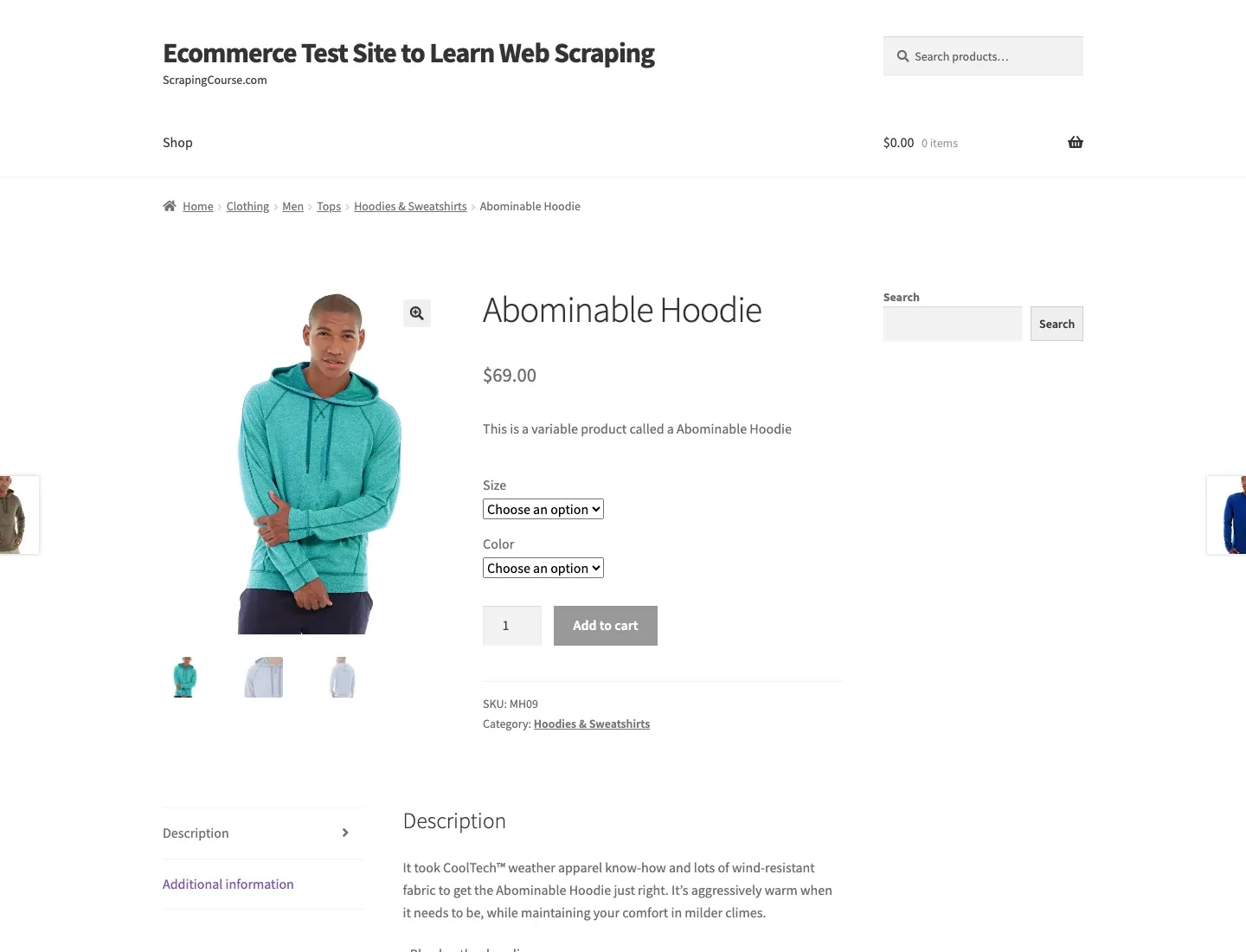
Figure 1: Real product page used in the PHP vs Python hands-on comparison.
| Field | Page Content | PHP XPath / Python CSS Selector |
|---|---|---|
| title | Abominable Hoodie | //h1[contains(@class,'product_title')] / h1.product_title |
| price | $69.00 | //p[contains(@class,'price')] / p.price |
| sku | MH09 | //*[contains(@class,'sku')] / .sku |
| category | Hoodies & Sweatshirts | //*[contains(@class,'posted_in')]/a[1] / .posted_in a |
The selector mapping is the core of the exercise. PHP and Python use different networking APIs, but they parse the same HTML. Both should return a null value when a field does not exist instead of allowing the entire task to crash.
Web Scraping PHP Tutorial: Scrape a Product Page with cURL
The PHP approach follows five steps: check the environment → download HTML → validate the response → parse fields → output JSON. Each step solves one problem, making failures easier to locate.
Step 1: Prepare the PHP Environment and Extensions
You need PHP 8.x plus the curl, dom, and libxml extensions. Run php -v and php -m first and confirm that the extension list includes curl, dom, and libxml. If anything is missing, install the extension for your current operating system or container image before running the script.
# macOS / Linux
php -v
php -m | grep -E "curl|dom|libxml"
php scrape_product.php
On Windows PowerShell, use Select-String instead of grep:
php -v
php -m | Select-String "curl|dom|libxml"
php scrape_product.php
Step 2: Request and Validate the Response with cURL
cURL handles the network layer. CURLOPT_RETURNTRANSFER returns the response body into a variable; CURLOPT_FOLLOWLOCATION handles normal redirects; and the connection and total timeouts prevent the task from hanging indefinitely. If curl_exec fails, read curl_error first. Then check the HTTP status code. Only normal HTML should be passed to the parser.
Step 3: Extract and Output Fields with DOMXPath
DOMDocument converts the HTML into a DOM tree, and DOMXPath locates the required nodes. The helper function returns null when no node is found, which is safer than directly accessing item(0)->textContent. Finally, json_encode outputs a consistent structure for downstream use by databases, queues, or files.
<?php
$url = 'https://www.scrapingcourse.com/ecommerce/product/abominable-hoodie/';
$ch = curl_init($url);
curl_setopt_array($ch, [
    CURLOPT_RETURNTRANSFER => true,
    CURLOPT_FOLLOWLOCATION => true,
    CURLOPT_CONNECTTIMEOUT => 10,
    CURLOPT_TIMEOUT => 30,
    CURLOPT_USERAGENT => 'PHPWebScrapingTutorial/1.0 ([email protected])',
]);

$html = curl_exec($ch);
if ($html === false) throw new RuntimeException(curl_error($ch));
$status = curl_getinfo($ch, CURLINFO_RESPONSE_CODE);
curl_close($ch);
if ($status !== 200) throw new RuntimeException("HTTP $status");

libxml_use_internal_errors(true);
$dom = new DOMDocument();
$dom->loadHTML($html, LIBXML_NOERROR | LIBXML_NOWARNING);
$xpath = new DOMXPath($dom);

function text(DOMXPath $xp, string $query): ?string {
    $node = $xp->query($query)->item(0);
    return $node ? trim($node->textContent) : null;
}

$data = [
    'title' => text($xpath, "//h1[contains(@class,'product_title')]") ,
    'price' => text($xpath, "//p[contains(@class,'price')]") ,
    'sku' => text($xpath, "//*[contains(@class,'sku')]") ,
    'category' => text($xpath, "//*[contains(@class,'posted_in')]/a[1]") ,
];

echo json_encode($data, JSON_PRETTY_PRINT | JSON_UNESCAPED_UNICODE), PHP_EOL;
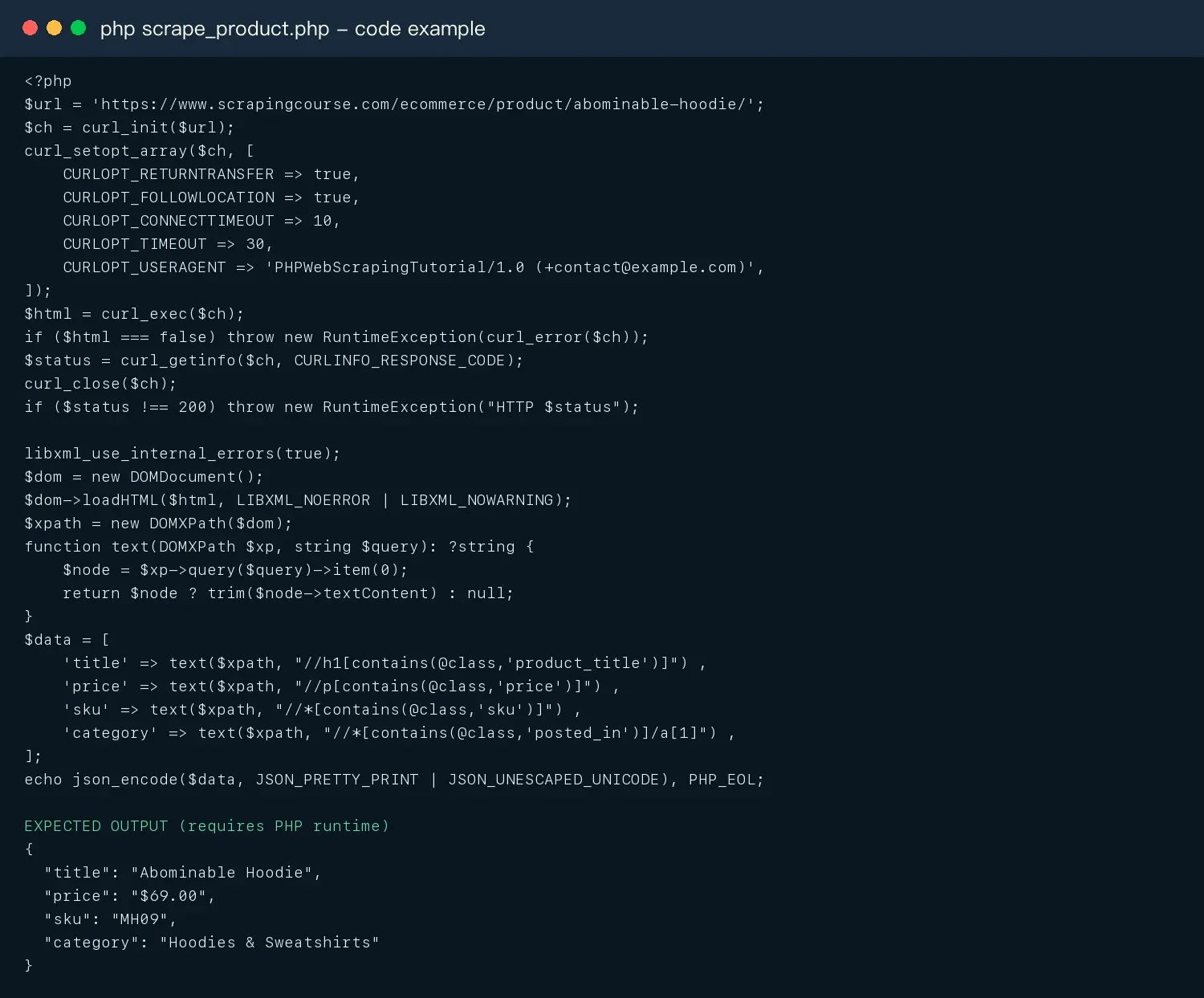
Figure 2: Complete PHP cURL + DOMXPath code and expected fields.
What Should the PHP Code Return?
If the script succeeds, it should output the following four fields. If any result is null, first inspect the page structure in the browser and then check the XPath. If the HTTP status is not 200, resolve network, permission, or rate-limit issues before continuing to adjust selectors.
{
  "title": "Abominable Hoodie",
  "price": "$69.00",
  "sku": "MH09",
  "category": "Hoodies & Sweatshirts"
}
A practical PHP troubleshooting order is: missing curl extension → TLS/connection issue → non-200 response → response is not product HTML → XPath no longer matches. Following this order is more effective than repeatedly changing selectors at the beginning.
Python Web Scraping Tutorial: Scrape the Same Product Page with requests
The Python approach follows the corresponding flow: create an environment → install dependencies → request HTML → parse fields → verify real output. This mirrors the PHP process so the comparison is fair.
Step 1: Create the Python Environment and Install Dependencies
# macOS / Linux
python3 -m venv .venv
source .venv/bin/activate
python -m pip install requests beautifulsoup4
python scrape_product.py
On Windows PowerShell, create and activate the environment with:
py -m venv .venv
.venv\Scripts\Activate.ps1
python -m pip install requests beautifulsoup4
python scrape_product.py
A virtual environment keeps project dependencies separate from the system Python installation. After installing the packages, save the complete code below as scrape_product.py and run it from the activated environment.
Step 2: Request the Page and Parse Four Fields
requests.Session reuses connections. response.raise_for_status() raises an error on 4xx/5xx responses. BeautifulSoup uses the same CSS selectors shown in the field table. The helper function checks whether a node exists before reading it, preventing AttributeError when a field is missing. For production timeout behavior, compare this example with Rola IP’s Python requests timeout guidance.
import requests
from bs4 import BeautifulSoup

url = "https://www.scrapingcourse.com/ecommerce/product/abominable-hoodie/"

with requests.Session() as session:
    response = session.get(
        url,
        headers={"User-Agent": "PythonWebScrapingTutorial/1.0 ([email protected])"},
        timeout=(10, 30),
    )
    response.raise_for_status()

soup = BeautifulSoup(response.text, "html.parser")

def text(selector):
    node = soup.select_one(selector)
    return node.get_text(" ", strip=True) if node else None

data = {
    "title": text("h1.product_title"),
    "price": text("p.price"),
    "sku": text(".sku"),
    "category": text(".posted_in a"),
}

print(data)
Step 3: Verify the Real Run Result
In the environment used for the article, the Python example successfully extracted title=Abominable Hoodie, price=$69.00, sku=MH09, and category=Hoodies & Sweatshirts. The screenshot places the complete code and output together so each selector can be checked against its result.
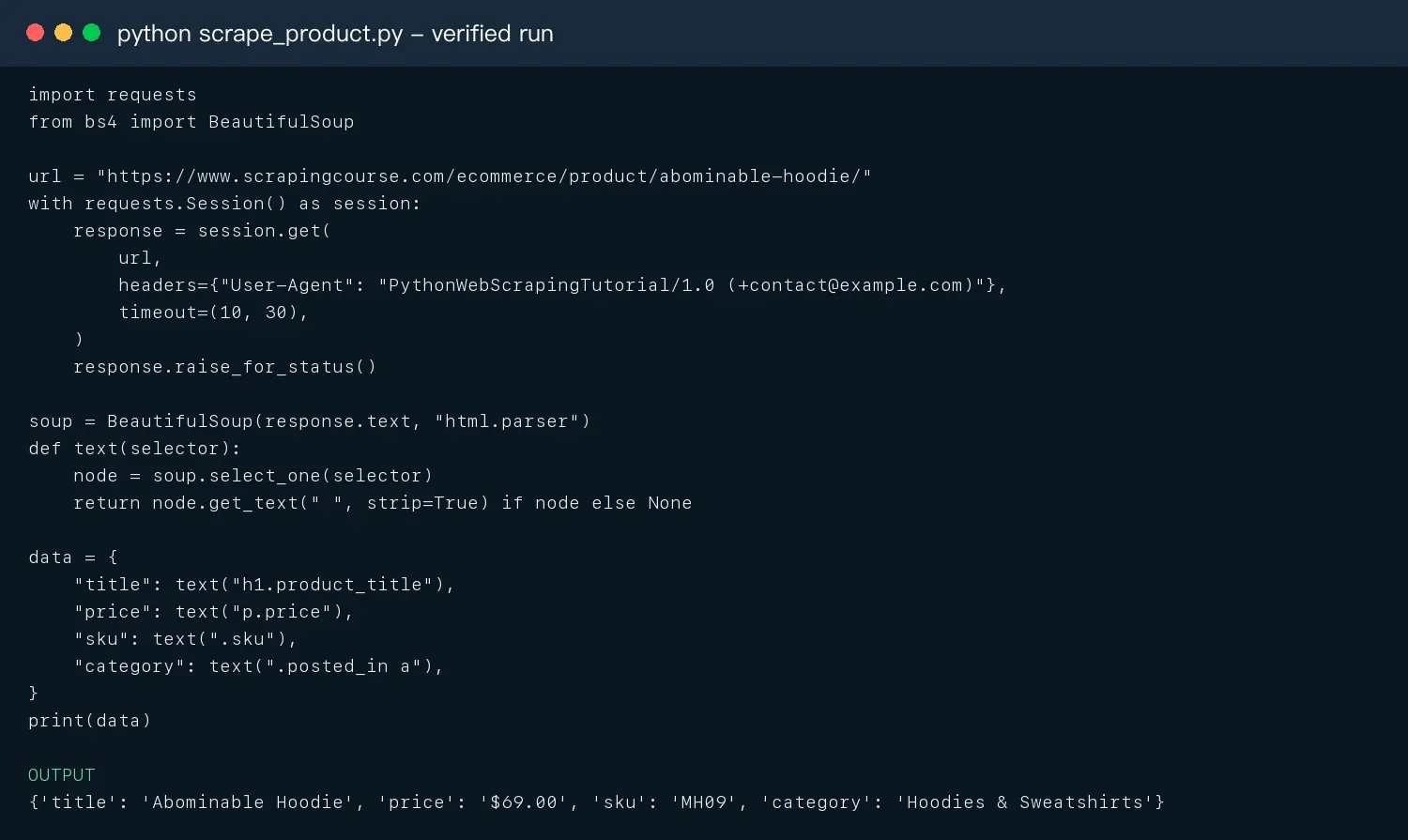
Figure 3: Verified Python requests + BeautifulSoup run.
Hands-On Result: What Is Different When PHP and Python Complete the Same Task?
Both languages can scrape this static product page. The main differences are the development experience and the path for scaling into a larger system. Python’s request and CSS-selector code is more compact. PHP’s cURL configuration is more explicit and can fit naturally into an existing Laravel, Symfony, or WordPress system.
| Comparison Area | PHP | Python | Result in This Test |
|---|---|---|---|
| HTTP request | Detailed cURL options | Concise requests API | Both can complete the request reliably |
| HTML parsing | DOMXPath with more boilerplate | Intuitive BeautifulSoup CSS selectors | Python is easier to read |
| Field protection | Check query()->item(0) |
Check the return value of select_one |
Both must handle missing fields |
| Structured output | json_encode |
Dictionary / json module |
No fundamental difference |
| Expansion path | Laravel Queue, Scheduler | Scrapy, queues, data-analysis tools | Depends on system boundaries |
PHP vs Python: Key Differences After the Hands-On Test
After both languages finish the same product-page task, it makes more sense to compare performance, ecosystem, dynamic pages, and deployment. These dimensions determine whether a project can grow from one URL into a long-running data pipeline.
1. Syntax and Learning Curve
Python’s syntax and scraping APIs are usually shorter, making it attractive for new projects and data teams. PHP is familiar to web developers and is especially suitable when scraping needs to be embedded in an existing CMS or Laravel service. The learning curve should not be measured only by lines of code; the team’s current experience, debugging tools, and release workflow also matter.
2. Library and Framework Ecosystem
| Task | PHP Tools | Python Tools |
|---|---|---|
| HTTP | cURL, Guzzle, Symfony HttpClient | requests, httpx, aiohttp |
| HTML | DOMDocument, DOMXPath, DomCrawler | BeautifulSoup, lxml, selectolax |
| Full crawler | Laravel Queue + custom pipeline | Scrapy |
| Dynamic pages | Symfony Panther, browser drivers | Playwright, Selenium |
| Scheduling | Cron, Laravel Scheduler/Queue | Cron, Celery, RQ, Airflow |
| Data processing | Collection, database clients | pandas, Polars, PyArrow |
For static HTML, the tooling gap is not large. When a project needs browser automation, asynchronous scraping, data cleaning, and analysis, Python provides a more complete end-to-end ecosystem.
3. PHP vs Python Performance
There is no universal speed winner for web scraping without a specific workload. In remote requests, DNS, TLS, the target server, the proxy chain, and rate limits are often more important than language-level function execution time. A small local loop benchmark therefore cannot replace a real scraping benchmark.
- Low-concurrency static pages: the difference between PHP and Python is often smaller than network variability.
- Large amounts of concurrent I/O: Python offers more choices through
asyncio,httpx,aiohttp, and Scrapy. - Existing PHP systems: avoiding a new Python service can reduce deployment and monitoring costs.
- Browser automation: Chrome’s CPU and memory usage is much larger than the difference between PHP and Python syntax.
- Useful metrics: valid-field rate, P50/P95 latency, 429 rate, retry traffic, and cost per valid record.
4. JavaScript Dynamic Pages
When scraping requires JavaScript execution, waiting for XHR, clicking pagination, or handling infinite scrolling, Python is usually the better fit because Playwright and Selenium have a more mature ecosystem of examples, testing support, and data-processing integration. The separate Scraping dynamic web pages with Python guide covers the browser-rendering path in more detail. PHP can use Symfony Panther or remote browser services, but its ecosystem is smaller.
Regardless of language, check the browser’s Network panel first. If the data comes from a public JSON endpoint that you are allowed to request directly, calling that endpoint is usually faster and more stable than launching a browser. If rendering is required, use explicit waits rather than relying only on fixed sleep delays.
5. Concurrency, Pagination, and Failure Recovery
PHP can use curl_multi, Laravel Queue, or workers. Python can use asyncio, Scrapy, Celery, and similar tools. Reliability comes from task-state design, not from endlessly increasing the number of threads.
- Set three pagination stop conditions: maximum page count, no new URLs, and no next link.
- Normalize and deduplicate URLs, and save a business key.
- Retry only idempotent GET requests and keep retries bounded; honor
Retry-Afteron 429 responses. - Put 403 responses, CAPTCHA pages, and login pages into manual review instead of storing them as product data.
- Save
checkpoint,attempt,last_error, andfetched_atso interrupted jobs can resume. - If field completeness suddenly drops, pause writes and inspect the page structure.
6. Deployment and Long-Term Maintenance
The php versus python decision is ultimately a system-boundary question. Adding a Laravel Command to a PHP application is usually cheaper to operate than creating a new Python service. An independent data platform, however, is more likely to benefit from Python’s scraping, queue, and analysis ecosystem.
| Project Scenario | Better Choice | Why |
|---|---|---|
| Synchronize a small amount of data inside WordPress/Laravel | PHP | Reuse the existing runtime, logs, and deployment |
| Independent crawler service with thousands of URLs | Python | Rich crawler, async, and data-pipeline ecosystem |
| Need Playwright, Scrapy, and pandas | Python | Toolchain integration is more direct |
| Server only has PHP and the task is static HTML | PHP | No need to add another service |
| Team only knows one language | The familiar language | First implement timeout, rate limiting, retries, and monitoring correctly |
How to Use Rola IP in Production Scraping
After single-page parsing is working, an authorized task that also requires regional verification, price monitoring, or scalable egress management can connect Rola IP at the HTTP request layer in either PHP or Python. Its current public product pages list residential, static residential, mobile, datacenter, and IPv6 proxy offerings. For authorized collection workflows, see the Rola IP web scraping proxy use case.
Figure 4: Rola IP proxy network.
Rola IP’s protocol FAQ states that its rotating and static IPs support HTTP/S and SOCKS5. Its proxy parameters guide documents country, state, city, and session controls; state and city targeting are limited to rotating residential IPs. Select the IP type, location, and session behavior only after confirming the options available in the account and testing an authorized target at low concurrency. A proxy only manages network egress. It does not grant access permission and cannot replace website terms, robots rules, rate limits, or data-compliance requirements.
Related resources: Rola IP, web scraping proxies, residential proxies, and proxy integration code.
Where to Configure Rola IP in PHP and Python
The following snippets only show where proxy parameters belong. Obtain the connection values from the dashboard, store them in environment variables or a secret manager, and do not write real credentials into source code, logs, or screenshots. The official Rola IP documentation should be checked for the account’s current authentication and integration options before deployment.
// PHP: add to curl_setopt_array
CURLOPT_PROXY => getenv('ROLA_PROXY_HOST') . ':' . getenv('ROLA_PROXY_PORT'),
CURLOPT_PROXYUSERPWD => getenv('ROLA_PROXY_USER') . ':' . getenv('ROLA_PROXY_PASS'),
# Python: add to the session.get configuration
proxy = f"http://{user}:{password}@{host}:{port}"
proxies = {"http": proxy, "https": proxy}
response = session.get(url, proxies=proxies, timeout=(10, 30))
- Select a proxy type, region, and rotating or sticky session mode in the Rola IP dashboard.
- Generate
host,port,username, andpassword, then store them in environment variables. - First request an authorized IP-check endpoint and verify that the egress country and session match expectations.
- Test 20–50 target pages at low concurrency, recording valid-field rate, 429 responses, latency, and traffic.
- After the setup is stable, increase concurrency gradually while preserving rate limits, retry caps, and monitoring.
PHP vs Python: A Clear Final Choice
If you have no historical technology constraints, Python is the default choice for a new web scraping project. If scraping is only a static-page synchronization module inside an existing PHP/Laravel product, PHP is more practical. Do not choose an entire system just because one code example is shorter.
- Determine whether the task belongs inside an existing web product or an independent data pipeline.
- Confirm whether the page is static HTML, public JSON, or requires JavaScript execution.
- Estimate the number of URLs, update frequency, concurrency, data-cleaning needs, and browser requirements.
- Test the same 20–50 pages for field completeness, failure recovery, and actual runtime cost.
- Compare the 30-day total cost: development, deployment, browser resources, proxy traffic, retries, and maintenance.
Conclusion
There is no absolute PHP vs Python answer without considering the system context. Python is the stronger default choice for new web scraping projects and data pipelines, while PHP is a practical solution for lightweight collection inside existing PHP products. Test the same real pages for field completeness, failure recovery, and total cost before deciding. Engineering metrics should drive the choice, not syntax preference.