
Rakuten Price Tracker A Practical Guide to Tracking Prices on Rakuten Ichiba Japan

Oct 20, 2026 · Guides · 19 min read
TL;DR
A rakuten price tracker records product prices on Japan’s Rakuten Ichiba and detects price drops over time. This guide shows how to build a Python and SQLite prototype using the official Item Search API, save comparable price observations, and prevent duplicate events. It also covers optional Rola proxy checks for authorized product pages. The tutorial uses synthetic samples; it does not cover US Rakuten cashback or Rakuten Group stock prices.
Step 1: Prepare the Project and Run the Local Samples First
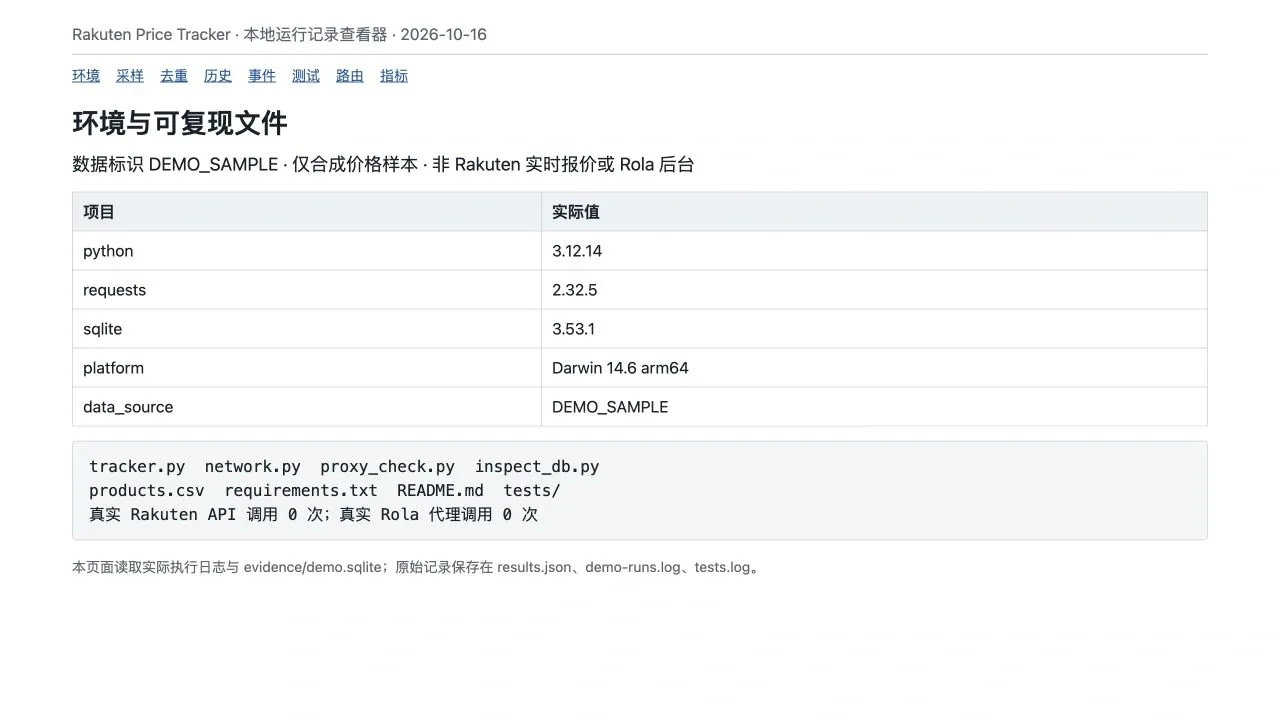
Start with the synthetic samples to verify installation, database operations, and event rules. Connect your own authorized products only after the program runs successfully. The accompanying code package contains these core files:
| File | Purpose |
|---|---|
tracker.py |
Product configuration, API sampling, field validation, transactions, and price-drop events |
network.py |
Explicit direct or proxied sessions, TLS, timeouts, and bounded retries |
proxy_check.py |
Optional proxy configuration, exit-IP checks, and strict product-page validation |
products.csv |
Three synthetic products with individual percentage thresholds for price drops |
inspect_db.py |
Examination of observations, events, and logical-task metrics |
tests/ |
20 local automated tests using mocked networking and synthetic pages |
requirements.txt and README.md |
Dependency versions, installation commands, and operating instructions |
The tutorial describes accompanying source code, dependencies, three synthetic sample products, and tests. In a local run on October 16, 2026, the prototype produced 12 observations and four price-drop events, skipped three tasks from duplicate sampling slots, and passed 20 tests. Official website screenshots were captured during access on that date; local screenshots came from actual logs and a read-only SQLite viewer, and use the label DEMO_SAMPLE. No Rakuten API requests with valid credentials or Rola proxy requests were made during this run, so these results demonstrate only the local prototype’s behavior.
The verified environment was macOS 14.6 arm64, Python 3.12.14, Requests 2.32.5, and SQLite 3.53.1. Install dependencies according to the accompanying requirements.txt. These versions describe the combination that was tested, not necessarily the newest available releases.
Extract the code package and open a terminal in the project directory. On macOS or Linux, run:
python3 -m venv .venv
source .venv/bin/activate
python -m pip install -r requirements.txt
python -m unittest discover -s tests -v
On Windows, create the environment with py -m venv .venv, then activate it using .venv\Scripts\Activate.ps1. After activation, the remaining python commands are the same. Windows scheduling and deployment were not verified in this run.
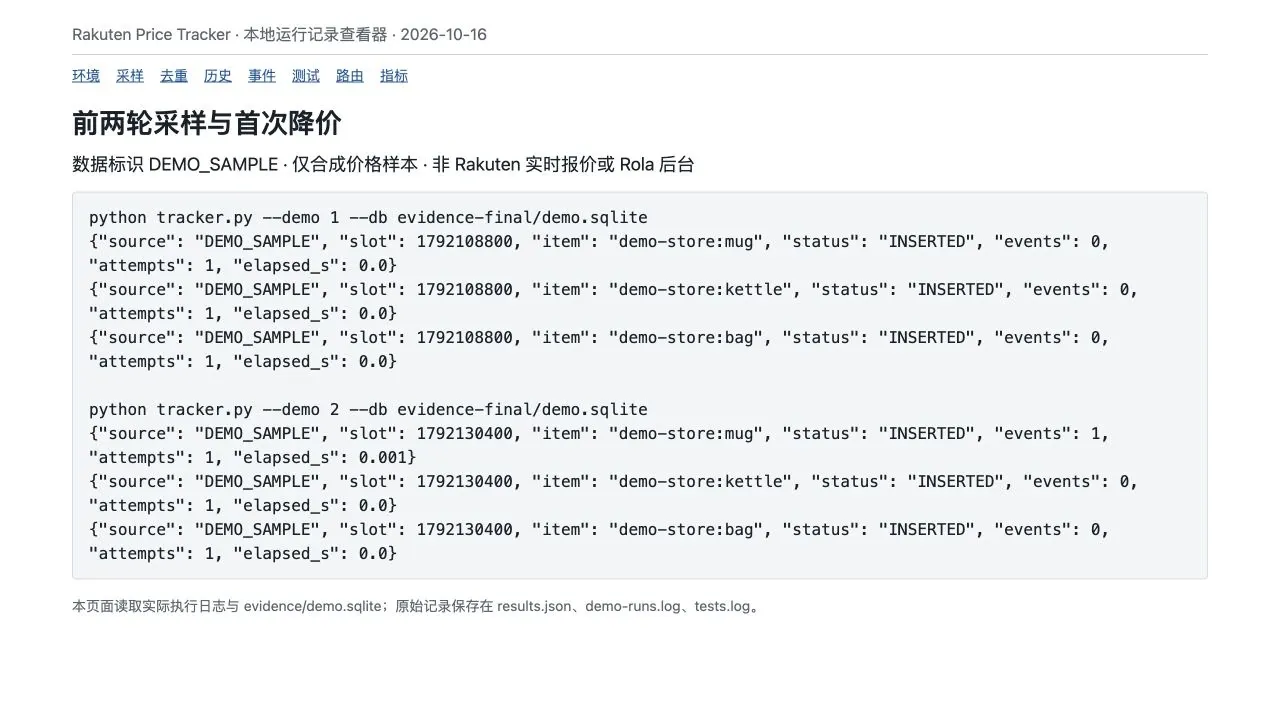
For the first run, use a demo database that does not yet exist, and execute these two rounds in sequence:
python tracker.py --demo 1 --db demo.sqlite
python tracker.py --demo 2 --db demo.sqlite
Each JSON output line represents one product task. INSERTED means a validated observation was saved; events is the number of new price-drop events created in that round. There is no earlier price to compare in round one, so events is zero for all three products. In round two, the mug price changes from JPY 2,280 to JPY 2,080, exceeding its configured 5% threshold and producing one event.
The --demo 1 through --demo 4 options use fixed six-hour UTC sampling slots for reproducibility. They do not imply that four real sampling periods elapsed. The demo database is marked as DEMO_SAMPLE; live API data must use a separate database, and the program refuses to mix the two modes.
Step 2: Connect the Official API and Define Exactly Which Price You Track
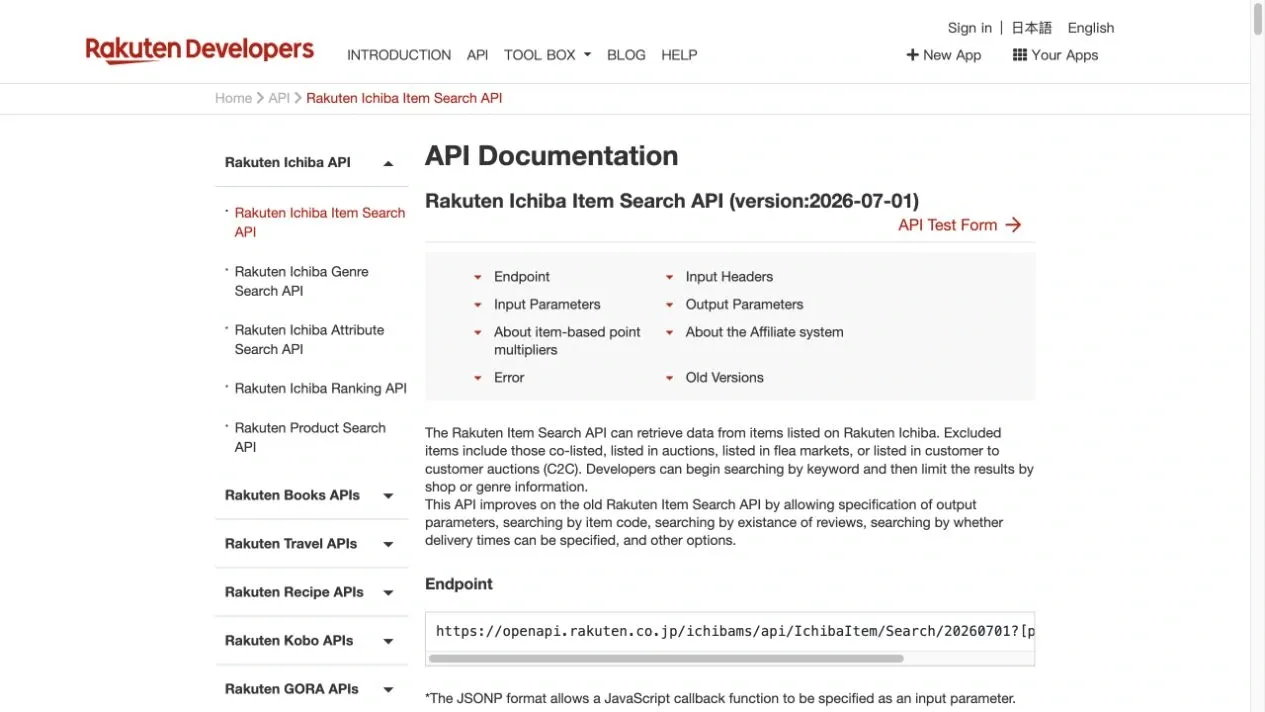
First, check the current API documentation, then provide credentials and real products. The official Rakuten Ichiba Item Search API documentation accessed on October 16, 2026, identified its version as 2026-07-01.
The original document displayed this address across two lines for layout purposes. The request must use the complete endpoint on one line, as the code already does. Do not copy an old-version example and change only the date while ignoring differences in authentication or response structure.
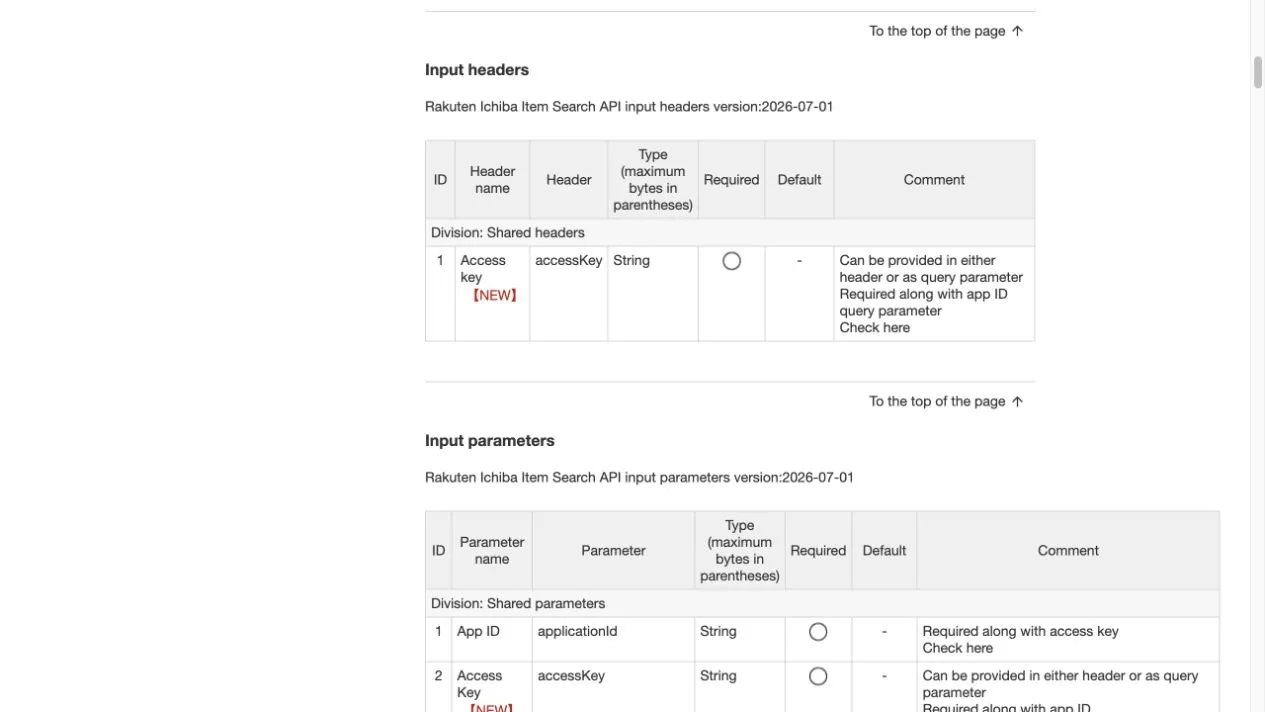
The current documentation requires applicationId and accessKey. The access key can be supplied in a request header or query parameter. This project sends it in a header to reduce the chance that the key appears in URL logs. Using format=json and formatVersion=2 produces a flat items array; the relevant expression is payload["items"][0]["itemPrice"]. Do not confuse it with the nested structure used by older versions.
Open products.csv and replace every demonstration row with products you are authorized to access. Keep the CSV column names unchanged. SHOP and ITEM_ID below are placeholders, not real products that can be used directly:
item_code,shop_code,variant,threshold_pct
SHOP:ITEM_ID,SHOP,listing,5
Use the API’s itemCode for item_code and its shopCode for shop_code. A product-page path may contain a seller-specific product identifier, so the API itemCode cannot be inferred from the page URL alone. This prototype supports only variant=listing, meaning the price at the product-listing level. To track a particular color, size, or SKU, first identify a data source that explicitly supports that granularity and revise the model accordingly.
Inject credentials through the local runtime environment, replacing the placeholders below. In production, credentials should be injected by a service manager or secret-management system rather than stored in shared scripts, screenshots, or version control.
export RAKUTEN_APP_ID='YOUR_APPLICATION_ID'
export RAKUTEN_ACCESS_KEY='YOUR_ACCESS_KEY'
python tracker.py --db live.sqlite --products products.csv
The program requests one product using itemCode and sets the request parameter availability=0 so out-of-stock products are included in the search scope. By contrast, availability in the response reports the product’s stock status: 0 means out of stock and 1 means in stock. Do not treat the request filter and response stock flag as if they have the same meaning.
Price comparisons also depend on itemPriceBaseField. The current documentation distinguishes the minimum-price basis for all, searchable, and purchasable SKUs using item_price_min1, item_price_min2, and item_price_min3. The prototype saves the returned price-basis field and compares consecutive observations only when that basis is unchanged. If the field changes, it still saves the observation but does not create a price-drop event.
| Saved field | How the prototype uses it |
|---|---|
itemPrice |
Positive integer listed price in yen; the system uses JPY throughout |
itemPriceBaseField |
Price basis; must match across compared observations |
taxFlag |
0 means tax included and 1 means tax excluded; must match |
itemCode and shopCode |
Exact verification of product and seller identity |
availability |
Out-of-stock observations are saved, but a comparison involving an out-of-stock observation does not trigger a price drop |
| API and parser versions | Stores 20260701 and listing-v1 to trace changes in response format |
This version does not calculate the final checkout price or store and convert shipping charges, points, or coupons. Unknown shipping costs must not be treated as zero. Membership discounts, delivery regions, promotion terms, and changes in which SKU has the minimum price can all make the page display differ from the API’s listed price. A drop in the listing’s minimum price does not necessarily mean the same specific SKU became cheaper.
Before using live data, review the scope of the Rakuten Web Service usage rules, using the original Japanese text as authoritative. These rules address permitted use cases, access restrictions, storage, display, and related conditions. Merely obtaining API credentials does not establish permission for long-term price-history storage, access restricted to specific people, or external redistribution. Confirm that your intended usage is allowed. The local demonstrations in this tutorial use synthetic data.
Step 3: Save Only Valid Observations to Price History
Even after receiving HTTP 200, the program must validate the response. The current implementation requires items to contain exactly one product; itemCode and shopCode to match the configuration; a positive integer price; valid stock and tax flags; a supported price basis; a nonempty name; and an HTTPS product URL under the specified seller. If any check fails, the error is recorded in failures, not in price history.
The prototype deliberately applies strict URL validation. It accepts only item.rakuten.co.jp and rejects product URLs containing user credentials, query strings, or fragments. This can also reject a legitimate API URL that includes valid tracking parameters. If that happens, inspect the original response and the meaning of those parameters, then add tests and an adapter for the confirmed format. Do not simply remove identity checks to raise the success rate.
The observations table stores each valid observation; events stores price-drop events matching the rule; failures stores error types; and tasks records logical-task status, attempts, duration, and response bytes measured by the application. Failed requests and out-of-stock observations must remain distinct: an out-of-stock item can still yield a valid record with correct identity and complete fields.
Run the final two rounds and inspect the database:
python tracker.py --demo 3 --db demo.sqlite
python tracker.py --demo 4 --db demo.sqlite
python inspect_db.py --db demo.sqlite
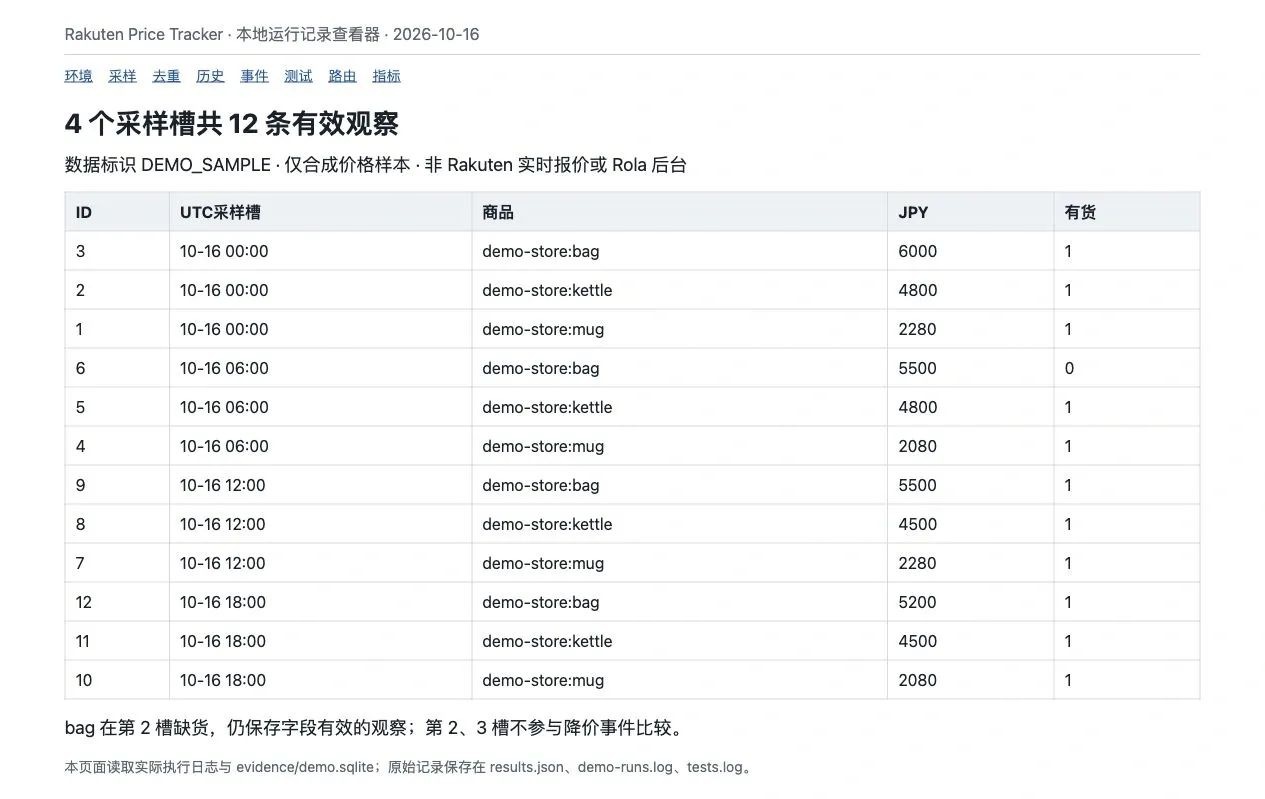
The initial result should contain 12 rows in observations. The program locates the previous record by sampling-slot order instead of mistaking the newly inserted row for the previous observation. Original integer prices are retained together with product identifiers, making it possible to explain precisely which two records produced an event.
Step 4: Compare Prices and Deduplicate Within One Transaction
The percentage price drop is calculated as (previous price - current price) / previous price. A change from JPY 2,280 to JPY 2,080 is approximately 8.77%, or 8.8% when displayed to one decimal place. Under this tutorial’s rule, the current price must actually be lower, the product’s threshold must be met, and the product must be in stock for both observations.
Operations within the transaction must follow a consistent order. The record function in tracker.py first acquires a write lock with BEGIN IMMEDIATE, checks whether a product observation already exists for that slot, and, if not, reads the preceding observation, inserts the current one, evaluates comparability, writes any event, and commits once. An exception midway rolls back both the observation and the event.
BEGIN IMMEDIATE
Check whether this product already has an observation in the sampling slot
Read the previous observation for this product
Reject a new sampling slot older than an already saved record
Insert the current observation
Check identity, price basis, source, versions, and availability
Insert an event if the price-drop rule is satisfied
COMMIT
On exception: ROLLBACK
Comparability checks cover itemCode, shopCode, variant, price basis, tax flag, source, API version, and parser version. If the source or version changes, the current round only establishes a new comparison baseline. The program does not skip the most recent out-of-stock record to compare against an older in-stock price, so restocking does not automatically create a price-drop event.
Events have a unique constraint on (rule_id, previous_observation_id, current_observation_id). That constraint is appropriate for the adjacent-observation price-drop rule used here. Additional rules, such as a new historical low, a daily digest, or a notification cooldown, need their own event semantics rather than reusing this deduplication definition.
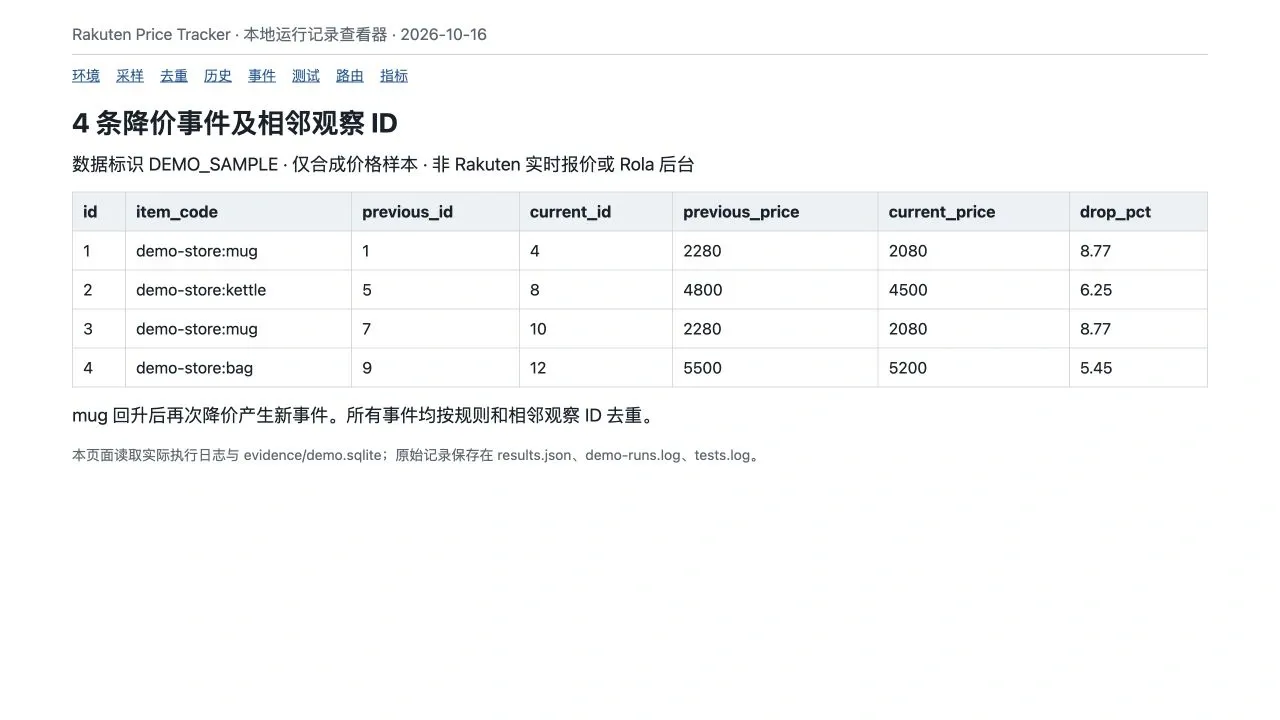
The synthetic price paths and expected results for all three products are:
| Product | Price and stock across four rounds | New events |
|---|---|---|
| mug | 2280 → 2080 → 2280 → 2080; in stock throughout |
One in round 2 and one in round 4; 2 total |
| kettle | 4800 → 4800 → 4500 → 4500; in stock throughout |
One in round 3; 1 total |
| bag | 6000 → 5500 (out of stock) → 5500 (in stock) → 5200 |
Only in round 4; 1 total |
Now repeat the second round:
python tracker.py --demo 2 --db demo.sqlite
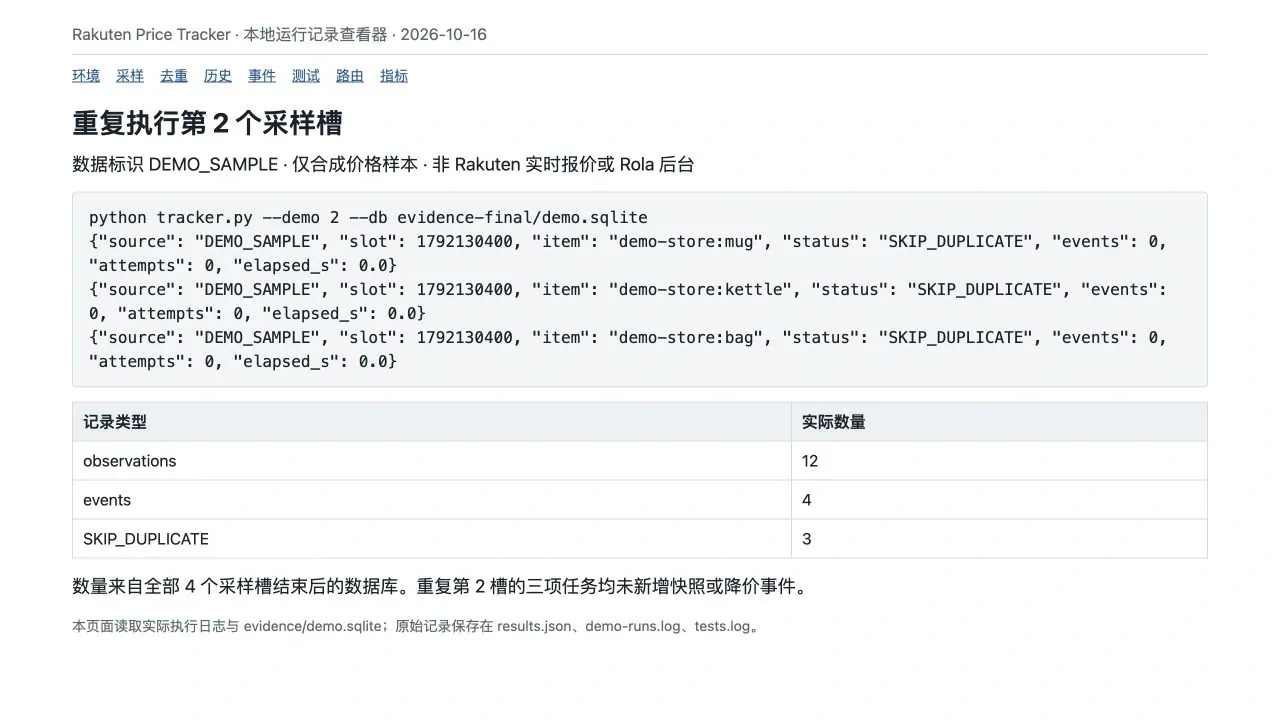
A repeat in the same sampling slot is skipped before a request is sent. Concurrent processes can nevertheless both pass the pre-request check, so duplicate network requests remain possible. The database write lock and uniqueness constraint prevent duplicate stored snapshots. This design guarantees idempotency of local storage, not that a network request will be issued only once under concurrency.
If an older, unsaved slot arrives after a newer slot has already been saved, the program returns out_of_order_slot and refuses to insert an out-of-order observation. To recover from a failed transaction, reuse the original slot provided a later slot has not superseded it. The prototype stores events in the database but does not implement email, webhooks, or messaging. External alerts would need additional delivery-state tracking and deduplication.
Step 5: Configure Rola When Needed and Verify Requests in Layers
When the official API works, continue to call it directly. Use a separate proxy session only when an authorized product page has a concrete regional or networking verification requirement. Start by reviewing Rola’s Rakuten proxy solution to see whether it fits the use case, then evaluate your access authorization, required fields, and cost.
This tutorial chooses Rola rotating residential proxies for the optional page-check workflow. The product page listed Japan / JP on the date of access, but the page does not guarantee that a particular account currently has inventory or plan access for that region. For consecutive steps that must share context, use a short-lived sticky session rather than intentionally changing exit IPs on every request. Consider independent sessions only for unrelated, one-page checks. Neither option should be used to continue access after it has been denied.
In an authorized account’s dashboard, select the rotating residential product, check whether Japan is available, choose the protocol and authentication method, and copy the generated hostname, port, and complete username. No proxy account was accessed for this tutorial, so the authentication examples retain placeholders; use the values generated for your own account.
| Setting | Approach used in this guide |
|---|---|
| Purpose | Independent checks of authorized product pages; never carries official API credentials |
| Region | Select Japan when a Japanese context is required; record the actual exit verification result |
| Protocol and authentication | HTTP gateway with username/password authentication; SOCKS5h is an alternative if configured according to the provider’s instructions |
| Session | Reuse the same session, Session, and cookies for consecutive steps, with a short retention window |
| Frequency | Manually verify one product at a time; do not run parallel bulk tests |
| Stop conditions | Stop on identity mismatch, verification page, or HTTP 403; respect Retry-After for HTTP 429 |
The Rola Python username/password integration documentation currently shows an HTTP gateway at gate.rola.vip:1000 and a SOCKS5h gateway at gate.rola.vip:2000. In the HTTP proxy dictionary, even an HTTPS destination uses an http gateway URL. The destination itself remains HTTPS, and the program keeps TLS certificate verification enabled.
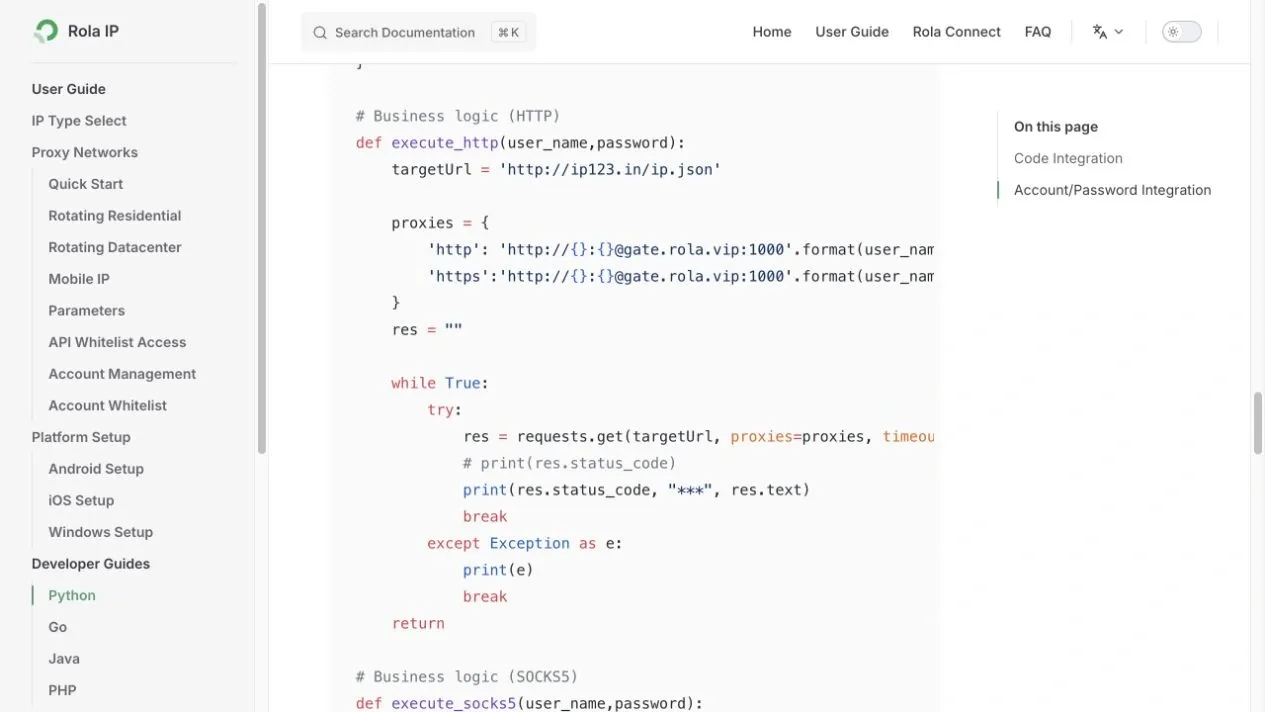
Session parameters require special attention. The current Python example shows USERNAME-country-COUNTRYCODE-sid-SESSION, whereas the same site’s Parameters page shows an underscore-separated session ID appended to the account, followed by country and sessiontime, such as test_1-country-us-sessiontime-10. Do not invent a hybrid syntax. The project preserves the complete username generated by the dashboard. If the dashboard and documentation disagree, confirm which format the selected product actually supports.
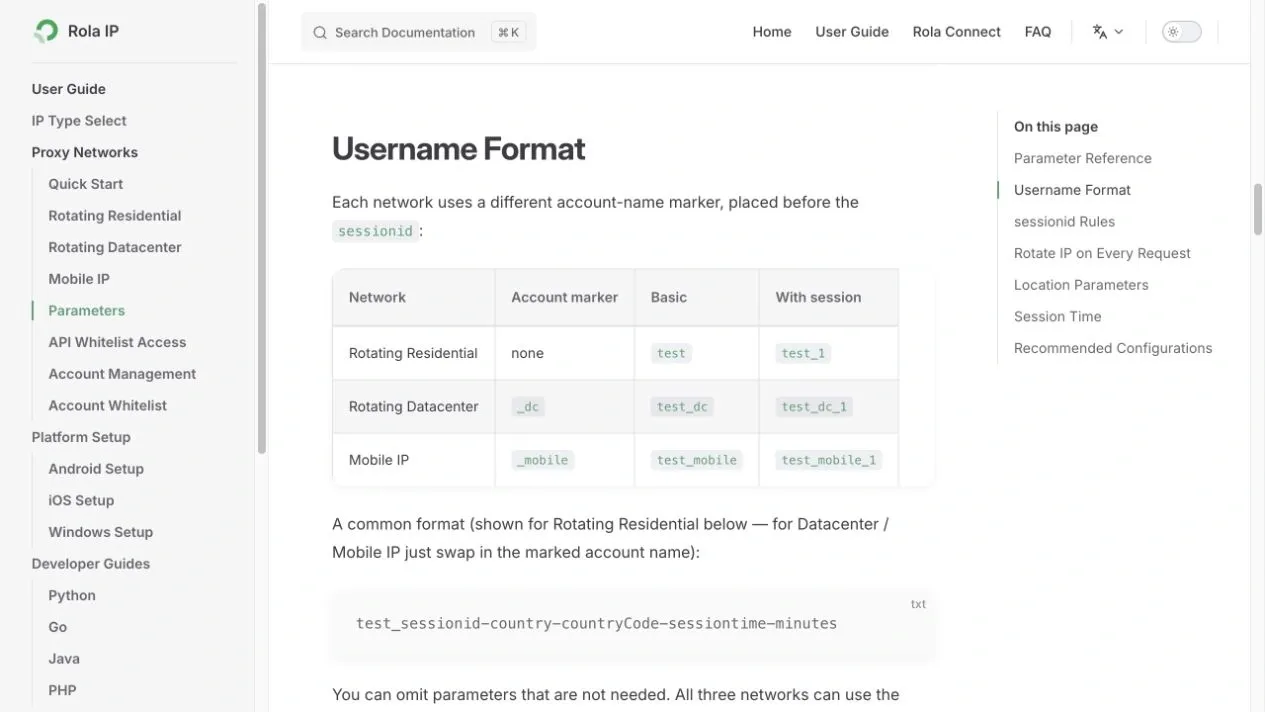
The Parameters page describes a session retention period of 1–120 minutes. Keeping the same IP is best-effort and must not be treated as a guarantee of a perfectly fixed exit. An unchanged exit IP also does not synchronize cookies, login state, language, or shipping location automatically. This project’s page requests set Japanese Accept-Language. Each command creates a new session, reusing it between retries within that command only; cookies are not persisted between commands. If multiple interactions need shared context, implement them in one controlled workflow.
First, verify that the program reads the configuration:
python proxy_check.py --mode direct
export ROLA_PROXY_URL='http://USERNAME:[email protected]:1000'
python proxy_check.py --mode proxy
If the username or password contains reserved characters, apply correct URL encoding. Check the resulting route, trust_env, and proxy_configured values. Configuration checks without --ip or --url do not send network requests and therefore cannot establish that the proxy is connected.
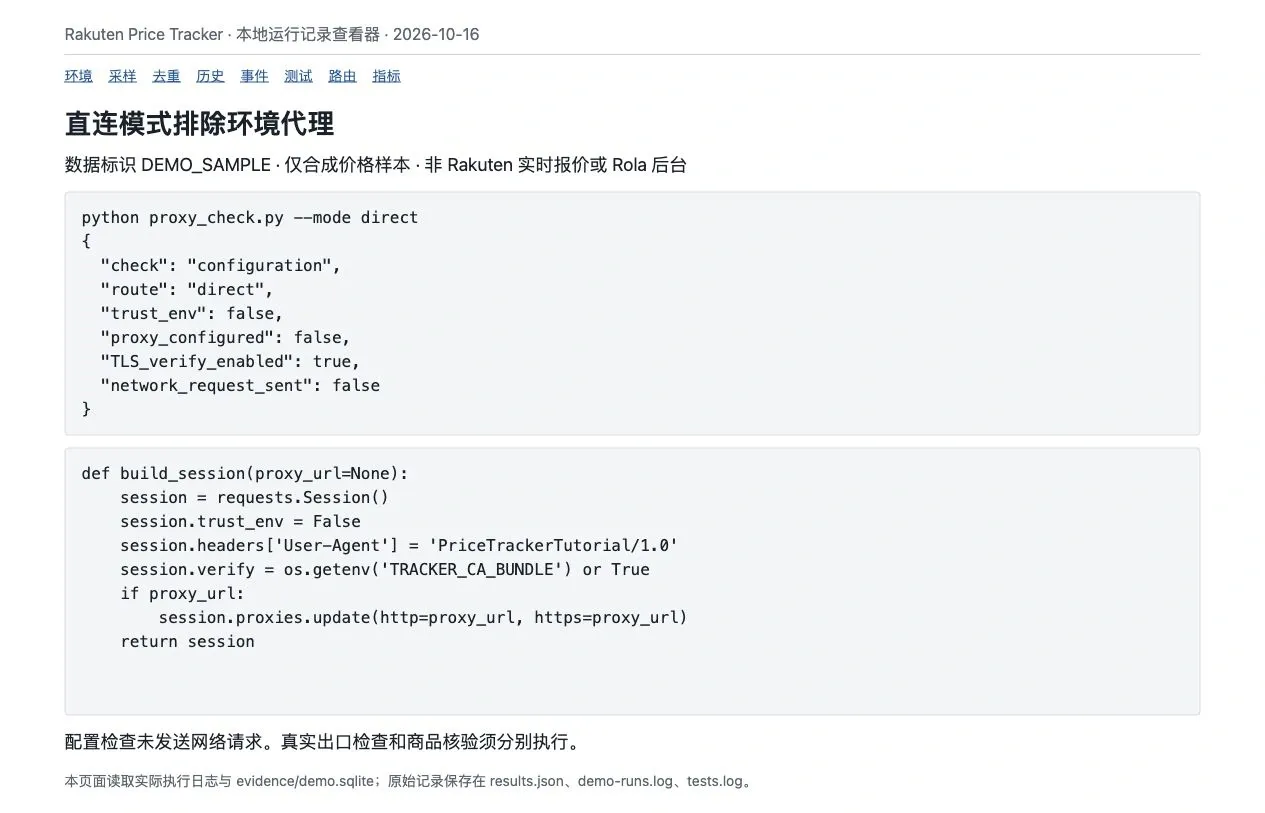
network.py creates requests.Session() instances in one place, sets trust_env=False, and populates proxy settings only when explicitly requested. Thus, direct mode does not inherit HTTP_PROXY, HTTPS_PROXY, or ALL_PROXY. This also affects environment-supplied certificate settings. If a company environment requires a custom trusted CA, configure TRACKER_CA_BUNDLE explicitly instead of using verify=False.
The second verification layer checks which network exit an actual request uses:
python proxy_check.py --mode direct --ip
python proxy_check.py --mode proxy --ip
The exit result establishes only the public IP observed for that request. An IP returned by ipify does not establish the country, so the output leaves country_verified=false. The Japanese region must be verified separately using an appropriate geolocation or attribution check together with the actual business context. A working exit check also does not prove that a Rakuten product page is accessible.
The third layer verifies an authorized product page. Replace the URL and EXPECTED-SKU with real values you have checked:
python proxy_check.py --mode proxy \
  --url 'https://item.rakuten.co.jp/SHOP/PRODUCT/' \
  --sku 'EXPECTED-SKU' --log proxy-checks.jsonl
The current parser requires text/html, a canonical URL matching the specified product page, exactly one JSON-LD Product with the expected sku, and a single JPY Offer with a recognizable availability state. It rejects aggregated prices, the wrong product, and verification pages. It has been tested only with synthetic pages, not validated against live Rakuten product HTML. If a target page does not contain these structures, the check fails and a target-specific adapter must be developed within the authorized scope; support for every product must not be assumed.
A log entry of valid_product_check=true means only that the strict validation conditions passed. It does not establish that shipping, taxes, discounts, or pricing basis match the API. Page-check results are not added to the official API’s observations. Exit checks, configuration checks, and HTTP 200 pages that fail parsing do not count as valid product checks.
When a proxy timeout occurs, consult Rola’s troubleshooting guide for timeouts in Python Requests through a proxy and inspect gateway protocol, authentication, and the connection and read phases. Log safe error codes rather than full proxy URLs. Do not automatically retry HTTP 403, and do not rotate IPs to work around HTTP 429. Billing units, failed traffic, and resource validity periods are governed by the terms of the selected plan.
Step 6: Schedule Sampling and Verify Failure Recovery
How often a scheduler starts the process and how much execution time an individual task receives are different considerations. This tutorial creates stable six-hour slots by rounding Unix epoch seconds down to the nearest six-hour UTC boundary:
slot = int(time.time()) // 21600 * 21600
Each process computes slot once; retries do not create a new slot. Restarting within the same six-hour window reuses the same slot. Recovery after crossing a slot boundary requires passing the original value to --slot and accounting for the out-of-order policy described above. Do not create a new task identity from the current time on every HTTP retry.
The prototype processes products serially, with concurrency of one per host. It adds a one-second delay after live requests; that is an illustrative pacing decision, not an official Rakuten quota. Adjust the product list and frequency based on actual account and API limits. After three consecutive product failures, the process suspends subsequent tasks in that run and records CIRCUIT_SKIPPED. Whether the next scheduled run should resume sampling depends on the failure cause.
network.py makes no more than three attempts, with a connection-timeout limit of eight seconds, a read-timeout limit of 20 seconds, and a total budget of 45 seconds for starting new attempts. Retryable network errors and HTTP 429, 500, 502, 503, and 504 receive bounded backoff with 0–0.25 seconds of jitter. Retry-After supports both seconds and HTTP dates. When the specified wait exceeds the remaining budget, the program returns a deferred error instead of waiting longer or switching exits.
The 45-second limit is a soft budget: the program controls whether to start another request and how long to wait, but DNS and read behavior in Requests do not provide a strict wall-clock deadline for the entire task. For a hard cutoff, use a deployment process manager to enforce a total execution limit. Do not assume that timeout=(8,20) guarantees completion within 28 seconds.
On Linux, the following cron template can start the process every six hours. Replace paths with those of the actual installation. Here, flock prevents two sampling processes from starting simultaneously on the same host. This template was not validated in production, and flock is not included in macOS by default.
0 */6 * * * /srv/rakuten/run.sh >> /srv/rakuten/run.log 2>&1
The run.sh script can contain:
#!/bin/sh
cd /srv/rakuten || exit 1
exec /usr/bin/flock -n -E 75 /srv/rakuten/run.lock \
  .venv/bin/python tracker.py --db live.sqlite \
  --products products.csv
Credentials are supplied by the deployment environment. Record the scheduler’s time zone explicitly. Local hours 00:00, 06:00, 12:00, and 18:00 in Asia/Shanghai correspond to UTC hours 16:00, 22:00, 04:00, and 10:00, which are not the UTC six-hour slot boundaries used by this program. The program still assigns a start time to the appropriate stable UTC slot, but actual sampling would happen four hours after that slot began. If sampling must begin exactly at the slot boundary, explicitly configure the scheduler to use UTC. Support for directives such as CRON_TZ varies across cron implementations and must not be assumed. The scheduling platform should also record process exit codes: the example lock conflict exits with 75, failed tracker tasks return 2, and success returns 0. Track forced timeouts separately from normal exits.
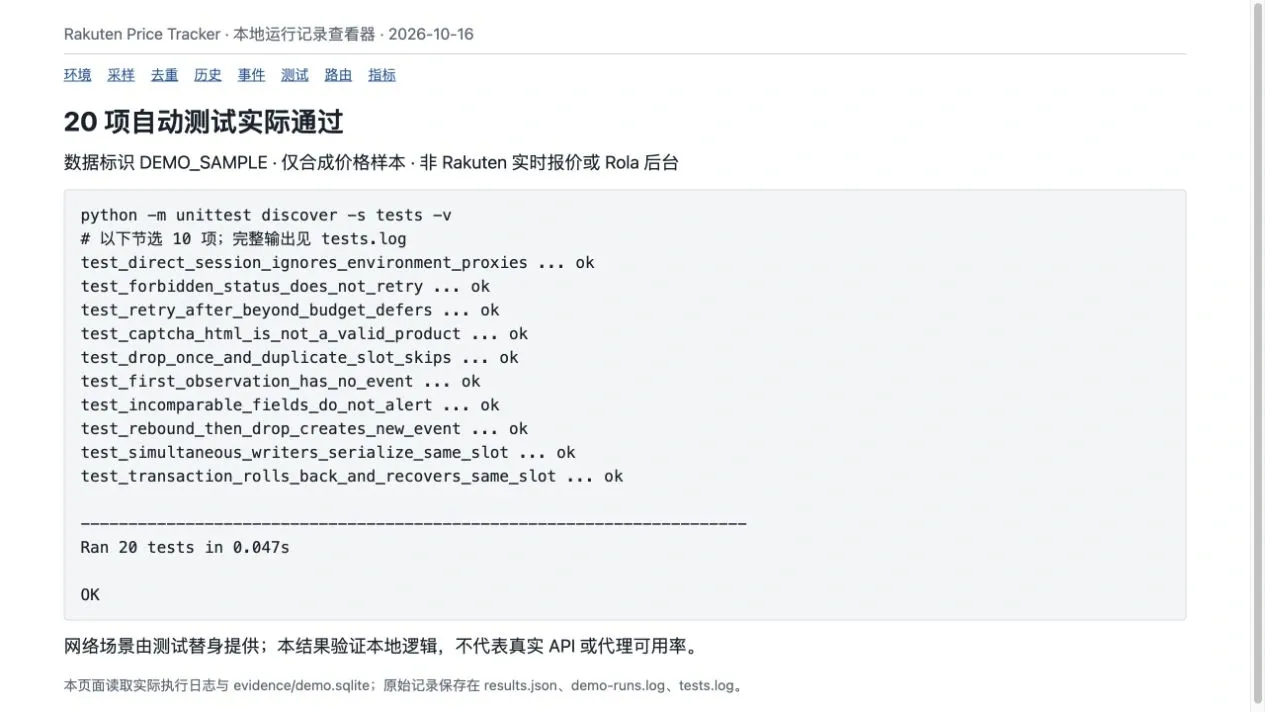
Tests cover the absence of an event for a first observation; one-time event creation after a drop; duplicate slots; price recovery followed by another drop; out-of-stock and pricing-basis changes; incorrect identities and invalid prices; out-of-order slots; concurrent writes; rollback after interrupted transactions; demo/live database isolation; isolation from environment proxies; stopping on 403; Retry-After in seconds and dates; and cancellation when the wait exceeds the remaining budget. Page tests also reject CAPTCHA HTML, an incorrect SKU, and AggregateOffer. These tests guard against known regressions but do not replace live-account and real-page validation.
Step 7: Measure Reliability and Cost Using Valid Results
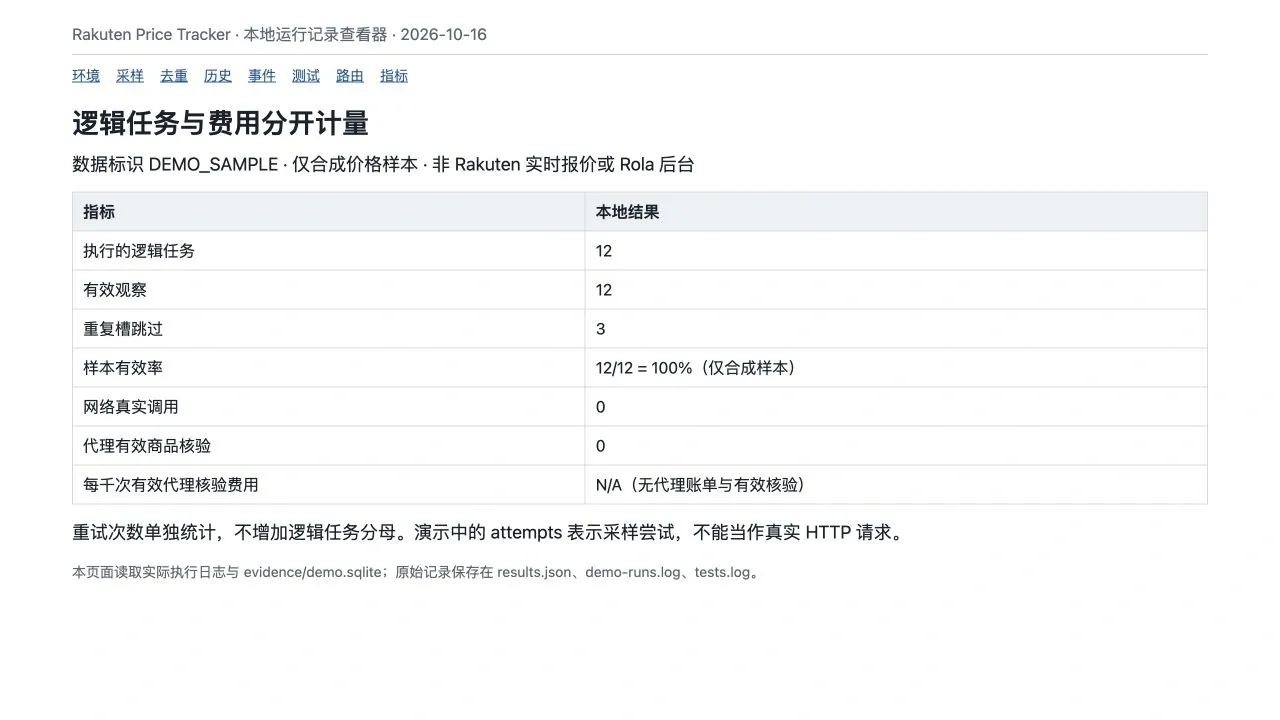
Measure one logical task as one product in one sampling slot. Even if that task needs three network attempts, it contributes only one item to the task denominator; attempts is accumulated separately. SKIP_DUPLICATE does not perform sampling, and CIRCUIT_SKIPPED does not send a task request, so neither belongs in the executed-task denominator. Both should remain visible as separate statuses to avoid hiding missed sampling opportunities.
The valid observation rate is the number of valid logical tasks divided by the number of logical tasks actually executed. For the API metrics in this tutorial, INSERTED counts as valid, while INSERTED and FAILED count as executed. An out-of-stock observation with correct identity and valid fields also counts as a valid observation; whether it triggers a price drop is determined separately.
Task duration is measured from the start of a product task through success or final failure, including requests, retries, and backoff. tracker.py records elapsed_s for each task; inspect_db.py reports their sum. This is not the wall-clock duration of the complete scheduled process and excludes the fixed pacing delay after tasks. Once enough comparable samples have been collected, calculate P50 and P95 on the same basis. This tutorial does not extrapolate live network speed from millisecond-scale local demonstrations.
The cost per 1,000 valid proxy checks is the actual expense attributable to the proxy page-check workflow, divided by the number of valid proxy product checks in the same period, multiplied by 1,000. Direct API observations do not enter this denominator, and proxy exit-IP checks do not count as product checks. If there are zero valid checks or no attributable billing records, report N/A, not a cost of zero.
| Metric to retain | Recording method and interpretation |
|---|---|
| Valid and executed logical tasks | API: aggregate from tasks; proxy: count only executed requests where check=page |
| Attempts and failure types | API: tasks and failures; proxy page command: save JSONL with --log |
| Task duration | Include backoff in the same logical task; retain failed-task durations too |
| Missing fields and identity errors | Group by validation error code; do not replace invalid fields with zero |
| Application-observed response bytes | Sum content lengths across all attempts; this is only an application-level measurement |
| Attributable actual expense | Allocate from supplier bills or usage records; do not estimate it from response-byte counts |
Successful and failed page-check outputs from proxy_check.py record route, attempts, and elapsed_s. Configuration errors occurring before a request have attempts=0 and do not count as executed network checks. Keep exit, configuration, and page-check logs separate. The current JSONL output does not automatically total costs, so billing information must be added from actual invoices or usage records.
The response-body length measured by the application is not the same as billable proxy traffic. Do not assume headers, tunneling, retries, or failed requests are free. To compare direct and proxy routes, use identical product lists, parsers, request contexts, and comparable periods. Examine valid content and failure reasons first, then duration and attributable cost. This run did not include such a real-world comparison, so it does not establish that a proxy is faster or cheaper.
Build a Trustworthy Price History Starting With Three Products
First, use the three accompanying synthetic products to reproduce 12 observations, four events, and duplicate-slot skips. Then connect a small number of authorized products to a separate live database. Review product identities, listing-level price bases, availability, and the preceding and current records referenced by each event. Only after confirming that live responses match the API documentation should you decide on a sampling schedule and notification workflow.
A useful rakuten price tracker makes every reported “price drop” traceable to two comparable observations. Keeping official API results, optional page checks, and proxy expenses separate makes it possible to judge both whether the data is trustworthy and whether the workflow is worthwhile to maintain.