
Scrape Google Shopping Results with Python and Playwright

Aug 24, 2026 · Guides · 13 min read
To scrape Google Shopping results with Python, use Playwright to render an authorized Shopping page, extract complete product cards, preserve the displayed price evidence, and reject invalid or unexpected result surfaces. This tutorial builds that Google Shopping scraper step by step and exports validated records to CSV.
The workflow collects product titles, sellers, current and old prices, ratings, review counts, links, placement labels, pagination context, locale inputs, and capture time. Its 15-test suite was verified against a controlled two-page fixture. Live selectors are isolated for review because Google does not provide a permanent Shopping-page DOM contract.
Key Takeaways
- Use Playwright when an authorized Google Shopping workflow requires browser rendering.
- Keep raw price, seller, placement, locale, and timestamp evidence before normalization.
- Treat a third-party Google Shopping results API and Google’s Merchant API as different products.
- Stop on consent, CAPTCHA, unusual-traffic, login, or unrecognized-result pages.
What You Will Build
The finished Python project accepts a query and locale, extracts typed product records, follows a bounded next-page link, validates the dataset, and writes UTF-8 CSV. It also keeps unsupported values such as From $49.99 or $12.50/mo out of the comparable numeric-price field instead of silently misclassifying them.
| Method | Best use | Maintenance | Important limitation |
|---|---|---|---|
| Playwright | Small, authorized experiments and page-structure research | High | Selectors and result surfaces change |
| Third-party results API | Structured output with less browser maintenance | Low to medium | Provider cost, terms, and schema dependence |
| Merchant API | Managing your own Merchant Center resources | Medium | Not a public competitor-results API |
Before You Run a Live Google Shopping Scraper
Technical access is not permission. Before a live run, review the Google Terms of Service, machine-readable instructions, contracts, applicable law, and your organization’s data-governance rules. Document the owner, purpose, retention period, permitted method, and stop conditions.
Stop the workflow instead of trying to work around the page when you encounter any of the following:
- a CAPTCHA or unusual-traffic message;
- a consent flow that has not been completed legitimately;
- a login or authentication request;
- an explicit denial or policy restriction;
- repeated error pages or an unrecognized result surface.
This tutorial does not include login automation, CAPTCHA solving, stealth plugins, access-control circumvention, checkout data, or personal information. A proxy changes the route; it does not create authorization.
Prerequisites and Verification Environment
The test project separates a reproducible verification target from an authorized live target. The following environment was rechecked on September 8, 2026:
| Component | Verified value | Notes |
|---|---|---|
| Operating system | Windows 11 | Test host |
| Python | 3.12.13 | Python 3.11 or later is recommended |
| Playwright | 1.62.0 | Version pinned in requirements.txt |
| Browser | Google Chrome 151.0.7922.138 | Launched by Playwright with channel="chrome" |
| Locale | en-US |
Fresh browser context for the fixture |
| Time zone | America/New_York |
Explicitly set in the context |
| Viewport | 1440 × 900 | Fixed for repeatable screenshots |
| Execution mode | controlled-fixture |
No automated live Google card extraction was run |
| Minimum valid records | 3 | The two-page fixture intentionally contains 7 |
Create and activate a virtual environment, then install the pinned package.
Windows PowerShell
py -3.12 -m venv .venv
.\.venv\Scripts\python.exe -m pip install playwright==1.62.0
macOS or Linux
python3 -m venv .venv
source .venv/bin/activate
python -m pip install playwright==1.62.0
The verification used an installed stable Chrome channel. To use Playwright’s bundled Chromium instead, install that browser and remove channel="chrome" from the launch call.
The complete project accompanying this article uses the following layout:
google-shopping-scraper/
├── README.md
├── requirements.txt
├── shopping_scraper.py
├── price_parser.py
├── selectors.py
├── fixtures/
│   ├── google_shopping_minimal_redacted.html
│   ├── google_shopping_page_2.html
│   ├── unusual_traffic.html
│   ├── consent.html
│   ├── empty_results.html
│   └── README.md
├── tests/
│   ├── test_parser.py
│   ├── test_price_parser.py
│   ├── test_url_identity.py
│   ├── test_failure_paths.py
│   └── test_validation.py
└── artifacts/
    └── google_shopping_results.csv
Every fragment below comes from this tested project. The accompanying package includes the two-page fixture, failure fixtures, 15-test suite, pinned dependency file, and sample CSV.
Understand Google Shopping Results Before Parsing
A Shopping-tab grid and a Shopping module inside a standard search page are not interchangeable. During manual review on August 21, 2026, a Google Shopping query using the older tbm=shop form redirected to a URL containing udm=28. The inspected page exposed an Ads region with a visible “Sponsored products” heading. That observation is a point-in-time finding, not a permanent URL or DOM contract.
Use module_position to describe a product’s order inside the module you actually parsed. Do not present it as a universal Google Shopping rank. Results can vary by query, country, language, device, time, personalization, inventory, and advertising.
Advertising status needs the same restraint. The extractor stores:
placement_type:sponsored,organic, orunknown;placement_label_raw: the visible label when one is found;source_module: the region or grid that contained the card.
A missing ad label is not proof that a record is organic, so the safe fallback is unknown.
Price fields also require evidence. Preserve price_text_raw exactly as displayed. Only populate price_amount when one tested rule can interpret the text without guessing. A value such as $99.99 may be parseable under a controlled U.S. locale; From $49.99, $12.50/mo, or $63.98 at checkout describes a different commercial meaning and should not be silently converted into the same field.
Use a schema that separates observed values from interpretations:
| Field group | Fields | Storage rule |
|---|---|---|
| Query context | query, page_number, country, language, captured_at_utc |
Required for every accepted record |
| Module evidence | source_module, module_position, placement_label_raw |
Preserve the observed module and label |
| Product evidence | title, seller, price_text_raw, shipping_text, rating_text_raw, review_count_text_raw |
Keep visible text; use null for absent optional fields |
| Link evidence | product_url_raw, product_url_canonical |
Preserve the source URL and a conservative canonical form |
| Price interpretation | price_amount, price_kind, currency_code, currency_source, old_price_amount |
Populate only when a tested rule supports the interpretation |
| Quality controls | parse_status, identity_key, match_confidence |
Explain null values and uncertain product matches |
This prevents missing values from becoming false zeroes. It also keeps parser changes auditable because the original displayed evidence survives later normalization updates.
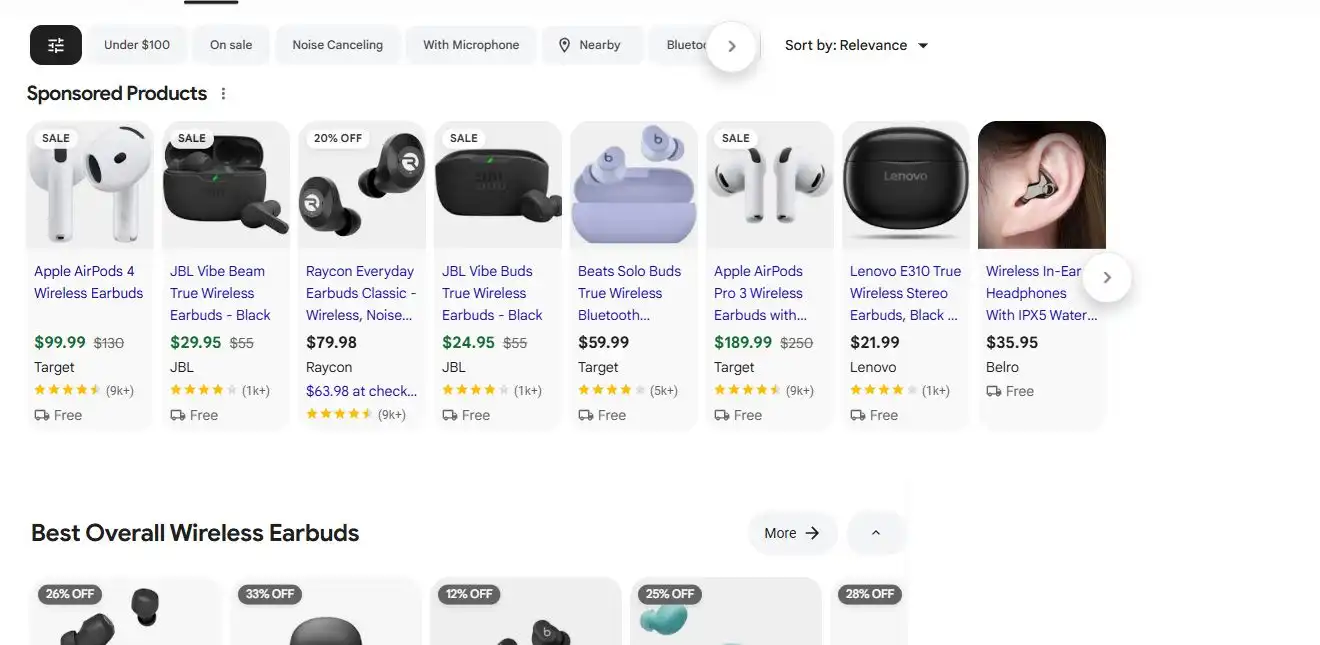
Figure 1. A manually reviewed Google Shopping results page captured on August 21, 2026. It shows the current udm=28 surface and visible product evidence. No automated product-card extraction was performed. Source: Google.
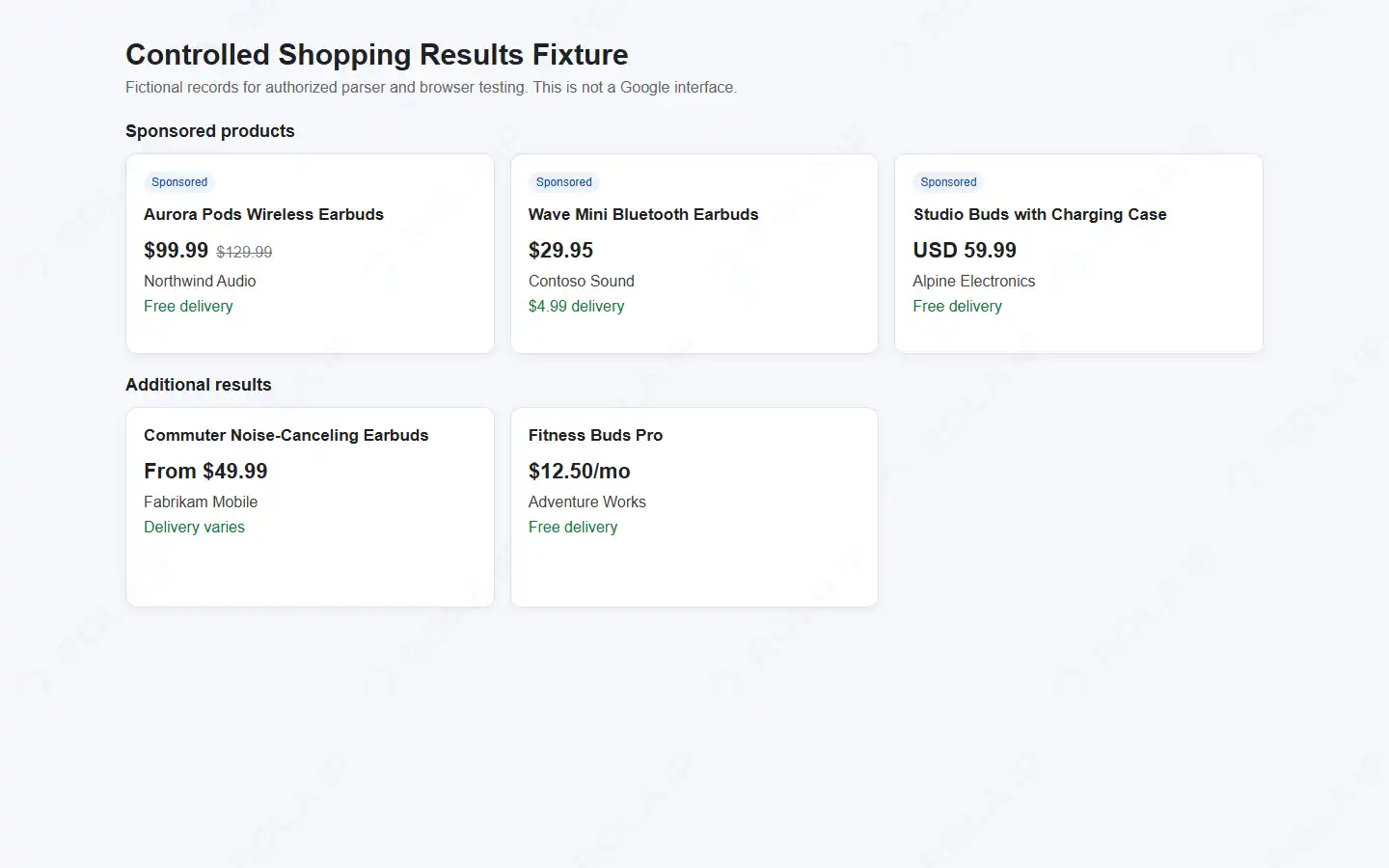
Figure 2. A real Playwright screenshot of the controlled fixture used for verification. All records are fictional, and the page explicitly states that it is not a Google interface.
Scrape Google Shopping Results with Playwright
For reusable browser-rendering patterns, see scraping dynamic web pages with Python. The Google Shopping-specific workflow below adds placement evidence, price semantics, pagination guards, and dataset validation.
Step 1: Centralize the selectors
Google does not publish the result-card CSS classes as a stable scraping API. Keep locator candidates in one file so that selector drift does not force changes throughout the application. The fixture selectors come first; the reviewed live-surface fallbacks come second.
# selectors.py
CARD_SELECTOR = "[data-shopping-card], .mnr-c.pla-unit"
TITLE_SELECTORS = (
    '[data-field="title"]',
    '[role="heading"][aria-level="3"]',
)
CURRENT_PRICE_SELECTORS = (
    "[data-price-current]",
    ".VbBaOe",
)
OLD_PRICE_SELECTORS = (
    "[data-price-old]",
    ".tWaJ3e",
)
SELLER_SELECTORS = (
    "[data-seller]",
    '[aria-label^="From "]',
)
PRODUCT_LINK_SELECTORS = (
    "a[data-product-url]",
    "a.pla-unit-single-clickable-target",
)
REVIEW_SUMMARY_SELECTORS = (
    "[data-review-summary]",
    '[role="img"][aria-label^="Rated "]',
)
NEXT_PAGE_SELECTORS = (
    "a[data-next-page]",
    'a[aria-label="Next page"]',
)
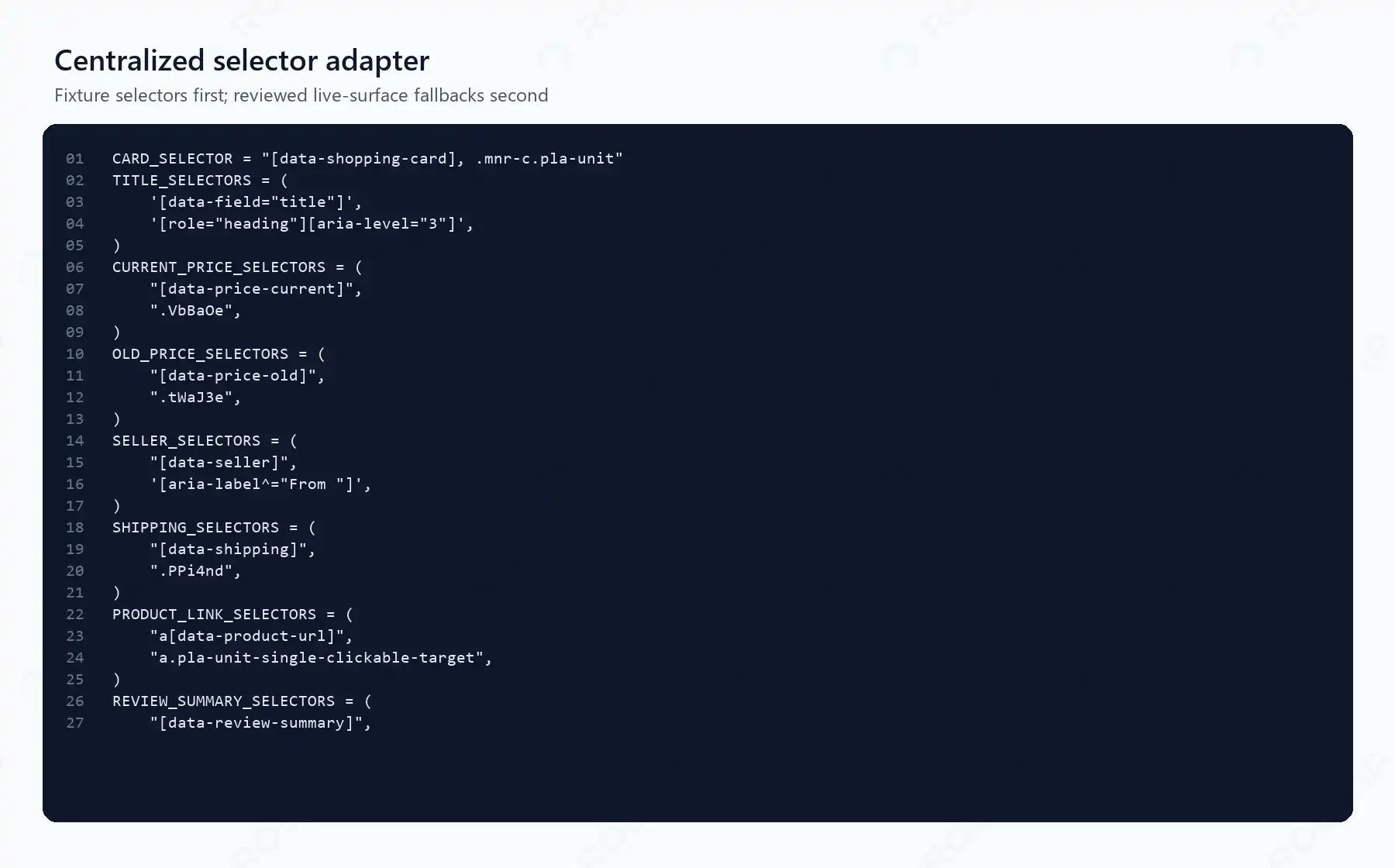
Figure 3. The selector adapter used by the tested project. Generated class names are isolated as replaceable fallbacks, not treated as durable contracts.
The first selectors make the fixture deterministic. The second selectors reflect the manually inspected surface on the verification date. Recheck them before any authorized live run.
Step 2: Build a controlled Shopping query
Do not concatenate raw search input into a URL. Use urlencode and freeze the query, country, and language alongside the output:
from urllib.parse import urlencode

def build_live_url(query: str, language: str, country: str) -> str:
    return "https://www.google.com/search?" + urlencode({
        "q": query,
        "udm": "28",
        "hl": language,
        "gl": country.lower(),
    })
hl influences interface language and gl supplies a country hint, but neither guarantees a local-shopper view. The browser locale, time zone, cookies, device profile, network location, and Google’s own systems can still affect the response. If the expected Shopping surface is unavailable, fail clearly instead of switching silently to a different search module.
Step 3: Launch a clean context and fail safely
The verified browser setup uses explicit context values and a bounded navigation timeout:
with sync_playwright() as playwright:
    browser = playwright.chromium.launch(channel="chrome", headless=True)
    context = browser.new_context(
        locale="en-US",
        timezone_id="America/New_York",
        viewport={"width": 1440, "height": 900},
    )
    page = context.new_page()
    page.goto(target, wait_until="domcontentloaded", timeout=30_000)
If an authorized regional test needs proxy routing, configure it at browser launch and keep credentials outside source control. Rola IP’s Python proxy integration guide shows the connection pattern; it does not replace the permission checks described above.
Before parsing cards, inspect visible page text for known invalid states. The tested project stops on unusual-traffic, CAPTCHA, unresolved consent, and sign-in markers. It also exits with a nonzero status when validated records fall below MIN_VALID_RECORDS. A challenge page must never become a successful empty CSV file.
The command-line interface enforces the same boundary. --fixture is reproducible by default. Live navigation requires the separate --authorized-live acknowledgement flag; without it, the program refuses the request with exit code 2. That flag only records the operator’s acknowledgement. Code cannot determine whether a contract, site policy, or law actually authorizes the run, so permission must be documented outside the program.
After authorization has been documented, the complete project accepts an explicit live command:
.\.venv\Scripts\python.exe shopping_scraper.py `
  --live `
  --authorized-live `
  --query "wireless earbuds" `
  --country US `
  --language en `
  --currency USD `
  --min-valid-records 5 `
  --max-pages 1 `
  --output artifacts\google_shopping_live.csv
This command path is included for authorized use but was not executed automatically against Google. Begin with one page, inspect the saved result surface, and confirm current selectors before increasing scope.
Step 4: Extract typed product records
For each matched card, require a title and displayed price. Read optional seller, shipping, old price, and product-link evidence without replacing missing values with empty numeric defaults. The extractor then assigns position within its source module:
cards = page.locator(CARD_SELECTOR)
positions: dict[str, int] = {}
results = []

for index in range(cards.count()):
    card = cards.nth(index)
    title = first_text(card, TITLE_SELECTORS)
    raw_price = first_text(card, CURRENT_PRICE_SELECTORS)
    if not title or not raw_price:
        continue

    placement_type, placement_label, source_module = placement_for(card)
    positions[source_module] = positions.get(source_module, 0) + 1
    parsed = parse_price(raw_price, currency_hint="USD")
    # Build ShoppingResult with raw evidence and nullable derived fields.
Ratings and review counts follow the same evidence-first rule. The extractor retains displayed strings in rating_text_raw and review_count_text_raw. It does not turn abbreviations such as 32K into an exact integer because the page has not supplied that precision.
Canonicalize product URLs conservatively before using them as identity evidence. Removing every query parameter can merge distinct variants or seller offers. The tested implementation strips only known tracking parameters, sorts the remaining parameters, removes fragments, and preserves identity-critical values such as variant=blue:
TRACKING_PARAMS = {"gclid", "dclid", "fbclid", "msclkid", "gbraid", "wbraid"}

def canonicalize_url(url: str | None) -> str | None:
    if not url:
        return None
    parts = urlsplit(url)
    if parts.scheme not in {"http", "https"} or not parts.netloc:
        return None
    query = [
        (key, value)
        for key, value in parse_qsl(parts.query, keep_blank_values=True)
        if not key.lower().startswith("utm_")
        and key.lower() not in TRACKING_PARAMS
    ]
    query.sort(key=lambda pair: (pair[0].lower(), pair[1]))
    return urlunsplit((parts.scheme.lower(), parts.netloc.lower(),
                       parts.path.rstrip("/"), urlencode(query, doseq=True), ""))
The deterministic identity hierarchy is:
- a cleaned product URL or exposed stable product ID;
- otherwise, normalized title + seller + variant evidence + raw price;
- separate records when preserved variant evidence conflicts or confidence is low.
The output includes identity_key and match_confidence. It never guesses a GTIN, EAN, MPN, or model number from the title.
Step 5: Normalize only prices you can prove
The price parser uses Decimal rather than binary floating-point numbers. Its deliberately narrow MVP supports a single displayed price and tested separator formats. It classifies special formats without inventing a comparable amount:
if re.search(r"\b(from|starting at)\b", lowered):
    return ParsedPrice(None, "from", currency_code,
                       currency_source, "unsupported_kind")
if re.search(r"(/\s*mo\b|per month|monthly)", lowered):
    return ParsedPrice(None, "monthly", currency_code,
                       currency_source, "unsupported_kind")
if re.search(r"\d[\d.,\s]*\s*[-–]\s*[$€£¥¥]?\s*\d", raw):
    return ParsedPrice(None, "range", currency_code,
                       currency_source, "unsupported_kind")
The parser records currency provenance as visible, controlled_locale_inference, or unknown. An ambiguous $ without a controlled currency hint remains null. An old price is captured only when it appears in a distinct visible field; the code does not infer a discount from two unrelated numbers.
Step 6: Export CSV and prove the run succeeded
Run the controlled workflow from the project directory:
.\.venv\Scripts\python.exe shopping_scraper.py `
  --fixture fixtures\google_shopping_minimal_redacted.html `
  --query "wireless earbuds" `
  --country US `
  --language en `
  --currency USD `
  --min-valid-records 3 `
  --max-pages 2 `
  --output artifacts\google_shopping_results.csv
The verified result was:
status=success mode=controlled-fixture records=7 output=artifacts\google_shopping_results.csv min_valid_records=3
Success means more than process exit code 0. The validator confirms that the recognized Shopping surface is present, no challenge marker is visible, the record count meets the frozen threshold, every accepted row contains both a title and raw price, and each module_position is unique within its source module. It also requires country, language, and capture time before storage. If any of those checks fail, the program returns a nonzero exit and does not describe an empty file as a successful scrape. Establish the record threshold manually for the exact frozen query and surface; do not copy the fixture’s value of three into every production workflow.
Fifteen tests passed. They cover real headless-Chrome fixture extraction, two-page continuation, variant-safe URL identity, explicit and inferred currency handling, unsupported From and monthly prices, ambiguous dollars, duplicate module positions, the minimum-record failure gate, unusual-traffic and consent pages, an empty result surface, and refusal of unacknowledged live mode.
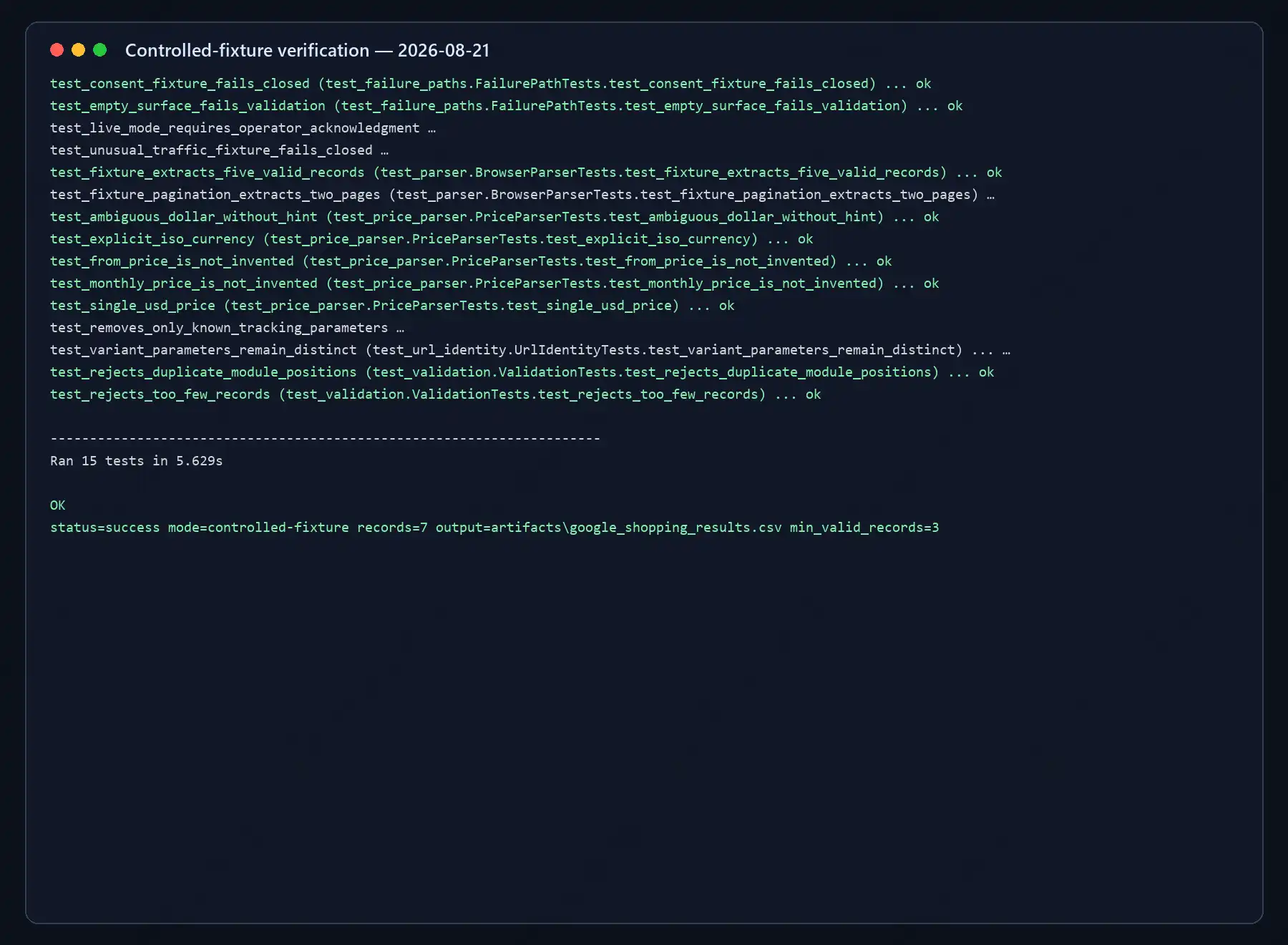
Figure 4. A rendered transcript of the actual verification logs for the 15 tests and two-page scraper run. The paths contain no credentials, account data, cookies, or live IP addresses.
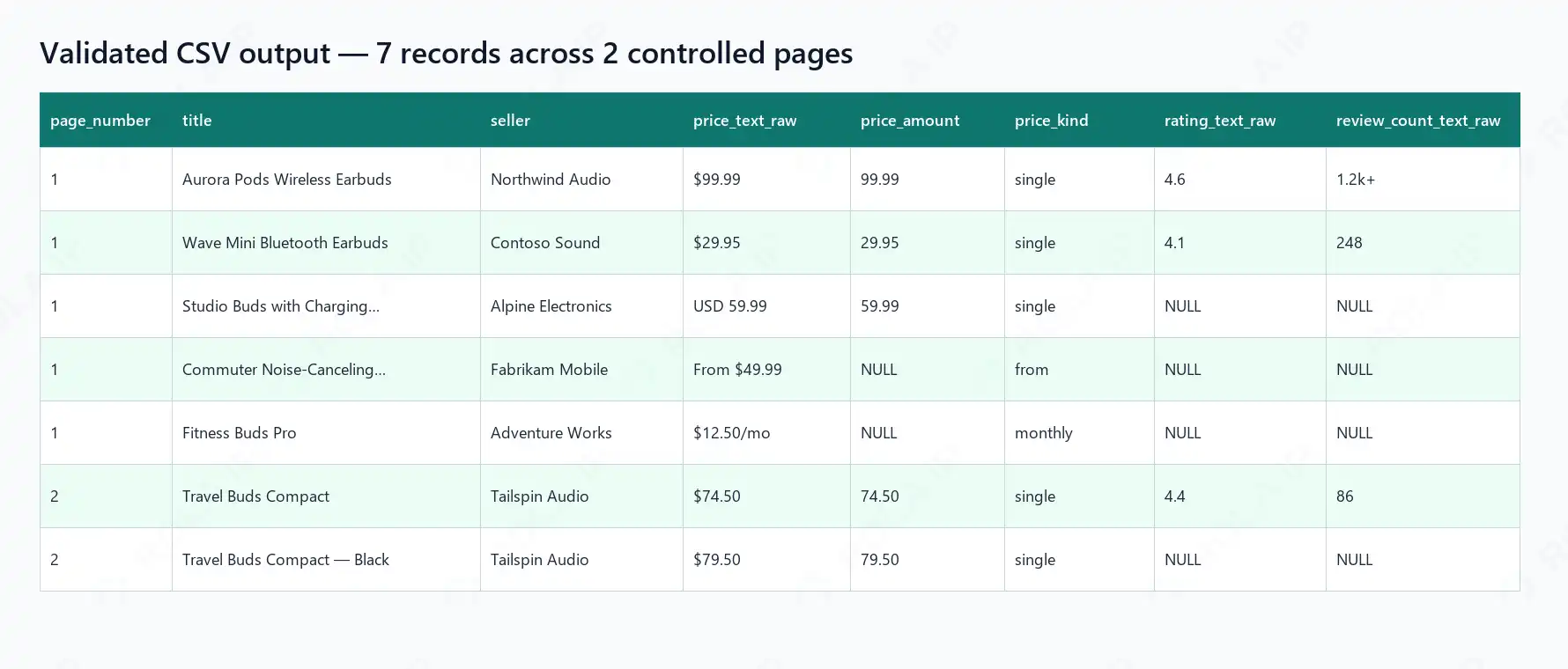
Figure 5. The generated CSV contains seven records across two controlled pages, preserves rating and review-count evidence, and leaves unsupported “from” and monthly amounts null.
Add Pagination and Build Price History
Do not assume that start=20 will always retrieve another Shopping page. A layout may expose a next link, a load-more control, continuous scrolling, or no continuation mechanism. Inspect the authorized target surface, then implement only the behavior that is actually present.
The tested fixture exposes an ordinary same-host next link. extract_pages() follows it only up to --max-pages, records page_number, rejects a link that leaves the current host, stops when no next link exists, and fails when either a URL or collected identity set repeats. The two-page test returns seven unique records and proves that variant=blue and variant=black remain separate identities. This validates the continuation algorithm, not Google’s current live pagination mechanism.
Use hard ceilings for pages, records, elapsed time, and consecutive empty results in any authorized implementation. Stop when content repeats, a challenge appears, the module changes, or validation fails. Never keep requesting pages merely because the expected button disappeared.
For price history, append observations instead of overwriting them. Compare records only when country, currency, seller scope, product identity, and variant confidence agree. Keep shipping separate from the displayed product price. Minimum, median, and maximum statistics are meaningful only after those dimensions match.
This is also where a conservative deduplication key matters. Two sellers offering the same model are separate offers; two titles that look similar may describe different variants. Exact GTIN/EAN and offer matching should be treated as a separate advanced workflow. For a broader implementation context, see Rola IP’s guide to proxies for price monitoring.
Collect Comparable Results by Country and Language
Record every input that could affect the snapshot:
| Input | Example | Why it matters |
|---|---|---|
| Query | wireless earbuds |
Defines the product search |
| Language | hl=en, locale en-US |
Affects labels and number formats |
| Country hint | gl=us |
Supplies a regional hint, not a guarantee |
| Time zone | America/New_York |
Makes the browser context reproducible |
| Viewport | 1440 × 900 desktop | Layout may change by device size |
| Cookie/account state | Fresh context | Reduces uncontrolled personalization |
| Network region | Logged separately | Can affect sellers and availability |
| Capture time | UTC timestamp | Prices and inventory change |
Only call two market snapshots comparable when these inputs are controlled and recorded. A proxy can help route an authorized regional QA or price-monitoring job, but it cannot stabilize selectors or guarantee the same inventory a resident would see. When that routing is legitimately required, Rola IP is one web scraping proxy infrastructure option. Keep one sticky session within a single query snapshot, rotate only between independent authorized batches, and verify the exit location before collection.
When to Use a Google Shopping Results API Instead
A Google Shopping results API usually means a third-party service that returns structured Shopping SERP data. Google’s Merchant API is different: it manages an authorized merchant’s own Merchant Center resources and is not a public competitor-results API.
| Option | Best fit | Data control | Main tradeoff |
|---|---|---|---|
| Playwright scraper | Small authorized tests and custom extraction | High | You own selector and browser maintenance |
| Third-party results API | Repeated structured collection | Medium | Provider cost, schema, freshness, and terms |
| Merchant API | Your own Merchant Center operations | High | Does not return a public competitor SERP |
Evaluate a third-party API by permitted use and retention terms, country/language/device controls, sponsored labeling, seller and shipping coverage, freshness, cache behavior, schema versioning, retries, request IDs, and cost per validated usable result. An API shifts browser maintenance to a provider; it does not automatically resolve data rights or contractual obligations.
Reliability, Maintenance, and Troubleshooting
Monitor more than success rate. Useful signals include valid record count, missing-price rate, placement_type=unknown rate, duplicate rate, currency mismatch, and parser failures. A sudden drop in records on a recognized Shopping surface is selector drift, not a successful “zero products” result.
| Symptom | Likely cause | How to verify | Safe fix |
|---|---|---|---|
requests.get() has no product cards |
JavaScript rendering or alternate page | Inspect the returned HTML | Use a permitted rendered-browser workflow |
| Consent page appears | Regional or cookie-state flow | Check the title and visible markers | Stop and resolve consent legitimately |
| CAPTCHA or unusual traffic | Automated-access signal | Save redacted failure evidence | Stop requests and review authorization |
| Visible cards but zero records | Selector drift | Compare the reviewed DOM with selectors | Update the centralized adapter and fixture |
| Duplicate products | Repeated modules, pages, or variants | Inspect module and identity fields | Apply the deterministic identity hierarchy |
| Wrong currency or sellers | Conflicting localization inputs | Audit logged inputs and network region | Align the controlled variables |
| Wrong parsed price | Range, financing, coupon, or locale text | Compare with price_text_raw |
Return null and add a regression test |
| Navigation timeout | Slow render, blocked page, or wrong wait target | Review redacted HTML and screenshot | Use a targeted wait and bounded failure exit |
Limits, Data Quality, and Compliance
Displayed Shopping prices can vary by location and may not be the final checkout price. A card does not prove inventory, authenticity, seller authorization, delivered cost, or stable ranking. Advertising, personalization, history, device, and capture time may change the result set.
Respect applicable terms, machine-readable instructions, privacy obligations, contracts, and intellectual-property rights. Do not collect account, checkout, payment, or non-public personal data. Preserve placement_type=unknown whenever advertising status cannot be verified. This tutorial provides technical guidance, not legal advice.