
Yandex SEO Guide 2026 Indexing and Regional Rank Tracking

Oct 22, 2026 · Guides · 17 min read
Yandex SEO is a combination of search demand research, crawl and indexing checks, relevant content, and accurate regional business information. Use Webmaster to diagnose page status, Wordstat to assess query demand, and analytics tools to measure visits and conversions. When tracking regional rankings, record API settings, the browser environment, and the proxy exit separately. A proxy can only control the network path used for a check. It cannot set a site’s region, and it cannot improve rankings on its own.
Key Takeaways
- Verify crawling and indexing separately; submitting a URL does not mean it has been indexed.
- Record the Wordstat query expression, filters, report period, and export date.
- Make the site’s region information match its real business coverage.
- API observations and browser observations are two independent ranking series. Do not mix them.
- Record failed requests separately from valid results where the target did not appear within the sampling depth.
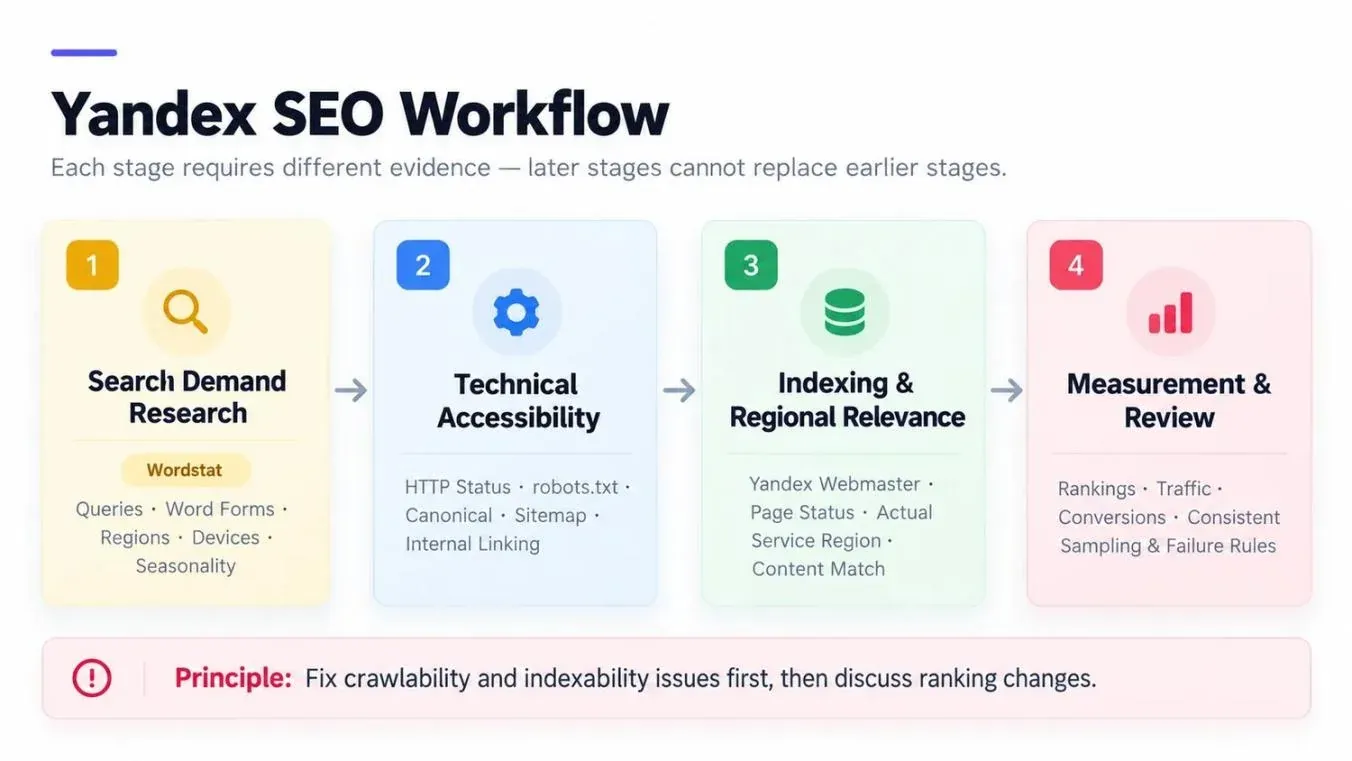
What Is Yandex SEO?
Yandex SEO is the work of making a website easier for Yandex Search to discover and understand, and to match with relevant queries. It includes Russian keyword research, crawl and indexing checks, page content and structure, accurate regional information, user experience, and ongoing performance measurement.
Many basic Google SEO principles still apply: stable HTTP responses, a clear site structure, canonical URLs, valuable content, and natural internal links. But Yandex also requires a separate check of whether a page has entered its searchable page set. Being indexed by Google does not prove that Yandex has indexed it. Depending on your analysis needs, you can use Yandex Webmaster (crawling and indexing), Wordstat (query demand), and Metrica (visits and conversions). The three answer different questions, and none of them is a prerequisite for a site to rank.
| Area | Core Yandex SEO Question | Recommended Action |
|---|---|---|
| Russian demand | Which word forms and expressions do users actually use? | Record the query expression, region, device, and period in Wordstat. |
| Crawling and indexing | Can YandexBot access the page? Has the page entered search? | In Webmaster, distinguish the three states: “submitted,” “crawled,” and “indexed.” |
| Regional relevance | Does the page’s service coverage match queries with local intent? | Check the site region, contact details, delivery area, and service areas. |
| Page quality | Does the page fully answer the user’s task? | Add specifications, conditions, steps, evidence, and limitations. |
| Performance measurement | Are rankings, traffic, and conversions compared on the same basis? | Fix the query, region, device, result modules, sampling depth, and time window. |
Yandex Ranking Factors 2026: What Should You Prioritize?
The public official sources consulted for this article do not provide a fixed 2026 weight table that can be applied directly. So “yandex ranking factors 2026” should be understood as a set of optimization priorities, not an algorithm formula.
Query Matching and Content Value
A page should help the searcher complete a task. Transactional pages need to explain service availability, pricing conditions, delivery, and after-sales support. Tutorials need prerequisites, steps, failure causes, and verification methods. Don’t stuff keywords just to cover more Russian word forms.
Genuine Regional Relevance
Queries with local intent may take the site’s region into account. The business address, service cities, delivery area, phone number, and the region setting in Webmaster should all agree with one another. If there is no real local business, don’t invent a local address or contact details.
Crawlability and Indexability
YandexBot must receive a valid response and be able to read the main content. When troubleshooting, consider robots.txt, robots meta directives, canonical links, duplicate URLs, internal links, and server stability. A sitemap is a discovery signal, not a guarantee of indexing.
Page Experience and Verifiable Information
Important content should display correctly on both mobile and desktop, and pages should not rely on misleading redirects. Company information, terms of service, and contact details should be verifiable. Relevant links and media coverage can help users judge credibility, but bulk link exchanges or fake clicks cannot replace improving the page itself.
How Yandex Discovers, Indexes, and Ranks Pages
From submission to ranking, a page goes through several states. An SEO team should keep evidence for each state separately, rather than treating an intermediate state as the final result.
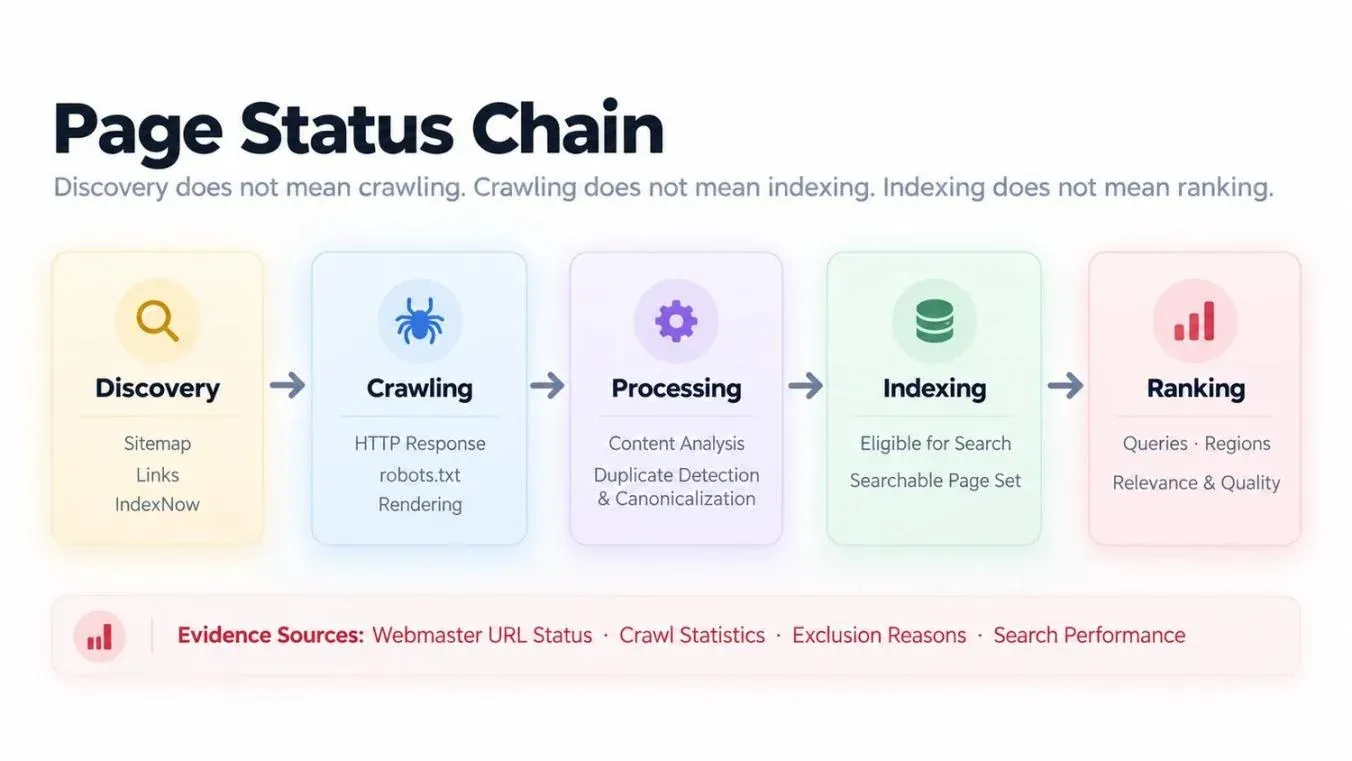
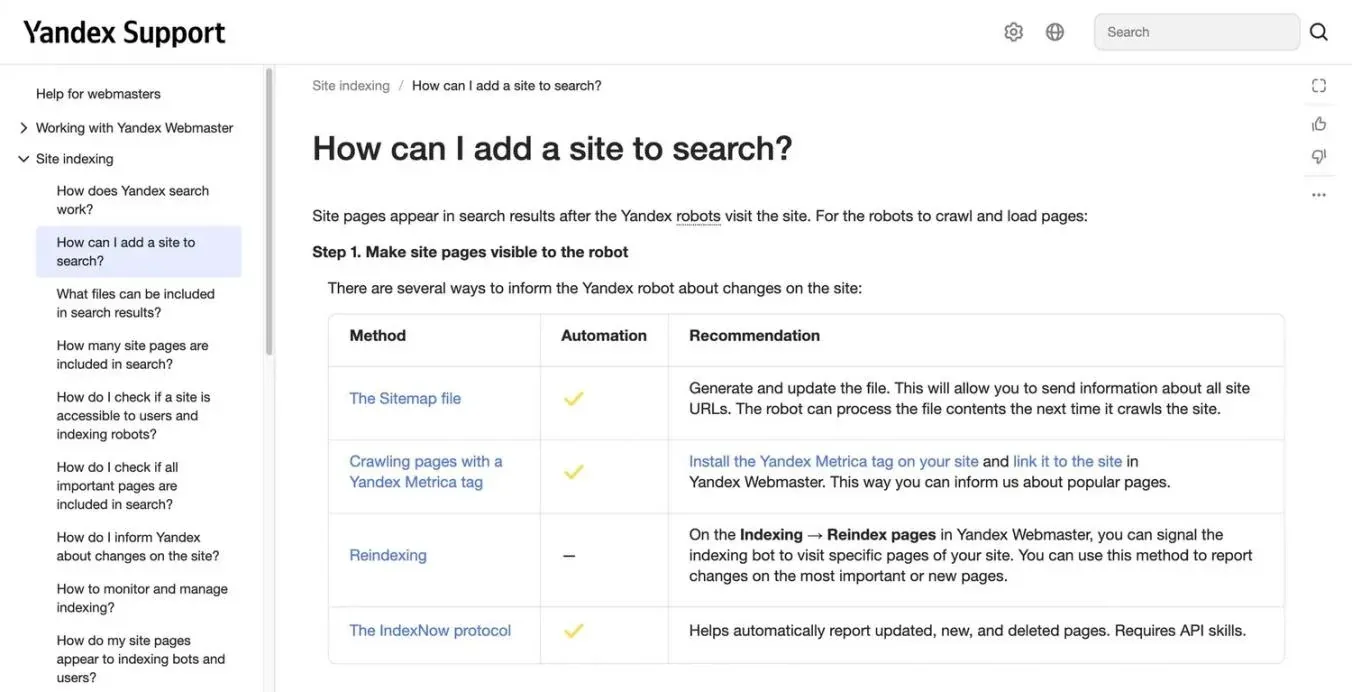
According to Yandex’s official page discovery documentation, the crawler can discover pages through internal and external links, sitemaps, recrawl requests in Webmaster, IndexNow, and linked Metrica counters with the relevant option enabled. Receiving these signals only means that Yandex has obtained a URL or an update notification. It does not prove that the page has been crawled, indexed, or ranked.
You can judge page status using the URL status in Webmaster, pages in search, crawl statistics, and exclusion reasons. A public site: query is suitable for a quick spot check, but for a verified site it should not replace the data in the back end.
Yandex SEO Guide: Six Practical Steps
Step 1: Add and Verify Your Site in Yandex Webmaster
In Yandex Webmaster, add the full site address you actually use, including the protocol and hostname. You can verify ownership through a DNS record, an HTML file, or a meta tag. A successful verification is not just being able to see the site name: the account must be able to access the site’s diagnostics, crawl information, and page status data.

First record the date of the action, the site hostname, the verification method, and who performed it. Check the server response for the homepage and one important inner page, and confirm there are no unresolved ownership or security issues in the back end.
Step 2: Submit a Sitemap and Check Indexing Conditions
A sitemap should include only the preferred, accessible canonical URLs that you want to be publicly reachable. After submitting it, record the following separately: whether the sitemap can be read, whether the URLs have been discovered, whether the pages have been crawled, and whether they have entered search. Don’t merge “submitted,” “crawled,” and “indexed” into a single status.
Adjust the following robots.txt example to match your actual directory structure:
User-agent: *
Disallow: /admin/
Sitemap: https://example.com/sitemap.xml
The Disallow directive in robots.txt is not a privacy measure. Sensitive pages need real access control such as authentication. Important pages should also return HTTP 200, avoid noindex, use the correct canonical URL, and receive internal links from crawlable pages.
Below is a public technical check record. On October 18, 2026, when checking Rola IP’s Yandex solution page (https://rola-ip.co/solutions/yandex-proxy/): the URL returned HTTP 200, both the response headers and the page’s robots meta allowed index, follow, the canonical pointed to the page itself, and the URL appeared in the English sitemap. These results only describe technical conditions that can be observed publicly. Without Webmaster access, it is impossible to confirm whether Yandex has indexed the page.
| Check | Observed Result | What It Shows |
|---|---|---|
| HTTP response | 200 | The page was publicly accessible at the time of the check. |
| Robots directive | index, follow | No indexing ban was declared in the locations checked. |
| Canonical | Points to itself | The page declares itself as the canonical URL. |
| Sitemap | The English sitemap includes the URL | Yandex can get a discovery signal from the sitemap. |
| robots.txt | Not checked (pending) | It is not yet possible to say whether robots.txt allows YandexBot to crawl the URL. |
| YandexBot access | Not verified | A normal request returning 200 does not prove that YandexBot’s network path can reach the page. |
| Yandex indexing status | Cannot be confirmed by public checks | Requires Webmaster access for a verified site. |
Step 3: Build a Russian Keyword Map with Wordstat
The official Wordstat interface documentation explains that the basic report shows query statistics for the entered word or phrase and its possible grammatical forms; the “Regions” tab shows regional distribution over the last 30 days; “Dynamics” lets you choose a date range and view data by day, week, or month; and the relevant views can be filtered by region and device.
So for every Wordstat number, record the query expression, operators, region, device, report tab, report period, and export date. The number is not a count of unique users, and it does not equal the traffic a page will receive. Use the operator syntax supported by the current official documentation, and record the full query expression you used. This article has not verified how specific operators affect the scope of the statistics, so it assumes no meaning for them.
Russian Query Example |
Meaning in English |
Search Intent |
Suggested Page |
Evidence to Collect |
|---|---|---|---|---|
купить офисное кресло |
Buy an office chair |
Transactional |
Office chair category page |
Wordstat report, filters, period, and export date |
как выбрать офисное кресло |
How to choose an office chair |
Informational |
Buying guide |
Wordstat report and a review of actual search results |
These queries are only for demonstrating keyword mapping. They are not recommendations backed by verified search volume. After collecting data, map keywords to real pages instead of making the homepage carry transactional, comparison, and tutorial intent all at once.
Step 4: Set an Accurate Site Region and Localize Your Pages
Yandex’s official Site region documentation explains that the site region may affect queries with local intent. The setting is located under “Display in the search → Site region.” Choose a region that covers your real service or delivery area, and back it up with the address, contact details, and delivery information on the site. Submitted changes are subject to review. Business information in Yandex Business is also one of the sources used to determine region, and it should be consistent with your site information and Webmaster settings.
A single-region business can choose the region where it actually operates. A store serving multiple regions should choose a region that covers its delivery area and list its real service cities on the site. A general-interest media site may not need a region association. Assigning a site to a region does not mean it cannot appear in other regions.
Localized pages should adapt to the language, currency, delivery methods, after-sales terms, and user questions, not just swap out the city name. For multilingual versions, also check the canonical tags, hreflang, and sitemap, to avoid regional pages with different purposes being wrongly canonicalized to the same URL.
Can Showing Regional Content by IP Make Some Pages Invisible to YandexBot?
It can. Yandex’s site region documentation warns that if the crawler arrives from an IP in a single region, it may only get one version of the site. Make regional pages discoverable and accessible through clear navigation and stable URLs, rather than showing them only after an IP-based redirect.
For target sites that you own or are permitted to test, you can access the same URL through different documented regional paths and compare the results. Record the final URL, language, service or delivery information, main content, canonical, and the navigation to other regional pages. Also control the browser language and cookie state, and note any deliberate changes.
A proxy can help you spot differences between visitor paths, but it cannot prove what YandexBot crawled or indexed. Conclusions like that require server logs and evidence from Webmaster.
Step 5: Optimize Content Structure and Internal Navigation
Each major page should have one clear H1, with H2s and H3s that answer the user’s follow-up questions. The opening paragraph should give the answer directly, followed by evidence, steps, conditions, and exceptions. Informational pages should link naturally to related service pages, and service pages should link to the guides and FAQs that resolve purchase questions.
Fix broken links, empty category pages, duplicate templates, and paragraphs written only for search bots. Titles, descriptions, and body copy should use the expressions Russian-speaking users actually use, not a mechanical translation of an English keyword list into Russian.
Step 6: Recheck Status and Log Changes
After a page is published or heavily updated, first confirm that the live version is accessible. Then submit important URLs through “Reindex pages” in Webmaster, working within the daily quota the console currently shows. Record the subsequent recrawl date, page status, exclusion reasons, and follow-up actions.
A useful diagnostic record should include at least: the URL, first discovery date, HTTP status, robots and noindex directives, canonical URL, whether it is in the sitemap, latest crawl date, indexing status, target region, owner, and next review date. Only when evidence in the back end supports a change in status can you say a page is “indexed” or “restored.”
Yandex SEO Tools: What Does Each Tool Do?
| Tool | Main Purpose | Typical Output | Key Limitation |
|---|---|---|---|
| Yandex Wordstat | Research query demand and regional differences | Queries containing the selected term, trends, regional and device data | Not a site indexing report |
| Yandex Webmaster | Verify ownership; diagnose crawling and indexing | URL status, crawl records, exclusion reasons, search queries | Submission does not guarantee indexing or ranking |
| Yandex Metrica | Analyze visits, behavior, and conversions | Sessions, landing pages, goal completions | Installing it alone does not guarantee indexing |
| Yandex Search API | Run structured searches within its supported capabilities | Structured search results; supported formats and region parameters are as stated in the official documentation (not verified in this article) | API results and browser pages are not the same data series |
| Compliant rank-tracking tools | Store regional and device rankings on a consistent basis | Query, URL, location, time, and status | Result modules, sampling depth, and failure rules must be defined first |
Metrica is mainly used to analyze visits and conversions, but it is not entirely unrelated to page discovery. Yandex’s documentation on using Metrica counters to assist crawling requires that you first link the counter to a verified site, and then enable the corresponding crawl option in Webmaster. This does not override robots directives or noindex, and it does not guarantee that a page will be indexed.
How to Track Yandex Regional Rankings Reliably
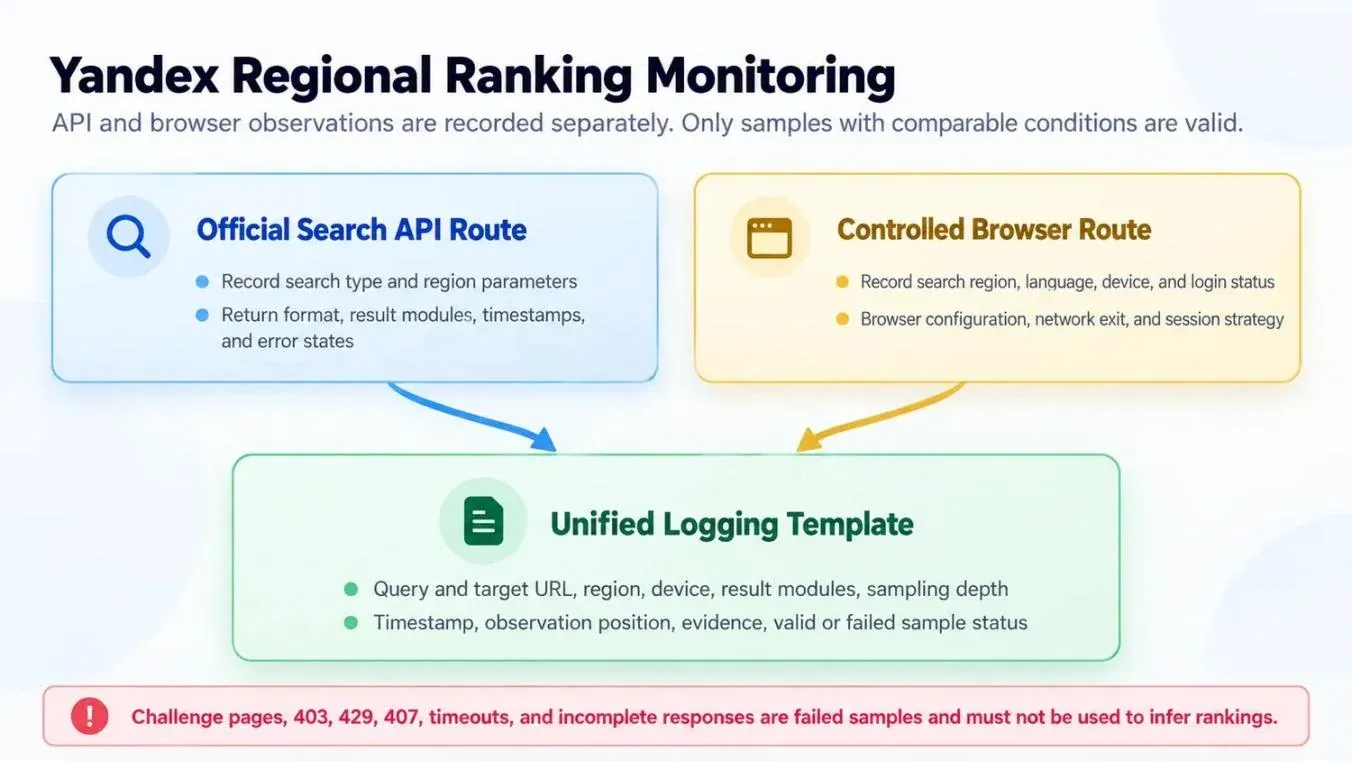
First, decide what you need to measure: structured search results, or regional display and network access in a browser. For structured results, start by evaluating the Yandex Search API and the search types and region parameters it supports. For permitted browser checks, then decide whether you really need to specify a network exit.
Distinguish the Four Meanings of “Region”
| Concept | What It Actually Means | What It Cannot Replace |
|---|---|---|
| Site region in Webmaster | The site’s real service coverage and regional affiliation | Cannot be changed directly by switching the visitor’s IP |
| Browser region, language, and session | The display and context settings of the current search | Cannot be confirmed from an IP geolocation report alone |
| Search API region parameter | The region-based ranking setting used in API requests | Not equivalent to a browser session, and does not necessarily require a local proxy |
| Geo label of the proxy exit IP | The network exit used by the request, and how a given database identifies it | Does not guarantee that Yandex recognizes it as the same city |
Match IP Resources to the Monitoring Task
| Task | Paths to Evaluate | What to Verify |
|---|---|---|
| Structured search observation | Official API or an authorized data provider | Supported search types, region parameters, response format, quotas, and cost |
| Repeated browser checks from a fixed exit | Static residential IPs, where available | Actual location, continuity of assignment, client configuration, and plan validity period |
| Independent regional browser samples | Rotating residential routes with the session defined for each task | Exit verification, session behavior, regional availability, and traffic budget |
| Accessibility of regional target pages | A permitted control path, plus the selected regional exit | Redirects, visible content, language, cookies, canonical, and regional navigation |
Rola IP offers proxy products that you can evaluate for these network tasks. If a test needs a fixed exit, you can evaluate static residential proxies against your actual location, session, and billing requirements. If you need to rotate exits between tasks and cover a wider range of markets, you can evaluate rotating residential proxies. A fixed or sticky route can remove one source of variation, but it will not make the browser state or the region Yandex selects fully consistent across observations.
As of October 19, 2026, the Rola IP website publicly describes its static residential proxies as billed per IP with unlimited traffic during the plan’s validity period, and its rotating residential proxies as covering more than 190 countries and regions and more than 80 million residential IPs. These are descriptions from the product pages. They do not mean that any particular city is in stock, nor that Russian exits are available. Before scaling up, validate the markets and session behavior you need with a small, authorized test first.
Record your route settings, failed attempts, and valid results so that the monitoring process can be diagnosed. Any claim of “higher reliability” or “lower cost” needs to be backed by comparable measurements from your actual configuration.
Two Monitoring Approaches
The API approach suits teams that need structured results, stable fields, and automated logging. Save the search type, region parameters, request time, response format, result modules, and error status. Don’t merge API ranking positions with browser ranking positions into a single trend line.
The browser approach suits checking how a page actually displays, map or ad modules, and reachability from a given network exit. Record the language, search region, device, login state, browser profile, and network path. When a permitted browser test needs documented regional routing, you can refer to Rola IP’s Yandex proxy workflow. Start with a small sample and evaluate the valid task rate, session consistency, and attributable cost.
A Six-Step Sampling Method
- Fix the query, target URL, target market, device, result modules, sampling depth, and observation time window.
- Choose the API, an authorized data provider, or browser observation, and keep a separate data series for each source.
- For browser checks, record the language, search region, login state, and browser profile. If you use a proxy, first confirm that the product currently supports the target location and the session mode you need.
- Before sampling, use the same route configuration to verify the observed exit IP and record the location the database reports. Then separately record the search region that Yandex actually uses or displays.
- Record organic results, ads, and map modules separately. Save the timestamp, time zone, target URL, observed location, and success or failure status.
- Compare only valid samples collected under equivalent conditions. Validation pages, 403, 429, proxy authentication failures, timeouts, and incomplete responses are failed samples. Don’t record them as rank 0 for the target URL.
If batch sampling needs to handle timeouts and retries in Python, see bounded retries in Python Requests to set a consistent timeout, backoff, and retry budget for connection errors, read timeouts, Retry-After, and retryable status codes.
| Field | What to Record |
|---|---|
| Query and target URL | The exact query text; the matching rule for the domain or URL |
| Data source | API, authorized data provider, or browser observation |
| Region | Target region; the API parameters or browser search settings actually used |
| Network environment | Direct or proxy; proxy type; exit country/city; source of the geolocation |
| Session environment | Language, device, login state, browser profile, and session strategy |
| Measurement | Timestamp and time zone; result module; sampling depth; organic ranking position |
| Attempts | Timeout settings, retry cap, number of attempts, and final status (do not expose credentials) |
| Result status | VALID_FOUND / VALID_NOT_FOUND / FAILED; fill in the position only when the target is matched |
| Evidence | Redacted real screenshots or raw responses, timestamps, tool exports; write “not verified” if unavailable |
| Limitations | Untested regions, no Webmaster access, historical indexing not examined, etc. |
| Cost | The actual plan and attributable fees; don’t enter 0 when unknown, and don’t use response body size in place of billed traffic |
Define a “Valid Monitoring Task” Before Calculating Success Rate
A logical task is a combination of one query, target, source, region, device, result module, sampling depth, and planned observation window. Network retries belong to the same task and are counted separately.
- Task validity rate = number of tasks that produced a complete, interpretable result set ÷ number of logical tasks executed.
- Attempt validity rate = number of network attempts that returned a valid result set ÷ total number of network attempts.
A valid result set can be either “target matched” or “target not found within the defined depth” (NOT_FOUND_WITHIN_DEPTH). Keep these two outcomes separate from blocked pages, authentication failures, timeouts, and incomplete results. Save the observed position only when the target is found; use a separate result status field for all other cases. Don’t convert failures into rank 0, and don’t automatically record them as N+1.
Report skipped or canceled tasks separately; if no tasks were executed, report N/A. Retries can improve a task’s final outcome, but they don’t erase the failed attempts or their associated traffic costs. This metric measures collection quality, not website ranking.
How to Troubleshoot Common Yandex SEO Problems
| Symptom | Evidence to Check | Action and Follow-Up |
|---|---|---|
| URL submitted but not in search | URL status in Webmaster, latest crawl, HTTP, robots, noindex, canonical | Fix confirmed issues; request a recrawl if needed, and record the status afterward. |
| Crawled but not indexed | The specific exclusion reason, duplicate and canonical status, page content, internal links | Act on the reason given in the back end; don’t treat sparse internal links as the only explanation. |
| Indexed but no impression data | Report period, filters, query demand, page intent, location, data delay | Confirm the measurement basis first, then decide whether to rewrite the page. |
| Lower position observed in one region | Query, region, device, session, module, time, sampling depth | Collect repeated samples under equivalent conditions to see whether the difference persists. |
| Proxy authentication failure | Credentials, allowlist, confirmed 407 or proxy errors | Fix the configuration and retest; don’t count it as a ranking result. |
| Restricted access | 403, 429, page content, Retry-After, source rules | Stop or reduce the request rate; confirm permissions and quotas before retrying. |
| Timeout or incomplete result | DNS, connection and read stages, response validity, session settings | Record it as a failed sample and investigate the access path; don’t enter rank 0. |
HTTP 444 is not a standard HTTP status code, and it is not a fixed category of Yandex SEO failure. Without the relevant logs, don’t label every disconnection, empty response, or failed sample as 444, and certainly don’t interpret it as a ranking change.
Can a Page Appear in Yandex AI Answers?
It can be considered, but inclusion is not guaranteed. Yandex’s official AI documentation explains that answers are generated automatically from pages Yandex has indexed, and that pages with a clear structure, sufficient information, and correct grammar are more likely to be used.
So an article should answer the question directly, provide verifiable sources, state the conditions under which it applies, and distinguish facts, inferences, and limitations. Even a page that is indexed and well formatted is not guaranteed to be selected or cited by Yandex AI. GEO-oriented “citability” depends on content quality and evidence management, not on yet another ranking switch that can promise results.
Conclusion
An effective Yandex SEO process confirms demand first, then verifies crawling and indexing, handles genuine regional relevance, and finally compares rankings, access, and conversions under consistent conditions. Teams should keep separate evidence for four states: submitted, crawled, indexed, and ranked.
A proxy mainly belongs to the network layer of regional monitoring, supporting authorized browser observations that need a specific exit. It cannot replace the site region setting in Webmaster, the Search API’s region parameters, content localization, or the indexing evidence in the back end. Designing your monitoring around these boundaries helps you avoid mistaking an access failure for a ranking drop, and avoid inflating a single IP lookup into proof of a “local user experience.”