
Geo-Targeted Proxies: Types, Use Cases, and How to Choose

Oct 22, 2026 · Proxy Basics · 12 min read
Geo-targeted proxies route requests through exit IPs associated with a selected country, region, city, or network. They help teams inspect local search results, ads, prices, inventory, and website localization. They change network egress only; GPS, account region, cookies, and delivery addresses may still affect what a site displays.
Key takeaways: Start with the broadest location level that answers your question, then verify the exit IP and the page content. Choose residential, mobile, datacenter, or ISP proxies according to the task and the selected product’s documented features. A proxy provides a regional network exit, not a complete device-location simulation.
What Are Geo-Targeted Proxies?
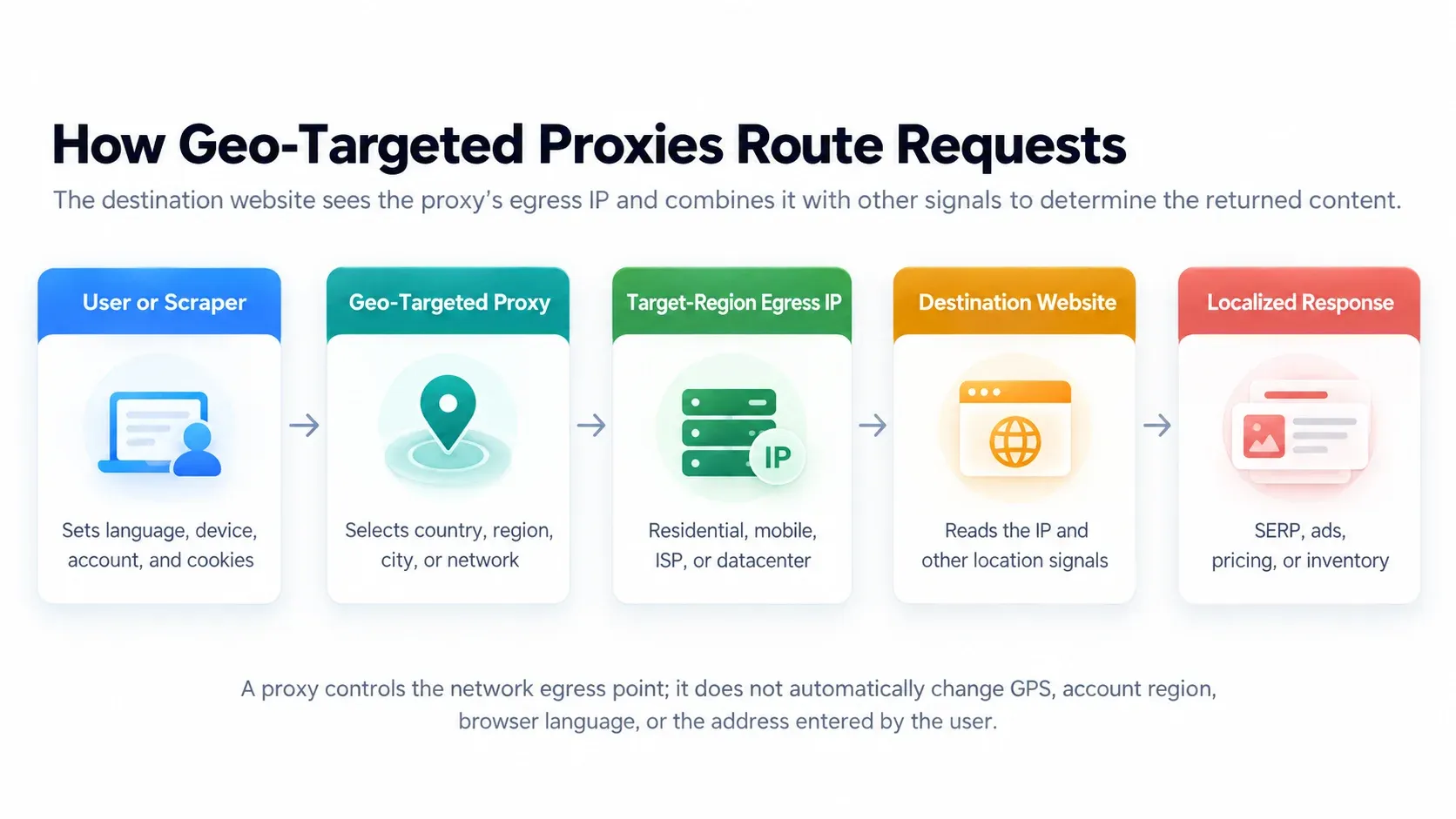
Geo targeted proxies are proxy servers that route internet traffic through IP addresses associated with selected geographic locations, such as countries, states, or cities. In practice, the user connects to a proxy gateway, which selects an exit IP in the requested region to access the target website. The website sees that exit’s public address rather than the user’s original public address.
An ordinary proxy primarily relays traffic; geo proxies also offer location selection. Providers may support country, state or province, city, postal code, ISP, ASN, or mobile-carrier filters. Availability, accuracy, and pricing differ at every level. In commercial usage, geo proxies and geo-targeted proxies are often near-synonyms. What matters is whether the specific product supports your target location and required level of targeting.
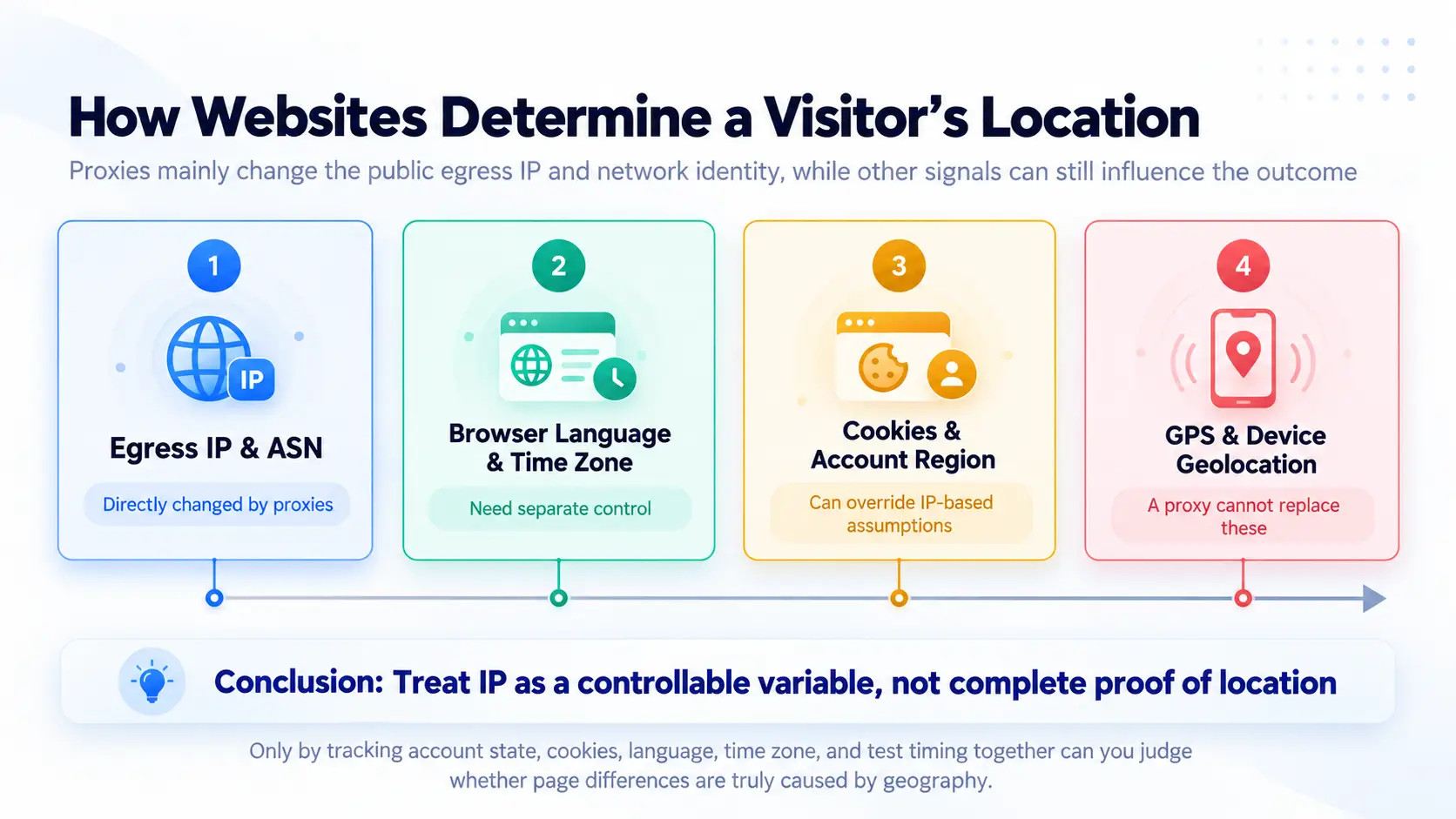
Websites generally estimate visitor location using IP geolocation databases, then combine that information with browser language, account settings, cookies, device permissions, and user inputs. An IP provides a network-location clue. It does not establish a device’s actual GPS coordinates or identify a household, person, or street address.
MaxMind explains that IP geolocation cannot be guaranteed to be 100% accurate and is not precise enough to identify a household, individual, or street address (checked October 22, 2026). Geo-targeted proxies therefore create regional network observation points; they should not be described as complete device-location simulators.
How Do Geo-Targeted Proxies Work?
IP Geolocation and Location-Based Routing
Once a connection is established, the proxy gateway routes the request through an exit associated with the selected location. Depending on the product, users may choose that location in a dashboard, API, gateway configuration, or username parameter. Requests reach the target through the selected exit, and responses return through the same path. Country-level filtering generally leaves a larger candidate pool; city, postal-code, or specific-ASN filters narrow it and may affect availability, latency, and unit costs.
How Websites Detect User Locations
Websites may first inspect the IP and its country, city, ISP, and ASN, then check browser language, time zone, cookies, account country, store selection, GPS, or browser-location permissions. A browser’s Geolocation API can provide device location when the user grants permission; this is separate from IP geolocation. Platforms weight these signals differently: search engines may combine the search domain with language, e-commerce sites may prioritize delivery addresses, and mobile apps may prioritize device location.
Rotating vs. Sticky Sessions
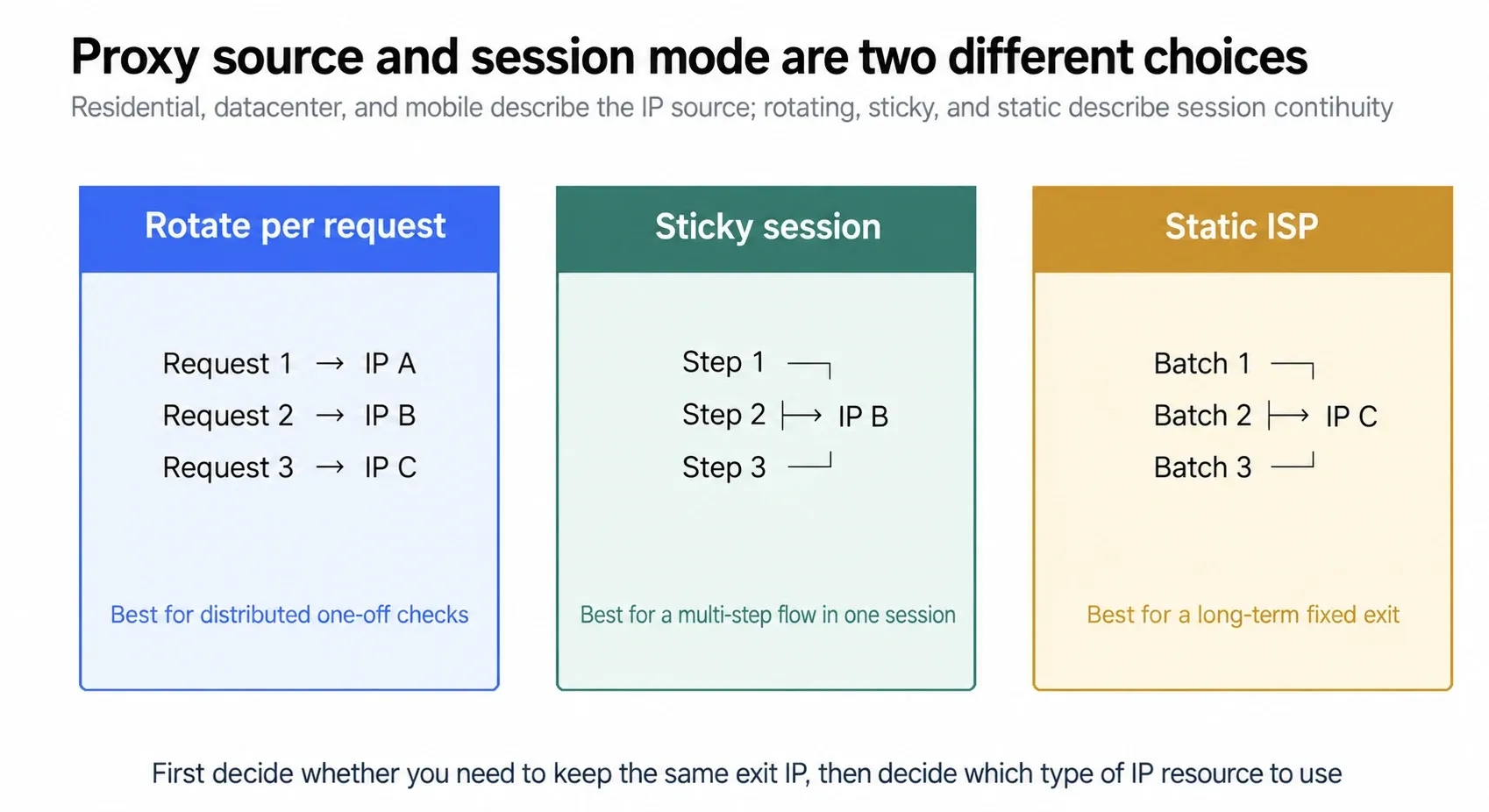
Rotating sessions change exits per request or at configured intervals, making them suitable for many independent public-page checks. Sticky sessions retain the same exit for a period, fitting search-result pagination, shopping carts, localization QA, and other continuous workflows. These are session strategies, not proxy sources: both residential and mobile proxies may offer rotating or sticky modes.
Types of Geo-Targeting: Country, State, City, ZIP Code, and ASN
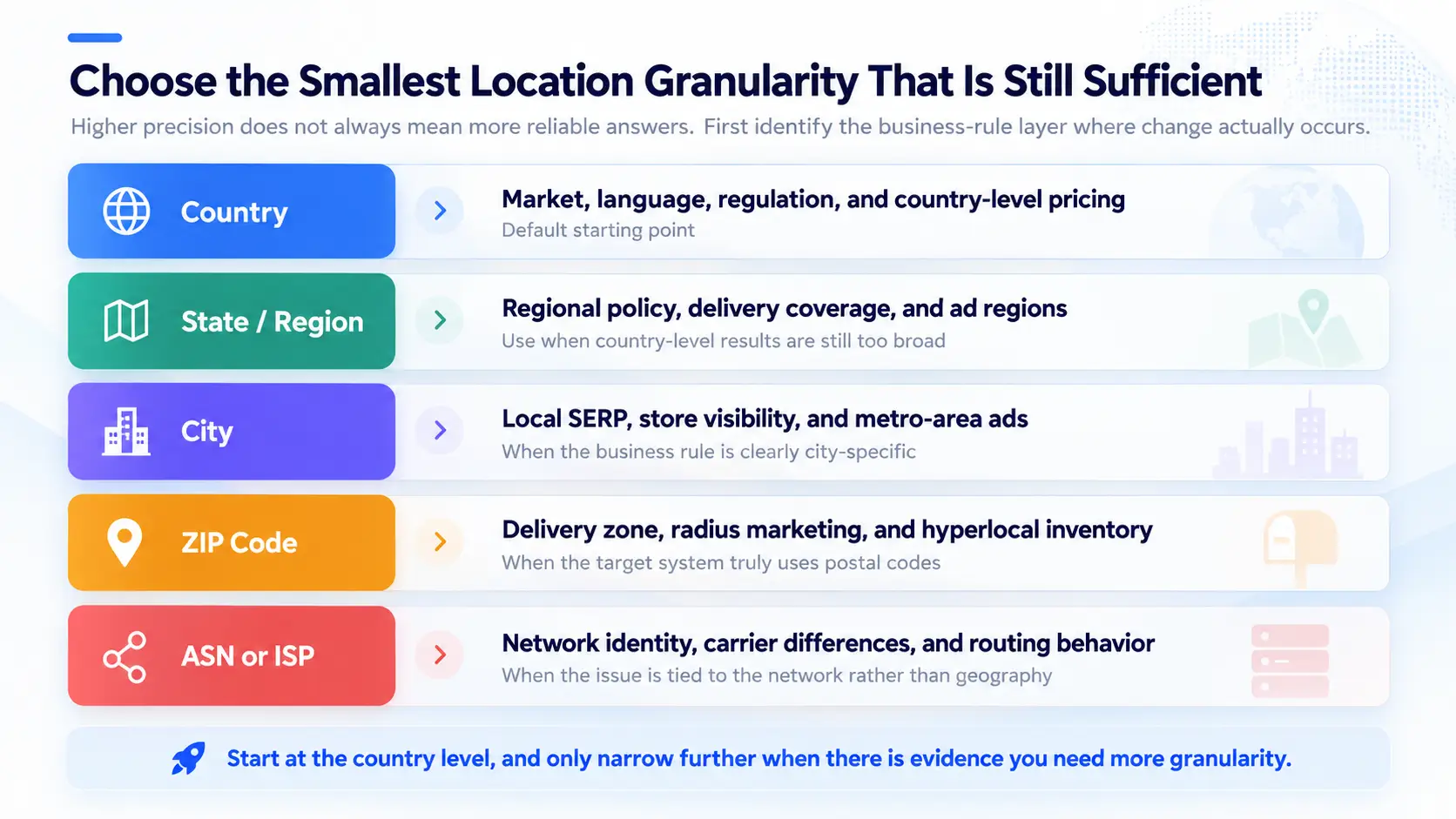
Choose targeting levels according to business rules, not the desire for the most granular label. The following table summarizes the questions each level can answer and its main limitations.
| Targeting Dimension | Typical Uses | Advantages | Main Limitations |
|---|---|---|---|
| Country | International markets, national pricing, language and content checks | Usually the broadest candidate pool | Does not explain city or delivery-zone differences |
| State / Province / Region | Regional SEO, state-level products and ads | Closer alignment with regional rules | Administrative mapping depends on provider and database |
| City | Local rankings, city ads, store and competitor research | Useful for metropolitan-level observations | City labels may be approximate |
| ZIP / Postal Code | Delivery areas, hyperlocal SEO, service coverage | Fine granularity | IP postal codes do not prove street-level location; smaller pools |
| ASN / ISP | Carrier, network-source, and routing-behavior analysis | Controls network identity | Not geographic coordinates; does not replace city targeting |
Country-Level Targeting
Country targeting suits international market research, regional price comparisons, country-limited content, and multilingual website testing. For example, when comparing UK and US e-commerce catalogs, first standardize the product SKU, account state, and device. Then use UK and US exits to check currency, tax notices, and available products. For most new projects, this is the most sensible starting point.
State and Region-Level Targeting
State, province, or regional targeting suits regional SEO, state-level product availability, regulatory notices, and ad analysis. When comparing public search results in California and Texas, also standardize keywords, search language, device, and testing time. Otherwise, differences may not originate from state-level location.
City-Level Targeting
City targeting is commonly used for Local Pack results, city ads, local competitors, and store pages. When comparing the same keyword in New York and Los Angeles, record the selected city, actual exit IP, at least one geolocation database’s assessment, and page evidence. An accurate provider city label does not mean a search engine necessarily reaches the same city determination.
ZIP Code and Postal Code Targeting
Postal-code filtering can support delivery-area, neighborhood-ad, and local-service availability tests. However, IP databases may misidentify postal codes, and the target website may mainly rely on a postal code entered by the user. Record both the proxy targeting and page input, treating them as separate test variables.
ASN and ISP Targeting
ASN stands for Autonomous System Number and identifies a group of networks operating under a unified routing policy. It answers which network a request comes from, not which street a device occupies. ASN or ISP filters suit carrier connectivity tests, mobile-network research, and network-specific behavior analysis. If a task requires both a particular city and carrier, each condition must be satisfied separately.
Types of Geo-Targeted Proxies
Residential Geo-Targeted Proxies
Residential proxies use addresses allocated by residential ISPs and may suit local SERPs, e-commerce pricing, market research, and ad verification when the selected product supports the required locations and session controls. Rotation and sticky sessions are different workflow options; verify availability and behavior for the chosen product. Residential sourcing does not eliminate geolocation errors, so validate the target region.
Mobile Geo-Targeted Proxies
Mobile proxies use cellular-carrier exits and suit mobile ads, carrier-related pages, and mobile-first experience research. A mobile IP does not automatically simulate a real phone model, GPS, app state, or cellular-network conditions. Configure the browser or automation environment separately.
Datacenter Geo Proxies
Datacenter proxies originate from hosting networks. They generally offer fast connections and manageable costs for less restricted public content, development, QA, and large request volumes that do not require residential sources. Their datacenter origin is easier to identify, so they should not represent ordinary household or mobile users.
ISP and Static Residential Proxies
ISP proxies and static residential proxies both offer fixed or longer-lived exits, but the labels are not interchangeable across providers. ISP proxies are generally identified by their ISP-registered network, while static residential products emphasize a residential exit held for an extended session. They can suit long-term monitoring and workflows that need consistent egress. Compare the product’s stated IP source, assignment duration, exclusivity, and regional availability; a fixed address does not automatically guarantee better success rates.
| Type | Best For | Main Advantages | Limitations |
|---|---|---|---|
| Residential | SERPs, prices, public market data | Broad regional choice; rotating or sticky sessions | Traffic-based billing; city accuracy requires validation |
| Mobile | Mobile ads, carrier-related experiences | Mobile-network egress | Higher cost; not complete device simulation |
| Datacenter | Development, QA, less sensitive bulk requests | Manageable speed and cost | Does not represent residential users |
| ISP / Static Residential | Long-term monitoring, fixed sessions | Stable egress and reproducibility | Product labels and IP sourcing vary; fixed addresses accumulate history |
6 Common Use Cases for Geo-Targeted Proxies
1. Local SEO and SERP Tracking
Organic results, local packs, maps, and ads for the same keyword change with location, language, device, and history. Teams using residential proxies for SEO monitoring can create controlled observation points with exits in target cities while standardizing search domain, language, device, and login status. Repeat collection windows and retain page evidence because SERPs also fluctuate over time.
Direct proxies provide control over browsers, request parameters, sessions, and page evidence, but teams must handle CAPTCHAs, rendering, parsing, retries, and page-structure changes. SERP APIs generally return structured results with less maintenance, while their supported locations, devices, fields, and prices depend on the API. Choosing proxies for SEO tracking requires comparing coverage, field completeness, and cost per valid result using the same keywords and regions.
2. Geo-Targeted Advertising Verification
Advertisers can inspect creatives, language, landing pages, and offers from target markets. Regional proxies provide observation locations only; ad delivery also depends on budgets, auctions, audiences, schedules, and frequency caps. A proxy for ad verification provides a regional observation point; record the exit IP, device, time, search terms, screenshots, and landing pages. Do not classify a single missing impression as a campaign failure.
3. Market Research and Competitor Analysis
Cross-market research can compare public catalogs, promotions, reviews, competing brands, and trends. Proxies for market research supply localized access, while the research workflow still needs field definitions, parsing, deduplication, and retained evidence.
4. Ecommerce Pricing and Product Availability
Country, city, store, and delivery postal code can all affect price, currency, inventory, and catalogs. Teams using proxies for price monitoring must also standardize SKU, currency, tax basis, time, and delivery settings to avoid mistaking exchange-rate or store differences for regional pricing.
5. Website Localization and App Testing
Product and QA teams can verify language fallbacks, currencies, privacy notices, legal statements, regional restrictions, and local content. If an app reads GPS, system language, or account region, configure the test device as well as the proxy, and document the priority assigned to each signal.
6. Regional Content Availability Testing
For owned or authorized content services, regional exits help verify whether public pages are accessible in target markets and whether error pages, rights notices, and catalogs match the intended design. A proxy grants no permission to access nonpublic content. Tests must comply with applicable laws, contracts, and website rules.
How to Choose the Right Geo-Targeted Proxy
Geographic Coverage and Targeting Precision
List required countries and cities, then confirm sufficient node availability. If country-level data answers the question, there is no need to pay more for ZIP or ASN filtering and accept a smaller pool. For city tasks, record agreement between provider labels and an independent database during trials.
Proxy Type and IP Quality
Choose residential, mobile, ISP, or datacenter sources according to the target platform’s requirements. Assess IP quality through valid-page rates, CAPTCHA rates, status codes, content completeness, and repeat tests. Do not rely solely on marketing descriptions such as clean IPs or total pool size.
Session Control and Connection Stability
Rotate for independent requests and use sticky or static exits for multi-step workflows. Confirm sticky duration, concurrent connections, timeouts, HTTP(S)/SOCKS5 support, and failure-retry strategy. The key is whether business steps remain consistent for the required period, not maximizing session length.
Pricing and Scalability
Compare total traffic charges, regional-filter surcharges, minimum commitments, traffic validity, concurrency limits, and retries. A better measure is cost per valid record: total cost divided by data passing region, content, and time checks. Low prices with many failures and repeat collections can cost more overall.
Recommended Geo-Targeted Proxy Providers
| Provider | Best fit | Main advantage |
|---|---|---|
| Rola IP | Teams comparing residential and mobile exits for regional research, SEO, pricing, or ad checks | Offers dedicated residential proxy and mobile proxy product paths, making it a relevant option when choosing between those two network sources from one provider. |
| Bright Data | Teams that need proxy infrastructure alongside web data collection products | Its product range includes residential and ISP proxies as well as APIs and managed data collection, so teams can evaluate proxy access and managed collection within one provider’s catalog. |
| Oxylabs | Large or automated residential-proxy collection workflows | Its residential product emphasizes geo-targeting and automatic scaling, with proxy products and scraping APIs available in the same broader platform. |
| Decodo | Workloads where city, state, or ASN-level targeting matters | Its residential proxy product lists city-, state-, and ASN-level targeting, which maps directly to more granular regional selection. |
| SOAX | Teams that need location filters and session control across residential traffic | Its residential product lists country, region, city, ISP, and ASN targeting, plus options to keep an IP across requests or rotate between requests. |
Geo-Targeted Proxy Setup and Validation Checklist
Step 1. Choose Your Target Location
Express the question as verifiable conditions, such as comparing the public price of the same SKU in the UK and US, or comparing the top ten organic results for the same keyword in New York and London. This determines whether country, city, or network targeting is necessary.
Step 2. Select a Suitable Proxy Type and Provider
Select proxy types and candidate providers based on target websites, budget, and session requirements. Begin with a small plan or trial and test actual pages in target regions rather than inferring local availability from global IP counts. Use the selected provider’s dashboard and current product documentation for final configurations.
Step 3. Configure Proxy Authentication and Sessions
Use the gateway, port, and authentication method documented by the selected provider, or configure IP allowlisting if supported. Set location parameters only as described in that product’s documentation. Choose rotation for stateless batches and a sticky session for pagination, forms, or carts when the product supports it. Do not change exits unnecessarily within one continuous workflow.
Step 4. Verify Your Proxy IP Location
Check the public exit, country, city, ISP, and ASN after connecting. The What Is My IP tool confirms the public egress, while the proxy checker checks connectivity and basic proxy information. For city or postal-code tasks, cross-check two geolocation databases. If assessments conflict, use broader targeting or mark the result uncertain.
Step 5. Test the Actual Localized Content
Visit pages you are authorized to test and check whether currency, language, catalogs, search results, or ads match expectations. Record time, complete URLs, screenshots, and key fields. An IP in the correct country does not guarantee complete localization. If results are unexpected, inspect account settings, cookies, language, time zone, GPS permissions, stores, and delivery addresses.
Minimum record set: target location, actual exit IP, country/city assessments, ASN/ISP, proxy type, session ID, time, URL, device and language, account and cookie state, page evidence, and failure reason.
Limitations and Common Mistakes of Geo-Targeted Proxies
Assuming an IP Address Guarantees Exact Physical Location
IP geolocation is a database estimate of a network address. Cities, postal codes, and mobile networks are especially affected by centralized egress, carrier routing, and database update timing. Reports should state that a database identifies the exit as a location, not that a user is physically there.
Ignoring Other Location Signals
If account country, cookies, browser language, time zone, GPS, and page delivery addresses are not standardized, proxy location is not the only variable. When the wrong region appears, retest with a clean, logged-out session, then introduce business conditions one at a time.
Using Overly Narrow Geo-Targeting
Overly narrow filters reduce the available pool and can increase cost and sampling bias. Use city, postal-code, or carrier restrictions only when business rules genuinely vary by those dimensions. Otherwise, broader country- or state-level targeting often gives you more candidate exits; availability still depends on the provider and time of the request.
Selecting Proxies Based Only on Price or Pool Size
Global pool counts do not reveal how many addresses are available in a particular city at a given time. Compare valid-page rate, regional consistency, session stability, support responsiveness, and cost per valid record on target websites. Also review terms, sourcing disclosures, and refund policies.
Conclusion
Geo targeted proxies make network egress location a selectable, documented testing variable for local search, ads, market research, e-commerce, and localization QA. Country, city, ZIP, and ASN solve different problems: the geographic levels describe location scope, while ASN describes network identity. Choose based on target coverage, location consistency, proxy type, session strategy, and cost per valid result.
If your project needs regional residential or mobile exits, first confirm that the selected product documents the required location filters and session behavior. Compare relevant options using small samples in your target markets. Proxies provide observation locations; reliable conclusions still depend on clear variable control, exit verification, and repeated comparisons.