Craigslist Proxies: How to Choose, Configure, and Test One

Sep 23, 2026 · Guides · 9 min read
TL;DR
Craigslist proxies are network routes that replace the public IP address seen by a website. They can support authorized regional page checks, connection isolation, or repeatable QA, but they do not change account history, browser state, or Craigslist permissions.
First decide whether a proxy is necessary. Craigslist already lets visitors open many city pages directly, so ordinary regional browsing may work without one. If the task requires a particular exit location, confirm the provider’s location controls, session behavior, authentication method, protocol, and billing model. Configure one route, verify the exit IP independently, open the intended Craigslist page, record the result, and disable the proxy when the test ends.
What is a Craigslist proxy?
A Craigslist proxy is an intermediary server between your browser and Craigslist. Instead of connecting directly from your local public IP, the browser sends supported web traffic through the proxy’s exit IP.
That network change has a narrow effect. It can alter the IP address and approximate network location visible to a destination, but it does not rewrite cookies, repair an account restriction, or authorize activity that Craigslist prohibits. A proxy should therefore be treated as routing infrastructure, not as a bypass tool.
A proxy is not automatically equivalent to a VPN. Protection between the device and proxy depends on the proxy protocol and application configuration, while HTTPS protects the browser’s encrypted connection to a supported destination. Changing the exit IP alone does not provide complete anonymity or device isolation.
Do you need a proxy to view another Craigslist city?
Often, no. Craigslist organizes listings into regional sites, and a visitor can usually choose another city or region from the site interface. If your goal is simply to read public listings from Portland while sitting elsewhere, try the Portland site through your normal connection first.
A proxy becomes relevant when the task specifically requires a different network exit—for example, an authorized localization check, a regional availability test, or separation between a QA environment and an office connection. Even then, loading a city page does not prove the exit IP is in that city. Verify the IP and location with a separate IP lookup tool before interpreting the Craigslist result.
Read the rules before changing the route
Craigslist’s Terms of Use restrict unlicensed software that interacts with the service and prohibit collecting content through robots, scripts, scrapers, or manual equivalents. The terms also prohibit attempts to bypass moderation.
Keep the scope conservative: authorized browsing, regional display checks, and network troubleshooting. Do not use this guide to automate posting, harvest listings, evade moderation, or operate account farms. If the intended workflow needs automation or data access, obtain written permission or a separate license before proceeding.
Which proxy type fits the task?
Choose the smallest amount of infrastructure that satisfies the test.
| Requirement | Suitable starting point | Why |
|---|---|---|
| Read a different city’s public listings | Direct connection | Craigslist city pages are often selectable without changing the exit IP. |
| Check a supported regional exit for a short authorized test | Rotating residential proxy with a sticky session | It can provide location controls while keeping one exit stable for a bounded session. |
| Repeat the same authorized check over several days | Static residential proxy | A fixed exit makes results easier to compare over time. |
| Test basic connectivity where residential origin is irrelevant | Datacenter or other permitted proxy | It may be sufficient when the test only concerns routing and reachability. |
Rola IP’s residential proxy supports geographic parameters and sticky-session controls. Its static residential proxy uses a fixed residential exit. Neither option guarantees that Craigslist will load or accept a posting, because the destination makes its own access and moderation decisions.
What to check before you buy Craigslist proxies
Do not select a Craigslist proxy service from pool-size marketing alone. Compare the fields that determine whether your exact workflow can be reproduced:
- Location precision: Confirm whether the product supports country, state, or city selection for the network type you plan to buy.
- Session behavior: Check whether the exit remains stable, rotates per request, or can be held for a defined session.
- Protocol and authentication: Confirm the web-proxy protocol required by your application and whether it accepts username/password or IP allowlisting.
- Billing unit: Rotating services are commonly billed by traffic, while static services may be billed per IP and time period. Read the current product terms before purchase.
- Validity and renewal: Check when packages expire, whether unused traffic carries over, and whether renewal is automatic.
- Replacement and support: Learn how the provider handles unavailable routes and what evidence support needs.
- Budget and stop condition: Start with the smallest practical test. Stop if the route cannot meet the required location, stability, or latency after basic configuration has been ruled out.
Write the acceptance criteria before paying: target region, maximum acceptable latency, required session duration, authentication method, and spending cap. That turns a vague purchase into a test with a clear pass or stop decision.
How to use proxies with Craigslist
The walkthrough below uses the Windows 11 Settings layout shown in the screenshots, a Chromium-based browser, and an HTTP proxy endpoint that accepts a host or IP plus a port. The address 192.0.2.10 is a documentation-only example and will not connect. Replace it with the endpoint supplied by your proxy provider.
Before changing anything, record the current Windows proxy state so you can restore it. If the computer is managed by an employer or school, obtain approval before modifying system network settings.
Step 1: Gather the connection details
You need the proxy host or IP, port, authentication method, and any location or session parameters. Keep the original values in a password manager rather than a shared document or screenshot.
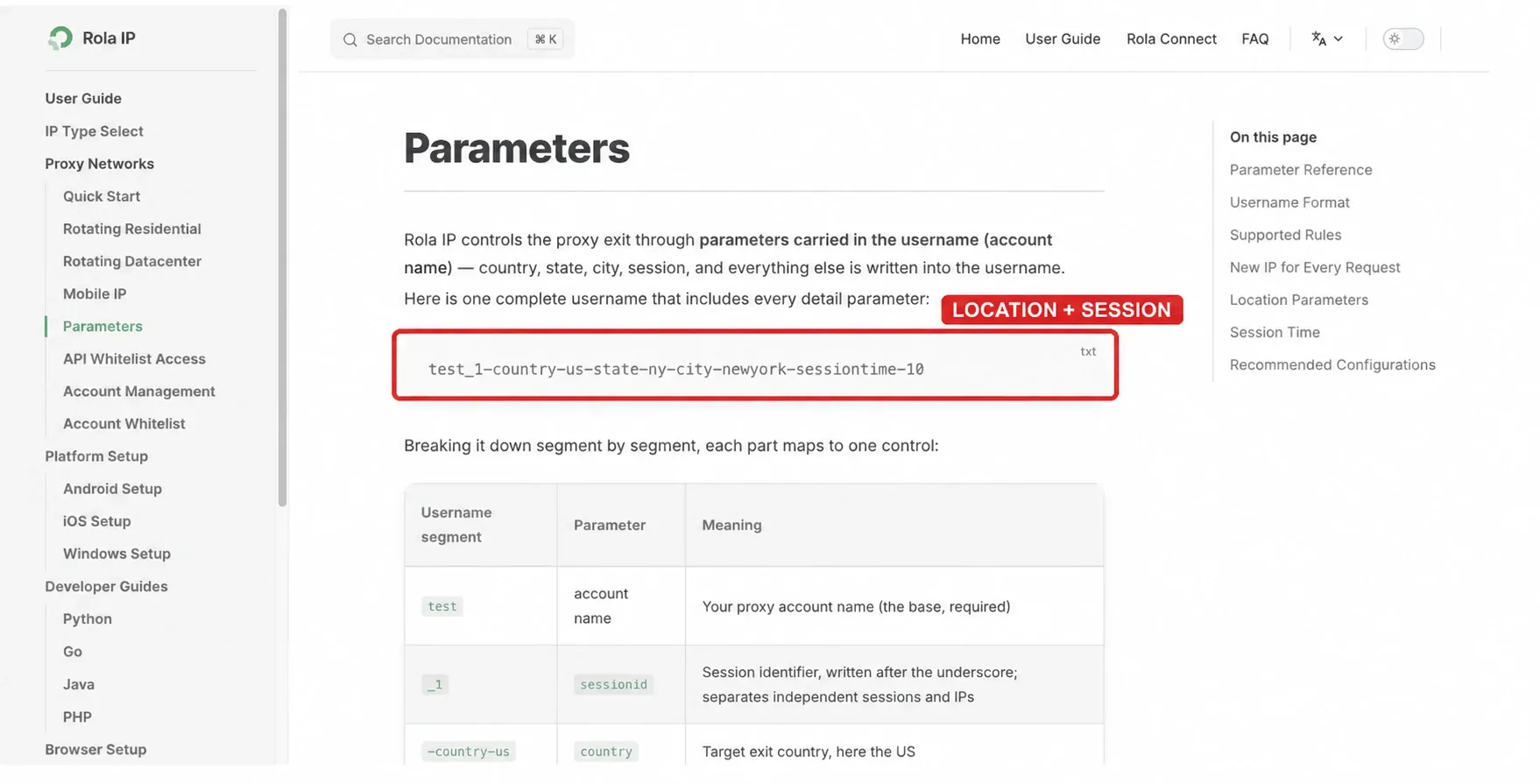
Rola IP documents a parameterized username format for selecting supported locations and sessions. Use only parameters available to the product you purchased, and copy the final generated connection details rather than typing a long username from memory.
Step 2: Choose one target and one session policy
Define the test before connecting. A useful record includes the intended Craigslist regional page, the requested proxy location, whether the exit must stay fixed, and the time window for the check.
For a logged-in or multi-page authorized check, keep one exit stable for the session. Do not rotate on every click. Frequent changes make authentication and troubleshooting harder because several variables move at once.
Step 3: Open Windows manual proxy settings
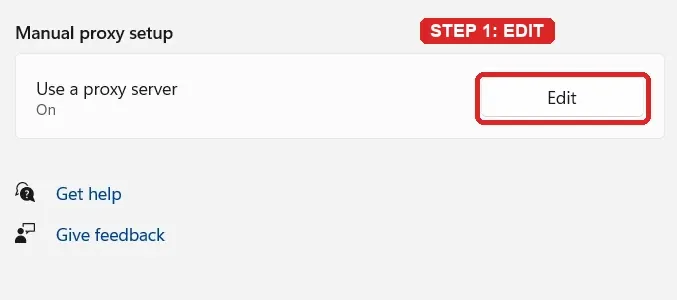
Open Settings > Network & internet > Proxy. Under Manual proxy setup, select Edit next to Use a proxy server.
Step 4: Enter the endpoint and save
Turn Use a proxy server on. Enter the provider’s host or IP in Proxy IP address, enter the assigned port, and select Save. The screenshot uses the reserved address 192.0.2.10 and port 8080 only to show field placement.
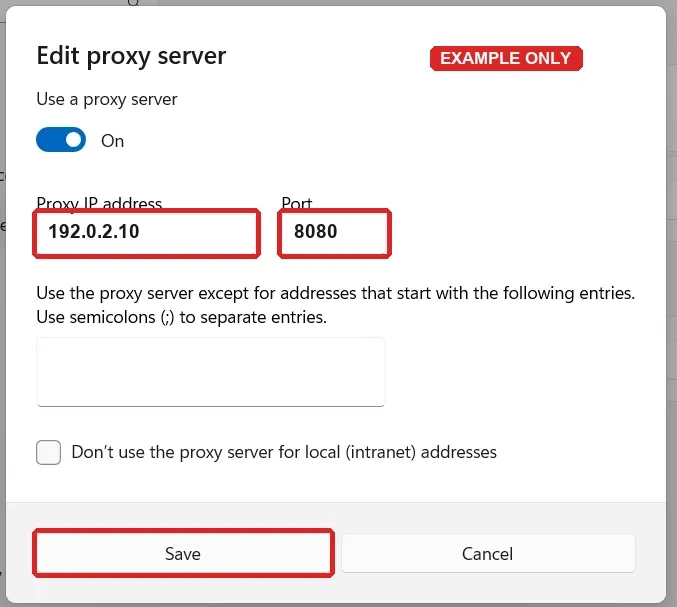
Windows’ system panel does not display username and password fields here. When username/password authentication is required, the browser may request the credentials when it first connects. If your provider uses IP allowlisting instead, add your current public IP in the provider dashboard before testing. Close and reopen the browser after saving so the new route is applied consistently.
Step 5: Verify the exit IP before opening Craigslist
Open an IP lookup page that is separate from Craigslist and compare the displayed public IP with the direct-connection baseline. Confirm that the address changed and that the reported region is close enough for the test. Save only the minimum evidence needed, with the IP redacted in any shared screenshot.
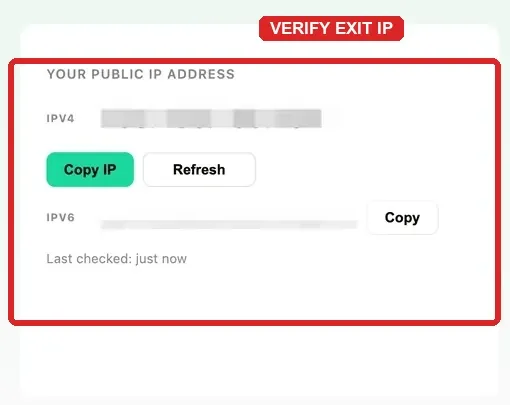
This screenshot shows where to inspect the address. Because the values are redacted, it does not document a specific exit IP, location, or successful Craigslist request.
If the checker still shows the original public IP, stop here. Recheck the proxy switch, host, port, authentication, browser restart, and any VPN or extension that might override system settings.
Step 6: Open the intended Craigslist regional page
With the verified route active, open the selected Craigslist regional page and perform only the authorized check you defined earlier. Record the page, time, exit location, and result so another reviewer can reproduce the same conditions.
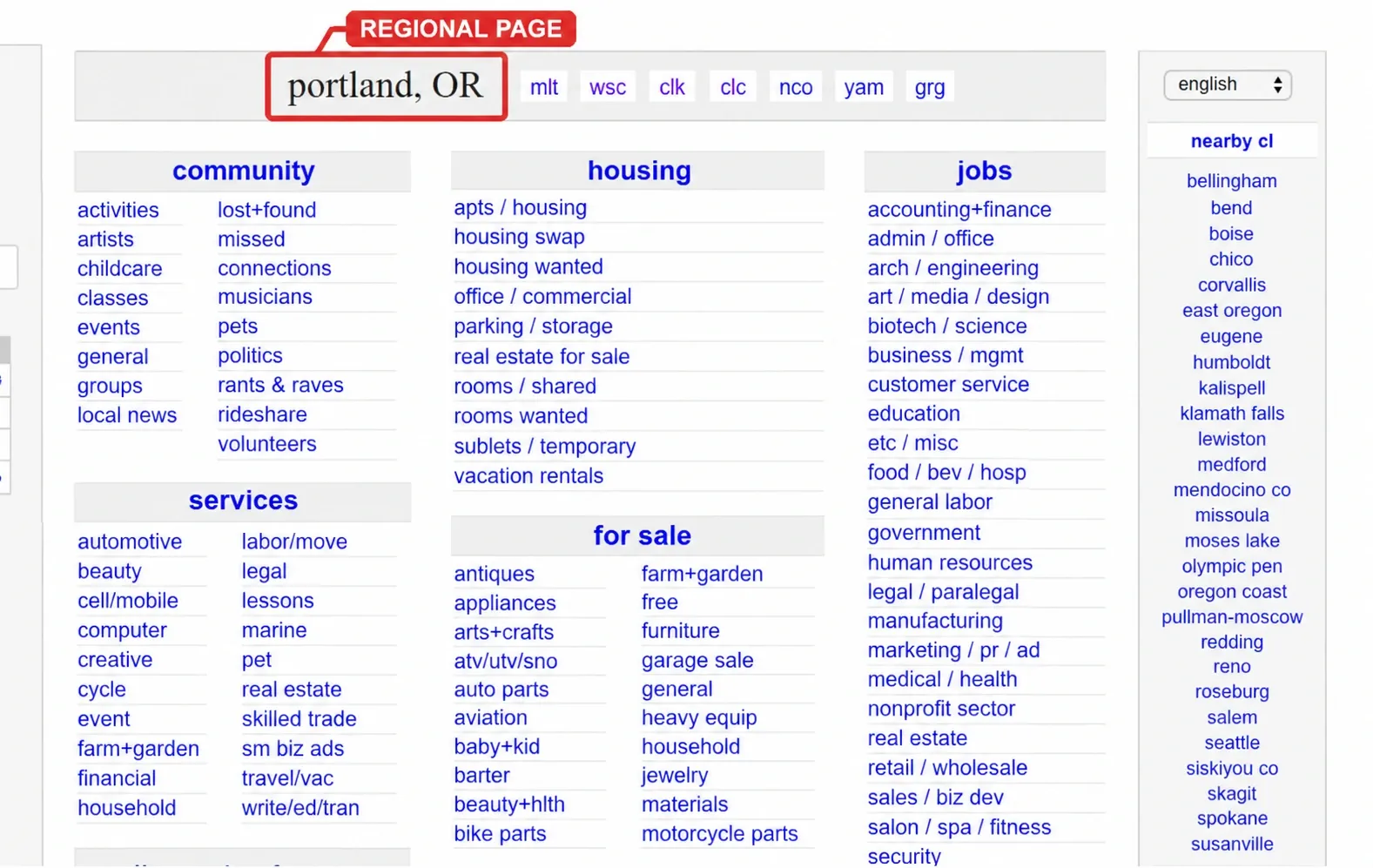
The Portland heading confirms which regional page is open. It does not confirm that the request used a proxy or that the exit IP was located in Portland; the separate IP lookup provides the network evidence.
Step 7: Disable the proxy and confirm rollback
Return to Settings > Network & internet > Proxy > Manual proxy setup, select Edit, and turn Use a proxy server off. Reopen the browser and reload the IP checker. Your normal public IP should return.
Do not leave a test proxy enabled on a shared or production computer. A forgotten system proxy can make unrelated applications appear offline later.
How to verify the result without overclaiming
Use three separate observations:
- Direct baseline: Record the public IP before enabling the proxy.
- Proxy evidence: Record the changed exit IP and approximate location with a separate IP lookup tool.
- Destination result: Record whether the intended Craigslist page loaded and what exact error appeared if it did not.
These observations answer different questions. The IP checker proves the route changed. The regional heading proves which Craigslist page was requested. A successful page load shows that one request completed under those conditions; it does not guarantee future access or posting acceptance.
Troubleshooting Craigslist proxy errors
Change one variable at a time. Repeatedly swapping exits before identifying the failure makes the result less useful.
| Symptom | Likely layer | What to check | Retest and rollback |
|---|---|---|---|
407 Proxy Authentication Required |
Proxy authentication | Recopy the username and password, confirm the authentication method, and check whether IP allowlisting is required. | Reopen the browser and test the IP checker. If it persists, disable the proxy and ask the provider to validate the credentials. |
403 Forbidden |
Destination or policy decision | Record the exact URL and response. Confirm the task is authorized and that cookies, account state, and requested action are consistent. | Stop retries, return to the direct route, and escalate with the exact response instead of rotating repeatedly. |
429 Too Many Requests |
Request rate | Pause requests and reduce frequency. Automated or repeated activity may trigger rate limits regardless of the exit IP. | Wait before one controlled retest. Do not cycle through IPs to evade the limit. |
| DNS error or name not resolved | Local DNS or route | Check whether other domains resolve, whether a VPN or extension overrides the route, and whether the proxy host was copied correctly. | Disable the proxy and retest normal DNS. Re-enable only after the baseline works. |
| Connection refused | Proxy endpoint | Confirm host, port, service availability, allowlisting, and account validity. | Test the endpoint once with the provider’s approved checker, then disable it if the refusal continues. |
| Connection timeout | Network path or unavailable exit | Check local connectivity, provider status, latency, and whether the selected route is available. | Compare direct and proxied loads, then stop after the defined timeout threshold. |
| Page loads, but a posting is rejected | Craigslist moderation or account workflow | Treat this separately from network connectivity. Read the exact notice and review account, content, category, and policy requirements. | Do not assume another IP will solve it. See Craigslist This Posting Is Being Blocked for the posting-specific path. |
Where Rola IP fits
Rola IP can provide the host, port, authentication values, and supported location or session parameters needed for this workflow. The proxy quick start explains where to obtain connection details and how the two supported authentication approaches differ.
Choose a rotating residential route when an authorized short test needs supported geographic controls and a bounded sticky session. Choose a static residential route when the same exit must remain stable across repeat checks. Start with a limited test, verify the route independently, and scale only after the connection meets the written acceptance criteria.
Limitations to keep in mind
A proxy changes network routing, not platform authorization. It cannot guarantee page availability, account access, posting approval, or immunity from moderation. Location databases can also disagree, so city-level results should be treated as approximate unless the provider dashboard and a separate IP database report consistent information.
System proxy settings may affect more than one browser or application. Managed devices, VPN clients, security software, and browser extensions can override or conflict with the Windows route. Keep a rollback record and avoid making several network changes at the same time.
Conclusion
The safest way to use Craigslist proxies is to begin with the question the test must answer. If selecting another Craigslist city already solves the task, stay on the direct connection. If a different exit is genuinely required, choose a service by location precision, session behavior, authentication, protocol, billing, and a clear spending limit.
Configure one route, verify the public IP independently, run the narrow authorized check, record the exact result, and restore the original settings. That process produces useful evidence without confusing a regional page selection, a proxy connection, and Craigslist’s own access decisions.