
How to Scrape Craigslist with Python and Playwright

Oct 12, 2026 · Guides · 11 min read
This guide walks through a Python and Playwright workflow for collecting Craigslist search results. You will extract titles, prices, locations, and listing URLs, handle scroll loading, check a sample against its detail page, and export a five-column CSV.
Choose Your Craigslist Search
Craigslist organizes housing, secondhand goods, and job listings by city and category. This example uses a New York “for sale” search for “laptop.” Before starting, review Craigslist’s terms of use and robots.txt, and obtain any permission required for your collection.
How to Scrape Craigslist with Python
Step 1: Choose the City, Category, and Search Term
Open the New York “for sale” search page for “laptop.” The city entry point, the category, and the search term together define the scope of your sample. For a cross-city analysis, run each city separately, and don’t treat one city’s results as national data. The example URL is the New York Craigslist search page.
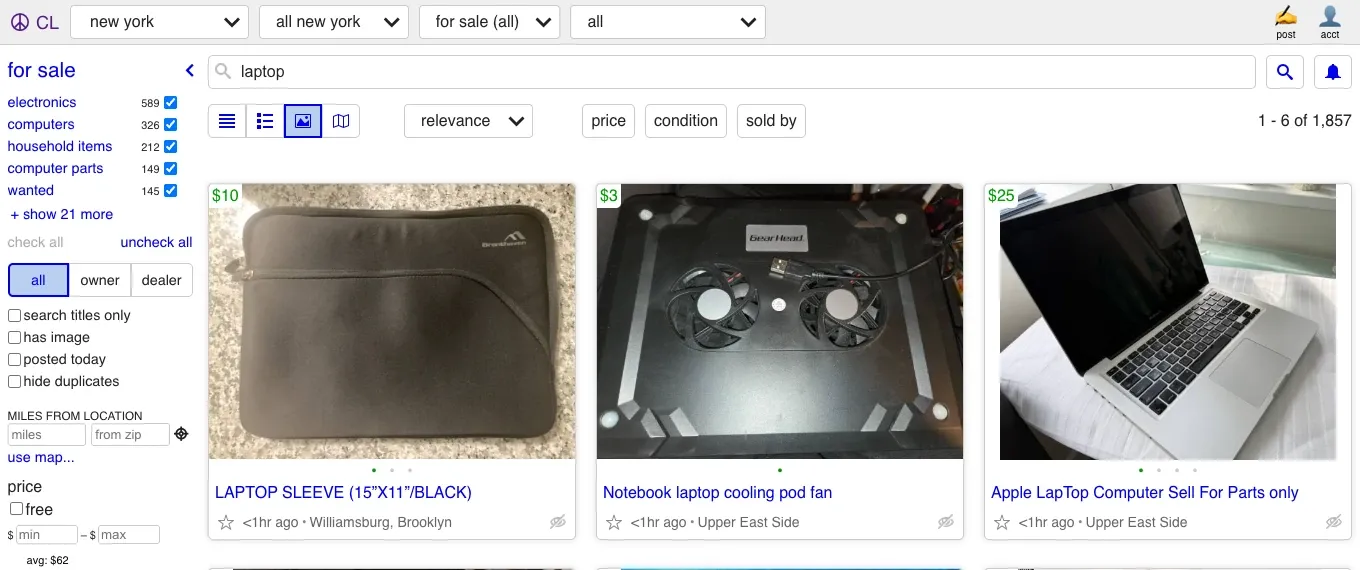
Figure 1: New York Craigslist search results for the example query.
Step 2: Install Playwright and Prepare the Browser
Install Python Playwright and Chromium. If Chrome is already installed on your machine, you can also put the path to its executable in CHROME_EXECUTABLE, and the script will use it to launch the browser. The full script for the commands below is in Step 9.
python -m pip install playwright
python -m playwright install chromium
python craigslist_live_playwright.py --max-results 20 --max-scrolls 3
For Playwright’s browser installation, navigation, and waiting methods, see the official Python documentation. Before the first run, you can open the same search page by hand to confirm that it shows listings on your current network.
For repeatable installations, pin your working Playwright version and use its matching Chromium build.
Step 3: Wait for the Listings and Switch to List Mode
The script waits for a visible a.posting-title, clicks the page’s list button, and waits for a visible result again after the view changes. This page fetches posts asynchronously, so you can’t start parsing just because the outer document returned HTTP 200. List mode puts the title, location, and price on one row, which makes it easier to check that the fields belong to the same record.
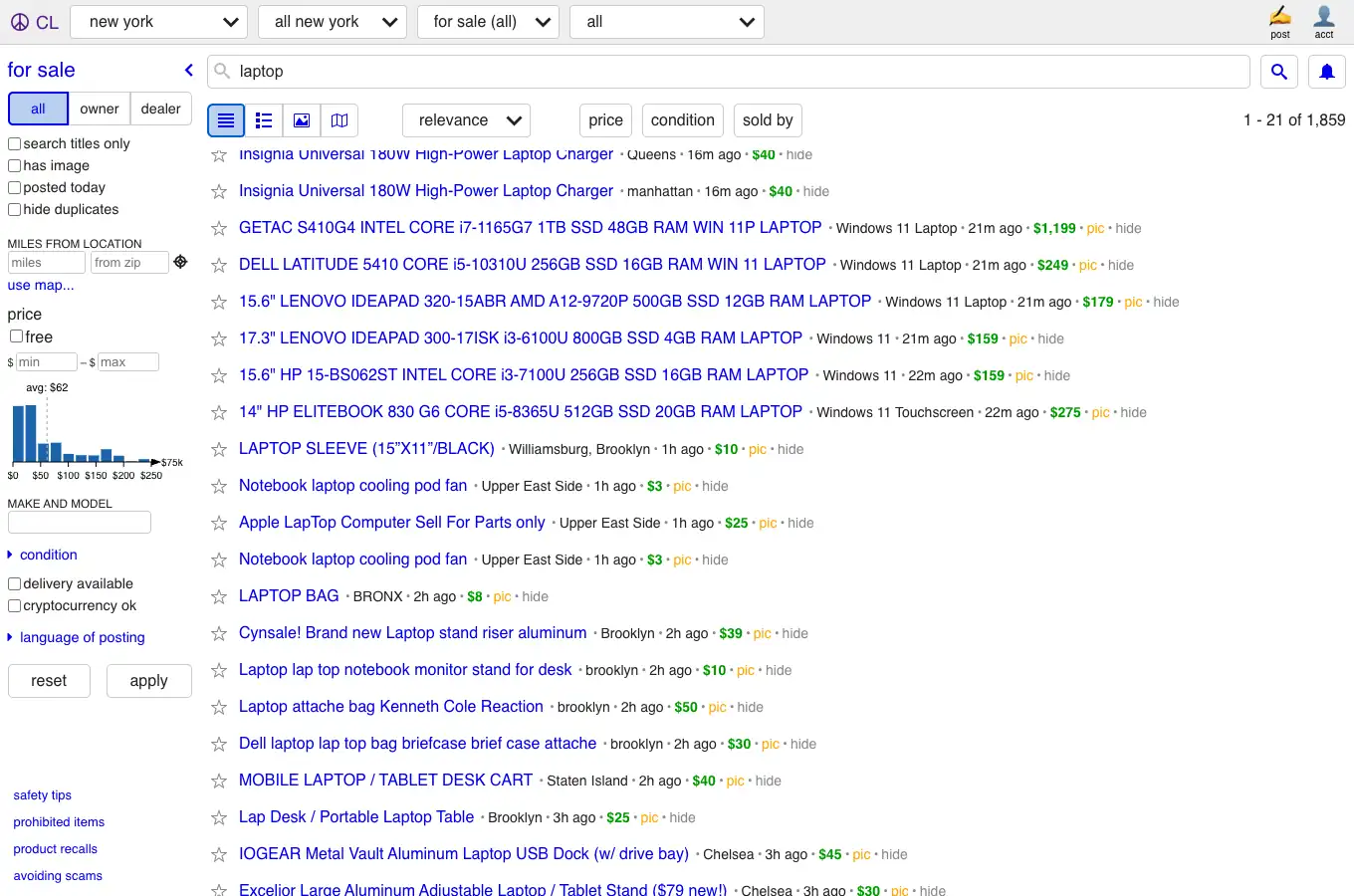
Figure 2: List mode showing a title, location, and price on one result row.
Step 4: Locate the Title, Price, Location, and Detail Link
The example search page uses a.posting-title, and its parent result area contains .priceinfo and .result-location. Through Playwright’s evaluate_all, the script runs the JavaScript below inside the page: starting from each title link, it walks up to the same result area and then extracts the fields. The script keeps only HTTPS Craigslist URLs whose path starts with /view/, the detail-page path shown by the example links.
card = link.closest('.result-data, .gallery-card')
title = link.innerText.trim()
price = card?.querySelector('.priceinfo')?.innerText.trim() || ''
location = card?.querySelector('.result-location')?.innerText.trim() || ''
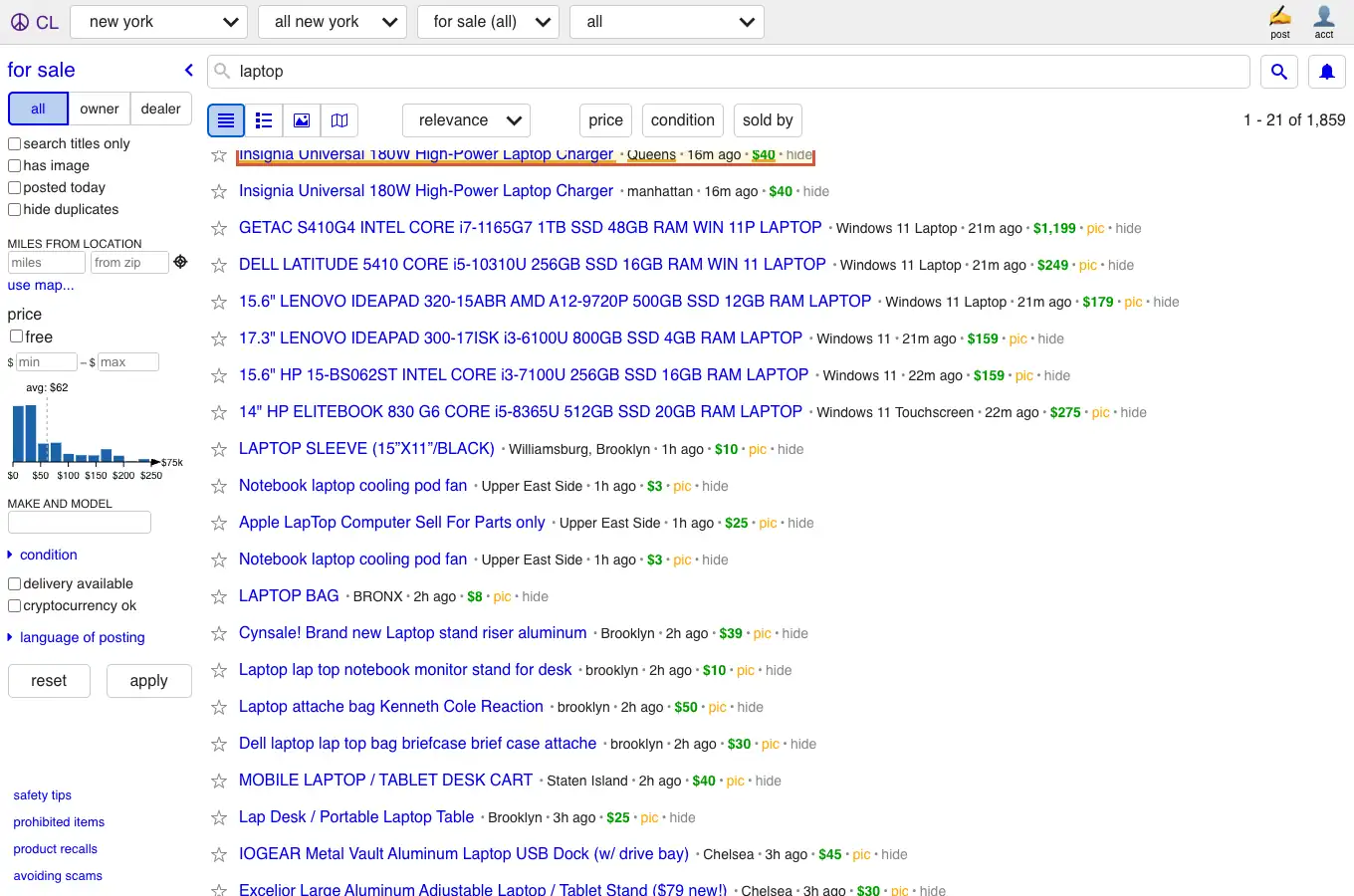
Figure 3: The title, location, and price fields highlighted on a search result.
Step 5: Keep the Raw Price and Clean the USD Amount
The displayed price text is saved in price with surrounding whitespace removed, for example $1,199. Only when it fully matches a single US dollar amount is Decimal used to produce price_usd=1199. For missing prices, “make offer” text, and price ranges, price_usd stays empty while price retains the displayed text. Monthly rent for housing and pay for jobs can’t be interpreted from a dollar figure alone, so record the time unit separately.
raw_price = '$1,199'
price_usd = parse_price_usd(raw_price)  # '1199'
As price-cleaning examples, $40 and $1,199 produce 40 and 1199, respectively. The location field is the text displayed on the post, so it can vary in capitalization or contain whatever the seller typed in. If you want to count by city, it needs further cleaning, and you can’t treat it as a verified administrative region.
Step 6: Scroll Down to Collect More Results
The search interface shown here uses a dynamic list, so you shouldn’t assume that the traditional ?s=120 pagination still works. Each time, the script scrolls down 1800 pixels, reads the title links in the current DOM, and de-duplicates them by detail URL. --max-scrolls controls the maximum number of scrolls, and --max-results controls the number of rows finally exported. The browser may load more records than the export cap. The script waits up to ten seconds for a URL not previously collected, then stops and logs the reason if none appears. A slow response can require a longer wait in your environment.
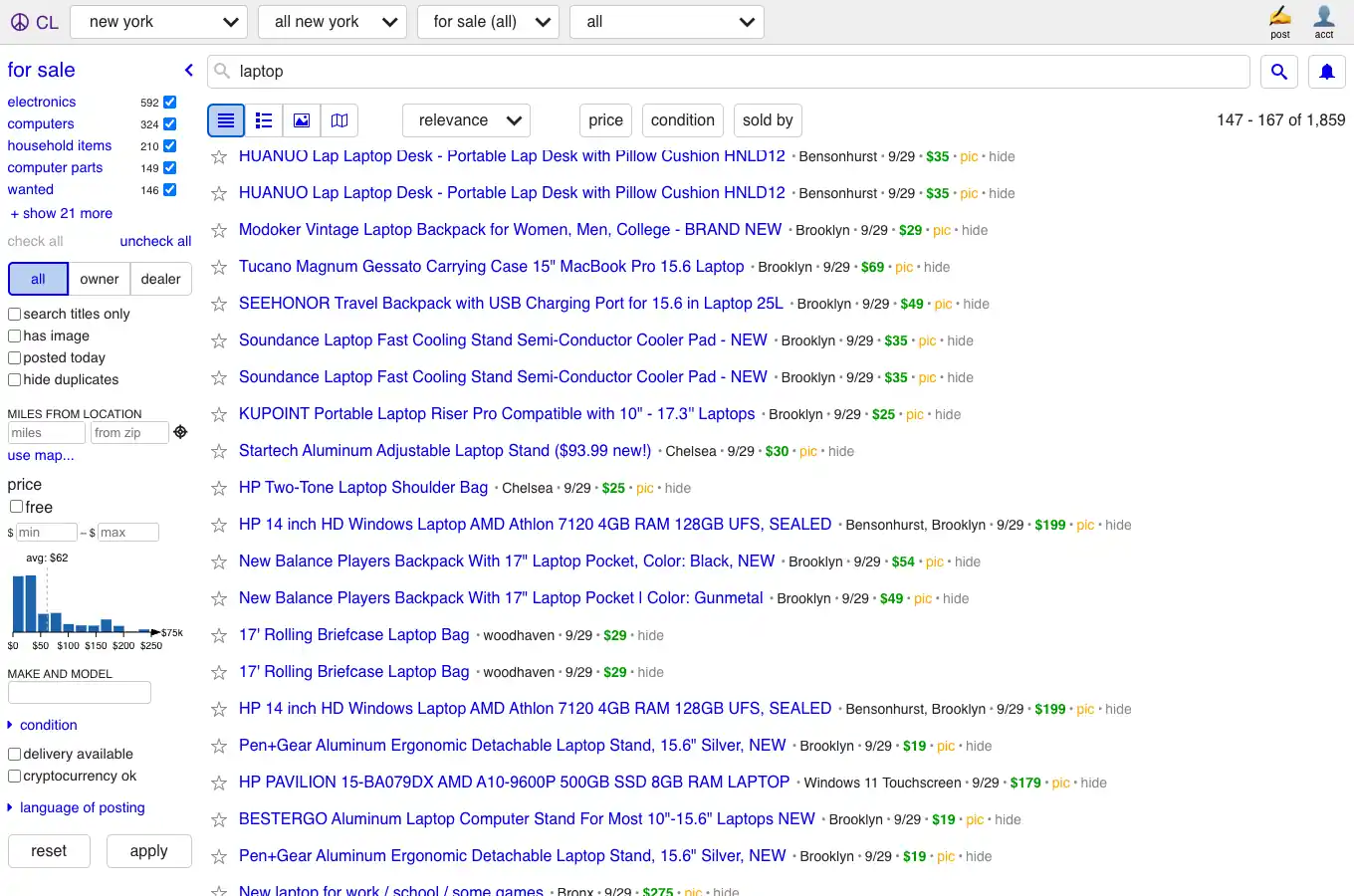
Figure 4: Listings at a later scroll position in the illustrated search interface.
Step 7: Export the Five-Column CSV
The script writes five columns, title, price, price_usd, location, url, to a UTF-8 CSV. First check the total row count, then spot-check that titles, prices, and detail links correspond. The Python standard library’s csv module documentation explains how DictWriter writes rows.
| Field | Meaning and validation |
|---|---|
title |
Listing title; require non-empty text and compare sampled titles with details. |
price |
Displayed price text with surrounding whitespace removed; retain currency symbols and ranges. |
price_usd |
A single parsed USD amount; blank for missing, ranged, or non-numeric prices. |
location |
Displayed location text, not a verified administrative region. |
url |
De-duplication key; verify source, path, and sampled detail DOM. |
Step 8: Open One Detail Page to Verify the Fields
Take the first collected listing URL and compare its title and asking price with the detail page. The script performs this sample check before exporting the CSV and a separate validation report. Extract the detail title and price from separate nodes, normalize whitespace in titles, and compare parsed prices exactly. $40 must not match $400. Record passed, mismatched, or unavailable separately from export status.
Step 9: Copy the Full Python Script
Save the following complete example as craigslist_live_playwright.py. It exports a bounded sample and writes a separate validation report. The default wait limits are 30 seconds for visible listings, 10 seconds for a new URL after scrolling, and 15 seconds for detail fields.
"""Collect a small sample of Craigslist search results with Playwright."""

import argparse
import csv
import json
import os
import re
from decimal import Decimal
from pathlib import Path
from time import monotonic
from urllib.parse import urlencode, urlparse

from playwright.sync_api import TimeoutError as PlaywrightTimeout
from playwright.sync_api import Error as PlaywrightError
from playwright.sync_api import sync_playwright


FIELDS = ("title", "price", "price_usd", "location", "url")


def parse_price_usd(raw):
    match = re.fullmatch(
        r"\$\s*((?:\d{1,3}(?:,\d{3})+|\d+)(?:\.\d{2})?)",
        raw.strip(),
    )
    return str(Decimal(match.group(1).replace(",", ""))) if match else ""


def visible_rows(page):
    return page.locator("a.posting-title").evaluate_all("""links => links.map(link => {
        const card = link.closest('.result-data, .gallery-card');
        return {
            title: link.innerText.trim(),
            price: card?.querySelector('.priceinfo')?.innerText.trim() || '',
            location: card?.querySelector('.result-location')?.innerText.trim() || '',
            url: link.href
        };
    })""")


def compare_fields(row, detail_title, detail_price):
    title_matches = " ".join(row["title"].split()) == " ".join(detail_title.split())
    list_amount = parse_price_usd(row["price"])
    detail_amount = parse_price_usd(detail_price)
    if not title_matches:
        return {"status": "mismatched", "title_matches": False,
                "reason": "List and detail titles differ"}
    if not list_amount or not detail_amount:
        return {"status": "unavailable", "title_matches": True,
                "reason": "One or both prices are not a single USD amount"}
    price_matches = Decimal(list_amount) == Decimal(detail_amount)
    return {"status": "passed" if title_matches and price_matches else "mismatched",
            "title_matches": title_matches, "price_matches": price_matches}


class AccessGuard:
    def __init__(self, context):
        self.failure = None
        context.on("response", self.on_response)
        context.on("requestfailed", self.on_failed)

    def on_response(self, response):
        # Only target-site documents and data requests can stop this run.
        kind = response.request.resource_type
        host = urlparse(response.url).hostname
        if host == "www.craigslist.org" and (response.status in (403, 429, 407) or (
            kind in ("document", "xhr", "fetch") and response.status >= 400
        )):
            retry = response.headers.get("retry-after", "not supplied")
            self.failure = f"HTTP {response.status}; Retry-After={retry}; stop and review"

    def on_failed(self, request):
        if urlparse(request.url).hostname == "www.craigslist.org" and request.resource_type in ("document", "xhr", "fetch"):
            self.failure = "Document/data request failed; stop and inspect the network"

    def check(self, page):
        if self.failure:
            raise RuntimeError(self.failure)
        text = page.locator("body").inner_text(timeout=5000).lower()
        if self.failure:
            raise RuntimeError(self.failure)
        markers = ("captcha", "error 15", "access denied", "verify you are human")
        if any(marker in text for marker in markers):
            raise RuntimeError("Possible access challenge; stop for manual inspection")


def navigate(page, url, guard):
    response = page.goto(url, wait_until="domcontentloaded", timeout=45000)
    guard.check(page)
    print(f"Document: HTTP {response.status if response else 'unknown'}")
    if response is None or response.status != 200:
        raise RuntimeError("Document unavailable; stop and review access")


def is_detail_url(value):
    parsed = urlparse(value)
    return (
        parsed.scheme == "https"
        and parsed.hostname == "www.craigslist.org"
        and parsed.path.startswith("/view/")
    )


def collect(city, category, query, max_results, max_scrolls, output, shots):
    url = f"https://www.craigslist.org/search/area/{city}"
    rows_by_url = {}
    with sync_playwright() as playwright:
        launch_options = {"headless": True}
        if os.environ.get("CHROME_EXECUTABLE"):
            launch_options["executable_path"] = os.environ["CHROME_EXECUTABLE"]
        if os.environ.get("ROLA_PROXY_SERVER"):
            launch_options["proxy"] = {
                "server": os.environ["ROLA_PROXY_SERVER"],
                "username": os.environ.get("ROLA_PROXY_USER", ""),
                "password": os.environ.get("ROLA_PROXY_PASSWORD", ""),
            }
        browser = playwright.chromium.launch(**launch_options)
        try:
            context = browser.new_context(viewport={"width": 1360, "height": 900}, service_workers="block")
            guard = AccessGuard(context)
            page = context.new_page()
            navigate(page, url + "?" + urlencode({"cat": category, "query": query}), guard)
            deadline = monotonic() + 30
            while not page.locator("a.posting-title").first.is_visible():
                guard.check(page)
                if monotonic() >= deadline:
                    raise RuntimeError("No listings within 30 seconds; inspect loading and selectors")
                page.wait_for_timeout(250)
            page.locator('button[title="list"]').click(timeout=10000)
            page.locator("a.posting-title").first.wait_for(state="visible", timeout=30000)
            guard.check(page)
            page.screenshot(path=str(shots / "search_list.png"))
            for step in range(max_scrolls + 1):
                guard.check(page)
                for row in visible_rows(page):
                    if is_detail_url(row["url"]) and row["title"] and row["url"] not in rows_by_url:
                        row["price_usd"] = parse_price_usd(row["price"])
                        rows_by_url[row["url"]] = row
                print(f"Step {step}: {len(rows_by_url)} distinct source-filtered URLs")
                if step == max_scrolls:
                    print("Stopped: scroll limit reached")
                    break
                seen = set(rows_by_url)
                page.evaluate("window.scrollBy(0, 1800)")
                deadline = monotonic() + 10
                while monotonic() < deadline:
                    guard.check(page)
                    candidates = [row for row in visible_rows(page) if row["title"] and is_detail_url(row["url"])]
                    if any(row["url"] not in seen for row in candidates):
                        break
                    page.wait_for_timeout(250)
                else:
                    print("Stopped: no unseen DOM URL within 10 seconds")
                    break
            guard.check(page)
            rows = list(rows_by_url.values())[:max_results]
            if not rows:
                raise RuntimeError("No listing rows collected; check list mode, selectors and network responses")
            validation = {"sample_size": min(1, len(rows)), "status": "unavailable"}
            if rows:
                detail = context.new_page()
                try:
                    navigate(detail, rows[0]["url"], guard)
                    # Re-check these selectors when the detail-page layout changes.
                    title_node = detail.locator("#titletextonly")
                    price_node = detail.locator("h1 .price")
                    deadline = monotonic() + 15
                    while title_node.count() != 1 or price_node.count() != 1:
                        guard.check(detail)
                        if monotonic() >= deadline:
                            raise PlaywrightTimeout("Detail title/price selectors unavailable")
                        detail.wait_for_timeout(250)
                    guard.check(detail)
                    detail_title = title_node.inner_text()
                    detail_price = price_node.inner_text()
                    guard.check(detail)
                    validation.update(compare_fields(rows[0], detail_title, detail_price))
                except (PlaywrightTimeout, PlaywrightError):
                    guard.check(detail)
                    validation["reason"] = "Detail load or selector check unavailable"
                finally:
                    detail.close()
            print(f"Detail sample validation: {validation}")
            guard.check(page)
            if guard.failure:
                raise RuntimeError(guard.failure)
            output.parent.mkdir(parents=True, exist_ok=True)
            with output.open("w", encoding="utf-8-sig", newline="") as file:
                writer = csv.DictWriter(file, fieldnames=FIELDS)
                writer.writeheader()
                writer.writerows(rows)
            report = output.with_suffix(".validation.json")
            report.write_text(json.dumps(validation, indent=2), encoding="utf-8")
        finally:
            browser.close()
    print(f"Exported {len(rows)} rows to {output}; see sample validation separately")
    for row in rows[:3]:
        print(f"{row['title'][:46]} | {row['price']} | {row['location']} | {row['url']}")


def main():
    parser = argparse.ArgumentParser()
    parser.add_argument("--city", default="newyork")
    parser.add_argument("--category", default="sss")
    parser.add_argument("--query", default="laptop")
    parser.add_argument("--max-results", type=int, default=20)
    parser.add_argument("--max-scrolls", type=int, default=3)
    parser.add_argument("--output", type=Path, default=Path("craigslist_live.csv"))
    parser.add_argument("--shots", type=Path, default=Path("screenshots"))
    args = parser.parse_args()
    if not re.fullmatch(r"[a-z]+", args.city):
        parser.error("--city must be an area slug using lowercase letters")
    if not re.fullmatch(r"[a-z]{3}", args.category):
        parser.error("--category must be a three-letter code")
    if not 1 <= args.max_results <= 100 or not 0 <= args.max_scrolls <= 10:
        parser.error("set --max-results to 1..100 and --max-scrolls to 0..10")
    args.shots.mkdir(parents=True, exist_ok=True)
    collect(args.city, args.category, args.query, args.max_results,
            args.max_scrolls, args.output, args.shots)


if __name__ == "__main__":
    main()
How Do You Validate the Exported Craigslist CSV?
Validate the export separately from the download. Check the exact five column names, unique URLs, non-empty titles, and each displayed price’s relationship to its normalized value. Compare sampled titles and prices with detail pages using exact normalized values. The script checks the first collected listing against its detail page. Missing detail nodes produce unavailable. Once both nodes can be read, a title difference takes priority and produces mismatched, even if the price text is empty or cannot be parsed. With matching titles, unparseable prices produce unavailable, unequal amounts produce mismatched, and equal amounts produce passed.
The script saves its one-row sample check beside the CSV, replacing the output filename’s extension with .validation.json (by default, craigslist_live.validation.json). The status describes that one-row sample. The CSV contains all collected rows up to --max-results, regardless of the sample status. Use mismatched to investigate field differences and unavailable to investigate missing nodes or unparseable prices.
How to Adjust When You Change Categories and Filters
In this article, sss is the “for sale” example. Housing and job categories have different category entry points and field combinations, so first choose the category, city, and filters by hand on the website, then confirm the URL and the DOM. Housing may need the number of bedrooms, floor area, and rent period, and jobs may need a pay unit; don’t use the secondhand-goods price_usd directly as a universal field. The script’s --city, --category, and --query can serve as inputs, but the selectors for any new category must be re-verified.
For multi-city projects, I recommend keeping the city, category, keyword, collection time, and raw price string for every run, and de-duplicating by detail URL in the storage layer. Validate field quality on a small number of pages first, and only then decide whether to widen the collection scope.
What to Do About 403 Errors, Blank Pages, or Broken Selectors
The script stops on observed 403 or 429 responses, proxy authentication errors, and possible access challenges. For 403, check the access conditions before running again. For 429, inspect Retry-After; the script does not retry automatically. For 407, check the proxy username, password, and endpoint. Proxy connection failures may also appear as navigation errors. If challenge detection triggers, inspect the page text to identify the cause.
If the main document returns 200 but a.posting-title never appears, first check whether the page is still loading asynchronously, and check the listing requests, any JavaScript errors, and whether the area slug is correct. If the page has been redesigned, re-check the title, price, and location nodes. Don’t parse a blank page as a normal result of zero records.
How Can Rola IP Help When You Scrape Craigslist?
When collecting from multiple cities, first pick the right Craigslist city page, and only then think about the network exit. The Rola IP rotating residential proxy product page describes coverage in more than 190 countries and regions, an IP pool of more than 80 million, per-request rotation, sticky sessions, and other capabilities. City-level targeting can support regional verification, but a proxy exit cannot replace Craigslist’s own city filtering.
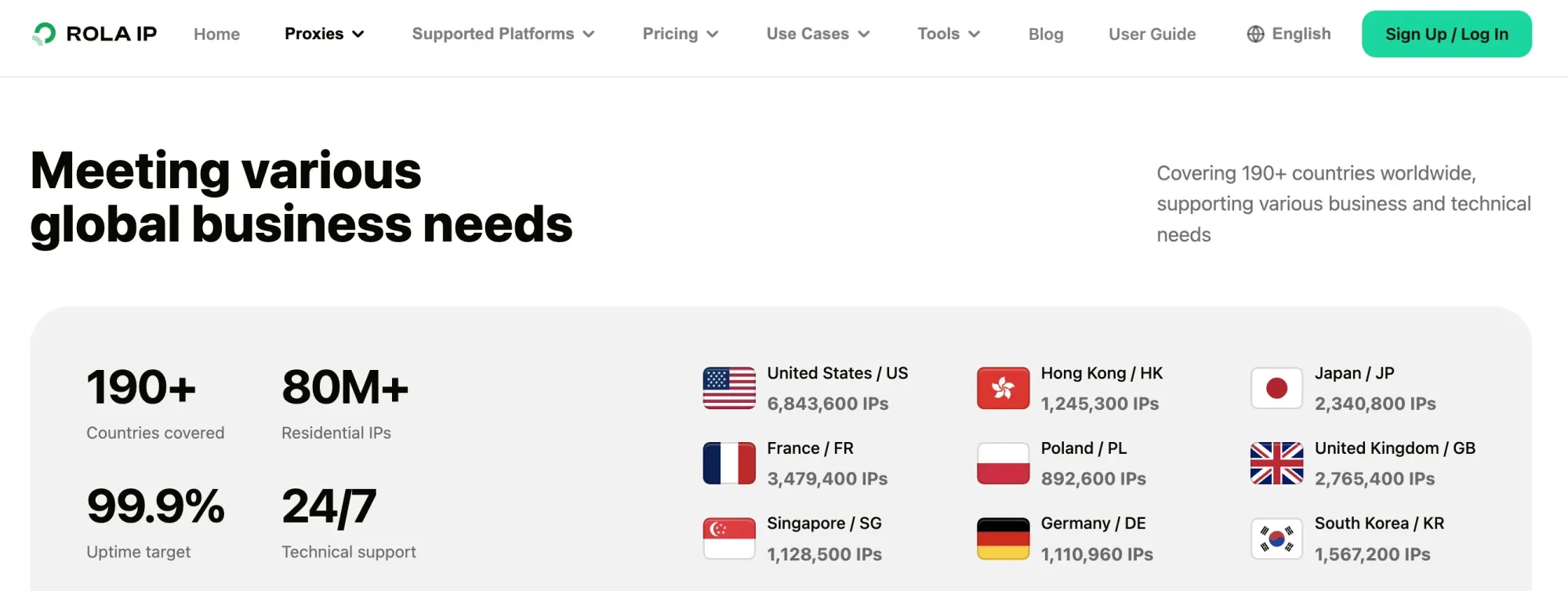
Figure 5: Rola IP residential proxy product information.
Rola IP’s web scraping use cases page describes regional targeting, session control, and automation integrations. Available parameters depend on the chosen product and plan.
The script’s configuration example uses an HTTP proxy endpoint. Set ROLA_PROXY_SERVER, ROLA_PROXY_USER, and ROLA_PROXY_PASSWORD locally, and Playwright will hand them to the browser’s proxy configuration. For the gateway, authentication, and region parameters, refer to the Rola IP Python integration guide and the Playwright network documentation. Rola’s Python guide includes HTTP and SOCKS5 Requests examples. Playwright documents browser and context proxy configuration for HTTP(S) and SOCKSv5, with username/password fields for HTTP(S) proxies. Test the exact provider protocol and authentication combination before production use.
export ROLA_PROXY_SERVER='http://YOUR_HOST:PORT'
export ROLA_PROXY_USER='YOUR_USERNAME'
export ROLA_PROXY_PASSWORD='YOUR_PASSWORD'
python craigslist_live_playwright.py --max-results 20 --max-scrolls 3
For Windows PowerShell, use:
$env:ROLA_PROXY_SERVER = 'http://YOUR_HOST:PORT'
$env:ROLA_PROXY_USER = 'YOUR_USERNAME'
$env:ROLA_PROXY_PASSWORD = 'YOUR_PASSWORD'
python craigslist_live_playwright.py --max-results 20 --max-scrolls 3
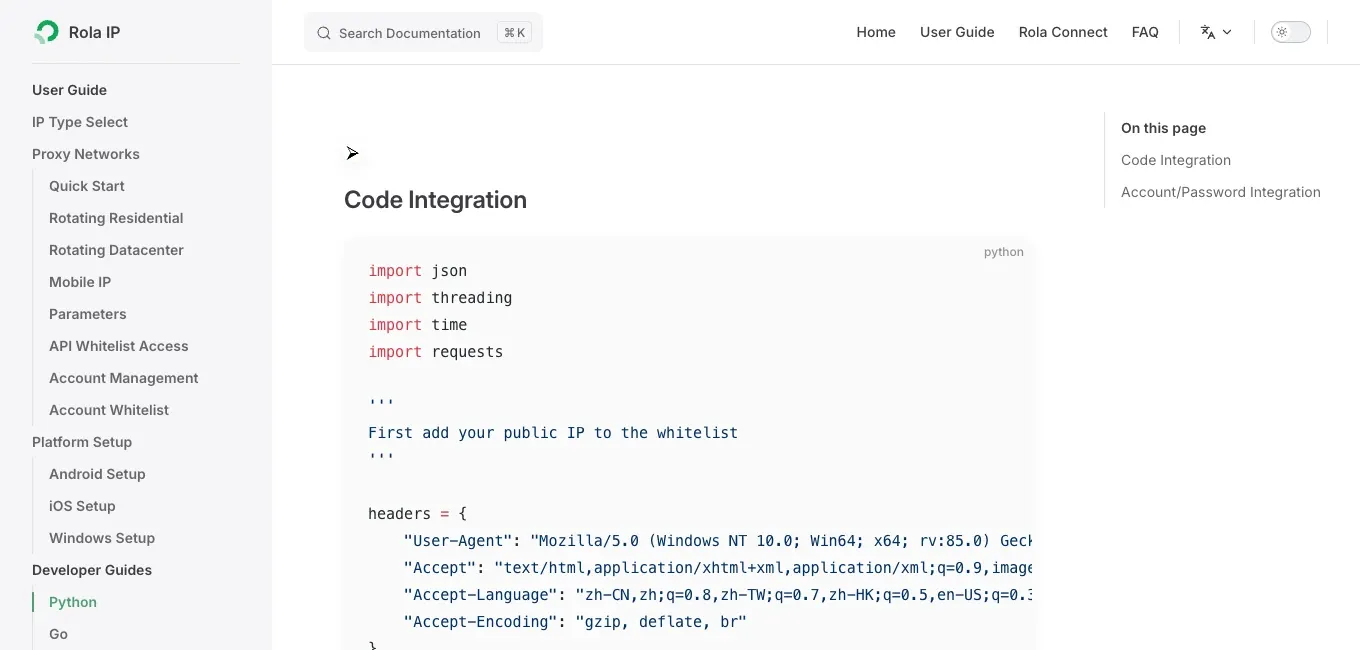
Figure 6: Rola IP Python integration documentation for proxy authentication examples.
If you want to extend to data fields on other product platforms, see Rola IP’s Python product information scraping tutorial. For help choosing a proxy type, configuring a connection, and checking the exit IP, see our Craigslist proxies guide. The example below shows how to pass proxy settings to Playwright.