
Shopee Price Tracker: How to Build Reliable Price Monitoring

Oct 12, 2026 · Guides · 11 min read
A Shopee price tracker records a product’s price over time so sellers, brand teams and analysts can review price history and monitor competitors. The useful part is the comparison: the same market, listing, variant and price conditions, checked at known times. Without that consistency, an apparent discount may simply be a different bundle or an unavailable offer.
This guide explains how to build that workflow, test its storage and alert logic, and diagnose collection failures. The downloadable Python example runs locally on synthetic fixtures. It is a tested monitoring core, not a live Shopee scraper; connecting an authorized data source is a separate step.
TL;DR
A reliable Shopee price tracker starts with an authorized data source and a precise definition of the price being observed. Save timestamps, currency, product and variant identifiers, stock status, and shipping and voucher conditions alongside each valid observation. Compare only matching records, keep collection failures out of the price series, and alert on changes that meet your business threshold. Proxies may help an authorized workflow use a supported regional exit or manage connection continuity, but they cannot grant data access, repair a parser or determine the final checkout price. Validate a small sample before scaling.
What Is a Shopee Price Tracker?
A tracker has three jobs: observe a price, preserve the observation, and report a meaningful change. Its input is a defined marketplace, product and variant. Its output is a timestamped price record with enough context to explain what was measured.
Consumer tools usually answer, “Has this item been cheaper?” A Shopee competitor price tracker serves a different decision: “Has this seller changed the price of the exact offer we compete with?” That requires stable product matching, stock checks and a clear rule for promotions.
A ready-made service may provide collection and historical coverage. A custom system gives your team control over the comparison rules, storage and alerts, while leaving you responsible for source access and maintenance. Rola IP supplies proxy connectivity; the workflow described here does not assume it includes a price tracker or historical database.
What Should You Track Besides the Listed Price?
Write a short data contract before choosing a scraper. For every observation, preserve:
- Marketplace and currency: keep Singapore dollar observations separate from Malaysian ringgit observations, even when product names match.
- Shop and product identifiers: tie the price to the intended listing rather than a search-result position or editable title.
- Variant identifier: distinguish sizes, colors, bundles and pack quantities. A “from” price is not a confirmed price for your selected variant.
- Observed price and price type: record whether you captured a listed offer, a crossed-out reference price or another displayed amount.
- Stock status: retain unavailable observations for diagnostics, but do not treat them as purchasable offers.
- Observation timestamp and time zone: store the time the source observed the price, separately from the time your system imported it. UTC makes ordering easier.
- Shipping and voucher treatment: state whether each is included, excluded or unknown. Unknown conditions should prompt review before comparison.
- Collection status and source: preserve failures, provenance and a reference to the attempt that produced the record.
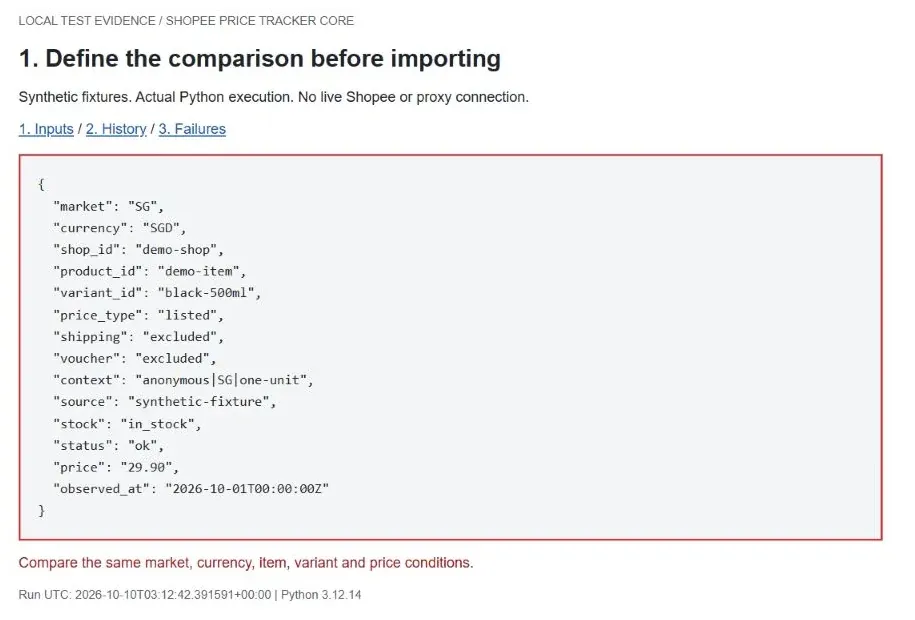
Keep delivery region, quantity and relevant offer eligibility consistent, too. You can represent these conditions with a nonpersonal context label; you do not need a shopper’s name or address to identify the comparison policy.
The public listed price is not every buyer’s final checkout price. A useful alert might say, “Listed price fell 10%, excluding shipping and vouchers.” That is more defensible than telling the team that all customers can now buy the product for 10% less.
How to Build a Shopee Price Tracker
Step 1: Define Your Market, Products, and Tracking Frequency
Start with one market and a short watchlist. For each item, specify the shop, listing, variant, currency and price conditions. Record the permitted data source and the business decision the observation supports.
Choose a schedule based on how quickly your team can act and how frequently the source permits access. A campaign review may need a different schedule from routine assortment research. There is no universal request rate that is safe for every Shopee endpoint, account or data provider.
Step 2: Choose an Authorized Data Source
Evaluate an official integration, a seller export or a licensed data feed first. Check its current documentation for market coverage, variant-level prices, timestamps and the listings you are permitted to query. Access to your own shop does not establish access to every competitor’s catalog.
For a website-based workflow, confirm that the intended collection is allowed and respect the applicable access restrictions. An access-denied response is a reason to check permissions or choose another authorized source. Changing the connection does not create permission.
The runnable example below accepts normalized JSON Lines, with one observation per line. This makes the source boundary explicit: your authorized adapter produces records; the monitoring core validates and stores them. No undocumented Shopee endpoint is presented as a supported API.
Step 3: Collect and Validate Product Prices
Validate the returned identity before the price. Does the record belong to the intended listing and variant? Is the currency correct? Is the amount a finite, positive value for the price type you selected?
Then inspect the collection result. A login screen, empty body or error page is a failed observation even if the server returns HTTP 200. Preserve the failure reason and review the response through your approved diagnostic process. Do not convert missing text into zero.
The local example also rejects unavailable offers and requires timezone-aware timestamps. A production adapter should additionally validate source-specific currency precision, freshness and the expected watchlist identifiers before handing records to the core.
Step 4: Store Timestamped Price Observations
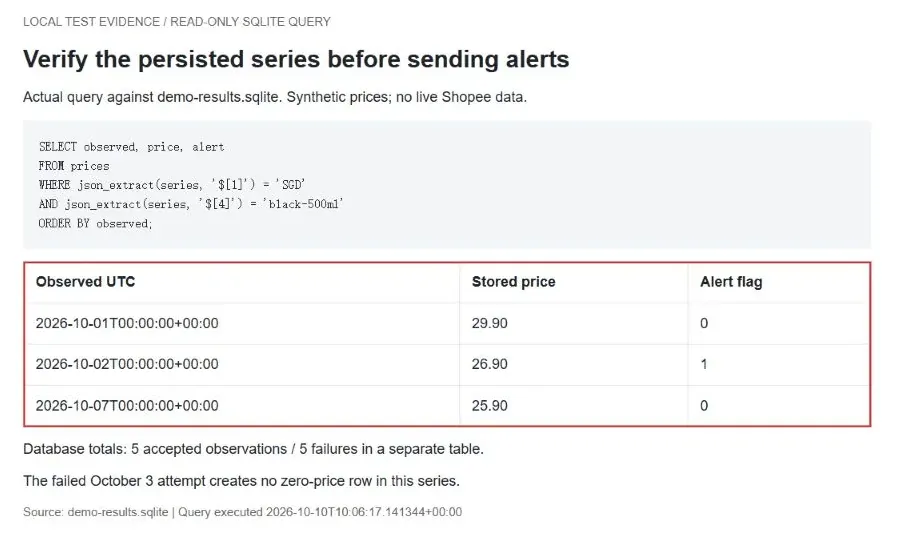
Keep successful observations and failures in separate records. A collection outage should create a gap in your history, not a plunge to zero. Store the original price as a decimal-compatible value, and preserve both source time and import time.
The example uses SQLite with a separate series for each combination of market, currency, shop, product, variant, price type, shipping treatment, voucher treatment, context and source. That deliberately conservative key prevents unlike offers from being compared. If your source changes its field definitions, version the adapter and review continuity before merging old and new records.
Run the Tested Python Example
The accompanying package contains tracker.py, run_demo.py, sample.jsonl, and test-output.txt. The core uses only Python’s standard library; no pip dependencies or credentials are required for this offline test. It was tested with Python 3.12.14 and SQLite 3.53.1 on October 10, 2026.
Extract the package, open a terminal in its folder, and run:
python --version
python run_demo.py
python tracker.py sample.jsonl --db prices.sqlite
Use a new database path when you want a clean import. Reusing the same database intentionally rejects repeated or older observations for an existing series. The demo runner uses an in-memory database for repeatable assertions and also writes a local SQLite snapshot and three HTML evidence pages.
The core comparison uses decimal arithmetic and looks up the most recent accepted observation for the same series:
previous = db.execute(
    'SELECT price, observed FROM prices WHERE series=? '
    'ORDER BY observed DESC LIMIT 1', (key,)
).fetchone()
change = None if not previous else (
    price / Decimal(previous[0]) - 1
) * 100
alert = change is not None and abs(change) >= threshold
This excerpt is part of the supplied full program. Run tracker.py, rather than executing the excerpt by itself. The sample input file demonstrates the complete record format, including source, context, stock and observation time.
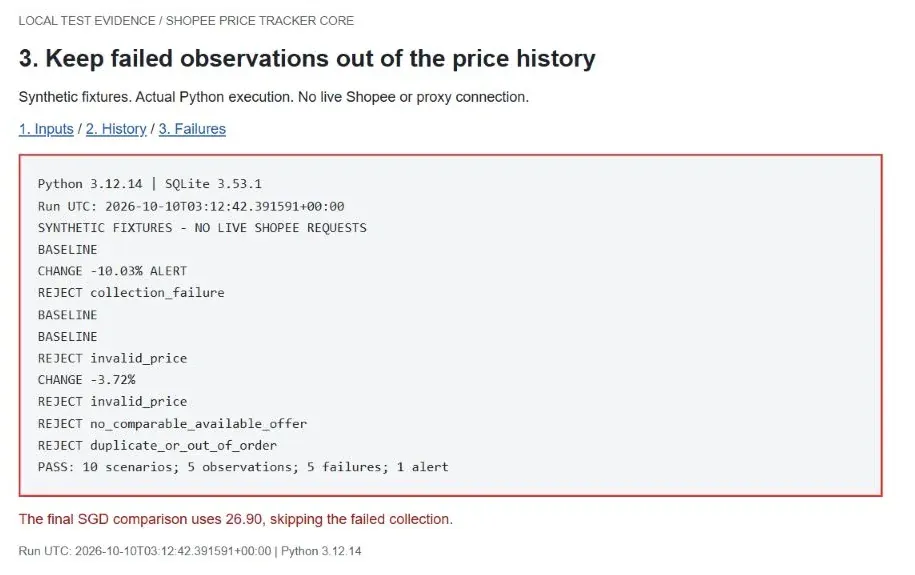
Actual output from the demo run was:
BASELINE
CHANGE -10.03% ALERT
REJECT collection_failure
BASELINE
BASELINE
REJECT invalid_price
CHANGE -3.72%
REJECT invalid_price
REJECT no_comparable_available_offer
REJECT duplicate_or_out_of_order
PASS: 10 scenarios; 5 observations; 5 failures; 1 alert
Test boundaries: these results verify the local comparison, storage and rejection paths using synthetic records. They do not verify live Shopee collection, proxy performance, scheduling or notification delivery. The example flags alerts locally; it does not send messages. Malformed JSON stops the importer, and database or filesystem errors propagate to the caller. Add input quarantine, operational logging and recovery before unattended production use.
When you add a real source adapter, load secrets from environment variables such as PRICE_SOURCE_TOKEN and, only if needed, ROLA_PROXY_URL. These are suggested names for your adapter, not settings read by the offline core. Obtain actual endpoints and credentials from your authorized provider; never paste secrets into screenshots or source control.
Step 5: Set Price-Change Alerts
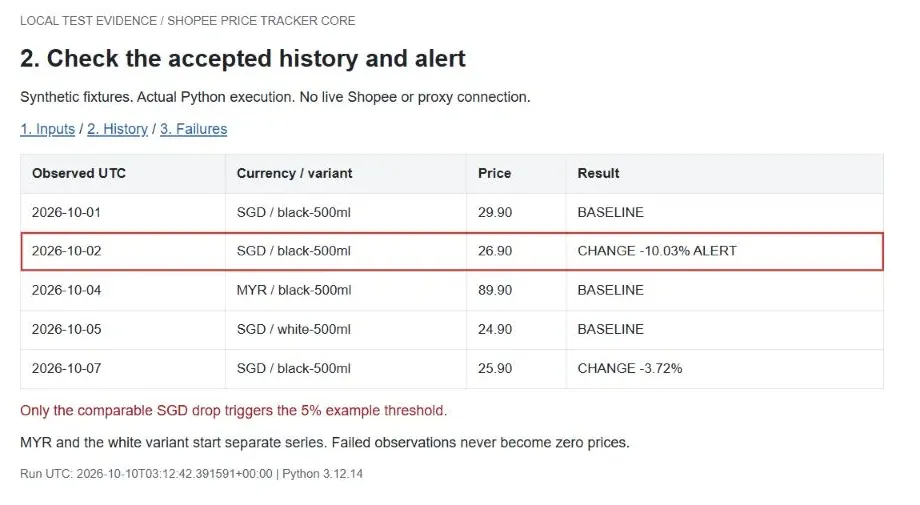
Calculate percentage change only after finding a valid previous observation with matching comparison fields:
percentage change = (new price - previous price) / previous price × 100
The previous price must be positive. In the test, SGD 29.90 falls to SGD 26.90, a change of approximately -10.03%. That exceeds the example 5% threshold. A MYR observation and a white variant each start a new series; neither generates a cross-currency or cross-variant alert.
Include the old and new prices, identifiers, timestamps, price conditions and source link in a production notification. Deduplicate delivery retries. For automatic repricing, add a separate approval or margin rule rather than allowing a single observation to change your selling price immediately.
Step 6: Log Failures Separately From Price Changes
Use distinct failure categories for connection errors, proxy authentication, target responses, session state, parsing and business validation. Record attempt time and an internal target reference without logging tokens or unnecessary personal data.
Set connection and response timeouts in the source adapter. Retry only transient failures, with a small maximum attempt count and backoff. When a response supplies a relevant Retry-After value, honor it; if the delay exceeds the current job window, reschedule the job. Pause after repeated failures or a defined budget limit.
To track Shopee prices automatically, schedule the authorized adapter and importer together. Prevent overlapping runs for the same target, monitor the age of the last successful observation, and route collection failures separately from price alerts. A silent tracker is not necessarily a stable market.
Why Does a Shopee Price Tracker Stop Working?
Diagnose the layer that failed before changing the proxy configuration.
Proxy authentication fails. Verify the actual host, port, protocol and authentication method. An HTTP proxy can return 407 Proxy Authentication Required. A SOCKS connection uses its own negotiation and error reporting; not every proxy failure has an HTTP status code.
DNS lookup or connection times out. Check endpoint spelling, DNS behavior, routing, timeout settings and the client’s connection logs. Test one controlled request from the same application. A successful browser request does not prove your Python client follows the same route.
Access is denied. HTTP 403 Forbidden means the responding HTTP server refuses the request. Determine whether the response came from the target service or an intermediary, then review the permitted access method. It does not, by itself, prove the IP is defective.
Requests are rate-limited. HTTP 429 Too Many Requests indicates rate limiting by the responding service. Check the source’s published limits and response instructions. Reduce request frequency, limit retries and pause when required. The standard allows a Retry-After header; its absence does not mean immediate retries are acceptable.
Login or session state disappears. Inspect legitimate session expiry and cookie handling. Keeping an exit IP stable does not renew a login or preserve cookies automatically.
HTTP 200 contains no valid price. Inspect the content and selected variant before blaming the network. A changed page structure or a response that is not a product page requires parser or source-adapter work.
An implausible discount appears. Recheck currency, pack size, variant, stock and price type. Review stale or out-of-order observations. Keep the alert pending until the offer is comparable.
For protocol definitions, see HTTP Semantics and the HTTP 429 specification.
When Does a Shopee Price Tracker Need Proxies?
A Shopee price tracker does not always need a proxy. Consider one when an authorized workflow requires a supported regional exit, a specified outbound address or connection continuity. If an approved API or data feed already meets your requirements, an extra proxy may add complexity without improving the observations.
A proxy for Shopee price tracking changes the route of configured traffic. It does not grant API access, validate a variant, calculate voucher eligibility or guarantee that a product page will load. The marketplace domain, account context, delivery settings and selected offer still need to be controlled independently.
For multiple collection jobs, assign network resources according to the workflow and its permissions. Keep the assignment visible in logs so a failure can be traced to a specific configuration. Do not use additional exits to evade access restrictions or request limits.
Rotating vs. Sticky vs. Static Proxy Connections
Rotating connections change exits at the boundaries defined by the service configuration. Evaluate them for independent requests only when that behavior fits the authorized workflow. Faster rotation is not a reliable measure of better data.
Sticky sessions request temporary exit continuity. Check the documented lifetime, idle behavior and what happens if the assigned exit becomes unavailable. Your client must still manage cookies and application state.
Static IP allocations provide an address intended to remain fixed under the product’s service terms. Evaluate them when a workflow needs longer continuity or an allowlisted exit. Confirm replacement policy, allocation period and whether the address is dedicated.
These terms describe related but different properties. A rotating residential network can offer sticky sessions; “sticky” does not mean permanent or exclusive. Rola IP’s existing guide to sticky vs. rotating proxies explains this distinction in more detail.
How Rola IP Fits Into a Shopee Price Monitoring Workflow
Verify Regional Availability and Protocol Compatibility
Treat Rola IP as the network component of the system. Its public site advertises residential coverage across 190+ countries and regions, but that is not a guarantee of available stock for your exact market, city or product. Verify the required location in the current product interface before designing around it.
Confirm that the selected proxy protocol is supported by your collector and its dependencies. Geographic exit selection and marketplace selection are separate settings. A Singapore exit does not, by itself, make every observed offer an SGD offer or establish a buyer’s delivery eligibility.
Configure and Test the Actual Connection
Copy the host, port and authentication configuration generated for your account. Follow Rola IP’s residential proxy setup guide for the configuration workflow, then verify the route from the program that will perform collection.
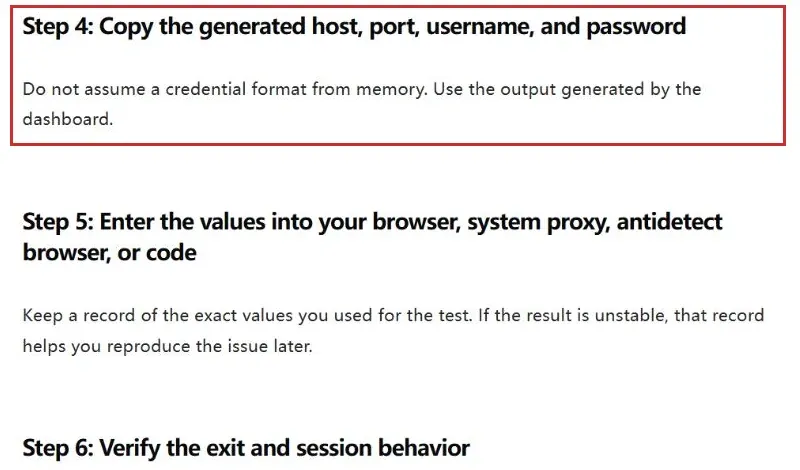
First check connectivity and the observed exit using an appropriate diagnostic endpoint. Next, make a permitted source request and validate its product fields. Those are separate tests: reaching an IP-check service establishes neither Shopee access nor correct price extraction.
Match Session Behavior to the Workflow
For independent observations, evaluate whether changing exits adds any useful capability. For a continuous authorized workflow, verify the selected session’s behavior across the complete sequence. Measure the actual result instead of assuming that a session label guarantees continuity.
The offline tests in this article do not establish Rola IP availability or performance. Run a separate pilot with your own approved source, chosen region and application before relying on that configuration.
Estimate Traffic and Control Costs
Measure request count, response bytes, failures and retries during the pilot. For a browser-based collector, include supporting page resources. Confirm the current plan’s billing unit, traffic validity, concurrency terms and treatment of unsuccessful traffic.
Estimate monthly usage from measured bytes per completed job multiplied by planned job count, then account for observed retry overhead. Avoid double-counting retries if your per-job measurement already includes them. For an IP-based plan, evaluate allocation cost and service terms separately from traffic-based pricing.
A useful operational metric is cost per accepted observation. Monitor it alongside freshness and validation failures. Set a spending alert and a stop threshold before increasing the watchlist.
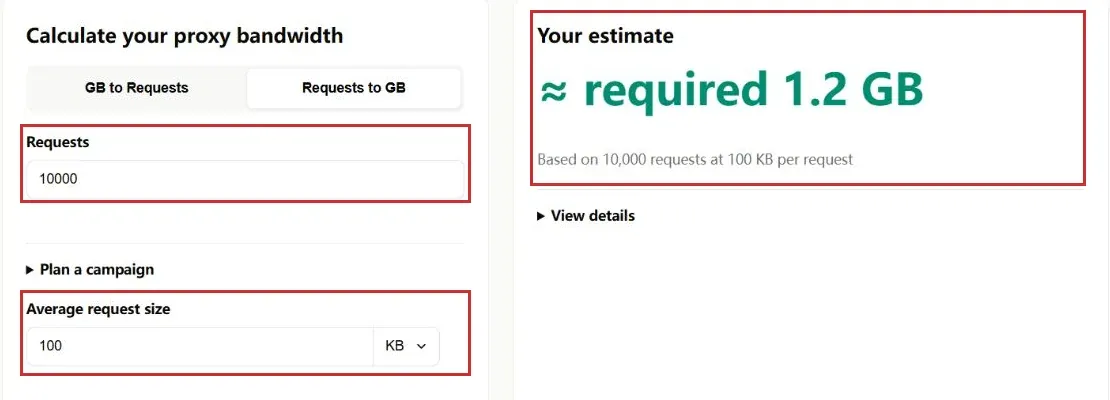
For a planning example, enter 10,000 requests and 100 KB per request into Rola IP’s bandwidth calculator. On the decimal basis, those assumed inputs equal 1 GB before a buffer, or 1.2 GB with the calculator’s 20% safety margin. This example was checked on October 10, 2026; the inputs are illustrative, not measured Shopee traffic, and the result is a traffic estimate rather than a price quote.
Build a Tracker Around Comparable Data and Verifiable Connections
Start with a small set of clearly defined offers. Prove that your system separates genuine price changes from mismatched variants and collection failures. Then connect an authorized source, verify the network path and measure operating cost before expanding.
Need a target-market exit or a consistent proxy session for an authorized monitoring workflow? Review Rola IP’s proxies for price monitoring and validate the available options against your application, market and traffic requirements.