
How to Scrape Tripadvisor Reviews With Python

Oct 27, 2026 · Guides · 19 min read
To scrape Tripadvisor reviews with Python, load a hotel’s review page with Selenium, expand each review’s text, and parse the rendered cards with BeautifulSoup. Then follow the review section’s Next link, remove duplicates by review ID, and export the records to CSV and JSON.
This guide walks through the review pages for 1926 Le Soleil Hotel & Spa in Sliema, Malta, from opening the first page to exporting individual guest reviews. You will extract titles, full text, ratings, publication dates, and dates of stay, with a two-page limit to keep the initial collection manageable. Collect and reuse reviews within your project’s permissions.
For scheduled review monitoring, Rola IP supplies the proxy connection used by Chrome. You can choose a network exit for your collection server and keep one session through the hotel’s pages. This guide includes the endpoint configuration, browser IP check, and proxy troubleshooting alongside the extraction code.
The Workflow
- Configure the browser connection, including Rola IP when your collection needs a proxy.
- Open the property’s review page in Chrome.
- Wait for review cards and expand their Read more controls.
- Extract each card’s fields without mixing in the hotel’s overall rating.
- Follow the actual Next link and keep only new review IDs.
- Save CSV, JSON, and a log with the reason collection stopped.
Step 1: Install Python, Chrome, and the Dependencies
Use Python 3.10 or later and an installed Chrome browser on Windows, macOS, or Linux. Create a virtual environment in your project folder and install the dependencies below.
Windows PowerShell:
python -m venv .venv
.\.venv\Scripts\Activate.ps1
python -m pip install "selenium>=4.11,<5" "beautifulsoup4>=4.12,<5"
macOS or Linux:
python3 -m venv .venv
source .venv/bin/activate
python -m pip install "selenium>=4.11,<5" "beautifulsoup4>=4.12,<5"
The script uses Selenium 4 and BeautifulSoup 4, with Python’s built-in csv and json modules for export. Save the complete code at the end of this guide as tripadvisor_review_scraper.py.
Selenium Manager handles ChromeDriver discovery and setup; the first launch may require a download. The Selenium Manager documentation explains driver management. Resolve browser startup errors before investigating review selectors.
The Python Selenium scraping guide covers the browser setup and element interactions used in this workflow.
Step 2: Start With One Hotel Review Page
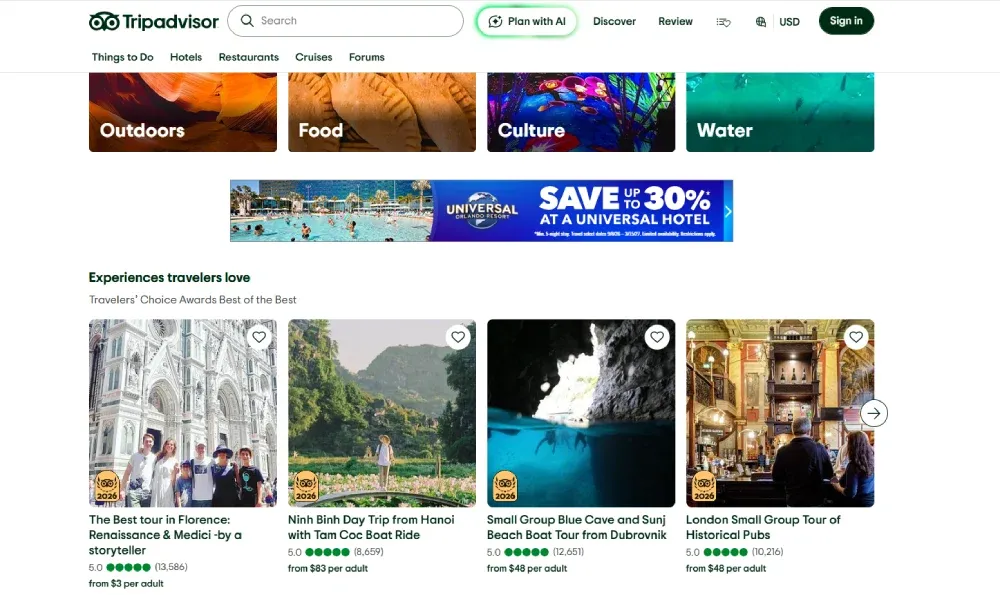
Use Tripadvisor’s search or Hotels navigation to find a property, then open its hotel review page. The homepage’s experience listings are separate from the guest review cards used in this tutorial.
Open the hotel’s review page:
https://www.tripadvisor.com/Hotel_Review-g190327-d264936-Reviews-1926_Le_Soleil_Hotel_Spa-Sliema_Island_of_Malta.html
In this URL, g190327 identifies the location and d264936 identifies the hotel. Scroll to the guest review section: each review card contains the text, individual rating, and dates that the scraper will extract.
The script requests English using Chrome’s language preferences and an Accept-Language header so the parser can recognize labels such as Date of stay:. For the first collection, use --manual-setup in the run command below. The script pauses on the first hotel page: handle any consent dialog and scroll to the reviews in the Chrome window it opens, then press Enter in the terminal to continue.
The review section’s Next link leads to:
https://www.tripadvisor.com/Hotel_Review-g190327-d264936-Reviews-or10-1926_Le_Soleil_Hotel_Spa-Sliema_Island_of_Malta.html
The or10 component indicates the offset for the next batch of reviews. Follow the page’s Next link in the script so pagination stays aligned with the hotel’s review section.
Step 3: Map the Review Cards to the Export Fields
Open Chrome DevTools → Elements and select an individual guest review. Use these selectors to extract the fields from the hotel review cards:
| Field or control | Selector | How the script uses it |
|---|---|---|
| Individual card | div[data-test-target="HR_CC_CARD"] |
Parses each card separately |
| Review ID | [data-reviewid] |
Checks the card itself and its descendants; falls back to the review permalink |
| Title | div[data-test-target="review-title"] a span span |
Falls back to the surrounding title link |
| Body | span[data-automation*="reviewText"] or [data-automation="ugcReviewReadMore_Content"] |
Keeps the longest matching body text |
| Rating | div[data-test-target="review-rating"] > span |
Parses rating labels or a bubble_50 class; also checks svg[data-automation="bubbleRatingImage"] |
| Publication date | span.scrVn or div[data-test-target="review-date"] |
Removes a leading “wrote a review,” “Written,” or “Reviewed” label |
| Date of stay | span.teHYY or a span containing Date of stay: |
Extracts the month and year independently of publication |
| Expand control | XPath .//*[@data-test-target='expand-review'] |
Clicks inside the current card; also supports exact Read more buttons and links |
| Next page | a[data-smoke-attr="pagination-next-arrow"] |
Reads the link and verifies that it belongs to the same hotel |
Class names such as scrVn and teHYY are layout dependent. If a date is missing, inspect its node rather than substituting another date. The complete script groups selectors near the top so the field mapping can be maintained in one place.
Check card and body matches in the DevTools Console:
const cards = [...document.querySelectorAll('div[data-test-target="HR_CC_CARD"]')];
console.table(cards.slice(0, 3).map(card => ({
  id: card.getAttribute("data-reviewid")
      || card.querySelector("[data-reviewid]")?.getAttribute("data-reviewid"),
  title: card.querySelector('[data-test-target="review-title"] a')?.innerText,
  body: card.querySelector(
    'span[data-automation*="reviewText"], [data-automation="ugcReviewReadMore_Content"]'
  )?.innerText
})));
console.log("Loaded review cards:", cards.length);
Each row should describe one guest review. Keep the card as the extraction boundary: a page-wide rating selector can accidentally capture the property’s aggregate rating instead.
The review “Wonderful Stay!” has ID 931842101, an individual rating of 5, publication text Dec 2023, and a stay date of December 2023. Store the publication and stay dates separately: one describes when the review was posted, and the other describes when the guest stayed. Keep month-level dates at their original precision.
Step 4: Expand the Body Before Parsing It
A loaded review card can still contain shortened text. For “Wonderful Stay!”, clicking Read more expands the body from 210 to 869 characters. For each card, the script locates an active Read more control, scrolls it into view, and clicks it. It then waits for the body to stabilize and for either a longer body or an inactive expansion control.
Only after expansion does BeautifulSoup parse driver.page_source. Parsing the original response with Requests would miss any content that appears only after browser interaction. The guide to scraping JavaScript pages with Python explains this distinction.
Avoid combining every matching body element into one string. When a selector matches both a parent and its child, concatenation duplicates text. The parser selects the longest matching body instead.
Inspect the end of a long review after expansion. In “Wonderful Stay!”, the body ends with the breakfast description, including “fresh pastries, local cheeses, eggs cooked to order and fresh fruit.” Keep that final text in the export. Use the expansion control and rendered body to check for shortened text; authors can also use ellipses within complete reviews.
The Selenium waits documentation describes waiting for specific browser conditions. The code uses explicit waits for card loading and expansion, with a separate delay between pages.
Step 5: Follow Next and Deduplicate by Review ID
For each page, the scraper expands the cards, extracts their fields, and adds new review IDs to a set. If a review appears again on the next page, skip it by ID. For example, review 922901673 appears at the end of the first batch and the start of the second; the set keeps a single record for it.
Before loading another page, the script reads the current Next link and checks that it is still an HTTPS Tripadvisor Hotel_Review URL for the same property ID. After navigation, it waits for stable cards containing at least one review ID absent from the previous pages.
Collection stops when it reaches the configured page cap, finds a disabled or missing Next control, or encounters an error. A missing Next link is recorded separately because it can also indicate a layout change. The page cap limits the job; it does not represent the hotel’s complete review history.
Step 6: Connect Selenium to Rola IP
When you move this scraper to a scheduled collection server or need a particular country’s network exit, route Chrome through Rola IP residential proxies. Rola IP provides the browser’s network connection; Selenium handles review interactions, and BeautifulSoup extracts the fields. Configure the connection once before loading the hotel page, then keep the same proxy session while expanding reviews and following pagination. If you use a rotating gateway, choose a sticky session long enough for the hotel collection. A fixed gateway address alone does not ensure a fixed exit IP.
Configure the Proxy Connection
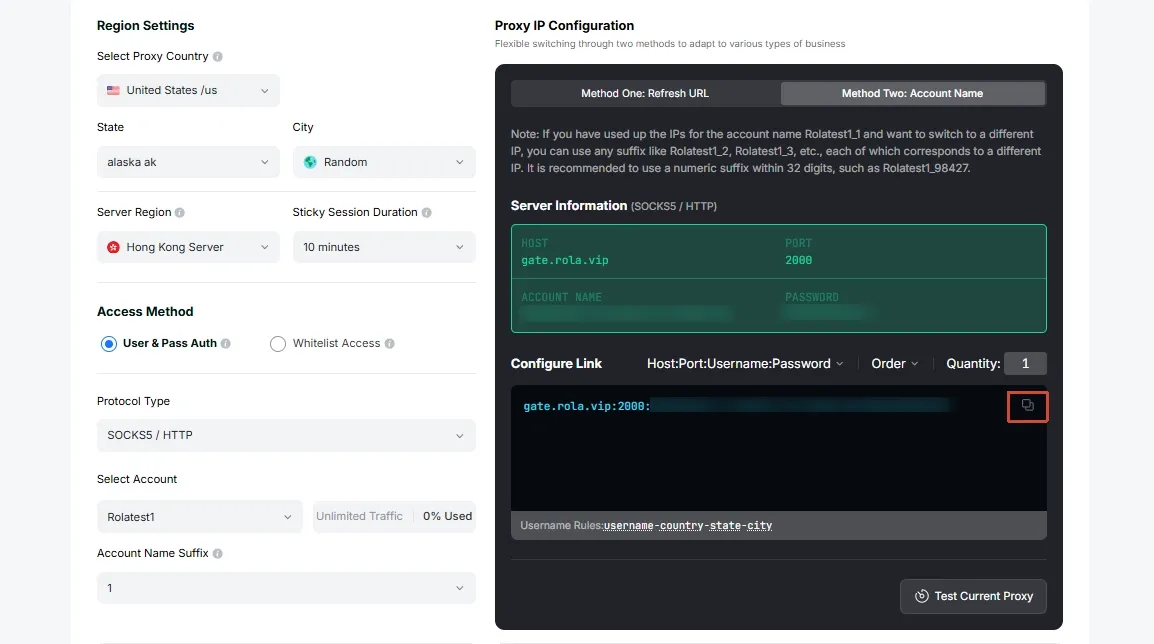
Prepare the connection in your Rola IP dashboard:
- Open your residential proxy configuration and choose the exit country for your collection.
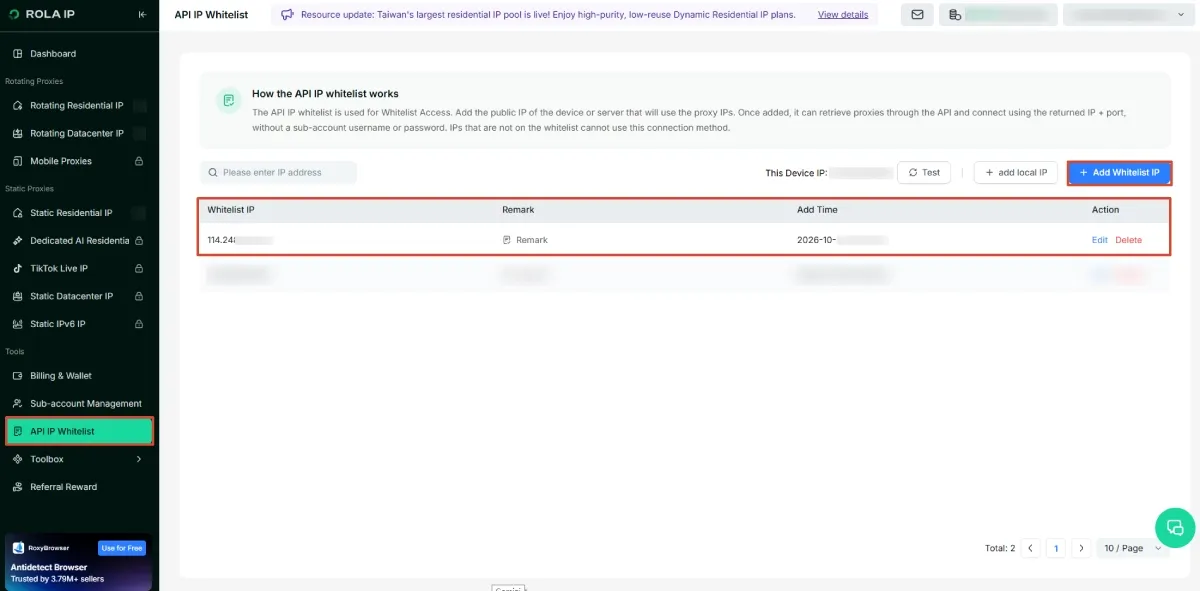
- Use HTTP with IP-whitelist authentication, and authorize the public IP of the computer or server running Selenium.
- Choose a session setting that keeps the exit for the collection, then copy the host and port generated for that configuration.
Use the endpoint and settings available in your account. The whitelist address is the machine’s outbound public IP, rather than a local address such as 192.168.x.x.
| Setting | Configuration for this tutorial |
|---|---|
| Network | Residential proxy |
| Protocol | HTTP |
| Authentication | IP whitelist |
| Endpoint | The host and port generated for your account |
| Country | The exit location your research requires |
| Session | Keep the same exit through the hotel’s paginated collection |
Choose a country based on the research task; collecting reviews about a Malta hotel does not itself require a Malta exit IP. Copy the endpoint from your account, including its actual port. The Rola IP residential proxy setup guide covers the account configuration.
Set the endpoint as an environment variable.
Windows PowerShell:
$env:ROLA_PROXY_URL = Read-Host "Paste your Rola IP endpoint in http://host:port form"
macOS or Linux:
printf "Paste your Rola IP endpoint in http://host:port form: "
read -r ROLA_PROXY_URL
export ROLA_PROXY_URL
The script reads ROLA_PROXY_URL and configures Chrome before launch:
proxy = proxy_endpoint(args.proxy)
if proxy:
    options.add_argument(f"--proxy-server={proxy}")
This connection method uses IP-whitelist authentication. A username and password pasted into Chrome’s --proxy-server argument do not complete proxy authentication; the script rejects credential-bearing URLs. Use the whitelist option for this workflow.
Check the Browser’s Proxy IP
Run the collection with --check-proxy:
python tripadvisor_review_scraper.py --check-proxy --max-pages 2 --output-dir output/1926-hotel-rola
Before opening Tripadvisor, the same Chrome session loads an IP-check endpoint and logs its public exit address. The script saves this as proxy_egress_ip in the JSON run metadata. Use this address to check the browser’s network exit against your proxy configuration.
If the IP check fails, inspect the endpoint, whitelist, account access, and network connection before collecting reviews. The scraper retains the error in its log rather than silently retrying through a direct connection. Configure the proxy in Selenium itself: a proxy used only by a separate Requests call will not route Chrome’s review traffic.
Step 7: Run the Scraper
After setting ROLA_PROXY_URL, start Chrome, check its exit IP, and collect up to two review pages:
python tripadvisor_review_scraper.py --check-proxy --manual-setup --max-pages 2 --output-dir output/1926-hotel-rola
Complete the page preparation in Chrome and press Enter in the terminal when prompted. Later runs can omit --manual-setup when no manual preparation is needed. Use a fresh output directory for each run to preserve previous files. To set the starting URL, page cap, delay, and timeout explicitly:
python tripadvisor_review_scraper.py --url "https://www.tripadvisor.com/Hotel_Review-g190327-d264936-Reviews-1926_Le_Soleil_Hotel_Spa-Sliema_Island_of_Malta.html" --max-pages 2 --delay 4 --timeout 30 --output-dir output/1926-hotel-next
| Argument | Default | Purpose |
|---|---|---|
--url |
The 1926 hotel URL above | Sets the hotel’s starting review page |
--max-pages |
2 |
Caps the number of pages |
--delay |
4 seconds |
Pauses between page requests; minimum accepted value is two seconds |
--timeout |
30 seconds |
Limits page loads and element waits |
--output-dir |
A timestamped folder under tripadvisor_output |
Stores exports and the log |
--headless |
Off | Runs without a visible Chrome window |
--manual-setup |
Off | Pauses on the first hotel page for preparation in the visible browser |
--proxy |
ROLA_PROXY_URL when set |
Sets an IP-whitelisted HTTP endpoint for Chrome |
--check-proxy |
Off | Checks the same browser’s public IP before loading the hotel |
When ROLA_PROXY_URL is set, these commands use that endpoint automatically. Use --manual-setup with a visible browser; omit it when using --headless.
Keep a delay between pages and start with a small collection. If the site returns a rate-limit response, stop and follow its retry instructions.
For another hotel, pass its full Hotel_Review URL and check that its review cards use the same fields. Restaurant pages require a separate mapping for their cards, visit dates, expansion controls, and pagination.
Step 8: Inspect the CSV and JSON
The output directory contains:
output/1926-hotel-rola/
  reviews.csv
  reviews.json
  run.log
The CSV uses UTF-8 with a byte order mark for spreadsheet compatibility. The JSON contains a run object and a reviews array. Run metadata includes page counts, duplicate counts, environment versions, proxy use, the optional proxy exit IP, and the stop reason.
| Export field | Meaning |
|---|---|
review_id |
Stable identifier used for deduplication |
property_name |
The page heading, with a property-ID fallback |
page_num |
The collection batch where the review was first retained |
rating |
The individual review’s numeric rating |
title / review_text |
The review heading and rendered body |
char_length |
Length of the normalized exported body |
published_date |
Publication-date text, preserving available precision |
stay_date |
Stay month and year when present |
review_url |
Review permalink when the card supplies one |
source_page_url |
The page from which the record was extracted |
Reviewer names and profile details are unnecessary for this workflow, so the script leaves them out.
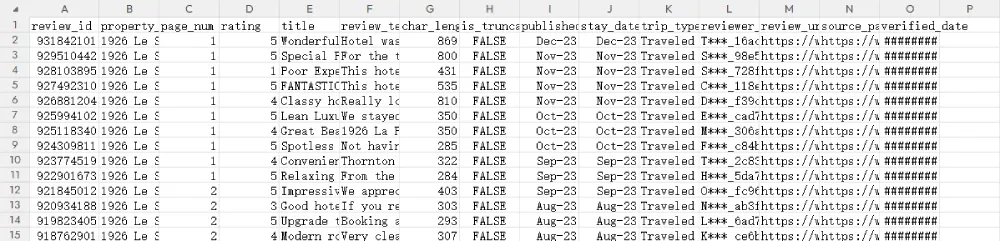
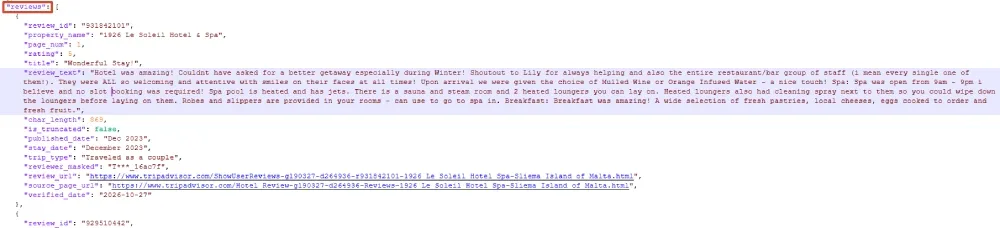
Use this small check after collection:
import csv
import json
from pathlib import Path

folder = Path("output/1926-hotel-rola")
payload = json.loads((folder / "reviews.json").read_text(encoding="utf-8"))
rows = payload["reviews"]
with (folder / "reviews.csv").open(encoding="utf-8-sig", newline="") as handle:
    csv_rows = list(csv.DictReader(handle))

assert rows, "The export has no reviews"
assert len(rows) == len(csv_rows), "CSV/JSON row counts differ"
assert len({row["review_id"] for row in rows}) == len(rows), "Duplicate review IDs"
for row, csv_row in zip(rows, csv_rows):
    assert row["char_length"] == len(row["review_text"]), "Body length mismatch"
    assert 1 <= row["rating"] <= 5, "Rating outside 1-5"
    for field, value in row.items():
        assert csv_row[field] == str(value), f"CSV/JSON mismatch: {field}"
print("Rows:", len(rows))
print("Stop reason:", payload["run"]["stop_reason"])
print("Error:", payload["run"]["error"])
Compare a few retained rows from each page with their source cards, including the end of a long body and both date fields. File consistency checks help catch export errors; source comparisons check the field mapping. If the script stops with an error, inspect run.log before using the partial dataset.
Complete Python Scraper
Save the following as tripadvisor_review_scraper.py. It includes the hotel’s starting URL, review selectors, text expansion, pagination, deduplication, and export handling.
"""Collect one Tripadvisor hotel's review cards and export CSV/JSON."""

from __future__ import annotations

import argparse
import csv
from datetime import datetime, timezone
import importlib.metadata
import ipaddress
import json
import logging
import os
from pathlib import Path
import platform
import re
import time
from urllib.parse import urljoin, urlsplit, urlunsplit

from bs4 import BeautifulSoup
from selenium import webdriver
from selenium.common.exceptions import StaleElementReferenceException
from selenium.webdriver.common.by import By
from selenium.webdriver.support.ui import WebDriverWait

TARGET_URL = (
    "https://www.tripadvisor.com/Hotel_Review-g190327-d264936-Reviews-"
    "1926_Le_Soleil_Hotel_Spa-Sliema_Island_of_Malta.html"
)
SELECTORS = {
    "card": 'div[data-test-target="HR_CC_CARD"]',
    "id": '[data-reviewid]',
    "title": 'div[data-test-target="review-title"] a span span, '
             'div[data-test-target="review-title"] a',
    "text": 'span[data-automation*="reviewText"], '
            'span[data-automation*="reviewText"] span, '
            '[data-automation="ugcReviewReadMore_Content"]',
    "rating": 'div[data-test-target="review-rating"] > span, '
              'svg[data-automation="bubbleRatingImage"]',
    "published": 'span.scrVn, div[data-test-target="review-date"]',
    "stay": 'span.teHYY, div[data-test-target="review-title"] + div',
    "next": 'a[data-smoke-attr="pagination-next-arrow"]',
}
EXPAND_XPATH = (
    ".//*[@data-test-target='expand-review'] | "
    ".//button[normalize-space(.)='Read more'] | "
    ".//a[normalize-space(.)='Read more'] | "
    ".//*[@role='button' and normalize-space(.)='Read more']"
)
FIELDS = [
    "review_id", "property_name", "page_num", "rating", "title",
    "review_text", "char_length", "published_date", "stay_date",
    "review_url", "source_page_url",
]
LOG = logging.getLogger("tripadvisor")


def proxy_endpoint(value):
    """Chrome proxy-server uses an endpoint; this workflow uses IP whitelisting."""
    if not value:
        return None
    try:
        parsed = urlsplit(value.strip())
        port = parsed.port
        valid = (parsed.scheme == "http" and parsed.hostname and port
                 and parsed.username is None and parsed.password is None
                 and parsed.path in ("", "/") and not parsed.query and not parsed.fragment)
    except ValueError:
        valid = False
    if not valid:
        raise ValueError("Use an HTTP endpoint in http://host:port form with IP-whitelist authentication; omit credentials")
    return f"http://{parsed.netloc}"


def check_proxy_ip(driver, timeout):
    driver.get("https://api.ipify.org?format=json")

    def read_ip(browser):
        try:
            body = browser.find_element(By.TAG_NAME, "body").text
            value = json.loads(body).get("ip", "")
            return str(ipaddress.ip_address(value))
        except (ValueError, TypeError, AttributeError):
            return False

    return WebDriverWait(driver, timeout).until(read_ip)


def clean(value):
    return re.sub(r"\s+", " ", value or "").strip()


def longest_text(card, selector):
    # Alternatives can select both a parent and its child. Do not concatenate.
    return max((clean(n.get_text(" ", strip=True))
                for n in card.select(selector)), key=len, default="")


def parse_rating(card):
    for node in card.select(SELECTORS["rating"]):
        nodes = [node, *node.select("[aria-label], [class], title")]
        for item in nodes:
            value = " ".join([
                item.get("aria-label", ""),
                " ".join(item.get("class", [])),
                item.get_text(" ", strip=True),
            ])
            bubble = re.search(r"\bbubble_(\d{2})\b", value)
            label = re.search(r"(\d(?:\.\d+)?)\s*(?:of|out of|/)\s*5\b", value, re.I)
            score = (int(bubble.group(1)) / 10 if bubble else
                     float(label.group(1)) if label else None)
            if score is not None and 1 <= score <= 5:
                return score
    return None


def parse_card(card, page_num, page_url, property_name):
    id_node = card if card.has_attr("data-reviewid") else card.select_one(SELECTORS["id"])
    review_id = id_node.get("data-reviewid", "") if id_node else ""
    review_url = ""
    for link in card.select('a[href*="/ShowUserReviews-"]'):
        match = re.search(r"-r(\d+)-", link["href"])
        if match and (not review_id or match.group(1) == review_id):
            review_id = review_id or match.group(1)
            review_url = urljoin(page_url, link["href"])
            break
    text = longest_text(card, SELECTORS["text"])
    rating = parse_rating(card)
    if not re.fullmatch(r"\d+", review_id) or not text or rating is None:
        raise ValueError("Missing review ID, body, or individual rating; inspect the review card selectors")
    published = longest_text(card, SELECTORS["published"])
    published = re.sub(r"^.*?\bwrote a review\s*", "", published, flags=re.I)
    published = re.sub(r"^(?:Written|Reviewed)\s*:?\s*", "", published, flags=re.I)
    stay = ""
    for node in card.select(SELECTORS["stay"]) + card.select("span"):
        value = clean(node.get_text(" ", strip=True))
        match = re.search(r"Date of stay:\s*([A-Za-z]+\s+\d{4})", value, re.I)
        if match:
            stay = match.group(1)
            break
    return {
        "review_id": review_id, "property_name": property_name,
        "page_num": page_num, "rating": rating,
        "title": longest_text(card, SELECTORS["title"]),
        "review_text": text, "char_length": len(text),
        "published_date": clean(published), "stay_date": stay,
        "review_url": review_url, "source_page_url": page_url,
    }


def check_page(driver):
    # Restriction detection uses headings, never guest review bodies.
    headings = " ".join(n.text for n in driver.find_elements(By.CSS_SELECTOR, "h1"))
    value = (driver.title + " " + headings).lower()
    if any(term in value for term in (
        "access denied", "verify you are human", "captcha", "too many requests",
    )):
        raise RuntimeError("Access restriction detected; stop and inspect the browser")


def wait_for_cards(driver, timeout, previous_ids):
    last = None
    since = time.monotonic()

    def ready(browser):
        nonlocal last, since
        check_page(browser)
        try:
            cards = browser.find_elements(By.CSS_SELECTOR, SELECTORS["card"])
            signature = tuple(c.get_attribute("outerHTML") for c in cards)
            if not signature:
                return False
            if signature != last:
                last, since = signature, time.monotonic()
                return False
            if time.monotonic() - since < 1:
                return False
            if previous_ids:
                soup = BeautifulSoup("".join(signature), "html.parser")
                ids = {n.get("data-reviewid") for n in soup.select("[data-reviewid]")}
                ids.update(re.findall(r"-r(\d+)-", str(soup)))
                if not ids - previous_ids:
                    return False
            return cards
        except StaleElementReferenceException:
            return False

    return WebDriverWait(driver, timeout, poll_frequency=0.5).until(ready)


def body_text(card):
    soup = BeautifulSoup(card.get_attribute("outerHTML"), "html.parser")
    return longest_text(soup, SELECTORS["text"])


def expansion_controls(card):
    return [n for n in card.find_elements(By.XPATH, EXPAND_XPATH)
            if n.is_displayed() and n.is_enabled()
            and n.get_attribute("aria-expanded") != "true"
            and clean(n.text).lower() != "read less"]


def expand_card(driver, card_index, timeout):
    clicks = 0
    for _ in range(3):
        card = driver.find_elements(By.CSS_SELECTOR, SELECTORS["card"])[card_index]
        controls = expansion_controls(card)
        if not controls:
            return clicks
        before = body_text(card)
        button = controls[0]
        driver.execute_script("arguments[0].scrollIntoView({block: 'center'});", button)
        button.click()
        clicks += 1
        last, since = None, time.monotonic()

        def expanded(browser):
            nonlocal last, since
            try:
                current = browser.find_elements(By.CSS_SELECTOR, SELECTORS["card"])[card_index]
                text = body_text(current)
                if not text or text != last:
                    last, since = text, time.monotonic()
                    return False
                return (time.monotonic() - since >= 1
                        and (len(text) > len(before) or not expansion_controls(current)))
            except (StaleElementReferenceException, IndexError):
                return False

        WebDriverWait(driver, timeout, poll_frequency=0.5).until(expanded)
    card = driver.find_elements(By.CSS_SELECTOR, SELECTORS["card"])[card_index]
    if expansion_controls(card):
        raise RuntimeError("Read more control remains active; inspect expansion before continuing")
    return clicks


def canonical_page(url, property_id):
    parsed = urlsplit(url)
    host = (parsed.hostname or "").lower()
    if (parsed.scheme != "https" or not (host == "tripadvisor.com" or host.endswith(".tripadvisor.com"))
            or not parsed.path.startswith("/Hotel_Review-")
            or f"-d{property_id}-" not in parsed.path):
        raise ValueError("Pagination must stay on the same Tripadvisor hotel property")
    return urlunsplit((parsed.scheme, parsed.netloc, parsed.path, parsed.query, ""))


def next_page(driver, property_id):
    for button in driver.find_elements(By.CSS_SELECTOR, SELECTORS["next"]):
        if not button.is_displayed():
            continue
        if button.get_attribute("aria-disabled") == "true" or button.get_attribute("disabled"):
            return None, "next_disabled"
        href = button.get_attribute("href")
        if not href:
            raise RuntimeError("Next control has no URL; inspect pagination")
        return canonical_page(urljoin(driver.current_url, href), property_id), None
    return None, "next_missing_check_page"


def export_files(folder, records, run):
    folder.mkdir(parents=True, exist_ok=True)
    with (folder / "reviews.csv").open("w", newline="", encoding="utf-8-sig") as handle:
        writer = csv.DictWriter(handle, fieldnames=FIELDS)
        writer.writeheader()
        writer.writerows(records)
    (folder / "reviews.json").write_text(
        json.dumps({"run": run, "reviews": records}, ensure_ascii=False, indent=2), encoding="utf-8")


def main(argv=None):
    parser = argparse.ArgumentParser(description=__doc__)
    parser.add_argument("--url", default=TARGET_URL)
    parser.add_argument("--max-pages", type=int, default=2)
    parser.add_argument("--delay", type=float, default=4)
    parser.add_argument("--timeout", type=float, default=30)
    parser.add_argument("--output-dir", type=Path)
    parser.add_argument("--headless", action="store_true")
    parser.add_argument("--manual-setup", action="store_true",
                        help="Pause on the first hotel page for consent and review-section setup")
    parser.add_argument("--proxy", default=os.environ.get("ROLA_PROXY_URL") or None,
                        help="IP-whitelisted HTTP proxy endpoint; defaults to ROLA_PROXY_URL")
    parser.add_argument("--check-proxy", action="store_true",
                        help="Check the proxied browser's public IP before collecting reviews")
    args = parser.parse_args(argv)
    if args.manual_setup and args.headless:
        parser.error("Use --manual-setup with a visible browser; omit --headless")
    if args.max_pages < 1 or args.delay < 2 or args.timeout < 1:
        parser.error("Use --max-pages >= 1, --delay >= 2, and --timeout >= 1")
    try:
        proxy = proxy_endpoint(args.proxy)
    except ValueError as exc:
        parser.error(str(exc))
    if args.check_proxy and not proxy:
        parser.error("--check-proxy requires --proxy or ROLA_PROXY_URL")
    match = re.search(r"-d(\d+)-", args.url)
    if not match:
        parser.error("URL must contain a hotel property ID")
    property_id = match.group(1)
    url = canonical_page(args.url, property_id)
    folder = args.output_dir or Path("tripadvisor_output") / datetime.now().strftime("%Y%m%d-%H%M%S-%f")
    folder.mkdir(parents=True, exist_ok=True)
    handlers = [logging.StreamHandler(), logging.FileHandler(folder / "run.log", encoding="utf-8")]
    LOG.setLevel(logging.INFO)
    LOG.propagate = False
    for handler in handlers:
        handler.setFormatter(logging.Formatter("%(asctime)s %(levelname)s %(message)s"))
        LOG.addHandler(handler)
    options = webdriver.ChromeOptions()
    options.add_argument("--lang=en-US")
    options.add_experimental_option("prefs", {"intl.accept_languages": "en-US,en"})
    if proxy:
        options.add_argument(f"--proxy-server={proxy}")
    if args.headless:
        options.add_argument("--headless=new")
    records, seen_ids, visited = [], set(), set()
    run = {
        "started_at": datetime.now(timezone.utc).isoformat(), "target_url": url,
        "requested_locale": "en-US", "max_pages": args.max_pages,
        "delay_seconds": args.delay, "timeout_seconds": args.timeout,
        "proxy_enabled": bool(proxy), "proxy_egress_ip": None,
        "python": platform.python_version(), "os": platform.platform(),
        "selenium": importlib.metadata.version("selenium"),
        "beautifulsoup4": importlib.metadata.version("beautifulsoup4"),
        "page_breakdown": [], "stop_reason": "error", "error": None,
    }
    driver = None
    exit_code = 0
    try:
        driver = webdriver.Chrome(options=options)
        run["browser_version"] = driver.capabilities.get("browserVersion")
        driver.set_page_load_timeout(args.timeout)
        driver.execute_cdp_cmd("Network.enable", {})
        driver.execute_cdp_cmd("Network.setExtraHTTPHeaders", {"headers": {"Accept-Language": "en-US,en;q=0.9"}})
        if args.check_proxy:
            run["proxy_egress_ip"] = check_proxy_ip(driver, args.timeout)
            LOG.info("Browser proxy egress IP: %s", run["proxy_egress_ip"])
        for page_num in range(1, args.max_pages + 1):
            if url in visited:
                raise RuntimeError("Repeated page URL detected")
            visited.add(url)
            LOG.info("Loading page %d: %s", page_num, url)
            driver.get(url)
            if page_num == 1 and args.manual_setup:
                input("In Chrome, handle any consent dialog and scroll to the reviews. "
                      "Press Enter here to continue: ")
            cards = wait_for_cards(driver, args.timeout, seen_ids)
            actual_url = canonical_page(driver.current_url, property_id)
            page = {"page_num": page_num, "page_url": actual_url, "cards_found": len(cards),
                    "expand_clicks": 0, "new_reviews": 0, "duplicates": 0}
            run["page_breakdown"].append(page)
            for index in range(len(cards)):
                page["expand_clicks"] += expand_card(driver, index, args.timeout)
            soup = BeautifulSoup(driver.page_source, "html.parser")
            heading = soup.select_one("h1")
            property_name = clean(heading.get_text(" ", strip=True)) if heading else f"Tripadvisor property {property_id}"
            for card in soup.select(SELECTORS["card"]):
                row = parse_card(card, page_num, actual_url, property_name)
                if row["review_id"] in seen_ids:
                    page["duplicates"] += 1
                    continue
                seen_ids.add(row["review_id"])
                records.append(row)
                page["new_reviews"] += 1
                if not row["title"] or not row["published_date"] or not row["stay_date"]:
                    LOG.warning("Review %s has an empty title or date field", row["review_id"])
            LOG.info("Page %d: %d new, %d duplicate; total %d", page_num,
                     page["new_reviews"], page["duplicates"], len(records))
            if not page["new_reviews"]:
                raise RuntimeError("Page produced no new reviews")
            if page_num == args.max_pages:
                run["stop_reason"] = "max_pages_reached"
                break
            url, reason = next_page(driver, property_id)
            if url is None:
                run["stop_reason"] = reason
                break
            time.sleep(args.delay)
    except Exception as exc:
        exit_code = 1
        run["error"] = f"{type(exc).__name__}: {exc}"
        LOG.exception("Collection stopped; retaining rows already parsed")
    finally:
        run["finished_at"] = datetime.now(timezone.utc).isoformat()
        run["unique_reviews_exported"] = len(records)
        run["exit_code"] = exit_code
        if driver:
            try:
                driver.quit()
            except Exception:
                LOG.warning("Browser cleanup failed", exc_info=True)
        try:
            export_files(folder, records, run)
            LOG.info("Saved %d rows to %s; stop reason: %s", len(records), folder, run["stop_reason"])
        finally:
            for handler in handlers:
                LOG.removeHandler(handler)
                handler.close()
    return exit_code


if __name__ == "__main__":
    raise SystemExit(main())
Troubleshooting
| Problem | Likely cause | What to do |
|---|---|---|
| Chrome does not open | Browser, driver, or driver download problem | Check Chrome installation and Selenium Manager diagnostics |
| No cards load | The review section has not loaded, a consent overlay intervenes, or the card selector changed | Inspect the visible page and card matches |
| Read more cannot be clicked | An overlay covers the control or the expansion selector targets the wrong element | Dismiss the overlay and inspect that card’s control |
| Expansion times out | The body did not update or the control still appears active | Compare the body selector and expansion control before increasing timeouts |
| Rating is missing | The rating node or its accessible label differs | Inspect the individual review’s rating markup |
| Date is empty | The page language or date markup differs | Update the relevant selector; keep publication and stay dates separate |
| The next page produces no new IDs | Repeated content, navigation problems, or changed pagination | Inspect the actual Next URL and review IDs |
next_missing_check_page appears |
No visible matching Next link was found | Check whether the page ended or its pagination changed |
| Access is denied or a CAPTCHA appears | The requested access needs attention | Stop collection and review the site’s access requirements |
| Proxy authentication or HTTP 407 error | Whitelist authorization is missing or the endpoint uses account/password mode | Authorize the Selenium machine’s public IP and use the matching whitelist endpoint |
| The browser cannot reach the IP-check service | Incorrect host or port, an unavailable endpoint, or an account/network issue | Check the Rola IP endpoint and authorization before loading reviews |
Check HTTP status codes in Chrome DevTools → Network when diagnosing denied requests or rate limits. Honor Retry-After where provided. The script’s title and heading checks detect some restriction screens, so browser inspection remains useful. The scraping access troubleshooting guide distinguishes network, session, and application issues.
Use Rola IP for Your Review Collection Workflow
To add a proxy connection to this scraper, choose a Rola IP residential proxy plan, prepare an HTTP endpoint, and whitelist your collection server. Set ROLA_PROXY_URL and run the two-page command with --check-proxy to inspect the browser’s exit before collecting reviews. Then adjust the country, session, and page cap for your ongoing review-monitoring task.